To rank in ChatGPT, a page has to be reachable by OpenAI’s search crawler, OAI-SearchBot, and written so that one passage answers a question on its own. Google AI Overviews work the same way through Googlebot and the normal Search index. There is no ChatGPT position to buy and no file to add: an AI answer cites the pages its retrieval step can fetch and quote.
InstaWP tested both halves on its own site in September and October 2026. On instawp.com, a bot-protection layer was challenging verified ChatGPT requests, and letting AI crawlers through took them from 19 requests in half a day to 92,038 in the next 24 hours. On a test site, Claude Code audited 20 real blog posts for AI-answer readiness through InstaMCP in 5 minutes 15 seconds, then rewrote the weak meta and one intro with every write read back.
- ChatGPT search cites what OAI-SearchBot can crawl. OpenAI says sites that opt out of OAI-SearchBot will not be shown in ChatGPT search answers. GPTBot is a different crawler, used for training.
- Check crawler access before you touch a word. On instawp.com, bot protection challenged requests its own log marked as verified ChatGPT traffic. One rule later, AI crawler requests went from 19 to 92,038 a day.
- On long questions, the citation is what you can win. Google shows an AI summary on 53% of searches of 10 words or more, and when one appears people click a regular result on 8% of visits instead of 15% (Pew Research Center, 2025).
- Most posts are not written to be quoted. Only 2 of 20 older instawp.com posts answered their own title in the first paragraph when Claude audited them through InstaMCP.
- An agent can audit and fix a whole blog. The audit took 41 InstaMCP calls and 5 minutes 15 seconds. The fixes took 23 calls and 1 minute 57 seconds, with every meta write dry-run first and verified after.
- Measure with a frozen prompt set. InstaWP’s 20-prompt baseline moved by 1 prompt in 40 on a same-day rerun, so treat a move of 3 or more prompts per engine as signal.
Table of Contents
How to rank in ChatGPT at a glance
The facts people ask for first, each checked against the AI companies’ own documentation or measured by InstaWP between 16 September and 12 October 2026.
What does ranking in ChatGPT actually mean?
Ranking in ChatGPT means being one of the pages ChatGPT search pulls into an answer, shown as a citation link or named in the text. Unlike a Google results page there is no stable list of ten positions: each answer is generated from a fresh retrieval, so the same question asked twice can cite different pages.
That changes what you optimise for. A classic SEO target is a page that ranks for a keyword. An AI answer target is a passage that answers a question well enough to be lifted out of your page and placed in someone else’s answer, with your link attached.
InstaWP scores every AI answer in one of three ways when it measures its own visibility, and the same scale works for any site:
Named is the goal, cited is progress, and absent tells you which questions to work on next. The full method is in the measurement section below.
How do ChatGPT and Google AI Overviews choose which pages to cite?
They search first and write second. ChatGPT search, Perplexity, Claude’s web search and Google’s AI features all retrieve web pages for the question, pick the passages that answer it, and then generate a reply that cites those pages. Google describes its version as a query fan-out: AI Overviews and AI Mode “may use a ‘query fan-out’ technique, issuing multiple related searches across subtopics and data sources, to develop a response” (Google Search Central).
Each engine uses its own crawler for step 3, and most companies run a separate crawler for training their models. Blocking the training crawler does not remove you from search answers, and allowing it does not put you in them:
Read that table by its second column. If you only want to be cited and do not want to feed model training, allow OAI-SearchBot, PerplexityBot, Claude-SearchBot and Googlebot, and disallow GPTBot, ClaudeBot and Google-Extended. Google is the exception to the split: AI Overviews are built into Search, so the only way to leave them is to leave Search snippets too.
Can AI crawlers reach your WordPress site?
Often not, and nothing on the site tells you. A robots.txt rule, a security plugin, a CDN bot filter or a “discourage search engines” setting can each stop an AI crawler before it reads a word, and every one of them leaves the page working normally for human visitors.
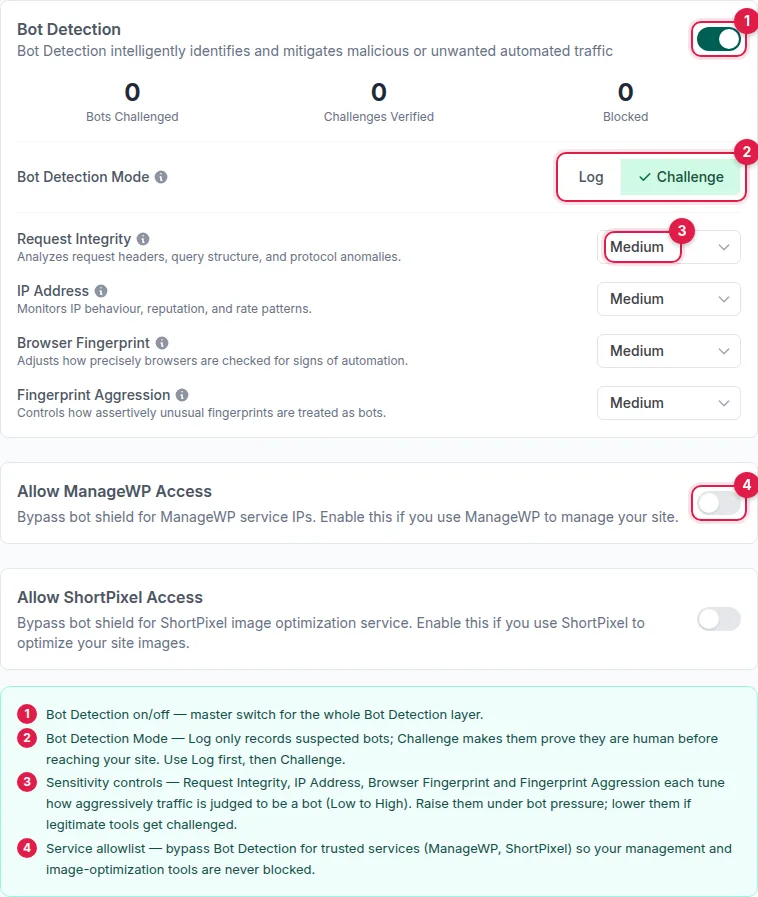
instawp.com is the example. On 16 September 2026 InstaWP’s website team found that the site’s CDN bot protection, Bunny Shield running in challenge mode, was challenging AI crawlers. Bunny’s own event log marked the challenged requests as verified ChatGPT-User and ClaudeBot traffic from OpenAI’s and Anthropic’s networks, so the block was real rather than a probing artefact.
An edge rule that lets the AI search and training crawlers skip bot detection went live at about 12:39 UTC, with the firewall still in front of them. The origin server’s access log tells the rest:
The before column measures what got through, and it was almost nothing. The crawlers had been arriving all along and were being stopped at the edge, which never shows up in WordPress at all. Two costs came with the fix, and both are worth knowing before you copy it. Total requests reaching the origin server rose about 2.5 times, with AI crawlers making up 67.5% of them, and a rule that trusts a user agent can be forged by anyone who sends that user agent. instawp.com absorbed the load with no errors; a smaller site may want to allow only the search crawlers and rate-limit the rest.
How to check crawler access on a WordPress site
Work through these in order and fix the first failure before you go on. Each check takes about a minute.
1. Open your robots.txt in a browser. Visit yoursite.com/robots.txt and look for a Disallow: / under OAI-SearchBot, PerplexityBot, Claude-SearchBot or User-agent: *. If a real robots.txt file sits in the web root, WordPress and your SEO plugin’s robots.txt editor are ignored, so check what the URL actually serves rather than what the plugin settings say.
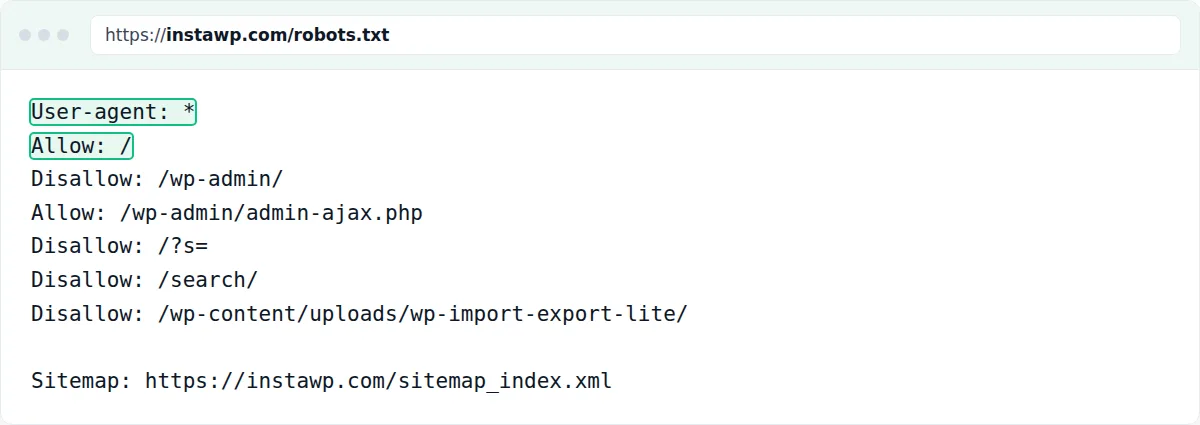
User-agent: * with Allow: / and no AI crawler disallowed, so OAI-SearchBot, PerplexityBot and Claude-SearchBot can all read the articles. Captured 13 October 2026.2. Check the WordPress search visibility setting. In wp-admin go to Settings, Reading. If “Discourage search engines from indexing this site” is ticked, every page carries noindex and drops out of Google, and with it out of AI Overviews. On InstaWP the same switch is in the site’s Site Tools.
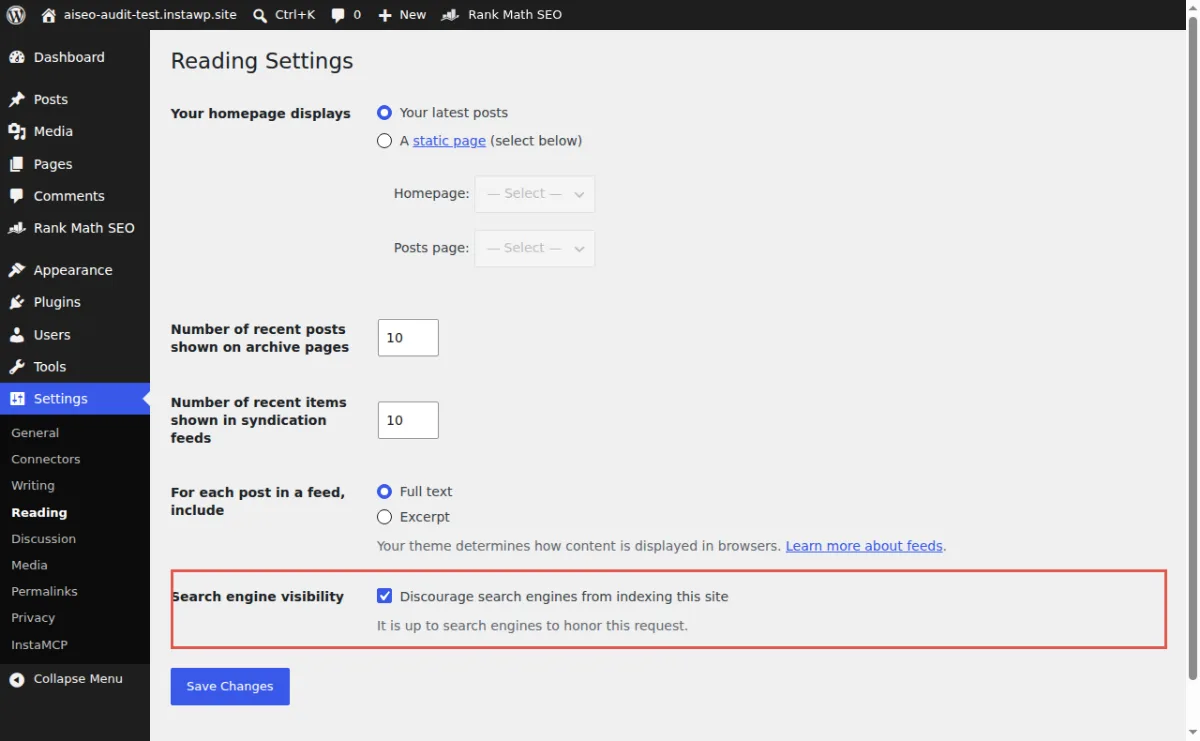
noindex. Captured 13 October 2026.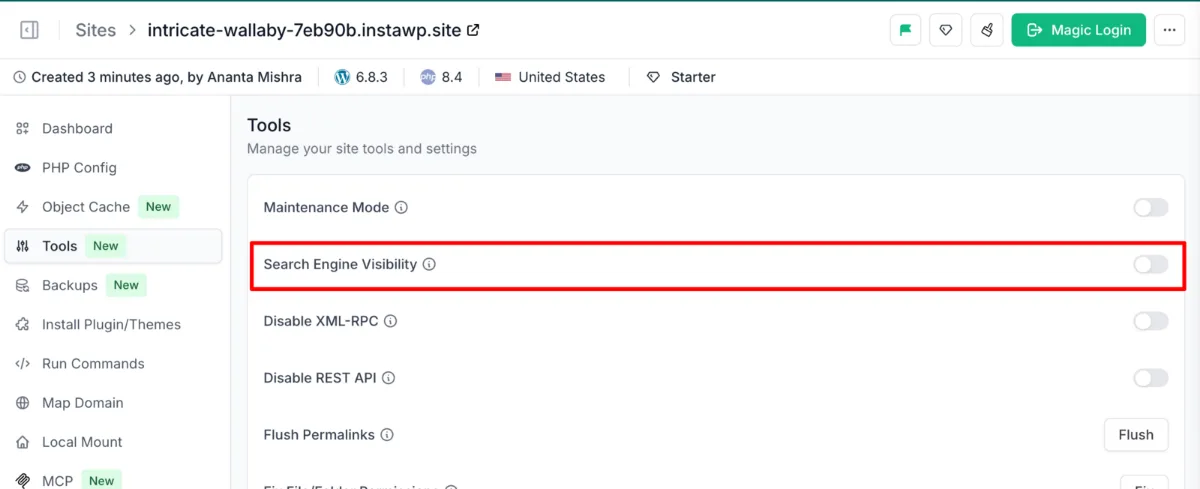
3. Read your access log for AI user agents. Search the last few days of the access log for OAI-SearchBot, ChatGPT-User, PerplexityBot and Claude-SearchBot. On InstaWP the access log is under View Logs. Zero hits over a week on a site with traffic means something upstream is stopping them.
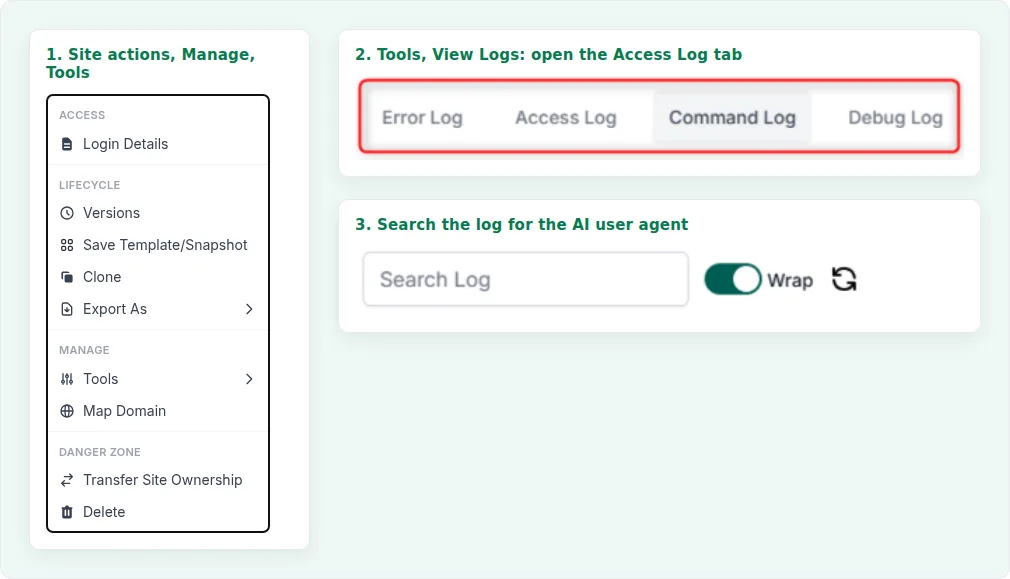
4. Check your CDN and firewall bot settings. Look for a “block AI bots” or “AI crawl control” switch, and for bot detection in challenge or block mode. A challenge is a JavaScript test, and no crawler can pass it.
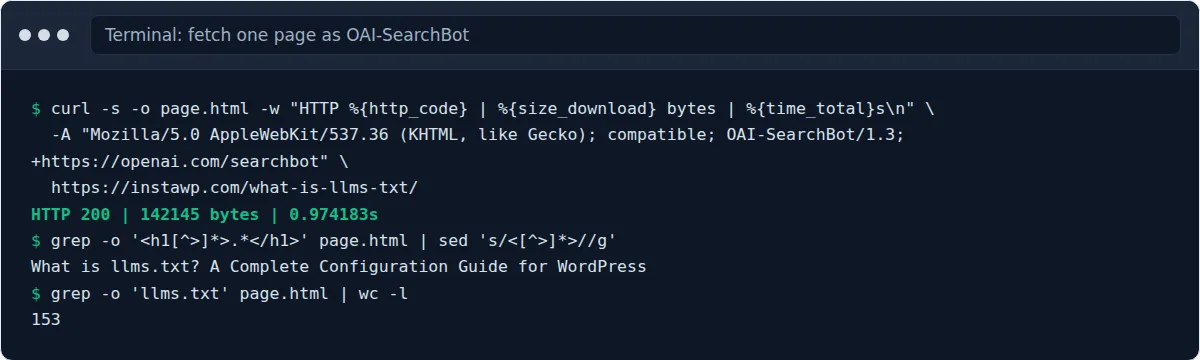
5. Fetch a page as the crawler. Request one page with the OAI-SearchBot user agent, a few seconds apart from any other test, and confirm you get HTTP 200 and the article text. A burst of fast requests can trip rate limiting and make every user agent look blocked, which is exactly how InstaWP’s first test got a false result.
# Let AI search engines read and cite the site
User-agent: OAI-SearchBot
Allow: /

User-agent: PerplexityBot
Allow: /

User-agent: Claude-SearchBot
Allow: /

# Opt out of model training (does not affect search answers)
User-agent: GPTBot
Disallow: /

User-agent: ClaudeBot
Disallow: /

User-agent: Google-Extended
Disallow: /

User-agent: *
Allow: /
Disallow: /wp-admin/
Allow: /wp-admin/admin-ajax.php

Sitemap: https://example.com/sitemap_index.xml
Blocking the training crawlers is a business decision, and it has no effect on search answers. instawp.com allows all of them because it wants its product facts in the models too. The file follows the Robots Exclusion Protocol (RFC 9309), and a crawler that ignores it is not stopped by it, which is why the firewall check above matters.
Why does a page that ranks well still get no clicks from AI answers?
Because the answer is shown on the results page and nobody needs to click. For long, question-shaped searches, Google and the AI engines lift the answer out of a page and display it, so a page can rank first and earn almost nothing. On those searches the citation is the result you can actually win.
The effect is not spread evenly. Pew Research Center tracked the real Google searches of 900 US adults and found that AI summaries show up mostly on exactly the searches people type as questions:
Once an AI summary is on the page, the click largely goes away. In the same study, people who saw one clicked a regular search result on 8% of visits, against 15% when there was no summary, and clicked a link inside the summary itself on only 1%.
Click-through data from search tools points the same way. Two larger studies measured the drop for pages that already rank well, and one measured what changes when your page is the source the AI answer cites:
That last number is the one to act on. Brands cited inside the AI Overview earned more clicks from the same searches than brands the answer left out. Seer is careful to say it cannot prove the citation causes the lift, since stronger brands are also more likely to be cited, but the direction matches what the other studies show: on question searches, being quoted is worth more than being ranked.
So the writing goal for these queries is a passage good enough that the AI answer quotes it with your link, and a brand name inside it so the quote carries your name.
What makes a WordPress page easy for an AI answer to quote?
A page is easy to quote when each section answers one question in its first sentence, that sentence names its subject, and the facts carry their own source. Retrieval works on passages, so a section that only makes sense after reading the three before it is a section an AI answer cannot use.
The last row is the gap to plan around. InstaMCP works inside WordPress, so it cannot see what your CDN or robots.txt does to a crawler. An agent with web access, Claude Code for example, can fetch the page from outside and close that gap in the same session.
How do you audit a whole WordPress site for AI answers with InstaMCP?
Connect an AI client to the site through InstaMCP, give it the checklist above, and let it read every post and its SEO fields. InstaMCP is InstaWP’s WordPress MCP server: switching it on gives an assistant such as Claude, ChatGPT or Cursor 43 typed tools for content, meta, media, taxonomies, plugins and themes over the Model Context Protocol, using the WordPress role of the user its token belongs to.
Step 1: switch on InstaMCP and connect your AI client
In the InstaWP dashboard, open the site, expand Extensions and click MCP, then turn on Enable MCP. InstaWP installs the InstaMCP plugin, creates a token and shows the connection URL, with one-click buttons for Claude Code, Claude.ai, Cursor, VS Code and other clients. The MCP setup guide covers 14 clients.
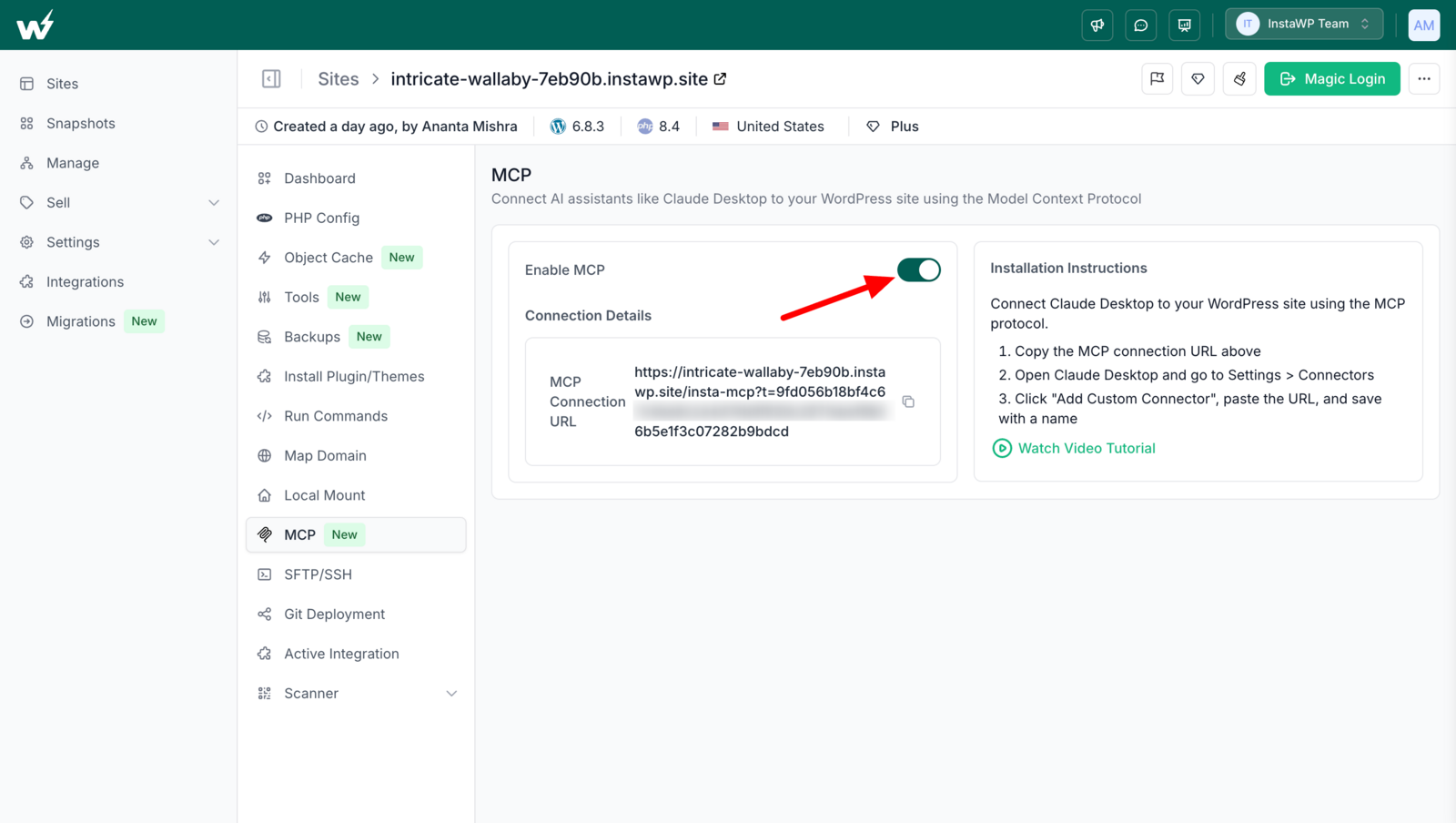
From a terminal, Claude Code connects with one command:
claude mcp add --transport http mysite <your MCP connection URL>
claude   # then ask: "List my published posts"
For an audit-and-fix job, give the assistant an Editor token rather than an administrator’s. In WP Admin, Settings, InstaMCP, API Tokens, create a token for an Editor user with an expiry date. An Editor token can read and edit every post and its meta, which is all this job needs, and cannot touch plugins, themes or the power tools.
Step 2: give the agent the checklist and let it read
On 12 October 2026 InstaWP created a fresh test site, copied 20 older instawp.com blog posts into it (all published between 13 and 15 November 2024, with their live SEO titles and descriptions), and asked Claude Code, running Claude Sonnet 5, to audit every one. It was allowed three read-only tools and nothing else. The prompt, shortened:
Audit EVERY published post for AI-answer readiness. Use only the InstaMCP tools.
Do not write anything. For each post read the content and the Rank Math
fields rank_math_title and rank_math_description, then score:
  1. does the first paragraph answer the title in 60 words or fewer?
  2. how many H2s, and how many are phrased as a question?
  3. meta description length (target 120 to 160 characters)
  4. is an SEO title set? (target 60 characters or fewer)
  5. is there an FAQ section?
  6. how many <img> tags lack alt text?
  7. how many H2/H3 headings carry an id?
Return JSON: one row per post with a one-sentence top_fix, plus totals.
Claude Code made 41 InstaMCP calls (one list_content, then a get_content and a get_meta for each post) and returned its report in 5 minutes 15 seconds of wall time. The run cost $1.42 of Claude Sonnet 5 usage at list price. What it found:
Read the first row carefully, because it is the one that matters most and the one no plugin flags. Every one of these posts has an SEO title and a description, which is what most SEO plugins check. Yet 18 of 20 make an AI answer read past the opening to find a sentence it can quote. The agent’s own one-line fixes said the same thing in plainer words, for example: “Move the direct 502-error definition into the opening paragraph (currently buried in paragraph 4).”
Step 3: check the agent’s counts before you act on them
InstaWP re-ran every count with a script that read the same posts through InstaMCP. Image and alt-text counts matched on all 20 posts. Where heading and FAQ counts differed, the agent was the one that was right: it left out a table-of-contents widget’s “Table of Contents” heading that the script had counted, and it found FAQ headings wrapped in bold tags that the script’s pattern missed. Meta lengths matched to within one character on 19 of 20 posts. The judgement calls (does this paragraph answer the title?) cannot be scripted, which is the reason to use a model at all; the counts can, which is the reason to check them.
How do you fix what the audit finds, in bulk and safely?
Write with tools that preview the change first and read the value back after. InstaMCP’s set_meta has a dry-run mode and returns a before, requested and after value for every field, and patch_content edits one passage in place with a dry run and a backup of the original body.
InstaWP gave Claude Code the five posts whose meta descriptions ran over 160 characters, plus the 502-error post with its buried answer, and allowed four tools: get_content, get_meta, set_meta and patch_content. It made 23 InstaMCP calls in 1 minute 57 seconds, about $0.89 of usage: a read of each post, a dry run of every meta change, the real writes, then a dry run and a real patch for the intro.
Here is what one of those writes looked like. The dry run shows exactly what would change and writes nothing; the real call shows the value it read back from the database:
// dry_run: true  ->  nothing written
{ "key": "rank_math_description",
  "before":    "Here are the best multi-page generators that are blessing in disguise...",
  "requested": "These WordPress multi-page generator plugins let agencies bulk-create pages...",
  "changed": false, "verified": null }

// the real call  ->  value read back after the write
{ "key": "rank_math_description",
  "after":   "These WordPress multi-page generator plugins let agencies bulk-create pages from CSV or keyword data, saving time on large, SEO-friendly sites.",
  "changed": true, "verified": true }
"summary": { "n_written": 2, "n_unchanged": 0, "n_failed": 0 }
And the intro it rewrote on the 502-error post, the change most likely to get that post quoted:
The “after” paragraph is a passage an AI answer can lift whole: it names its subject, defines it, gives the causes and the fixes, and depends on nothing around it.
What InstaWP checked after the writes
Every result was confirmed from outside the agent, because an agent’s summary is not evidence. The checks and what they found:
- The meta values were read back independently. All five descriptions and both shortened titles matched what the agent reported, and every specific claim it wrote into them, from “six themes” to “CSV import”, appears in the posts themselves.
- Only the intended paragraph changed. The 502 post has 67 paragraphs; a paragraph-by-paragraph comparison showed paragraph 1 changed and the other 66 byte-identical.
- The backup exists.
patch_contentsaved the original body as a post meta field on the same post before writing. Restoring from it is a separate write, because InstaMCP has no undo button. - The rendered page shows the new description. The page’s
<meta name="description">tag carried the new text once Rank Math was set up. - The agent’s own tally was wrong. It reported 17 tool calls; its transcript shows 23. It did no harm here, and it is the reason to trust the read-back over the summary.
Two rules made this safe enough to run on a real blog. Work on a staging copy first: on InstaWP a staging site is a full copy you can let the agent loose on, then push the result. And keep batches small, ten posts or fewer, so a human can read every change before the next batch. For what an agent can and cannot reach once it is connected, read InstaWP’s guide to WordPress MCP security.
How do you make the audit repeatable for every client site?
Save the checklist as an InstaMCP skill. A skill is a Markdown playbook stored on the site; when a request matches its description, the assistant loads it and follows it, so the next audit runs the same way whoever asks for it and whichever AI client they use.
InstaWP saved the audit above as a skill called ai-answer-readiness with one skill_save call, which took 0.77 seconds. It sits next to the 15 skills InstaMCP ships with, including an SEO meta and schema pass and a pre-launch content QA pass that overlap with this job.
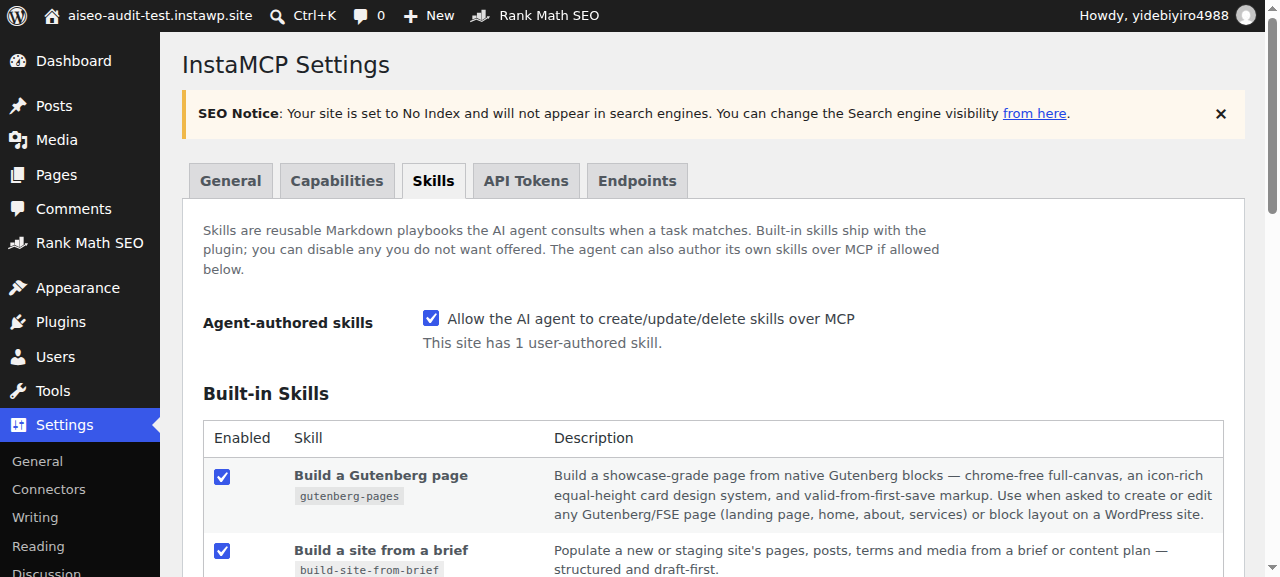
Two details matter when you do the same. Saving a skill needs an administrator’s token, because skills change how every future session behaves, so create the skill once as an admin and run the audits with an Editor token. And InstaMCP’s per-site memory tools can hold the conventions an agent should keep, such as your brand name, your house style for titles, or a list of posts never to touch.
How do you check whether ChatGPT already cites your site?
Write down the questions your customers ask, run them through the AI engines on a fixed date, and score each answer as named, cited or absent. Then leave the list alone and re-run it after your changes. The list has to stay frozen, because AI answers change from run to run and a different set of questions measures nothing.
InstaWP did this for its website-as-a-service pages on 7 October 2026 with 20 prompts: 6 definitions, 7 how-to questions and 7 “best tool for” questions. The answers were collected the same day from Claude’s web search, the Exa answer engine and Google’s AI Overviews:
Two findings from that baseline shape how to read your own. First, a same-day re-run changed 1 of 40 prompt and engine pairs, so a move of one or two prompts later is noise and a move of three or more in one engine is worth acting on. Second, the sources Google’s AI Overviews cited were often Reddit threads and YouTube videos that the other engines never used, which no change to your own pages can reach.
For ChatGPT and Perplexity specifically, use their APIs, a rank-tracking tool that records AI answers, or a person with a logged-in browser running the same prompts on the same day each time. Whatever you use, keep the prompts, the engines and the scoring identical between runs, and give changes about six weeks before you judge them.
Should you add an llms.txt file to WordPress?
Add one if it takes you ten minutes, and do not expect it to move your citations. llms.txt is a proposed Markdown file that summarises a site for language models, but none of the AI search engines documents reading it, and Google says plainly that “you don’t need to create new machine readable files, AI text files, or markup to appear in these features.”
instawp.com has served one since 7 October 2026, because it costs nothing and gives any agent that does fetch it an accurate summary of what InstaWP sells. InstaWP’s own measurement plan treats it as unattributable: if citations change, llms.txt gets no credit unless the server logs show AI crawlers actually requesting it. The llms.txt explainer covers the format.
What can’t InstaMCP do for AI search?
Anything outside the WordPress site, and anything that needs judgement about facts. InstaMCP is a server that runs inside WordPress, so the parts of AI visibility that live at your CDN, in other people’s content or inside the AI companies stay manual. An honest list:
- It cannot change crawler access. InstaMCP’s file tool is limited to an allowlist (wp-config.php, .htaccess, mu-plugins, drop-ins and uploads) and is off by default, so it cannot edit robots.txt, and it has no access to CDN or firewall settings.
- It cannot see the rendered page the way a crawler does. Its tools read the database. Pair it with an assistant that can fetch URLs, or fetch the page yourself.
- It cannot earn mentions elsewhere. In InstaWP’s baseline, many of the sources Google’s AI Overviews cited were Reddit threads, YouTube videos and third-party lists. Those come from people, partners and outreach.
- It does not track citations. Measuring stays a separate job, as in the section above.
- It has no undo.
set_metashows a before value andpatch_contentkeeps a backup copy, but restoring either is a deliberate write, not a button. Take a restore point or use staging first. - It does not check facts. An agent writing 150-character descriptions will occasionally compress a claim into something the post does not say. Read every description before it goes live.
When is an InstaMCP audit worth running?
When you have more posts than you can reread by hand and the crawlers can already reach the site. On a handful of pages, read them yourself.
Ranking in ChatGPT and Google AI Overviews comes down to two things you control: whether the search crawlers can fetch your pages, and whether each page has passages that answer a question on their own. On instawp.com the first was quietly broken until a single bot-protection rule took AI crawler requests from 19 to 92,038 a day.
On 20 older posts the second was missing in 18 cases, and Claude found every gap and fixed the worst meta and one intro through InstaMCP in about seven minutes of agent time, with every write previewed and read back. Check access first, rewrite with an agent second, measure with a frozen prompt set third, and keep a person reading every change.
To try it, create a WordPress sandbox, copy in a few of your own posts, switch on InstaMCP and run the audit prompt above. If you already host with InstaWP, run it against a staging copy of the live blog. For the wider SEO basics behind all of this, InstaWP’s WordPress SEO checklist and its Rank Math vs Yoast comparison are a good place to start. If your blog is hosted elsewhere, the best WordPress MCP plugins roundup tests 21 plugins that add an MCP server to an existing site, and WordPress hosting with MCP compares 11 hosts that build one in.
Related guides on WordPress, MCP and AI search
- WordPress MCP server: what InstaMCP is and how it works.
- How to connect Claude with WordPress: five methods, from MCP to the REST API.
- Best SEO MCP servers: pairing Search Console and Ahrefs data with an agent that writes the fix.
- Using MCP for WordPress in production: tokens, roles and staging on live sites.
- Account MCP vs site MCP: the two levels of MCP on InstaWP.
- Make a WordPress site AI-agent ready: the site-side groundwork.
- WordPress hosting with staging: why rehearsal copies matter for agent work.
- Managed WordPress hosting plans: what each InstaWP plan includes.
- InstaWP CLI for CI/CD and AI agents: scripting the same work from a terminal with the InstaCLI.
- What is GitHub MCP: what GitHub’s MCP server does, and what it cannot do for a WordPress site.
- WooCommerce MCP servers compared: 10 servers, 5 tested on a live store, including prices and orders.
How to rank in ChatGPT: frequently asked questions
How do I rank in ChatGPT?
Make sure OAI-SearchBot can crawl your pages, because OpenAI says sites that opt out of it are not shown in ChatGPT search answers. Then write each section so its first sentence answers one question on its own, with the subject named and the facts dated. There is no paid placement or special file.
What is the difference between GPTBot and OAI-SearchBot?
OAI-SearchBot crawls pages so ChatGPT search can show and cite them. GPTBot crawls content that may be used to train OpenAI’s models. Blocking GPTBot opts you out of training without removing you from ChatGPT search, as long as OAI-SearchBot is still allowed.
Do I need special schema or an llms.txt file for Google AI Overviews?
No. Google says there are no additional requirements and no need for new machine-readable files, AI text files or markup to appear in AI Overviews or AI Mode. A page needs to be indexed and eligible for a snippet. Structured data still helps when it matches the visible text.
Can a security plugin or CDN block ChatGPT from my WordPress site?
Yes. Bot protection in challenge mode stops crawlers that cannot run JavaScript, and Cloudflare has blocked AI crawlers by default on new domains since July 2025. On instawp.com, letting AI crawlers past bot protection took them from 19 requests to 92,038 in a day.
How can I check whether ChatGPT cites my website?
Write a fixed list of 15 to 25 questions your customers ask, run them through ChatGPT search, Perplexity and Google on the same day, and score each answer as named, cited or absent. Keep the list unchanged and re-run it after about six weeks. A change of 3 or more prompts in one engine is signal.
Can an AI agent safely edit my WordPress SEO meta?
Yes, if it uses tools that preview and verify. In InstaWP’s test, Claude rewrote five meta descriptions through InstaMCP’s set_meta with a dry run first and every value read back. Use an Editor token rather than an admin’s, work on a staging copy, and read each description before it goes live.
How long does it take to show up in ChatGPT after fixing my site?
No AI company publishes a timeline. Crawlers have to revisit the page first, which can take days to weeks. InstaWP’s own plan waits about six weeks before re-running its frozen prompt set. In the meantime, check your access log to confirm the crawlers are fetching the changed pages.
Should I block AI crawlers on my WordPress site?
Block the training crawlers (GPTBot, ClaudeBot, Google-Extended) only if you do not want your content used to train models. Keep the search crawlers (OAI-SearchBot, PerplexityBot, Claude-SearchBot and Googlebot) allowed, or AI answers cannot cite you. On a small server, rate-limit crawlers rather than blocking them.