AI for WordPress has come a long way. What began as autocomplete and basic chat help now does real operational work: building pages, writing and fixing code, managing content at scale, and running multi-step jobs that used to need a developer sitting at the keyboard. As these agents matured, they started taking on the parts of WordPress that have always been slow and error-prone. Migration is one of the clearest examples.
Moving a WordPress site between hosts has traditionally meant SSH access, command-line tools, and a long checklist. You export the database, archive the files, transfer everything over SSH or SFTP, import on the other side, rewrite URLs, fix the table prefix, purge caches, then click through every page hoping nothing broke. It works, but it assumes someone who knows WordPress internals, and a single missed step can leave a white screen or a wall of broken links.
InstaWP’s AI-powered migration removes all of that. It is the easiest way to move a WordPress site to InstaWP, with no manual setup on your side. Instead of opening a terminal or running a checklist, you point the AI at your existing site and it handles the move end to end.
This guide covers what AI WordPress migration is, how it works step by step, what the agent fixes on its own, and how agencies and hosting companies can offer the same migrations under their own brand. If you want the short version, start with the key takeaway below.
On this page
- What is AI WordPress migration?
- How AI WordPress migration works, step by step
- What the AI fixes automatically
- Works with almost any host, no SSH required
- Migrate sites behind Cloudflare or a firewall
- It checks its own work
- Multisite and large, complex sites
- White-label migration for agencies and hosts
- Manual vs AI WordPress migration
- How reliable is it?
- Frequently asked questions
Key takeaway
InstaWP’s AI-powered migration is the easiest way to move a WordPress site to InstaWP. You point it at your existing site and the AI handles the entire move, with no SSH, no manual steps, and no post-migration cleanup.
- ✓ Fully AI-powered. An AI agent runs the whole migration, deciding the safest method and adapting as it goes.
- ✓ Detects and auto-fixes errors. It catches problems mid-migration, like mismatched table prefixes, broken URLs, and stale caches, and repairs them where possible.
- ✓ End-to-end migration. Database, files, themes, plugins, media, users, and settings all move in a single pass.
- ✓ Over 95% success rate. The large majority of migrations run to completion without manual intervention.
- ✓ White-label ready. Hosting companies and agencies can offer the same AI migration under their own brand.
- ✓ Built for WordPress. It currently focuses on WordPress site migrations, which is exactly where that intelligence pays off.
What is AI WordPress migration?
AI WordPress migration is the process of moving a full WordPress site to a new host using an AI agent instead of SSH commands, a fixed script, or a manual checklist. The agent decides how to move the site, transfers every part of it, repairs issues as they appear, and confirms the new site matches the original before it finishes.
InstaWP built this as the simplest way to get a site onto its platform. There is no setup to prepare, no server credentials to wrangle, and no post-migration cleanup waiting for you. The agent is fully AI-powered and runs the whole job: it detects errors during the migration and auto-fixes them where possible, so the problems that usually stall a move, a mismatched table prefix, serialized data pointing at the old domain, a stale cache, get handled in the moment rather than handed back to you.
It supports end-to-end migration, meaning everything moves in one pass: the database, files, themes, plugins, media library, users, and settings. The feature currently works for WordPress site migrations only, which is deliberate.
Because it is purpose-built for WordPress rather than a generic file mover, it understands how a WordPress site is actually put together and what can break, and that is what lets it reach an over 95% success rate. InstaWP runs this as part of its managed WordPress hosting platform, so the same agent that brings your site in can host and manage it afterward.
How InstaWP’s AI migration works, step by step
Moving to InstaWP takes a few inputs and then runs on its own. There is no SSH session, no command line, and no manual setup on your side. You point the AI at your existing site, it picks the fastest safe method, copies everything, fixes references as it goes, and checks its own work. You follow a live progress link the whole time and get a confirmation at the end.
Step 1: Connect your site
Go to Migrate on your InstaWP dashboard to access the InstaMigrate tool page.
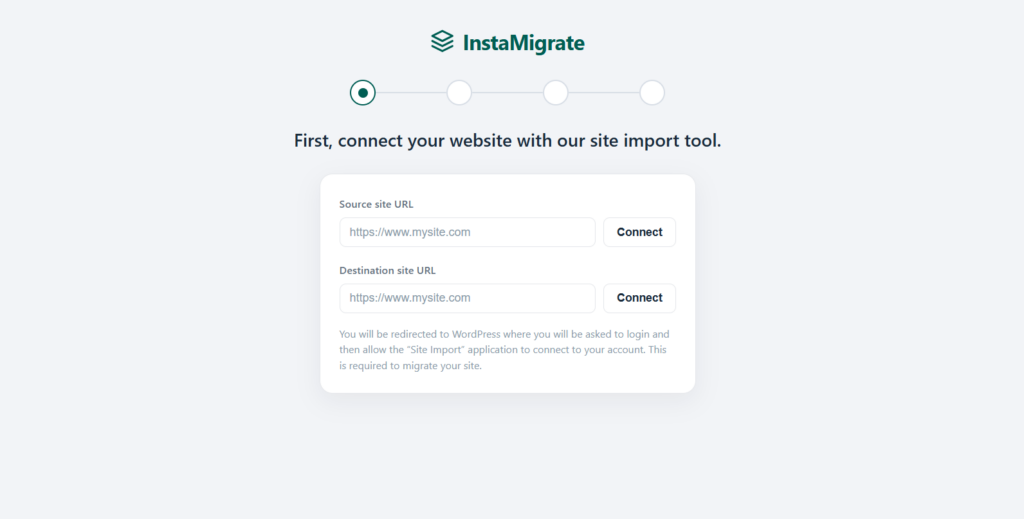
Paste your existing site link, or connect with a secure application password.
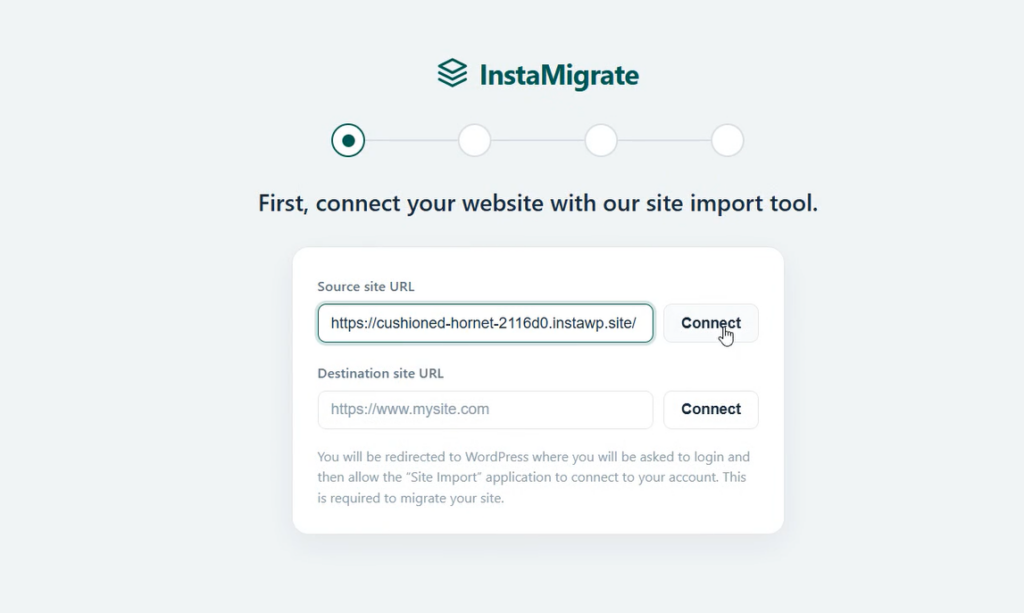
Nothing is shared in plain text, and there are no server credentials to hand over. You need to approve the connection request on your source site.
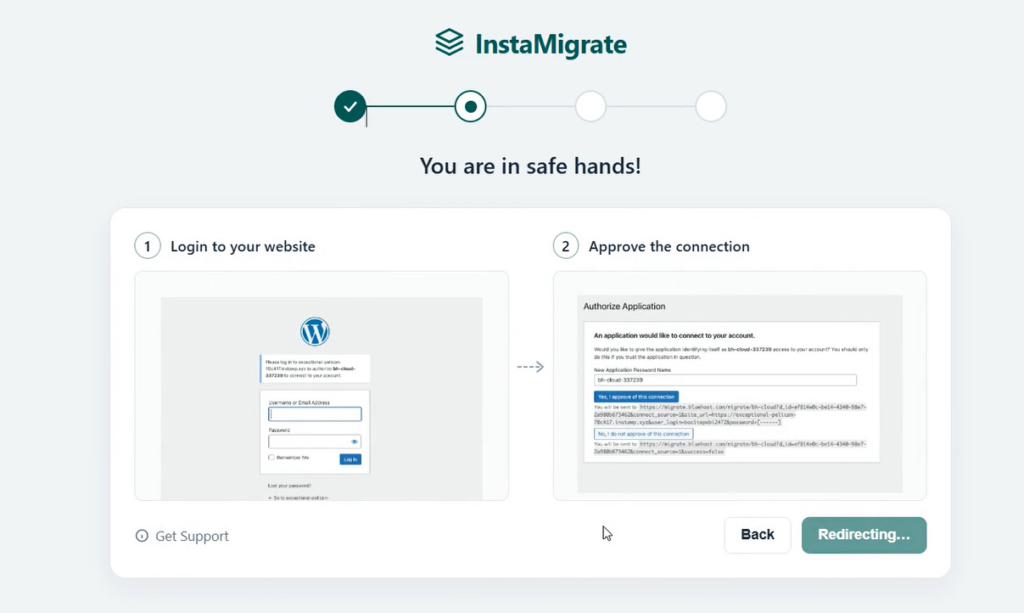
Instantly, your source site will be connected to InstaWP.
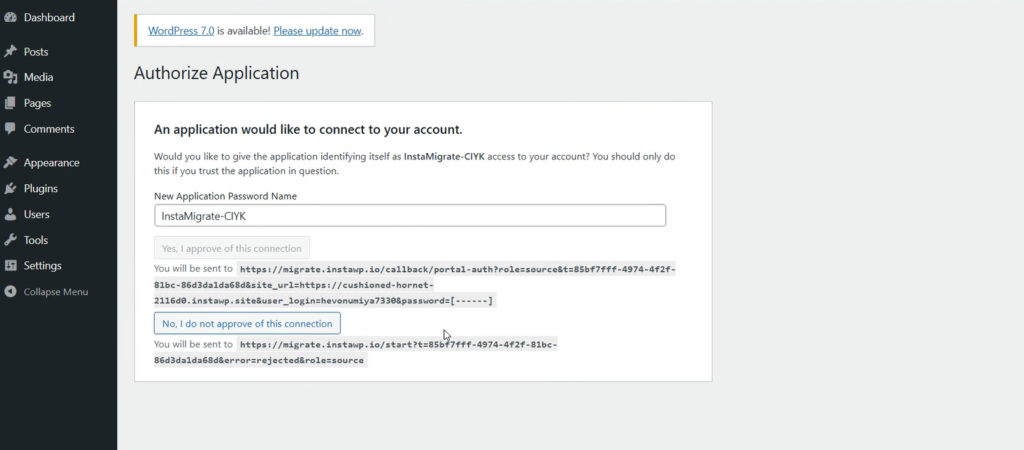
Next, you need to enter the URL of the destination site and repeat the process for connecting the site with InstaWP.
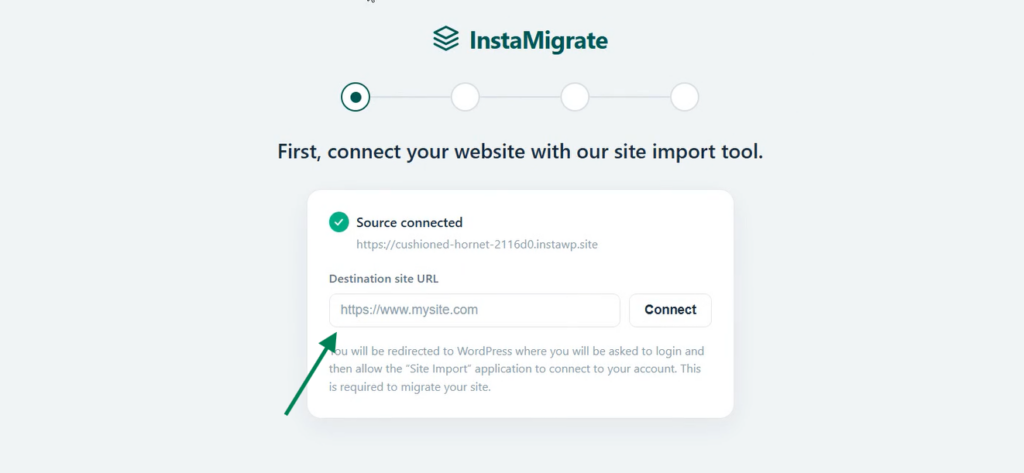
Step 2: The AI moves everything
It inspects the site, picks the fastest safe method, and copies the database, files, themes, plugins, and media library into InstaWP in a single pass.
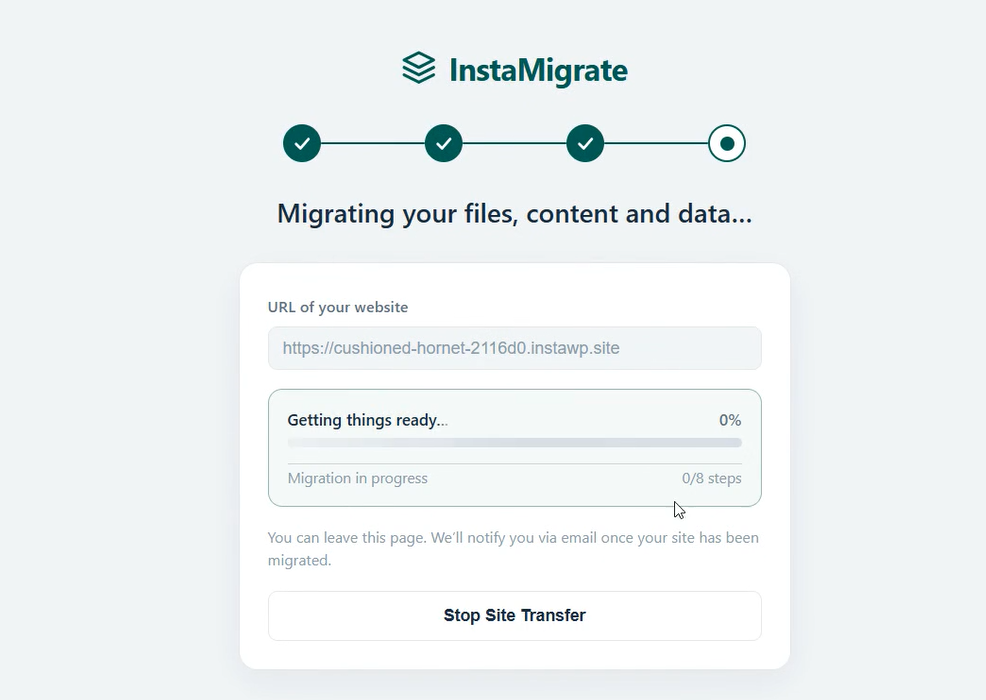
Step 3: It fixes as it goes
It detects issues mid-migration and auto-fixes them where possible, rewriting URLs and table prefixes and clearing caches so the site works correctly on InstaWP without you touching wp-config or the database.
Step 4: It verifies its own work
It compares the original and the new InstaWP copy and confirms the data landed before it calls the job done.
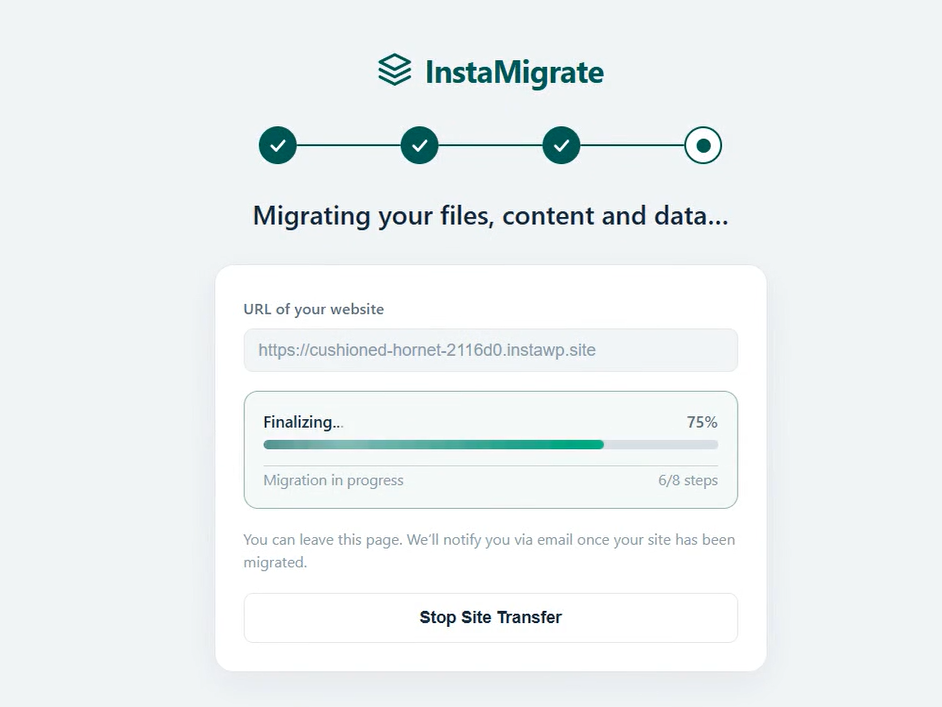
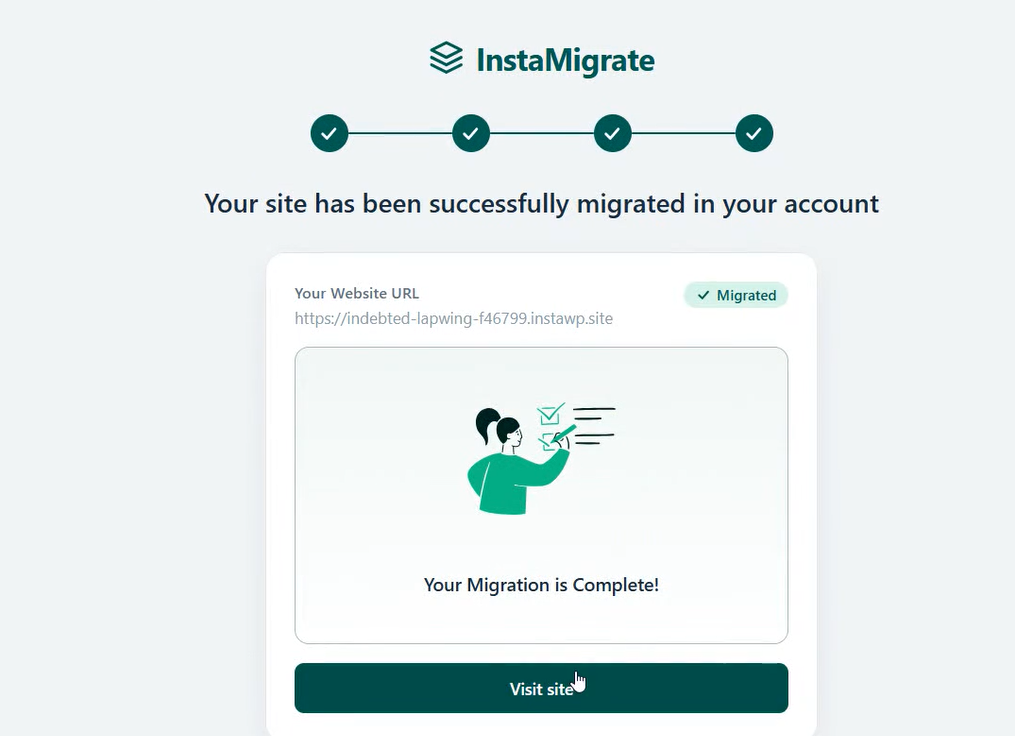
Step 5: You are done
No cleanup, no broken-link hunt. You get a live, bookmarkable progress link throughout and a confirmation once your site is live on InstaWP.
What the AI fixes automatically
The difference between automation and an AI agent shows up when something breaks. A script only handles the cases its author planned for. InstaWP’s agent reads each site’s real condition and repairs a wide class of problems without help, the same issues that usually force a manual migration to stop halfway.
Database prefix mismatches
Rewrites table prefixes safely, a common source of silent data corruption in other tools.
Serialized and page builder data
Rewrites URLs inside Elementor, Divi, and other builders, including escaped JSON and cached CSS.
Stale caches
Clears environment-coupled caches, such as object caches and PDF invoice fonts, so the new site renders correctly.
CDN cache
Purges stale CDN content so visitors see the new site, not a cached copy of the old one.
Plugin and theme compatibility
Removes host-specific plugins that would crash on the new host.
Connectivity failures
Retries with backoff and switches strategy, for example into Bridge Mode, instead of giving up.
When the agent genuinely needs something only you can provide, such as server credentials, it pauses safely and tells you exactly what is needed, rather than failing silently or corrupting data. That pause is a safety feature, not a failure.
Works with almost any host, no SSH required
You do not need shell access for an AI migration. InstaWP connects through whatever the site already supports and picks the best option automatically: SSH for full speed, a WordPress application password for a one-click connect, a lightweight migration plugin, or an SFTP and plugin hybrid for managed hosts that lock down the shell.
| Connection method | What it needs | Best for |
|---|---|---|
| Automatic selection (InstaWP) | Nothing, the agent chooses | Most sites, no decision required |
| SSH | Shell access | Fastest transfers, full control |
| WordPress application password | One-click connect, no shared credentials | Quick connections without shell access |
| Migration plugin | Installs automatically from WordPress.org | Hosts without SSH |
| SFTP plus plugin | SFTP credentials | Managed hosts that lock down the shell |
The customer does not choose the method, the agent does, based on what each site actually allows. It has been validated against the quirks of major managed hosts, so the awkward cases that usually need a support ticket are handled as routine.
Migrate sites behind Cloudflare or a firewall
Sites behind Cloudflare, a WAF, or an inbound firewall normally block migration tools, because those tools cannot reach in. InstaWP’s Bridge Mode solves this by letting the locked-down site reach out and take part in the migration instead. That means even tightly firewalled destinations can be moved without opening them up.
This is also why the agent rarely gives up on a connection. If a direct route is blocked, it does not stop, it pivots into Bridge Mode and keeps going, the same way it retries failed transfers with backoff.
It checks its own work
A migration is not finished just because files copied. InstaWP’s agent verifies the result before it calls the job done. It compares the old and new sites visually, confirms the data transferred, checks that files landed on disk, and loads the live site to confirm it actually works.
- Visual comparison: screenshots the source and destination and compares them pixel by pixel.
- Database integrity: confirms pages, users, roles, and settings transferred intact.
- File integrity: confirms the active theme, all active plugins, and all media folders are on disk.
- Live-site checks: confirms the destination loads, HTTPS works, and key endpoints such as Apple Pay for WooCommerce still resolve.
If a check fails, the agent investigates rather than declaring success. So when it says a migration is complete, that statement has been tested, not assumed.
Multisite and large, complex sites
InstaWP’s AI migration handles full WordPress Multisite networks, including the network tables, sub-site domains, and network-activated plugins. For large sites, it uses chunked uploads for hosts with small upload limits, direct server-to-server transfer so big media libraries do not bottleneck, and a disk-space pre-flight check that aborts early instead of failing midway.
That pre-flight check matters more than it sounds. Running out of space halfway through a migration is one of the worst outcomes for a big site, so catching it before the transfer starts saves hours of cleanup.
White-label migration for agencies and hosts
If you run an agency or a hosting business, you can offer these AI migrations under your own brand. InstaWP’s migration runs in your colors, with your logo, your name, and your support link. You send a client a secure link, they connect their sites, and they watch branded progress without ever seeing the plumbing or leaving your brand.
- Brandable UI: logo, favicon, brand name, primary and accent colors, and support URL, all configurable per partner.
- Hosted, tokenized flow: send a secure, time-limited link (valid 24 hours), no login required.
- Multiple entry modes: destination-first, where you pre-fill the new home, self-serve, where the customer supplies both ends, or fully headless through the API.
- Webhooks and metadata pass-through: your own reference data is echoed back on every event, so migrations slot into your existing systems.
- Programmatic API: trigger and monitor the whole flow from your own backend.
Migrations, in your colors, done by an AI.
Your customers never leave your brand and never see the plumbing.
See the Agency ProgramFor agencies, this turns migration from a chore you absorb into onboarding you can sell. The InstaWP Agency Program is free and adds a dedicated account manager, migration cashback, and bulk migration assistance on top of the white-label flow, so you can sell hosting under your own brand end to end.
Manual vs AI WordPress migration
Migrating a WordPress site by hand means exporting the database, moving files over SFTP, importing, then hunting down broken URLs, serialized data, and caches yourself. An AI migration does the transfer and the cleanup automatically. The table below compares the two across the steps that usually cause trouble.
| Step | InstaWP AI migration | Manual migration |
|---|---|---|
| Choosing the method | Agent inspects both sites and picks the safest method | You decide based on host access and experience |
| Copying database, files, media | Automatic, server to server | Manual export, SFTP transfer, and import |
| URLs and serialized data | Rewritten automatically, including page builder content | Find and replace by hand, easy to miss serialized data |
| Table prefix mismatches | Detected and rewritten safely | Manual SQL edits, a common cause of data loss |
| Caches and CDN | Cleared and purged automatically | Manual cache and CDN purges |
| Sites behind a firewall | Handled with Bridge Mode | Often blocked entirely |
| Verifying the result | Visual, database, file, and live checks | Manual spot checks |
| Who does the work | The AI agent | You |
How reliable is it?
In InstaWP’s migration tracking, more than 95% of migrations that run to a definitive technical outcome complete successfully. That figure counts migrations that either finished or genuinely failed. It excludes runs that paused waiting on a customer for access and runs a user cancelled, since neither reflects whether the tool works.
of migrations that run to a definitive technical outcome (completed or failed) finish successfully.
Source: InstaWP migration tracking, June 2026.
Reliability also improves over time. After every migration, an automated retrospective captures what happened and feeds the lessons back into the system, so recurring edge cases get handled automatically on the next run. In practice, that means the product gets a little better with each site it moves.
Conclusion: The easiest way to move a WordPress site to InstaWP
WordPress migration used to be a job for someone comfortable in a terminal, exporting databases, transferring files over SSH, rewriting URLs, and fixing whatever broke on the other side. AI has changed what that takes. InstaWP’s AI-powered migration turns the whole process into a single guided move: you point it at your existing site, and the agent handles the transfer end to end, detecting and auto-fixing issues as they come up and verifying the result before it finishes.
That is the real shift. There is no manual setup, no server credentials to dig up, and no post-migration cleanup waiting for you. Everything moves in one pass, and with an over 95% success rate, most sites land on InstaWP without anyone having to step in. It is, simply, the easiest way to move a WordPress site to InstaWP.
For agencies and hosting companies, the same engine runs under your own brand, so you can offer one-click migrations to your clients without building any of it yourself. Whether you are moving a single site or bringing over a whole book of business, the AI does the heavy lifting.
Move your next WordPress site with AI
Paste two links and let the agent handle the database, files, URLs, caches, and checks.
Start Building Free See the Agency ProgramFrequently asked questions
What is WordPress migration?
WordPress migration is moving a complete WordPress site, its database, files, themes, plugins, media, and settings, from one host or domain to another. A full migration makes the destination an exact copy of the source. With AI migration, an agent runs the transfer and the cleanup for you instead of a fixed script or manual steps.
How do I migrate a WordPress site to a new host?
The manual route is to export the database, copy files over SFTP, import on the new host, update URLs, and clear caches. With InstaWP’s AI migration you skip all of that: connect the source and destination, and the agent picks the method, copies everything, fixes URLs and prefixes, and verifies the result on its own.
Is it really AI, or just automation with an AI label?
Really AI. A fixed script can only handle the cases its author anticipated. This agent reads each site’s actual condition and reasons about how to handle what it finds, including problems no one pre-programmed, then verifies the outcome rather than assuming it.
What happens if something goes wrong during migration?
It retries, tries alternate methods, and fixes the common failure causes itself, such as prefix mismatches and stale caches. When it genuinely needs you, for example server credentials, it pauses safely and says exactly what is required, rather than failing silently or corrupting data.
Why does my WordPress site show a white screen after migration?
A white screen after migration usually comes from stale caches, a PHP or plugin conflict on the new host, or URLs still pointing at the old server. AI migration prevents the common causes by rewriting references, removing host-specific plugins, and clearing environment-coupled caches before it finishes.
Can I migrate to a new domain, not just a new host?
Yes. For a domain change, clone, or staging move, the agent rewrites every URL reference correctly, including inside serialized data and page builder content, so the new domain works without broken links or mixed content.
Does my host work with it?
Almost certainly. It works over SSH, a WordPress application password, a plugin, or SFTP, and it can even reach sites behind Cloudflare or a firewall with Bridge Mode. It has been validated against the major managed hosts.
Will my site look different afterward?
No, and the agent proves it. It screenshots the source and destination and compares them pixel by pixel before calling the job done, so a visual difference would be caught rather than shipped.
Does AI migration mean zero downtime?
Not by itself. The migration creates a complete copy of your site on the new host while the original keeps running. Any brief downtime happens at cutover, when you point your domain (DNS) at the new host, and that timing is up to you. Schedule the cutover for low-traffic hours to keep the switch smooth.
Can I offer migrations to my own clients?
Yes, fully white-labeled in your branding, through a hosted link or your own backend via the API. The Agency Program bundles this with a dedicated account manager and migration assistance for agencies and resellers.