A CDN is one of the quickest speed wins for a WordPress site, and one of the setups most often left half done: another account, DNS changes, a plugin, and a cache you purge somewhere other than your host. WordPress hosting with a CDN built in skips all of that. InstaCDN is that CDN on InstaWP’s managed WordPress hosting: it turns on by itself when a site moves to a production plan, and serves pages and files from an edge network across six continents.
This guide covers how InstaCDN serves a request, how much bandwidth each plan gets, the cache settings you can change, what happens at the bandwidth limit, and when you would still put a CDN of your own in front of a site.
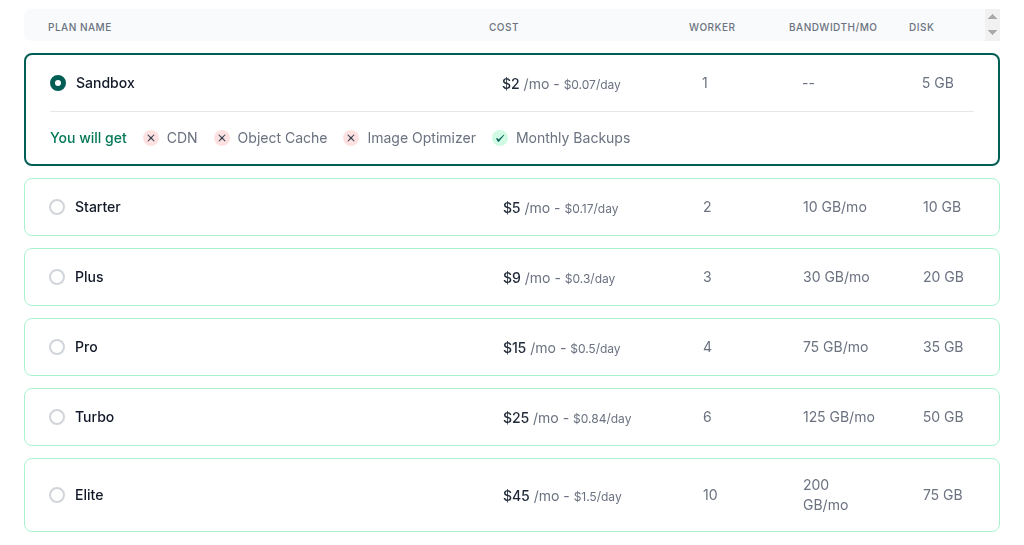
- There is nothing to set up. Moving a site to Starter or above turns InstaCDN on; $2 Sandbox sites have no CDN.
- Bandwidth per site per month: 10 GB on Starter (Basic edge), then 30, 75, 125 and 200 GB from Plus to Elite on the Premium global network.
- WooCommerce carts and account pages are safe by default: requests carrying logged-in or cart cookies skip the edge cache.
- Use Cache Exclusions only for pages that must stay fresh for everyone, up to 25 patterns such as */checkout/*.
- At the bandwidth limit, CDN traffic is throttled unless you switch on auto-upgrade, which moves the site to the next plan and charges for it.
- After a deploy, purge in one click from CDN Settings, or from the API.
Table of Contents
What Is InstaCDN?
InstaCDN is InstaWP’s native WordPress CDN, built directly into the hosting stack. It stores copies of your pages, images, CSS, JavaScript and fonts on edge servers around the world and serves each visitor from a location near them, so most requests never travel to your origin server.
Because it is part of InstaWP’s managed cloud hosting rather than a separate service, there is no plugin to install and no second account to manage. Each site gets its own edge configuration, and the CDN sits alongside the rest of the hosting tools in the same dashboard: backups, the firewall, object cache and site management.

For agencies, that means client sites start fast without extra setup and are better placed to meet Core Web Vitals targets. For developers, it removes one more tool to wire up between staging and launch. If you want the general background on how a CDN differs from server caching, read CDN vs caching.
Which InstaWP plans include InstaCDN?
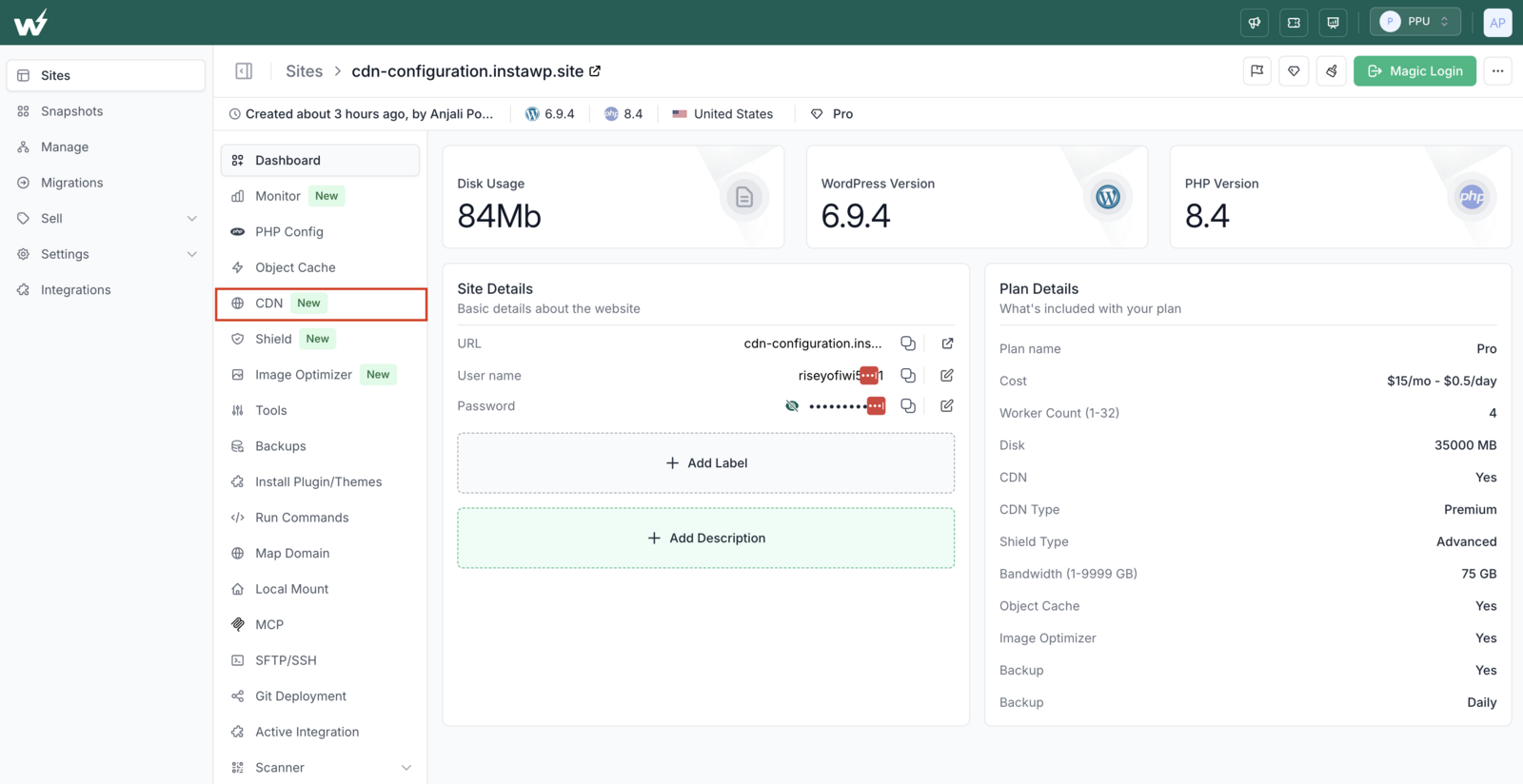
InstaCDN is included on every InstaWP production plan, from Starter up. Starter gets the Basic edge, and Plus and above get the Premium global network. The $2 Sandbox plan has no CDN, because sandboxes are for building and testing rather than serving real visitors.
Basic edge serves from a smaller set of locations and suits sites with a mostly regional audience. Premium serves from the full global network across six continents and suits production sites with visitors in several regions. Compare the full plan matrix on the managed hosting plans page.
How Does InstaCDN Work?
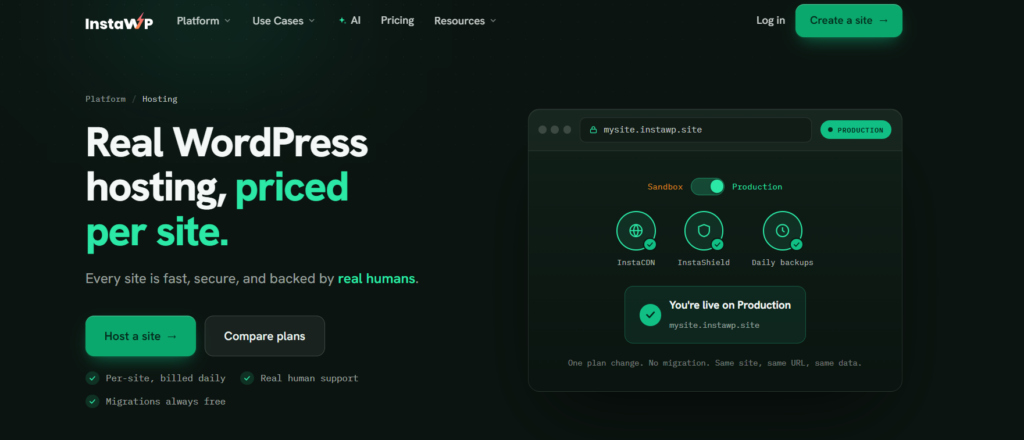
InstaCDN routes each visitor to a nearby edge location, filters the request through InstaShield, serves cached content straight from the edge, and passes anything that cannot be cached back to your InstaWP server. You do not have to do anything to turn this on beyond putting the site on a production plan.
What Can You Control in InstaCDN Settings?
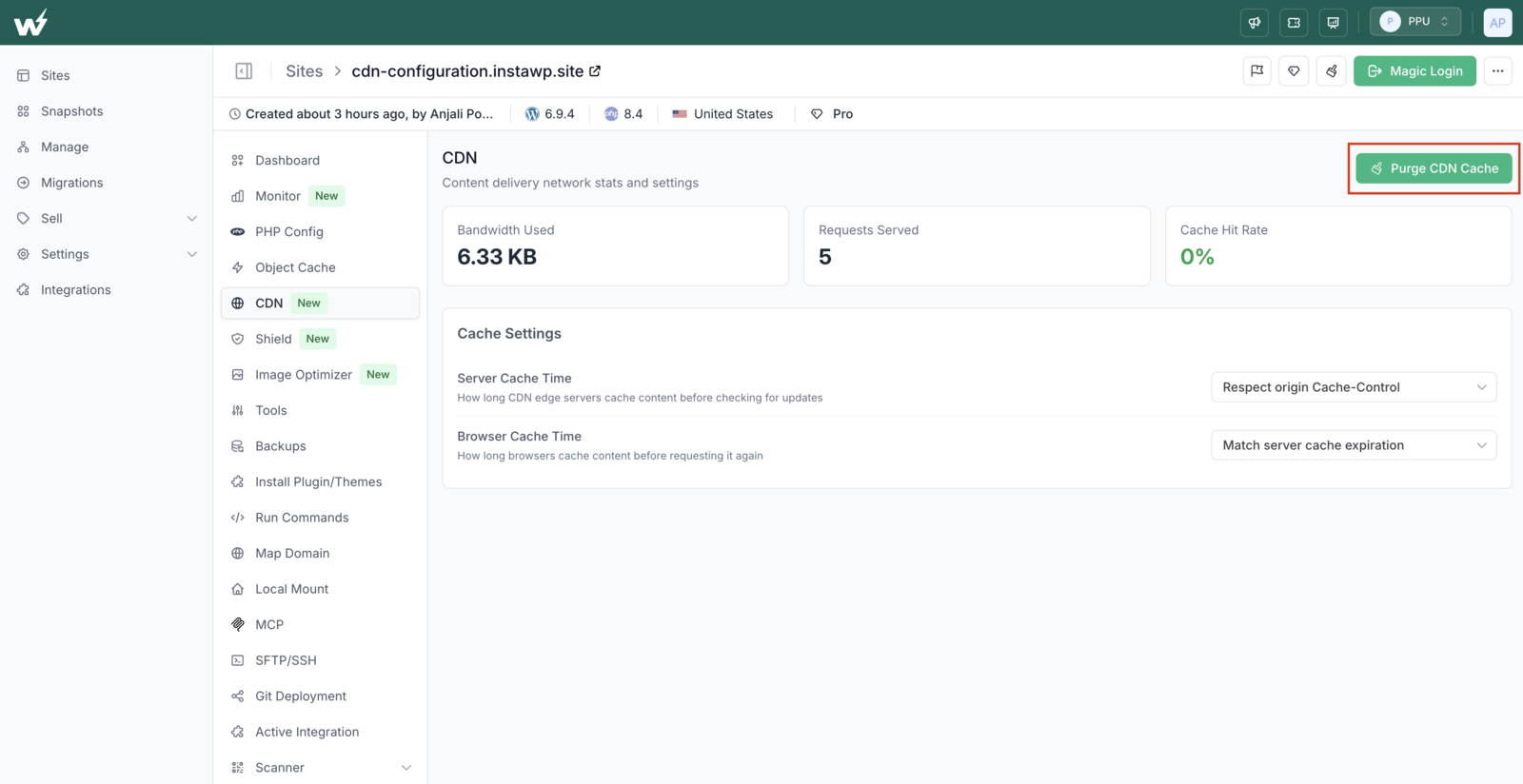
Open the site in the InstaWP dashboard, expand Performance in the left sidebar and click CDN Settings. The page shows the site’s CDN statistics and lets you purge the cache, set how long content is cached, and exclude URLs from the edge.
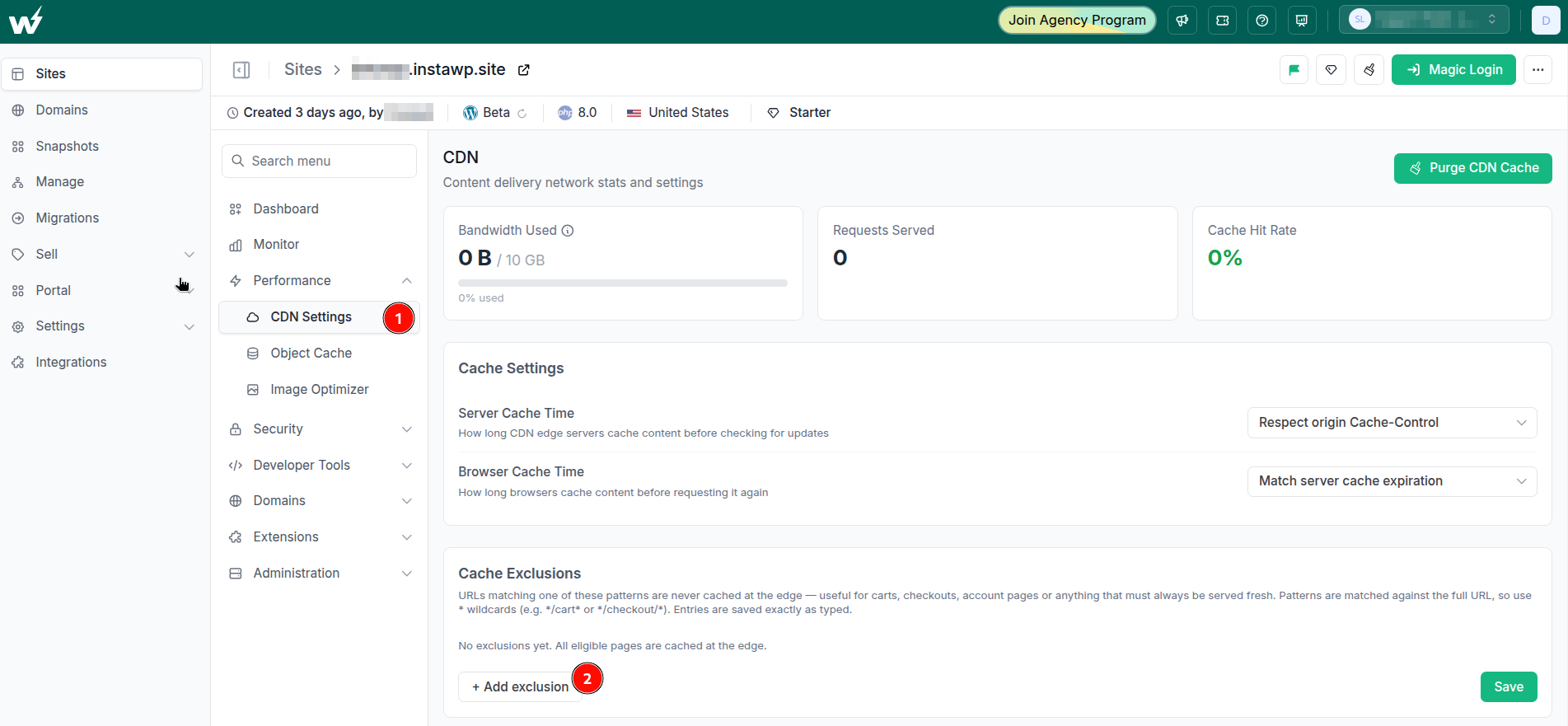
Typical cache exclusions for a store are */cart*, */checkout/*, */my-account* and *?add-to-cart=*. Patterns are saved exactly as typed, so a pattern without a * only matches that one URL. Changes reach the edge within about a minute; purge once if the page was already cached.
What happens when a site reaches its CDN bandwidth limit?
By default, CDN traffic for that site is throttled. If you would rather keep the site at full speed, switch on Auto-upgrade plan on bandwidth limit in CDN Settings: when the site reaches its limit, InstaWP moves it to the next plan, which has more bandwidth, and charges the card on file for the new plan. The switch is off by default and set per site. Full steps are in the docs on how to configure the CDN.

How Is InstaCDN Different From a CDN You Add Yourself?
A separate CDN can be just as fast at the edge. The difference is the work around it: a separate service means another account, DNS changes, a plugin or rules to keep in sync, and a cache you purge somewhere other than your host. InstaCDN removes those steps because it is part of the hosting plan.
If you prefer to run your own CDN in front of InstaWP, you still can. Our guide on how to get a free CDN for WordPress covers the options.
What Are the Benefits of InstaCDN for Agencies and Developers?
For agencies and developers, InstaCDN means faster client sites, edge security, less setup per launch and a performance story you can put in front of clients, all without adding a tool.
Faster pages for visitors in every region
When clients say “the site feels slow,” distance is often part of the reason. InstaCDN serves cached content from a location near each visitor, which cuts load times for audiences far from the origin and takes load off the server. Faster pages help Core Web Vitals, engagement and search visibility, and mean fewer slow-site escalations to handle.
Security without extra tools
InstaCDN works with InstaShield, InstaWP’s managed firewall at the edge. Starter gets Basic Shield (managed WAF rules, DDoS mitigation and SSL), and Plus and above get Advanced Shield, which adds bot detection and custom WAF rules. Attacks are filtered before they reach WordPress, so you need fewer security plugins. See InstaWP Shield for the tiers.
Workflows that save time
Setting up a CDN for each client site usually means DNS edits, plugin installs and testing. With InstaCDN, moving a site from Sandbox to a production plan turns the CDN on, on the same URL, so launches stay on schedule. When content changes, you purge from the same dashboard you used to build the site.
A performance story you can sell
Agencies selling care plans need to show what the client is paying for. On Plus and above, InstaWP’s Advanced site management adds performance scans and white-label PDF client reports, and the CDN settings show each site’s bandwidth, requests and cache hit rate. That gives you concrete numbers for a monthly report instead of “we kept your site fast.” See InstaManage explained.
Do You Still Need Cloudflare With InstaCDN?
Not for caching or edge security. InstaCDN handles edge delivery and InstaShield handles the firewall, DDoS mitigation and SSL, so most InstaWP sites do not need Cloudflare in front of them. You can keep Cloudflare as your DNS provider; leave its proxy turned off for the records that point at your InstaWP site, so requests reach InstaCDN directly.
Is InstaCDN the Right WordPress CDN for You?
If your site is hosted on InstaWP, InstaCDN is already there from the Starter plan up: Basic edge with 10 GB a month on Starter, and the Premium global network with 30 to 200 GB a month from Plus. You get one-click purging, cache times and exclusions you control, automatic bypass for logged-in and cart sessions, and InstaShield at the same edge, without another account or plugin.
Ready for a faster site? Explore InstaCDN today. It is included in InstaWP hosting from Starter onwards.
InstaCDN: Frequently Asked Questions
What is InstaCDN?
InstaCDN is InstaWP’s built-in WordPress content delivery network. It caches your site on a global edge network across six continents and serves each visitor from a nearby location, which makes pages load faster and takes load off your server.
Which InstaWP plans include InstaCDN?
Every production plan. Starter ($5) includes Basic edge with 10 GB a month. Plus, Pro, Turbo and Elite include the Premium global network with 30, 75, 125 and 200 GB a month. The $2 Sandbox plan has no CDN.
How is InstaCDN different from other CDNs for WordPress?
It is part of the hosting plan. It turns on automatically, you purge it from the same dashboard as the site, InstaShield sits at the same edge, logged-in and cart sessions are bypassed automatically, and it is billed with the site rather than on a separate invoice.
Do I need to configure DNS or install a plugin to use InstaCDN?
No. InstaCDN activates when the site is on a production plan. If you use your own domain, you map it to the site once, and the CDN and SSL work on it automatically.
What happens when my site uses up its CDN bandwidth?
By default, the site’s CDN traffic is throttled. You can instead switch on Auto-upgrade plan on bandwidth limit in CDN Settings, which moves the site to the next plan and charges your card for it.
Does InstaCDN cache WooCommerce carts and logged-in pages?
No. Requests carrying WordPress logged-in or cart session cookies skip the edge cache automatically. You can also add cache exclusions, such as */cart* or */checkout/*, for URLs that must never be cached for anyone.
How do I purge the InstaCDN cache?
Open the site, expand Performance, click CDN Settings and press Purge CDN Cache. It clears every cached copy so visitors get the latest version. You can also purge through the InstaWP API.
Can agencies resell InstaCDN to clients?
Yes. InstaCDN comes with every production site, so it is part of any hosting you resell through InstaWP’s white-label and WaaS tools. On Plus and above, Advanced site management adds white-label PDF reports you can send to clients.
How does InstaCDN improve SEO?
It reduces load times for visitors far from your server, which helps Core Web Vitals and user experience, both of which Google considers. A CDN does not replace good content and a fast site, but it removes distance as a bottleneck.
Is InstaCDN secure?
Yes. InstaShield, InstaWP’s managed firewall, filters traffic at the edge before it reaches your server, and SSL is issued and renewed for every site. Starter gets Basic Shield, and Plus and above add bot detection and custom WAF rules.


