We all know that offering a demo site boosts conversions for hosting companies and agencies selling hosting. When a prospect can click into a real, working WordPress site instead of reading about one, hesitation drops and sign-ups climb. A live “try it now” experience consistently outperforms a “buy first, see later” funnel, because people trust what they can touch.
But here is the catch: actually setting up demo sites has always been the hard part. Spinning up a fresh WordPress install for every prospect, handing out logins, keeping demos from clashing with each other, cleaning up the stale ones, and then rebuilding everything from scratch once the customer says yes.
The operational overhead is exactly why so many hosts and agencies know demos work yet never run them well.
That is the gap this guide closes.
Table of Contents
Key Takeaway
- InstaWP is an all-in-one WordPress cloud that handles building, hosting, managing, and selling WordPress sites. Demo creation is one capability within that wider platform.
- Because demos run on the same cloud you build, host, and sell on, a demo site is never throwaway work. It becomes the live, paid site.
- InstaWP solves the real demo problems hosts and agencies face: slow provisioning, login friction, demos that don’t scale, cleanup, and lack of branding.
- You prepare one demo, share one link, and every prospect gets a fresh, branded, live WordPress site, with auto-expiry and automated migration to paid hosting.
Common Problems Hosts and Agencies Face With Demo Sites
Everyone agrees demos convert. The reason demos still get neglected is that they are operationally painful to run the traditional way. Here are the problems hosting companies and agencies repeatedly hit.
Slow, manual provisioning
Spinning up a fresh WordPress install per prospect means server setup and configuration every time.
Login and credential friction
Prospects bounce when they must create accounts, wait for logins, or navigate a cPanel to see anything.
Demos that don’t scale
A single shared demo server gets messy. One visitor’s changes bleed into the next person’s experience.
Cleanup and resource drain
Stale demos pile up, consume server resources, and rely on someone remembering to delete them.
No branding control
Generic demo tools display their brand, not yours, weakening the professional impression you want.
The demo is throwaway work
After the prospect converts, the demo is discarded and the real site is rebuilt, doubling the effort.
How InstaWP Solves Each Problem
InstaWP is an all-in-one WordPress cloud platform that covers the entire WordPress site lifecycle across four workflows: Build, Host, Manage, and Sell.
You can build WordPress sites instantly (from scratch, from templates, or with AI builders), host them on managed cloud infrastructure with a global CDN and security stack, manage any WordPress site remotely from one dashboard, and sell hosting and websites under your own brand.
Most tools do one of these things. InstaWP does all four on a single platform.
Build
Instant sandboxes, staging, templates, AI builders
Host
Managed cloud hosting, CDN, security, backups
Manage
Remote management of any WordPress site, anywhere
Sell
White-label hosting, WaaS, demos, and reselling
This matters for demos because a demo is only valuable if it leads somewhere. On a standalone demo tool, the demo is a dead end you eventually throw away. On InstaWP, the demo is built on the same cloud you host and sell from, so it flows naturally into a live, paid site. The demo is step one of the customer journey, not a disposable sales prop.
Where Demo Creation Fits in the Platform
Demo creation sits inside InstaWP’s Build and Sell workflows. You build a polished WordPress site once, save it as a shareable blueprint, and offer it as a live demo that prospects can try. Because that blueprint also powers InstaWP’s hosting and selling tools, the same demo can become a hosted site, a template you resell, or a product in a Website as a Service storefront.
In other words, demos are one of many offerings InstaWP provides, not the whole product. That is precisely why they are so powerful here: a demo on InstaWP is connected to everything else you do, from building to hosting to billing. For hosting companies and agencies, that connection is the difference between a demo that impresses and a demo that converts.
Curious how the full demo-to-paid flow works for your business?
The InstaWP team helps hosts and agencies set up demo flows that connect to hosting and billing. Have questions? Book a free call.
Book a Free Call →The Strengths of Building Demos on InstaWP
With the problems handled, here is what makes demos on InstaWP genuinely strong, the capabilities that go beyond just fixing pain points.
Instant, live, real sites
Every demo is a real, fully functional WordPress site, not a screenshot or a limited sandbox. Prospects can install plugins, edit pages, and click everything exactly as they would on your live hosting.
One link, unlimited fresh demos
A Shared Snapshot is a public link anyone can open to create their own copy of your saved site. Prepare your demo once, and that single link serves every prospect a clean, identical experience across your landing pages, emails, and campaigns.
Zero-friction, branded entry
Auto-login drops prospects straight into the dashboard or a redirect page you choose. Combined with full white-label branding and your own suffix domain, the entire experience reads as your company, start to finish.
Self-managing demos
Auto-expiry deletes unconverted demos for you, and because billing is pay-per-site, you only pay for demos that are actively running. Demos stay cheap even at high volume.
Easy updates and AI builders
Update your master site with the built-in code editor and sync the changes into your snapshot, no rebuilding. You can also pair demos with AI website builders so prospects generate and customize their own site inside the demo.
A direct path to revenue
This is the strength only an all-in-one cloud can offer. Built-in migration helpers turn the demo into the customer’s live, paid site, so the demo is the start of the sale rather than a throwaway. We will cover this conversion path in detail below.
Did you know? Some of the top hosting companies already power their “Try WordPress” demos with InstaWP. The same cloud infrastructure is available to agencies and smaller hosts on a pay-per-site basis.
How to Create a WordPress Demo Site With InstaWP (Step by Step)
Here is the full process, in order. The setup is a one-time effort that then runs on its own. If you do not have an account yet, you can create a WordPress site on InstaWP to follow along.
Step 1: Create your demo site
From the InstaWP dashboard, click Add New. In the site creation pop-up, choose your PHP version, set a site name, set the server location closest to your target audience for the fastest demo experience, and click Next Step.
You can build the site from scratch, from a store template, or with an AI builder like ZipWP or Kadence AI for the fastest start.

Choose any plugins you want pre-installed, select the site plan, and click Create Site.
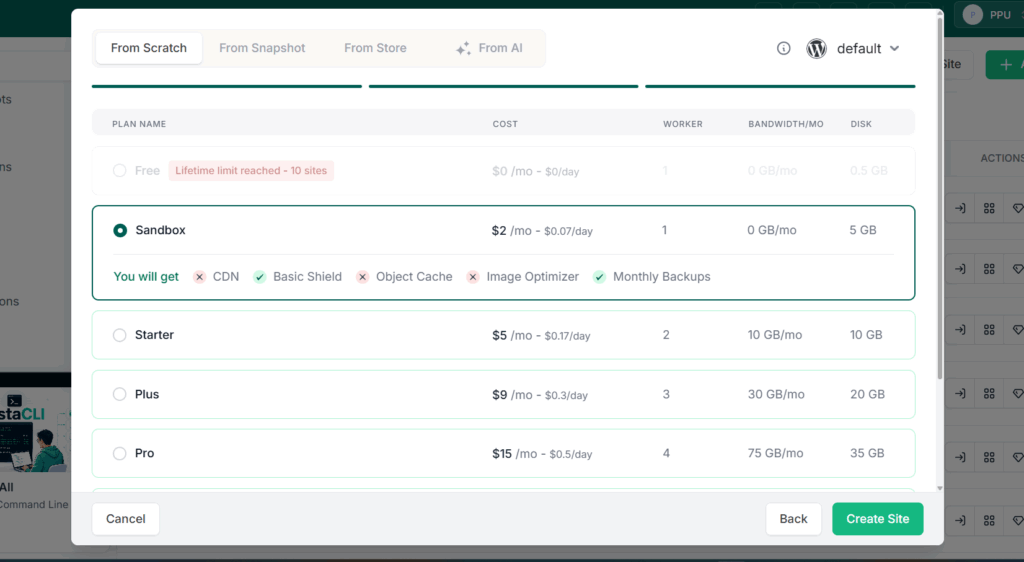
Your site spins up in seconds, and you can open the admin panel instantly using the Magic Login link.
Step 2: Set up the demo experience
Prepare the site the way a prospect should see it. Install and configure the theme and essential plugins, build a polished landing page and the core pages, and add realistic demo content so the site feels complete rather than empty.
Add a short welcome message on the WordPress dashboard explaining how to explore, and update the fields under Settings then General so the site name and tagline match your pitch.
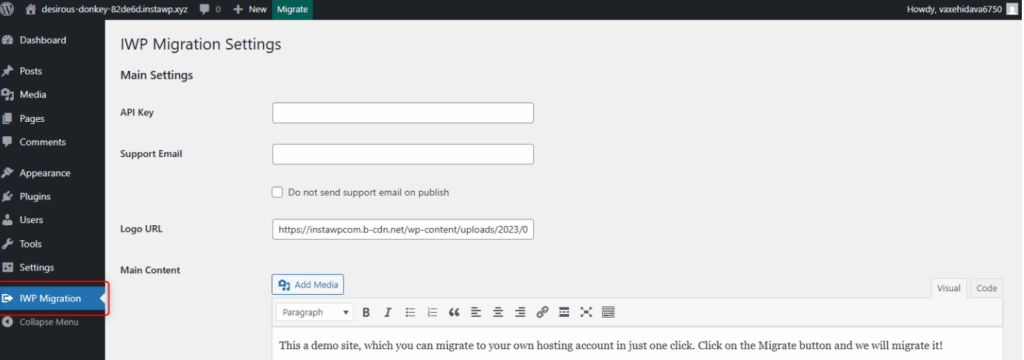
If you are a hosting company, this is also the stage to add a conversion plugin: the IWP Demo Helper for a semi-automated migration request, or the IWP Migration Helper for a fully automated demo-to-live transfer.
Step 3: Save your site as a Shared Snapshot
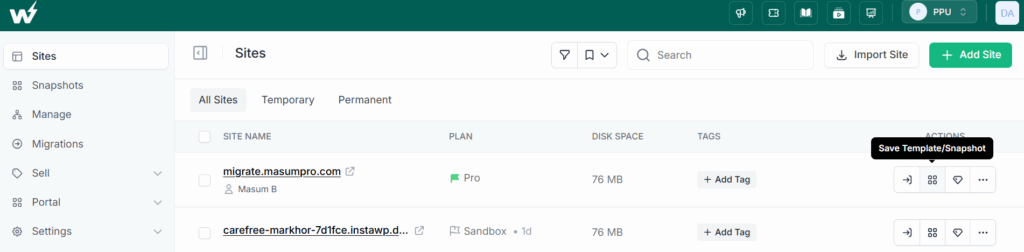
Once your demo looks right, turn it into a reusable, shareable demo. From the Site page, click the Save as Template/Snapshot icon next to your site. Add a name and a short description, select Snapshot, and mark it as Shared.
Watch the video tutorial here:
You can also tick Instant Snapshot to make demos load faster. Click Save. Keep the name and description crisp and client-friendly, because anyone who opens the demo link (and search engines) can see them.
Step 4: Customize and brand your demo
From the Snapshots page, find your shared snapshot and click Edit. Under Branding, add your logo, brand colors, privacy policy, and custom CSS. Use the Gallery to add images to the demo landing page.

Then open Advanced Options to configure the experience: enable Auto Login to wp-admin so prospects skip credentials, set a Site Lifetime so demos auto-delete, add a Redirect URL to send visitors to a specific page first, and enable Site Cloning if you want to let prospects keep their own copy. You can also set the Reply-To name and email so confirmation messages come from your company.

Step 5: Copy the link and share it
From the Snapshots page, click the Copy icon next to your snapshot’s name to copy your shared demo link. That single link is now your demo. Add it to your landing pages, sales emails, a “Try a live demo” button on your site, and your campaigns. Every prospect who clicks gets their own fresh, branded, live WordPress demo with no further effort from you.
Step 6: Keep the demo updated
When you need to refresh the demo, you do not start over. Go to the Sites page, open your master site’s Tools then Code Editor, make your changes, and save. Then go to the Snapshots page, choose Sync from Site, and confirm. Your snapshot updates, and every future demo reflects the change automatically.
For a deeper look at using demos specifically to win deals, see our guide on how to close website clients faster with a live demo link.
Turning a Demo Into a Paid Customer
This is where being part of an all-in-one cloud pays off. The demo is not a dead end. It becomes the live site.
For hosting companies, the IWP Migration Helper automates the handoff: once a customer completes your checkout (choosing a domain and plan), the plugin installs InstaWP Connect and migrates the demo into their live hosting environment, with no manual transfer.
For agencies, the same snapshot that powered the demo can be deployed as the client’s live, managed site, so the work that won the deal is the work that delivers it.
You can take this further by packaging demos into a full Website as a Service offering, where prospects try a demo and then buy a hosted plan that provisions automatically. That is how a demo becomes a recurring revenue engine.
If reselling hosting is the goal, our guide on how to resell hosting covers the business model in depth, and white-label WordPress for agencies explains how to brand the whole experience.
From demo to recurring revenue
The InstaWP Agency Program helps hosts and agencies build demo-to-paid flows, white-label everything, and migrate clients for free. Questions? Talk to our team.
Book a Call →Conclusion: One Cloud, From Demo to Paid Site
The best way to create a WordPress demo site is not to bolt a demo tool onto your stack. It is to use an all-in-one WordPress cloud where the demo is connected to everything else you do.
InstaWP lets you build a demo once, brand it as your own, share it with a single link, and convert it into a live, paid, hosted site, all on the same platform. Along the way it removes every traditional demo headache: the slow provisioning, the login friction, the scaling mess, the cleanup, and the lack of branding.
For hosting companies and agencies, that is what turns demos from a good idea into a dependable engine for growth. Build once, share the link, and let the experience do the selling.
The All-in-One WordPress Cloud
Create branded WordPress demos that convert into paying customers
Have questions about setting up demos, white-labeling, or converting them into paid hosting? Book a free call with the InstaWP team and we’ll map it out with you.
Book a Free Call →Further reading
- How to Close Website Clients Faster with a Live Demo Link
- How to Sell White-Label Hosting with InstaWP
- White-Label WordPress for Agencies
- How to Resell Hosting in 2026: A Guide for WordPress Agencies
Frequently Asked Questions
What is the best way to create a WordPress demo site?
The best way is to use an all-in-one WordPress cloud like InstaWP. You prepare one demo site, save it as a Shared Snapshot, and share a single link. Every prospect who clicks gets their own fresh, live WordPress demo in seconds, with no server provisioning or credential management, and the demo can convert into a paid hosted site.
Why use InstaWP instead of a standalone demo tool?
Standalone demo tools only show a product, then the demo is discarded. InstaWP is a full WordPress cloud, so the same demo connects to hosting, management, and billing. The demo becomes the customer’s live site, which means no rebuild and a direct path from interest to paid customer.
Do prospects need to sign up or install anything?
No. With auto-login enabled, prospects click the link and land directly inside a working WordPress site. There is no account creation, no credentials, and nothing to install.
Can I brand the demo with my own company’s identity?
Yes. InstaWP demos support full white-labeling: your logo, brand colors, custom CSS, reply-to email, and your own suffix domain, so the entire experience reads as your brand rather than InstaWP’s.
What happens to demos that don’t convert?
You set a site lifetime, and unconverted demos delete themselves when it expires. Because billing is pay-per-site, you only pay for active demos, keeping costs low even at high volume.
Can a demo become the customer’s real site?
Yes. With the IWP Migration Helper, a demo migrates into the customer’s live hosting automatically after checkout. For agencies, the same snapshot can be deployed as the live managed site. The demo is the start of the project, not throwaway work.