Are you ready to take your WordPress website to the next level of engagement? Imagine seamlessly integrating WhatsApp chat functionality right into your site, effortlessly connecting with your visitors in real-time.
With the ever-increasing reliance on instant messaging, incorporating WhatsApp chat WordPress plugins is not just a trend—it’s a necessity for modern websites aiming to foster meaningful interactions.
Whether you’re running a business, managing a blog, or showcasing your portfolio, WhatsApp chat plugins offer a direct line of communication that’s convenient for both you and your audience. Let’s explore these plugins in this blog!
Table of Contents
Best WordPress WhatsApp Chat Plugins to Explore
Here are our carefully picked WordPress WhatsApp chat plugins that agencies can use on their clients’ sites to improve reachability and foster strong brand-customer relationships.
1. WP Social Ninja

WP Social Ninja is the best WordPress WhatsApp chat plugin designed to transform your website visitors into loyal customers. By integrating a WhatsApp chat widget, you can enhance customer relationships, provide instant support, and boost sales. This all-in-one solution allows you to manage social interactions seamlessly while offering a personalized and engaging experience for your users.
With its user-friendly interface and advanced features, WP Social Ninja is the ultimate tool for businesses looking to elevate their online presence.
Its advanced features like personalized chat widgets, offline scheduling, and no-code configuration make it the best WordPress WhatsApp chat plugin to enhance customer engagement and drive sales. Whether you’re a small business or a large agency, WP Social Ninja offers a scalable solution to meet your needs.
Benefits of using this plugin include:
- Instant Customer Engagement: Turn website visitors into regular clients with real-time WhatsApp chat.
- Time-Saving: Simplify communication with a quick and easy-to-use chat widget.
- Improved Customer Relationships: Build long-term connections by solving customer queries promptly.
- Increased Sales: Encourage purchases through personalized consultations via WhatsApp.
- Brand Consistency: Deliver updated brand information and maintain a professional image.
- 24/7 Availability: Schedule offline messages to keep customers informed even when you’re unavailable.
Key Features:
- Match the chat widget to your brand’s style and color.
- Choose from a variety of stylish templates.
- Adjust captions, profile names, pictures, and logos.
- Set personalized messages for website visitors.
- Customize chat bubble text, icons, and positions (bottom/top, left/right).
- Decorate chat widgets to align with your brand’s aesthetics.
- Display chat options on specific pages or across the entire website.
Pricing Structure:
WP Social Ninja offers flexible pricing plans to suit businesses of all sizes:
- Single License: Price: $44/year
- Agency License: Price: $149/year
- Unlimited License: Price: $249/year
2. Click To Chat App

The Click To Chat App is a WhatsApp Chat plugin for WordPress that enables your site visitors to initiate a conversation with you directly from your website to your WhatsApp or WhatsApp Business number. This plugin incorporates a WhatsApp button with a pre-set message, which is automatically the first message in the conversation.
Benefits of using this plugin include:
- Convenience: The plugin offers a direct link between your website and your WhatsApp account, making it easy for customers to reach you.
- Increased Engagement: By facilitating real-time conversations, you can engage your customers more effectively.
- Lead Generation: WhatsApp is popular globally, enabling you to generate leads from a wide audience.
- Customization: Customize the look and feel of your WhatsApp button and chat box.
Key Features:
- A direct link to your WhatsApp account.
- Allows you to display contact information and a personalized message.
- Customizable button and box colors.
- Ability to add a custom icon in the WhatsApp button.
- Choose between two different button designs.
- Hide the button based on post types and taxonomies.
- Add rounded or square borders to your buttons.
- Vertical and horizontal positioning of the button.
Pricing Structure:
The plugin offers a free version with basic features. The premium version comes with additional features including multiple WhatsApp numbers, a chatbox for each number, customization of welcome messages, and more. Pricing details for the premium version are not mentioned and may need to be checked on the provider’s website.
The plugin also supports shortcodes for customization and is developed by QuadLayers.
3. Joinchat

Joinchat is a WordPress plugin that allows website visitors to chat with the site owner or support staff via WhatsApp. This plugin is known for its ability to add a floating button at the bottom of the site, making it easy for customers to reach out for support or inquiries. With more than 600,000 installations worldwide, it is considered the best WordPress plugin for WhatsApp.
Benefits of using Joinchat WhatsApp Chat plugin:
- It enhances customer interaction and improves support.
- It makes communication with customers more direct and personal.
- It increases customer satisfaction, trust, and loyalty.
- It helps in generating leads and promoting sales.
- It can be customized according to business needs.
Key Features:
- Insert a contact button for WhatsApp on your website.
- Onboarding, Preview, Custom CSS, and Multi-language.
- Settings at page or archive level.
- Show a notification.
- Create call-to-action messages.
- Customize conversation start messages.
- Opt-in text.
- Integration with WooCommerce.
- Dynamic Variables.
- Analytics Integration.
- Chat Triggers.
- Multi-Language & RTL Support.
- Theme Colors & Dark Mode.
Pricing Structure
Joinchat offers a free version with basic features. For advanced features, they offer premium add-ons such as Chat Funnels, Support Agents, and Random Phone, which are priced individually.
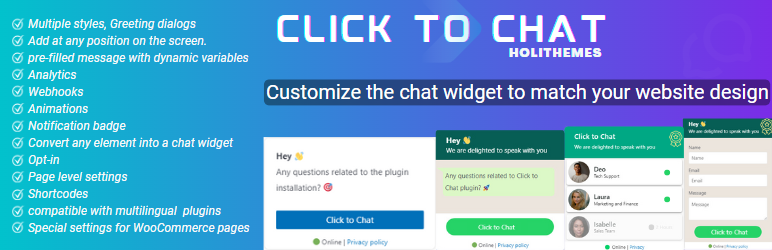
The Click to Chat plugin by HoliThemes is a tool that enables your website visitors to contact you through WhatsApp or WhatsApp Business with a single click. This plugin is designed to create a seamless communication channel between you and your website visitors, thereby enhancing user engagement and satisfaction.
Benefits of Using Click to Chat Plugin:
- It provides a convenient and swift communication channel for website visitors to contact you.
- It enhances user participation by displaying the right message at the right time.
- It allows you to design your chat interface to match your website’s design.
- It enables you to add multiple WhatsApp chat accounts.
Key Features of Click to Chat Plugin:
- Allows users to contact you through WhatsApp or WhatsApp Business with a single click.
- Provides 8 pre-defined customizable styles/designs.
- Allows custom element/design, enabling you to convert any element to a WhatsApp Chat element.
- Features different styles and positions for mobile and desktop.
- Offers a greetings dialog to encourage user participation.
- Allows form filling to get the necessary information from website visitors before initiating the chat.
- Enables adding multiple WhatsApp chat accounts.
- Allows customizing the notification badge with count, text color, background color, border color, and display time.
- Enables you to add WhatsApp at any position of the screen.
- Allows pre-filled messages to appear in the WhatsApp chat window when the user clicks on the WhatsApp.
- Enables addition of WhatsApp button or icon at WooCommerce single product pages.
- Allows overwriting the settings for each post at the page level.
- Supports Google Analytics, Facebook Pixel, and Google Ads Conversations.
- Allows connecting other applications using Integrate, Automation tools like Zapier, IFTTT, Pipedream, etc.
Pricing Structure:
- Single License Price: $18
- Plus License Price: $34
- Unlimited License Price: $69
5. Chaty

The Chaty is a WordPress plugin that allows you to chat with your website visitors through their preferred channels such as WhatsApp, Facebook Messenger, and more. The plugin allows you to display a chat button, which makes communication with your customers easily accessible.
Benefits of using the WhatsApp Chat plugin
- Direct customer interaction: The plugin lets you directly interact with your customers through their favorite channels, improving your customer support and potentially increasing sales.
- Lead generation: It allows you to generate leads and calls from over 20+ chat channels, including WhatsApp, Facebook Messenger, WhatsApp Business, Viber, Slack, Telegram, TikTok, and Line Messenger.
- Customer direction: The plugin lets you direct customers to your store’s location, improving the overall customer experience.
Key Features:
- The plugin lets you connect with your website visitors on WhatsApp and 20+ other chat channels.
- It provides an ultimate click-to-chat and call-now phone button for easy customer interaction.
- It allows you to show different chat channels for different pages, ideal for multi-language sites or different products.
- The plugin lets you show the widget only during your opening hours, showing live chat options when you’re available and other chat channels when you’re not.
- It allows you to launch your favorite live chat app, enabling you to use JavaScript as one of your chat channels to launch live chat products like Tawk.to, Tidio, Chatra, Formilla, Zoho, Zendesk, LiveChat, Crisp, Intercom, JivoChat, Olark, and more.
Pricing Structure
The plugin is available for free with some limitations. However, to unlock more advanced features and capabilities, users can upgrade to a Pro plan. For accurate pricing details, it is recommended to check the official website or contact the plugin provider directly.
6. WP Chat App

The WP Chat App is a WhatsApp Chat plugin for WordPress that lets you add a WhatsApp floating button, stationary button, widget, or web beacon to your website. It facilitates easy setup and is compatible with all cache plugins.
You can add multiple customer service agents, sales reps, technical support, and more. It serves as an effective medium to connect and interact with your audience, providing support directly, accepting orders on WhatsApp, building trust, and increasing customer loyalty.
Benefits of Using WP Chat App:
- Enhances customer interaction by providing direct support.
- Enables order acceptance through WhatsApp.
- Helps build trust and increase customer loyalty.
- Allows the addition of multiple customer service agents, sales reps, etc.
Key Features:
- WhatsApp Floating Widget: Show a WhatsApp chat widget on selected or all pages with agent name, title, custom color & greetings, and set pre-filled message with dynamic shortcodes.
- WooCommerce WhatsApp Button: Add Order on WhatsApp button on WooCommerce product pages with a choice of a specific agent/expert for products.
- In-post/page WhatsApp Button with shortcode: Unlimited display with a choice of a specific agent/expert to fit page/post content.
- Event Tracking: Google Analytics, Google Tag Manager, Google Analytics 4, Facebook Pixel.
- Multiple Agent Accounts: Add multiple accounts of your members into a WhatsApp box to display.
- Compatibility with WordPress Cache Plugins: Works with many WordPress hosting caching systems and WordPress optimization plugins.
- Enhanced Customer Relationship: Greet customers by name to create mutual trust and build customer loyalty.
- Easy to Use: Customize each agent’s profile depending on their working hours, daily roster, avatar, name tag, and job title.
- Support WPML: Works with any WordPress translation plugins like WPML, Polylang, etc.
Pricing Structure
The pricing structure for the WP Chat App is not explicitly mentioned in the description provided. You may need to visit the provided links or contact the developer for detailed pricing information.
7. My Sticky Elements

The My Sticky Elements is a multi-functional WordPress plugin that enables your website visitors to contact you easily. It provides a floating form and tabs on any side of your website, making it easier for your visitors to find important business information and contact you via various channels like WhatsApp, Facebook Messenger, and other social channels.
Benefits of using this plugin:
- Improved accessibility: With this plugin, your customers can easily reach out to you through their preferred social channels. This enhances user experience and can lead to increased customer satisfaction and loyalty.
- Increased leads: By making it easy for potential customers to contact you, this plugin can help capture more leads and generate more business.
- Enhanced online presence: The plugin helps increase followers on your social pages, further improving your online presence and reach.
Key Features:
- Capture more leads and messages through various chat and social channels like WhatsApp, Facebook Messenger, etc.
- Increase followers on your business’s social media pages.
- Display important business information like open hours and address.
- Show customizable tabs to help website visitors contact you and follow your business on any popular social channel.
- Choose from a variety of contact icon templates and set an entry effect for your contact form and chat icons.
Pricing Structure
The plugin offers a free plan with basic features. For advanced features, you can upgrade to the Pro plan for $49/year. The Pro plan includes features like showing unlimited tabs simultaneously, getting contact form leads directly to your email, page targeting, widget analytics, and country targeting among others.
8.Chat Button by GetButton io

The Chat Button by GetButton.io is a WhatsApp chat plugin that allows website visitors to initiate a conversation directly through various messaging apps like WhatsApp or Facebook Messenger. This feature provides the flexibility to track and follow up on the conversation anytime and anywhere.
Using this plugin can offer several benefits:
- It enables continuous conversation even when visitors leave your site.
- It allows you to view customers’ profiles, helping you understand, connect, and engage with them better to boost sales.
- It provides support to customers anytime and anywhere, even on mobile devices.
Key Features:
- Easy Installation: It can be installed and configured to match your style in less than a minute.
- Compatibility: It works on all platforms – desktops, tablets, and mobile devices.
- Messaging App Support: It supports a wide range of messaging apps including Facebook, WhatsApp, Viber, Snapchat, Line, and more.
- AI Assistant: You can build a ChatGPT-powered Chatbot that is trained on your website links and PDF files in just 5 minutes.
- Additional Widgets: You can add floating widgets like a contact form, calendar, or callback form to generate more leads and sales.
Pricing Structure
The pricing structure for the Chat Button by GetButton.io is not mentioned and may need to be enquired through their support contact.
9. OneClick Chat to Order

OneClick Chat to Order is a WordPress plugin that simplifies the purchase process for your customers by allowing them to order your products directly via WhatsApp. By integrating your WooCommerce-powered online store with WhatsApp, this plugin makes it super quick and easy for your customers to complete their orders.
Benefits of using OneClick Chat to Order plugin:
- Accelerate the purchase process and potentially increase sales.
- Provide a more convenient shopping experience for customers.
- Enhance customer engagement and interaction through WhatsApp.
- Boost customer service efficiency by bridging the communication gap between you and your customers.
Key Features:
- Three new selectable WhatsApp button positions on a single product page.
- Option to hide WhatsApp and floating buttons on all posts and pages, specific posts, pages, product categories, and tags.
- Button color customization options for WhatsApp and floating buttons.
- Multiple Numbers feature to add more than one WhatsApp numbers and assign them to specific pages on your store.
- Option to assign a WhatsApp number from a list of created numbers only for a single product.
- Options to set button text and custom message for individual product, including the option to individually hide/show WhatsApp button on a single product page.
Pricing Structure
OneClick Chat to Order is a premium plugin with additional add-ons available for purchase. However, the pricing details are not specified on the website. Potential users are encouraged to visit the official website or contact the developer for more information on pricing.
10. Cresta Help Chat

Cresta Help Chat is a WordPress WhatsApp chat plugin that offers a seamless way for your users or customers to contact you directly via WhatsApp. By simply clicking on a button, users can start a private conversation with you on your WhatsApp number and continue the conversation either on WhatsApp web or the WhatsApp mobile application.
Benefits of using Cresta Help Chat WhatsApp Plugin
The Cresta Help Chat plugin offers an innovative and effective way to communicate with your users or customers. It enhances customer service by providing direct, real-time communication. It is also compatible with WooCommerce and WPML, making it a versatile tool for your website.
Key Features:
- Allows you to add a button for opening WhatsApp chat at the bottom right of your site.
- Offers a shortcode [cresta-help-chat] to add the WhatsApp button in your posts, pages, or custom post type.
- Provides the option to choose which pages to display the WhatsApp Chat button.
- Offers automatic opening of the WhatsApp App on mobile version by clicking the button.
Pricing Structure
The pricing structure for the Cresta Help Chat plugin is not provided in the source. For detailed pricing information, potential users are encouraged to visit the Cresta Help Chat plugin homepage.
How do WhatsApp Chat WordPress Plugins help eCommerce Businesses
WhatsApp Chat WordPress Plugins provide numerous benefits for eCommerce businesses, enhancing communication, customer service, and ultimately boosting sales. Here’s how they help:
- Real-time Customer Support: eCommerce businesses can offer instant support to their customers directly through WhatsApp Chat plugins. This enables quick resolution of inquiries, product questions, and order-related issues, leading to higher customer satisfaction and loyalty.
- Personalized Assistance: With WhatsApp Chat plugins, eCommerce businesses can provide personalized assistance to shoppers, guiding them through the purchasing process, suggesting products based on their preferences, and offering tailored recommendations, mimicking an in-store experience online.
- Cart Abandonment Recovery: By integrating WhatsApp Chat with their eCommerce website, businesses can send personalized messages to customers who abandon their shopping carts, reminding them to complete their purchase, addressing any concerns they may have, and even offering incentives to encourage conversion.
- Order Updates and Notifications: WhatsApp Chat plugins allow businesses to send order updates, shipment tracking information, and delivery notifications directly to customers’ WhatsApp accounts, keeping them informed every step of the way and reducing support inquiries.
- Feedback and Reviews: eCommerce businesses can use WhatsApp Chat to solicit feedback from customers post-purchase, ask for product reviews, and address any issues or concerns they may have, fostering trust and improving brand reputation.
- Marketing and Promotions: WhatsApp Chat plugins can also be utilized for marketing purposes, allowing businesses to send promotional messages, exclusive offers, and product announcements directly to customers’ WhatsApp contacts, increasing engagement and driving sales.
In summary, WhatsApp Chat WordPress Plugins empower eCommerce businesses to provide seamless, personalized customer experiences, improve communication, and drive conversions, ultimately contributing to their success in the competitive online marketplace.
Final Word
And there you have it, folks! WhatsApp Chat WordPress Plugins are not just another add-on for your website; they’re a powerful tool that can transform the way you engage with your audience. From boosting customer satisfaction to increasing conversion rates, the benefits are endless.
So why wait? Elevate your website’s communication strategy today and watch your online presence thrive. Get ready to chat your way to success!


