
Just another contact form plugin. Simple but flexible.
About Admin CSS MU
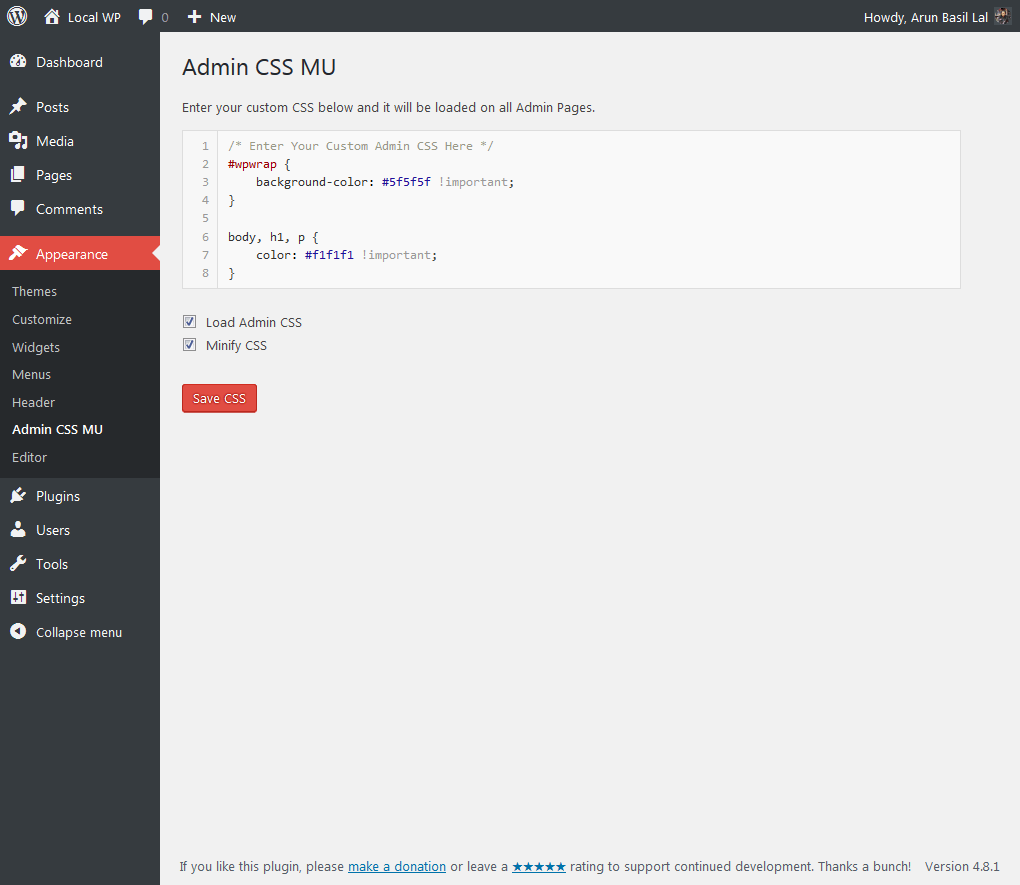
This plugin allows you to add your own custom CSS to style the WordPress Admin. It is compatible with both single install and multisite WordPress installations. The latest version includes an Admin interface and uses CSSTidy to clean and optionally minify CSS.Screenshots
Frequently asked questions
What is Admin CSS MU?
Admin CSS MU is a WordPress plugin that allows you to add custom CSS to style the WordPress Admin area. It works with both single WordPress installations and WordPress multisites.
Where can I find the Admin interface for Admin CSS MU?
As of version 2.0, the Admin interface for Admin CSS MU can be found under Appearance > Admin CSS MU in your WordPress dashboard.
Does Admin CSS MU minify CSS?
Yes, Admin CSS MU uses CSSTidy to clean and optionally minify CSS. CSS is only minified when it is being used, while the editor always displays un-minified CSS for easy editing.
Can I use Admin CSS MU to style the login page or front-end?
No, Admin CSS MU is specifically for styling the WordPress Admin. If you need to add custom CSS to your Login and Front-end as well, you should use the Custom Login Admin Front-end CSS plugin instead.
Changelog
2.10
- Date: 04.October.2023
- Tested with WordPress 6.3.1
- Enhancement: Added compatibility with PHP 8.x
2.9
- Date: 16.May.2023
- Tested on WordPress 6.2
- Enhancement: Added support for
justify-content.align-items, andflex-wrapin CSSTidy.
2.8
- Date: 9.February.2023
- Tested on WordPress 6.1.1
- Enhancement: Added support for
flex-directionin CSSTidy.
2.7
- Date: 19.October.2022
- Tested on WordPress 6.0.3.
- Security Fix: Deleted unwanted files in CSSTidy. Thanks Darius from Patchstack for the heads up.
2.6
- Date: 17.May.2021
- Tested on WordPress 5.7.2
- Updated CSSTidy to 1.7.3
- Added support for CSS properties grid-gap and grid-template-columns.
- Fix PHP warning: PHP Warning: “continue” targeting switch is equivalent to “break” in class.csstidy.php on line 859.
2.5
- Date: 18.January.2018
- Added support for PHP version lesser than PHP 5.5
- Updated text domain. For plugins, text domain should be the slug which is admin-css-mu in this case
- Tested with WordPress 4.9.2
2.4
- Date: 29.August.2017
- Fixed: Compatibility issue with Custom Login Admin Front-end CSS plugin.
- Updated readme.txt to work around #2931
- New: Added an option “Load Admin CSS” to enable and disable CSS easily. Useful during testing.
- Code improvements.
2.3
- Date: 18.August.2017
- Tested with WordPress 4.8.1. Result = pass.
- Updated CSSTidy classes to meet PHP 7.x standards.
- Added option to minify CSS. CSS is only minified during use and the CSS editor will show the un-minified and more readable version for easy editing.
2.2
- Date: 14.December.2016
- Tested with WordPress 4.7.
- Uses wp_kses() instead of esc_html() during output to prevent stripping of useful html tags.
- Minor bug fixes.
2.1
- Date: 19.March.2016
- Updated multisite compatibility.
- Appearance > Admin CSS MU is now visible only on the main website.
2.0
- Date: 15.March.2016
- Added an admin interface in Appearance > Admin CSS MU.
- Tested with WordPress 4.5.
1.01
- Date: 11.April.2016
- Code updates.
- Tested with WordPress 4.4.2.
- Changed the location of custom stylesheet into /wp-content/uploads/admin-css-mu/ while preserving the original folder for backward compatiblity with version 1.0
1.0
- Date: 25.June.2012
- First release of the plugin.

