WordPress vs Lovable is not just a “traditional CMS vs AI builder” debate. It is a workflow decision. Lovable can turn a prompt into a working app interface fast.
WordPress gives developers, agencies, and clients a mature publishing, SEO, eCommerce, hosting, and ownership layer. This comparison looks at what matters after launch: editing, integrations, performance, cost, maintenance, and revenue potential.
Table of Contents
Key Takeaways
A quick summary of how WordPress and Lovable compare for real developer, agency, and production website workflows.
Lovable is faster for the first build. It is excellent for MVPs, prototypes, dashboards, internal tools, and custom app interfaces.
WordPress is stronger for long-term websites. It wins on CMS workflows, SEO, eCommerce, ownership, content operations, and client handoff.
Lovable’s rendering model has improved. Newer Lovable apps use server-side rendering with TanStack Start, while older React/Vite projects may rely on prerendering.
WordPress still has the ecosystem advantage. Plugins, themes, developers, WooCommerce, SEO tools, and hosting choices make it easier to maintain production websites.
InstaWP removes much of the old WordPress friction. Instant sandboxes, managed hosting, staging, snapshots, monitoring, and WaaS workflows help agencies build faster without losing WordPress flexibility.
WordPress vs Lovable at a Glance
WordPress vs Lovable at a Glance
A practical snapshot of how both platforms fit into modern web development workflows.
43%+
A dominant CMS and website platform used across blogs, business sites, stores, and enterprise publishing.
Minutes
Prompt-to-app workflow for creating working front ends, prototypes, dashboards, and app interfaces quickly.
60k+
Large plugin ecosystem for SEO, forms, memberships, bookings, eCommerce, analytics, and more.
GitHub
Exports generated code to GitHub, making it useful for developers who want to continue in a code workflow.
What WordPress Is
WordPress is an open-source CMS built for publishing, site management, extensibility, and ownership. It runs on PHP and MySQL or MariaDB, supports themes and plugins, includes user roles, revisions, media management, taxonomies, REST APIs, and the block editor. It is used by small businesses, publishers, agencies, stores, membership sites, learning platforms, and enterprise teams.
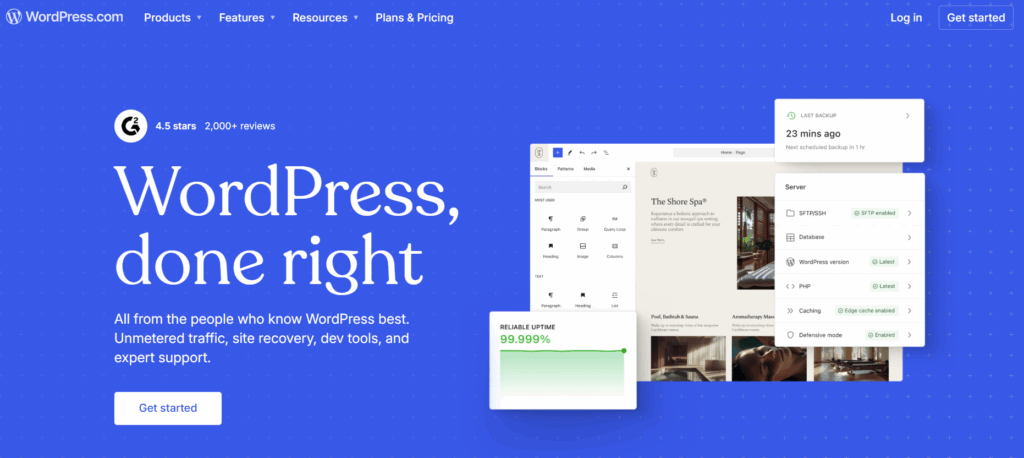
For developers, the biggest advantage is not that WordPress is old. It is that the workflow is proven. You can build locally or in the cloud, use a theme, create custom blocks, add custom post types, extend with plugins, manage content from the admin, and host the site almost anywhere.
What Lovable Is
Lovable is an AI app builder. You describe what you want in natural language and Lovable generates a working web app. It is useful for fast UI exploration, landing pages, internal tools, dashboards, and SaaS prototypes. Developers can connect GitHub, review code, and continue the project outside the prompt interface.
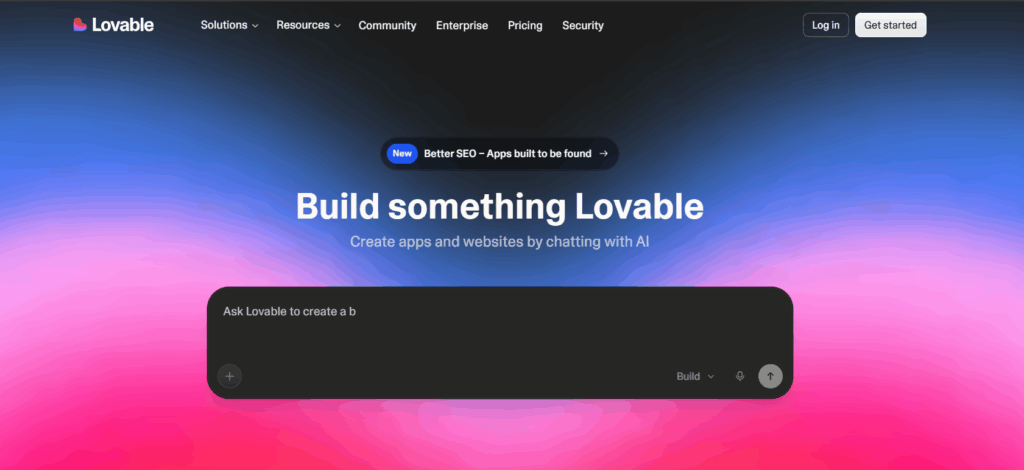
Lovable is strongest when the goal is speed to first interface. It is weaker when a project needs a mature CMS, repeatable content operations, editor workflows, complex SEO controls, or long-term non-technical maintenance.
WordPress vs Lovable Comparison
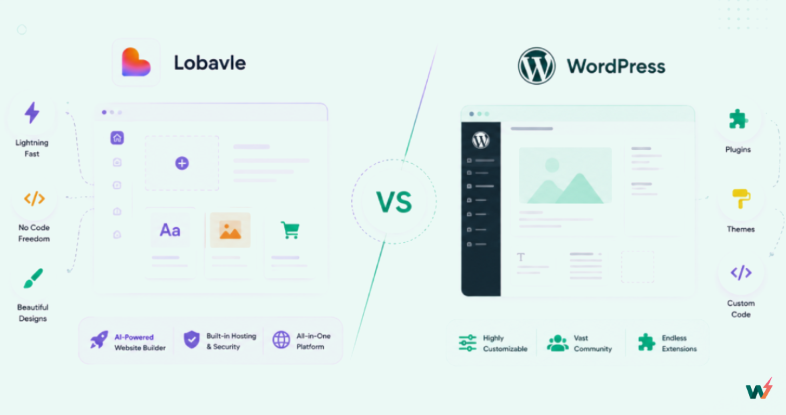
Before going deep, here is a practical snapshot of how both platforms behave in real development and client workflows.
Workflow Matrix
Where WordPress and Lovable fit across real client and developer workflows.
1. Speed of First Build
The first-build experience is not just about how fast something appears on screen. It is about how quickly a developer can move from an idea to a working, reviewable build without losing time to setup, configuration, hosting, or deployment decisions.
With Lovable, the first few minutes feel very direct. You write a prompt for a landing page, dashboard, booking flow, or SaaS-style interface, and the platform generates a visual app quickly. There is no local setup, no framework installation, no database configuration, and no hosting decision before the first draft appears.
That makes Lovable useful when the goal is to see an idea fast. You can test layout direction, explore an app flow, or show a rough prototype to a stakeholder without starting from a blank code editor.
But after that first draft, the workflow usually moves into review mode: checking generated code, refining UI details, connecting data, managing auth, handling environment variables, and deciding how the project will be maintained after launch.
Traditional WordPress development has historically felt slower at the beginning. Developers often had to prepare a local environment, configure PHP and MySQL, install WordPress, choose a theme, install plugins, create staging, set up temporary hosting, and only then start building the actual site. For agencies, that repeated setup work adds up across multiple client projects.
But that is not the only way to start a WordPress build anymore. With an all-in-one cloud platform like InstaWP, developers and agencies can start from a fully managed WordPress instance instead of assembling the environment manually.
You can launch a WordPress sandbox, use Magic Login, install themes and plugins, test changes, create a staging site, save the setup as a reusable Snapshot, and move toward production without rebuilding the workflow from scratch.
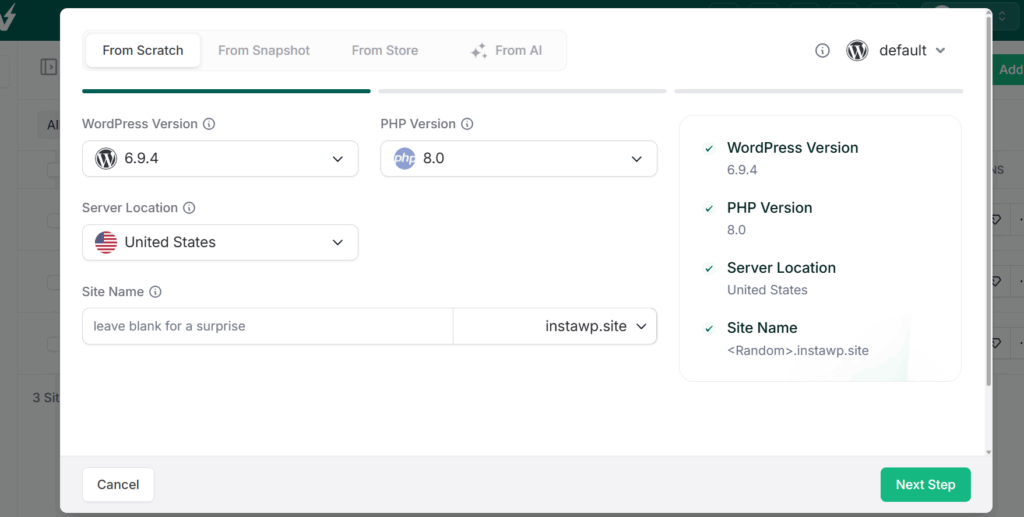
So the practical comparison is not “AI builder vs old WordPress.” It is prompt-first app generation vs cloud-first WordPress development. Lovable removes friction from the first visual draft. InstaWP removes the traditional setup friction from WordPress, so developers can start building inside a real WordPress environment almost immediately.
First Build Experience: Lovable vs WordPress with InstaWP
A practical look at what happens when a developer starts from zero.
| First-build factor | Lovable | WordPress with InstaWP |
|---|---|---|
| Starting point | Prompt a visual app-style interface and iterate from the generated draft. | Launch a fully managed WordPress instance and start building in the browser. |
| Setup work | No initial framework, hosting, or database setup for the first draft. | No local server, manual WordPress install, database setup, SSL, or temporary hosting needed. |
| Best first-build use case | Prototype, MVP interface, dashboard, internal tool, or app-flow demo. | Client website, CMS-driven site, WooCommerce build, theme test, plugin test, or agency template. |
| After the first draft | Review generated code, connect data, configure auth, and plan deployment/maintenance. | Continue with WordPress admin, plugins, themes, content, staging, snapshots, and hosting workflows. |
| Client handoff | Good for demos, but editable content workflows may require custom setup. | Strong for handoff because WordPress already includes pages, posts, media, users, roles, and editor workflows. |
Verdict: Lovable gives teams a fast way to see an app idea take shape from a prompt. WordPress, especially with InstaWP, gives developers a faster path to a real CMS-based build without the usual setup burden.
If the goal is a quick interface prototype, Lovable feels immediate. If the goal is a production-ready website that clients can edit, marketers can grow, and agencies can maintain, starting WordPress on InstaWP is the more practical first-build workflow.
2. Content Management and Day-to-Day Editing
The real content management test starts after the first build looks good.
We would not judge this part by asking, “Can the platform create a page?” We would test what happens when a client or marketing team starts using the site every week: changing pricing, adding a blog post, updating service pages, replacing images, adding a case study, editing menus, creating landing pages, or scheduling content without asking a developer.
With Lovable, the day-to-day editing experience still feels like app iteration. You can prompt changes, ask it to rewrite a section, add a new page, adjust layout, or change the interface.
That feels fast when the same founder or developer who built the project is also managing the updates. The problem appears when the website becomes a business asset and multiple non-technical people need safe editing access.
For example, if a client wants to update the headline on a service page, Lovable can usually handle that through a prompt.
But if the same client wants a proper blog workflow, author management, category pages, reusable content sections, media organization, drafts, scheduled publishing, revisions, and role-based access, the workflow becomes less straightforward. At that point, you are not just editing a screen. You are building a content system around the app.
WordPress feels more natural in this part of the WordPress vs Lovable comparison because content management is not bolted on later. It is the core of the platform.
The WordPress editor, pages, posts, categories, tags, media library, menus, drafts, revisions, scheduled publishing, and user roles are already part of the default workflow. A client can log in, edit a page, add a post, upload images, update navigation, or roll back a content change without touching code.
With InstaWP, that WordPress content workflow starts faster. An agency can launch a fully managed WordPress instance with built-in AI capabilities. Every site built with InstaWP comes with WordPress MCP integration. You can simply copy the MCP URL of your site site and take the help of 13 AI tools to enjoy prompt-based content editing.
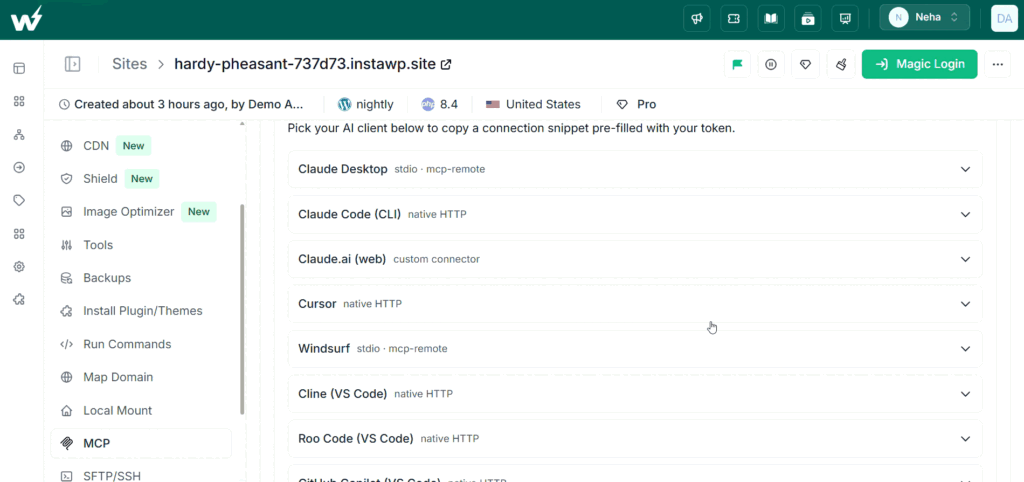
So the practical Lovable vs WordPress question is not whether both can display content. They can. The question is how safely and repeatedly that content can be managed after launch. Lovable is useful when content changes are part of a developer-led app workflow. WordPress is stronger when editing needs to move to clients, marketers, editors, and agencies managing multiple sites.
Content Management Experience: Lovable vs WordPress
A practical look at what happens when the site needs weekly updates, client editing, and repeatable content workflows.
| Editing factor | Lovable | WordPress with InstaWP |
|---|---|---|
| Routine content updates | Prompt-driven or code-driven. Works well when the builder controls the update flow. | Handled through pages, posts, blocks, menus, media, drafts, and revisions. |
| Client editing | Possible, but usually needs a custom editing model or developer involvement. | Built for client handoff with user roles, permissions, and familiar admin workflows. |
| Blog and publishing workflow | Can generate blog-style pages, but ongoing editorial workflows need extra structure. | Native support for posts, categories, tags, authors, scheduling, revisions, and archives. |
| Repeatable agency setup | Reusable patterns depend on code organization and project discipline. | Agencies can save client-ready WordPress builds as Snapshots and reuse them across projects. |
| Risk during edits | A prompt meant to change one area can affect nearby layout or logic if not reviewed carefully. | Content changes are more contained, and staging/sandbox workflows help test larger updates safely. |
Verdict: Lovable works well when content updates are part of a developer-led app workflow. WordPress is more practical when a site needs real content management, client editing, publishing workflows, and repeatable agency delivery.
With InstaWP, WordPress also removes much of the old setup delay because developers can start from a managed instance, prepare a CMS-ready build, test it safely, and reuse it for future projects.
3. SEO and AI Search Visibility
The SEO test should not start with “Can the page look good?” It should start with “Can search engines, AI crawlers, and answer engines understand the page without extra guesswork?” In a real WordPress vs Lovable workflow, we would check rendered HTML, title tags, meta descriptions, canonical URLs, schema, sitemap output, internal links, redirects, image metadata, page speed, and how easy it is to keep publishing new search-focused pages.
With Lovable, the first SEO experience depends on how the generated app is structured. You can create a clean landing page, product page, or SaaS-style interface quickly, but the SEO layer still needs developer review.
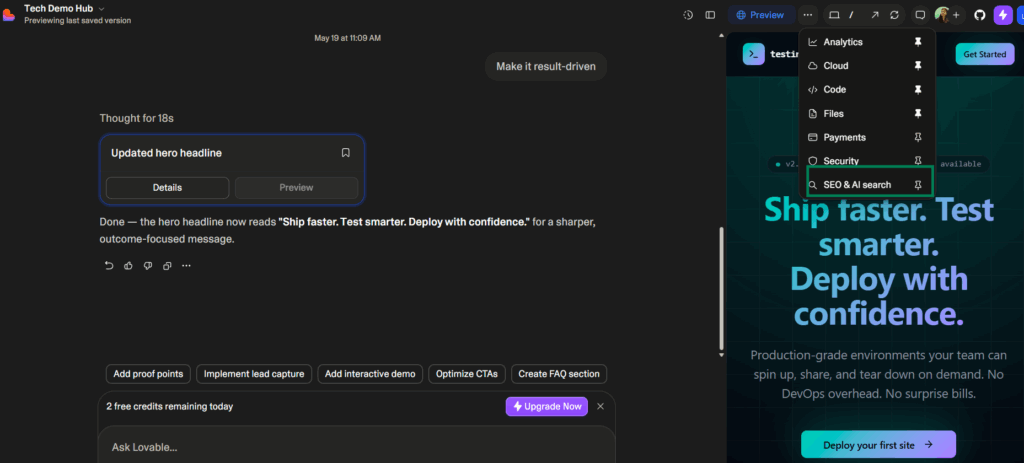
You can ask the AI to improve the SEO and search visibility. You can find and fixes SEO issues. AI Someone has to inspect whether the page has crawlable content, correct metadata, proper headings, indexable routes, social preview tags, structured data, and a sitemap or route strategy that search engines can follow.
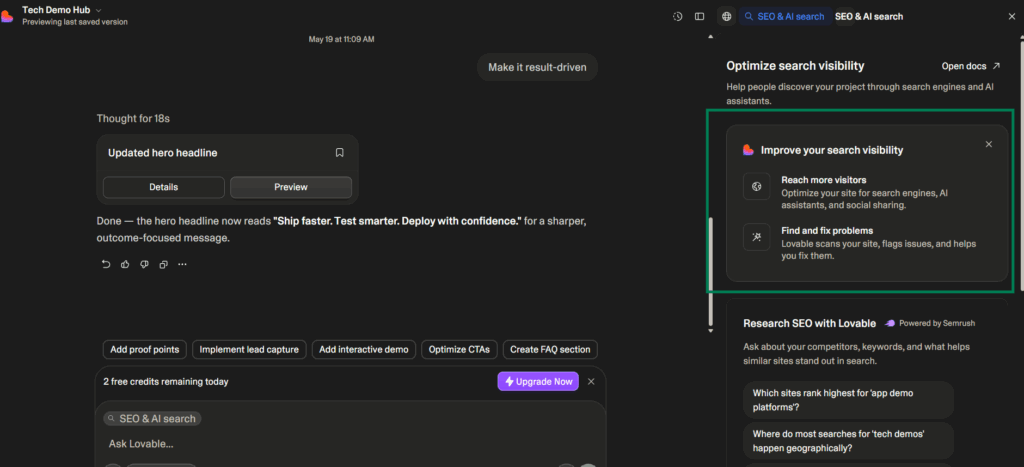
That is fine for a small prototype or a focused marketing page. But when we test Lovable vs WordPress for a content-led site, the workflow becomes more demanding.
A SaaS marketing site, agency website, affiliate site, documentation hub, or local business site usually needs repeatable SEO pages, blog publishing, topic clusters, internal links, categories, author pages, redirects, and regular content updates. At that point, SEO is no longer a one-time page setup. It becomes an ongoing publishing system.
WordPress feels more natural here because SEO and publishing sit close together. Pages, posts, categories, tags, authors, media, excerpts, permalinks, and archives are part of the default content model.
Add tools like Rank Math, Yoast SEO, or other WordPress SEO plugins, and developers get practical controls for titles, meta descriptions, schema, sitemaps, redirects, breadcrumbs, Open Graph data, and canonical URLs without building every SEO function from scratch.
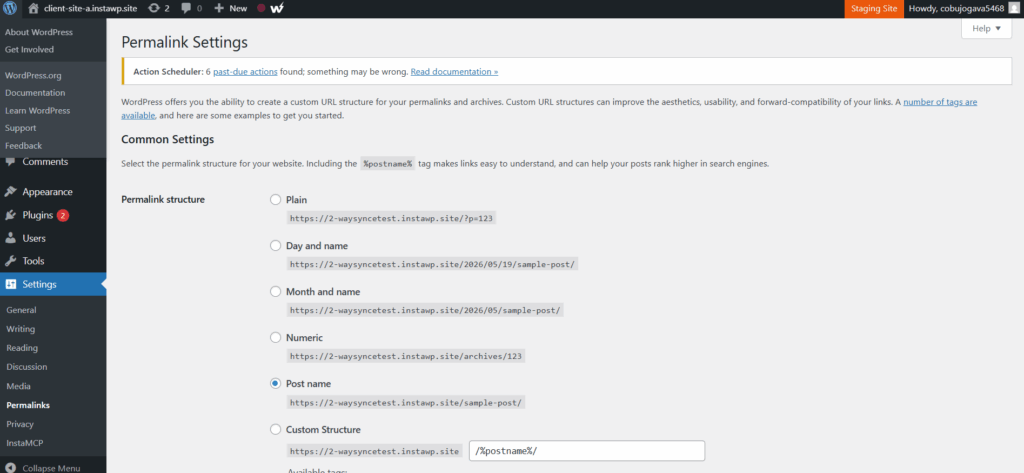
WordPress also fits AI search visibility better when the goal is to publish structured, crawlable, well-linked content over time. AI answer engines still need clear source pages, consistent entity signals, schema, internal context, and crawlable content.
A WordPress site can support that with landing pages, blog posts, glossary pages, comparison pages, FAQs, documentation, and product-led content, all managed from the same CMS.
SEO and AI Search Experience: Lovable vs WordPress
A practical look at what happens when a site needs crawlability, metadata, publishing, and long-term organic visibility.
| SEO factor | Lovable | WordPress with InstaWP |
|---|---|---|
| First SEO setup | Needs developer review for metadata, headings, routes, indexability, and structured data. | SEO plugins and CMS settings handle titles, meta, schema, sitemaps, redirects, and canonicals. |
| Content publishing | Good for focused pages, but ongoing blog and content workflows need extra structure. | Built for pages, posts, categories, tags, authors, archives, drafts, and scheduled publishing. |
| AI search readiness | Depends on how clearly the generated app exposes content, entities, headings, links, and schema. | Supports structured, crawlable content through landing pages, blogs, FAQs, glossary pages, and schema plugins. |
| Technical SEO changes | Changes usually need code review, route checks, deployment discipline, and manual testing. | Developers can test redirects, schema, caching, image optimization, and SEO plugin updates in staging. |
| Repeatable agency setup | Reusable SEO patterns depend on app structure and code organization. | Agencies can save SEO-ready WordPress builds as Snapshots and reuse them across client projects. |
Verdict: Lovable can work for SEO when the project is small, focused, and reviewed carefully by a developer. WordPress is more practical when SEO is an ongoing growth channel that needs publishing workflows, schema, metadata controls, internal linking, redirects, and safe testing.
With InstaWP, WordPress also becomes faster to prepare because agencies can start from an SEO-ready managed setup instead of rebuilding the same technical foundation for every client.
SEO Architecture: What Bots See
Search performance depends on what crawlers can access, render, and understand.
Request → Server-rendered page → HTML content → SEO plugins add metadata/schema.
Best for blogs, landing pages, documentation, service pages, programmatic content, and long-term organic acquisition.
Request → SSR or prerendering path → generated app output.
Better than older client-only app flows, but SEO setup depends on project age, rendering mode, and implementation quality.
4. Plugin Ecosystem and Integrations
The integration test starts when the project moves beyond the first screen. A real client site rarely needs only a homepage. It needs forms, analytics, CRM sync, email marketing, cookie consent, search, payments, bookings, memberships, security, backups, performance optimization, automation, and sometimes multilingual support.
So, in a practical WordPress vs Lovable comparison, we would test how quickly each platform handles these everyday requirements without turning every small feature into a custom development task.
With Lovable, integrations feel developer-led. You can connect APIs, use packages, add SDKs, wire up databases, and build custom workflows into the generated app.
That works well when the project is genuinely app-like: an internal dashboard, a SaaS workflow, a custom calculator, a client portal, or a data-heavy interface. In those cases, Lovable gives you speed at the interface layer and flexibility at the code layer.
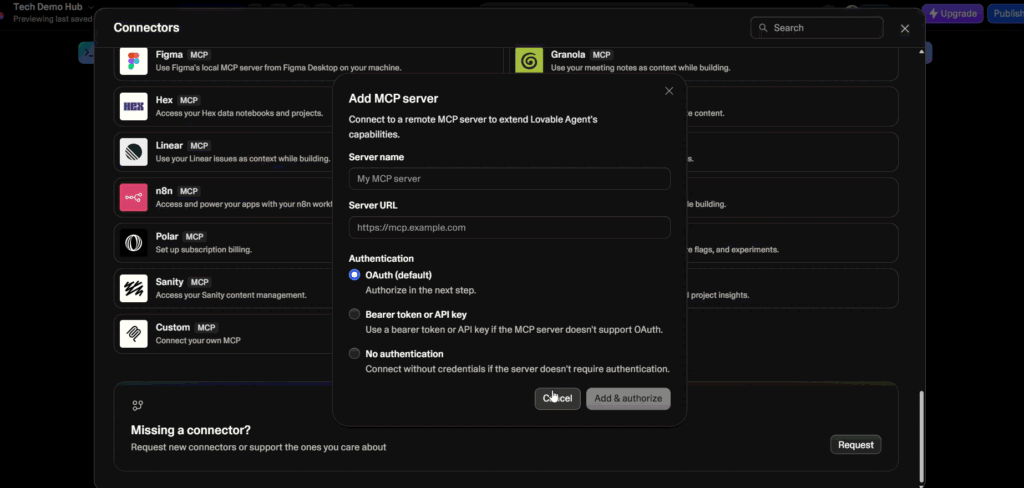
The friction appears when the project needs standard website functionality. For example, if a client asks for a contact form connected to HubSpot, newsletter opt-ins, SEO metadata, a booking calendar, cookie consent, spam protection, analytics events, and a searchable blog, Lovable can still support those things, but most of them become implementation decisions.
You have to think about API keys, packages, custom logic, error handling, deployment, and long-term maintenance.
WordPress feels more practical in this part of the Lovable vs WordPress workflow because the WordPress plugin ecosystem already covers most common website requirements. Forms, SEO, analytics, caching, image optimization, memberships, LMS, multilingual content, security, backups, automation, payments, and WooCommerce extensions are not unusual edge cases. They are normal WordPress workflows.
That does not mean developers lose control. WordPress still gives developers hooks, filters, custom plugins, custom post types, block development, REST API access, and theme-level control when a project needs something custom.
The difference is that standard client requests do not always need to start from code. You can use a proven plugin where it makes sense, then extend or customize only the parts that actually need developer work.
Plugin and Integration Experience: Lovable vs WordPress
A practical look at what happens when a site needs forms, SEO, analytics, CRM sync, bookings, payments, and repeatable plugin stacks.
| Integration factor | Lovable | WordPress with InstaWP |
|---|---|---|
| Custom API workflows | Strong for app-style projects where developers expect to connect APIs, SDKs, packages, and custom logic. | Supported through plugins, custom plugins, hooks, filters, REST API, and theme-level development. |
| Common website features | Often requires implementation decisions around packages, API keys, data flow, and maintenance. | Forms, SEO, analytics, caching, security, backups, memberships, LMS, bookings, and WooCommerce are plugin-ready workflows. |
| Client handoff | Works best when a developer continues managing integrations and code-level changes. | Clients can manage many plugin-based features from the WordPress dashboard after setup. |
| Testing plugin or integration changes | Depends on the app’s testing process, deployment workflow, and code review discipline. | Developers can test plugin stacks, updates, API connections, and conflicts in sandboxes or staging before production. |
| Repeatable agency setup | Reusable patterns depend on project structure, code organization, and developer documentation. | Agencies can save tested plugin stacks as Snapshots and reuse them across similar client builds. |
Verdict: Lovable is useful when integrations are part of a custom app workflow and a developer will keep owning the code. WordPress is more practical when the project needs standard website integrations, plugin-based workflows, client handoff, and repeatable agency delivery.
With InstaWP, WordPress also becomes safer to work with because developers can test plugin stacks, API connections, and updates in isolated environments before anything reaches production.
5. eCommerce and Payments
The eCommerce test should not stop at “Can I add a payment button?” A real store needs products, variations, coupons, taxes, shipping, inventory, refunds, customer accounts, abandoned cart flows, subscriptions, order emails, analytics, reporting, and a backend that a store owner can actually use.
With Lovable, the first eCommerce experience can feel fast. You can describe a storefront, product page, pricing page, or simple checkout flow and get a polished interface quickly. That is useful for validating a product idea, creating a paid waitlist, testing a one-product MVP, or showing a founder what the buying flow could look like before committing to a full commerce stack.
The friction starts when the store needs real operations. A simple payment flow is not the same as eCommerce management.
If the project needs product catalogs, variations, tax rules, shipping zones, inventory management, discount codes, customer accounts, subscriptions, refunds, order management, and admin reporting, Lovable can still be used, but most of that logic needs to be planned and built into the app. At that point, the project becomes closer to a custom commerce application.
WordPress feels more practical in this part of the Lovable vs WordPress workflow because WooCommerce already provides the store model.
Products, orders, customers, coupons, taxes, shipping, payment gateways, emails, reports, and extensions are part of the normal WordPress eCommerce workflow. Developers can customize templates, checkout logic, product displays, and backend behavior, but the store owner still gets an admin area built for daily commerce work.
This matters during client handoff. A store owner should not need a developer every time they want to add a product, update a price, process a refund, check an order, or run a coupon campaign. With WordPress and WooCommerce, those tasks live inside the dashboard. With Lovable, the same experience depends on how much custom admin logic has been created around the generated app.
InstaWP makes the WordPress side more controlled through its managed WordPress hosting. Developers can test WooCommerce plugins, checkout changes, payment gateway updates, product table layouts, and performance-sensitive features inside a WordPress sandbox or WordPress staging site before anything reaches production.
For agencies, this also makes eCommerce delivery more repeatable. You can prepare a WooCommerce-ready WordPress setup with the right payment plugins, shipping configuration, product templates, email settings, SEO plugins, caching rules, and performance checks, then save it as a reusable Snapshot in InstaWP.
The next store build starts from a tested commerce foundation instead of another blank install and a risky plugin checklist.
eCommerce Experience: Lovable vs WordPress
A practical look at what happens when a store needs products, payments, checkout testing, admin workflows, and long-term maintenance.
| eCommerce factor | Lovable | WordPress with InstaWP |
|---|---|---|
| First store draft | Fast for storefront mockups, pricing pages, product pages, and simple payment-flow prototypes. | Starts with WooCommerce’s store structure, including products, checkout, orders, and customer workflows. |
| Product management | Needs custom logic for catalogs, variations, inventory, discounts, and admin controls. | Native WooCommerce workflows for products, variations, inventory, coupons, categories, and attributes. |
| Payments and checkout | Good for simple payment flows, but complex checkout logic needs developer planning. | Payment gateways, checkout customization, taxes, shipping, order emails, and refunds fit the WooCommerce workflow. |
| Store owner handoff | Depends on whether a custom admin experience has been built around the app. | Store owners can manage products, orders, coupons, refunds, customers, and reports from the WordPress dashboard. |
| Safe updates | Checkout and payment changes depend on the app’s testing, deployment, and rollback workflow. | Developers can test WooCommerce plugins, checkout changes, payment updates, and performance fixes in staging before production. |
| Repeatable agency setup | Reusable commerce patterns depend on custom code structure and documentation. | Agencies can save WooCommerce-ready builds as Snapshots and reuse them for similar store projects. |
Verdict: Lovable works well for commerce prototypes, product validation, and simple payment flows. WordPress with WooCommerce is more practical when the project needs real eCommerce operations, product management, client handoff, checkout testing, and long-term store maintenance.
With InstaWP, agencies can make WooCommerce delivery faster and safer by testing store changes in sandboxes or staging and reusing proven commerce setups across client projects.
6. Hosting, Deployment, and Infrastructure Control
The deployment test starts when the first build needs to become a real live project. I would not judge this by asking, “Can I publish it?” I would test what happens after publishing: custom domain setup, environment variables, SSL, redirects, backups, logs, staging, rollbacks, database access, file access, performance, and how quickly a developer can debug something when the site breaks.
With Lovable, the deployment experience feels lightweight at first. You can move from a generated app to a shareable project quickly, which is useful for prototypes, MVPs, internal tools, and stakeholder demos. If the goal is to get an app-like interface in front of people fast, Lovable keeps the early deployment path simple.
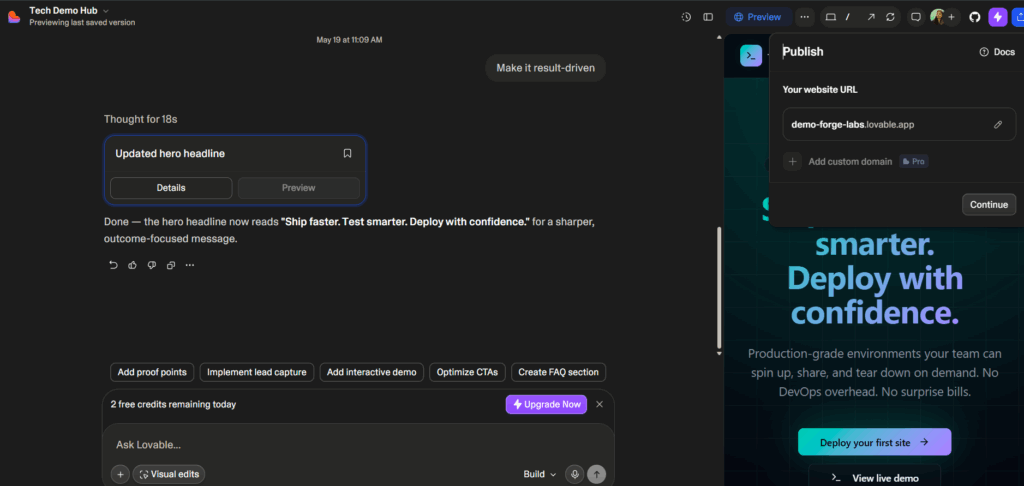
The question changes once the project needs long-term infrastructure control. A production app needs a clear plan for hosting, environment variables, database access, authentication, logs, errors, version control, backups, deployment previews, and rollback behavior.
Lovable can fit into a developer-owned workflow, especially when the project is connected to GitHub and maintained like a normal codebase. But that also means the team has to own the operational layer around the app.
WordPress has a different hosting model. A WordPress site has files, a database, themes, plugins, uploads, cron jobs, redirects, caching, backups, and server-level performance concerns. That can feel heavier than a generated app at the beginning, but it also gives developers more control over the production environment.
You can move the site, inspect the database, manage plugins, change hosting, configure caching, and build a deployment workflow around a platform that clients and agencies already understand.
With InstaWP, the WordPress deployment workflow becomes more connected.
Developers can start from a managed WordPress instance, build in the browser, test in a WordPress sandbox, prepare a WordPress staging site, save reusable Snapshots, and move toward production hosting without stitching together multiple tools. The environment is not an afterthought; it becomes part of the build workflow from the start.
This matters for agencies because deployment is rarely a one-time action. Client sites need updates, backups, performance checks, plugin tests, content changes, and emergency fixes. When WordPress hosting, staging, snapshots, monitoring, and site management live closer together, the agency can deliver and maintain sites with fewer handoffs and fewer tool gaps.
Hosting and Deployment Experience: Lovable vs WordPress
A practical look at what happens when a build needs custom domains, staging, backups, debugging, and long-term infrastructure control.
| Deployment factor | Lovable | WordPress with InstaWP |
|---|---|---|
| First deployment | Fast for prototypes, MVP interfaces, internal tools, and app-style demos. | Starts from a managed WordPress instance, so the site environment is ready before production work begins. |
| Infrastructure control | Control depends on how the generated app is exported, hosted, and maintained by the developer. | Developers control WordPress files, database, plugins, themes, redirects, caching, backups, and migration path. |
| Staging workflow | Depends on the app deployment setup and the team’s preview/testing process. | Staging and sandbox workflows let teams test site changes before production. |
| Debugging and recovery | Requires app-level logging, deployment discipline, backup planning, and rollback strategy. | Backups, logs, staging, snapshots, and managed WordPress workflows make recovery more predictable. |
| Agency operations | Works well when the agency is delivering custom app projects and managing the codebase directly. | Build, staging, hosting, snapshots, monitoring, and site management can stay in one repeatable workflow. |
| Migration flexibility | Depends on export path, code ownership, hosting choice, and external services used by the app. | WordPress gives developers access to the database, files, media, plugins, and hosting path for migration planning. |
Verdict: Lovable is useful when the deployment goal is to publish an app-style prototype or MVP quickly. WordPress is more practical when the project needs infrastructure control, staging, backups, debugging visibility, migration flexibility, and long-term client-site management.
With InstaWP, WordPress also removes much of the traditional deployment friction because developers can build, test, stage, host, and manage sites from a connected cloud workflow.
7. Scalability and Maintenance
A real project also has to handle more pages, more editors, more plugins or packages, more integrations, more client feedback, more update cycles, and more chances for something to break.
With Lovable, the early workflow feels fast because changes can be prompted and applied quickly. That works well when the project is still small, app-like, and controlled by a developer or technical founder. You can add screens, refine flows, connect services, and keep pushing the prototype forward without the usual blank-codebase friction.
The maintenance test gets harder when the app becomes operational. As more features are added, the team has to think about generated code quality, component structure, dependencies, state management, authentication, database logic, API changes, regression testing, and deployment discipline.
A prompt-based change that feels simple in the first week can become risky later if the project has grown without strong code review and testing habits.
WordPress has a different maintenance profile. It is not maintenance-free, but the maintenance model is familiar.
Developers already know the recurring tasks: update WordPress core, test plugins, update themes, check PHP compatibility, monitor performance, review security, back up the site, test forms, and make sure content workflows still behave correctly. The work is predictable, which matters when an agency is responsible for many client sites.
In a Lovable vs WordPress maintenance workflow, the WordPress advantage is that scaling a website is a known problem. More blog posts, more landing pages, more media, more editors, more WooCommerce products, more SEO pages, and more plugin-based features fit into an existing CMS model. The site still needs care, but the operational pattern is clear.
The traditional WordPress challenge is that maintenance can become scattered. One tool for staging, another for backups, another for monitoring, another for hosting, and another for local testing can make routine work slower than it should be.
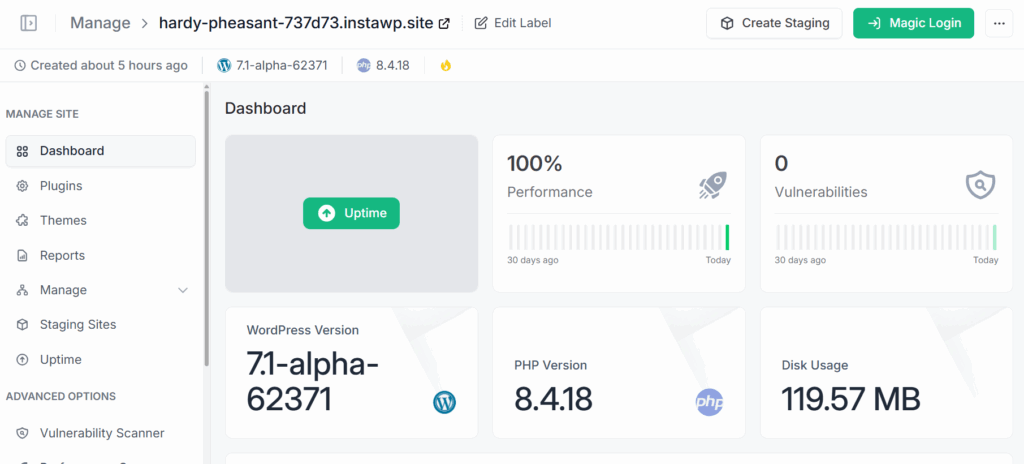
With InstaWP, developers can keep more of that maintenance workflow together. They can test updates in a WordPress sandbox, review larger changes on a WordPress staging site, save stable builds as Snapshots, and manage multiple WordPress sites from a centralized cloud workflow.
Scalability and Maintenance Experience: Lovable vs WordPress
A practical look at what happens when a project grows beyond the first build and needs updates, testing, monitoring, and repeatable maintenance.
| Maintenance factor | Lovable | WordPress with InstaWP |
|---|---|---|
| Early growth | Fast for adding screens, flows, and app-like features while the project is still small. | Structured for adding pages, posts, media, plugins, products, editors, and site sections. |
| Long-term maintenance | Needs developer discipline around code review, dependencies, testing, deployment, and generated changes. | Uses familiar maintenance patterns for core, plugins, themes, PHP versions, backups, and performance checks. |
| Client-site operations | Works best when the app stays developer-managed and changes are reviewed before deployment. | Better suited for sites managed by clients, editors, marketers, and agencies over time. |
| Testing updates | Depends on the app’s test coverage, preview workflow, and deployment setup. | Developers can test plugin, theme, content, and performance changes in sandboxes or staging before production. |
| Multi-site agency scale | Each app may need its own maintenance plan, deployment workflow, and documentation. | Agencies can use centralized management, Snapshots, reusable templates, staging, and monitoring across multiple sites. |
| Operational risk | Prompt-based changes can become risky as the codebase grows without strong review practices. | Known WordPress maintenance routines and staging workflows make recurring updates more predictable. |
Verdict: Lovable can scale when a developer actively owns the app, reviews the code, and maintains a disciplined deployment workflow. WordPress is more practical when the project becomes a long-term website with growing content, editors, plugins, client requests, and maintenance needs.
With InstaWP, WordPress also becomes easier to manage at agency scale because updates, staging, Snapshots, monitoring, and reusable site workflows can stay connected.
8. Security and Backups
The security test should not only ask, “Is this platform secure?” That is too broad to be useful. A real test looks at what happens when the site or app faces everyday risk: bad updates, weak credentials, exposed keys, plugin conflicts, broken forms, deleted content, dependency issues, malware, failed deployments, or a client accidentally changing something they should not.
With Lovable, the security model feels closer to a custom app workflow. You do not have the same WordPress plugin surface area, which can feel cleaner at first.
But that does not remove security work. A generated app still needs proper handling for authentication, API keys, database access, user permissions, forms, third-party services, environment variables, package dependencies, and deployment access.
WordPress has a different security profile. The platform is widely used, which means it has mature security practices, but it also means poorly maintained sites are common targets.
Weak passwords, outdated plugins, abandoned themes, poor hosting, unused admin accounts, and skipped updates can all create risk. So when I test WordPress vs Lovable for security, I do not treat WordPress as automatically safe. I look at the maintenance workflow around it.
When WordPress is managed properly, the security workflow is practical and familiar. Developers can use role-based access, strong passwords, trusted plugins, update testing, backups, firewalls, malware scanning, activity logs, and the official WordPress hardening practices.
The advantage is not that WordPress has no risk. The advantage is that the risks are known, documented, and manageable with the right workflow.
With InstaWP, WordPress security and recovery become easier to operationalize.
Developers can test risky plugin or theme updates inside a WordPress sandbox, review larger changes on a WordPress staging site, save known-good setups as Snapshots, and manage client sites from a more controlled cloud workflow. That turns security from a last-minute checklist into part of the build, test, and maintenance process.
Security and Backup Experience: Lovable vs WordPress
A practical look at what happens when a project needs secure access, update testing, backups, restore points, and recovery workflows.
| Security factor | Lovable | WordPress with InstaWP |
|---|---|---|
| Main security model | Closer to custom app security, where developers must review auth, APIs, keys, permissions, and dependencies. | Closer to managed site security, where plugins, roles, updates, hosting, backups, and access control matter. |
| Common risk areas | Exposed secrets, weak auth logic, package issues, API misuse, form handling, and deployment mistakes. | Outdated plugins, weak passwords, abandoned themes, poor hosting, unused admin accounts, and untested updates. |
| Testing risky changes | Depends on the app’s preview, test coverage, deployment workflow, and developer review process. | Developers can test plugin updates, theme changes, and configuration changes in sandboxes or staging before production. |
| Backups and restore points | Recovery depends on the hosting stack, database setup, version control, and backup process chosen by the team. | Snapshots, backups, staging, and managed workflows make recovery more predictable for client sites. |
| Client access control | Needs a custom permissions model if non-technical users will edit or manage parts of the app. | WordPress roles and permissions help control what clients, editors, admins, and store managers can access. |
| Agency-scale security | Each app may need its own security review, backup plan, deployment process, and recovery documentation. | Agencies can standardize update testing, staging, restore workflows, and access rules across multiple WordPress sites. |
Verdict: Lovable can be secure when a developer treats the generated project like production software and reviews authentication, APIs, secrets, dependencies, and deployment carefully.
WordPress is more practical for client-site security when teams need known maintenance routines, role-based access, backups, staging, and restore workflows. With InstaWP, WordPress security becomes easier to manage because updates, testing, Snapshots, staging, and recovery can be part of the same cloud workflow.
9. Cost and Total Cost of Ownership
With Lovable, the early cost can feel attractive because the platform reduces the time between idea and first working interface. For a quick MVP, internal tool, landing page concept, or product demo, that speed can save real development hours.
The cost picture changes when the project needs more iterations, more collaborators, custom domains, external services, database work, authentication, API integrations, code review, deployment planning, and long-term maintenance. A prototype that looks inexpensive in week one can become more expensive if every new business requirement turns into custom app work.
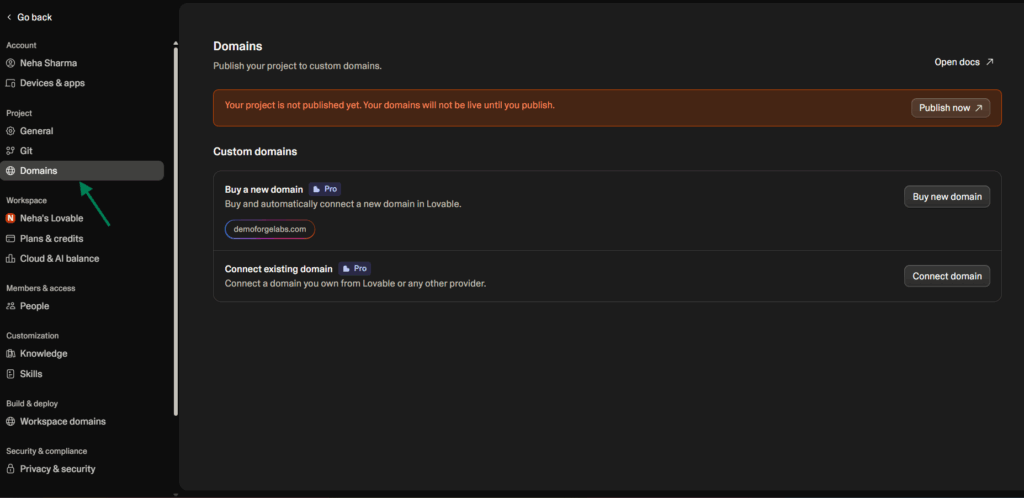
WordPress has a different cost profile. WordPress itself is open source, but a production WordPress site is not free to operate. You still need hosting, domain management, premium plugins in some cases, themes or custom development, backups, performance optimization, security, updates, and ongoing support.
The benefit is that these costs are usually easier to understand and package for real websites because agencies have been pricing WordPress builds, hosting, care plans, SEO retainers, and WooCommerce support for years.
With InstaWP, the WordPress cost model becomes easier to organize because several workflow layers sit closer together. Developers can start with instant WordPress environments, test in sandboxes, use staging, save reusable Snapshots, launch on managed hosting, and manage sites centrally.
The point is not that every WordPress project becomes cheaper automatically. The point is that agencies can reduce repeated setup time and avoid stitching together too many separate tools for every client build.
This also matters for client pricing. If an agency builds the same type of site again and again, a reusable WordPress setup can lower delivery cost over time. A niche-ready Snapshot with the right plugins, starter pages, SEO configuration, forms, security settings, and hosting workflow can turn future projects into repeatable delivery instead of custom setup every time.
That is where InstaWP billing and cloud workflows become more relevant for agencies trying to control margins.
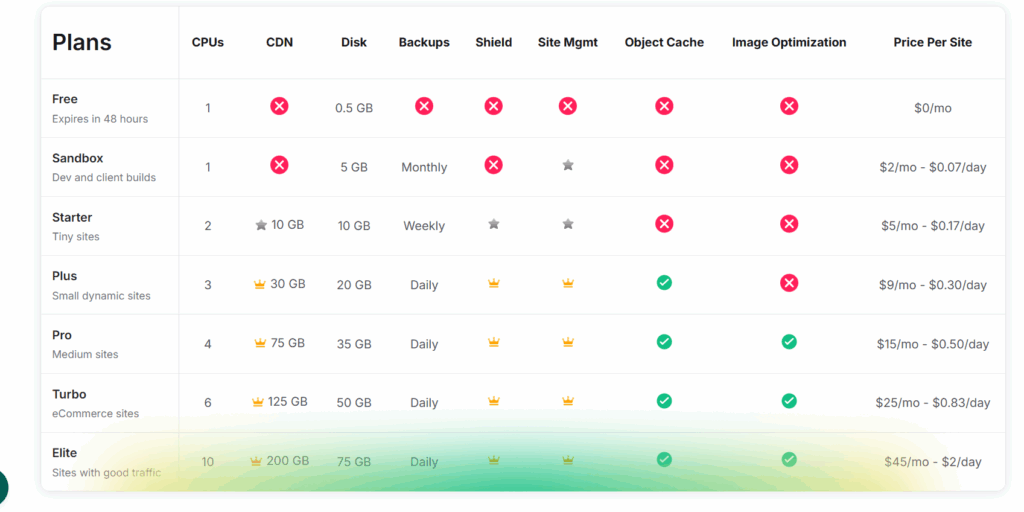
So the practical Lovable vs WordPress cost question is not “Which one is cheaper?” The better question is “What are you paying for after the first build?” Lovable can reduce early prototyping cost. WordPress can become more predictable for production websites, especially when the agency has a repeatable setup, managed hosting workflow, and recurring maintenance model through InstaWP.
Cost Model Comparison
The lowest upfront cost is not always the lowest long-term cost.
Free CMS + managed WordPress cloud + optional plugins + scalable site workflows.
Free start + paid plans/credits + hosting/export decisions as usage grows.
Separate hosting, staging, backups, monitoring, migration, and maintenance tooling.
Verdict: Lovable can be cheaper for a small prototype. WordPress is usually more predictable for long-term content, SEO, commerce, and agency-managed client sites.
10. Revenue Opportunities for Agencies
The agency revenue test is different from the first-build test. A freelancer or agency does not only need to deliver a working site or app. They need repeatable delivery, clear margins, client retention, support workflows, hosting revenue, maintenance packages, upsells, and a way to reuse what they have already built.
With Lovable, the revenue opportunity is strongest around fast discovery, prototypes, MVPs, and custom app-like builds.
An agency can use Lovable to turn a client’s rough idea into something visual, validate a product concept, create an interactive demo, or show a SaaS-style workflow before committing to the full build. That can shorten the strategy phase and make client conversations more concrete.
The limitation appears when the agency wants predictable recurring revenue from standard website services. A Lovable project can become a paid custom build, but ongoing revenue depends on how the app is hosted, how the code is maintained, how content updates are handled, how support is packaged, and whether the client needs a developer for every meaningful change.
That can work well for custom software retainers, but it is less naturally aligned with classic website care plans and client-managed content workflows.
WordPress has a more established agency revenue model. Agencies can sell website builds, managed WordPress hosting, care plans, SEO retainers, WooCommerce support, migrations, performance optimization, plugin customization, security maintenance, and content support. Once a client site is live, there are clear recurring services that clients already understand and often expect.
The bigger opportunity is repeatability. In a Lovable vs WordPress agency workflow, WordPress becomes especially strong when an agency serves a specific niche.
A dental clinic website, coaching website, restaurant website, real estate landing page system, WooCommerce store setup, or membership site can be built once as a strong base and reused across clients with changes to branding, content, integrations, and features.
The traditional WordPress challenge is that repeatability still required operational discipline. Developers had to clone sites, configure plugins, set up staging, prepare hosting, migrate files, create demo environments, and manage updates across different tools.
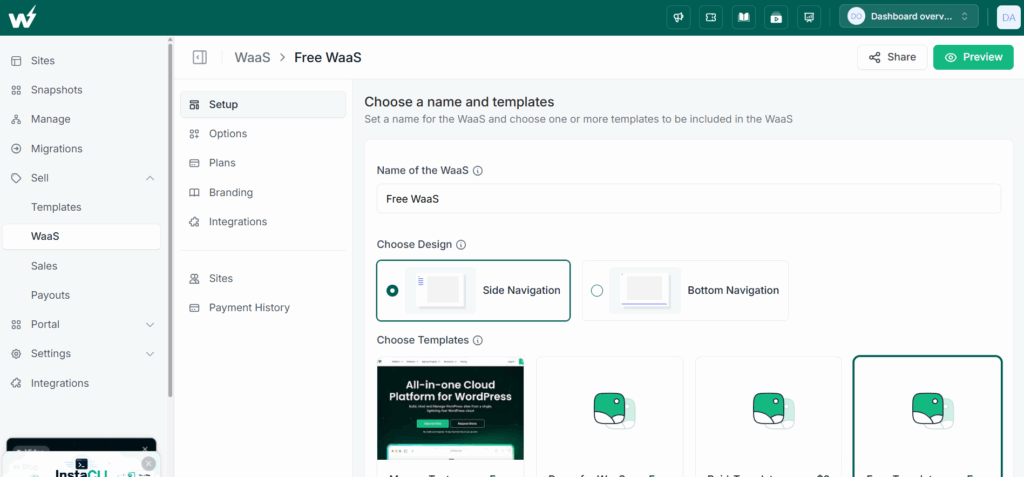
That is where InstaWP changes the agency workflow. Agencies can create a niche-ready WordPress build, save it as a Snapshot, launch new client sites faster, host them on managed infrastructure, and manage them centrally from one platform.
This is also where Website as a Service becomes practical. Instead of selling every project as a one-off build, an agency can package a repeatable WordPress system as a subscription. The client gets a ready-to-use website with hosting, maintenance, updates, and support bundled in. The agency gets recurring revenue and a more scalable delivery model.
InstaWP’s Website as a Service workflows make this easier because templates, provisioning, hosting, and site management can be connected instead of rebuilt manually every time.
Agency Revenue Experience: Lovable vs WordPress
A practical look at how each workflow supports prototypes, repeatable delivery, care plans, hosting revenue, and WaaS.
| Agency revenue factor | Lovable | WordPress with InstaWP |
|---|---|---|
| Discovery and prototyping | Strong for fast demos, MVPs, app concepts, calculators, dashboards, and interactive client ideas. | Useful when the prototype needs to start inside a real WordPress/CMS environment from day one. |
| One-off custom work | Good fit for custom app projects where the agency owns design, code review, deployment, and maintenance. | Good fit for custom WordPress builds, theme work, plugin customization, WooCommerce, and migrations. |
| Recurring revenue | Depends on custom support agreements, hosting choices, app maintenance, and developer involvement. | Naturally supports hosting, care plans, SEO retainers, WooCommerce support, maintenance, and WaaS subscriptions. |
| Repeatable delivery | Reusable patterns depend on project structure, documentation, and codebase discipline. | Agencies can save niche-ready WordPress builds as Snapshots and reuse them across client projects. |
| Client handoff | Works best when the client expects a custom app and the agency remains involved in updates. | Works well for clients who need CMS access, content editing, admin workflows, and ongoing site support. |
| WaaS potential | Possible with custom infrastructure, but not the natural default workflow. | Templates, Snapshots, managed hosting, and provisioning workflows make Website as a Service easier to package. |
Verdict: Lovable is useful for agencies that sell fast discovery, prototypes, MVPs, and custom app-like projects. WordPress is more practical for agencies that want recurring revenue from client websites, hosting, care plans, SEO, WooCommerce support, and Website as a Service.
With InstaWP, WordPress becomes easier to productize because agencies can reuse Snapshots, launch niche-ready sites faster, host them on managed infrastructure, and manage ongoing client workflows from one place.
Hybrid Workflow + WaaS Revenue Loop
Use Lovable for fast ideation, then productize durable WordPress workflows with InstaWP.
When Lovable Is the Better Choice
Lovable deserves credit. It is a strong choice when you need a working prototype, interactive app interface, internal dashboard, quick SaaS MVP, calculator, data tool, or investor demo. It is especially useful when the goal is to validate an idea before investing in a complete stack.
It is also helpful for developers who want AI-assisted code generation but still plan to review, refactor, and own the code through GitHub. For app-first projects with limited content operations, Lovable can be the faster tool.
When WordPress Is the Better Choice
WordPress is the better choice when the site needs SEO, publishing, content updates, editors, eCommerce, landing pages, blog workflows, local business pages, multilingual content, memberships, course content, or long-term client maintenance.
It is also better when ownership matters. You control the database, hosting, files, themes, plugins, users, redirects, and migration path. That matters a lot once a site becomes a business asset.
Final Verdict: WordPress vs Lovable
Lovable wins for speed to first prototype. It is one of the fastest ways to turn an idea into a working app-like interface, and it deserves a place in the modern development workflow.
WordPress wins for production websites. It is better for SEO, publishing, content editing, eCommerce, ownership, hosting flexibility, and agency monetization. When paired with InstaWP, WordPress also becomes much faster to build, test, launch, manage, and sell.
So the practical answer is simple: use Lovable to move fast during ideation. Use WordPress when the site needs to last.
Conclusion
WordPress vs Lovable comes down to workflow maturity. Lovable is excellent for rapid AI-generated prototypes. WordPress is still the better long-term foundation for real websites that need SEO, content management, commerce, client editing, and revenue opportunities.
If WordPress feels slower only because of setup, hosting, staging, or maintenance, InstaWP solves that layer. Start with an instant WordPress sandbox, save your build as a template, launch on managed hosting, manage sites centrally, and package repeatable sites as WaaS.
Try InstaWP for free and build WordPress sites without local setup, hosting friction, or workflow sprawl.
FAQs
Is WordPress better than Lovable for SEO?
Yes, WordPress is generally better for SEO-focused websites because it has mature SEO plugins, content workflows, schema tools, sitemap support, and a long history of search-friendly publishing. Lovable has improved rendering for new projects, but WordPress remains the safer choice for content-led growth.
Is Lovable faster than WordPress?
Lovable is faster for the first build. A prompt can generate a working interface much faster than a traditional WordPress setup. WordPress becomes faster over time when you reuse templates, snapshots, staging workflows, and managed cloud tools like InstaWP.
Can I migrate a Lovable site to WordPress?
You can migrate the idea, design, and content, but not through a clean one-click conversion. Lovable exports code, while WordPress uses themes, blocks, templates, plugins, and a database-driven CMS. Most migrations require manual rebuilding.
Which is better for client websites?
WordPress is usually better for client websites because clients can edit content, publish posts, manage media, and use admin workflows without touching code. Lovable is better for prototypes or custom apps where a developer remains involved.
Which platform is better for eCommerce?
WordPress with WooCommerce is better for most eCommerce projects. Lovable can build simple payment flows, but a complete store needs product management, inventory, tax, shipping, refunds, subscriptions, and admin workflows that WooCommerce already supports.
Can agencies use WordPress for recurring revenue?
Yes. Agencies can sell hosting, care plans, SEO retainers, WooCommerce support, and Website as a Service. InstaWP helps by turning reusable WordPress templates into faster launches and repeatable WaaS workflows.
Should developers use Lovable or WordPress?
Developers should use Lovable when speed to prototype matters and WordPress when the project needs long-term publishing, SEO, ownership, eCommerce, or client management. Many teams will use both in the same workflow.