You can build a complete, professional WordPress website using AI in under 30 minutes, even without touching a single line of code. This guide walks you through the exact process, from choosing your AI builder to going live, with a focus on what actually works for agencies and developers in 2026.
Whether you’re building your first client site or looking to speed up a workflow you’ve done a hundred times, AI-powered WordPress builders have changed what’s possible.
Table of Contents
Key Takeaway

AI website builders for WordPress can generate a fully designed, content-ready site from a simple prompt in minutes.
Tools like Kadence WP and ZipWP integrate directly into WordPress and work inside a live cloud environment.
Agencies using AI builders report significantly faster delivery times without sacrificing design quality.
You can test, preview, and refine your AI-generated site in a sandbox before pushing anything to production.
What is a WordPress AI Website Builder?
A WordPress AI website builder is a tool that uses artificial intelligence to generate website layouts, content, and design structures based on your inputs. Instead of starting from a blank canvas and manually configuring every section, you describe what you need and the AI produces a working starting point.
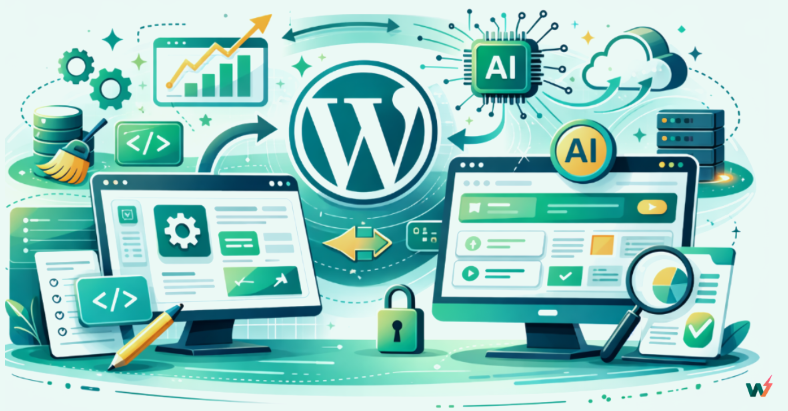
These tools analyze your industry, target audience, and style preferences to suggest templates, page structures, and even copy. The result is a functional, design-ready WordPress site that you then refine rather than build from scratch.
This matters most for agencies and freelancers who are building multiple sites at once. The manual approach doesn’t scale. AI builders do.
Why Are Agencies Switching to AI WordPress Builders in 2026?
The shift isn’t about hype. It’s about time. Here’s what agencies are actually gaining by adopting AI website builders for WordPress:
- Speed without cutting corners. A site that used to take a week to scaffold now takes an afternoon. The AI handles the repetitive parts so your team can focus on the work that actually requires human judgment, like strategy, client communication, and custom functionality.
- Consistency across projects. AI builders apply the same logic to every build. SEO structure, mobile responsiveness, and performance optimization are baked in by default rather than depending on whoever is assigned to the project that week.
- Lower cost per site. When you reduce the hours spent on initial setup and design, your margins improve. For agencies pricing projects, this either means taking on more work or offering more competitive rates without hurting profitability.
- Easier client handoffs. AI-generated sites tend to use clean, well-documented themes and builders that clients can manage themselves after launch. Less post-launch support, more happy clients.
Did You Know?
InstaWP lets you create a fully configured WordPress environment in seconds, directly from the cloud. No local setup, no server configuration. You can have an AI-built site running in a sandbox before most people have finished installing WAMP.
Must Read: How to Set Up and Deliver WordPress Projects Faster as an Agency
How to Build a Website Using WordPress AI Website Builders: Step-by-Step Guide for Agencies
Now that we’ve explored the advantages of using a WordPress AI website builder, let’s walk through the process of building a website using one of the best AI website builders- InstaWP.
- Sign up for InstaWP and create a fresh WordPress instance.
- Click on ‘Create New Staging Site’.
- Select the fourth option, From AI, to build a website using AI.
This launches InstaWP’s AI-powered site creation flow, which gives you access to two of the best AI WordPress website builders available.
You don’t need to configure hosting, install WordPress, or set up a database. InstaWP handles all of that instantly in the cloud.
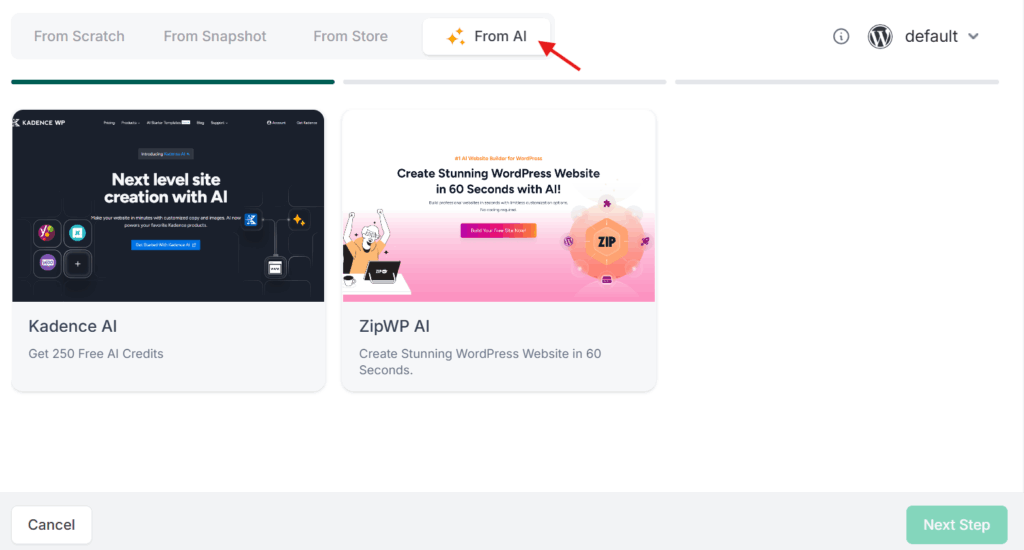
You have two options to choose from- Kadence WP and ZipWP. Both are powerful AI WordPress website builders.
| Builder | Best For | Key Strength |
|---|---|---|
| Kadence WP | Design-focused builds with high customization | Flexible layouts, robust design controls, strong template library |
| ZipWP | Speed-first workflows with minimal input | Maximum automation, fastest time to first draft |
These integrations enhance the AI website builder’s functionality, providing you with advanced design options and seamless integrations.
For this guide, we’ll use Kadence WP since it gives you more control over the final design while still handling the heavy lifting automatically.
Once you’ve selected Kadence WP, you need to configure your site. Set your site’s basic parameters inside the InstaWP dashboard. This includes your WordPress version, PHP settings, and any pre-installed plugins you want baked in from the start. Then click Create Site.
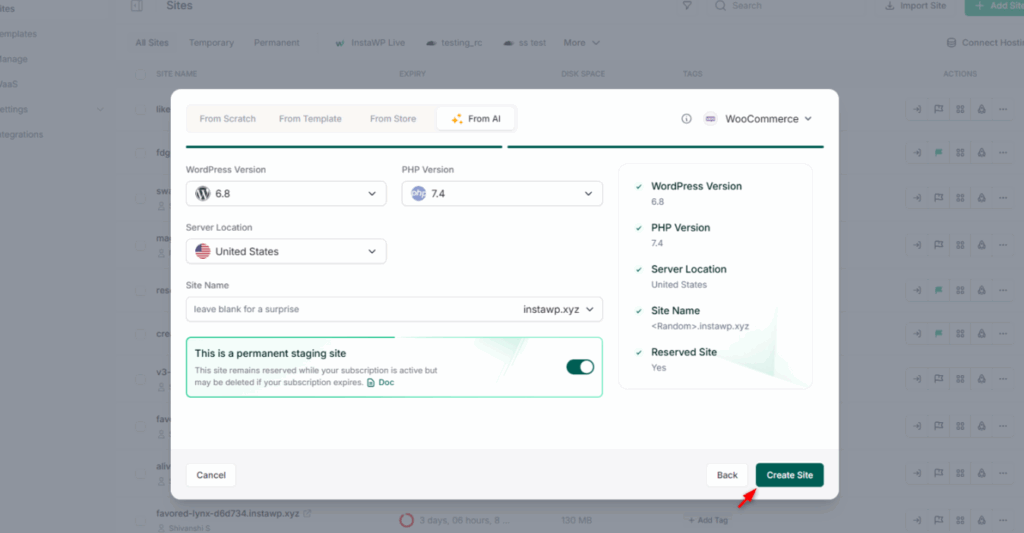
InstaWP spins up your environment in the background. In about a minute, your AI-ready WordPress site is live in a cloud sandbox.
Once your site is ready, use InstaWP’s Magic Login to jump directly into the WordPress dashboard without entering credentials. It’s a small thing, but when you’re managing dozens of client sites, it saves more time than you’d expect.
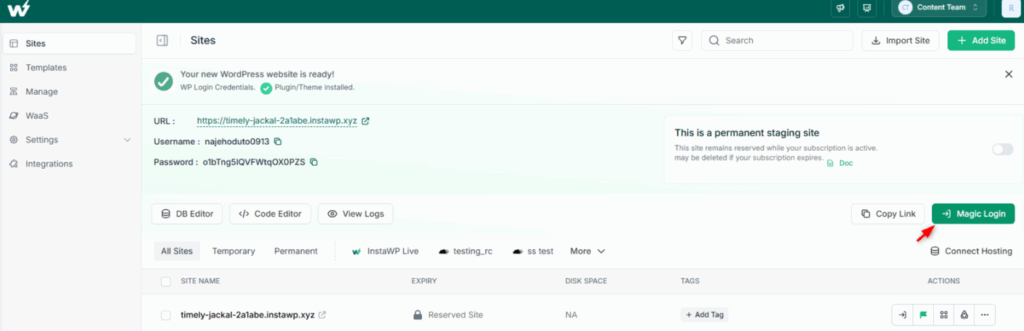
Inside WordPress, navigate to Appearance > Kadence. You’ll be prompted to fill in details about the business you’re building for. This includes:
- Business type and industry
- Target audience
- Style preferences (modern, classic, minimal, bold, etc.)
- Brand colors and fonts if you have them
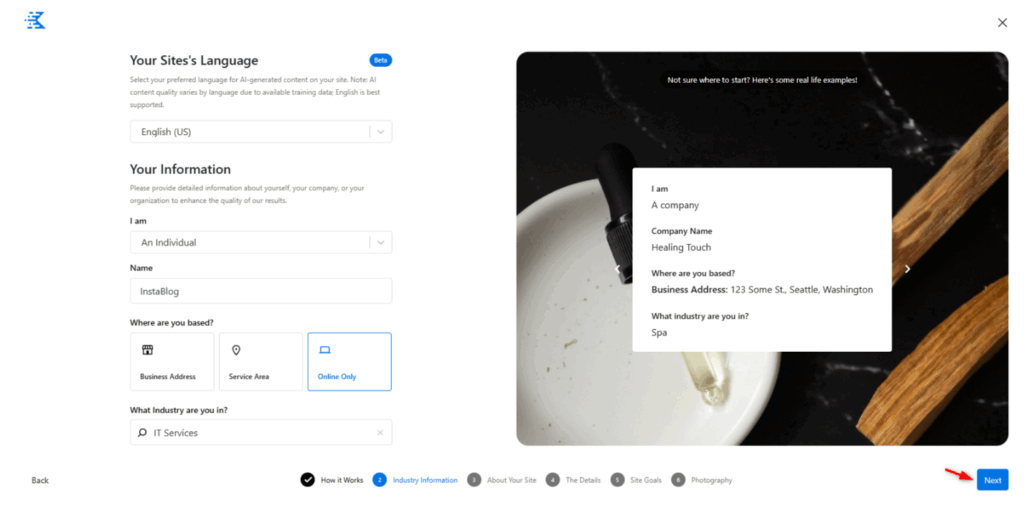
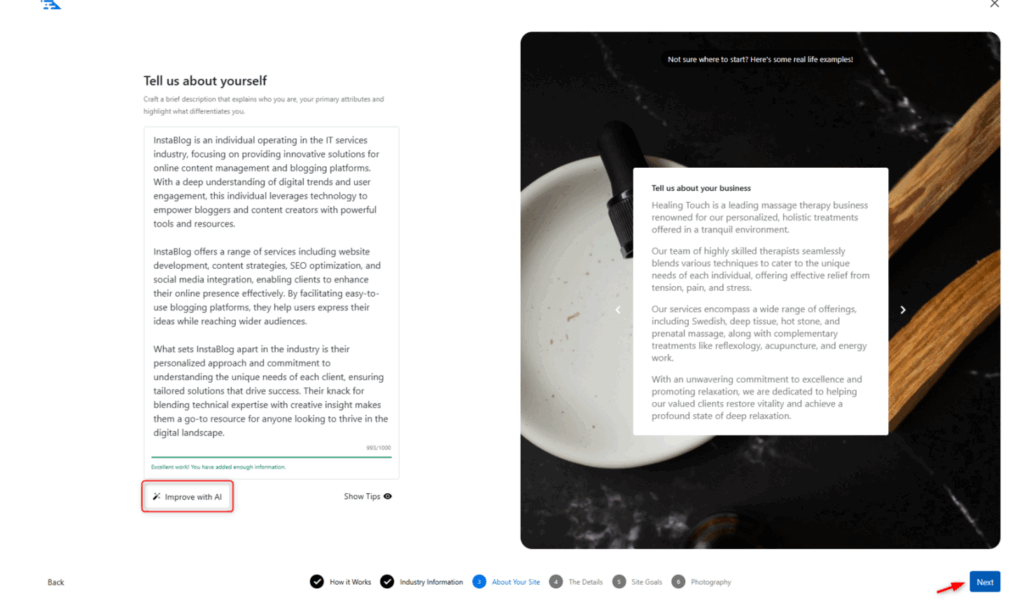
Give a description of your site.
Kadence presents you with a set of AI-generated template options based on your brief. Each one is already optimized for mobile, SEO, and performance. Select the one that’s closest to what your client needs.
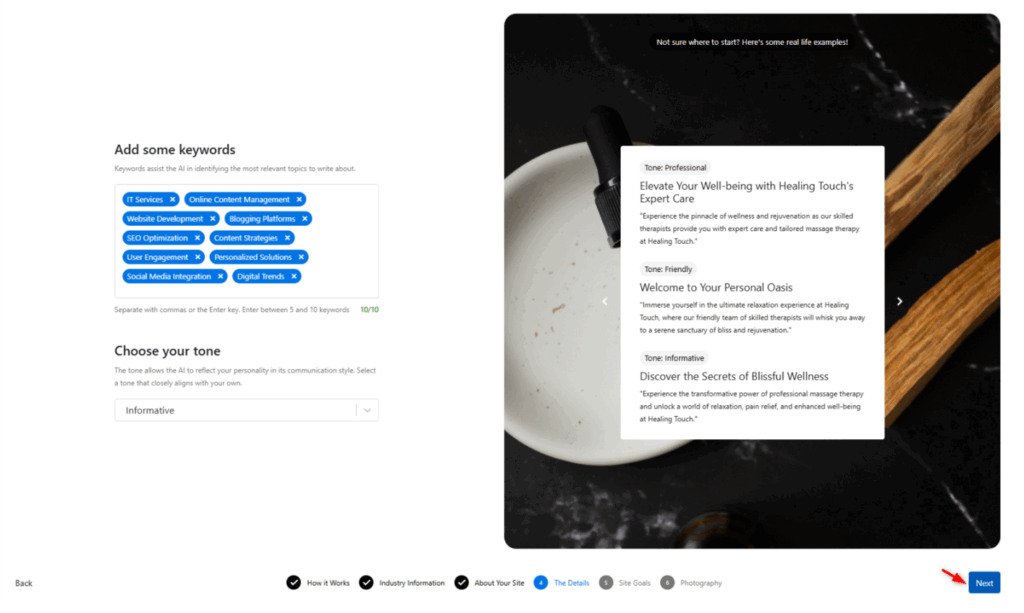
From the Kadence dashboard, you can adjust:
- Layout and page structure
- Fonts and color palette
- Section content and imagery
- Navigation and footer design
The AI continues to offer suggestions as you work. You can follow its recommendations or override them manually. Think of it as a collaborative design partner rather than an autopilot.
Modify layout and content from Kadence Dashboard. The AI builder will give you suggestions for design changes, layout tweaks, and content placement, but you can manually adjust fonts, colors, and images to match your client’s branding.
Generate the feature image for your site using the WordPress AI builder.
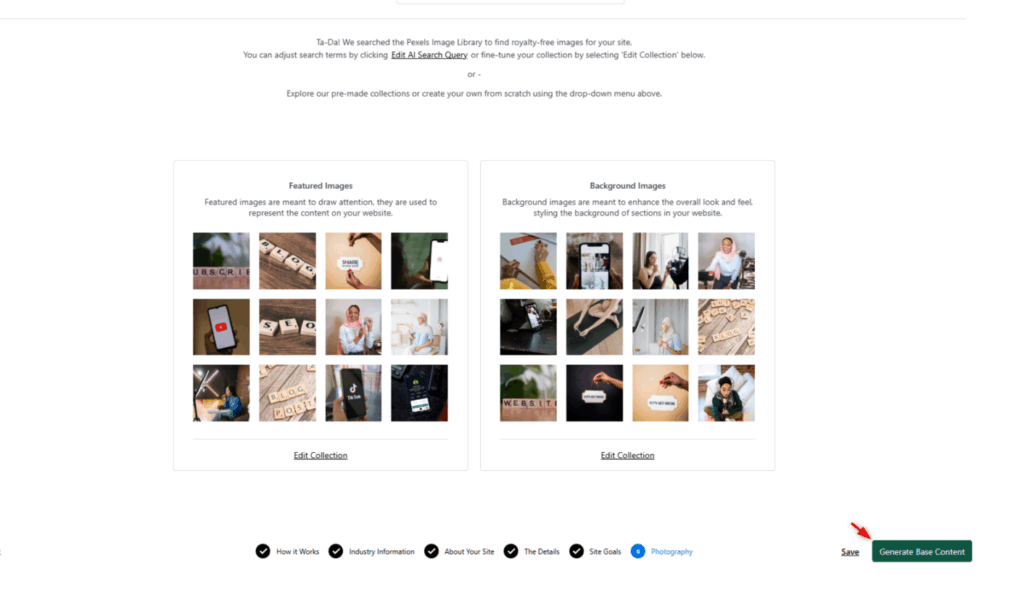
When you’re satisfied with the design and functionality, you can launch the website directly from your InstaWP environment to the live domain.
Did You Know?
1nstaWP’s snapshot feature lets you save the exact state of any WordPress site, including all settings, plugins, and content, and use it as a reusable template. Agencies building similar sites for clients in the same industry can clone a finished build and adapt it in minutes instead of starting over.
When building a website with an AI WordPress website builder, choosing where to host it is just as important as how you build it. A poorly matched hosting environment can undermine everything the AI got right, from page speed to uptime to security.
This is especially true for AI-generated sites, which tend to be image-heavy, plugin-rich, and built on modern block-based frameworks that need a hosting stack that can keep up.
InstaWP’s native managed hosting for WordPress is purpose-built for AI development, which means it’s already optimized for exactly the kind of sites AI builders like Kadence WP and ZipWP produce. Here’s what that looks like in practice:
- Object caching keeps database-heavy pages snappy, even when your AI-generated site pulls in dynamic content or runs WooCommerce on top.
- Built-in CDN ensures your site loads fast for visitors regardless of where they’re located, without you needing to configure a third-party CDN manually.
- Image optimization at the infrastructure level compresses and delivers the visuals your AI builder generates without adding another plugin to the stack.
- Automated backups and security patches run in the background so you’re not managing server maintenance on top of managing clients.
For agencies, the bigger advantage is workflow continuity. You build and test inside InstaWP, and when the site is ready, you launch it on the same platform.
There’s no export-and-reconfigure step, no compatibility surprises, and no third-party migration to coordinate. Your staging environment and your production environment are already aligned, which means fewer things can go wrong between “approved” and “live.”
If you’re delivering AI-built WordPress sites at any kind of volume, keeping the entire workflow inside one platform is what makes it actually scalable.
The Realistic Outcome of Using AI WordPress Builders
AI builders won’t replace developer expertise, and they’re not supposed to. What they replace is the repetitive scaffolding work that consumes hours without producing anything unique.
For agencies, the practical result is this: you spend less time on initial setup, more time on the work that differentiates you, and you deliver faster without telling clients you cut corners. That combination is what makes AI builders genuinely useful rather than just interesting.
The best workflows combine AI for speed with human judgment for quality. Build fast, review carefully, ship confidently.
Get $25 in free credits and build your first AI-powered WordPress site today. Start building with InstaWP and have a fully configured WordPress environment ready in under a minute. No credit card needed to get started.
FAQs
What is the best AI website builder for WordPress in 2026?
Kadence WP and ZipWP are two of the strongest options currently available for WordPress. Kadence WP offers more design control and customization, while ZipWP prioritizes speed and automation. Both integrate directly into WordPress and work well inside cloud environments like InstaWP.
How long does it take to build a WordPress site with AI?
With a tool like Kadence WP inside InstaWP, you can have a fully designed, content-populated site ready for review in under 30 minutes. Refinement and client customization typically adds another hour or two depending on complexity.
Do I need coding skills to use an AI WordPress website builder?
No. AI builders are specifically designed to handle the technical work automatically. You provide inputs about the business, audience, and style, and the AI generates the structure and design. Developers can still customize under the hood if needed, but it’s not required.
Can I use an AI builder with my existing WordPress theme?
Yes. Kadence WP and ZipWP are designed to work with existing WordPress installations. If you already have a theme and want to use AI to generate layouts or content within it, both tools support that workflow.
Is there a free AI website builder for WordPress?
Kadence WP and ZipWP both offer free tiers with access to core AI features. InstaWP also has a free plan that lets you spin up WordPress environments and test AI builders without upfront costs. Advanced features and production hosting require a paid plan.