Although the internet is accessible to people all around the world, communication barriers caused by language could limit your reach. With a bilingual website, you may overcome this barrier and reach a global audience in an instant.
The best part is that it’s easier than you would think to make a multilingual website! This guide will show you how to use InstaWP and WPML, a powerful WordPress plugin, to transform your website into a multilingual powerhouse.
With WPML, you can translate your content effortlessly, manage different languages on your site, and ensure a smooth experience for visitors regardless of their native language.
Table of Contents
Key Takeaway

Over 70% of internet users prefer browsing in their native language, making multilingual sites a direct conversion lever.
WPML lets you translate your entire WordPress site, including pages, posts, menus, widgets, and WooCommerce products, into 65+ languages.
Choosing the right URL structure (subdirectories vs. subdomains vs. separate domains) has a direct impact on multilingual SEO.
You can safely test your entire multilingual setup, including hreflang tags and language switchers, on a WordPress staging site before pushing changes live.
Why Build a Multilingual Website?
The numbers are hard to argue with.
- Studies consistently show that more than 70% of internet users prefer to browse in their own language, and websites serving localized content see significantly higher engagement and conversion rates. When someone can read your content, navigate your site, and complete a purchase in their native language, they trust you more. That trust translates directly to sales.
- A multilingual website also gives your SEO a multiplier effect. Each translated page can rank independently in its target language and region, expanding your total organic surface area. Done correctly with hreflang tags and proper URL structure, a multilingual site does not create duplicate content penalties. It creates new ranking opportunities.
- Finally, there is a relationship dimension worth mentioning. When you communicate in someone’s native language, you are signaling that you care about them specifically, not just about global reach in the abstract. That distinction matters for brand loyalty.
Understanding Your Options: URL Structures for Multilingual Sites
Before you install a single plugin, you need to make one foundational decision: how will different language versions of your site be organized? This choice affects your SEO, your hosting setup, and how much complexity you take on during maintenance.
There are three common approaches:
- Subdirectories (example.com/fr/) are the most practical choice for most sites. They share your root domain’s authority, require no additional DNS configuration, and are the easiest to maintain. WPML defaults to this structure for good reason.
- Subdomains (fr.example.com) are hosted separately from a search engine’s perspective. They require DNS records pointing to the same server and are worth considering when different regions have distinct audiences and content strategies.
- Separate domains (example.fr) provide the strongest regional signal to search engines and can improve rankings in country-specific results. The trade-off is that each domain needs its own SSL certificate, DNS setup, and domain registration, and you start each one with zero domain authority.
For most WordPress developers and agencies, start with subdirectories unless there is a specific business reason to use separate domains.
Challenges Faced in Creating a Multilingual Website
While creating a multilingual website can be incredibly rewarding, it’s not without its challenges.
- Translation Accuracy: Ensuring accurate and culturally relevant translations is crucial. Literal translations often miss nuances and can convey incorrect information, potentially alienating users or causing misunderstandings.
- Website Design and Navigation: Designing a website that accommodates languages with different scripts and orientations (like Arabic, which reads right-to-left) can be technically challenging. Additionally, the site must be intuitive and easy to navigate for speakers of all languages.
- Maintenance and Updates: A multilingual website requires regular updates and maintenance in all languages to ensure consistency and accuracy. This can be resource-intensive and requires careful coordination.
- SEO Complexity: Multilingual SEO is more complex than single-language SEO. It involves optimizing content for multiple language audiences, dealing with country-specific search engines, and managing various versions of the same site without incurring penalties for duplicate content.
Don’t fret! You shouldn’t let these obstacles stop you from expanding your website’s global reach! The advantages of reaching the global audience considerably surpass the early challenges.
The good news is that making and maintaining a multilingual website is now easier than ever with intuitive solutions such as InstaWP and WPML. By providing a detailed walkthrough, this guide aims to open up the fascinating world of multilingual websites to all.
How to Create a Multilingual Website in InstaWP using WPML
We assume that you already have a WordPress website and must convert it into a multilingual website. If you don’t have a WordPress website, we recommend you create and launch a WordPress website with InstaWP.
Must Read: Create Site | InstaWP Docs
If you are starting from scratch, you can create a new site on InstaWP, choose a site plan that matches your needs, and have a fully hosted WordPress environment ready in under a minute. Plans range from Starter ($5/month) to Elite ($45/month), with storage, bandwidth, and PHP workers scaling accordingly.
Before adding WPML, check the following:
- Your PHP version meets WPML’s minimum requirements (check the WPML documentation for current specs)
- You have a functioning site with at least your core content published in the default language
- If you plan to use separate domains, you own those domains and have access to their DNS settings
Step 1: Configure Your Domain Structure (If Using Separate Domains)
If you chose subdirectories, you can skip this step. WPML handles that automatically.
For separate domains or subdomains, you need to map each domain to your site before WPML can verify the connection. Here is how to do it in InstaWP:
Step 1: From your InstaWP dashboard, open the site you want to configure and navigate to the Map Domain settings.

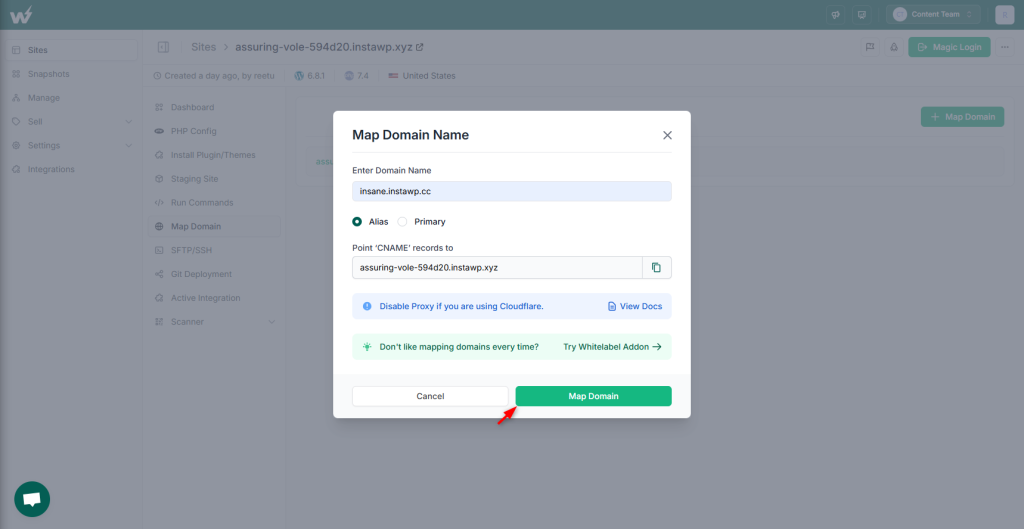
Step 2: Click on the + Map Domain and enter the domain name you want to map (for example, example.de for your German version).

Note both of the A record IP addresses displayed, as you will need to add these to your DNS provider.
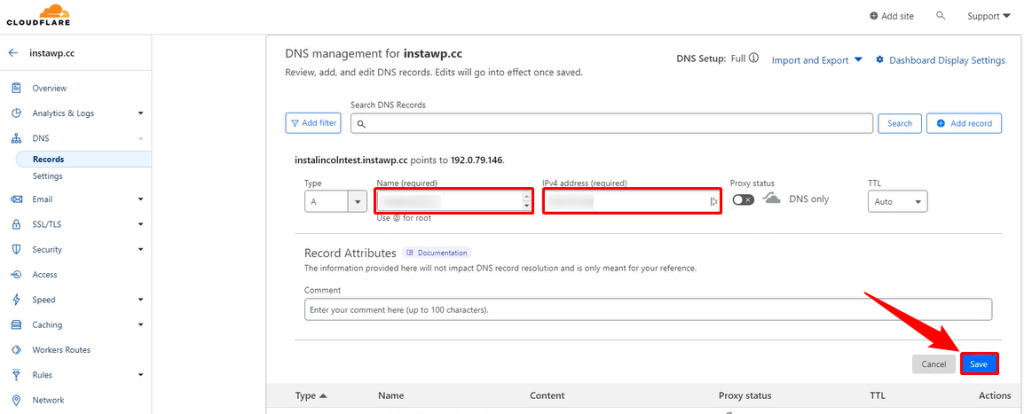
Step 3: Log in to your DNS provider (Cloudflare, Namecheap, or wherever your domain is registered). Create a new A record using the domain name and the first IP address.

Then create a second A record for the same domain using the second IP address. This ensures proper routing redundancy.
Step 4: Save the DNS records. DNS propagation typically takes between a few minutes and 48 hours depending on your provider.
Step 5: Return to InstaWP and click “Map Domain” to complete the connection. Once the domain resolves correctly, InstaWP confirms the mapping.
A few things to have ready beforehand: registered domains for each language, SSL certificates for each domain (or a multi-domain SSL certificate), and confirmation from your hosting plan that multiple domain mapping is supported.
Step 5: To finish mapping, click the “Map Domain” button.
Once this process finishes, your domain name will be fully mapped. To see the update, simply reload the page.
Must Read: How to Map a Domain | InstaWP Docs
Step 2: Install and Set Up WPML
WPML is a paid plugin available at wpml.org. The Multilingual CMS plan at €99/year is the most commonly used tier. It includes full site translation, AI translation credits, WooCommerce support, and access to their support team.
WPML uses the OTGS Installer to manage its components. Here is the setup sequence:
Log in to your WPML account and navigate to Downloads. Download the OTGS Installer ZIP file.
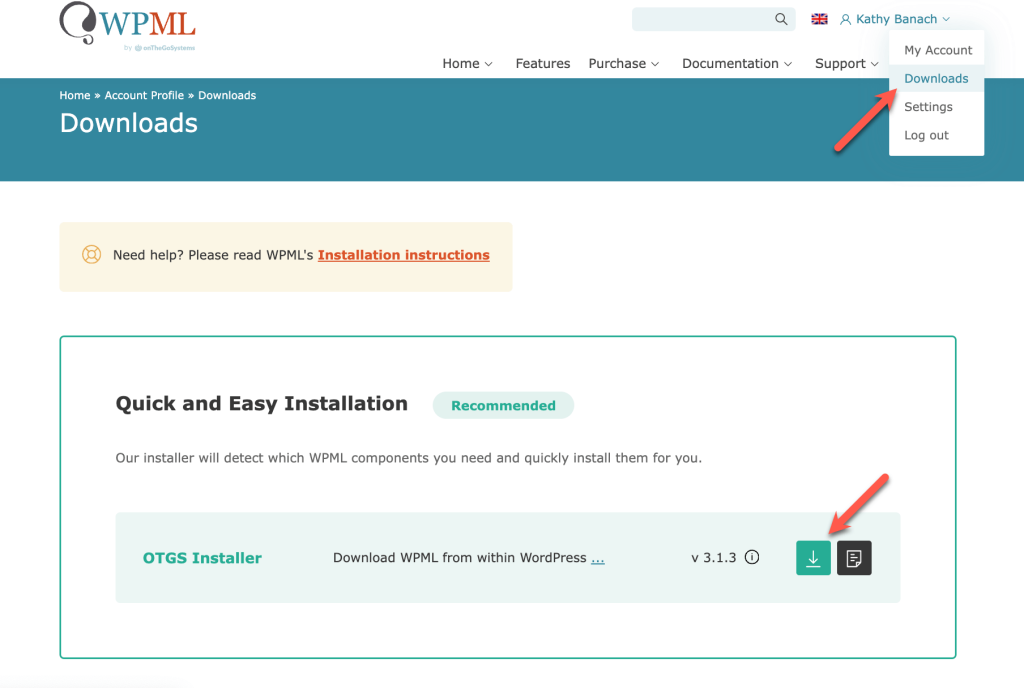
In your WordPress admin, go to Plugins > Add New > Upload Plugin. Upload the ZIP file and click Install Now, then Activate.

Once activated, WPML will prompt you to enter your site key to register the plugin. This step is required before WPML’s features become fully accessible.

Enter the Site Key for registering.

Provide context about your website. This will later help WPML provide high quality automatic translations.

Add additional translators or a translation manager.

Enable recommended plugins by the WPML that are compatible and helpful for your website.

Finish the setup wizard.

Here’s an important setting for setting up a different domain per language in WPML:
After your domain registrar connects your language-specific domain to your WordPress site, head back to your admin dashboard and navigate to WPML → Languages.
There, locate the Language URL format section and choose “A different domain per language”.

Enter the new domain name, like “example.de”, in the designated field and click “Save.” WPML will automatically check the connection to the domain. If there are any issues, you’ll see an error message on the screen.
This same screen allows you to enable a feature that keeps you logged in across different domains. This is especially important if you use a page builder like Elementor to manage both your main content and translations. Without this option enabled, you’ll be logged out when switching between language versions of your site.

Step 3: Translate Your Content
Once WPML is configured, you can start translating. The process is the same whether you are on a single domain or multiple domains.
Go to WPML > Translation Dashboard.

You will see a breakdown of all your content types: pages, posts, products, menus, and more. Expand the content type you want to translate.

Choose your translation method and click the Translate button. 
To get the best translations, we recommend translating automatically using WPML’s most accurate AI translator – PTC (Private Translation Cloud).
PTC is like your own team of expert translators with a deep understanding of your content and niche. It’s WPML’s proprietary AI technology, and even includes a translation quality guarantee: If you’re not satisfied with PTC’s translations, you’ll get a full refund.
Once WPML is done, your website will appear translated when switching languages.

If at any moment you want to edit your automatic translations, you can do so using WPML’s Advanced Translation Editor.

Just visit the translated page you want to edit on the front-end, and click Edit translation in the top admin bar. This will open the editor, where you can make any changes necessary.
Step 4: Test Your Multilingual Setup Before Going Live
This step is where many people skip ahead and regret it later. A multilingual site has more moving parts than a standard WordPress site, and catching issues in a test environment costs nothing. Finding them after launch can cost you rankings and user trust.
Did You Know?
InstaWP’s 2-way sync lets you push approved changes from your staging environment to your live site selectively, so you can test your WPML configuration completely in staging, confirm everything works, and then sync only the changes you want live without overwriting anything you want to preserve.
Using InstaWP’s WordPress staging site feature, you can create a full copy of your site in seconds via the InstaWP Connect plugin. On the staging site, verify the following before going live:
- Language switcher appears correctly on all page templates
- Translated slugs and URLs are structured as expected
- Hreflang tags are present (check with Google’s Rich Results Test or a browser plugin like Hreflang Tag Checker)
- RTL languages display correctly if applicable
- WooCommerce checkout and emails are translated end-to-end if you run a store
- Navigation menus reflect the correct language on each version
Once everything checks out, you can push changes live with confidence.
Maintaining Your Multilingual WordPress Site
A multilingual site requires more ongoing attention than a single-language site, but the maintenance workflow does not have to be complicated.
- Snapshots for version control: InstaWP lets you create snapshots of your site at any point. Before a major WPML update, a theme change, or a new language rollout, take a snapshot. If something breaks, you can roll back in seconds.
- Staging for updates: Always test plugin and theme updates on a staging copy first. This applies especially to WPML updates and any page builder updates that affect translated layouts. InstaWP’s 2-way sync means you can test updates in staging and push only the approved changes to your live site.
- Uptime monitoring: InstaWP includes uptime monitoring, so you are alerted if any language version of your site goes offline. This matters more for multiregional sites running on separate domains, since each domain is essentially its own surface to monitor.
- Scaling with traffic: As your multilingual reach grows, your hosting needs to grow with it. InstaWP’s managed WordPress hosting plans are pay-per-site, so you can upgrade individual sites as their traffic increases without affecting other sites in your account. The built-in CDN with 119+ edge locations also helps with load times for international visitors, which directly affects both UX and rankings.
- Content synchronization: Establish a clear workflow for keeping translations in sync when you update source content. WPML flags outdated translations automatically and prompts you to update them, but designating a team member or workflow owner for this task prevents content drift over time.
Conclusion
A multilingual WordPress website is one of the most effective ways to expand your reach, build trust with international audiences, and grow your organic search presence across multiple markets. The combination of WPML and InstaWP covers the full workflow: a reliable translation layer, a clean hosting environment, safe testing via staging, and scalable infrastructure as your traffic grows.
The setup is more involved than a single-language site, but the steps are clear and repeatable. Once you have the workflow dialed in for one language pair, adding another is significantly faster.
Get started today. Create your first InstaWP site and get $25 in free credits to build and test your multilingual setup before you go live.
Explore WordPress multilingual plugins to compare WPML with other options, or learn more about InstaWP’s managed WordPress hosting to see how the platform supports your global ambitions from day one.
FAQs
What is the best plugin to create a multilingual WordPress website?
WPML is the most widely used plugin for complex multilingual sites, with over 1 million active installations. It offers full site translation, multilingual SEO support, WooCommerce compatibility, and AI-powered translation. For simpler sites or beginners, TranslatePress and Weglot are easier to set up. For free options, Polylang is a solid choice.
What is the difference between a multilingual and a multiregional website?
A multilingual website serves content in multiple languages. A multiregional website targets users in multiple countries. A site can be one, the other, or both. For example, a site in English targeting both the US and UK is multiregional but not multilingual. A site serving content in both Spanish and French for the same country is multilingual but not multiregional. WPML helps with both by supporting language-specific URLs, hreflang tags, and country-specific content.
Does a multilingual website hurt SEO?
No, when set up correctly. The key is using hreflang tags to tell search engines which language version to serve to which users, and choosing a URL structure that avoids duplicate content. WPML handles hreflang automatically. Multilingual sites done well actually compound SEO by creating additional ranking surfaces in each target language and region.
Can I use WPML with any WordPress hosting provider?
WPML works with any standard WordPress hosting environment. For best results, use a host that supports multiple domain mapping, offers SSL for each domain, and provides staging environments for safe testing. InstaWP covers all three out of the box.
How much does it cost to build a multilingual WordPress website with InstaWP?
InstaWP’s hosting plans start at $5/month for the Starter plan (10GB storage, 10GB bandwidth, 2 PHP workers). You will also need a WPML license, which starts at €99/year for the Multilingual CMS plan. If you are using separate domains per language, add the cost of domain registration for each. You can get started with $25 in free credits on InstaWP to explore the platform before committing to a plan.