If you are searching for a Vercel alternative, you are almost certainly not searching because Vercel is bad. It is one of the best frontend hosting platforms ever built, and the team behind it also builds Next.js. You are searching because something specific went wrong: a Vercel pricing invoice that moved without warning, a function that cannot write to disk, a background job with nowhere to run, or a free tier whose terms turn out not to cover the paid client work you were doing on it.
This guide is built almost entirely from Vercel’s own documentation. Every limit, rate and restriction below is quoted directly from vercel.com, with a link so you can verify it yourself, and each was captured in August 2026. Then it covers the alternative to Vercel we recommend for full-stack apps, why it is different in kind rather than degree, and the four situations where you should ignore all of this and stay exactly where you are. If your app was built with an AI coding tool, you may also want our wider guide to deploying a vibe-coded app and to vibe coding a website.
Key Takeaways
Vercel’s free Hobby plan is restricted to non-commercial personal use. Being paid to build or host a site counts as commercial usage, so most freelance and agency work needs Pro at $20 per seat.
Vercel pricing layers more than thirty metered resources plus separate monthly add-ons on top of the plan fee, which is why bills can be difficult to forecast.
Vercel’s docs state that setting a spend amount does not automatically stop usage, while the optional hard stop pauses every project on the team at once.
Vercel functions are stateless by design, so SQLite files, user uploads and long-running background workers need external infrastructure.
InstaPods is the Vercel alternative we recommend for full-stack apps: a real server from $3/mo flat, with SSH, persistent disk and databases, and no usage meters.
Stay on Vercel if you rely on Next.js ISR, edge middleware or image optimization, or if your audience is genuinely global.
What Is a Vercel Alternative, and Who Actually Needs One?
A Vercel alternative is any platform that can host the app Vercel is hosting, without the constraint that pushed you to look. That definition matters, because the Vercel competitors people recommend are not interchangeable. Netlify and Cloudflare Pages solve the same problem Vercel already solves well. Railway and Render solve a different one. A self-hosted Vercel alternative such as Coolify solves a third. Picking correctly starts with naming your actual constraint.
In practice, the people searching for alternatives to Vercel fall into two groups. The first group has a billing problem: the app works fine, the invoice does not. The second group has an architecture problem: the app itself does not fit the serverless model, and no amount of budget fixes that. The table below sorts you into one column before you read another word.
Should You Stay on Vercel?
A quick self-diagnosis before you compare any Vercel competitors.
- You ship a Next.js app and use ISR, edge middleware or image optimization.
- Your audience is global and latency matters in every region.
- Traffic is spiky and you need to scale to tens of thousands of concurrent requests.
- Your Vercel pricing is stable and you are happy with it.
- It is a personal project and no money changes hands.
- You want managed edge caching you never have to think about.
- Your app writes to disk, accepts file uploads, or uses SQLite.
- You need a background worker, queue consumer, cron job or bot.
- You want SSH access to the machine running your code.
- You want to know the bill before the month starts, not after.
- You are being paid to build, update or host the site.
- You are running several client sites and want them billed separately.
If everything you recognised is in the left column, close this tab and keep shipping. The rest of this page is written for the right column.
Why Developers Search for Vercel Alternatives in 2026
Vercel hosting began as the fastest way to put a React frontend on the internet. It is worth looking at how the company presents itself now, because the positioning explains a lot about where the product roadmap is going and which customer it is being built for.
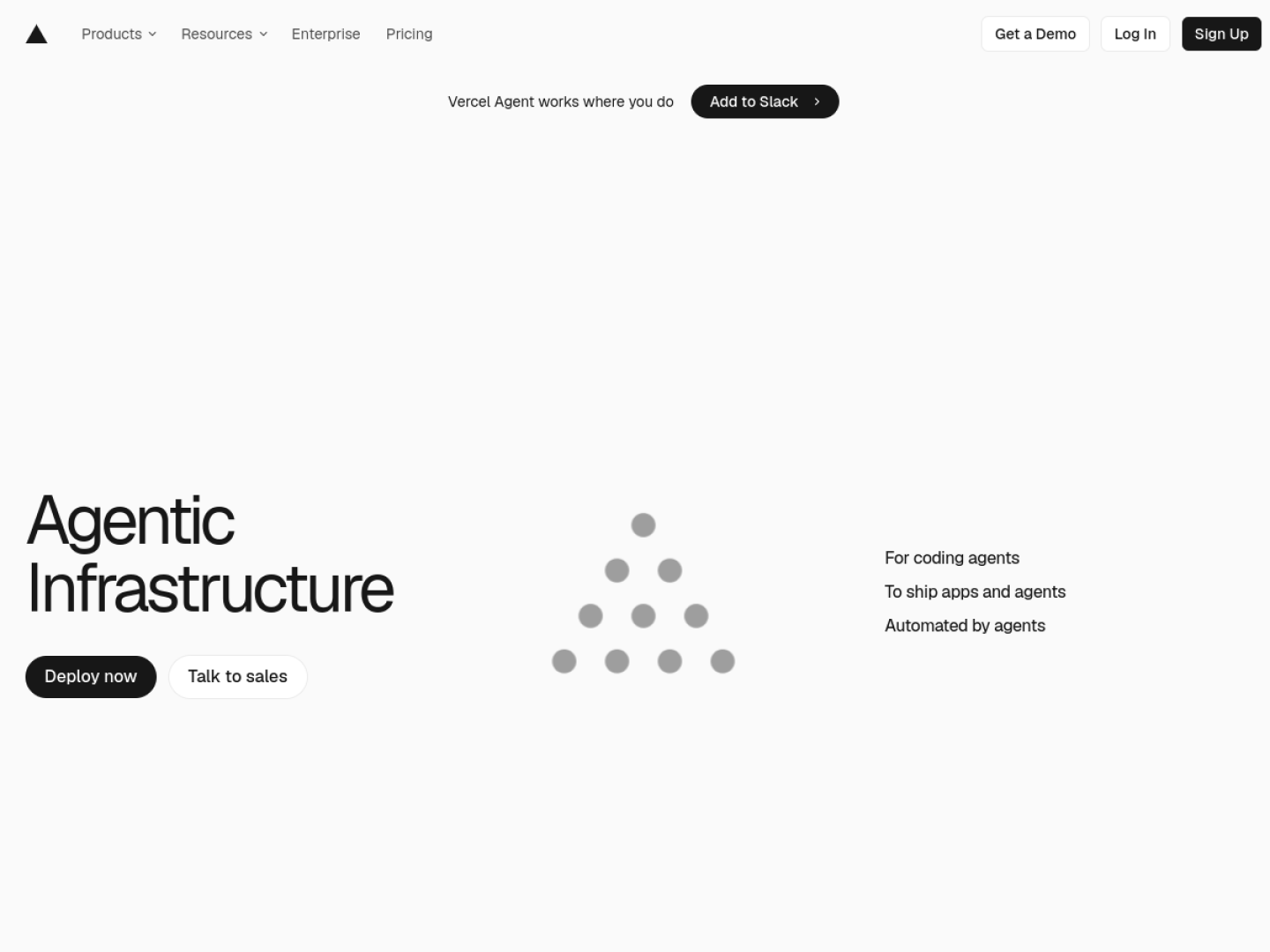
That is not a criticism. It is a signal. Vercel is building for AI agent infrastructure and for enterprise teams with a sales conversation attached, and it is very good at both. If you are a solo developer, a freelancer or a small agency running a handful of apps, you are no longer the centre of that roadmap, and the pricing model reflects it.
Across support threads, Reddit posts and our own conversations with developers, the same five triggers come up again and again:
- 1 The invoice moved. Nothing changed in the code, but image cache writes or Incremental Static Regeneration revalidations did, and Vercel pricing is metered on both.
- 2 The free tier did not cover the work. Someone read the fair use guidelines properly and found that paid client work is not permitted on Hobby.
- 3 The database keeps resetting. An AI coding tool wrote SQLite into the app, and the file does not survive a deploy.
- 4 There is nowhere to put the worker. A queue consumer, scraper or Discord bot has no home on a request-scoped function.
- 5 Debugging hit a wall. The bug happened yesterday, and on Hobby the runtime logs are gone after an hour.
Each of those is covered in detail below, sourced from Vercel’s own documentation rather than from anecdote.
Is Vercel Free? Understanding the Vercel Free Tier Limits
“Is Vercel free?” is one of the most searched questions about the platform, and the honest answer is yes with an asterisk that catches a lot of people. The Vercel free tier, branded the Hobby plan, costs nothing and is genuinely generous for a personal project. What most people never read is the clause in the fair use guidelines, and it is not a soft recommendation. It is a plan restriction with teeth.
“Hobby teams are restricted to non-commercial personal use only. All commercial usage of the platform requires either a Pro or Enterprise plan.”
“Commercial usage is defined as any Deployment that is used for the purpose of financial gain of anyone involved in any part of the production of the project, including a paid employee or consultant writing the code.”
Source: Vercel Fair Use Guidelines, captured August 2026Read the second sentence slowly, because it is far broader than most developers assume. The site itself does not have to make any money. If anyone involved in producing it is being paid, including you, the deployment is commercial. Vercel’s own examples include taking payment from visitors, advertising a product or service, receiving payment to create, update or host the site, affiliate linking as the site’s primary purpose, and running ads such as Google AdSense. The docs add that asking for donations also counts.
Who this actually catches
The freelancer who builds a client site and deploys it to their own free account. The developer who adds AdSense to a side project that finally got traffic. The indie hacker with a donate button in the footer. None of these are edge cases, and all three are commercial usage under the definition above. If you are being paid to do the work, the Vercel free tier is not the plan you are on.
Vercel free tier limits at a glance
Beyond the commercial rule, these are the Vercel free tier limits that matter day to day, taken from Vercel’s limits documentation and fair use guidelines. The last row is the one worth planning around.
Vercel Hobby Plan Limits
Vercel Hobby plan limits, captured from Vercel’s documentation in August 2026.
| Hobby plan limit | Value | Why it bites |
|---|---|---|
| Fast Data Transfer | Up to 100 GB / month | Vercel bandwidth pricing is regional beyond this. |
| Function invocations | 1 million included | Fine until a crawler finds you. |
| Active CPU | 4 CPU-hours | Server-rendered pages burn this faster than static ones. |
| Deployments per day | 100 | An afternoon of rapid iteration can reach it. |
| Concurrent builds | 1 | Builds queue behind each other. |
| Function memory | 2 GB / 1 vCPU maximum | Not configurable upward on Hobby. |
| Runtime log retention | 1 hour | Yesterday’s bug left no evidence. |
| Git organization repos | Not supported | A team repo forces Pro regardless of traffic. |
| If you exceed a limit | “You will have to wait until 30 days have passed before you can use the feature again.” | |
That final row is the real difference between a free plan and a paid one. On a paid plan, an overage is a charge you can argue about later. On the Vercel free tier it is a month of downtime. Combine it with the Git organization restriction and the free plan stops being viable for anything resembling team or client work, which is the point at which most people start comparing Vercel alternatives on price.
Vercel Pricing Explained: What the Pricing Page Does Not Show
Vercel pricing looks simple on the surface, and the surface is where most comparison articles stop. Pro is $20 per user per month. Enterprise is a conversation. Those two numbers are easy to budget for, and if that were the whole story nobody would be searching for a cheaper alternative to Vercel.
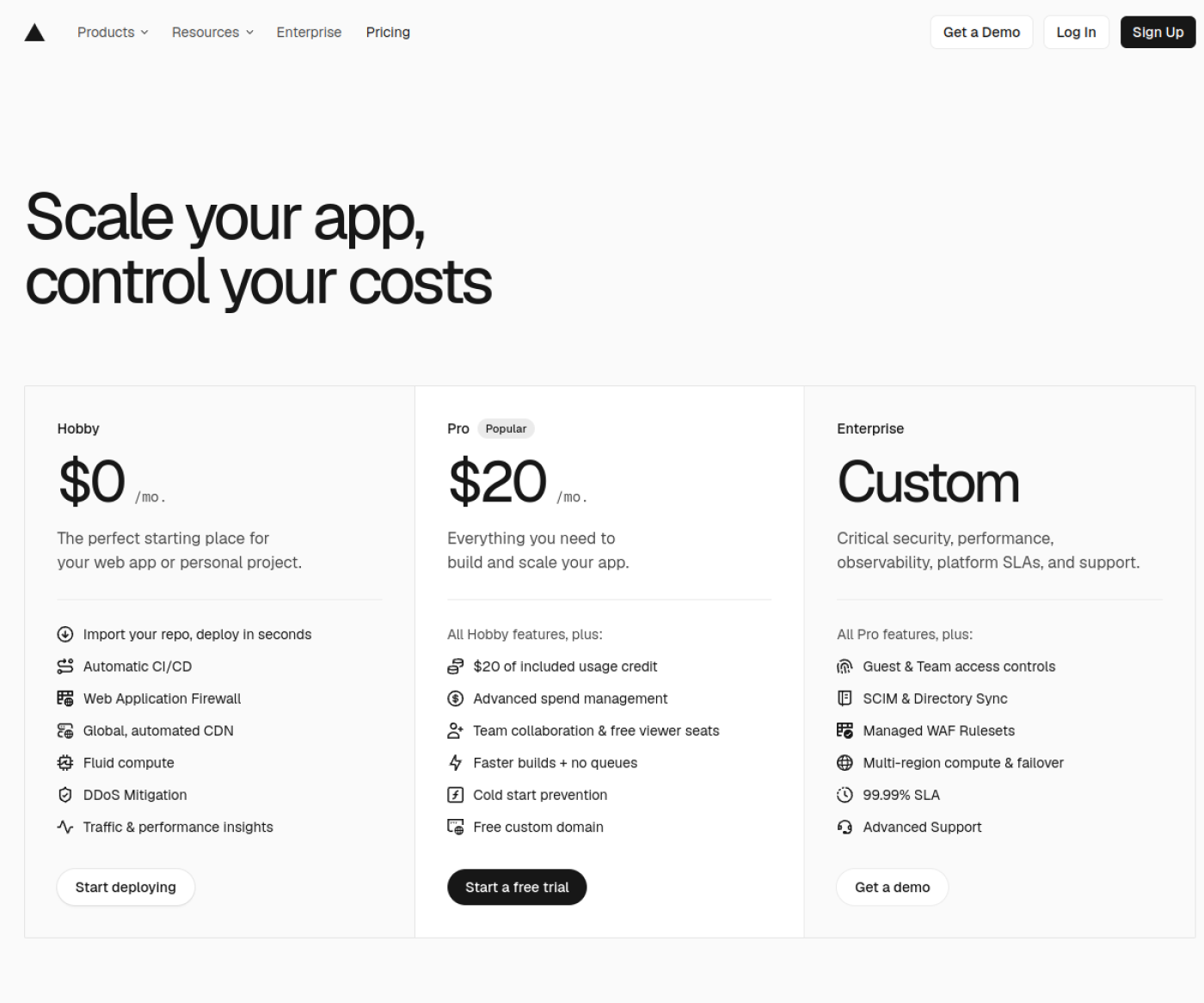
The part you cannot plan for sits one page deeper, in the on-demand rate card. Vercel does not meter one or two things on top of your plan. It meters more than thirty. Here is a representative sample, straight from Vercel’s limits page.
What Vercel Pro Meters
A sample of Vercel’s on-demand rates for Pro. This is not the complete list.
| Metered resource | Rate | What drives it |
|---|---|---|
| Active CPU | From $0.128 per hour | Server rendering and API work. |
| Provisioned Memory | From $0.0106 per GB-hour | Function memory multiplied by runtime. |
| Function invocations | $0.60 per million | Every request that hits a function. |
| Build CPU minutes | From $0.0035 per CPU minute | Every deploy, multiplied by machine size. |
| ISR reads | $0.0004 per 1,000 | Incremental Static Regeneration traffic. |
| ISR writes | $0.004 per 1,000 | Page revalidation. |
| Image transformations | $0.05 per 1,000 | Each new size or format of an image. |
| Image cache reads | $0.40 per million | Serving optimized images. |
| Image cache writes | $4.00 per million | Cache misses on images. |
| Global Config reads | $3.00 per million | Edge config lookups. |
| Global Config writes | $10 per 1,000 | Feature flag and config updates. |
| Log drains | $0.50 per GB | Shipping logs anywhere useful. |
| Observability Plus | $1.20 per million events | Seeing what your app is doing. |
| Fast Data Transfer, Fast Origin Transfer, Edge Requests, WAF rate limiting, Blob storage | Priced by region | Vercel bandwidth pricing varies by where your users are. |
No single rate here is unreasonable. The difficulty is forecasting. To predict next month’s Vercel bill you would need to predict your image cache write volume, your ISR revalidation count, and how much CPU time your functions will actively burn. Almost nobody can do that in advance, which is why the common experience is finding out afterwards.
The add-ons that sit on top of Vercel pricing again
Metered usage is only one of the two layers above the plan fee. The second is a set of fixed monthly add-ons, and several of them cover capabilities that feel like platform basics rather than extras. If you have ever needed a fixed IP address so a client’s payment provider or corporate firewall could allow list you, note the fourth row.
Vercel Pro Add-ons
These add-ons are billed monthly on top of the Pro plan fee and any metered usage.
| Add-on | Price |
|---|---|
| HIPAA BAA | $350 / month |
| SAML Single Sign-On | $300 / month |
| Flags Explorer | $250 / month |
| Static IPs | $100 / month per project |
| Advanced Deployment Protection | $150 / month |
| Preview Deployment Suffix | $100 / month |
| Additional microfrontend project | $250 / project / month |
| Speed Insights | $10 / month per project |
| Web Analytics Plus | $10 / month |
| Additional team seat | $20 / month |
Password-protecting a preview URL before you send it to a client is an add-on. A fixed IP is $100 a month for every project that needs one. For an agency running ten client projects, that single line is $1,000 a month before any traffic is served.
Why a Vercel Spend Limit Does Not Actually Limit Spend
The reasonable response to unpredictable Vercel pricing is to set a budget, and Vercel provides Spend Management to do exactly that. It is a genuinely useful alerting tool, and it is worth understanding precisely what it does and does not do before you rely on it, because the name suggests a hard cap and the documentation says something different.
“Setting a spend amount does not automatically stop usage.”
Source: Vercel Spend Management documentationBy default it notifies you at 50%, 75% and 100% of your budget. You can opt into a hard stop, and it is important to know what that stop actually does before you switch it on. When the amount is reached, Vercel pauses the production deployment for every project on the team, and visitors get a 503 Service Unavailable error page. Recovery is manual.
“Projects won’t automatically unpause if you increase the spend amount, you must resume each project manually.”
Source: Vercel Spend Management documentationTwo further details from the same page are worth knowing. The spend check runs every few minutes rather than continuously, so Vercel notes that “projects can keep serving traffic and accruing usage for several minutes after you cross the spend amount”. And the budget does not cover seats, marketplace integrations or the add-ons listed above, which are billed monthly no matter what your cap says.
If you run a single product, that is a reasonable safety net. If you host fifteen client sites in one Vercel team, the safety net takes all fifteen offline simultaneously and you bring them back one at a time while the phone rings. This is the specific scenario that sends agencies looking for Vercel alternatives with per-project billing.
The Architecture Limits Behind Most Vercel Migrations
Pricing is the loud reason people look for an alternative to Vercel. The quiet reason, and the one no budget can solve, is that some applications simply do not fit the serverless model. Vercel is refreshingly direct about this in its own comparison documentation, and the sentence below explains almost every migration story you will read.
“Because instances come and go with traffic, containers on Vercel are stateless. Each instance takes a request, returns a response, and keeps nothing between calls. Persistent state belongs in a backing service.”
Source: Vercel Knowledge BaseSQLite, uploads, and anything else that lives on disk
AI coding tools reach for SQLite constantly, because it is one file and no separate database server to configure. On a stateless platform that file does not survive a deploy. Neither do user uploads written to the filesystem, generated PDFs you meant to keep, or a disk cache you built to save API calls. This is inherent to the serverless execution environment these functions run inside, not a Vercel decision. The remedy on Vercel is always the same: move that state into a managed service and pay for that service too, which quietly raises the real cost of the platform above the headline Vercel pricing.
Background jobs, queues, scrapers and bots
A function starts when a request arrives and stops when it responds. A queue consumer that listens continuously, a Discord bot holding a connection, a scraper on a loop or any long-running worker has no natural home in that model. Vercel’s own documentation points those workloads at a container platform instead, which is a fair and accurate thing for them to say and also a clear signal about when to use a different tool.
The limits you meet by accident
These are the constraints nobody reads in advance, because they are invisible until the exact moment they are not. All are from Vercel’s function limitations and limits documentation.
Vercel Platform Limits
Vercel platform limits, captured from Vercel’s documentation in August 2026.
| Limit | Value | What it feels like in practice |
|---|---|---|
| Request and response body | 4.5 MB | File upload returns a 413 Content Too Large the first time someone uploads a real phone photo. |
| Runtime log retention | 1 hour Hobby, 1 day Pro | The bug you are chasing happened yesterday and left no trace. |
| File descriptors | 1,024 file descriptors shared across all concurrent executions | “Too many open files” appears only under load. |
| Build time | 45 minutes maximum | A large content site eventually stops being deployable. |
| Source files per CLI deploy | 15,000 | The deploy fails at the build step with no obvious cause. |
| Environment variables | 64 KB total per deployment | Certificates and long private keys consume the budget fast. |
| Default region | Single region; multi-region needs Pro or above | Your function is a long way from your database. |
| Shell access | None | You debug from logs, or you do not debug. |
The 4.5 MB body limit is the one that catches people building with AI tools most often, because the app works perfectly with the small test image and fails the first time a real user uploads a photo straight from their phone.
InstaPods: The Best Vercel Alternative for Full-Stack Apps
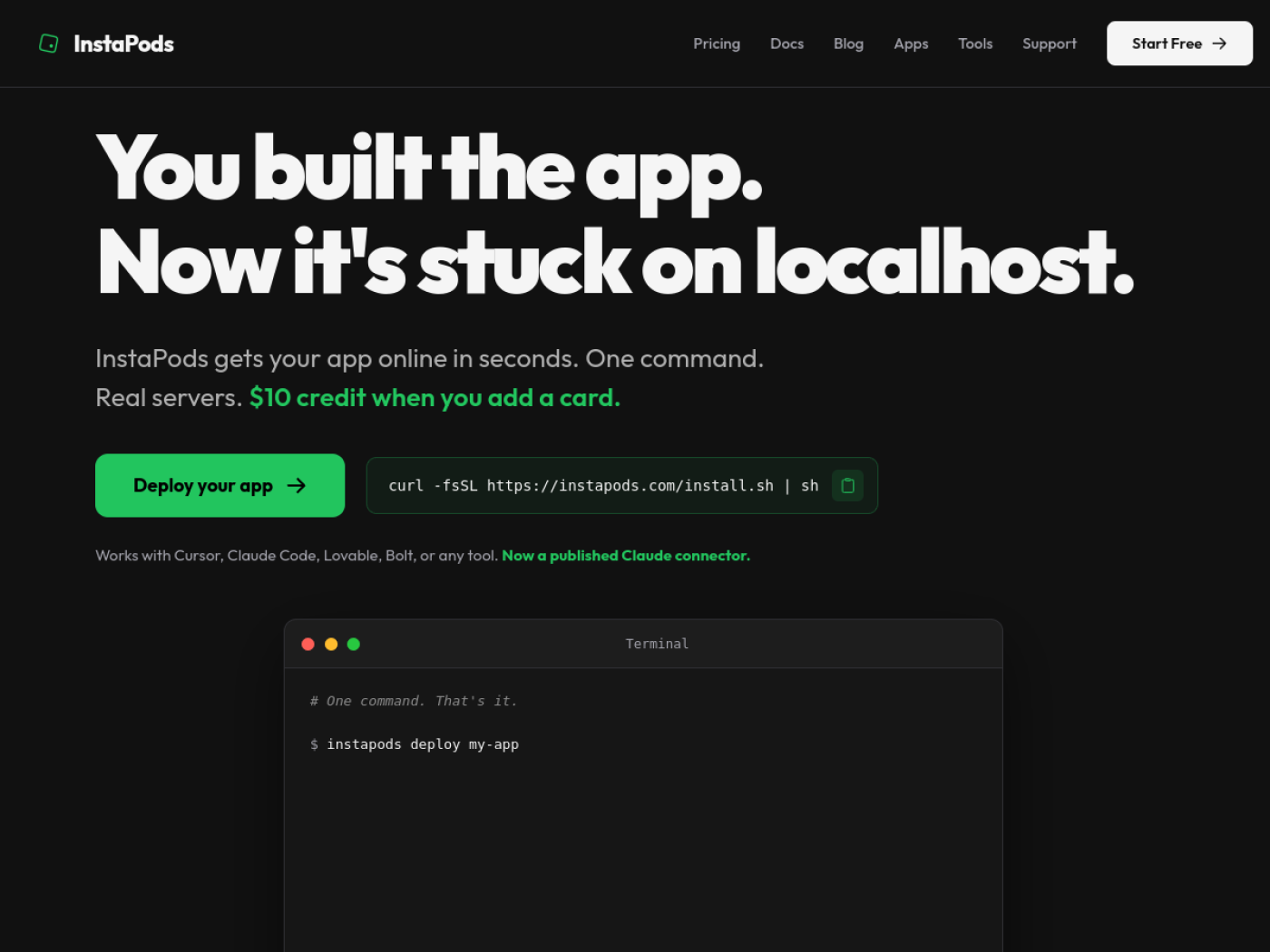
Everything above describes the same root cause from different angles: Vercel gives you a function, and a growing number of apps want a server. The Vercel alternative we recommend inverts that single decision. InstaPods gives you a small server that stays running, with your code, your disk and your database on it, for one flat monthly price. Because it is a server rather than a function, most of the friction listed above does not arise at all.
Why we recommend it as the alternative to Vercel
InstaPods is the best Vercel alternative for full-stack apps that need state, a shell and a predictable bill. That qualifier is deliberate. It is not a better global edge network than Vercel and does not claim to be. What it is better at is the specific set of problems that make people leave: persistent disk so SQLite and uploads survive, worker pods for background jobs, SSH on every plan, and one price with no meters behind it.
If your constraint is bandwidth cost, unpredictable Vercel pricing, or an app that will not fit in a stateless function, this is the shortest route out.
InstaPods pricing: one number, prorated by the day
The pricing model is the clearest point of difference. There is no usage billing, no egress metering and no per-seat charge, so the number in the table is the entire cost of running that pod. Billing is prorated by the day, which means a pod you delete mid-month only costs you the days it existed.
InstaPods Plans
Databases such as MySQL, PostgreSQL and Redis can be installed on the same pod from the Build plan upward.
| Plan | CPU | Memory | Storage | Backups | Price |
|---|---|---|---|---|---|
| Launch | 1 | 512 MB | 10 GB | 1 | $3 / mo |
| Build Full Stack | 2 | 2 GB | 25 GB | 5 | $7 / mo |
| Grow | 2 | 4 GB | 50 GB | 10 | $15 / mo |
| Scale | 4 | 8 GB | 100 GB | 10 | $25 / mo |
| Turbo | 6 | 12 GB | 150 GB | 10 | $49 / mo |
You do not have to take the pricing page’s word for it. The same catalogue is available from the command line, which is a useful habit when you are evaluating any Vercel competitors:
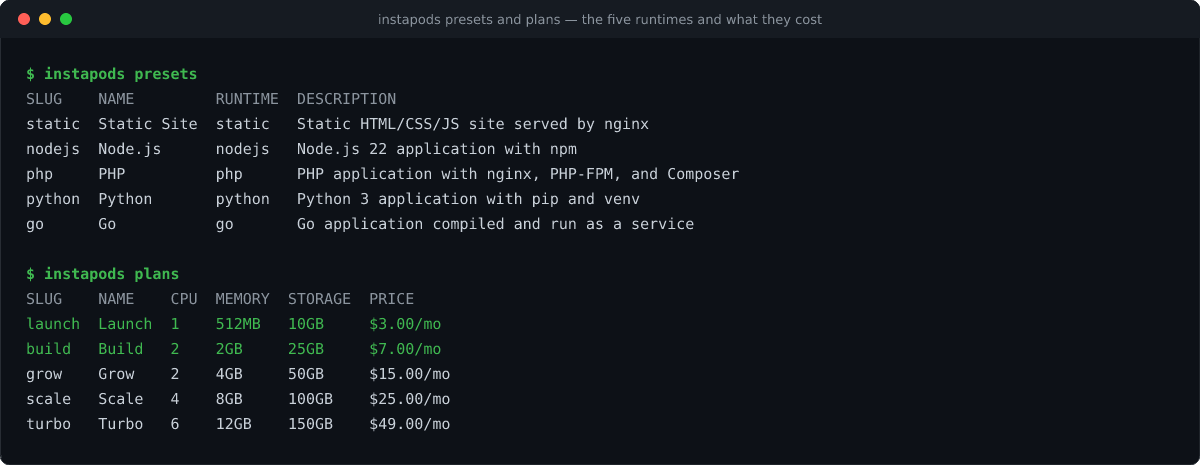
That last detail is worth pausing on. Static, Node.js 22, PHP, Python and Go all start at the same price, so whichever language your AI coding tool happened to reach for does not change what the app costs to run.
What every plan includes, including the $3 one
The second difference is that there is no add-on list. The capabilities that are billed separately on Vercel hosting are simply present on every InstaPods plan.
What You Get With InstaPods vs Vercel
Included capabilities across InstaPods plans, compared with how the same capability is handled on Vercel.
| Capability | InstaPods | Vercel |
|---|---|---|
| SSH and SFTP access | Every plan | Not available |
| Browser web terminal and web IDE | Every plan | Not available |
| Custom domains with automatic SSL | Every plan, up to 5 per pod | Included |
| Git deploy on push | Every plan | Included |
| Fixed IP address | It is your server | $100 / month per project |
| MCP server for AI assistants | Every plan | Available |
| Databases on the same machine | Build plan and above | External or marketplace, billed separately |
| Background workers and cron jobs | Worker pods | Not the model |
Two capabilities follow directly from it being a real machine rather than a function. SQLite works, because the file sits on a disk that persists across deploys, which removes the single most common failure people hit when moving a vibe-coded app to production. And background workloads finally have somewhere to live: a worker pod runs “a bot, scraper, queue consumer or scheduled job on a pod with no public URL”, keeping SSH, logs, databases and backups while dropping the web layer it does not need.
Vercel vs InstaPods: The Full Comparison
Here is the honest side-by-side. The top of the table is where InstaPods wins, the bottom is where Vercel does, and both halves matter if you are going to make a decision you do not reverse in a month.
Vercel vs InstaPods
Vercel vs InstaPods, captured August 2026 from both vendors’ documentation.
| Criterion | Vercel | InstaPods |
|---|---|---|
| Entry price | Free, non-commercial only, then $20 per seat | $3 / mo, commercial use permitted |
| Billing model | Plan + 30 metered resources + add-ons | Flat per pod, prorated daily |
| Bandwidth and egress | Metered, priced by region | Not metered |
| Per-seat cost | $20 / month per extra seat | None |
| State on disk | Stateless, nothing persists | Persistent disk, SQLite works |
| Databases | External or marketplace, billed separately | MySQL, PostgreSQL, Redis on the pod from $7 |
| Background jobs, queues, bots | Not the model | Worker pods |
| SSH access | No | Every plan |
| Request body limit | 4.5 MB | No platform limit |
| Log retention | 1 hour Hobby, 1 day Pro | Searchable pod logs with regex filtering |
| Fixed IP | $100 / month per project | Included |
| Per-project billing separation | One team budget across all projects | One pod, one price |
| Global edge network | Yes, extensive | No, two regions |
| Autoscaling | To 30,000 concurrent executions | Fixed size, you resize the pod |
| Next.js ISR, edge middleware, image optimization | First-class | Not native |
| Deploy speed, measured | Roughly 60 seconds for a static build | 13.1s first deploy, 7.8s redeploy |
How the Other Vercel Competitors Compare
InstaPods is not the only alternative to Vercel worth considering, and pretending otherwise would not help you choose. InstaPods maintains its own platform comparisons if you want the vendor’s side of it. Here is an honest read on the rest of the field, including the two comparisons people search for most often, Vercel vs Netlify and Vercel vs Railway.
Vercel Alternatives at a Glance
The wider field of Vercel alternatives, and the constraint each one actually solves.
| Platform | Entry price | Solves | Does not solve |
|---|---|---|---|
| Netlify | Free tier | Framework-agnostic static hosting and strong preview deploys. | Similar serverless constraints to Vercel, so persistent state and long-running workers still need another home. |
| Cloudflare Pages | Free tier | Strong edge performance and generous bandwidth. | Workers use a different programming model than many conventional server-side apps. |
| Railway | Hobby $5/mo + usage | Real containers, a GitHub-first workflow, and a smooth developer experience. | Usage-based billing means monthly costs can still vary. |
| Render | $7/mo per service | Managed containers with a more traditional hosting dashboard. | Multiple services, such as an app plus database, increase the monthly total. |
| Fly.io | Usage-based | Multi-region containers that can run close to users. | Requires more infrastructure knowledge and operational involvement. |
| Coolify or Dokploy | Free software + VPS from ~$4/mo | Self-hosted deployment with no separate platform fee. | You remain responsible for the server, updates, backups, security, and availability. |
| InstaPods | $3/mo flat | Persistent state, SSH access, workers, and predictable per-pod pricing. | It is not a global edge network and does not automatically scale instances up and down. |
The pattern is worth naming. Netlify and Cloudflare Pages are lateral moves: they solve the problem Vercel already solved. Railway and Render are real architectural moves but keep usage-based billing, so if your reason for leaving was an unpredictable invoice, you have changed vendors rather than changed models. A self hosted Vercel alternative removes the bill entirely and hands you the operational work instead. A flat-priced managed pod is the option that changes both the architecture and the billing model at once.
When Vercel Is Still the Better Choice
The bottom rows of the comparison table are real, and skipping past them would waste your time and cost you a migration you regret. There are four situations where moving off Vercel would be a downgrade, and you should check all four before you start.
- 1You lean on Next.js platform features. ISR, edge middleware and Vercel’s image optimization are platform features rather than framework features, built by the team that built the framework. Nothing else runs them as well, and rebuilding around them is real work.
- 2Your users are genuinely everywhere. A global edge network beats a single origin for a worldwide audience. InstaPods runs two regions, eu and us-east, and that is the honest limit today.
- 3Traffic is spiky and unpredictable. Scaling automatically to tens of thousands of concurrent executions is a genuine feature. A fixed-size pod is not that, and a launch spike means resizing rather than shrugging.
- 4Your bill is already small and stable. If Vercel pricing has never surprised you, flat pricing solves a problem you do not have. Stay.
A fair summary of the whole comparison: Vercel is priced and engineered for global-scale frontend delivery and, increasingly, for AI agent infrastructure. A great many apps are neither global nor at scale, and those are the ones paying for complexity they will never use.
How to Migrate From Vercel to InstaPods, Step by Step
Migrating a typical Node.js or Python app takes about ten minutes. The commands and screenshots below are from a real Express app we deployed while writing this guide, not from documentation, so the output you see is the output you will get. The full command reference lives in the InstaPods documentation. Nothing here requires you to tear down the Vercel deployment first.
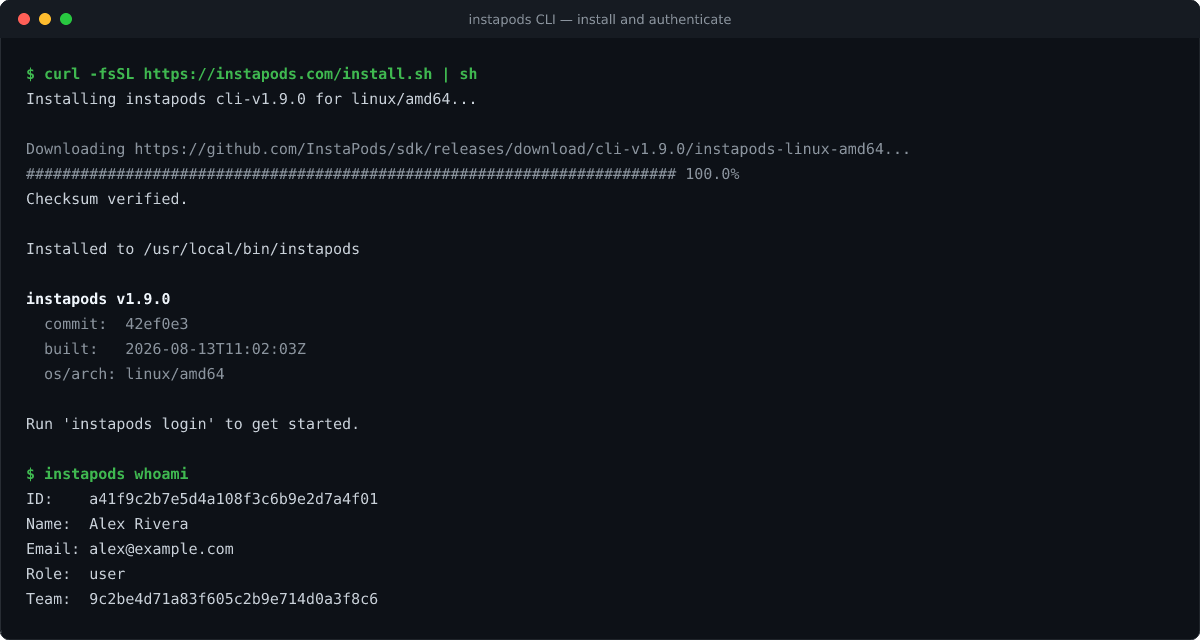
Step 1: Install the CLI and authenticate
curl -fsSL https://instapods.com/install.sh | sh
instapods login
instapods whoami
instapods login opens your browser once per machine and stores the token locally. Run whoami straight afterwards: it is the fastest way to rule out an authentication problem before you start debugging a deploy that was never authenticated in the first place.
Step 2: Deploy the same repository
There is no Dockerfile to write, no build configuration and no repository connection needed at this stage. The runtime is detected from your project files, in the order PHP, Hugo, Go, Node.js, Composer, Python, then raw HTML. Pass the pod name you want, because running the command bare returns Error: pod NAME is required.
cd my-app
instapods deploy my-app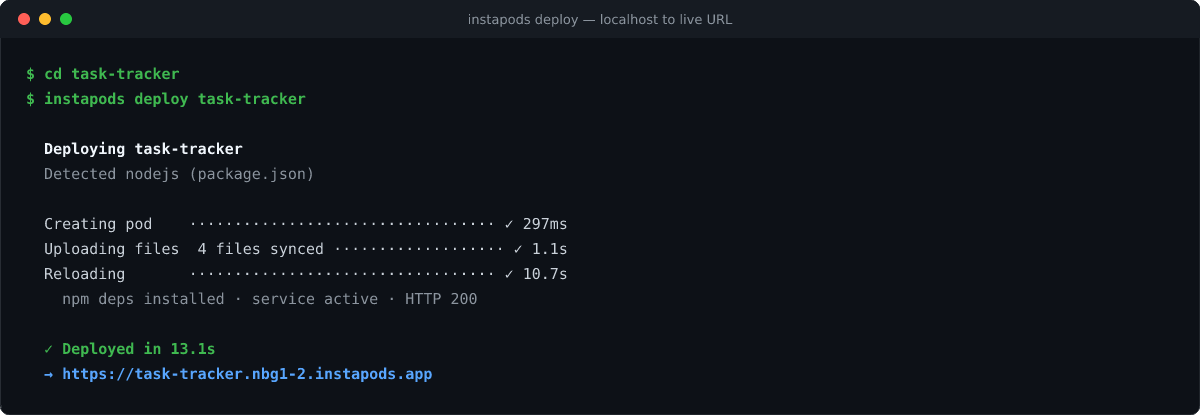
Step 3: Move your environment variables across
Pull them out of Vercel with vercel env pull, then set them on the pod. Your local .env is deliberately excluded from the upload along with node_modules, .git and your .gitignore entries, which is exactly why this step exists and why a first deploy returns a 500 without it.
instapods env set my-app DATABASE_URL=postgres://... API_KEY=sk-...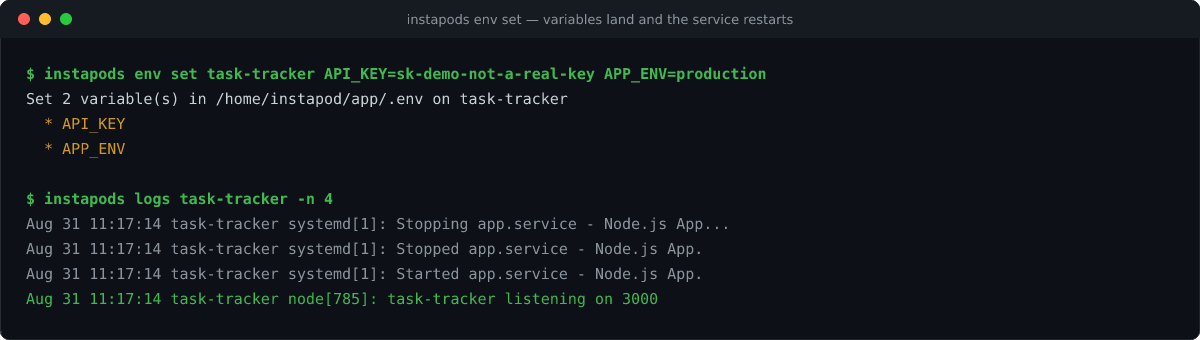
Step 4: Bring the database onto the pod
If you only moved to a hosted Postgres because Vercel could not keep a file on disk, you can move back to SQLite and delete that bill. If you want a managed engine, install PostgreSQL, MySQL or Redis on the same pod so the app and its database share a machine and a price.
instapods services add my-app -s postgresql
instapods services creds my-app -s postgresql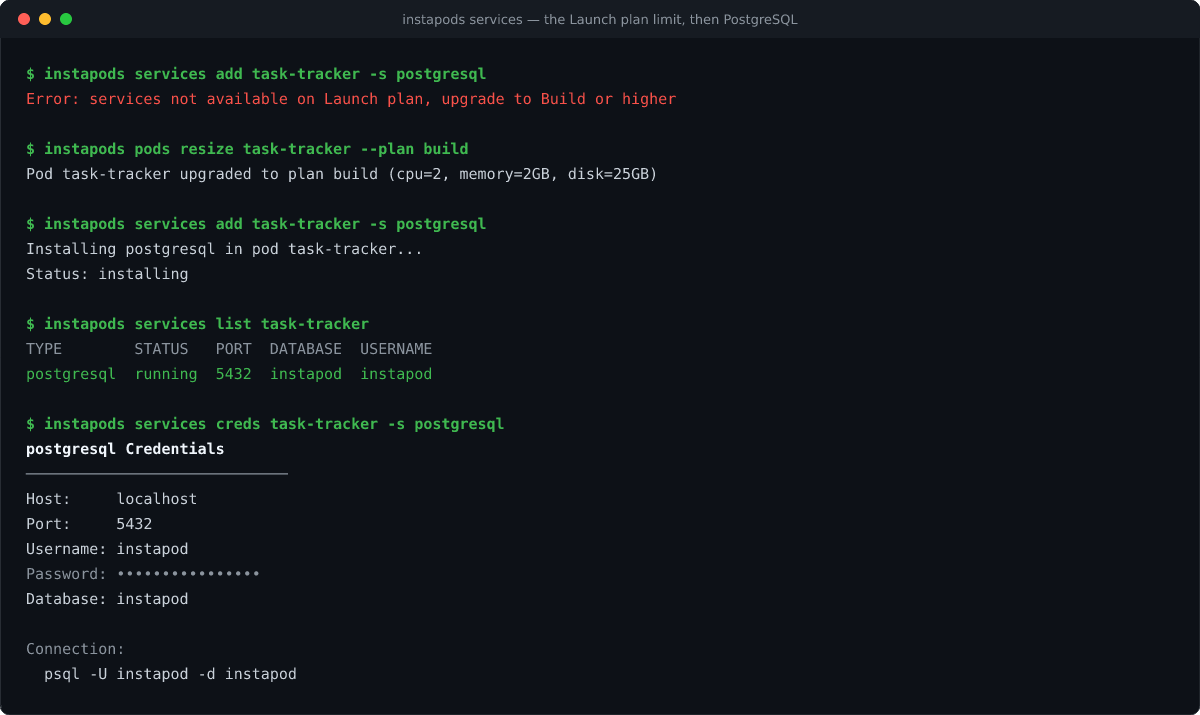
Step 5: Reconnect Git and point the domain
This restores the push-to-deploy loop you had on Vercel, using a GitHub deploy key for private repositories. Note that --repo takes a full URL rather than an owner and name pair.
instapods git connect my-app
  --repo https://github.com/yourname/my-app --branch main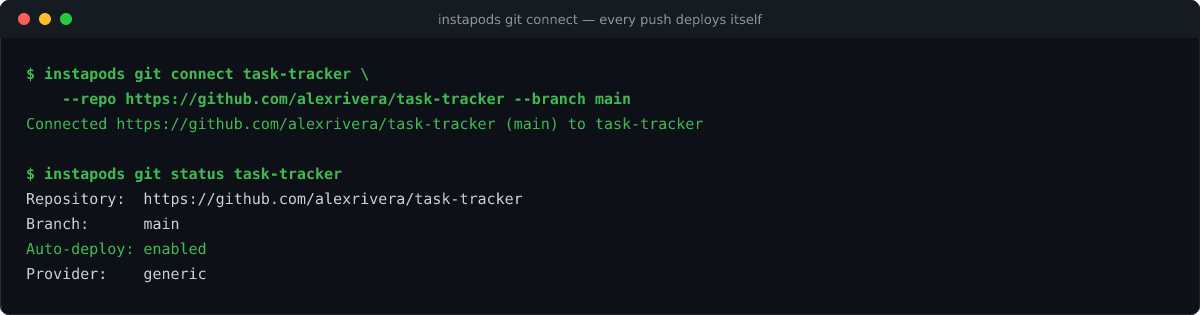
--deploy to trigger the first build immediately, or --no-auto-deploy if you would rather push the button yourself.Then add your domain from the pod’s Domains tab, point a CNAME at it, and SSL is issued through Let’s Encrypt and renewed automatically. Keep the Vercel deployment live until DNS has propagated and you have clicked through the app on the new URL. There is no reason to cut over in a single step, and every reason not to.
Check this before you cut over
If your app relies on Next.js ISR, edge middleware or Vercel’s image optimization, those are platform features rather than framework features. Confirm what your app actually uses first, because that part needs rebuilding rather than redeploying. Everything else moves as-is.
If Part of Your Stack Is WordPress
A large share of the apps in this situation are a React or Next.js frontend attached to a client who needs to edit content. If that describes yours, the backend half has its own answer, and it is not a custom admin panel generated by an AI tool that you then maintain forever. This is the pattern we cover in WordPress development in the AI era, and you can hand the finished site to an assistant using account MCP or site MCP.
Run WordPress on managed WordPress hosting and read from its REST API. InstaWP prices that per site and bills it daily, with SSH and WP-CLI on every plan, one-click staging, automatic WordPress backups and a managed WAF, which is the same shape of deal as the pricing model above. We publish our own hosting benchmarks in full if you want the numbers behind that. Our guides to deploying a vibe-coded app and building a headless WordPress frontend walk through that combination end to end.
The Verdict: Which Vercel Alternative Should You Pick?
Vercel is very good at global frontend delivery, and its free tier is genuinely generous right up to the moment somebody is being paid. The reasons people look for an alternative to Vercel are consistent and specific: state on disk, a background worker, shell access, or a bill that can be predicted before the month begins rather than explained after it. If the app you are moving was built with an AI tool, our step-by-step guide to deploying a vibe-coded app covers the wider set of hosting options.
If the middle option describes your app, the fastest way to find out is to deploy it. Try InstaPods from $3 a month, with $10 in credit when you add a card, which covers roughly three months on the Launch plan. Keep your Vercel deployment running while you test. If it does not suit the app, you have lost an afternoon and nothing else.
Keep Reading
- How to Deploy a Vibe-Coded App, Step by Step
- How to Vibe Code a Website
- Headless WordPress Frontend, Build and Deploy Guide
- Best AI Coding Tools for WordPress Developers
Frequently Asked Questions About Vercel Alternatives
Is Vercel free?
The Vercel free tier, called the Hobby plan, costs nothing but is restricted to non-commercial personal use. Vercel’s fair use guidelines define commercial usage as any deployment used for the financial gain of anyone involved in any part of producing it, including a paid employee or consultant writing the code. Taking payment, running ads, affiliate linking, asking for donations, or being paid to build or host the site all count. Commercial projects need Pro at $20 per seat per month or Enterprise.
Can I host client websites on the Vercel free tier?
No. Vercel’s fair use guidelines explicitly list ‘receiving payment to create, update, or host the site’ as commercial usage, which requires a Pro or Enterprise plan. A freelancer deploying paid client work to a personal Hobby account is outside the plan terms even if the site itself never takes a payment. This is one of the most common reasons agencies start comparing Vercel alternatives.
What are the Vercel free tier limits
On Hobby: up to 100 GB Fast Data Transfer a month, 1 million function invocations, 4 CPU-hours of Active CPU, 100 deployments per day, one concurrent build, 2 GB and 1 vCPU maximum function memory, and one hour of runtime log retention. Hobby also cannot connect to Git repositories owned by a Git organization. If you exceed a limit, Vercel’s docs state you will have to wait until 30 days have passed before using that feature again.
Why is my Vercel bill higher than expected?
Because the plan fee is only one of three layers. Vercel pricing meters more than thirty resources on top of Pro, including Active CPU at $0.128 an hour, provisioned memory, invocations at $0.60 per million, build CPU minutes, ISR reads and writes, image transformations, image cache reads and writes at $4.00 per million, Global Config reads and writes, log drains and regional data transfer. Several platform features are separate monthly add-ons as well, such as SAML at $300, Static IPs at $100 per project and Speed Insights at $10 per project.
Does Vercel’s spend limit actually stop charges?
Not on its own. Vercel’s documentation states that setting a spend amount does not automatically stop usage. You can enable an option that pauses production deployments, but it pauses every project on the team at once, visitors get a 503 error, and projects do not unpause automatically even if you raise the limit. Each has to be resumed manually. The check also runs every few minutes rather than continuously, so usage keeps accruing after you cross the amount.
What is the cheapest Vercel alternative for a full-stack app?
For an app with a backend and a database, InstaPods starts at $3 a month flat on the Launch plan, with MySQL, PostgreSQL and Redis available on Build at $7. There is no usage billing, no egress metering and no per-seat charge, and billing is prorated daily. For comparison, Railway’s Hobby plan is $5 a month plus per-second compute usage, Render’s cheapest full-stack setup of a web service plus managed Postgres is $14 a month, and a self-managed VPS is around $4 a month plus one to four hours of setup.
Why does my SQLite database reset on Vercel?
Because Vercel is stateless by design. Its own documentation puts it plainly: instances come and go with traffic, and each one takes a request, returns a response and keeps nothing between calls. Anything written to disk, including a SQLite file or a user upload, does not survive. You either move that state into a managed service and pay for it, or move the app to a platform with a persistent disk.
Can I run a background job, cron job or bot on Vercel?
Not as a long-running process. Vercel functions are stateless and scoped to a request, and Vercel’s own comparison documentation points background workers and cron-style jobs at a container platform instead. A platform that gives you a persistent server handles this natively. On InstaPods it is a worker pod, which runs a bot, scraper, queue consumer or scheduled job with no public URL while keeping SSH, logs, databases and backups.
Is there a self-hosted Vercel alternative?
Yes. Coolify and Dokploy are the two open-source options people reach for, and both run on a VPS you manage, typically from around $4 a month. They remove the platform bill and replace it with operational work: you own the updates, the backups, the TLS renewals and the incident at 2am. A managed pod sits between the two, giving you the server and the shell without the maintenance burden.
Vercel vs Netlify vs Railway: which should I choose?
Netlify is a lateral move from Vercel, since it shares the same serverless constraints, so it solves branding and DX preferences rather than architecture. Railway is a real architectural move to containers with an excellent developer experience, but it keeps per-second usage billing, so an unpredictable invoice follows you. If you are leaving Vercel because of cost predictability specifically, a flat-priced platform changes the billing model rather than just the vendor.
How long does it take to migrate from Vercel?
For a typical Node.js or Python app, about ten minutes. Install the CLI, deploy the folder, move your environment variables, add a database if you need one, reconnect Git and point the domain. In our own test, a first deploy of a small Express app took 13.1 seconds and a redeploy took 7.8 seconds. Keep the Vercel deployment running until DNS has propagated so you can roll back instantly.
When should I stay on Vercel?
When you use Next.js platform features such as ISR, edge middleware or image optimization, when your audience is global and latency everywhere matters, when traffic is spiky enough that scaling to tens of thousands of concurrent executions is a genuine requirement, or when your current bill is small and stable. In those cases Vercel is doing something a single-region pod cannot, and moving would be a downgrade.