

The Elementor Website Builder has it all: drag and drop page builder, pixel perfect design, mobile responsive editing,…
About Frontend Reset Password
Frontend Reset Password is a plugin that allows users to reset their passwords directly on your website, instead of using the default WordPress reset form. It is great for sites that have disabled access to the WordPress dashboard or for including a lost/reset password form on custom site pages. The plugin is easy to set up and customize, and also works well with Easy Digital Downloads.Screenshots
Frequently asked questions
What does Frontend Reset Password do?
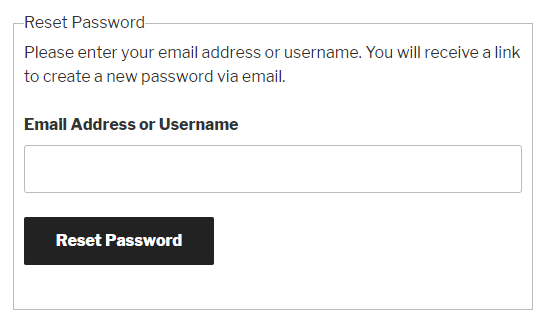
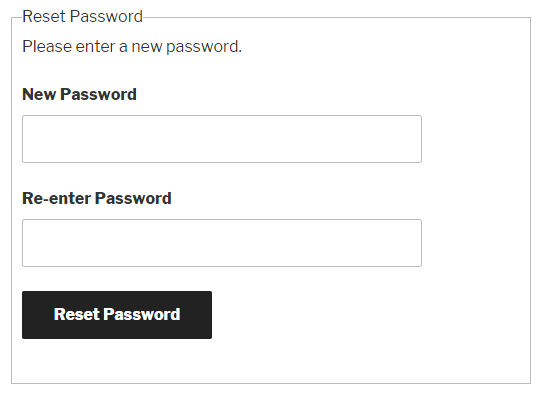
Frontend Reset Password lets your site users reset their lost or forgotten passwords in the frontend of your site. Users fill in their username or email address and a reset password link is emailed to them. When they click this link they'll be redirected to your site and asked for a new password.
Why should I use Frontend Reset Password?
Frontend Reset Password is perfect for sites that have disabled access to the WordPress dashboard, or if you want to include a lost/reset password form on one of your custom site pages. It also works great with Easy Digital Downloads!
How does Frontend Reset Password handle error messages?
Any error messages display right on the form, including whether the username or email address is invalid.
How does Frontend Reset Password work with other plugins?
The plugin works by hooking into the lostpassword_url WordPress filter, meaning compatibility with other plugins can be better maintained.
Is Frontend Reset Password translation ready?
Yes, Frontend Reset Password is also translation ready.
Changelog
1.2.2 – 1st August 2023
- MOD: Lost Password Form – Accessibility
1.2.1 – 8th November 2022
- MOD: Updated branding to match WP Enhanced
- MOD: Updated “tested up to” so its not out of date anymore
1.2 – 13th July 2020
- [New Feature] Setting to change the email subject.
- [Change] Additional
esc_html()calls added to frontend facing text. - [Change] All translatable strings using
__have been converted toesc_html__(). - [Change] Updated POT file included.
1.1.91
- New Feature: Custom templates. Template files can now be included in your child theme folder. Create a new folder inside your child theme directory called
somfrp-templates, and follow the same template folder/file structure as found in the plugin’stemplatesfolder. - Change: Now uses
add_query_arg()when creating a reset password link, to improve compatibility - Change: Username no longer included in reset password link, switched to using user ID
- Change: Changes made to
lost_password_form.phptemplate file - Change: Tested up to WordPress 5.4
1.1.9
- Fix: Changed the way error messages are displayed to improve security. As such the plugin template files have changed, meaning any custom ones you have made will need to be updated to reflect the new changes.
- Change: Removed redundant
<i>element fromlost_password_form.php.
1.1.8
- New Feature: Custom templates. You can now override the form templates in your theme. Create a new folder inside your theme directory called
somfrp-templates, and follow the same template folder/file structure as found in the plugin’stemplatesfolder.
1.1.7
- Change: More HTML tags are now available to use in email messages, since the saved message is now included in the email raw, but still uses the
wpautop()function to automatically add<p>tags
1.1.6
- Change: Replaced filter ‘retrieve_password_title’ with ‘somfrp_retrieve_password_title’ to prevent other plugins unintentionally overriding the email title
- Change: Replaced filter ‘retrieve_password_message’ with ‘somfrp_retrieve_password_message’ to prevent other plugins unintentionally overriding the email message
- Change: Set priority for lostpassword_url filter to 999
- Change: Moved plugin settings page from the Plugins section to the Settings section of the admin menu
1.1.5
- Change: Removed login check to allow resetting password when logged in
- Fix: Error output corrected for the invalid_key index
1.1.41
- Fix: Corrected bug with action displaying form
1.1.4
- Change: Changed to using “somfrp_action” parameter rather than “action” to avoid conflicts
1.1.3
- Change: Functions to override default lost password actions and filters have a higher priority number
1.1.2
- Change: Email sent confirmation text no longer shows the email address
1.1.1
- Fix: Custom text for the reset form now outputs HTML tags correctly
1.1
- New feature: Customise the name and email address that the reset password emails send from, rather than the default wordpress@yoursite.com
- New feature: Plugin now sends HTML formatted emails which can be fully customised in the settings
- New feature: Select custom pages to redirect to for the email sent successfully and password changed pages, rather than the reset password page handling everything
1.0.5
- Cleaned undefined index errors
- Change wp_mail() headers to better support some plugins/themes
1.0.4
- Fixed missing WP_Error object on password validation
1.0.3
- Plugin now translation ready
1.0.2
- Textdomain set for language file
1.0.1
- Textdomain fix
1.0
- Initial release

