If you run a WordPress agency, how you handle client hosting is one of the most consequential decisions you will make, and there is no single correct answer. There are five distinct hosting models agencies use to manage client sites, ranging from a simple referral link to running your own white-label hosting brand, and each one trades effort for control and profit in a different way.
This guide breaks down all five models in detail, shows you the revenue math behind each, and explains how to run any of them on a managed WordPress platform without drowning in operational overhead.
Table of Contents
? Key Takeaway
There is no single “right” way for an agency to host client WordPress sites. There are five proven models, and the best one depends on how much control, margin, and ownership you want:
- Referral / Affiliate: lowest effort, lowest margin, no control.
- Reseller: you buy hosting at a base cost and mark it up, keeping 100% of the difference.
- White-Label (WaaS): your brand, your pricing, your own hosting product.
- Managed Care Plan: hosting bundled into a recurring maintenance retainer.
- Client-Owned, Agency-Managed: the client pays the host, you manage everything.
Most growing agencies eventually combine the Reseller and WaaS models on a single managed platform to turn hosting from a cost line into recurring revenue.
What a “hosting model” Really Means for Your Agency
A hosting model is simply the answer to three questions: who pays the hosting provider, who owns the client relationship, and who keeps the margin. Every agency answers these three questions whether they realize it or not.
The agency that tells a client “just sign up for SiteGround and give me the login” has chosen a model. So has the agency that bills $40 per month per site under its own brand and never mentions who the underlying host is.
The reason this matters is margin. Hosting is the one recurring cost in your stack that you can either absorb as overhead or flip into a profit center. An agency managing 30 client sites is sitting on a recurring revenue opportunity worth thousands of dollars a month, but only if it picks a model that captures the margin instead of handing it to a third party.
The right model also determines how much operational work you take on, how locked in your clients are, and how defensible your business is when a competitor (or an AI tool) tries to undercut you.
The 5 WordPress Hosting Models for Agencies
Below is every model in practical detail: how it works, what it earns you, where it costs you, who it suits, and exactly how to run it on InstaWP as your managed hosting layer. They are ordered from least to most control, which also happens to be least to most margin.
Model 1: The Referral / Affiliate model
How it works: You recommend a host, the client signs up and pays the host directly, and you collect a referral or affiliate commission. You never touch the billing relationship and you carry no hosting liability. This is the model most freelancers and young agencies start with because it requires almost nothing from you.
The economics: Commissions are usually one-time or a small recurring percentage. It is simple money, but it is the smallest amount of money on this list, and you give up the client hosting relationship entirely. If your client has a hosting problem at 2am, they call the host, not you, which sounds convenient until you realize it also means the host owns the most sticky part of the relationship.
✅ Pros
- Zero operational work
- No hosting liability
- Fastest to set up
❌ Cons
- Smallest possible margin
- You lose the hosting relationship
- No control over performance or support
How to run it on InstaWP: The InstaWP Agency Program includes a referral path that pays a 10% lifetime commission when you send customers our way.
Unlike a one-time affiliate payout, a lifetime commission keeps paying as long as the referred customer stays, which over a few dozen referrals becomes meaningful passive income. This is a sensible starting point if you are not ready to own billing, with a clear upgrade path into the higher-margin models below.
Best for: Freelancers, brand-new agencies, or anyone who wants hosting income without taking on support duties.
Model 2: The Reseller model
How it works: You buy hosting at a wholesale or base cost, then resell it to your clients at whatever price you choose. You own the billing relationship, you set the markup, and you keep the entire difference.
This is the first model where hosting genuinely becomes a profit center rather than a referral kickback. The client may or may not know which underlying host you use, and either way they pay you, not the host.
The economics: This is where the math gets interesting. InstaWP uses pay-as-you-go, per-site pricing, so your base cost is just the plan price for each active site. You set your client price, and 100% of the difference is your margin. There are no reseller tiers to buy into and no minimum commitments, because billing is daily per active site.
? The reseller margin math
$9
Your base cost per site (Plus plan, 20GB)
$25
What you charge the client
$16
Your margin per site, every month
$3,840
Annual recurring profit across 20 client sites
How to run it on InstaWP: This is what InstaWP was built for. You can create a WordPress site for each client in seconds, host it on a managed plan with CDN, security, and backups included, and bill the client directly.
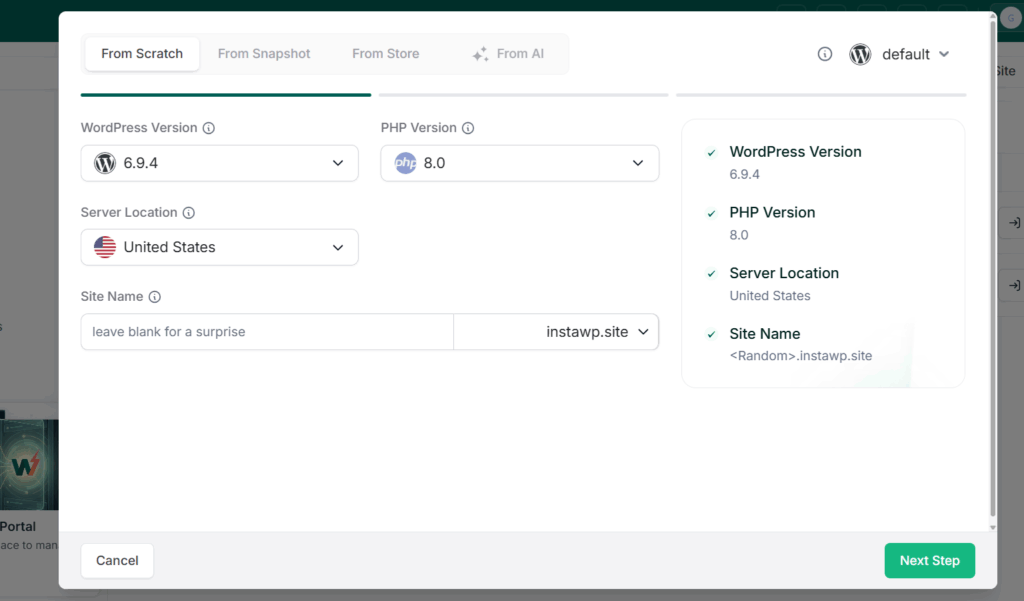
Because you can manage multiple client sites from one dashboard, the operational cost of running 5 sites or 50 is roughly the same. Adding a card unlocks $25 in free credits, so you can test the model with real client sites before committing a rupee or a dollar of your own.
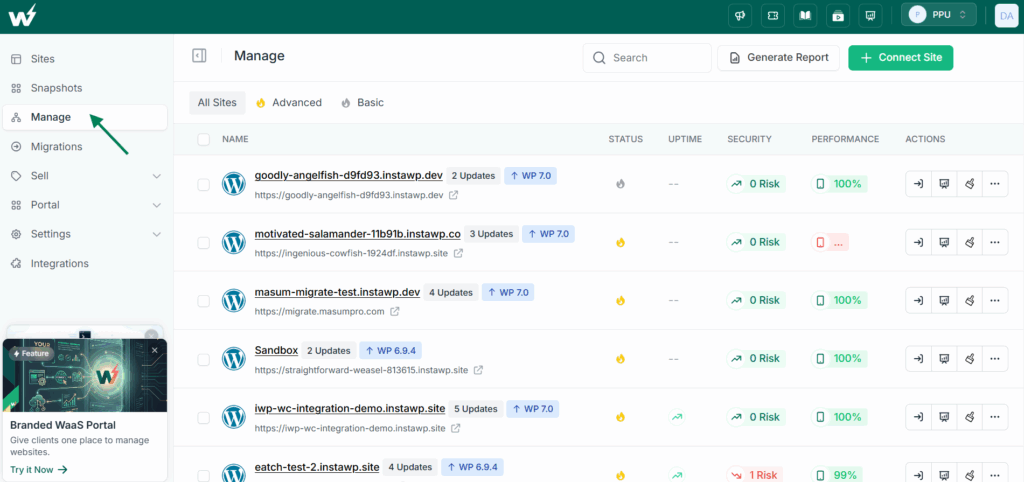
Best for: Established agencies that already manage client billing and want to capture hosting margin without building a full branded product yet. If you want to learn the mechanics, our guide to website reselling and hosting resale walks through the setup.
Model 3: The White-Label (WaaS) model
How it works: WaaS (Website as a Service) is the reseller model taken to its full conclusion. Instead of quietly hosting client sites at a markup, you build your own hosting product: your branding, your domain, your pricing plans, your checkout, and a self-service customer portal where clients sign up, pick a plan, launch a site from your templates, and pay you directly.
The underlying infrastructure is fully white-labeled, so your clients see your brand, not InstaWP’s.
Must Read: Create WaaS
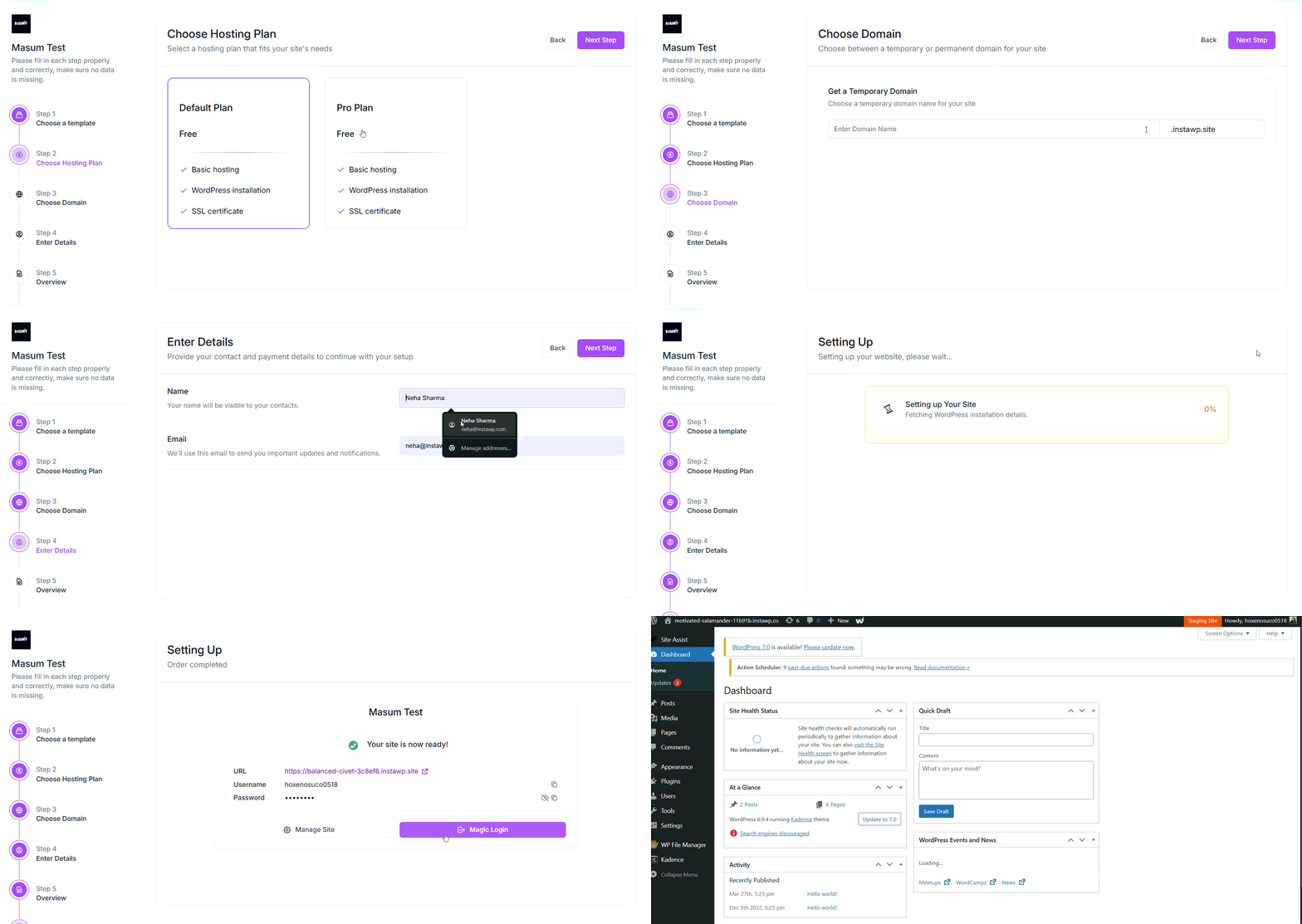
The economics: This is the highest-margin, most defensible model on the list. You are no longer billing for “a website you built.” You are selling a recurring product with its own brand equity. You set multiple plans and multiple templates, you can mark up domains, and you keep the full spread between your base cost and your retail price.
Done well, WaaS converts your agency from a project shop with feast-and-famine revenue into a product business with predictable monthly recurring revenue.
? Did you know?
InstaWP’s WaaS supports demo and trial sites that expire after a set window (from 30 minutes to 48 hours) and then convert into paid sites. A “try before you buy” demo flow is one of the most reliable ways to lift conversions, because prospects experience the product before they pay, instead of trusting a screenshot.
How to run it on InstaWP: The WaaS platform gives you everything natively: white-label branding, custom suffix domains in the format yourclients.yourdomain.com, multi-plan and multi-template configuration, a customer self-service portal, an agency admin dashboard, payment history, and demo-to-paid flows.
You can build the entire thing inside the InstaWP dashboard under Sell, or, if you want full e-commerce control, run it through WooCommerce with the InstaWP integration. For more advanced needs, an API-based path supports fully custom checkouts.
Best for: Agencies and MSPs ready to productize, scale beyond one-off projects, and build a recurring revenue asset with their own brand on it.
Building a WaaS product is exactly the kind of move the Agency Program is designed to support, with preferential pricing and a dedicated account manager to help you launch.
Join the Agency Program →Model 4: The Managed Care Plan model
How it works: Rather than charging for hosting as a separate line item, you fold it into a single monthly care plan that also covers updates, security, backups, performance monitoring, and a set number of support hours.
The client sees one predictable monthly invoice for “keeping my website healthy,” and hosting is just one ingredient inside it. This is the model that consistently produces the stickiest, highest-lifetime-value client relationships.
Must Read: WordPress Care Plans for Agencies: Packages, Pricing & Workflow
The economics: Managed WordPress Care plans typically run from $100 per month at the low end to $500 to $2,000 per month for serious plans that include real human support and proactive work.
Because the client is buying an outcome (a site that stays online, fast, and secure) rather than a commodity (raw hosting), they are far less price-sensitive and far less likely to churn. Your hosting cost becomes a small, fixed input into a much larger recurring fee.
| Care plan ingredient | InstaWP feature that powers it |
|---|---|
| Hosting + performance | Managed hosting with InstaCDN and Object Cache |
| Security | InstaShield WAF, DDoS protection, auto SSL, malware and vulnerability scans |
| Backups | Automatic backups with a synced shadow copy in a second region |
| Updates | Auto-update manager and scheduled core/plugin updates |
| Monitoring | Uptime monitoring, alert rules, and activity logs |
| Client reporting | Client-ready PDF performance reports |
How to run it on InstaWP: The Manage workflow was built for exactly this. Install the InstaWP Connect plugin on each site to manage a WordPress site from one dashboard, then layer on monitoring, scheduled updates, scans, and automated PDF reports you can hand straight to the client at the end of each month.
Pair this with hosting on InstaWP and your care plan ingredients all live in one place instead of across five separate tools.
Best for: Agencies focused on long-term client retention and recurring revenue who want hosting to be invisible inside a premium service.
Model 5: The Client-Owned, Agency-Managed model
How it works: The client owns and pays for the hosting account in their own name, and you manage the site on top of it. This is common with larger or more compliance-conscious clients (think healthcare, finance, or enterprise) who insist on owning their own infrastructure and never want to be locked to a vendor. You make your money on management and development, not on the hosting itself.
The economics: You forgo hosting margin entirely, but you also shed hosting liability and remove a common objection from enterprise clients (“we need to own our hosting”). The trade is clear: less recurring hosting revenue in exchange for access to bigger, more demanding accounts that pay well for management and custom work.
How to run it on InstaWP: Even when you do not host the site, you can still manage it. The InstaWP Connect plugin lets you bring any externally hosted WordPress site under management, so you get monitoring, staging, scans, and reports regardless of where the site physically lives.
You can also host a site inside a client’s own account when the situation calls for it, and use 2-way sync to push changes from your staging environment into the client’s live site without overwriting their content.
Best for: Agencies serving enterprise WordPress clients, regulated industries, or any client who contractually requires ownership of their infrastructure.
All five models compared side by side
| Model | Who bills the client | Your control | Margin | Effort | Best for |
|---|---|---|---|---|---|
| Referral | The host | Low | Low (commission) | Minimal | Freelancers, new agencies |
| Reseller | You | Medium | High (100% of markup) | Medium | Established agencies |
| White-Label (WaaS) | You, under your brand | Full | Highest | Higher upfront | Agencies productizing |
| Managed Care Plan | You (bundled) | High | High + sticky | Medium | Retention-focused agencies |
| Client-Owned | The client | Management only | None on hosting | Low (hosting) | Enterprise, regulated clients |
How to choose the right model for your agency
You do not have to pick just one. Most successful agencies run a blend: a managed care plan as the headline offer, a reseller or WaaS layer underneath it to capture hosting margin, and the client-owned model reserved for enterprise accounts that demand it. Use these quick rules to decide where to start.
- If you have fewer than 5 client sites and limited time: start with the Referral model and a couple of Reseller sites to learn the mechanics.
- If you already manage client billing: go straight to the Reseller model. It is the fastest jump in margin with the least new work.
- If you want predictable recurring revenue and high retention: build a Managed Care Plan with hosting baked in.
- If you want to scale into a product business: build a White-Label WaaS offering and treat hosting as your own SaaS line.
- If you serve enterprise or regulated clients: support the Client-Owned model for those accounts while running higher-margin models for everyone else.
Why “managed” hosting is non-negotiable for agencies
Every model above assumes one thing: that the underlying hosting is genuinely managed, not just a bare server you are expected to babysit.
The difference matters more for agencies than for anyone else, because you are not maintaining one site, you are responsible for the uptime, speed, and security of every client site at once. Unmanaged or cheap shared hosting shifts all of that burden onto you, and it quietly destroys your margin in support hours.
As a managed WordPress hosting provider, InstaWP handles the infrastructure layer so you can focus on clients. That includes a global CDN, enterprise security, automated backups, and a single dashboard to manage WordPress hosting across every client. Here is what is included on paid plans without extra setup.
119
CDN edge locations worldwide via InstaCDN
2-5x
Faster loads with Object Cache on dynamic sites
Up to 80%
Smaller images with the built-in Image Optimizer
Daily
Automatic backups with a shadow copy in a second region
You also get a proper development workflow on top of hosting: one-click WP staging from any site, the ability to create a sandbox for client demos in seconds, and 2-way sync so a content change on live never gets wiped out by a deploy. For an agency, that is the difference between confidently shipping changes and dreading every Friday push.
Managing client sites with AI (InstaMCP)
The newest leverage for agencies is AI-driven management, and this is where InstaWP pulls ahead of traditional managed hosts.
Every InstaWP site is MCP-ready with a single toggle and no server setup, which means you can connect an AI assistant directly to a client’s WordPress site and have it perform real work: auditing plugins, drafting content, running checks, and diagnosing issues in plain language.
? Did you know?
InstaMCP connects AI clients such as Claude Desktop, Claude Code, Claude.ai, Cursor, VS Code, GitHub Copilot and ChatGPT directly to your WordPress sites, with setup guides for 14 of them. For agencies managing many sites, that means you can use AI as a force multiplier across your whole portfolio, not just one site at a time.
The point worth repeating to clients and to yourself is this: AI managing your workflows is a huge accelerant, but it works best with a human owning the outcome.
A managed platform that is AI-ready lets your agency move faster on the routine work while you stay accountable for the result. That combination, AI plus a human in the loop, is exactly what makes the agency model stronger in 2026, not weaker.
How to get Started with InstaWP and Migrate Your Clients
Switching hosting providers is the single biggest fear that stops agencies from capturing hosting margin, and it usually comes down to one worry: breaking a client’s live site in the middle of the move. InstaWP is built to remove that fear.
You migrate onto a copy first, test it fully, and only point the domain over once you are certain everything works, so the live site never goes down during the process. Here is the complete path, from creating your account to running your full client portfolio from a single dashboard.
Step 1: Create your InstaWP account
Sign up for a free InstaWP account using your email or a Google login.
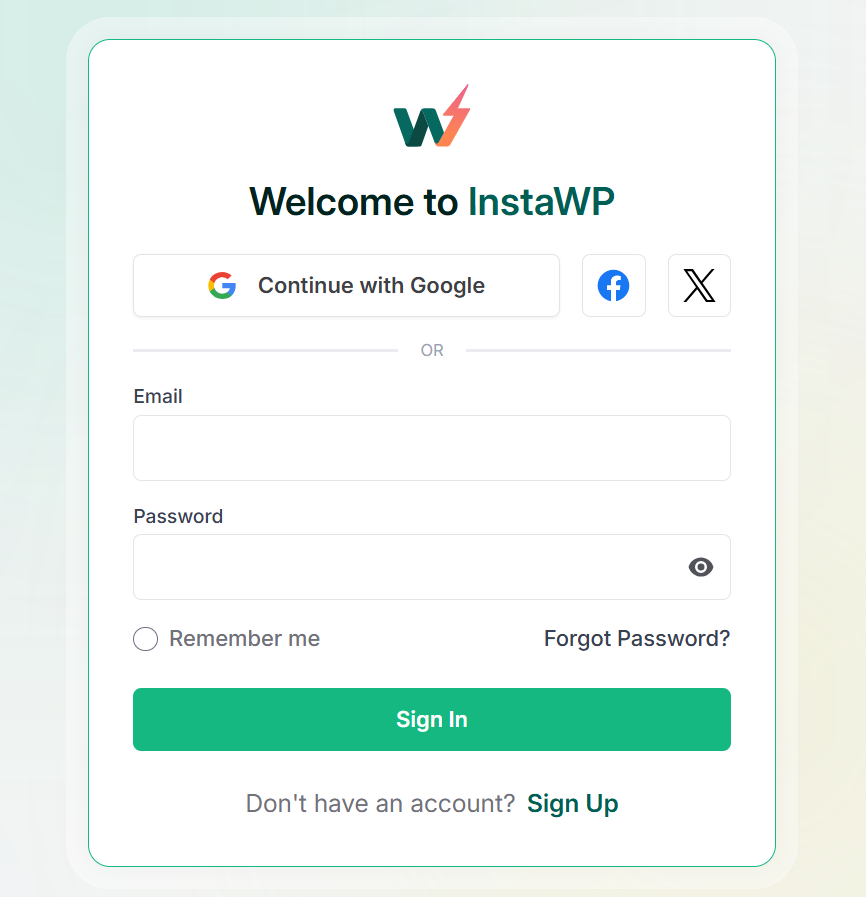
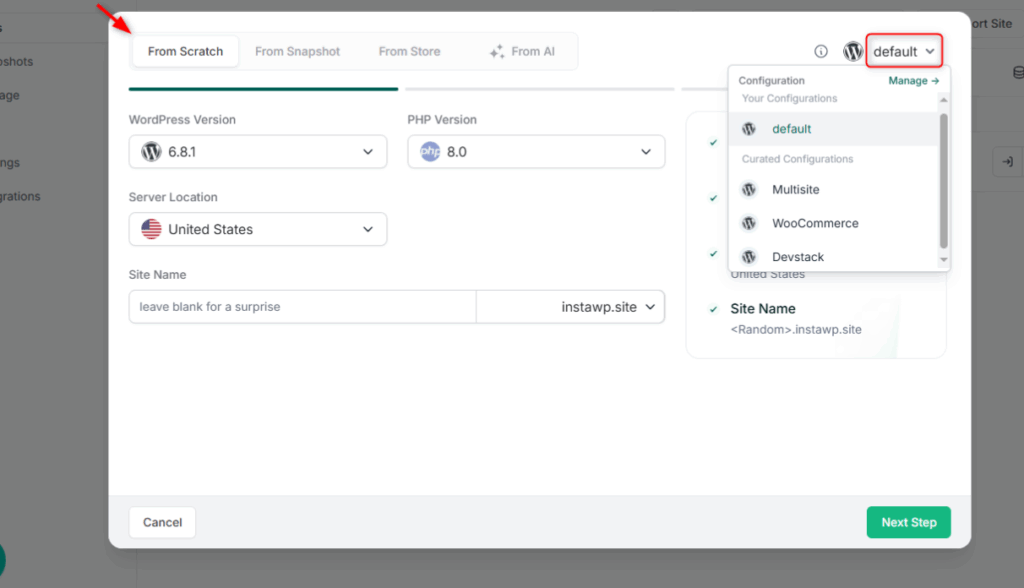
You do not need a card to start, and you can immediately create a sandbox site to get a feel for the dashboard before you commit any client work to it. This first sandbox is also a useful scratch space for testing the migration flow on a throwaway site before you touch a real client.
Step 2: Add a payment method and claim your free credits
Adding a card unlocks $25 in free credits and gives you access to the paid plans where managed hosting features (CDN, security, daily backups, Object Cache) live.
InstaWP bills pay-as-you-go, charged daily per active site at a rate of the monthly plan price divided by 30, so you only ever pay for sites that are actually live.
Watch the video below to understand how billing works at InstaWP.
For an agency this matters: you are never locked into a fixed block of “reseller slots” you have to fill, and spinning a site up or down adjusts your bill automatically.
Step 3: Apply for the Agency Program before you migrate
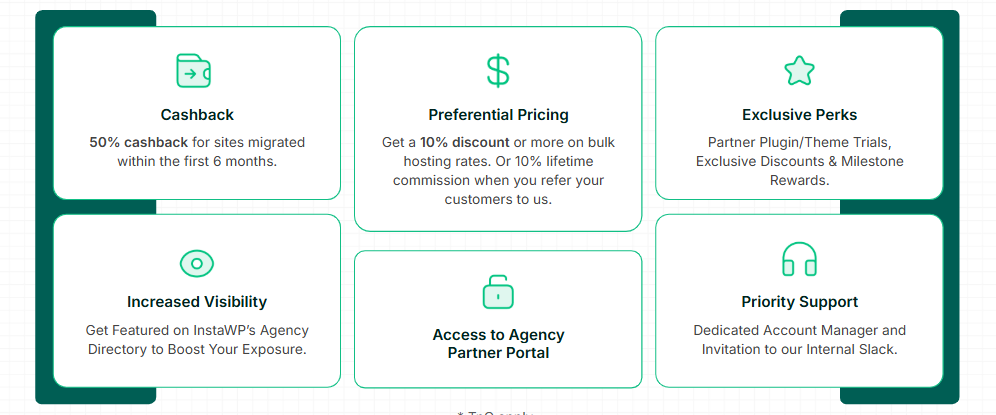
Do this before moving any sites, not after. The Agency Program unlocks preferential pricing, a dedicated account manager, the partner portal, a private partner Slack, and most importantly for this stage, 50% cashback on sites you migrate within your first six months.
Because that cashback is tied to migrations, applying first means every client site you bring over starts qualifying for it from day one. Applying after you have already moved everything leaves money on the table.
Book a call to learn more about the agency program.
Step 4: Inventory your client sites and right-size each plan
Before migrating, list every site you plan to move along with its current host, approximate storage size, monthly traffic, and whether it is dynamic (WooCommerce, membership, LMS, or community sites) or mostly static.
Then match each one to the appropriate InstaWP plan: Starter for small brochure sites, Plus and above for anything that benefits from Object Cache, and Pro or higher for heavier stores and high-traffic sites. Right-sizing at this stage is what protects your margin once you start reselling, so it is worth ten minutes per site now.
Step 5: Choose your migration method
InstaWP gives you three ways to migrate, and you can mix them across your portfolio depending on the site.
The recommended method is the 1-click migration which is free and works from almost any host. You install the InstaMigrate plugin on the source site and it packages and pushes the site to InstaWP for you.
Must Read: Import Site to InstaWP from Live Website (Automated)
The second method is importing a backup or export file (supported up to 512 MB), which is useful when you already have a recent backup or the source host makes plugin installation difficult.
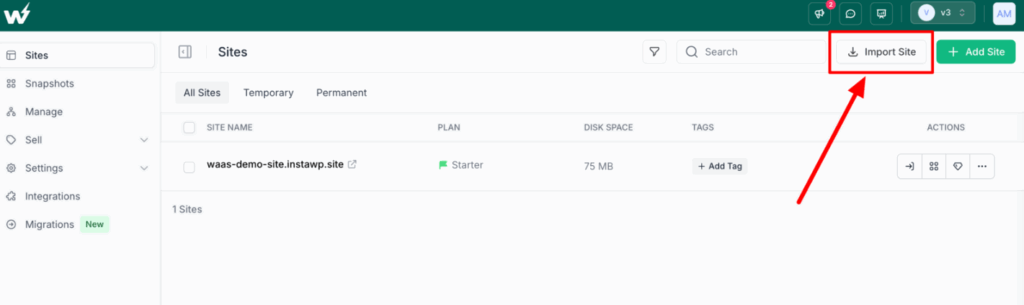
The third method is free migration assistance, where the InstaWP team handles the move for you. This is the right choice for large stores, complex setups, or when you simply want to hand off the work and focus on clients.
Step 6: Migrate your first client site
Start with a single, low-risk site so you can validate the whole flow before doing it at scale. The key point to reassure clients about: the original live site stays online and untouched throughout, because you are working on a copy, not the original.
Step 7: Test the migrated copy on its temporary URL
Once the migration finishes, your copy is available on a temporary InstaWP URL. This is your safety net. Walk through the site exactly as a visitor and as an admin would: check every key page and menu, submit the contact forms, run a test transaction if it is a WooCommerce store, confirm media and images load, and verify that plugins and the theme behave as expected.
Because the client’s real site is still live on the old host, you can take as long as you need here without any pressure.
Step 8: Map the client’s domain and let SSL provision
When the copy checks out, map the client’s domain to the InstaWP site. SSL certificates are provisioned and renewed automatically, so you do not need to handle certificates manually. A useful tip just before this step: lower the DNS TTL on the domain a day in advance so that when you do cut over, propagation happens quickly rather than dragging on for hours.
Watch the video tutorial to map a domain on InstaWP.
Step 9: Update DNS and go live
Point the domain’s records to InstaWP and wait for propagation. Once it resolves, confirm the live site is now being served from InstaWP and run one more quick pass over the critical pages and checkout. Keep the old hosting account active for a short overlap period (a few days is plenty) as a fallback, then cancel it once you are confident the cutover is clean.
Step 10: Turn on the managed hosting layer
With the site live, confirm the managed features that justify your hosting price are switched on: the global CDN for speed, Object Cache on dynamic sites for faster loads and fewer database queries, the Image Optimizer for lighter pages, automatic backups with the synced second-region copy, and InstaShield security with its WAF and DDoS protection.
These are the things that let you sell hosting as a premium managed service rather than a commodity.
Step 11: Set up your chosen hosting model
Now connect the site to the model you picked earlier. For the Reseller model, set the price you bill the client and add the site to your client billing. For a Managed Care Plan, enable uptime monitoring, alert rules, scheduled updates, security and vulnerability scans, and turn on the client-ready PDF reports you will send each month.
For a White-Label WaaS offering, configure your branding, pricing plans, templates, and customer portal under the Sell workflow so the site becomes part of your own branded product.
Step 12: Establish your ongoing change workflow
Set up a staging environment for the site so future changes never go straight to the client’s live site. With one-click staging plus 2-way sync, you can make edits on staging, review them as individual changes, and push only those changes to live without overwriting new content, orders, or comments that came in while you were working.
This is the workflow that keeps you out of the “I broke the client’s site” situation for the entire life of the account.
Step 13: Migrate the rest of your portfolio and manage everything from one dashboard
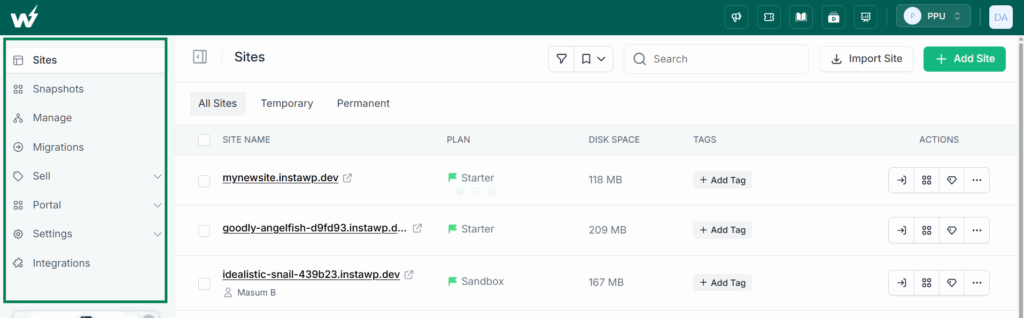
With the first site proven, repeat the process for your remaining clients. From that point on, every site lives in one dashboard where you handle hosting, staging, monitoring, backups, scans, and reporting together, instead of logging into five separate tools and as many hosting panels. This single-pane-of-glass setup is what makes managing 50 client sites feel closer to managing five.
Conclusion: pick a model, then make hosting pay
The agencies that win in 2026 are not the ones with the cheapest hosting. They are the ones who treat hosting as a deliberate part of their business model rather than an afterthought.
Whether you start with a simple referral, jump straight to reselling, build a managed care plan, or launch a full white-label WaaS product, the goal is the same: capture the recurring margin that is otherwise leaking to a third party, on infrastructure that does not create new work for you.
InstaWP gives you the managed hosting layer, the management dashboard, the migration tools, the WaaS platform, and the AI capability to run any of these models from one place. The Agency Program is where it all comes together, with the pricing, cashback, and support to make whichever model you choose more profitable from day one.
Start running a more profitable agency today
Apply for the InstaWP Agency Program and get the pricing, cashback, and partner support to make hosting work for you, not against you.
Apply for the Agency Program →Frequently asked questions
What is the best hosting model for a small WordPress agency?
For most small agencies, the Reseller model is the best starting point. You already manage the client relationship, so adding a hosting markup is the fastest way to turn hosting from a cost into recurring profit. As you grow, you can layer a Managed Care Plan on top or move into a full white-label WaaS product.
How much margin can an agency make reselling WordPress hosting?
Because InstaWP uses per-site pricing, your margin is simply the difference between your base plan cost and your client price, and you keep 100% of it. As an example, hosting a site on a $9 per month plan and charging the client $25 per month yields $16 per site in monthly margin, which across 20 sites is $3,840 in recurring annual profit.
What is WaaS (Website as a Service)?
WaaS is a model where you sell websites as a recurring subscription under your own brand instead of as one-off projects. With InstaWP’s WaaS platform you get white-label branding, your own pricing plans and templates, a customer self-service portal, demo-to-paid flows, and an agency admin dashboard, so you can run your own hosting product without building the infrastructure yourself.
Can I manage client sites that are hosted elsewhere?
Yes. The InstaWP Connect plugin lets you bring any externally hosted WordPress site under management, so you can run monitoring, staging, scans, updates, and client reports regardless of where the site is hosted. This makes the Client-Owned, Agency-Managed model practical for enterprise clients who must keep their own infrastructure.
Is migrating client sites to InstaWP risky?
Migration is the most common worry, which is why InstaWP offers 1-click migration and free migration assistance. You can move a single client site first to confirm everything works before bringing your whole portfolio over, and the Agency Program adds 50% cashback on sites migrated in your first six months to make the switch even easier.