If you’re searching for the best WordPress directory plugin, the Directorist vs HivePress debate is one you’ll run into quickly. Both are strong contenders, helping you build business directories, classified websites, job boards, service marketplaces, and niche listing platforms.
Both have been around long enough to build real user bases and proven track records. But once you install them and start configuring real features, the differences show up fast.
If you’re specifically looking for a Directorist alternative, or trying to decide which is the best business directory plugin WordPress has to offer in 2026, we tested both in identical conditions to see how they compare beyond marketing pages.
Here’s what actually stood out.
Table of Contents
Quick Overview
HivePress is a flexible WordPress directory plugin built for both beginners and advanced users. It ships several essential features for free that competing plugins charge for, offers lifetime licenses across all paid extensions, and is built on clean, well-structured code that developers genuinely enjoy working with.

Directorist is a feature-rich directory plugin with deep Elementor integration and an extensive library of premium extensions. It runs on a subscription-based pricing model, with add-ons available individually or in bundles, though a lifetime option is also available.

Both are actively maintained, offer official themes built by their core teams, and can handle a wide range of directory types. The real differences come down to what’s included at each price tier and how each team handles support.
Testing the Contenders: Our Methodology
We set up a staging site on InstaWP to compare these two plugins. Creating staging sites on InstaWP is effortless, so you don’t have to worry about configuring staging servers or handling the usual setup overhead.

If this is your first time building a directory site and you’re deciding between HivePress and Directorist, InstaWP makes the staging-to-production journey straightforward. You can start in staging, iterate safely, and when you’re ready to go live, move to production by upgrading your plan and choosing the production hosting that fits your requirements.

We installed each plugin, activated its official theme, configured common directory features, and tested the experience from both the admin and front-end sides.
Free vs. Paid: Where the Real Differences Hide

The free vs. paid feature split is where these directory plugins diverge most visibly, and where your real cost calculation begins.
HivePress includes a generous free tier. Out of the box, you get:
- Custom listing fields and categories
- Front-end submission and user dashboards
- Search and filtering
- Advanced review-and-rating system with custom criteria
- Vendor profile custom fields
- Claim listings
- Paid listing monetization
- Mailchimp integration
- reCAPTCHA spam protection
Directorist’s free version covers the essentials:
- Custom listing fields and categories
- Front-end submission and user dashboards
- Search and filtering
- Basic review system
- Social links and import/export
Advanced review criteria, claim listings, monetization, Mailchimp integration, and reCAPTCHA all require paid extensions.
If you’re testing a directory concept or keeping costs tight, HivePress lets you launch with monetization, spam protection, and vendor claim functionality already working. With Directorist, you’ll likely need several paid add-ons before reaching the same baseline.
What’s in the Premium Libraries
Both plugins have a solid premium extension ecosystem. The distinction isn’t the range, it’s what you need to purchase just to get going.
HivePress extensions cover every major directory use case. Some of the options include:
- Marketplace turns your directory into a fully functional peer-to-peer platform where vendors can sell services or products directly;
- Bookings adds scheduling and appointment functionality, letting users book time slots directly through listings;
- Memberships restricts access to listings or features based on subscription plans, ideal for monetizing a gated directory;
- Requests enables a reverse marketplace model where buyers post what they need, and vendors respond with offers;
- Search Alerts notifies users by email when new listings or requests match their saved search criteria, keeping them engaged without returning to the site.
Directorist has a comprehensive extension library of its own. Some of the available options include:
- Business Hours displays opening and closing times on each listing;
- Analytics provides listing owners with detailed performance data, including views, clicks, and user interactions;
- Bookings adds appointment and reservation functionality directly to listings;
- Mark as Sold allows vendors to flag listings as no longer available;
- Advanced Reviews upgrades the basic review system with custom criteria.
Extensions are available individually or bundled with subscription plans. If you already know exactly which extensions you need, the bundle pricing can make sense.
| Feature | HivePress | Directorist |
| Custom Fields | ✅ | ✅ |
| Front-End Submissions | ✅ | ✅ |
| Reviews & Ratings | ✅Advanced (free) | ✅Basic (advanced is paid) |
| Vendor Custom Fields | ✅ | ❌ |
| Claim Listings | ✅ | ? |
| Monetization options | ✅ | ? |
| Mailchimp Integration | ✅ | ? |
| reCAPTCHA Integration | ✅ | ? |
| Social Links | ? | ✅ |
| Import/Export | ? | ✅ |
| Business Hours | ? | ? |
| Analytics | ? | ? |
How You’ll Actually Build Your Site
How you build your directory’s visual presentation matters, especially if you’re not a developer, and this is where the two plugins take noticeably different paths.
HivePress builds around Gutenberg, WordPress’s native block editor. If you want to keep your site lean and avoid the performance overhead that page builders can add, the block-based approach is a natural fit. It also works with Elementor, though without the same depth of integration.

For users who value a lightweight setup and want to stay aligned with where WordPress is heading, it’s the more future-proof choice.

Directorist has put real investment into Elementor. If you’re already working inside its drag-and-drop interface, you’ll feel at home, dedicated widgets and design controls integrate directly into your existing workflow, making it straightforward to build custom listing layouts without touching code.

If visual drag-and-drop building is central to your process, Directorist has a clear advantage. If you prefer a WordPress-native architecture, HivePress aligns more closely with core development standards. There’s no universal answer here, just different priorities depending on how you like to work.
One Team, One Theme, Zero Conflicts
When the theme and plugin come from the same developers, compatibility is a given. Updates ship together, features are tested against each other, and you’re not left troubleshooting conflicts between two different codebases.
HivePress offers six purpose-built themes, each designed with layouts and templates tailored to its specific use case:
- ListingHive: general-purpose directories, similar to Yelp or Yellow Pages;
- RentalHive: rental and booking platforms, similar to Airbnb or VRBO;
- ExpertHive: service marketplaces, similar to TaskRabbit or Thumbtack;
- TaskHive: freelance and gig platforms, similar to Fiverr or Upwork;
- MeetingHive: appointment booking, similar to Vagaro or Booksy.
- JobHive: job boards, similar to Indeed or LinkedIn Jobs.

Directorist’s themes, including dList, dService, and others, cover similar ground, with directory-specific layouts and visual foundations that help you reach a professional-looking launch without a custom design.

Support: What Happens When Things Break
HivePress gives you multiple ways in:
- Community forum: an active space where users, developers and the core team share solutions and troubleshoot together;
- Email support: direct access to the HivePress team for issues that need a human;
- 24/7 AI assistant: trained on HivePress-specific documentation, it answers quick questions at any hour, genuinely handy when you’re deep in a build and just need a fast answer;
- Documentation library: covers everything from initial setup to advanced customization;
- GitHub code snippets: a ready-to-use library of common customizations, so developers don’t have to start from scratch
Directorist provides ticket-based support along with a documentation library that covers setup, configuration, and premium extensions. Users submit requests through official support channels, and the team responds directly to tickets.
For standard setup questions, the documentation is usually sufficient, but as with most commercial plugins, response times and depth can vary depending on the complexity of the issue.
Either way, test pre-sales communication with both teams before you buy. Send a specific technical question and see how quickly and accurately they respond. That interaction tells you more about what ongoing support will actually look like than any comparison article will.
Developer Experience: Under the Hood
For non-developers, both plugins work fine through settings and add-ons. But when you need to push beyond what’s available in the admin panel, code quality becomes important.
This Directorist alternative is built to be extended. There’s a comprehensive snippet library on GitHub, hook reference documentation, and a code structure that’s logical and predictable enough to navigate without much frustration.

Most users never touch any of this, but knowing it’s there when you need it is reassuring. The framework is designed to be extended cleanly rather than hacked around.

Directorist skews toward configuration through settings and add-ons rather than code-level extension. For many users that’s ideal, you can achieve most customizations through the admin interface without needing a developer. If you ever need custom functionality that doesn’t exist as a setting or extension, the path forward is less clearly defined, which can be a limitation on more complex builds.
Pay Once or Pay Forever: Licensing Compared
Subscription fatigue is real in 2026, and worth thinking through before committing to any directory plugin for WordPress.
HivePress uses lifetime licensing as its standard model. The core plugin is free. HivePress extensions run $29–$39 as one-time purchases with lifetime updates.

Themes cost $69–$89 and are bundled with premium add-ons. Everything comes with a 30-day money-back guarantee, a full month to test in production before you’re committed.
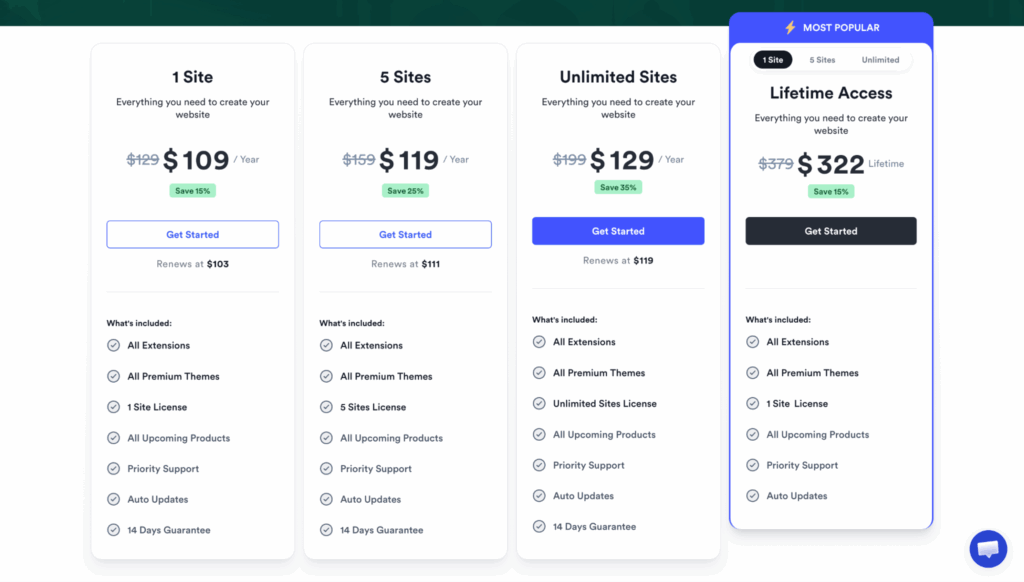
Directorist primarily operates on subscriptions. The one-site plan is $109/year and covers the plugin plus all premium themes and extensions. A lifetime plan is available at $322 for one site, but there’s a notable catch: Directorist doesn’t offer refunds on lifetime purchases.
If you buy it and later decide it’s not the right fit, that investment doesn’t come back. Subscription refunds are capped at 14 days, compared to HivePress’s 30.
In an era where nearly every tool wants a recurring slice of your monthly budget, a one-time payment model is a breath of fresh air.
Which Plugin Should You Choose?
Both can build excellent directory websites. The right call depends on your workflow, budget, and what you need included from day one.
- Go with HivePress if you want more features included for free: monetization, claim listings, advanced reviews, spam protection. The lifetime pricing keeps costs predictable, the 30-day refund window gives real breathing room, and Gutenberg integration keeps things lightweight. Developers will appreciate the clean codebase when customization comes up. As a Directorist alternative, it’s the obvious first stop.
- Go with Directorist if you’re already deep in Elementor and want visual customization with dedicated widgets. It’s also worth a close look if specific extensions in the Directorist library map directly to your use case and subscription pricing fits how you already manage software costs.
Don’t Just Take Our Word for It
Read recent user reviews before you finalize anything. Check WordPress.org for both plugins, filtering to the last six months for current feedback. Browse Reddit threads in r/WordPress, unfiltered discussions from actual site owners tend to surface things that comparison articles miss.
Pay attention to support patterns: how quickly do issues get resolved, and do they actually get resolved or just go quiet? Update reliability matters too, do new versions land cleanly or break things? A team’s character shows in how they handle problems, not in how they present when everything’s working perfectly.
Final Thoughts
In the Directorist vs HivePress matchup, both are legitimate answers to the question of which is the best directory plugin for WordPress. The choice isn’t really about capability, it’s about approach.
HivePress is the leaner, more wallet-friendly option: a generous free tier, clean extensible code, and a licensing model that doesn’t come back to bite you every January.
If you want a WordPress directory plugin that ships more out of the box and keeps long-term costs predictable, it’s a strong place to start. For anyone still weighing their options, HivePress is worth serious consideration as a Directorist alternative.
Directorist is the seasoned pick for Elementor-first workflows, with deep visual customization and a modular extension library. If drag-and-drop control is your priority and subscription pricing works for your budget, it holds its own.
Either will hold up in production. Consider your budget, technical comfort level, and how many directories you’re planning to build, and once you’ve made that call, the next step is finding the right home for it. InstaWP offers hosting plans built around WordPress, a natural next step once you’ve picked your plugin.