

Improve your WordPress SEO: Write better content and have a fully optimized WordPress site using the Yoast SEO…
About Insert Headers And Footers
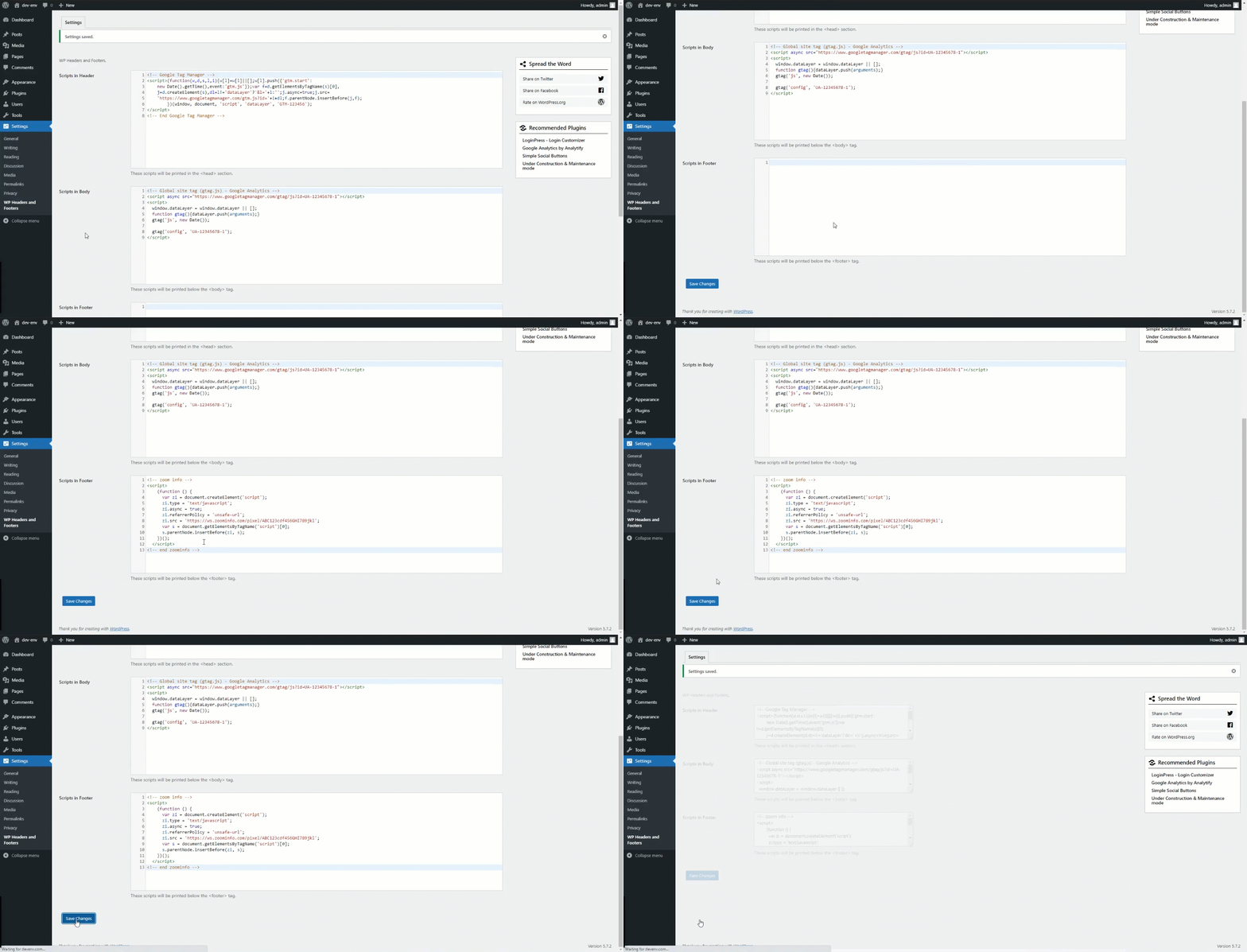
The WP Headers and Footers plugin allows you to easily insert code into the headers and footers of your WordPress website, such as Google Analytics tracking code, Facebook Pixels code, and more. You can also add custom CSS and scripts to your website without having to edit the theme files. If you find the plugin useful, please consider leaving a good rating and checking out the developer's other plugins.Screenshots


Frequently asked questions
What does the WP Headers and Footers plugin do?
The WP Headers and Footers plugin helps you to insert code to your WordPress website headers and footers section like Google Analytics tracking code, Facebook Pixels code, Google Optimize code for A/B testing, Custom CSS code, and more. You don’t need to edit the theme files to insert the code.
What sections of a WordPress website can I insert code to using this plugin?
You can insert code to the headers, footers, and body section of your WordPress website using this plugin.
What are the features of the WP Headers and Footers plugin?
The features of the WP Headers and Footers plugin include inserting code to WordPress headers and footers, inserting Google Analytics code to any WordPress theme, inserting Facebook Pixels code, adding Google Optimize code for A/B testing, adding Google search console authentication code for verification, adding custom CSS, scripts, and HTML to your website, inserting Google Tag Manager code/script, adding Microsoft Clarity tracking code, inserting code to the website body section, adding Bing webmaster tool code for website verification, and adding Google AdSense code.
How can I leave a rating/review for the WP Headers and Footers plugin?
If you find our plugin useful, please leave a good rating/review.
What are some other plugins developed by the same company?
Some other plugins developed by the same company include Analytify - Google Analytics Plugin, LoginPress - For Custom login page and login page security, Simple Social Buttons - Plugin for Social share buttons and social icons, Related Posts Thumbnails Plugin - For related posts/products, and Under Construction, Coming Soon & Maintenance Mode - Plugin for Under construction & Coming soon page.
Changelog
3.1.3 – 2025-08-06
- Bugfix: Fixed download log file functionality issue.
- Enhancement: Improved data validation and security measures.
- Enhancement: Addressed RTL layout styling inconsistencies in admin dashboard.
3.1.2 – 2025-04-18
- Security Fix: Sanitize option value from debug mode.
- Enhancement: Update Languages (POT) file.
- Compatibility: Compatible with WordPress 6.8
3.1.1 – 2025-01-03
- Bugfix: PHP Warning for translation hook.
3.1.0 – 2024-12-04
- New Feature: Introduced new option to reset the scripts/settings of the plugin.
- Compatibility: Compatible with WordPress 6.7
3.0.0 – 2024-09-11
- Security Fix: Fixed Opt-out and Opt-in consent.
- Enhancement: Code re-factorization and optimization.
2.2.2 – 2024-08-22
- Enhancement: Code re-factorization and optimization.
- Compatibility: Compatible with WordPress 6.6
2.2.1 – 2024-07-30
- Enhancement: Apply min/max limit for the script priority value.
- Compatibility: Compatible with WordPress 6.6
2.2.0 – 2024-03-18
- Enhancement: Provided admin role access in multi-site to update scripts.
- Enhancement: Addressed dashboard style issue to prevent text overflow.
- Enhancement: Optimized code for improved performance.
- Compatibility: Compatible with WordPress 6.5
2.1.1 – 2024-01-09
- Bugfix: Warning with PHP 8.3 in Diagnostic log.
- Enhancement: Update data in Diagnostic log.
- Compatibility: Compatible with PHP 8.3 and WordPress 6.4
2.1.0 – 2023-11-07
- New Feature: Introduced an option for removing the scripts/settings during un-installation of the plugin.
- Compatibility: Compatible with WordPress 6.4
2.0.3 – 2023-10-26
- Enhancement: Introduced diagnostic log feature helps in product support.
- Compatibility: Compatible with WordPress 6.3
2.0.2 – 2023-08-09
- Enhancement: content updates.
- Compatibility: Compatible with WordPress 6.3
2.0.1 – 2022-11-02
- Enhancement: Update Languages (POT) file.
- Compatibility: Compatible with WordPress 6.0
2.0.0 – 2022-05-19
- New Feature: Introducing settings to set the priority for each header, footer or body script’s location.
- Enhancement: Introducing new dashboard design layout.
- Enhancement: Added a review notification for administrator only.
- Compatibility: Compatible with WordPress 6.0
= 1.3.2 – 2022-02-18
* Enhancement: Added a filter wp_hnf_header_script to enhance the header scripts.
* Enhancement: Added a filter wp_hnf_body_script to enhance the body scripts.
* Enhancement: Added a filter wp_hnf_footer_script to enhance the footer scripts.
* Compatibility: Compatible with WordPress 5.9.
= 1.3.1 – 2021-12-01
* Enhancement: Code Optimization.
* Enhancement: Add compatibility of Mozilla Firefox on dashboard settings.
* Compatibility: Compatible with WordPress 5.8.
* Compatibility: Compatible with PHP 8.0.
= 1.3.0 – 2021-06-05
* New Feature: Introducing Code Editor for writing scripts.
* Bugfix: Plugin language domain updated to ‘wp-headers-and-footers’
* Enhancement: Dashboard design updated.
* Enhancement: Code Optimization.
* Compatibility: Compatible with WordPress 5.7.
= 1.2.2 – 2021-04-04
* Compatibility: Compatible with WordPress 5.7.
* Compatibility: PHP 8.0
* Enhancement: Code Optimization.
1.2.1 – 2020-12-08
- Compatibility: Compatible with WordPress 5.6.
- Bugfix: PHP Error.
1.2.0 – 2020-12-08
- Bugfix: Remove PHP 7 deprecated function.
1.1.0 – 2020-03-21
- Compatibility: Compatible with WordPress 5.4.
- Enhancement: Dashboard Design updated.
1.0.0
- Initial Release.

