Revenue is key to every WordPress product company’s growth and survival. That is not to say that boosting it is easy, though everyone thrives too. The intrigue is fun, and the result is mixed.
Have you been struggling to boost your revenue?
Guess what? It is, however, possible to boost WordPress product revenue by 200%, and that is what we’ll be looking at in this article.
We will showcase the numbers involved in how WordPress product companies develop, demonstrate, and sell plugins.
Build a Solid WordPress Plugin or Theme
A good product is often presentable and has a greater shot at selling than a poorly made product.
Think about the fact that the world of WordPress plugin development is saturated right now. In the WordPress plugin directory alone, there are over 60,000 free and premium plugins to choose from. As a result, standing out in such a crowded marketplace has become a crucial challenge for developers and businesses in this domain.
Picture this: A small company with the idea of a revolutionary plugin sets out on a mission to take a considerable share of the WordPress plugins market. Building the product is just the tip of the iceberg; the real challenge lies in navigating the sea of competition and attracting users.
Differentiating a plugin from the multitude requires a combination of factors, including unique features, user-friendly interfaces, efficient performance, and effective marketing strategies.
This further begs another question;
Is Building a Good Product Enough?
The answer is No! There is zero doubt that a good product is a crucial factor in boosting WordPress plugin revenue in a competitive market as such. However, achieving significant revenue growth, such as a 200% increase, requires a strategic approach beyond product development.
Next Step: Market your WordPress Plugin/Theme Right
More than ever, your good WordPress products need marketing.
As posited above, building a great product is one step out of many steps to boost revenue. Marketing plays a crucial role in increasing visibility, creating awareness, and acquiring new users. It establishes credibility through consistent messaging, positive reviews, and testimonials, contributing to a positive brand image within the WordPress community.
Furthermore, marketing helps differentiate your product from competitors by highlighting unique features. It engages users through regular updates and educational content, fostering a connection that encourages retention and repeat business. Conversion optimization strategies ensure that users not only discover your product but also take desired actions, such as making a purchase.
How to Boost Your Revenue by 200% as a WordPress Product Developer?
As a WordPress product developer, the goal is not only to create a valuable product but also to ensure substantial revenue growth. Achieving a 200% increase requires a strategic approach that goes beyond product development.
What are the effective methods to boost revenue significantly, considering the competitive landscape of the WordPress ecosystem? From marketing strategies to customer engagement, each aspect plays a crucial role in realizing this ambitious growth target.
Know Your Target Users
Understanding your target audience and the demographics of potential customers is a fundamental step that significantly enhances your chances of breaking even and achieving substantial revenue growth.
By gaining insights into the characteristics, preferences, and behaviors of your audience, you can tailor your WordPress product to meet their specific needs.
1. Targeted Approach
A targeted approach allows you to create marketing messages that resonate with your audience, increasing the likelihood of capturing their attention and interest.
2. Customer’s Demography
Knowing your customers’ demographics helps in selecting the most effective channels for reaching them, whether through social media, online forums, or other platforms where they are likely to engage.
Ultimately, a deep understanding of your target audience enables you to refine your product features and user experience to align with their expectations. This customer-centric approach not only increases the appeal of your product but also fosters loyalty among users who feel that your solution addresses their unique requirements.
Address a Pain Point Comprehensively
Addressing a pain point comprehensively is a key strategy to boost revenue as a WordPress plugin developer. Let’s delve into this concept using a real-life scenario in the context of selling a WordPress plugin.
Imagine you are developing a plugin that enhances the security of WordPress websites. One common pain point for website owners is the increasing frequency of cyber threats and the potential vulnerability of their sites. Your plugin aims to comprehensively address this concern.
1. Identify the Pain Point and Offer A Solution
- Website owners are worried about the rising threat of cyber attacks and the security vulnerabilities of their WordPress sites.
- Create a robust security plugin with features like firewall protection, malware scanning, and real-time monitoring.
2. Identify How Your Product Defers From Others
- You want customers to know what uniqueness your WordPress product offers that other products don’t so hammer hard on that.
- Emphasize how your plugin goes beyond basic security measures. For example, it provides a detailed security dashboard, regular security audits, and automatic threat resolution.
3. Educate Users
Develop educational content on the importance of website security and the specific risks associated with WordPress sites. Use blog posts, video tutorials, or webinars to showcase your expertise in the field.
Build Your Product/Plugin Demo
For example, you have a Dynamic Content Showcase (DCS plugin)plugin designed to revolutionize how website owners display and manage dynamic content on their WordPress sites. It provides a versatile solution for showcasing various types of content, such as blog posts, portfolio items, testimonials, or product listings, in an engaging and customizable manner.
Building a WordPress product/plugin demo for this is a crucial step in the process of selling a WordPress plugin. It provides prospects with a firsthand experience of what you’ve built, offering them a tangible understanding of your product’s features and capabilities.
This interactive demonstration serves as a powerful marketing tool in the competitive landscape of WordPress plugin development.
Why Build a WordPress Product/Plugin Demo
Engage Prospects
A demo allows potential users to engage with your WordPress product in a practical way. They can navigate through Dynamic Content plugin features, explore functionalities, and experience the value your plugin brings in a safe sandbox environment.
Visual Representation
Seeing is believing. A demo visually represents the real-time usage of your Dynamic Content WordPress plugin. Prospects can witness how your product functions within a WordPress sandbox environment, making it easier for them to grasp its benefits.
Hands-On Experience
Providing a hands-on experience is invaluable. Prospects get to click buttons, explore settings, and witness the impact of your Dynamic Content Render plugin in a controlled environment. This direct interaction enhances their understanding and increases their comfort level with your product.
How to Set up a Plugin/Theme Demo using InstaWP?
InstaWP product/plugin demo feature is one of the best out there. The intuitive and user-friendly interface makes it all too easy to navigate through your plugin effortlessly.
Creating a demo for the Dynamic Content Render plugin using InstaWP involves setting up an interactive and visually appealing environment where users can explore the plugin’s features in a WordPress sandbox site. Here’s how you can set up a demo for this plugin.
To use the InstaWP product/plugin demo, you need to access your user dashboard by logging in. If you don’t already have an account, create one in seconds here.
Step 1: Create a New Site on InstaWP
1. Sign in to your InstaWP account and access your dashboard.
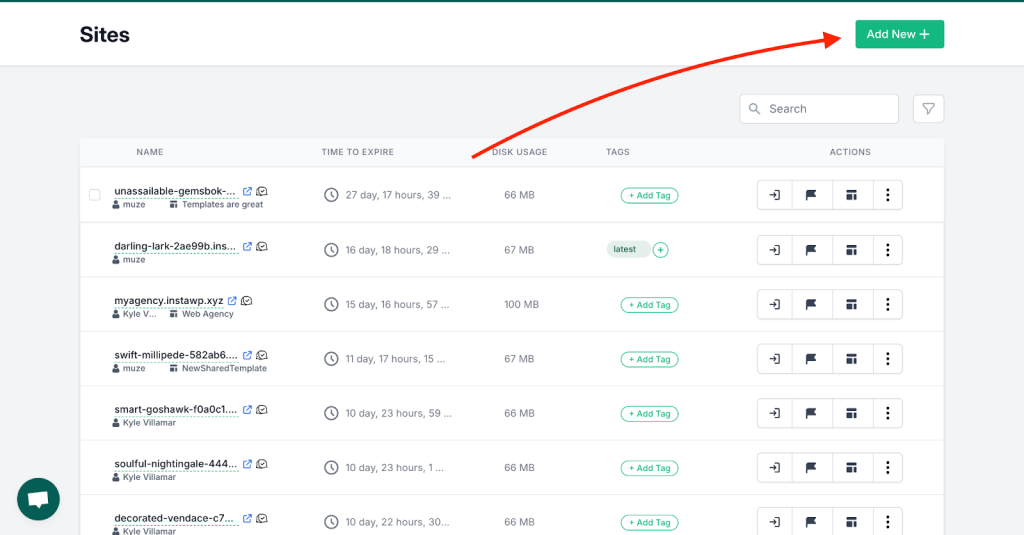
2. Next click on the “Add New” button to create a new site.
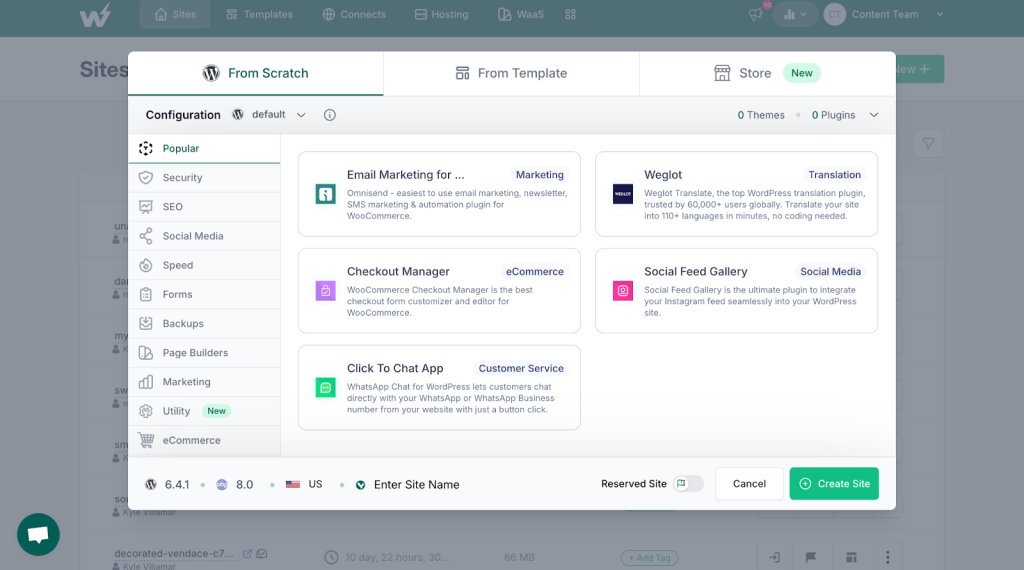
3. Explore the modal pop-up to configure the new site according to your needs.
Step 2: Set Up the Dynamic Content Plugin
1. Install the Dynamic Content Showcase plugin on the new site.
2. Configure the plugin settings, including content types, templates, and interactive elements.
3. Populate the site with sample dynamic content, such as blog posts, portfolio items, or products.
Step 3: Customize the Demo Site
1. Choose an appealing theme that complements the Dynamic Content Showcase plugin.
2. Customize the theme to create an engaging landing page for the demo users.
3. Add a welcoming message or instructions on the dashboard to guide users through the demo.
Step 4: Save as a Sharable Template Site
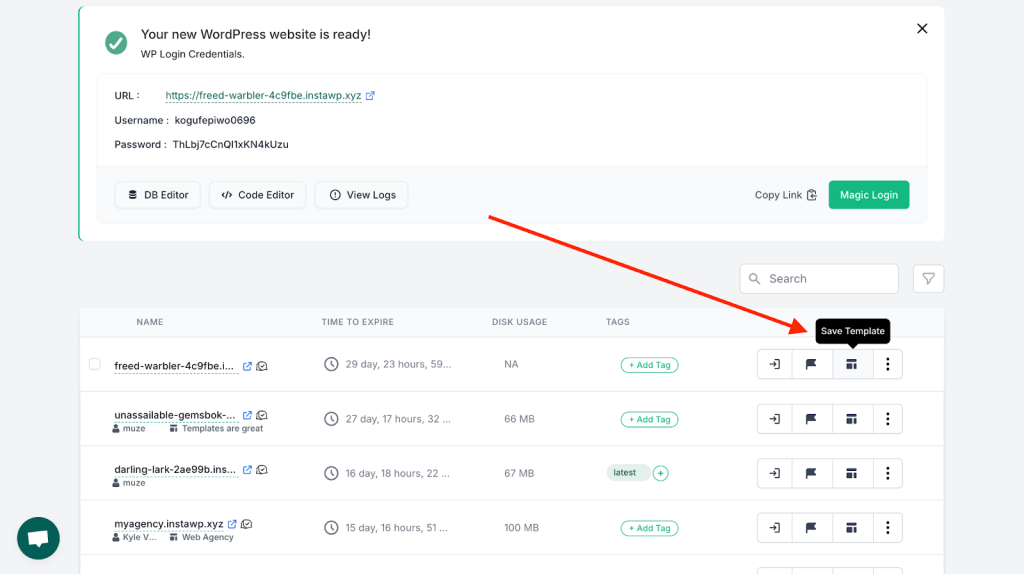
1. Navigate to the site you created and click on the “Save As Template” icon.
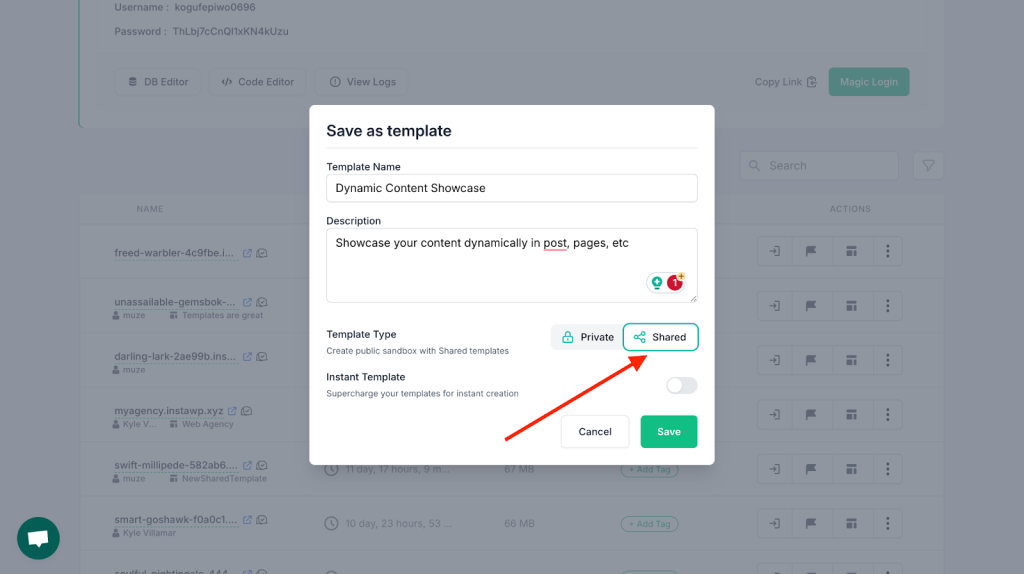
2. Enter a name and description for your template.
3. Toggle the Template Type to “Shared” to make the template sharable.
Save the template.
Step 5: Edit and Brand Your Template
1. Find your template on the Templates page and click on the “Edit” button.
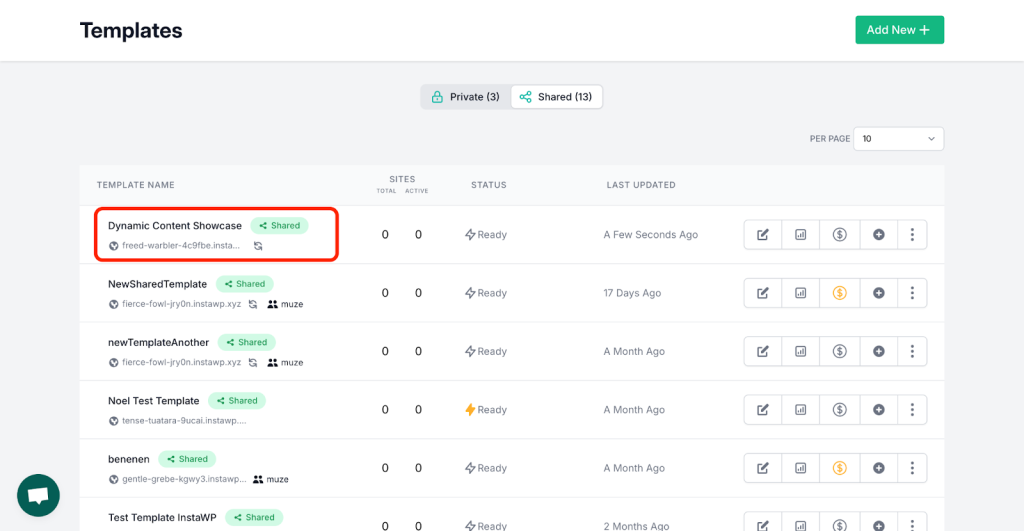
2. Customize the template setup, including branding, sale information, and additional details.
3. Add a logo or plugin thumbnail to represent the Dynamic Content Showcase plugin.
4. Customize the color scheme and add plugin images to the gallery.
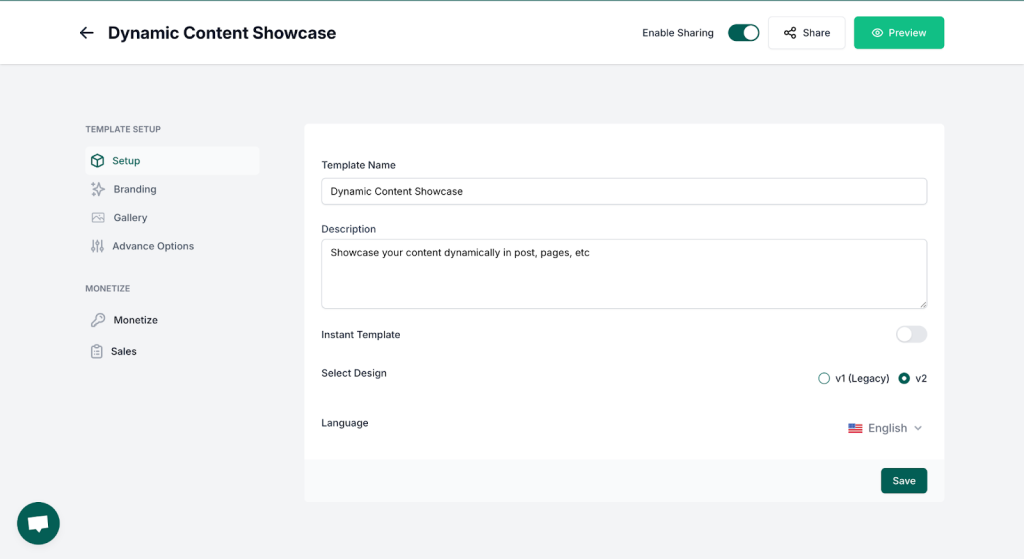
Save your customizations.
Step 6: Preview Your Plugin Demo
1. Click on the “preview” button to view your plugin demo.
2. Ensure that the user interface reflects the features of the Dynamic Content Showcase plugin.
3. Allow users to interact with the dynamic content, experiment with filtering options, and explore different templates.
4. Preview your plugin demo by clicking on the “preview” button
Now that your product/plugin demo is ready, you have successfully created a hands-on experience for potential users. This immersive demo allows them to interact with the plugin’s features, understand its capabilities, and make informed decisions about incorporating it into their WordPress sites.
Create Content that Attracts People
“Mastering WordPress Plugin Development: A Comprehensive Guide” is a content title that can attract people to your product. Creating compelling content is essential to attract people and generate interest in your WordPress plugin. However, the content you develop should not only highlight the value of your plugin but also engage and educate your audience. Here are a few examples:
Educate Users
1. Let’s assume your plugin helps solve security issues, it would make more sense to develop educational content on the importance of website security and the specific risks associated with WordPress sites. Use blog posts, video tutorials, or webinars to showcase your expertise in the field.
2. Offer insights into best practices, emerging trends, and challenges in the industry.
3. Use blog posts to subtly showcase how your plugin addresses specific issues or enhances the development process.
4. Use real-life case studies that demonstrate the impact of your WordPress plugin. Highlight success stories, challenges faced by users, and how your plugin effectively addressed those challenges.
5. Create engaging video tutorials that walk users through the features and functionalities of your plugin. Showcasing a WordPress plugin demo through video allows users to visually understand its capabilities. Include step-by-step guides and use cases to make the content more practical.
6. Leverage social media to create visual content, such as infographics short demos or snippet videos, to grab attention. You can begin designing with templates from Picsart or similar tools to quickly create engaging visuals that resonate with your audience. Encourage users to explore more by directing them to your website or demo page.
Create Content that Helps Users
Your content may be attractive does not necessarily translate to helping users. while establishing your WordPress plugin as a valuable solution, engage your audience by providing content that genuinely aids users in solving problems or enhancing their skills, you build trust and credibility. For example:
1. How-To Guides
Develop comprehensive how-to guides that address common challenges in WordPress plugin development. Break down complex processes and offer step-by-step instructions. If your plugin solves a particular problem, showcase how users can implement your solution effectively.
Check this “how-to-guide” title out – “How to Secure your Website: A Step-by-Step Guide to <your-plugin-name>Plugin Integration”
You can work on similar titled guides.
2. Q&A Sessions and Webinars
Host Q&A sessions or webinars where you address questions from the community. Provide valuable insights, share expert advice, and showcase real-life examples of how your plugin can address specific needs. Encourage audience participation.
3. Tips and Insights
Position your plugin as a tool that aligns with industry best practices by Offering insights into optimizing code, improving performance, or staying updated with the latest trends.
There are examples of content that helps users, like troubleshooting articles, and educational podcasts but in all, creating content that genuinely helps people in their WordPress plugin development journey not only attracts a relevant audience but also positions your plugin as a valuable asset in their toolkit.
Conclusion
In conclusion, the process of selling a WordPress plugin involves a multifaceted approach that integrates plugin development, demo creation, and content marketing strategies. Building a demo using InstaWP provides a hands-on experience for potential users, allowing them to explore the plugin’s features in a simulated environment.
This, coupled with insightful content creation emphasizing WordPress plugin development best practices and helpful resources, serves to attract, engage, and ultimately convert users.