As a WordPress agency or site owner, you are always in search of tools that allow effective site management.
When it comes to WordPress website management, a WordPress Staging site is a game-changer. Acting as a copy of your live, actual website, it offers you a secure platform to test updates, plugins, themes, and other WordPress changes without risking your main site’s functionality. But is it really necessary, especially if, say, you only have one website, for example?
Well, in a word, yes. Keep reading, and we’ll explore why staging a website for WordPress website management is essential for a seamless, risk-free experience for you.
Table of Contents
Key Takeaways
- Staging sites are a must for WordPress website management, offering a secure platform to test updates, plugins, themes, and more without risking the live site’s functionality.
- A good staging environment for WordPress simplifies the creation of WordPress staging sites, allowing for quick setup without the need for direct interaction with hosting providers.
- This tool embodies the concept of a “staging cloud,” providing simplified migration and backup features.
- Using staging sites, particularly through tools like InstaWP Connect, significantly makes your website workflow management better by providing a reliable testing environment.
- This facilitates error-free updates, client approvals before changes go live, and overall better management of website development projects.
Challenges of Managing a WordPress Website
So, how hard is it exactly to manage or maintain a WordPress site? Whether you’re an individual handling multiple websites or you own an agency with plenty of clients, we’re sure you’ve encountered the following difficulties or risks:
Unexpected Downtime
Every time you have to update a website, there will be downtime, right? However, if you make changes to the actual site and something goes wrong, there’s the real problem.
If the real site goes down, it will make many users unhappy, especially if you can’t put it up for a long time. Your client won’t be happy either, especially as they might experience a loss of sales as well as a negative site reputation with search engines.
Erroneous Updates
Updates or new features can sometimes cause errors. For example, if you try out a WordPress Beta version on the live site, you might discover that it’s not compatible. And if you do it on the actual site, you risk various disrupted functions or data loss.
Testing Limitations
Say you’ve discovered a new plugin or theme you want to pitch to your client. The best way to prove it’s good is if you test it out, right? But if you don’t have a WordPress staging environment, testing it on the live site is not a good idea since you risk stability and performance.
Security Issues
When you test changes and updates on a live site, it means you’re doing it on a site that’s accessible to practically everyone. That’s not a good practice since that means your website is vulnerable to cyber-attacks. It’s better to do testing on a staging site.
Plugin Conflicts
Not all plugins work well in relation to other plugins. Introducing a new plugin can cause conflicts, break site features, or cause general unexpected behavior. WordPress staging can help you test them better.
Theme Issues
If you’re using a custom theme or if you’ve customized a theme, updating it can change the whole appearance. This can lead to the website looking different from what customers are used to, leading them to doubt if it’s still the same website.
Performance Degradation
Aside from plugins, doing anything new to a live website may slow it down. This means customers will experience longer loading times and an overall poorer experience.
Negative SEO Impact
Anything that affects user experience badly also impacts SEO. Remember, every time a visitor navigates away from a site, search engines will analyze why they left. If they find that people are leaving because they can’t seem to trust the site or they had a poor experience because of updates or changes, the site can go down in rankings.
Backup and Recovery Challenges
Any decent WordPress developer knows that having a backup and a recovery copy of the live site is important, right? But sometimes, you just might have forgotten to do one. What if you do changes and it’s not good? You’re going to have a hard time restoring the website to its normal state.
Remember: clients won’t be happy if something goes wrong when changing a live site. You’ll have to be careful and make sure you update websites without causing any problems. This is why having a staging site is so important—you can test everything safely before making changes live.
What Is A WordPress Staging Site and How Does It Help Developers?
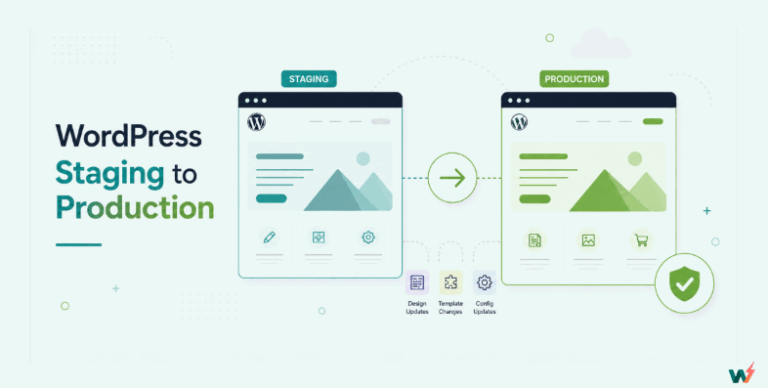
A WordPress staging site, also known as a staging environment, is basically a copy of your live site but in a private environment. This means you can test and make many changes all you want, and you keep your website safe! The staging site is also private to you, so you can prepare and perfect everything before showing it to your clients.
For developers, a staging site is incredibly helpful for the following reasons:
- You get a safe testing environment. As mentioned above, you can test new themes, plugins, or code without affecting your live site. This means no surprises for you or your visitors.
- You can prevent errors. Your live site stays safe and running even if something breaks on the staging site. Plus, you can fix any errors in your staging site before they go public, so site visitors will never experience them.
- You can check updates. Before you update your live site, you can check on them in the staging site. This way, you can find out if they work well with the rest of your site plugins and other customizations, if any, and don’t cause conflicts.
- You get increased confidence. As a developer, probably one of your worst fears is destroying a client site that you worked hard to build. But with a WordPress staging environment, you can experiment with all you want without pressure. With this approach, you can discover everything you need to know about the site!
- Staging sites are great for demonstrations. If you want to get your client’s opinion on changes you want to make, you can show it to them via the staging site instead of the live site. That will make them happy you didn’t make any unapproved changes and that their site is still running smoothly.
When should you create a staging site for WordPress?
As a developer, are you now seeing the advantages of creating a staging site? If yes, keep these situations in mind for getting a staging site:
- Before doing any major updates: Whenever you plan to update WordPress core, themes, or plugins, it’s wise first to test any change on a staging site. This helps ensure compatibility and functionality before applying any actual and permanent changes. You’ll be able to identify and fix any site-breaking problems before live site deployment.
- When implementing website redesigns or new features: If you’re planning a complete overhaul, significant design changes, or adding features like custom code and additional functionalities, a staging site allows you to work on these changes without disrupting the live site. You can take your time to perfect the new design before going live.
- When debugging: If the live site experiencing issues, instead of working on the live site, replicate the site first on a staging environment. This way, you can troubleshoot and resolve any problems without worsening the live site situation.
- If you’re going to launch a new site: Building a new WordPress site? Develop it first on a staging site to make sure you get everything right.
- During code testing: If you plan to change some CSS or other code, do it first on the live site replica. Do yourself a favor and lessen the risk of breaking the actual site.
- When doing regular maintenance and testing: Maybe your client is happy with the site and doesn’t want you to make any major changes. Great, right? Well, to make your client much happier, do periodic testing anyway. This way, you can always ensure compatibility and optimal performance.
Staging Environment Best Practices
To ensure your staging environment effectively mirrors your live site and supports a seamless development workflow, consider the following best practices:
- Keep the staging environment as close to the live environment as possible by regularly syncing data and settings. This includes themes, plugins, and content.
- Use the staging environment to test all changes, including updates, new features, and bug fixes, before applying them to the live site.
- Restrict access to the staging environment to only those who really need to use it so that you won’t experience unauthorized changes or leaks of potentially sensitive information.
- Where possible, use automated testing tools to run through common scenarios and catch issues before they affect the live site.
- Once testing is complete and changes are pushed to the live site, clean up the staging environment to prepare for the next round of testing.
By following these, you can maximize the effectiveness of your staging environment, ensuring a more reliable and efficient workflow for WordPress website management.
Effective Website Management with the help of WordPress Staging Site
Doing E WordPress website maintenance is a lot of work, but you should do it anyway. After all, you’ll make your client happier by making their website faster and more secure. Managing a WordPress website or websites effectively often hinges on thoroughly testing, updating, and making changes without disrupting the live site.
This is where a WordPress staging site becomes an invaluable asset because it lets you do the following:
- Safe Updates: Test updates and changes without risking breaking your live site. This means you can ensure everything works perfectly before taking your changes live.
- Safe Bug Fixes: See any problem on your website? Fix it on the staging site first. That way, your live site isn’t affected and can run smoothly.
- Safe Design Changes: If you want to safely change how your site looks, do it on the staging site first. That way, you won’t make any permanent changes, especially if you change your mind later about the design.
- Get Client Reviews: If you’re building or updating a site for a client, you can show them the changes on the staging site first. This makes sure they’re happy before you take anything live.
- Learning and Testing: A staging site is a safe place to learn and experiment, especially if you’re trying new things with WordPress, whether it’s a plugin or a custom code.
- Launch Planning: Get everything ready on your staging site and then simply take everything live when you’re ready. This is great for lining up new features with your business plans.
In short, a staging site has many benefits when it comes to managing WordPress sites. It’s like having a practice area where you can ensure everything is perfect before showing it to the world.
Creating Staging using InstaWP’s WordPress Staging Plugin
One likely reason why many developers may forgo making a staging site is that the process can be quite tedious. After all, there are many factors, such as what’s the hosting provider you’re using, cloning your site based on your choice of hosting provider, installing a content management system software (in this case, WordPress), and configuring the site to make sure it’s the exact copy.
Plus, when going through all this, you’ll have to make allowances for the fact that you’re not using the actual site with all its actual data.
However, there’s now an easier way to create a WordPress staging environment that’s an exact copy of your live website. How, you ask? Well, by using InstaWP’s plugin, InstaWP Connect!
With this plugin, you get a staging WordPress Staging site in seconds without having to mess with your hosting provider—think of it as having a staging cloud. You even get simplified migration and a WordPress website backup. It’s very convenient.
How To Use InstaWP Connect
The first thing you need to do is go to your WordPress site, go to plugins, and search for InstaWP Connect.

Press Install Now, then Activate when it’s done installing. You’ll then be taken to this screen:

Press the Create Staging option to go to the next menu:

Now, you’ll have to create an InstaWP account to continue with this step. Once that’s done, make sure you’re logged in before pressing Connect. You will be taken to your InstaWP dashboard with this message:

Press Approve, wait for the plugin to work, and you’ll be taken back to your WordPress site. This time, you’ll have new options:

Press Create Staging Site to go to the next screen:

If you want to replicate your actual site, select Full Staging. This way, you’ll have an actual clone. Press Next Step to get to this screen:

You can select Active Plugins and Active Themes only since you want to work with your actual site, but we don’t suggest skipping the rest. Let’s keep the accuracy up! For the next step:

You will be asked if you want to exclude anything. Again, don’t. At the last window:

Check if the details are correct, then press Create Staging. InstaWP will start working to clone your site.

The time it takes will depend on how big your website is, but when it’s done, the staging site will appear on your InstaWP dashboard. Congratulations, you now have a staging site you can play with!
Conclusion
To wrap it up, having a WordPress staging site is super important for anyone managing a WordPress website. It doesn’t matter if you’re taking care of one site or many; a staging site makes a big difference. It’s like having a practice space to try out WordPress changes, fix problems, or add new things without worrying about messing up your live site.
We’ve seen how a staging site can save you from many headaches. It keeps your site safe when you’re updating it, testing new features, or making changes. Plus, it’s great for showing clients changes before they go live, which they really appreciate.
And with tools like InstaWP Connect, setting up a staging site is now super easy. You don’t have to be a tech expert or follow complicated steps to accomplish this. This means more people can keep their websites running smoothly and safely.
In short, if you’re working with WordPress, a staging site isn’t just a nice thing to have—it’s essential. It gives you the freedom to be creative and make changes without the risk, and that’s a big win for everyone involved.
Want to give it a try? Sign up for an account at InstaWP to get started.
FAQs
What is a WordPress staging site?
A WordPress staging site is a clone of your live website, used as a testing ground for updates, plugins, themes, and other changes without affecting the live environment.
What’s the advantage of testing new features on a staging site?
Staging sites allow you to rigorously test new features, ensuring they work as intended without risking the stability or performance of your live website.
How does a staging environment facilitate redesign projects?
It provides a sandbox where you can freely experiment with and finalize redesigns, ensuring the new look aligns with expectations before it goes public.
Can staging environments help with website updates?
Yes, they’re essential for safely applying and vetting updates. This ensures that any modifications don’t adversely affect your live site’s functionality or user experience.
How does InstaWP Connect facilitate staging?
InstaWP Connect enables the creation of a staging site in seconds, bypassing the need to deal with hosting settings directly. It offers a streamlined process akin to using a “staging cloud,” complete with easy migration and backup options.