Websites play a crucial role in the success of most online businesses, and making changes to live sites that harm the website could be better for businesses. For your customers, it can hamper their users’ experience, negatively impact the productivity of their business, and mar their brand´s image.
As an agency, it can portray a bad image for your agency where you and your team members come off as incompetent, unprofessional, unreliable, etc, which can ruin your firm´s good reputation.
Therefore, agencies must ensure that updates and changes on their customers’ websites are seamless, harmless, and non-intrusive. The best way to make changes on WordPress sites without disrupting the live site is by staging, which usually involves using a staging plugin in WordPress.
That is why, as an agency, you need to include a staging plugin in WordPress as part of your WordPress development and management processes and workflows.
Table of Contents
What does a Staging Plugin in WordPress Do?
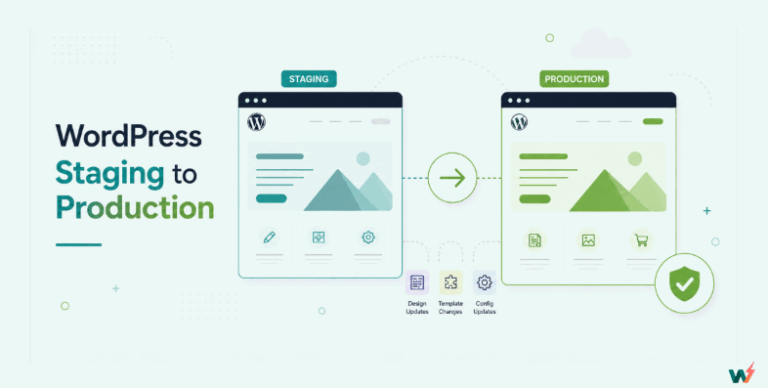
A Staging plugin in WordPress creates a replica of a live WordPress site in a testing environment to test changes, updates, and new features before deploying them to the live site.
WordPress staging plugins allow your agency’s team members to easily stage live WordPress sites where they can collaboratively and remotely test changes, updates, and new features before deploying them to the live site.
When Must You Use a Staging Plugin
There are several instances where you must use a staging plugin in WordPress.The most common instances include the following:
1. Before updating WordPress core, Themes, or Plugins
The most common significant WordPress changes, which are also the major culprits of most WordPress site errors and downtime, are the updates to WordPress core, plugins, and themes.
Adding a new plugin or theme, deactivating an old plugin or theme, or tinkering with the code of an existing plugin or theme are examples of changes that can create unexpected site errors and downtime that can take forever. So, you need first to test them in a WordPress staging environment.
2. Testing new plugins or themes
Plugins and themes on WordPress sites can clash and cause issues. Since different developers often make them, their codes might play poorly together, leading to problems like a security plugin blocking debit card payments during checkout and hurting sales. To avoid this, set up a staging site to test new plugins or themes before applying them to the live site.
3. Making design changes or layout modifications
Imagine you’re sprucing up your live WordPress site with a new template. But halfway through, things go haywire. Fonts get jumbled, images need fixing, and the logo changes unexpectedly. Before you can fix it, your client calls, furious and demanding a quick fix. Sound familiar? It happens all too often.
Here’s a simple fix: use staging sites. Make all your changes there first before going live. It’s like trying on clothes before a big event – it saves you from embarrassing mishaps and keeps everyone happy.
4. Implementing security updates
Most WordPress plugins establish security protocols and layers that interface with the WordPress core, database, and access file. Making security updates or changes can interfere with these interfaces, which could cause site errors, glitches, or downtime. So, you need first to test security updates in a staging environment.
5. Collaborating with team members
You must create a staging site before team members can collaborate on website changes or a website development project. This ensures that human errors are controlled and minimized while allowing team members to showcase their talents.
Advantages of using a WordPress Staging Plugin
1. Minimizes the risk of breaking the live site
The most obvious reason for using a WordPress staging plugin is to ensure your agency changes customers’ websites without breaking the live site.
After vetting that the change will give the desired outcome, your team members make and implement changes behind the scenes on the live site. Doing this helps to mitigate the risk of data loss or conflicts with specific plugins or themes.
2. Saves time and resources by identifying issues before deployment
Some unexpected WordPress errors can take forever to fix, a luxury you do not have if you work on a live site. But you can troubleshoot or avoid the problem by simply trying a different approach.
Take the design change from our earlier scenario via template import.
You can troubleshoot and solve the demo importing issues at your own pace, or instead of wasting time and resources trying to pick up the pieces, you can simply delete the messed up staging site, create another staging site, and try again.
So, with staging, your agency can make mistakes, try different approaches, identify issues, and mitigate errors before deployment while saving time and resources.
3. Improves website performance and user experience
Because you test changes and mitigate issues that may arise before deploying, you can deliver changes that improve your agency customers´ overall website performance and provide their visitors with a fantastic browsing experience.
4. Facilitates collaboration and feedback among team members
With staging, team members can collaborate on projects, share ideas, and provide feedback in a controlled environment before implementing them on the live site. This ensures your customers’ websites get the best of their abilities while improving your agency´s workflow efficiency.
5. Enhances overall website security
Staging sites can enhance website security by allowing developers to identify potential vulnerabilities or issues that could compromise the website’s security while testing codes, updates, plugins, and themes. Additionally, staging sites provide an opportunity to perform security tests and implement security measures without affecting the live site.
InstaWP Connect – The best Plugin for Staging in WordPress
Now that you know that your agency will better serve your customers and maintain its high reputation when you make use of a WordPress staging plugin to test changes before implementing them on your customer live sites, it’s time to introduce you to InstaWP Connect, a top agency choice for WordPress staging plugins.

InstaWP Connect is a reliable and user-intuitive WordPress staging plugin. It helps you speed up your WordPress staging process by connecting existing live WordPress sites anywhere on the internet to InstaWP, which provides the cloud staging environment for housing all your staging sites and implementing tests and changes on them.
Features
InstaWP Connect is a robust WordPress staging plugin that can cater to all your staging needs, thanks to the remarkable features packed in it, which include:
- Creation of full, custom, or quick staging websites in your InstaWP dashboard
- Auto-login to your Connected sites from InstaWP
- 2-way sync (to push from staging to production and vice versa)
- Monitor actions performed during 2-way sync
- Connect and disconnect your WordPress live site
- Utilize dozens of InstaWP other features after connecting your site to it.
How it Works
You must first install and activate InstaWP Connect on the existing WordPress site. Once activated, navigate to the plugin dashboard and connect the site to InstaWP.
After connecting your site, you can use the InstaWP Connect staging plugin to create 1-click staging websites from within the WP admin panel.
To stage a live site, navigate to the plugin dashboard, click the Create Staging button, select the type of staging you want to perform, and click the Next button.
You will be able to set up any of the following types of staging with just a few clicks:
- Quick staging [skips media and big files]
- Custom staging
- Full staging [clones it all to the staging]

When staging with InstaWP Connect, you can select the information you want to stage. You should include the Active Plugins and Themes in the staging.

Taking it further, you can select which folders and tables in the database to exclude from the staging site.

All well? Hit Create Staging.

The site will be cloned into InstaWP. Once the staging process is complete, click on the URL to view its frontend.
You can also use the Auto Login button to automatically log into the staging site WP Panel to test, develop, edit, clone, or migrate the staging site in seconds.
What Makes it Unique
1. Staging in seconds: InstaWP Connect allows agencies to create WordPress staging quickly and easily.
2. Zero mess in your hosting account: InstaWP Connect keeps your hosting account clutter-free by utilizing InstaWP’s dedicated staging environment instead.
3. FREE Staging Environment: InstaWP Connect offers a free staging environment, providing a cost-effective website testing and updates solution without additional expenses.
4. 2-Way Sync: InstaWP Connect allows you to seamlessly sync, track, and push changes from staging to production and production.
5. Simplified migration and WordPress website backup: InstaWP Connect allows you to migrate sites from one hosting provider to another seamlessly and provides easy backup options for WordPress sites.
6. Connect multiple staging sites to your live site: InstaWP Connect allows WordPress agencies to connect and manage various staging sites from one centralized dashboard, facilitating efficient testing and deployment workflows.
Remote Management Capabilities
InstaWP allows you to access and control your staging environment from anywhere with an internet connection, making it convenient for teams working in different locations.
You can do everything related to remote management securely, such as editing files and databases, testing new plugins and themes, testing and debugging code changes, etc, in real-time, making it easier to work together on projects and share feedback.

Using these remote management capabilities, your agency can deliver project changes faster while saving on infrastructure costs associated with setting up and maintaining physical staging environments.
Conclusion
In conclusion, utilizing a WordPress Staging Plugin can significantly benefit agencies by streamlining website development processes, reducing risks, and enhancing overall website quality.
By leveraging the features and capabilities of a reliable staging plugin, agencies can ensure a smooth and efficient website management experience.
Embrace this powerful tool and unlock new possibilities for your WordPress projects.
FAQs
What is Staging in WordPress?
WordPress Staging is simply creating a replica of a live WordPress site in a private environment where changes meant for the live site are tested to ensure that they will not harm the live site before actually implementing those changes on the live site. This helps in preventing errors and downtime on the live site.
How do you create Staging in WordPress?
Typically, you use a WordPress Staging Plugin to create an exact copy of your live site into a staging environment where you can access the staging site and make changes intended
for the original site on it. You can then preview these changes, test them thoroughly, and only push them to your live site once satisfied with the results.
What is a WordPress Staging Plugin?
A WordPress staging plugin is one that you can use to create an exact copy of a live WordPress site for staging purposes, such as testing new features or updating existing ones.
What are the advantages of using a WordPress Staging Plugin?
Using a WordPress staging plugin will allow your agency to easily create replicas of live sites where you can test changes, updates, and new features before making them on the live site. This helps prevent potential issues or errors affecting your customers’ live sites.
How does using a WordPress Staging Plugin benefit Agencies?
When WordPress agencies use a WordPress staging plugin, they can ensure that any changes they make on their customers’ sites do not disrupt the user experience or functionality. They can also maintain customers’ site performance and security by testing updates in a controlled environment.
What is the best staging plugin for WordPress?
The best staging plugin for WordPress is InstaWP Connect. It is straightforward to use, offering easy-to-use interfaces and reliable staging capabilities, empowering you to create multiple staging in seconds, and establishes the staging sites on a cloud staging environment away from your hosting to avoid clutter and over usage of hosting resources.