Choosing between cloud hosting vs shared hosting comes down to one thing: how much risk your WordPress site can tolerate under load. Shared hosting puts many sites on one server, so a traffic spike from a neighbor can slow you down. Cloud hosting runs your site on a network of servers, so you can scale resources and reduce single-server failure.
In this guide, you will get a WordPress-first comparison of performance, uptime, security, and real costs, plus a checklist for agencies and WooCommerce.
Table of Contents
Key Takeaway

Shared hosting is fine for low-risk WordPress sites with predictable traffic, but the “noisy neighbor” problem can hit performance and reliability fast.
Cloud hosting typically handles spikes better because resources can scale and the setup is not tied to a single physical server.
What is Shared Hosting?
Shared hosting means your WordPress site lives on one physical server alongside many other websites, all borrowing from the same pool of CPU, RAM, bandwidth, and storage. It stays popular because it is cheap and easy to start with, but it is also where performance becomes unpredictable as soon as the server gets busy.

On shared hosting, every uncached request competes for the same limited resources:
- PHP execution time for page renders
- MySQL capacity for queries (options table, WooCommerce orders, search filters)
- I/O for uploads, backups, and plugin updates
That is why a WordPress site can feel “fine” at 10 AM and suddenly crawl at 7 PM without you changing anything. When another site on the same server spikes, your site can get throttled or slowed down.
The direct benefit of WordPress shared hosting is the cost-effectiveness. Since you don’t have to pay for the dedicated servers, hosting a site becomes pocket-friendly. However, you pay not in pennies but in terms of hassles.
The classic shared-hosting failure mode is simple: your site is stable, but your neighbor is not. If another website on the same server gets high traffic or consumes too many resources, your site’s speed and reliability can drop even if your own traffic is unchanged.
For agencies, this becomes an ops problem fast:
- Random client complaints you cannot reproduce
- Time wasted “debugging WordPress” when the root cause is server contention
- Higher risk during launches, campaigns, and plugin update windows
Shared hosting can be a reasonable fit when all of these are true:
- The site is low-risk (portfolio, brochure site, small blog)
- Traffic is predictable and mostly anonymous (not logged-in heavy)
- There are no revenue-critical flows like WooCommerce checkout
- You can accept occasional slowdowns in exchange for lower cost
What is Cloud Hosting?
Cloud hosting means your WordPress site runs on a pool of interconnected servers, rather than being tied to a single physical machine. If one server has issues, the platform can shift workloads or rely on redundancy. Additionally, if your traffic increases, the environment can usually scale resources more easily than withshared hosting.
Must Read: What is WordPress Cloud Hosting (Explained Simply)
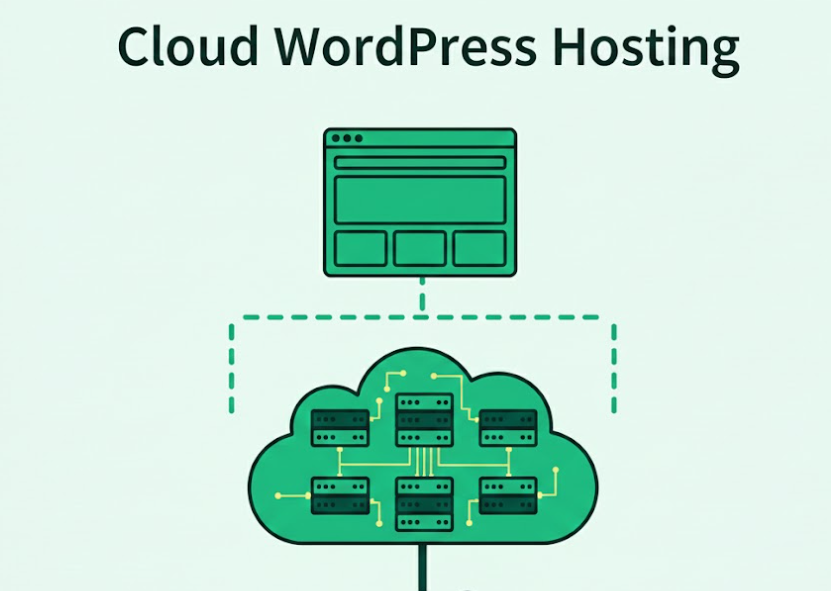
In the “cloud hosting vs shared hosting” debate, this is the core difference:
- Shared hosting = one server, many sites, fixed resources, contention risk.
- Cloud hosting = virtualized resources across multiple servers, built for elasticity and higher availability.
For WordPress developers and agencies, cloud hosting is less about buzzwords and more about predictable behavior under load:
- More consistent performance: Cloud environments typically reduce the “noisy neighbor” problem because resources are better isolated and can be allocated more predictably than classic shared hosting setups.
- Better handling of spikes: If a WooCommerce store gets a sudden burst (sales, influencers, ads), cloud infrastructure is generally designed to scale up capacity rather than throttling everything the moment a limit is hit.
- Resilience and redundancy: Cloud hosting is often positioned around redundancy (not being dependent on a single physical server). That matters for uptime and for recovering faster when something breaks.
But, you need to know that cloud hosting does not automatically mean “managed” or “optimized.” There is a subtle difference between standard cloud hosting and managed cloud hosting.
Think of basic cloud hosting like getting a Formula 1 car delivered to your garage. You have the keys, but you are also the driver, the mechanic, and the pit crew.
The reality is you get raw infrastructure power from providers like AWS, DigitalOcean, or Google Cloud, but you still have to do the under-the-hood work yourself: harden the server, configure firewalls, set up caching, manage PHP versions, tune the database, and keep everything patched. When it is done well, it is fast. When it is not, that “fast” car can still drive like a tractor.
The risk shows up at the worst time. If something breaks at 3 AM or a traffic spike hits during a launch, you are the one diagnosing logs, rolling back changes, and keeping the site online.
Managed cloud hosting is the better option: you get the Formula 1 car, plus a professional team that keeps it race-ready.
Here, the managed cloud hosting provider manages the messy infrastructure work in the background: security updates, performance tuning, caching layers, and reliability safeguards. That is where managed cloud becomes more rewarding for WordPress teams, because you stop spending hours on server babysitting and start shipping faster.
InstaWP’s managed cloud hosting combines cloud speed with a developer-first workflow: spin up WordPress staging sites, test changes safely, then push from staging to live, while performance layers like WordPress object cache are available when your site needs it. You stay focused on building and shipping, while the platform keeps the stack stable and fast.
If your team wants less server babysitting (updates, monitoring, rollback tooling), compare managed WordPress hosting vs cloud hosting as a separate layer of choice, not a replacement for the shared vs cloud decision.
Cloud hosting is most effective when you treat WordPress changes like releases:
- Build and test on WordPress staging sites
- Validate real flows (login, checkout, membership access, forms, webhooks)
- Push staging to live with a controlled rollout
- Add a performance layer (for many sites, that includes WordPress object cache)
That workflow turns “better infrastructure” into “fewer production incidents.”
Cloud Hosting vs Shared Hosting: Key Differences at a Glance
Cloud vs shared hosting is more than understanding the fact that you get shared servers with one option and dedicated ones with the other. The type of hosting you choose impacts a lot of stuff.

| What you are comparing | Shared hosting | Cloud hosting | WordPress developer lens |
|---|---|---|---|
| Scalability | Limited, because you are capped by one physical server’s shared pool. | Designed to scale because resources come from multiple servers. | Spikes matter more than averages. If traffic bursts break checkout or wp-admin, cloud is usually the safer baseline. |
| Resources + isolation | Your site shares CPU/RAM/bandwidth with many others; a neighbor spike can slow you down or take you offline. | Resources are pulled from a network; less dependency on one machine. | “Noisy neighbor” shows up as random slowness, 503/504s, and flaky background jobs (WP-Cron). |
| Performance | Can be slower when the server is busy due to shared resources. | Better performance potential via multiple servers/load balancing and scaling. | For dynamic WordPress, pairing cloud resources with WordPress object cache is often where you feel the biggest win on DB-heavy pages. |
| Reliability + uptime | Single-server dependency means outages and traffic spikes can hit you harder. | “No single point of failure” framing: if one server fails, another can take over. | Agencies care about incident frequency and recovery time, not just the promise of uptime. |
| Security blast radius | If sites share a server, vulnerabilities can become a shared problem. | Typically positioned as stronger isolation + advanced security options. | Regardless of hosting, you still need safe change control: test updates on WordPress staging sites before production. |
| Customization + flexibility | Usually more limited control over environment and configs. | More flexibility to adjust resources and environment. | This is where “managed WordPress hosting” vs “cloud hosting” becomes a separate decision (ops responsibility vs infrastructure). |
| Pricing model | Typically cheaper monthly plans. | Often pay-for-what-you-use / higher cost due to advanced capabilities. | Agencies should include hidden cost: debugging time, downtime impact, and emergency migrations. |
Let’s learn more about these cloud va shared hosting differences in detail.
#1: Scalability
Scalability decides how your WordPress hosting behaves when traffic spikes, not when everything is calm. In the cloud hosting vs shared hosting debate, it is the make-or-break factor for WooCommerce checkouts, lead forms, and wp-admin tasks. Agencies see burst traffic from ads, bots, crawlers, and seasonal sales, even on “small” sites.
If the stack cannot scale, performance drops, support tickets rise, and SEO suffers. A scalable WordPress development and production environment keeps releases predictable. It also controls future growth costs.
How shared hosting handles scalability
On shared hosting, scalability is limited because many sites share the same server resources. Your WordPress site competes for CPU, RAM, I/O, and database capacity, so a neighbor’s spike can slow your pages. Plans usually have fixed caps, so you cannot scale instantly when a campaign hits.
For teams trying to setup a WordPress development environment that matches production, shared hosting can restrict PHP workers, cron behavior, and WordPress caching options. The result is uneven performance and higher risk during launches. When you try to create a WordPress development environment with staging, shared hosting often lacks cloning, testing, and rollback tooling.
How cloud hosting handles scalability
With cloud hosting, scalability is the point: your site runs on a pool of servers and can access more resources as demand changes. In cloud hosting vs shared hosting, this elasticity helps WordPress stay responsive during traffic bursts and background jobs.
You can scale compute, memory, and bandwidth, and improve resilience if one node fails. For agencies, managed cloud hosting supports a cleaner WordPress development environment, where staging mirrors production and load tests are realistic before going live.
This reduces fire drills and protects revenue flows. It also makes it easier to standardize managed WordPress hosting practices across multiple client sites.

Verdict
If traffic is stable and the site is low-risk, shared hosting can be acceptable. But for cloud hosting vs shared hosting on WordPress, cloud hosting wins scalability because resources can grow with demand. Pair it with WordPress staging sites early so your WordPress development environment matches production before pushing live.
#2: Resources and isolation
Resources and isolation decide whether your WordPress hosting stays stable when other sites on the same machine spike. In cloud hosting vs shared hosting, shared plans split CPU, RAM, storage, and bandwidth across many tenants, while cloud setups draw from a pool of servers.
For agencies, weak isolation shows up as random wp-admin lag, slow database queries, and failed background tasks. A WordPress development and production environment is only reliable if resources behave consistently under load. Protects launches and revenue.
How shared hosting handles resources and isolation
Shared hosting runs your WordPress site on a single physical server with many other sites borrowing the same CPU, RAM, storage, and bandwidth. If another site hits a traffic surge or consumes too many resources, your site can slow down or even go offline, which is why agencies see unpredictable support tickets.
Shared plans also tend to ship with lower storage and bandwidth limits, so growth quickly turns into plan upgrades or migrations. For teams trying to setup a WordPress development environment, resource caps can make staging and repeatable testing harder in a WordPress development environment that should match production.
How cloud hosting handles resources and isolation
Cloud hosting pulls resources from a network of servers, so your site can access more CPU, RAM, and bandwidth when needed instead of being trapped on one crowded machine. That elasticity helps WordPress hosting stay responsive during spikes, and it gives agencies headroom for database heavy plugins and WooCommerce peaks.
For a best development environment for WordPress, this makes it easier to mirror production limits, test safely, and standardize environments across client sites.

Verdict
Shared hosting is fine for low traffic WordPress sites, but shared resources create unpredictable slowdowns. Cloud hosting is better for agencies because resources scale and neighbors cannot starve your site easily. Test the switch on WordPress staging sites, then push staging to live. Recheck flows after enabling WordPress object cache.
#3: Performance
Performance is where cloud hosting vs shared hosting shows up for users. Slow loads increase bounce rate, hurt SEO, and reduce WooCommerce conversions. For agencies, performance is also workflow speed: wp-admin responsiveness, backups, and deployments inside a WordPress development and production environment.
Shared resources can create inconsistent TTFB, while scalable infrastructure can smooth peaks. If you are evaluating the best WordPress development environment, prioritize predictable performance during campaigns and heavy bot traffic, so support stays calm and releases stay predictable.
How shared hosting handles performance
On shared hosting, performance depends on how many other sites are using the same server. Compute power and bandwidth are shared, so when neighbors consume resources your WordPress pages can lag or time out.
For agencies trying to setup a WordPress development environment, this unpredictability makes it harder to benchmark, reproduce issues, or plan daily releases. Even if you follow how to create a WordPress development environment guides, it may not match real production performance under load.
How cloud hosting handles performance
Cloud hosting is designed to improve performance by spreading workloads across multiple servers. Cloud performance is as it uses multiple servers for load balancing and notes CDNs can distribute files across global servers.
For agencies, that means a WordPress development and production environment with fewer slowdowns during campaigns. It is also closer to the best development environment for WordPress because you can test on staging with parity, then add WordPress object cache for database heavy pages.

Verdict
Shared hosting can feel fast until neighbors spike, so WordPress performance swings. Cloud hosting keeps times steadier through pooled resources, load balancing, and regional delivery. For agencies building the ideal WordPress development environment, test on WordPress staging sites, then push staging to live and add WordPress object cache if needed.
#4: Security
Security matters because WordPress sites are constant targets for bots, credential stuffing, and plugin exploits. In the cloud hosting vs shared hosting choice, security is not just SSL; it is detection speed, blast radius, and recovery time.
Agencies also need a WordPress development and production environment that supports safe updates, quick restores, and predictable access controls. If you take payments or store user data, weak isolation can turn one breach into many. It also affects compliance and customer trust directly.
How shared hosting handles security
Shared hosting usually provides protections like firewalls, login controls, and SSL, but your site lives on the same server as many others. Security vulnerabilities are also shared: if one site on the server is attacked, that access can lead to attacks against every site using the same server.
For WordPress hosting, that raises blast radius and extends incident time while the provider investigates. When you setup WordPress development environment and production workflows, this makes patch cycles stressful, because one neighbor incident can impact your uptime. Ask about DDoS protection, malware response, and confirm restore speed for agencies.
How cloud hosting handles security
Cloud hosting is typically positioned as more secure because workloads are distributed and providers can add layered protections. With cloud hosting, you can benefit from enterprise-grade security with around-the-clock monitoring and rapid response, and it highlights PCI standards for payment data.
For best WordPress development environment parity, that means fewer cross-tenant risks, clearer incident handling, and stronger defaults when you run WooCommerce or membership sites. It helps meet client security expectations with less tooling overall.

Verdict
If security risk is low and data is non-sensitive, shared hosting can be acceptable, but shared vulnerabilities increase your blast radius. Cloud hosting is the safer choice for WordPress hosting that handles payments, logins, or client SLAs. Keep updates in a staging site, then push staging to live after verification.
#5: Customization and flexibility
Customization and flexibility determine how closely your WordPress development environment matches production. In cloud hosting vs shared hosting, this affects PHP versions, server rules, caching layers, and debugging access. Agencies need repeatable setups across clients, plus safe room to test changes before launch.
If a host blocks key settings, you lose time on workarounds and cannot standardize workflows. The best development environment for WordPress is the one you can tune, document, and reuse. It decides how quickly you ship fixes.
How shared hosting handles this
With shared hosting, customization is limited to what the provider exposes in a control panel. You can tweak basic settings, but bigger changes like switching systems or adding storage are restricted by the vendor.
For WordPress teams trying to setup a WordPress development environment, that means fewer choices for PHP tuning, cron behavior, and server level caching. You may be forced into one stack for every site, even when a plugin or WooCommerce store needs different limits. This makes the WordPress development and production environment harder to keep consistent.
How cloud hosting handles this
Cloud hosting is built for change and offers far more flexibility: you can adjust control panel options, upgrade RAM, and even swap operating systems as needs evolve. For agencies, this is what “how to create a WordPress development environment” should look like: pick PHP versions per project, raise limits for heavy imports, and align production like-for-like.
It also supports staging workflows, because the environment can mirror production settings instead of approximating them. That is how you get the best WordPress development environment.

Verdict
If your sites are simple and you rarely need stack changes, shared hosting is fine. But if you must tune PHP, scale storage, or standardize client setups, cloud hosting wins. Treat managed WordPress hosting as a separate choice from infrastructure. Always validate changes on staging before pushing staging to live.
#6: Reliability and uptime
Reliability and uptime decide whether a WordPress site stays online during spikes, maintenance, or infrastructure failures. In cloud hosting vs shared hosting, this is the difference between a minor slowdown and a client-facing outage.
Agencies need predictable uptime for WooCommerce checkouts, lead capture, and SLA commitments, plus a WordPress development and production environment that behaves consistently on every release. Weak uptime costs revenue, erodes trust, and triggers emergency fixes that consume billable time, and distracts teams from planned product work.
How shared hosting handles reliability and uptime
On shared hosting, reliability depends on one physical server and everyone on it. If that server goes down, your WordPress site fails, and visitors can hit errors instead of pages. High traffic from other sites on the same machine can also drag down your performance, so uptime feels unpredictable even when your own traffic is steady.
For agencies trying to setup a WordPress development environment that mirrors production, these random dips make releases risky and hard to validate. Shared hosting is fine for low-risk sites, but it is fragile for client SLAs. It can also lengthen recovery when something breaks.
How cloud hosting handles reliability and uptime
With cloud hosting, reliability improves because your site is supported by multiple servers. If one server fails, others can pick up the workload, reducing the chance of website failure and removing a single point of failure. Redundancy helps during traffic spikes too, because load can be balanced across a server network to minimize downtime. Some providers market uptime figures like 99.99%.
For agencies, this makes the WordPress development and production environment steadier and closer to the best WordPress development environment: you can test realistic load on staging, then deploy with fewer surprises. Failures still happen, but impact is lower overall.

Verdict
If downtime is tolerable, shared hosting can work, but it is tied to one server and neighbor traffic. Cloud hosting is typically more reliable because it avoids a single point of failure and balances load. Validate with WordPress staging sites, then always push staging to live for a safer cutover.
#7: Cost
Cost is not just the monthly invoice; it is the total cost of running WordPress hosting across builds, launches, and support. In cloud hosting vs shared hosting, shared plans look cheap until slowdowns create hours of debugging, client churn, or missed revenue.
Agencies also budget for the WordPress development and production environment: staging, backups, monitoring, and performance layers. If you want the best WordPress development environment, compare up-front price, scaling, and operating time. Factor in tooling and incident response.
How shared hosting handles cost
Shared hosting is usually the lowest entry price because many customers split one physical server. The tradeoff is shared bandwidth, storage, and memory, so a neighbor spike can often slow WordPress pages or cause sudden downtime.
That creates hidden costs in agency support time and SLA credits. If you setup a WordPress development environment on shared hosting, performance testing can mislead because the WordPress development and production environment changes day to day.
How cloud hosting handles cost
Cloud hosting typically costs more up front because you are paying for scalable resources and reliability. With cloud hosting, you pay for the resources you use. This model fits seasonal traffic and campaigns: scale up during peaks, scale down afterward.
For agencies, it can reduce emergency support, since performance is less tied to noisy neighbors. When you create a WordPress development environment with staging parity, the WordPress development and production environment stays closer in behavior, more predictable.

Verdict
Shared hosting wins on price, but it can get expensive once you price in downtime, support cycles, and emergency migrations. Cloud hosting costs more, yet pay-as-you-go hosting plans and fewer incidents can lower total cost for growing sites. Test changes on WordPress staging sites, then push staging to live.
When Shared Hosting is Still a Smart Choic
Shared hosting can be a smart choice when your WordPress site behaves like a “mostly static app” and the business impact of a slowdown is low. In the cloud hosting vs shared hosting decision, shared works best when you want the simplest hosting bill, you are not expecting sudden traffic bursts, and your stack does not depend on heavy database activity.
Shared hosting is OK when you can say “yes” to most of these
- You are not running ad campaigns, seasonal launches, or influencer-driven spikes. Traffic grows slowly and patterns are stable week to week.
- If the site goes down briefly, it is inconvenient, not revenue-critical. No strict client SLA, no contractual uptime expectations.
- Mostly cacheable pages. Limited logged-in experiences. No heavy “real-time” flows like checkout, course progression, or gated content logic.
- Few transactions, low user activity, and limited background processing. Posts and pages change occasionally, not constantly.
When Cloud Hosting Becomes Non-negotiable
Cloud hosting becomes non-negotiable when your WordPress hosting needs to behave predictably under pressure. If you are managing client sites, shipping frequently, or running revenue flows, cloud hosting vs shared hosting usually tilts hard toward cloud because you need scalability, isolation, and faster recovery when something breaks.
Cloud hosting is required when you can say “yes” to any of these:
- Email blasts, paid ads, seasonal sales, viral content, or high bot traffic. If you cannot control “when load happens,” you need infrastructure that can absorb it.
- Dynamic pages are not reliably cacheable. Cart/checkout, logged-in dashboards, course progress, and subscription logic create database pressure and require resource headroom.
- Agencies feel the “noisy neighbor” problem twice: once from other tenants on shared servers, and again across your own client portfolio when one incident steals time from every other project.
- If you promise uptime, response times, or dependable performance, shared hosting becomes a liability. One crowded server can break your SLA even when your code is fine.
Point to Ponder
Raw cloud hosting gives you scalable infrastructure, but managed cloud hosting is what turns that into a dependable WordPress development and production environment. The big win is workflow plus performance stack: staging you can trust, safer releases, and built-in optimization choices that do not require stitching together five tools.
For example, InstaWP’s managed cloud hosting pairs cloud resources with developer workflows like WordPress staging sites and staging to live, plus performance layers like WordPress object cache and image optimization.
The result is not just “better servers,” but fewer production surprises, faster testing, and easier standardization across client sites, which is exactly what agencies need when comparing cloud hosting vs shared hosting at scale.
Conclusion
If you are choosing cloud hosting vs shared hosting for WordPress, the safest rule is to match hosting to risk. Shared hosting works when traffic is predictable and the site is mostly static. Cloud hosting becomes the better default when spikes, uptime expectations, and dynamic features like WooCommerce are involved.
If you want cloud benefits without extra operational overhead, managed cloud hosting of InstaWP is where it gets rewarding staging, safer releases, and performance tooling as part of the workflow.
Try a staging-first workflow on your next client release and standardize it across sites.
FAQs
u003cstrongu003eWhat is the main difference between cloud hosting vs shared hosting?u003c/strongu003e
Shared hosting places many sites on one physical server with shared resources. Cloud hosting runs your site on a network of servers so resources can scale and failures are less likely to take the site down.u003cbru003eu003cbru003eu003cstrongu003eWhen is shared hosting still a smart choice for WordPress?u003c/strongu003eu003cbru003eu003cbru003eWhen traffic is predictable, uptime is not business-critical, the site is mostly static, and database writes are low. It is a cost-first option for low-risk sites.u003cbru003eu003cbru003eu003cstrongu003eWhen does cloud hosting become non-negotiable?u003c/strongu003eu003cbru003eu003cbru003eWhen you expect traffic spikes, run WooCommerce or membership/LMS features, manage multiple client sites, or have real SLA expectations around uptime and performance.u003cbru003eu003cbru003eu003cstrongu003eIs cloud hosting always faster than shared hosting?u003c/strongu003eu003cbru003eNot always in a simple speed test, but cloud hosting is usually more consistent during peak traffic because resources are not as tightly constrained by other tenants.u003cbru003eu003cbru003eu003cstrongu003eWhat is managed cloud hosting, and why does it matter for agencies?u003c/strongu003eu003cbru003eu003cbru003eManaged cloud hosting combines cloud infrastructure with operational help like performance tuning, security maintenance, and workflow support. For agencies, it reduces firefighting and makes releases more predictable.u003cbru003eu003cbru003eu003cstrongu003eHow does InstaWP make managed cloud hosting more rewarding?u003c/strongu003eu003cbru003eu003cbru003eIt pairs cloud performance with developer workflows like WordPress staging sites and staging to live, and adds performance layers like WordPress object cache for database-heavy sites, so teams can ship faster without server overhead.u003cbru003eu003cbru003eu003cstrongu003eDo I still need caching if I move to cloud hosting?u003c/strongu003eu003cbru003eu003cbru003eYes. Better infrastructure helps, but caching reduces repeated work. For dynamic WordPress and WooCommerce sites, object caching can significantly reduce database load during traffic spikes.u003cbru003eu003cbru003eu003cstrongu003eWhat is the safest way to migrate from shared hosting to cloud hosting?u003c/strongu003eu003cbru003eu003cbru003eUse a staging-first approach: clone the site, test critical flows (login, forms, checkout), validate performance, then switch DNS with a rollback plan.u003cbru003e