The race for perfect WordPress development never ends. It demands excellence on every front, from optimized themes and the right plugins to, most importantly, choosing the best WordPress hosting. Making the wrong choice here can cost you dearly in speed, security, and scalability.
Among the top contenders in this space, Hostinger vs GoDaddy are two giants battling for dominance in WordPress hosting. Both boast millions of users and offer compelling features, but which one truly stands out for your WordPress site in 2026?
In this detailed comparison, we’ll break down the strengths and weaknesses of Hostinger vs GoDaddy for WordPress hosting. And beyond that, we’ll tell you about one of the best hosting providers that delivers more bang for your buck.
Table of Contents
Overview of Hostinger for WordPress
Hostinger has rapidly grown into one of the most popular choices for WordPress hosting worldwide. Known for its affordable pricing and user-friendly interface, Hostinger aims to offer high performance without breaking the bank. With millions of websites hosted on its platform, Hostinger’s reputation rests on delivering reliable uptime, fast loading speeds, and a beginner-friendly experience.
For WordPress users, Hostinger provides optimized managed hosting plans that include LiteSpeed web servers, built-in caching with LSCache, and automated backups. Their custom control panel, hPanel, simplifies site management, making it easier for beginners and developers alike to launch and maintain WordPress sites efficiently.
Hostinger’s plans are well-suited for bloggers, small businesses, and growing agencies looking for scalable hosting options. They offer shared hosting, VPS, and cloud hosting tailored for WordPress, with features like one-click WordPress installation and free SSL certificates on all plans.
Strengths and Weaknesses of Hostinger
When comparing Hostinger vs GoDaddy for WordPress, understanding Hostinger’s strengths and weaknesses is essential to making an informed choice.
Strengths of Hostinger
- Affordable Pricing: Hostinger offers some of the most budget-friendly WordPress hosting plans starting as low as $2.69/month, making it accessible for beginners and small businesses.
- Optimized Performance: Powered by LiteSpeed servers and LSCache, Hostinger delivers fast loading speeds and excellent uptime (99.9%+), which is critical for SEO and user experience.
- User-Friendly Control Panel: Hostinger’s custom hPanel is intuitive and beginner-friendly, simplifying WordPress installation, SSL activation, and website management.
- Developer Tools: Support for PHP versions, Git integration, SSH access, and staging environments on higher-tier plans make Hostinger viable for developers.
- Free SSL and Backups: All plans include free SSL certificates and automated backups, weekly on lower plans and daily on premium tiers, ensuring site security and data protection.
- Global Data Centers: With multiple server locations worldwide, Hostinger ensures low latency and faster access for visitors across different regions.
Weaknesses of Hostinger
- Backup Frequency on Lower Plans: Weekly backups on entry-level plans might not be sufficient for websites with frequent updates.
- Limited Phone Support: Hostinger primarily offers 24/7 live chat support but lacks phone support, which some users may prefer.
- Renewal Price Increases: The initial low prices increase significantly on renewal, which can surprise some customers.
- Staging Limited to Higher Plans: Staging environments are only available on mid-to-high-tier plans, restricting testing capabilities for entry-level users.
Overall, Hostinger offers a compelling WordPress hosting package with solid performance and affordability, especially attractive for startups and growing websites.
Overview of GoDaddy for WordPress
GoDaddy is one of the most established names in web hosting and domain registration, serving millions of customers globally. Its WordPress hosting offerings cater to a wide audience, from beginners building their first site to businesses needing reliable, scalable hosting solutions.
GoDaddy’s WordPress hosting plans include features such as one-click installation, automatic daily backups, and built-in security tools. The platform uses the traditional cPanel control panel, which is familiar to many developers but can feel complex for beginners.
With a focus on providing an all-in-one solution, GoDaddy combines hosting with domain registration, website building tools, and marketing services. This makes it a convenient option for users looking to manage their entire online presence under one roof.
Strengths and Weaknesses of GoDaddy
In the ongoing Hostinger vs GoDaddy for WordPress hosting discussion, GoDaddy remains a strong contender, offering its own set of advantages and challenges.
Strengths of GoDaddy
- Brand Recognition and Trust: GoDaddy is a household name with a long-standing reputation, which gives many users confidence when choosing their WordPress hosting.
- Comprehensive Service Offering: Beyond hosting, GoDaddy provides domain registration, website builders, marketing tools, and email hosting, all integrated under one platform.
- Customer Support Options: Offers 24/7 live chat and phone support, catering to users who prefer direct, real-time assistance.
- Automatic Daily Backups: All GoDaddy WordPress plans include daily backups, providing an extra layer of security and peace of mind.
- Simple One-Click WordPress Install: Users can get started quickly with easy setup options and a familiar cPanel control panel.
- Mobile App Management: GoDaddy offers mobile apps for managing hosting accounts on the go, a feature appealing to busy site owners.
Weaknesses of GoDaddy
- Higher Pricing: GoDaddy’s plans are generally more expensive than Hostinger’s, with higher renewal fees and fewer features included in basic tiers.
- Limited Free Features: SSL certificates, staging environments, and some security tools are often only available in mid- to high-tier plans or as paid add-ons.
- Performance Constraints: Uses Apache servers with less advanced caching compared to Hostinger’s LiteSpeed setup, which may result in slower page load speeds, resulting in a full dependence on the best WordPress speed optimization solution.
- Complex Control Panel: While powerful, cPanel can be overwhelming for beginners and lacks the streamlined simplicity of Hostinger’s hPanel.
- Upselling Practices: GoDaddy is known for aggressive upselling during signup and customer support interactions, which can be off-putting.
While GoDaddy offers a robust all-in-one platform, these limitations can affect its competitiveness in the WordPress hosting market, especially when compared directly with Hostinger.
Hostinger vs GoDaddy for WordPress Hosting: Finding the Best Option
So, let’s get into details and start learning what Hostinger and GoDaddy offer on the table on different hosting-related aspects, and which one is best. We will also help you find a better alternative than these two.

Performance and Uptime: Hostinger vs GoDaddy for WordPress
Performance is the backbone of any successful WordPress site. Fast loading times and reliable uptime keep visitors engaged and boost your SEO rankings.
Hostinger excels in this area with its use of LiteSpeed web servers and LSCache technology. In real-world tests, Hostinger consistently delivers impressive page load speeds, often under 1 second, and maintains an uptime guarantee of 99.9%, ensuring your site stays accessible around the clock. Its global network of data centers helps reduce latency for visitors worldwide.
GoDaddy offers a respectable 99.9% uptime guarantee as well, but its reliance on Apache servers and less advanced caching means page load times tend to be slower. Users have reported occasional outages and slower response times during traffic spikes. While GoDaddy does provide daily backups, its performance under heavy load is less consistent compared to Hostinger.
If Hostinger excels in speed and uptime, it sometimes falls short in offering comprehensive support during outages. Conversely, GoDaddy’s strength in providing 24/7 phone support is undermined by less consistent performance during peak traffic.
In contrast, InstaWP’s managed WordPress hosting delivers high-performance sites powered by a global CDN and edge caching that optimizes content delivery instantly. InstaWP creates fully isolated WordPress sandboxes in seconds, allowing you to test performance optimizations safely before pushing live.
Its pay-as-you-go WordPress hosting plans mean you only pay for the resources your site consumes, while its infrastructure ensures rock-solid uptime and rapid load times, even under heavy traffic. For developers and agencies, InstaWP guarantees the performance and reliability needed to keep client sites running flawlessly.
We conducted a stress test for all these hosting providers, and here are our findings:
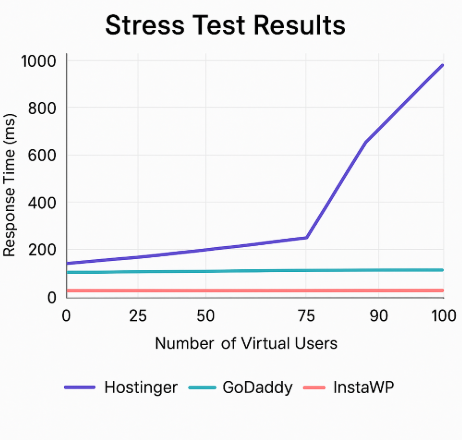
When simulating increased traffic with up to 100 virtual users, the difference in hosting performance becomes clear.
- Hostinger’s response time starts low but rises sharply after 50 users, reaching nearly 1 second (950 ms) at 100 users. This indicates potential slowdowns under heavy traffic.
- GoDaddy maintains relatively stable response times but shows moderate increases after 75 users, reflecting less optimized resource handling.
- InstaWP, however, remains rock solid throughout, holding response times consistently below 40 milliseconds even at peak virtual user loads. This stability highlights InstaWP’s superior infrastructure, edge caching, and optimized managed environment designed specifically for WordPress performance under real-world, high-demand conditions.
For developers and agencies needing fast, scalable, and reliable WordPress hosting, InstaWP delivers unmatched performance that outpaces traditional hosts like Hostinger and GoDaddy, ensuring sites remain responsive and user experiences stay flawless no matter the traffic surge.
Security and Backups: Hostinger vs GoDaddy for WordPress
Security and reliable backups are vital for protecting your WordPress site against threats and data loss. When comparing Hostinger vs GoDaddy for WordPress hosting, both providers offer basic security features, but there are important differences that impact peace of mind.
Hostinger provides free SSL certificates on all plans, weekly automated backups on entry-level tiers, and daily backups on premium plans.
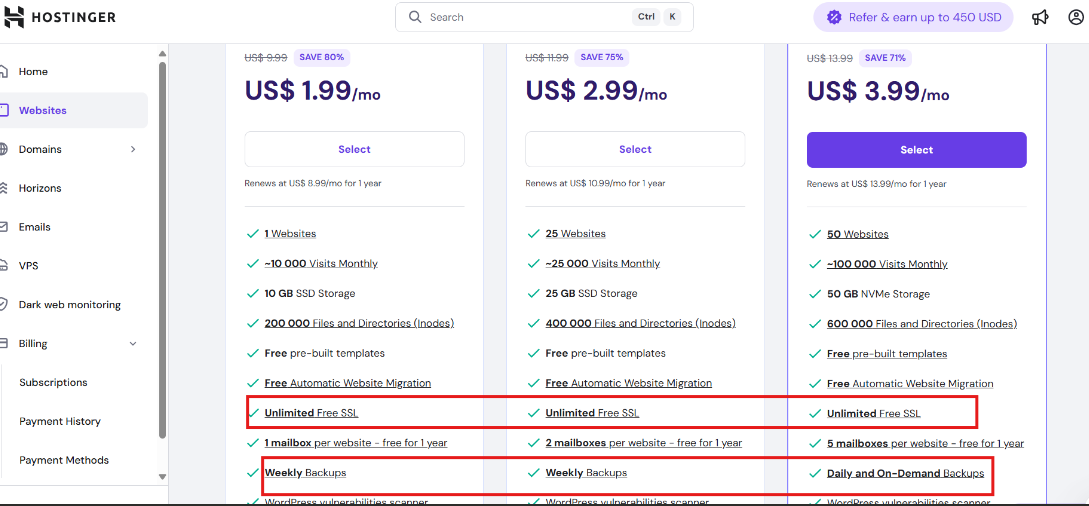
It includes malware scanning, DDoS protection, and a WordPress vulnerabilities scanner to help identify outdated or risky plugins and themes. However, some advanced security features require upgrading to higher-tier plans.
GoDaddy also offers SSL certificates, but only on mid-tier or higher plans. It’s WordPress backups run daily on all plans, which is a slight advantage over Hostinger’s weekly backups on the basic plan.
Basic malware scanning and firewall protection are included, but many security enhancements are locked behind paid add-ons, adding to overall costs.
Hostinger excels in bundled security tools but limits advanced features on lower plans, and GoDaddy offers daily backups but charges extra for most security add-ons; both can leave users wanting a more comprehensive, hassle-free solution.
This is where InstaWP truly shines. InstaWP’s managed WordPress hosting comes with daily automated backups powered by snapshot technology, enabling instant site restores or cloning with zero downtime.
It’s built-in WordPress vulnerability scanner continuously monitors for plugin, theme, and core software weaknesses, alerting you before issues arise; even on the free plan.
Yes, free plan users can also run a vulnerability scan once. Combined with industry-grade DDoS protection, malware scanning, and Bot protection in an advanced Security Shield, InstaWP provides an all-in-one security suite included in every plan without surprise fees.
For developers and agencies managing multiple client sites, InstaWP’s centralized site management dashboard streamlines security oversight, letting you monitor vulnerabilities and backups across all projects effortlessly. This level of built-in protection and backup automation far exceeds what Hostinger and GoDaddy offer, giving you greater confidence and saving valuable time.
Control Panels and Ease of Use: Hostinger vs GoDaddy for WordPress
The control panel is your command center for managing WordPress hosting. A clean, intuitive interface can save hours and reduce frustration, especially for developers and agencies juggling multiple sites.
Hostinger offers its custom-built hPanel, designed specifically for ease of use. It features a modern, streamlined layout with clear menus for website management, domain control, email setup, and WordPress tools.
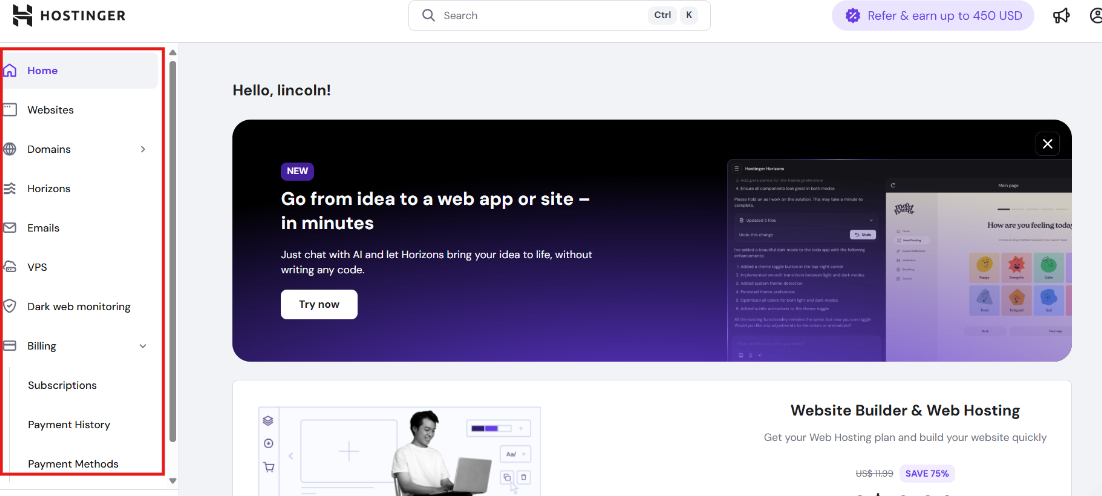
For beginners and intermediate users, hPanel simplifies common tasks like one-click WordPress installs, SSL activation, and backup management. The lightweight design ensures fast load times and minimal clutter.
GoDaddy uses the classic cPanel, a powerful and feature-rich platform familiar to many seasoned developers.
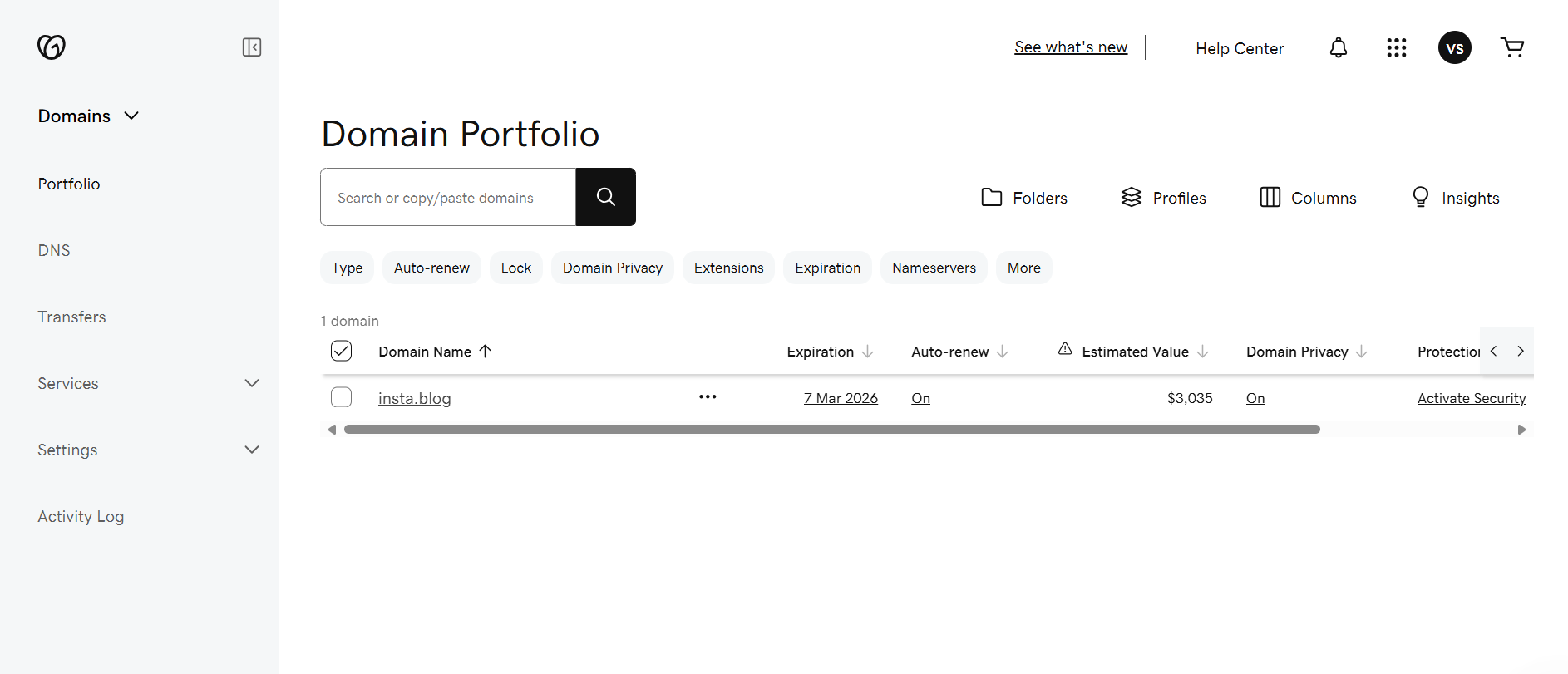
While it offers extensive options for file management, databases, and security settings, its interface can be overwhelming for beginners. The lack of modern UX updates makes routine tasks more complex for non-technical users, potentially increasing the learning curve.
While Hostinger’s hPanel focuses on user-friendliness, it may lack some advanced customization options prized by power users. Conversely, GoDaddy’s cPanel excels in flexibility but sacrifices simplicity and speed.
InstaWP introduces a fresh approach with its cloud-based dashboard built for WordPress developers and agencies.
From hosting to site management, everything is visible with the proper labelling, leaving no confusion.
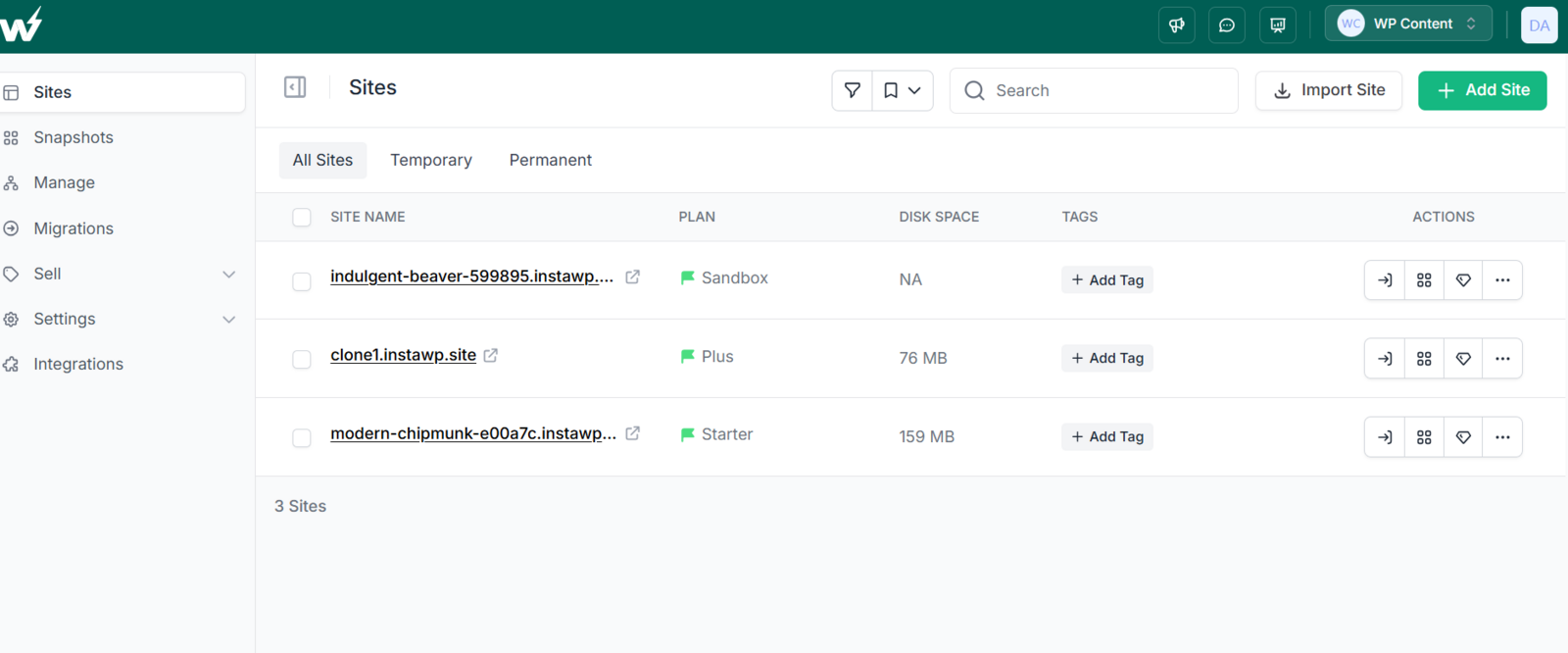
At the individual site level, the InstaWP dashboard integrates site creation, staging, backups, Git Deployment, Plugin/Theme updates, and every other crucial aspect into one centralized hub.
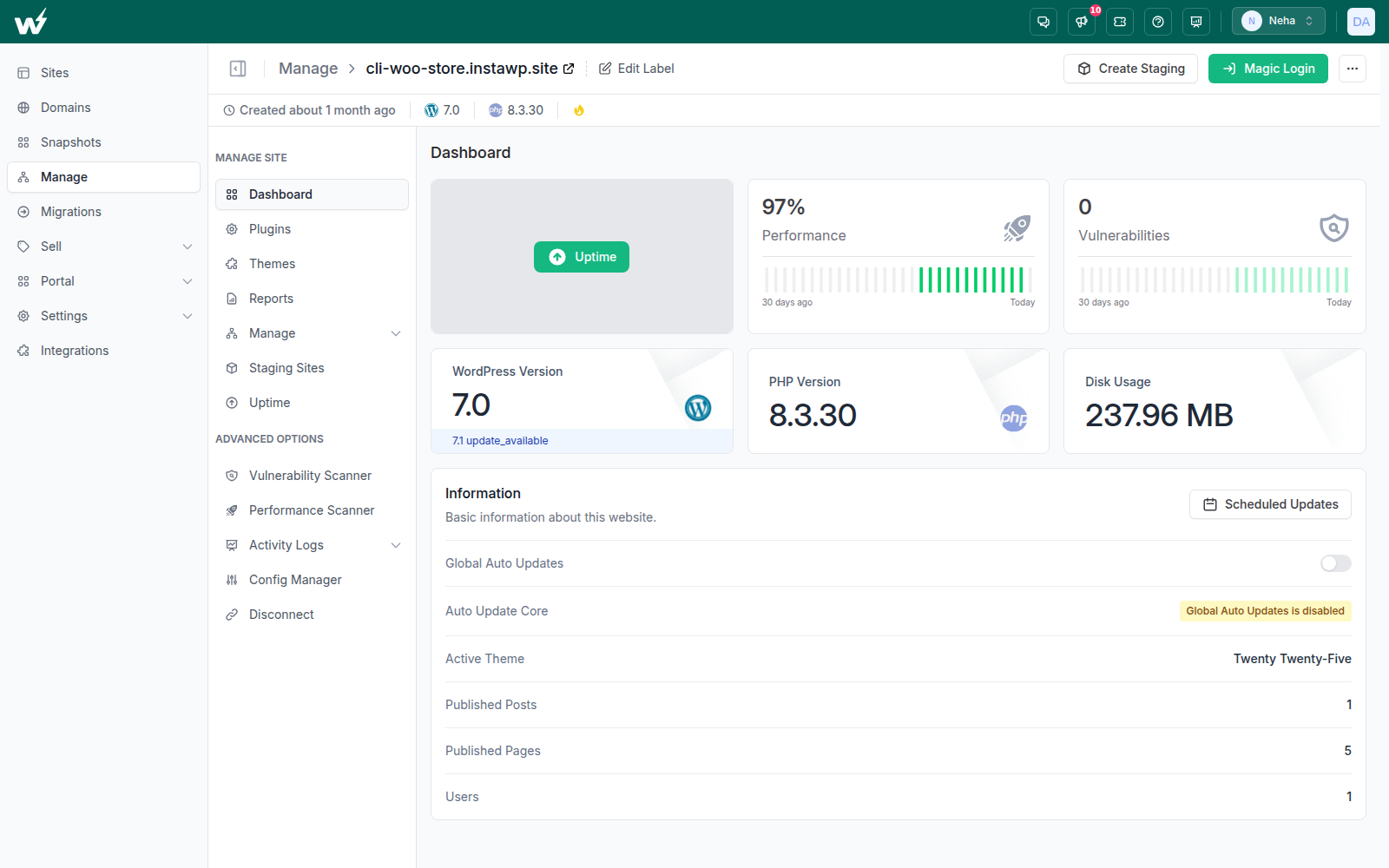
If you’re managing sites using InstaWP, all of them will be listed under the ‘Manage’ label, and each managed site has its own dedicated dashboard as well.
Unlike traditional panels, InstaWP enables instant sandbox environments with a few clicks and offers pay-as-you-go billing directly within the interface. This level of automation and modern design empowers developers to manage multiple sites effortlessly without toggling between separate tools.
Pricing Comparison: Hostinger vs GoDaddy for WordPress
Pricing is often the first factor users consider when choosing between Hostinger vs GoDaddy for WordPress hosting, but understanding what you get for your money is equally important.
Hostinger’s basic WordPress hosting plan starts at an affordable $1.99 per month (introductory price) and renews at around $8.99 per month after the initial term.
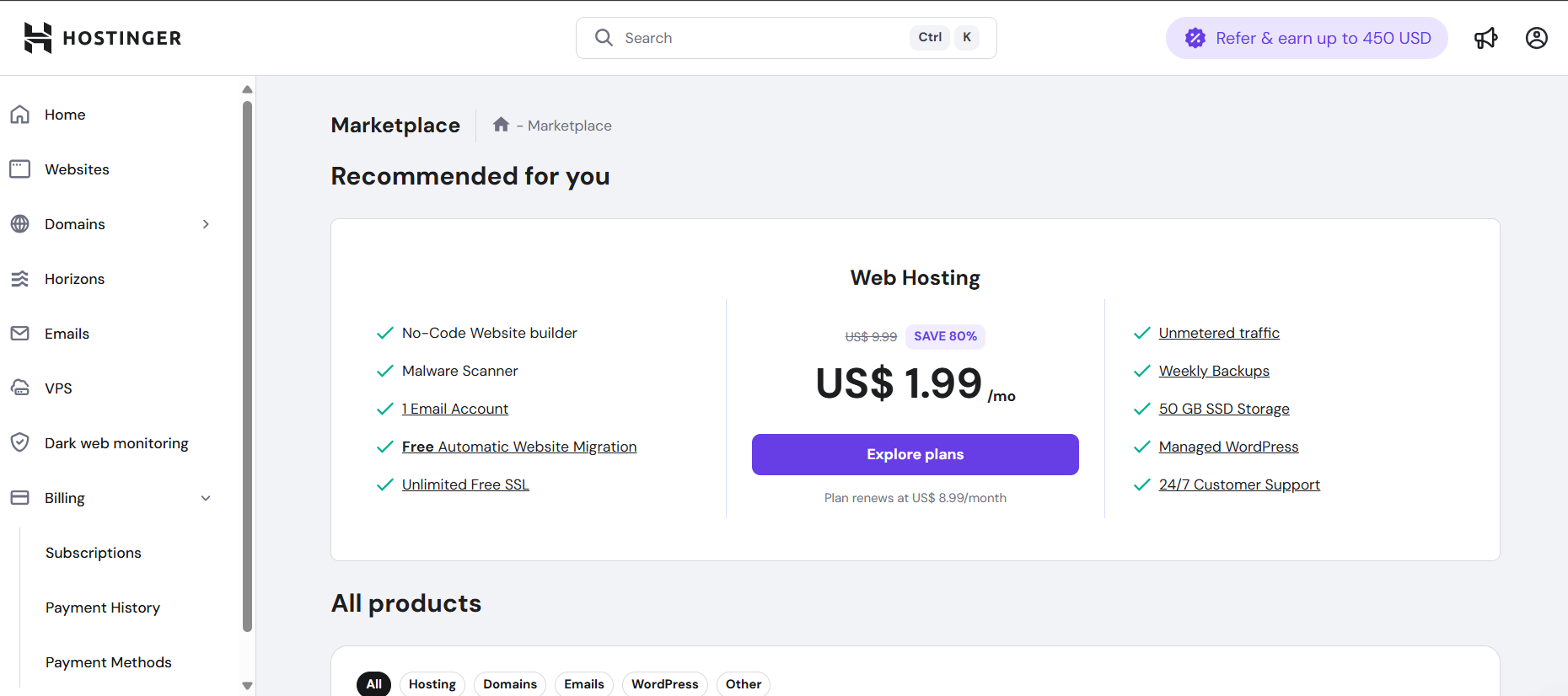
This plan includes essentials like 10 GB SSD storage, weekly backups, free SSL certificates, and WordPress-optimized features such as staging and automated updates. Hostinger’s tiered pricing also scales well for growing sites, with VPS and cloud plans available for more demanding needs.
GoDaddy’s entry-level WordPress hosting starts at $7.99 per month when billed annually, renewing at about $15 per month. While it offers 10 GB NVMe storage and weekly backups, many key features like SSL certificates, staging environments, and enhanced security tools are reserved for higher-tier plans or come at an extra cost.
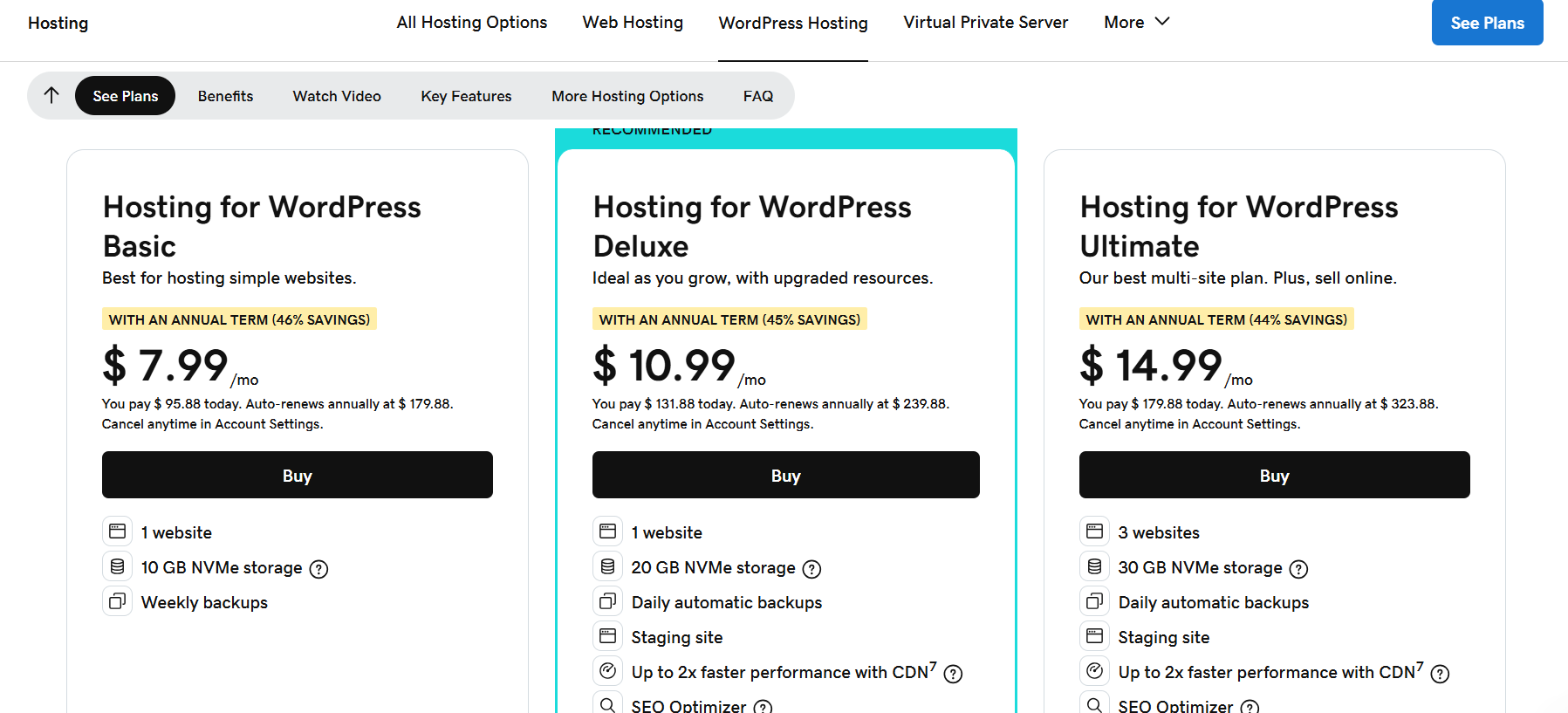
To conclude Hostinger vs GoDaddy for WordPress at the pricing front, we can say that:
- Hostinger excels in delivering affordable starter plans with strong WordPress features, but it lacks the all-in-one convenience of GoDaddy’s combined hosting and marketing services.
- GoDaddy offers a broader service ecosystem but at a significantly higher price point, which may not suit budget-conscious developers and agencies.
InstaWP’s pay-as-you-go WordPress cloud hosting plans are the melting pot. While you can start for free and build a sandbox at a mere cost of $2 per month, the fully managed hosting starts from $9 per month for the Plus plan.
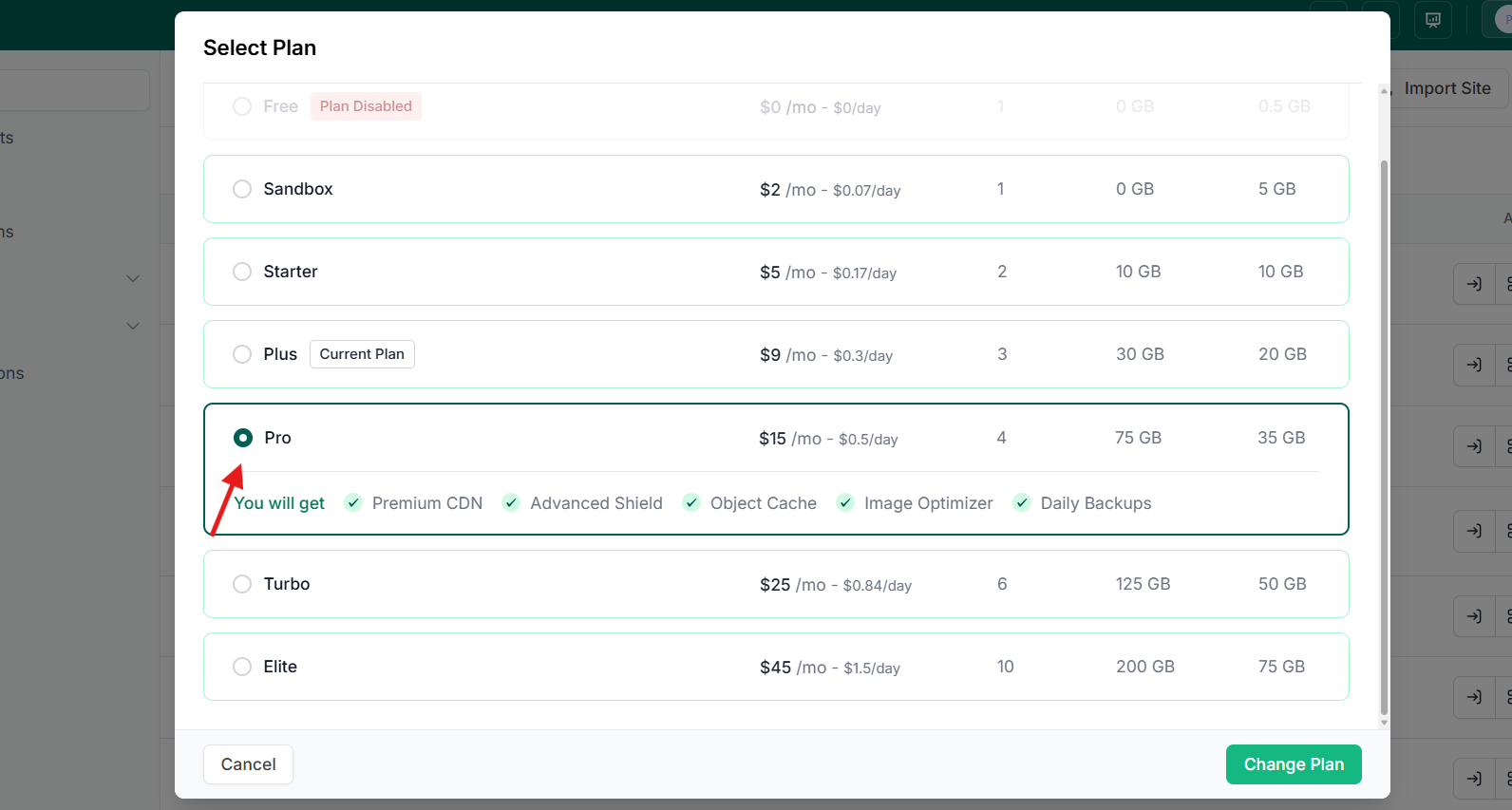
InstaWP charges based on actual usage and resources consumed, eliminating fixed monthly fees and long-term commitments. This means you only pay for the days you actively use a site, making it extremely cost-effective for short-term projects, staging, demos, or fluctuating workloads.
As if that was not enough, InstaWP’s Agency program brings more savings to the table. As you join the agency program, you will be paying nearly half of the actual cost.
Additionally, InstaWP’s pricing includes advanced managed hosting features like daily backups, multi-CDN support, vulnerability scanning, and site management tools without hidden fees. For agencies scaling across dozens of clients, this flexible, transparent pricing model can lead to significant savings and more predictable expenses compared to traditional hosts like Hostinger and GoDaddy.
Customer Support and Reputation: Hostinger vs GoDaddy for WordPress
Reliable customer support is crucial when hosting WordPress sites, especially for agencies and developers managing multiple clients. Quick, knowledgeable assistance can minimize downtime and resolve issues before they impact your business.
Hostinger offers 24/7 live chat support and a comprehensive knowledge base filled with tutorials and guides. Their support agents are generally praised for responsiveness and helpfulness. However, Hostinger does not provide phone support, which some users find limiting when needing immediate, verbal assistance.
GoDaddy provides both 24/7 live chat and phone support, giving customers multiple ways to reach out. While phone support is a plus, many users report long wait times and upselling attempts during calls. The quality of GoDaddy’s customer service has been mixed, with some customers expressing frustration over inconsistent problem resolution.
But, InstaWP raises the bar by combining 24/7 live chat support with a developer-focused support team trained specifically for WordPress workflows. InstaWP’s platform also includes self-service tools like automated backups, vulnerability scanning, and site health monitoring that reduce the need for support intervention altogether.
Those who are already building and hosting sites with InstaWP are in awe of the promptness of the support team.
- Over 7,000+ tickets handled with heart
- Jaw-dropping 4.9/5 rating
- The Average First Response Time is 5 minutes.
- Average Resolution Time is just 2 hours, even for complex issues
With these metrics, you know your issues will be resolved by the best mind out there.
For agencies, InstaWP provides a centralized dashboard to manage support tickets and site issues across all client sites, streamlining communication and issue tracking.
With InstaWP, you get the responsiveness and expertise required for fast problem-solving, plus powerful tools that prevent issues before they arise. This proactive approach sets InstaWP apart from traditional hosting providers like Hostinger and GoDaddy.
Which is the Best WordPress Hosting Provider?
We’re done with Hostinger vs GoDaddy for WordPress comparison, and it’s time to answer the burning question: which is the best WordPress hosting?
Well, as the above comparison has established, Hostinger and GoDaddy have long been popular options, but InstaWP is quickly emerging as the superior choice, especially for developers and agencies demanding speed, flexibility, and modern management for obvious reasons:
| Feature | Hostinger | GoDaddy | InstaWP |
| Pricing | Starts at $1.99/mo (renewal $8.99); affordable but with renewal hikes | Starts at $7.99/mo (renewal ~$15); higher cost, fewer features included | Pay-as-you-go pricing; only pay for what you use; plans from $9/mo; no fixed commitments |
| Performance & Uptime | LiteSpeed servers, 99.9% uptime, fast loading globally | Apache servers, 99.9% uptime, slower load times, occasional outages | Built-in WordPress vulnerability scanning, DDoS protection, and malware scanning are all included without extra fees |
| Backup Frequency | Weekly on basic, daily on premium plans | Daily backups on all plans | Daily automated snapshots with instant restore and cloning |
| Security | Free SSL, malware scans, DDoS protection; advanced features require upgrades | Basic SSL, limited malware scanning; many security features are extra cost | Built-in WordPress vulnerability scanning, DDoS protection, malware scanning all included without extra fees |
| Control Panel & UX | Custom hPanel—modern and beginner-friendly | Traditional cPanel—powerful but complex for beginners | Cloud-based, developer-focused dashboard with instant sandboxing and site management |
| Support | 24/7 live chat, no phone support | 24/7 live chat and phone, mixed reviews | 24/7 expert live chat, developer-centric support, centralized multi-site issue tracking |
| Developer Tools | SSH, Git, and staging on higher plans | SSH, staging on mid-tier plans | Instant WordPress sandboxes, Git integration, WP CLI, PHP config editor, and pay-as-you-go resource scaling |
| Scalability | VPS and cloud plans are available | Built-in WordPress vulnerability scanning, DDoS protection, and malware scanning all included without extra fees | Built from the ground up for multi-site agencies and dynamic projects, effortless scaling |
To sum up this comparison:
- Flexible Pay-as-You-Go Model: Unlike Hostinger and GoDaddy’s fixed monthly plans, InstaWP charges only for the resources and days you actively use, making it ideal for developers juggling multiple client sites or staging environments.
- Instant WordPress Sandboxes: InstaWP lets you spin up fully functional WordPress sites in seconds for testing, demos, or development, a feature neither Hostinger nor GoDaddy currently offers.
- Modern, Developer-First Platform: From a centralized dashboard to built-in vulnerability scans, automatic backups, and edge caching, InstaWP is purpose-built for WordPress professionals who demand speed, security, and control.
- Superior Performance and Reliability: With multi-CDN architecture and optimized caching, InstaWP consistently outperforms traditional hosts in load times and uptime, ensuring your sites stay fast and available.
- Comprehensive Security Included: InstaWP bundles advanced security features without hidden costs, simplifying site protection for agencies and freelancers alike.
Neither Hostinger nor GoDaddy matches the innovation and flexibility of InstaWP.
Final Say
Choosing the right WordPress hosting is more important than ever as your website’s performance, security, and scalability directly impact your success. In the showdown between Hostinger vs GoDaddy for WordPress, both providers offer solid features with their own advantages. Hostinger shines with affordability and speed, while GoDaddy brings brand recognition and integrated business tools.
However, for developers, agencies, and power users looking to elevate their WordPress hosting experience, InstaWP stands apart. Its pay-as-you-go pricing, instant WordPress sandboxes, superior performance powered by multi-CDN caching, and comprehensive built-in security deliver unmatched flexibility and reliability.
InstaWP’s modern, developer-first platform transforms how you build, test, and manage WordPress sites, making it the best alternative in 2026.
If you want to future-proof your WordPress projects with a platform designed for speed, security, and developer efficiency, it’s time to try InstaWP.
Frequently Asked Questions (FAQs)
u003cstrongu003eQ1: Which is better for WordPress hosting, Hostinger or GoDaddy?u003c/strongu003e
Hostinger offers more affordable plans and faster performance, while GoDaddy provides integrated domain and marketing tools. Overall, Hostinger tends to deliver better value for WordPress sites.u003cbru003eu003cbru003eu003cstrongu003eQ2: How does InstaWP differ from Hostinger and GoDaddy?u003c/strongu003eu003cbru003e u003cbru003eInstaWP offers pay-as-you-go pricing, instant WordPress sandbox creation, and a managed hosting environment built specifically for developers and agencies — features not available with Hostinger or GoDaddy.u003cbru003eu003cbru003eu003cstrongu003eQ3: Is pay-as-you-go pricing better than traditional hosting plans?u003c/strongu003e u003cbru003eu003cbru003eFor many developers and agencies, yes. Pay-as-you-go ensures you only pay for resources you actively use, making it cost-effective for managing multiple or temporary sites.u003cbru003eu003cbru003eu003cstrongu003eQ4: Does Hostinger offer staging environments?u003c/strongu003e u003cbru003eu003cbru003eYes, but staging is only available on mid-tier and higher plans, not the basic entry-level plan.u003cbru003eu003cbru003eu003cstrongu003eQ5: What kind of backups do GoDaddy and Hostinger provide?u003c/strongu003e u003cbru003eu003cbru003eGoDaddy provides daily backups on all plans. Hostinger offers weekly backups on entry plans and daily backups on higher tiers.u003cbru003eu003cbru003eu003cstrongu003eQ6: Can InstaWP handle multiple client sites efficiently?u003c/strongu003e u003cbru003eu003cbru003eAbsolutely. InstaWP is designed for agencies, offering centralized multi-site management, instant sandbox environments, and developer tools that streamline workflows.u003cbru003eu003cbru003eu003cstrongu003eQ7: How secure is InstaWP compared to Hostinger and GoDaddy?u003cbru003eu003c/strongu003eu003cbru003eInstaWP includes daily automated backups, continuous vulnerability scanning, malware protection, and DDoS mitigation by default, providing superior built-in security without extra charges.