So, you just discovered InstaWP. Great News!
You’re probably here because someone said, “You can spin up a WordPress site in seconds.” And it’s true; InstaWP lets you create instant WordPress sandboxes, staging environments, and live production sites faster than anything else out there.
But now you’re staring at the Site Plans page, wondering:
“Which one should I choose?”
“What if I outgrow the free plan?”
“Is it worth upgrading?”
This guide will walk you through when, why, and how to upgrade your InstaWP site plan, with real examples, not just a feature checklist.
Let’s decode it all.
Table of Contents
InstaWP Plans Explained in Plain English
We know choosing the right site plan can feel overwhelming, especially when most hosting platforms throw tons of features at you with no clear explanation.
That’s not how we do things at InstaWP.
We built our site plans to match how real developers and agencies work, from quick tests to full-scale client projects.
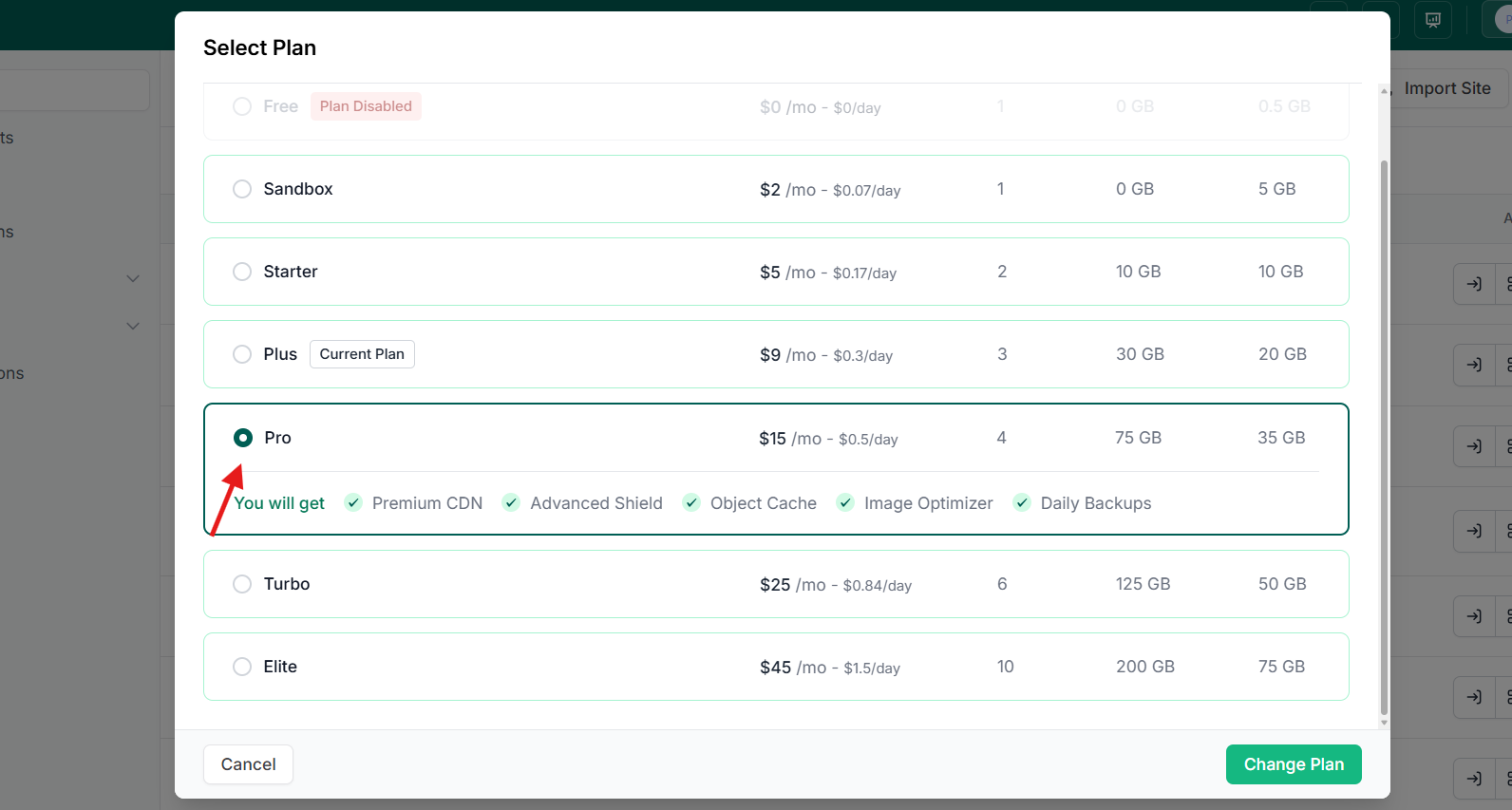
Each plan is designed to support a different stage of your workflow, without forcing you to pay for features you don’t need (yet).
Let’s walk you through them:
Free Plan – For Quick Tests and Throwaway Demos
- 1 site with 0.5 GB storage, 1 PHP worker
- Expires in 48 hours
Best For: Trying out a plugin, testing a theme, or building a demo you don’t need to keep.
Think of it like a scratchpad. Super fast. No strings.
Sandbox Plan – For Ongoing Development and Client Previews
- Persistent sites with 5 GB storage
- 1 PHP worker
- Great for staging or in-progress client builds
Best For: Freelancers and developers working on sites that aren’t quite production-ready.
Your always-on dev environment. No more “Oops, site expired.”
Starter Plan – For Lightweight Sites and Prototypes
- 10 GB storage, 2 PHP workers
- Weekly backups
- Run simple live sites or deliver advanced client previews
Best For: Small business sites, landing pages, or MVPs.
When it’s time to go live, keep it lean.
Plus Plan – For Dynamic Client Sites and WooCommerce
Running WooCommerce? Memberships? High-traffic blogs?
The Plus Plan is designed for sites that need more power, more storage, and more reliability.
- 30 GB CDN, 20 GB Disk storage, 3 PHP workers
- Daily backups, full site management suite, security scanner
- Shield for security + performance scanning
- Managed hosting priority support
Best For: Client portals, blogs, WooCommerce stores, or multi-page sites with regular traffic.
If your site has users, forms, sales, or frequent content changes, this is your go-to plan.
Turbo Plan – For Power Users and Performance-Critical Sites
Turbo plan of InstaWP is designed for power users, building and managing performance-critical sites.
- 50 GB disk storage, 6 PHP workers
- Faster infrastructure, daily backups, priority site tools
Best For: Performance-focused developers, active Woo stores, course platforms, or a portfolio of live sites.
When speed, uptime, and performance matter, our Turbo Site plan is the right bet to make.
Elite Plan – For Agencies, Teams, and Enterprise Builds
Our Elite plan is resource-packed and is designed in a way that agencies, teams, and enterprises can build, host, and manage sites without much effort.
- 200 CDN, 75 GB disk space, GB+ storage, 10 PHP workers
- Access to premium support, uptime SLAs, enhanced CDN, and white-labeling options
Best For: Agencies managing 20+ sites, multisite setups, or enterprise development workflows.
The highest level of control, power, and reliability is gained through the Elite site plan.
Is It Time to Upgrade? Use This Checklist
We designed InstaWP to be flexible. You can start for free and only upgrade when you really need to. But sometimes it’s not obvious when that moment arrives.
Let’s break down a few signs that upgrading would genuinely make your workflow smoother, safer, or faster.
1. You need your site to stay live for more than 48 hours
If you’re using the Free Plan, your site will auto-expire after 2 days.
That’s perfect for quick demos or plugin testing. But it becomes a hassle if you’re in the middle of:
- A multi-day build
- Waiting on client feedback
- Making slow progress between meetings or side projects
The Sandbox Plan removes this expiration limit, letting your site stay live until you’re done. It means you can pick up tomorrow where you left off today, without rushing or redoing anything.
2. You’re working on a client project that takes time
Client projects rarely get done in one sitting. You might need to:
- Share a preview link
- Collect feedback
- Go through 2–3 rounds of revisions
The Free Plan isn’t designed for this.
At this point, you should upgrade to the Pro or Elite plans as they give you a long-lasting environment where the client can view and interact with the site at any time. You won’t wake up to “Site not found” errors in the middle of a build.
Plus, it keeps your work organized and persistent; no cloning or rebuilding necessary.
3. You’re launching a real website that should stay online
Let’s say you’re building a:
- Personal blog
- Landing page
- Small business site
- Portfolio for job applications
Even if the traffic is light, this is not a test site; it’s something that needs to stay online, be reliable, and represent you or your client.
The Starter Plan gives you:
- 10 GB storage
- 2 PHP workers (better performance than Free/Sandbox)
- Weekly backups (just in case something breaks)
- Basic monitoring and update tools
It’s the first step toward real hosting without overkill; ideal for small but serious projects.
4. You’re building a dynamic or e-commerce site
If you’re using:
- WooCommerce (for selling)
- LMS plugins (for courses)
- Memberships (user login, subscriptions)
- Anything with lots of content or logged-in users
These sites require more backend processing power than a simple blog or static page.
The Plus Plan is built for this. You’ll get:
- 3 PHP workers to handle user actions without lag
- Daily backups so you never lose a transaction
- Full access to Shield (for performance + security monitoring)
- Site management tools to stay in control as the site scales
Basically, Plus makes sure your site doesn’t break when people start using it.
5. You’re juggling 3 or more active sites
Whether you’re:
- A solo freelancer managing multiple client sites
- An agency building demos and delivering projects
- A product team is prototyping different versions
Managing everything manually becomes a pain fast. You start forgetting which site has which plugin version. Or worse, you miss updates and something breaks.
Turbo and Elite Plans are for power users who need:
- Higher storage (100–200 GB+)
- More PHP workers
- One dashboard to monitor, update, and back up multiple sites
- Access to white-labeling and premium support (Elite only)
These plans make InstaWP feel less like a tool and more like an operations system for your agency or dev stack.
6. You want peace of mind from backups and update tools
Ever updated a plugin and broken the whole site? Or made changes late at night and lost them because you forgot to back up? These problems are common and preventable.
Starting with the Starter Plan, you unlock:
- Scheduled backups (weekly or daily, depending on the plan)
- Auto-update management for plugins, themes, and core
- Rollback capabilities when updates fail
- Uptime alerts to catch site downtime before your client does
It’s like having a safety net for every site you build.
7. You care about site speed and can’t risk slowdowns
If you’re working with traffic, user engagement, or search rankings, performance matters. A single slow page load can impact:
- Your SEO
- Your conversion rate
- Your client’s reputation
Plans like Plus, Turbo, and Elite are backed by faster infrastructure, higher memory, more PHP workers, and integrated performance tools. They’re built to scale with real-world traffic and keep your user experience sharp.
If you checked off even 2 or more of these scenarios, upgrading isn’t just a “nice to have”—it’s likely the next logical step in your workflow.
The right plan doesn’t cost you money; it saves you time.
Still Not Sure? Use This Rule of Thumb
If you’re on the fence about upgrading, here’s a simple mindset shift:
Only upgrade when the cost of not upgrading is higher than the price of the plan.
Let’s unpack what that means:
Time Wasted Is Still a Cost
Say you’re using the Free Plan, and every 48 hours, your site expires.
- Rebuilding from scratch? That’s at least 30 minutes lost.
- Reinstalling plugins, importing content, and setting up settings again? Easily an hour.
Multiply that by 4–5 sites a week, and suddenly you’ve lost 5–10 hours/month—all to avoid a $2 Sandbox upgrade.
That’s not savings. That’s burnout.
Stress Adds Up—Even If You Don’t Notice It
If you’re constantly checking whether your client’s staging site is still live, worrying about backups, or skipping plugin updates because you’re afraid of breaking something…
That’s mental overhead. And it slows you down.
One missed backup, one expired site, or one broken plugin could undo a day’s work.
For the price of a coffee or two, you get:
- Automatic backups
- Persistent environments
- Performance monitoring
- Less mental clutter
Sometimes, the biggest upgrade isn’t the features; it’s peace of mind.
Is It Billable? It Should Be Scalable.
If you’re charging clients for builds, prototypes, or WooCommerce sites, it makes no sense to host on a plan meant for testing.
For example:
- You bill $300 for a landing page.
- Hosting it on the Starter plan = $5/month
- You protect that revenue with backups, support, and reliable uptime.
It’s not just hosting; it’s infrastructure that protects your income.
Don’t upgrade because it “sounds better.”
Upgrade when:
- You’re spending more time fixing issues than building
- You’re hitting the limits of speed, storage, or stability
- Your work (or income) depends on the site being reliable
When you hit friction, upgrading isn’t an expense; it’s a performance boost.
How to Upgrade Your InstaWP Plan (In 60 Seconds or Less)
Upgrading your site plan on InstaWP is fast, safe, and doesn’t require any site migration. You’re not starting over; you’re simply unlocking more power for the site you’re already working on.
Here’s how to do it:
Step 1: Go to app.instawp.io and sign in with your account.
Step 2: Head to the “Plans” Section
In the left-hand sidebar, click on “Plans” to view all available options.
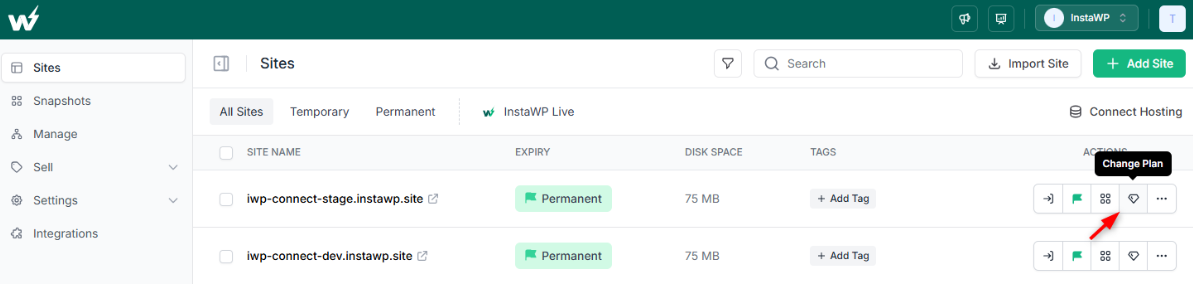
You’ll see:
- Your current plan
- A full list of upgrade options (Free → Sandbox → Starter → Plus → Turbo → Elite)
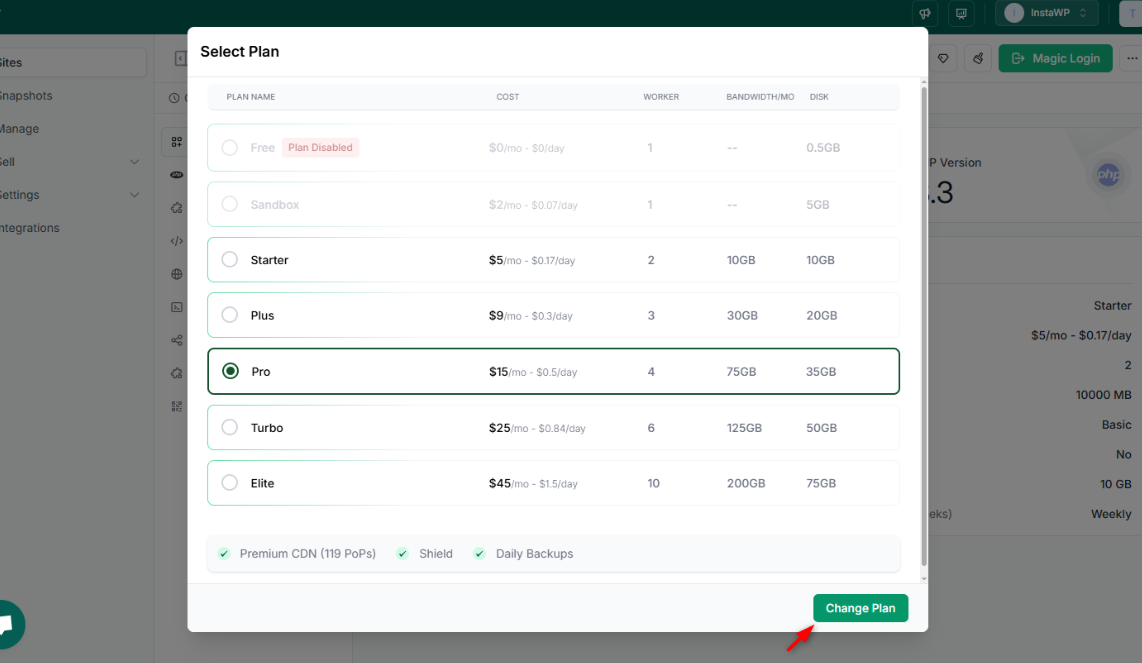
Step 3: Look at the plan descriptions and click “Change” next to the one that fits your needs best.
Need help deciding? You can revisit the use cases we explained above.
Step 4: You’ll be prompted to confirm your upgrade and payment (if applicable).
Once done, the upgrade is instant.
No site migration. No downtime. No manual reconfiguration.
Keep note of the fact that during the plan upgrade:
- Your site stays right where it is, just with upgraded resources.
- You’ll instantly unlock features like backups, performance tools, and longer site lifespans.
- You can manage everything from the same dashboard.
? Don’t worry; you won’t lose anything when you upgrade. You’re just leveling up.
Conclusion: Start Small, Scale Smart
Upgrading your InstaWP plan isn’t about spending more. It’s about unlocking more of what helps you work faster, safer, and smarter.
Whether you’re just testing a theme, building client sites, or launching a full-scale WooCommerce store, InstaWP has a plan that meets you exactly where you are in your workflow.
And when you’re ready to level up, you don’t need to migrate or start over.
You simply click “Upgrade,” and you’re there.
Think of each InstaWP plan as a productivity layer. The more serious your project, the more layers you’ll want.
? Ready to Upgrade Smarter?
Launch a free site with the Free plan or a sandbox site with the Sandbox Plan for just $2/month and see the difference.
Or jump straight to Starter or Plus if you’re going live soon.
? Log in and upgrade your site plan; it only takes 60 seconds.
No downtime. No migration. Just more power when you need it.