If you’re wondering how to protect your WordPress site before threats even reach your server, you’re not alone. Traditional plugin-based firewalls aren’t enough to stop advanced threats like Layer-7 DDoS attacks or bot traffic. You need something at protects your site at its core.
That’s where network edge security comes in.
In this blog, we’ll break down what edge security means for WordPress, how it works, and why it’s essential in today’s threat landscape.
Table of Contents
What is Edge Security for WordPress?
Edge security is a security model that protects your website at the outermost layer of the internet, the edge of the network, before a request even reaches your web server. For WordPress sites, this means filtering traffic at the WordPress CDN or proxy level to block malicious bots, prevent DDoS attacks, and enforce security rules in real-time.
Unlike traditional security setups that rely on firewalls or WordPress security plugins installed inside your site, network edge security stops threats at the earliest point in the request path. It’s proactive, faster, and far more scalable.
In simple terms, it’s like having a security guard at the gate, not inside the building. Here are a few of the most essential components of edge security.
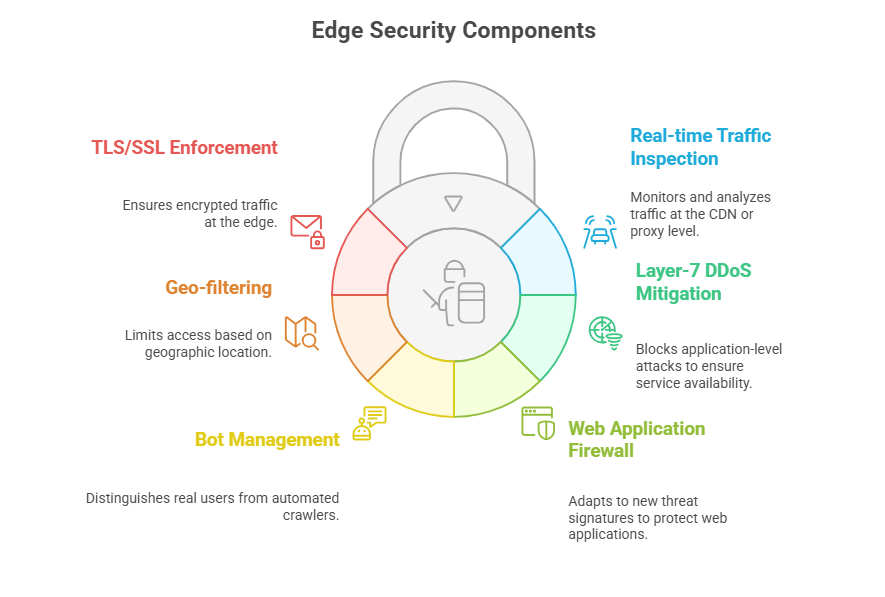
Why WordPress Sites Need Edge Security
WordPress runs over 43% of all websites, making it a prime target for bots, hackers, and DDoS attacks. Unfortunately, many WordPress users rely on plugin-based firewalls to defend their sites, but that strategy has major downsides.
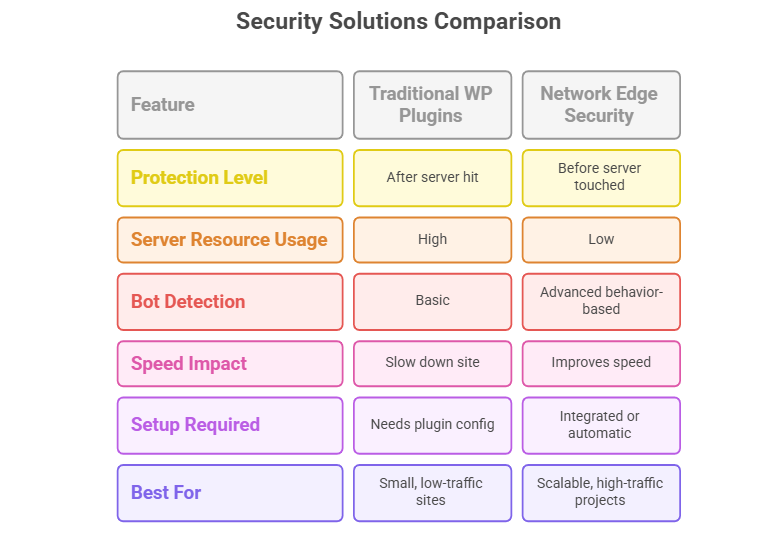
Most WordPress security plugins only start protecting your site after the request reaches your server, which means:
- Your server resources are already being used
- The database and PHP layers get loaded unnecessarily
- Smart bots and fake browsers can often bypass basic filters
- Your site slows down, especially under attack
In short, plugin-based security is like installing a lock inside your house when intruders are already in your living room.
Edge security protects your WordPress site before the traffic reaches your server. It lives at the network edge, where traffic is first received by services like a CDN, proxy, or edge firewall.
This means:
- Malicious traffic is filtered instantly
- Your server stays untouched
- Bots, spam, and DDoS attacks are blocked in real time
- Legitimate users experience faster load times with less friction
When we talk about keeping a WordPress site secured and miles away from threats and cyberattacks, choosing a managed cloud hosting with network edge security is a far better approach.
The comparison below will help you understand why:
How Does Network Edge Security Work for Websites?
To understand how network edge security protects a WordPress site, let’s first look at what happens when someone visits your site.
Let’s break down a typical visit to a WordPress site, step by step:
- A visitor opens their browser and types in your website’s URL.
- That request travels across the internet toward your web hosting server.
- If there’s no edge security in place, the request goes straight to your WordPress site, whether it’s a real visitor, a spam bot, or part of a DDoS attack.
This means your hosting server has to process every single request, even the malicious or unnecessary ones. Your PHP engine, MySQL database, and memory resources are all engaged just to figure out whether the visitor is legitimate.
This creates three big problems:
- Slower performance as traffic volume increases
- Security risks from automated bots or hackers
- Downtime or crashes during high-traffic or attack events
Without the protection of edge security, your website reacts only after something has already reached it, which is too late for true prevention.
That’s where network edge security comes in. Instead of allowing every request to reach your WordPress environment, edge security steps in before the request hits your server.
This layer acts as a checkpoint positioned between the user and your hosting stack. It decides who gets through and who gets blocked, all in real time.
When a request reaches the network edge, it doesn’t go straight to your WordPress server. Instead, it’s filtered, inspected, and categorized in real time. This happens within a few milliseconds, long before your site’s PHP or database layers even know someone knocked on the door.
Here’s what edge security does at this point:
1. Real-Time Traffic Scanning
Every incoming request is analyzed instantly. The system checks IP addresses, request patterns, request headers, user-agent strings, and known threat signatures. This helps identify suspicious behavior, like a bot attempting to brute-force your login page.
2. Blocking Malicious Actors
If the request matches known attack patterns, like SQL injection attempts, cross-site scripting (XSS), or path traversal, it’s dropped at the edge. This keeps your site from even seeing the threat.
3. Web Application Firewall (WAF)
A WAF at the edge applies rule sets based on OWASP Top 10 threats. It protects against common web vulnerabilities before traffic hits your origin server. Unlike plugin-based WAFs, an edge WAF doesn’t consume your WordPress resources.
4. Bot Behavior Analysis
Advanced bots are tricky; they can mimic human users. Edge security systems use behavior-based fingerprinting to tell if a request is coming from a real person or an automated script. Bots that fail validation are either challenged (with invisible methods) or outright banned.
5. Enforcing SSL/TLS Encryption
Edge servers can enforce HTTPS, redirecting insecure traffic and handling SSL/TLS negotiation with support for modern protocols like TLS 1.3. This keeps the connection secure from the very first hop.
6. Caching and Acceleration
Static assets like images, fonts, CSS, and JavaScript are served directly from the edge, not your origin server. This reduces latency, saves bandwidth, and improves user experience across the globe.
In short, edge security acts as a smart gatekeeper. It filters out junk, protects against attacks, and speeds up your website. all before your WordPress stack gets involved.
How Edge Security Boosts Speed and Uptime
Edge security isn’t just about blocking bad traffic; it’s also a powerful way to make your WordPress site faster, more stable, and more scalable.
Here’s how edge protection improves both performance and uptime in practical ways:
1. Faster Load Times with Edge Caching
Edge servers cache your site’s static files, like images, stylesheets, scripts, and fonts, and serve them from locations closer to your users. This drastically reduces the distance each request has to travel, which means:
- Faster page loads, especially for international visitors
- Lower Time to First Byte (TTFB)
- Less bandwidth usage on your main server
The result? Your site feels snappier, even under heavy load.
2. Less Load on Your Hosting Server
With edge security in place, your hosting server no longer has to process every request. Bots, attacks, and duplicate traffic are filtered out before reaching WordPress or PHP. This reduces:
- CPU and memory spikes
- Database connection usage
- Risk of “resource exhaustion” that causes downtime
This is crucial as you build WooCommerce stores, client portals, or high-traffic blogs where uptime equals revenue.
3. Built-In Load Balancing and Traffic Shaping
Modern edge networks (like BunnyCDN or Cloudflare) include built-in load balancing, which helps distribute traffic more evenly. During traffic surges, they manage the load so your origin server isn’t overwhelmed.
4. Resilience Against Attacks
Edge security absorbs and deflects:
- Layer-7 DDoS attacks
- Malicious bot floods
- Credential stuffing attempts
Since these threats never reach your server, your site stays stable and online, even during an attack.
In summary, edge security does double duty: it protects your WordPress site and makes it faster. That’s why developers, agencies, and growing site owners are prioritizing cloud edge security as a core part of their hosting stack in 2026.
How to Enjoy the Best Edge Security for Your WordPress Site
By now, you understand what edge security is and why it matters in 2026. But here’s the big question: how do you get edge security for your WordPress site?
The traditional way is… complicated.
To set up edge security yourself, you typically need to stitch together multiple third-party tools:
- A CDN (Content Delivery Network) like Cloudflare, BunnyCDN, or Fastly for caching, latency reduction, and static file acceleration
- A WAF (Web Application Firewall) like Sucuri, Astra, or Cloudflare Pro for Layer-7 security, OWASP protection, and request filtering
- DDoS Protection Services on a separate subscription or tier in CDN plans
- Bot Management Tooling to detect fake traffic and prevent scraping or brute-force attacks
- SSL/TLS Management to handle secure HTTPS connections, certificate renewals, and protocol upgrades
- DNS Configuration to point your domain correctly and activate edge services
Each of these layers needs to be:
- Purchased individually
- Configured manually
- Monitored and updated continuously
- Kept in sync with plugin updates and hosting changes
And then there’s billing, different vendors, different dashboards, and often premium plans just to unlock basic security functionality.
But Who Has Time for All That?
If you’re a solo developer, agency owner, or freelancer managing client sites, your time is already maxed out. You’re building, testing, debugging, launching, optimizing, not babysitting DNS records or studying WAF rule sets.
Even if you know edge security is important, most developers skip it because the setup is just too frustrating or time-consuming.
That’s the exact gap InstaWP is solving.
With InstaWP’s managed cloud hosting, you no longer need to manage edge security yourself.
Every WordPress site hosted on InstaWP automatically includes Shield, a built-in edge security layer powered by BunnyCDN + Bunny Shield.
That means:
- No plugins to install
- No third-party WAF accounts to configure
- No additional cost or setup
- No separate dashboard to manage
It’s real edge security; managed for you.
What You Get with InstaWP’s Security Shield
Here is what you will get with InstaWP’s Security Shield.
- InstaWP’s Security Shield blocks complex DDoS attacks at the application layer in under 10 milliseconds. These are the kinds of attacks that take down login pages, carts, and contact forms. With Shield, they’re filtered before they ever touch your server.
- A full-featured WAF is built into your edge layer, powered by real-time threat data and OWASP Top 10 rules. It updates automatically, no need to tweak settings or create custom rules.
- Shield uses behavioral analysis to detect whether a visitor is human or a bot. Suspicious bots are either challenged silently or blocked outright. Unlike traditional firewalls, it doesn’t rely on outdated IP blacklists.
- Real users don’t get interrupted. No annoying popups or visual tests. Shield uses an invisible scoring system to validate traffic so that real people glide through, while bots hit a wall.
- InstaWP’s edge layer supports modern encryption and connection protocols right out of the box, meaning better security and faster performance for your visitors.
- You’re not just getting protection. With BunnyCDN built in, your site’s static content is cached and delivered from 10 to 119+ global locations (based on your plan), drastically improving site speed.
Instead of managing five different services, you get:
- A fast cloud host
- A built-in CDN
- An always-on edge firewall
- Proactive bot and DDoS protection
- Auto-managed SSL
- Full WordPress site management tools (like backups, updates, staging, and reports)
All from a single dashboard, under a single managed hosting plan, at a price that grows with your business, not against it. Anyone who is on our Plus or above plans will get built-in edge security at zero added cost.
Learn more about our managed hosting plans and the features you can expect.
Whether you’re managing five client sites or fifty, InstaWP removes the friction of cobbled-together solutions and gives you a modern cloud hosting stack that’s fast, secure, and fully integrated.
Final Thoughts: Edge Security Isn’t Optional
If you’re running a WordPress site, whether it’s a client project, a WooCommerce store, or a growing blog, edge security is no longer a “nice to have.” It’s a must-have baseline for performance, uptime, and protection.
Attack patterns are more sophisticated. Bots are harder to detect. And user expectations for speed and safety are higher than ever. Traditional plugin-based security can’t keep up, and piecing together your own edge stack is time-consuming and expensive.
That’s why more developers and agencies are switching to managed cloud hosting providers such as InstaWP, where cloud edge security is built in. With InstaWP Shield, you don’t need to configure anything. No plugins. No manual DNS. No external tools. You just launch your site, and it’s protected at the edge from day one.
If you’re ready to stop juggling tools and start building with confidence, InstaWP gives you the edge, literally and figuratively.
Launch a site with InstaWP to see edge security in action.
FAQs
What is edge security in simple terms?
Edge security protects your website at the outermost layer of the network, before a request reaches your WordPress server. It blocks threats like bots, DDoS attacks, and malicious traffic at the CDN or proxy level, improving both speed and safety.
Is edge security better than WordPress security plugins?
Yes. Plugins act only after a request hits your server, using your resources. Edge security stops harmful requests earlier, keeping your server faster, more stable, and better protected.
What is network edge security vs cloud edge security?
They often overlap. Network edge security refers to protection at the infrastructure level (CDNs, proxies), while cloud edge security adds cloud-managed services like WAFs and bot protection on top. Together, they form a comprehensive defense layer.
Do I still need Cloudflare or Sucuri with InstaWP?
No. InstaWP’s hosting includes BunnyCDN and Bunny Shield, providing CDN, WAF, DDoS protection, and bot management at the edge. Everything is built-in, so no need for external services.
Can edge security improve website speed?
Yes. Edge caching delivers static content from locations closer to users, reducing latency. It also offloads traffic from your server, making your site load faster and perform better under load.
What’s the easiest way to get edge security for WordPress?
Use a managed WordPress hosting platform like InstaWP that includes edge security by default. With InstaWP Shield, you get DDoS protection, WAF, and bot filtering without installing or configuring anything.