

Just another contact form plugin. Simple but flexible.
About Temporary Login Without Password
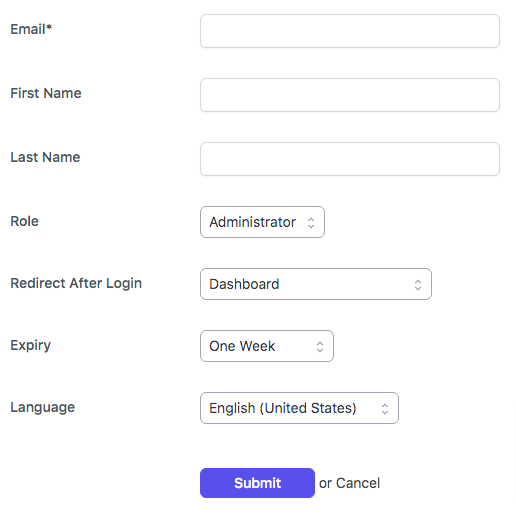
The "Temporary Login Without Password" plugin allows you to create secure, self-expiring login links for WordPress. This is useful when you need to give temporary access to developers or editors without sharing your username and password. The plugin also offers additional features in the pro version, such as limiting link usage and receiving admin alerts.Screenshots
Frequently asked questions
What is the purpose of the Temporary Login Without Password plugin?
The plugin allows you to create self-expiring, temporary admin accounts and share direct login links without needing a username or password. It's useful for granting temporary access to developers or editors.
What are the benefits of using temporary logins?
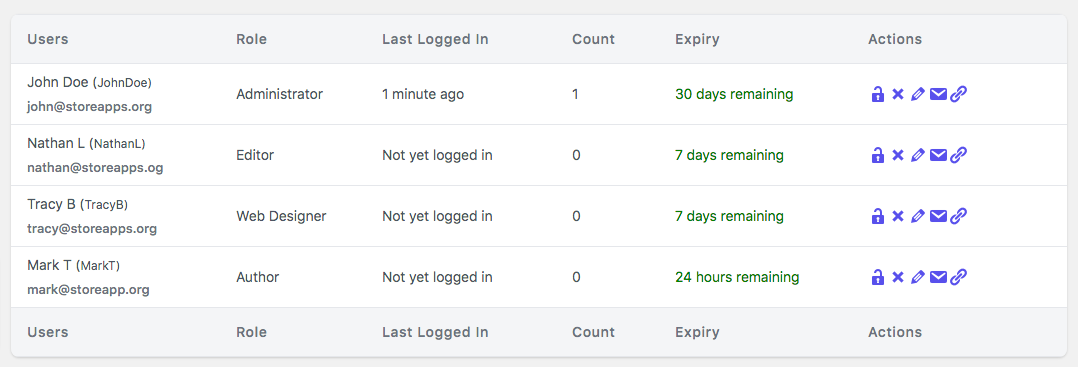
You can create unlimited temporary logins with any role, set account expiry, and redirect users to specific pages after login. It also tracks the last login time and the number of times a temporary user accessed the setup.
Can I set an expiration for temporary accounts?
Yes, you can choose when the login expires, with various options like one day, one week, one month, or a custom date. After the expiry time, the temporary user cannot log in.
Changelog
1.9.0 [2025-02-25]
- New: Initial release of Temporary Login Without Password pro plugin
1.8.5 [2024-11-22]
- Fix: PHP Notice: Function _load_textdomain_just_in_time was called incorrectly
1.8.4 [2024-11-18]
- Update: Compatibility test with WordPress 6.7
1.8.3 [2023-12-06]
- Fix: PHP Warning “Deprecated: trim(): Passing null to parameter #1 ($string) of type string is deprecated”
- Update: Compatibility test with WordPress 6.4.1
1.8.2 [2023-05-19]
- Fix: CSS conflict with some admin header menu classes
- Update: Compatibility test with WordPress 6.2.1
1.8.1.1 [2022-11-19]
- Update: Change in release version
1.8.1 [2022-11-19]
- Update: Minor improvements
1.8.0 [2022-10-21]
- Update: WordPress 6.0.3 compatibility check
- Update: Minor improvements
- Update: POT file
- Fix: PHP Fatal error: Uncaught Error: Call to undefined function get_current_screen() in some cases
1.7.6 [2022-09-14]
- Update: WordPress 6.0.2 compatibility check
1.7.5 [2022-08-16]
- Fix: Fatal error: Uncaught Error: Class ‘IG_Tracker_V_1_2_5’ not found
1.7.4 [2022-08-08]
- Update: WordPress 6.0.1 compatibility check
1.7.3 [2022-07-05]
- Update: WordPress 6.0.0 compatibility check
- Fix: Prevent extra css from loading on non plugin page
1.7.2 [2022-02-15]
- Update: WordPress 5.9 compatibility check
1.7.1 [2021-11-11]
- Fix: Added capability check in Settings
1.7.0 [2021-10-21]
- Fix: Improved security related to nonce in Settings (Thanks to WPScan team)
1.6.15 [2021-09-03]
- Update: Improved security – better protection against brute force attacks and loopholes in other plugins (thanks to Zack Katz for suggestions)
1.6.14 [2021-07-27]
- Fix: User creation failed with non latin First Name or Last Name (Thanks @gmspb for reporting)
- Update: WordPress 5.8 compatibility check
1.6.13 [2021-05-21]
- New: Added option delete temporary login plugin data on plugin delete
- Update: Create username with lowercase letters
- Update: Improve settings screen UI
- Update: .POT files
- Fix: Internationalization issues. (Thanks @yordansoares for reporting)
- Fix: Blank page appear after settings saved.
1.6.12 [2021-05-10]
- Update: Confirm before delete temporary user
1.6.11 [2021-04-08]
- Update: PHP 8 compatibility check
- Fix: Deprecated: Required parameter $data follows optional parameter
$user_idintemporary-login-without-password/includes/class-wp-temporary-login-without-password-common.php on line 130
1.6.10 [2021-03-19]
- New: Set default redirect after login option
- Update: Improve UI
- Update: .POT file
1.6.9 [2021-03-10]
- New: Added feature to redirect temporary user to a specific page after login
- Update: WordPress 5.7 compatibility
1.6.8 [2021-03-05]
- Update: Improve UI
1.6.7 [2020-12-30]
- Update: WordPress 5.6 compatibility check
1.6.6 [2020-10-08]
- Fix: Datepicker issue.
1.6.5 [2020-09-28]
- Update: WordPress 5.5.1 compatibility check
1.6.4 [2020-08-17]
- Update: Compatibility check with WordPress 5.5
- Fix: Deactivation checkbox is disabled for Administrator
1.6.3 [2020-06-29]
- Fix: Upgrade failed to notice while upgrading plugins through temporary login
- Update: Removed all unnecessary admin notices from the Temporary Login screen
1.6.2 [2020-05-30]
- New: Notify about Temporary Access in the admin bar
1.6.1 [2020-04-11]
- Update: Compatibility test with WordPress 5.4
1.6.0 [2020-02-20]
- New: Now, able to create a temporary login link that will expire on a specific time after access.
- Fix: Conflict of Sweetalert JS
1.5.23 [2020-01-14]
- Fix: Incorrect temporary Login URL shows up while using iThemes Security plugin with Custom URL Login enabled
1.5.22 [2019-12-23]
- Update: Compatibility test with WordPress 5.3.2
1.5.21 [2019-11-04]
- Update: Make it compatible with iThemes Security (formerly Better WP Security) plugin with Custom URL Login enabled
1.5.20 [2019-09-09]
- Update: Add Temporary Super Admin to all sites
- Fix: JS & CSS loading issue for WordPress Multi sites
- New: Added Italian translation. (Thanks @alessioangeloro for providing Italian translation)
1.5.19.1 [2019-08-19]
- Fix: Redirection issue with WordPress subdirectory installation.
1.5.19 [2019-08-16]
- Fix: “404 Not Found” issue after clicking on a temporary login link for WordPress subdirectory installation.
1.5.18 [2019-07-29]
- Fix: Browser console error
1.5.17 [2019-06-17]
- New: added “locale” support for a temporary user
- New: Show number of times the temporary user logged in via temporary login link
- Fix: CSS issue with Divi theme (Thanks @lordsnake for reporting)
1.5.16 [2019-05-20]
- Update: Compatibility test with WordPress 5.2
- Fix: Typo in the success message.
1.5.15.2 [2019-04-17]
- Update: Release Note.
1.5.15.1 [2019-04-17]
- Update: Minor update.
1.5.15 [2019-03-08]
- Fix: Redirection after login gives “404 error” error on sub-site of WordPress multi-site installation. (Thanks @csigncsign for reporting this.)
1.5.14 [2019-01-14]
- Update: Added System info page and allow the temporary user to access the system info page
1.5.13 [2018-11-19]
- Update: Now, temporary user can be redirected to any page without using redirect_to query params.
1.5.12 [2018-10-24]
- Fix: Temporary user redirected to the admin page even if the ‘redirect_to’ query param present once a user logged in with a temporary login link.
1.5.11 [2018-10-08]
- Update: Added filter for expiry_option. Now, one can add any custom expiry_option for the temporary login. See example
1.5.10 [2018-09-12]
- Fix: ‘redirect_to’ parameter in request didn’t use for user redirection. Now, a temporary user will be redirected to the URL available in the ‘redirect_to’ parameter.
1.5.9 [2018-07-25]
- Update: Added settings to set default expiration time. Now, admin don’t have to select expiry time from dropdown whenever they
create a new temporary login.
1.5.8 [2018-04-25]
- Fix: Format temporary login link email for Apple Mail. (Thanks to @danielgm)
1.5.7 [2018-04-11]
- Update: Added settings link on Plugins page
- Update: URL parameters sanitized as keys (Thanks to @danielgm)
- Update: Paste temporary login link directly into email
- Fix: Lock and delete icon not clickable (Thanks to @danielgm)
1.5.6 [2018-03-14]
- Fix: Datepicker doesn’t show up when editing temporary login and select “custom date” value from expiry time dropdown
1.5.5 [2018-03-05]
- Update: Set default expiry time as a “Week” for new temporary login instead of an “Hour”.
- Fix: PHP Warning: in_array() expects parameter 2 to be array, string given in temporary-login-without-password/includes/class-wp-temporary-login-without-password-common.php
- Fix: Existing temporary user’s role is not available into roles dropdown while editing.
1.5.4 [2018-02-20]
- Fix: Invalid argument supplied for foreach() PHP Warning in class-wp-temporary-login-without-password-deactivator.php
1.5.3 [2018-02-06]
- Update: Now, admin can change the role and expiry of temporary login
1.5.2 [2018-01-29]
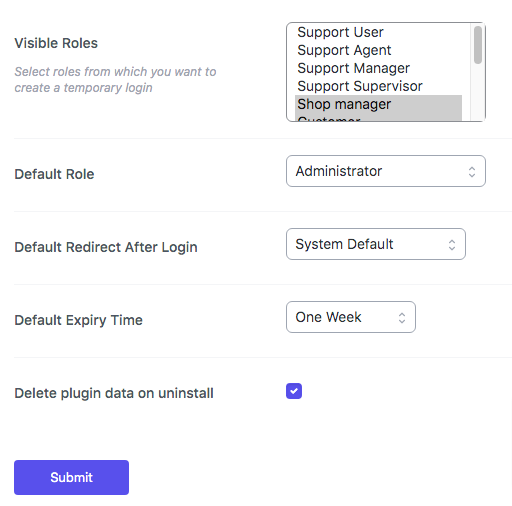
- Update: Now, admin can select roles from which they want to create a Temporary Login.
- Fix: Temporary User with ‘administrator’ role shows as a ‘Super Admin’ for WordPress single-site installation.
1.5.1 [2018-01-19]
- Fix: Parse error: syntax error, unexpected ‘[‘ (PHP < 5.4)
1.5 [2018-01-08]
- Update: Now, Temporary Login can be created for WordPress Multisite. Super Admin can create a temporary super admin for multi-site
- Update: Restrict Temporary user to delete other users.
1.4.6 [2017-11-18]
- Update: Now, admin can set the default role for temporary user from the settings panel
1.4.5 [2017-11-13]
- Update: Restrict temporary user to deactivate/delete Temporary Login Without Password plugin
1.4.4 [2017-10-23]
- Fix: Trying to load scripts from unauthorized sources error.
1.4.3 [2017-08-04]
- Fix: Localization issue
1.4.2 [2017-06-28]
- Fix: Uncaught Error: Call to undefined function wc_enqueue_js().
1.4.1 [2017-06-23]
- Update: Now, create a temporary login with a custom expiry date.
1.4 [2016-09-07]
- Added: Support for “Theme My Login” plugin. Now, a temporary user will be redirected to a page that is defined in the Theme My Login plugin.
1.3 [2016-09-01]
- Fix: Temporary users can log in with an email address. Now onwards, the temporary user is not able to login using username/email and password
- Fix: Temporary user was able to reset the password. Now onwards, they won’t be able to reset the password.
- Update: Now, the role of a temporary user is a downgrade to “none” on deactivation of plugin and change to default on the reactivation of plugin
1.2 [2016-09-01]
- Fix: Temporary user can log in with username and password.
1.1 [2016-08-05]
- Fix: Temporary user redirected to login page instead of admin dashboard after successful login.
1.0 [2016-08-04]
- Initial Release

