When it comes to building websites on WordPress, ensuring seamless collaboration between developers and clients is paramount. The ability to share a WordPress project effectively for feedback not only streamlines the development process but also enhances client satisfaction.
We will delve into the intricacies of sharing your WordPress project with clients for feedback. From setting up a collaborative environment to utilizing the right tools and methodologies, we will explore actionable strategies to streamline the feedback process.
Importance of Client Feedback for WordPress Development Teams
The importance of client feedback for WordPress development teams cannot be overstressed if you want to know how they feel about your product. With client feedback, you can learn where to improve your product for better service.
If you don’t take clients’ feedback, you are likely to miss out on the arrears in which your product can better serve them. This could result in the loss of clients over time.
Building Demo Sites: The Best Way to Share a WordPress Project with Clients
Creating Demo sites for sharing WordPress projects with clients is a powerful strategy for development teams to gather feedback, foster collaboration, and ensure project success.
How to Build a Demo Site in WordPress
Building a demo site is made easy by InstaWP.
In the ever-evolving landscape of WordPress development, efficient collaboration between teams and clients is paramount. InstaWP readily defines how WordPress projects are shared and collaborated on.
In the following steps, you will learn how to easily build a demo site.
Step1: Use InstaWP
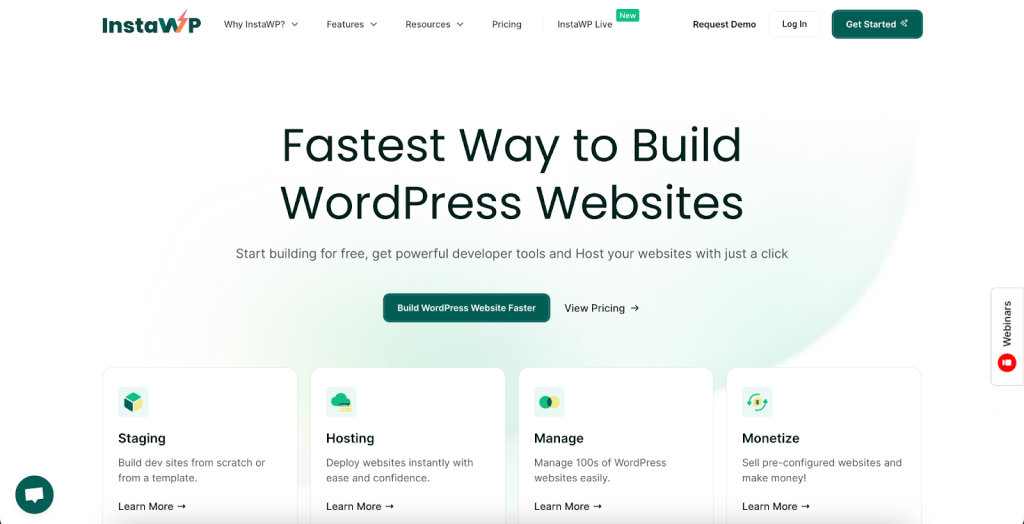
InstaWP allows you to create a demo website in seconds with a few clicks. To create a demo WordPress site, go to the InstaWP dashboard. If you don’t have an account already, sign up for one.
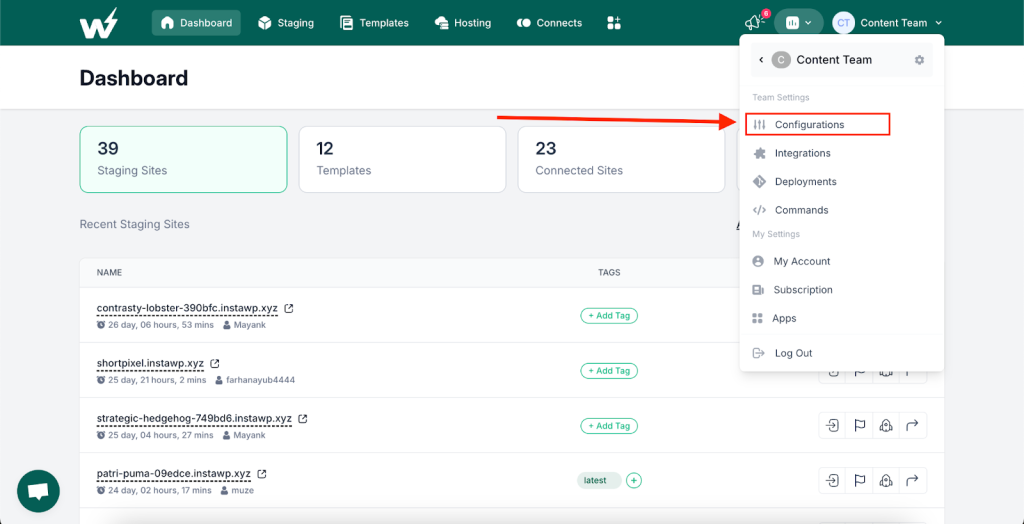
Step 2: Configure Settings
On your profile settings, click on “Configurations”.
Add your configuration details.
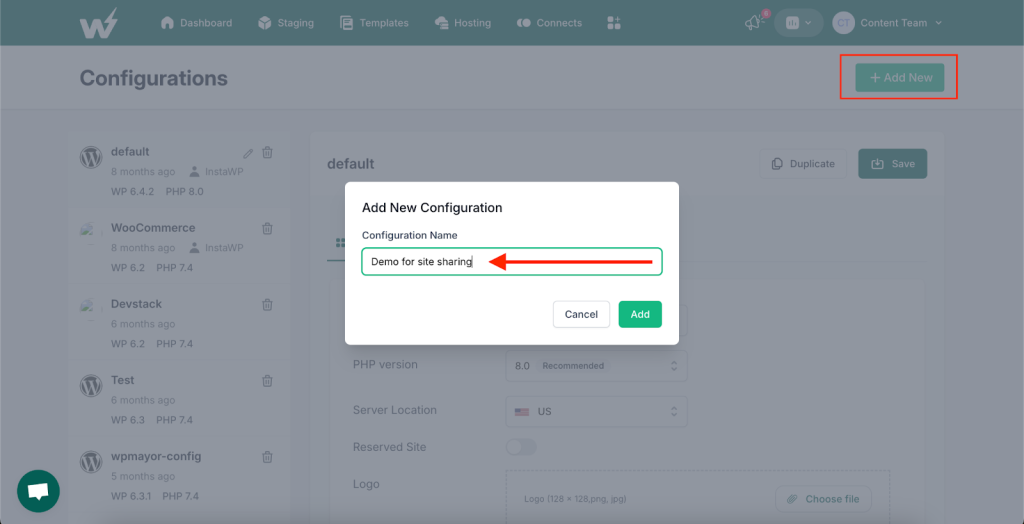
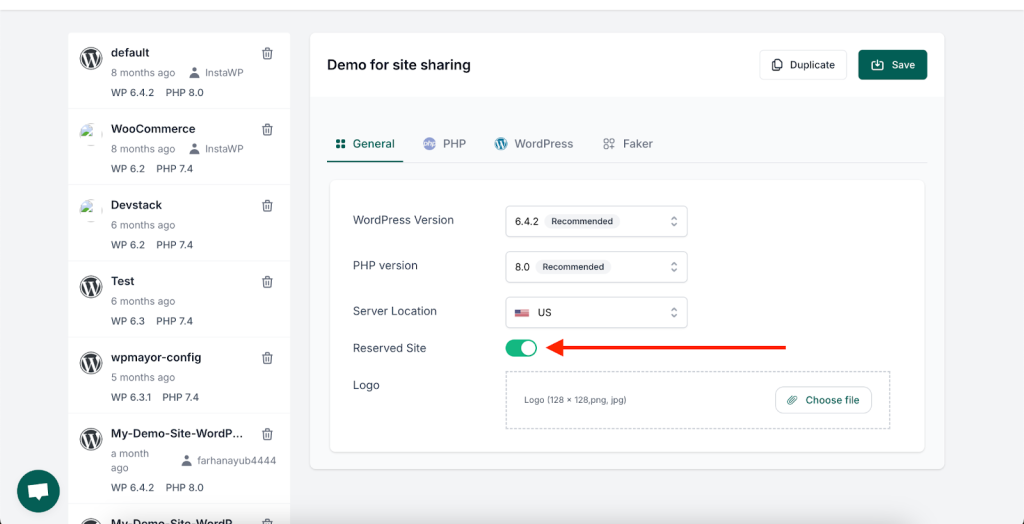
Start configuring your demo site. There are several configuration options that InstaWP sandboxing environment provides for you to ensure a custom WordPress demo site development.
Ensure you toggle green to “Reserved Site”
Go to the “Faker” option next and enable it. This option provides your site with dummy content if that is what you aim to share for feedback..
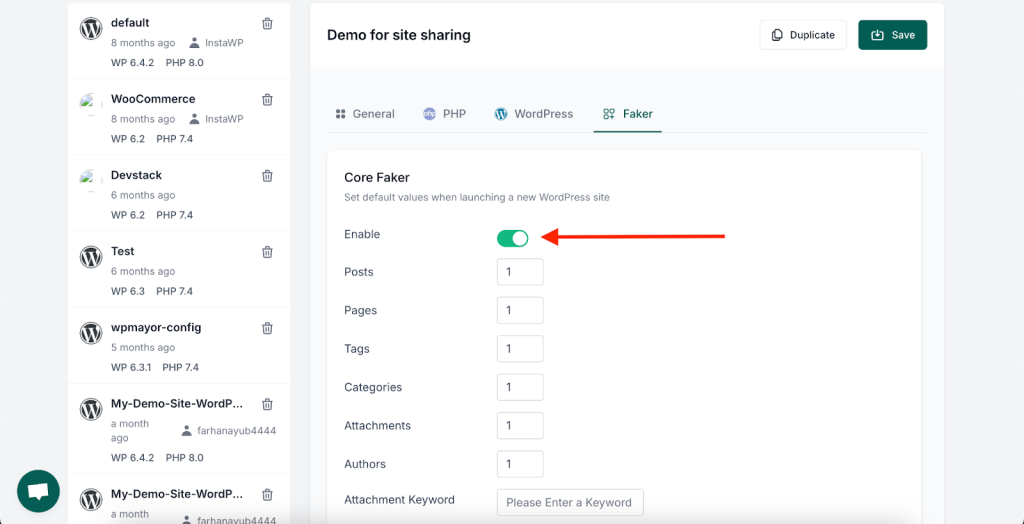
For demo Woo site, you get prepopulated products. Only do this if that’s what you want to share with your client for feedback.
Hit the save button to save your configurations.
Step 3: Create A WordPress Site
Having completed the setup, you can start to create a WordPress website.
Back in your InstaWP main dashboard, click on the Add New button.
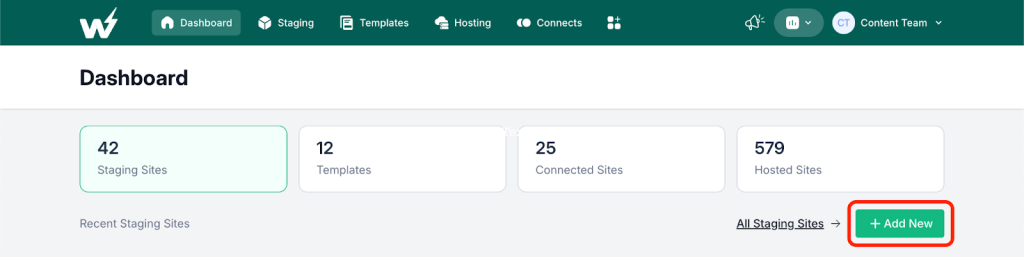
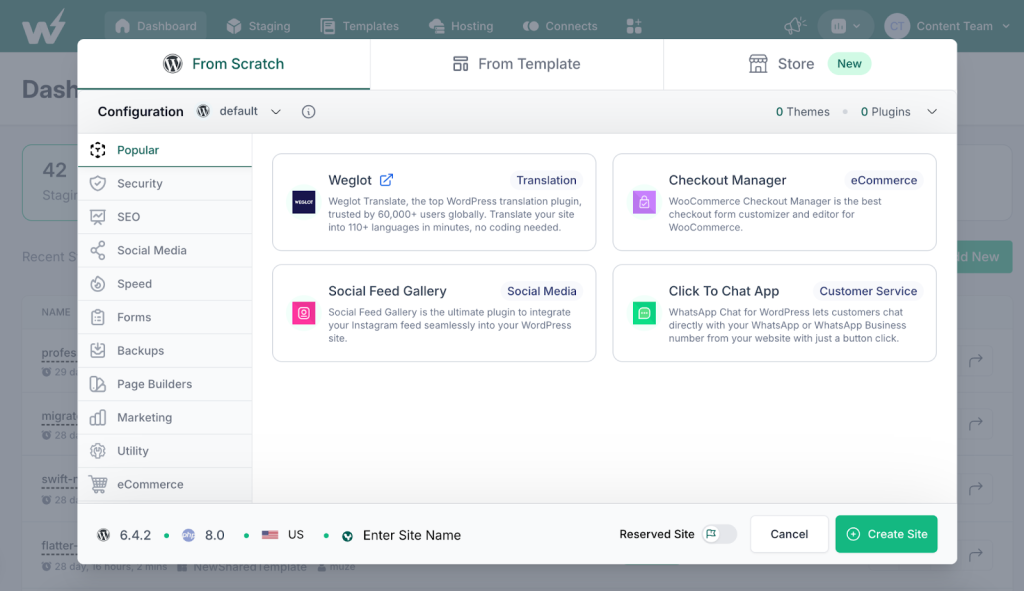
There are multiple ways of building sites faster with InstaWP. Set your WordPress site the way you see fit. You can either create a WordPress site from scratch, which will look like this;
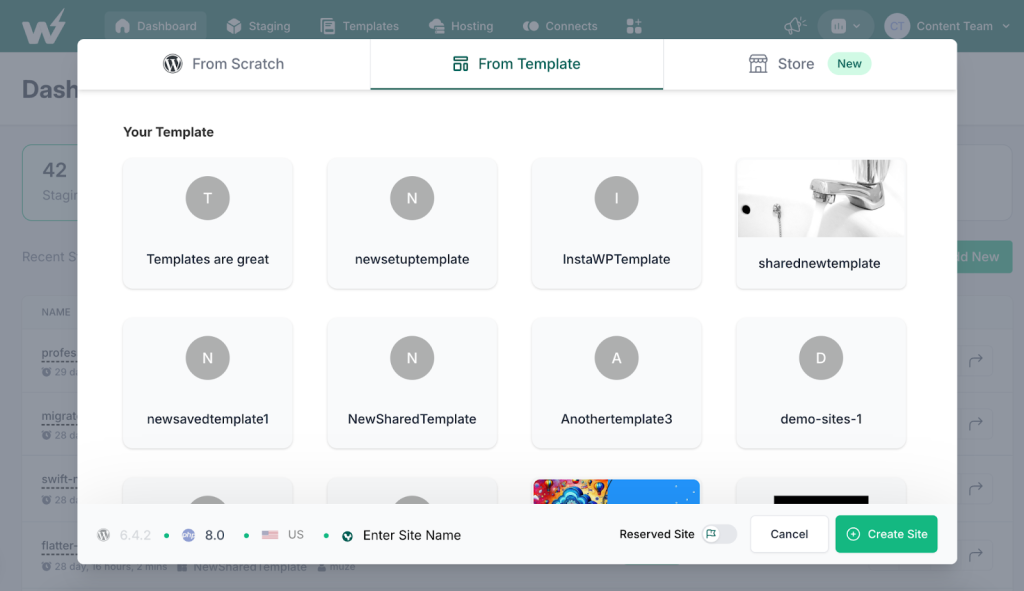
Or from Template;
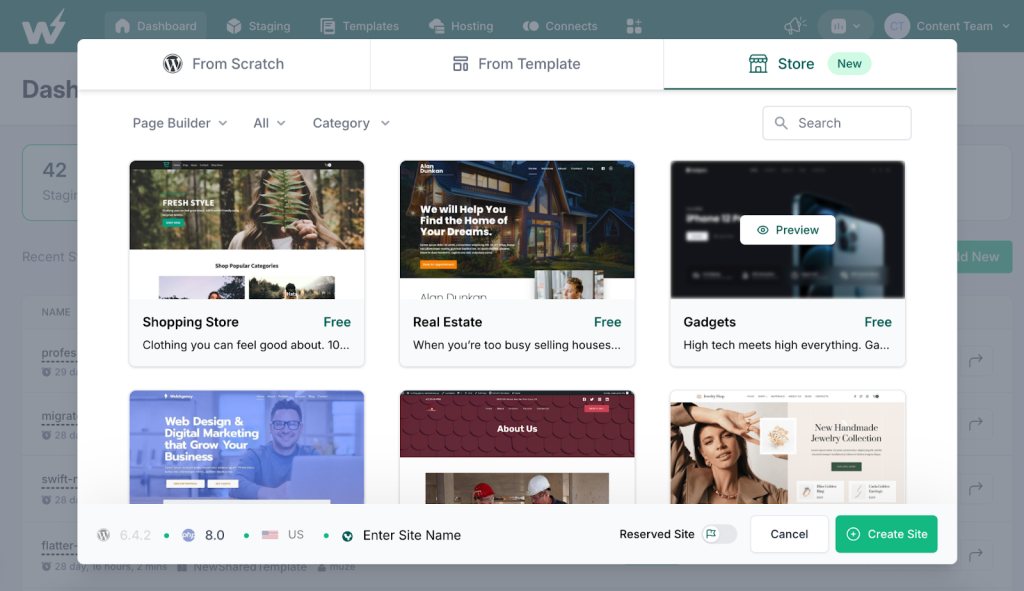
Or from Store that looks this;
Creating a site from scratch gives you the customization level obtained in every custom WordPress development.
Step 3: Build and Design Your Site
In a nutshell, your site is ready for design and you can proceed to do just that with the method and tools you are most comfortable with. These tools may include page builders like Elementor.
Share Your WordPress Project With Your Client For Feedback
After designing your site, it’s vital to ensure that clients can access and modify it without disrupting your main site.
Provide your clients with the website URL and login credentials. This allows them to explore the developed site, interact with its features, and even access the WordPress dashboard, all without impacting your primary site.
Gather Feedback
Start by collecting feedback from your clients or stakeholders. This could include comments on design, functionality, user experience, or any other aspect of the project. Utilize tools such as surveys, feedback forms, or direct communication to gather comprehensive input.
Communicate with Clients
Keep open lines of communication with your clients throughout the feedback incorporation process. Discuss their feedback, clarify any uncertainties, and ensure that you have a clear understanding of their expectations. The easiest and our personal favorite way to do this is using one of these design feedback tools which are designed specifically to enable teams to make it easy for their clients to share feedback (without the endless email ping pong).
If you’re looking for a simple solution, consider using a feedback plugin for WordPress, which can streamline the process of gathering and managing client feedback directly within the project.
Sidenote: If you’re looking for a quick recommendation, we’re big fans of Atarim (which we’ve partnered with and integrated with)
Implement Changes
Use the feedback gathered to make necessary adjustments to the WordPress project. This could involve tweaking design elements, refining functionality, optimizing performance, or any other modifications required to address client feedback.
Test and Validate
After implementing changes, thoroughly test the WordPress project to ensure that the modifications have been successfully incorporated and that the project meets the client’s expectations. This may involve user testing, quality assurance checks, or other validation processes.
Going Live Your WordPress Site
After meticulously iterating on the project until every concern is addressed and the client expresses satisfaction with the outcome, the next step is to host your client’s WordPress site seamlessly. Enter InstaWP hosting, the comprehensive solution for hosting WordPress sites with ease.
InstaWP hosting streamlines the entire process, incorporating everything needed to take your client’s site from concept to reality. Picture this workflow: from initial planning and building a demo site to gathering feedback from your client and finally launching the site live – all seamlessly integrated within InstaWP.
With InstaWP, hosting your client’s site becomes a seamless extension of the development process. Gone are the days of juggling multiple platforms and services; InstaWP provides a centralized hub where you can manage every aspect of your WordPress project from start to finish.
Benefits of a Demo Site
Demo sites offer clients an immersive experience
Unlike static mockups or descriptions, demo sites provide clients with a tangible, interactive experience. They can explore the proposed solution firsthand, clicking through pages, interacting with features, and getting a real feel for how the final product will look and function. This immersive experience makes it easier for clients to understand the project and provide meaningful feedback.
Real-time collaboration is facilitated
Demo sites enable real-time collaboration between development teams and clients. By sharing a live link to the demo site, clients can review progress, offer feedback, and suggest changes as the project unfolds. This immediate feedback loop streamlines communication, minimizes misunderstandings, and ensures that the project stays on track.
Iterative Development
Demo sites support an iterative development approach. Rather than waiting until the end of the project to unveil the final product, development teams can deploy incremental updates to the demo site throughout the development lifecycle.
This allows clients to provide feedback early and often, ensuring that their input is incorporated into the project from the outset and minimizing the need for extensive revisions later on.
Visual Representation
Demo sites serve as a visual representation of the proposed solution. By presenting the project in its intended environment, complete with design elements, branding, and functionality, demo sites give clients a clear and comprehensive understanding of what the final product will look like and how it will perform.
This visual representation makes it easier for clients to evaluate the project and provide informed feedback.
Enhanced Transparency
Demo sites promote transparency and accountability in the development process. By granting clients access to the demo site, development teams demonstrate their commitment to openness and collaboration. Clients can see firsthand how their feedback is being incorporated into the project and feel reassured that their input is valued and acted upon.
Reduced Misinterpretation
Demo sites minimize the risk of misinterpretation compared to static designs or written descriptions. Clients can interact directly with the site, ensuring a clearer understanding of functionality, layout, and user experience. This reduces the likelihood of miscommunication and ensures that client feedback is aligned with the project’s goals.
Early Issue Identification
By sharing a demo site early in the development process, potential issues can be identified and addressed before they escalate. Clients may uncover usability issues, design inconsistencies, or functionality gaps that were not apparent in earlier stages. This early detection allows for timely adjustments, preventing costly rework later on.
Showcasing Progress
Demo sites serve as tangible evidence of progress, providing clients with a sense of momentum and accomplishment. Regular updates to the demo site demonstrate the development team’s dedication and progress, instilling confidence in the project’s trajectory. This reassurance is particularly valuable in long-term projects or those with complex requirements.
Benefits of Client’s Feedback for WordPress Development Teams
Tailored Solutions
Client feedback provides invaluable insights into their unique needs and expectations. By actively listening to clients, WordPress development teams can tailor solutions to precisely match their requirements, ensuring a product that resonates with the target audience.
Continuous Improvement
Incorporating client feedback fosters a culture of continuous improvement within development teams. By analyzing feedback, teams can identify areas for enhancement, refine their processes, and stay ahead of evolving client preferences, ultimately delivering better outcomes with each iteration.
Enhanced User Experience
Clients often offer perspectives on the user experience that developers might overlook. By leveraging client feedback, WordPress teams can fine-tune user interfaces, streamline navigation, and optimize performance, resulting in a website or application that not only meets but exceeds user expectations.
Risk Mitigation
Addressing client feedback early in the development cycle minimizes the risk of misunderstandings and project deviations. By actively seeking feedback, teams can identify potential issues before they escalate, ensuring smoother project execution and reducing the likelihood of costly rework down the line.
Building Trust and Loyalty
Actively soliciting and incorporating client feedback demonstrates a commitment to their success and satisfaction. By prioritizing client input, development teams build trust and rapport, fostering long-term relationships that are invaluable in a competitive market.
Conclusion
In conclusion, effectively incorporating client feedback into a WordPress project is essential for delivering a successful end product that meets the client’s needs and expectations.
Hosting the client’s site with InstaWP hosting offers a seamless transition from development to deployment, providing a comprehensive solution that streamlines the entire process.
From planning and building a demo site to gathering feedback and ultimately going live, InstaWP simplifies every stage of the WordPress development workflow, making it the ideal platform for collaboration and success.
FAQ
1. How can WordPress demo sites streamline collaboration on projects?
WordPress demo sites provide a centralized platform for stakeholders to interact with the project in real time, explore its features, and provide feedback.
2. Is InstaWP suitable for building WordPress demo sites for collaboration on projects?
Yes, InstaWP is an ideal platform for creating WordPress demo sites for collaborative projects.
3. Can I customize the design and functionality of my WordPress demo site on InstaWP?
Absolutely! InstaWP offers full customization options for WordPress demo sites, allowing you to tailor the design, layout, and functionality to your project’s specific requirements.
4. How does InstaWP ensure security for WordPress demo sites?
Security is a top priority for InstaWP, and measures such as regular updates, malware scanning, SSL encryption, and firewall protection are in place to safeguard demo sites hosted on the platform.
5. Can InstaWP assist with hosting the live version of my WordPress site after the demo phase?
Yes, InstaWP offers a seamless transition from demo to live hosting for WordPress sites. With InstaWP hosting, you can easily launch your client’s site from the demo environment, ensuring a smooth transition from development to deployment.