In the ever-evolving ecosystem of website management, the quest for seamless organization and enhanced user experience is perpetual. Enter the realm of WordPress Calendar Plugins—a crucial arsenal for website owners navigating the intricate dance of scheduling, appointments, and event management.
These plugins not only punctuate the functional aspect of websites but also orchestrate a symphony of efficiency, transforming your platform into a well-orchestrated event hub.
As the digital canvas expands, businesses and individuals alike are seeking more than just a static online presence. They crave interactivity, engagement, and a means to effortlessly showcase their schedules and events. WordPress Calendar Plugins emerge as the unsung heroes, bringing order to the chaos of dates and deadlines.
In this blog, we embark on a journey through the vibrant spectrum of these plugins, exploring their diverse functionalities, user-friendly interfaces, and how they seamlessly integrate into the intricate tapestry of WordPress websites.
Let’s delve into the world where time meets technology, where events find their digital rhythm, and where WordPress Calendar Plugins reign supreme in orchestrating the perfect online calendar symphony.
Table of Contents
What is WordPress Calendar Plugin?
WordPress calendar plugins are tools that help you organize, display, and manage events or content schedules visually on your WordPress site. These plugins are especially useful for agencies, bloggers, event organizers, and content teams that want a clear editorial or event calendar inside WordPress.
Best WordPress Calendar Plugins to Try
Here are some of the best WordPress calendar plugins that one can try without any hassles.
1. The Events Calendar

The Events Calendar is a WordPress plugin that allows users to create and manage events on their website. It provides both in-person and virtual event compatibility. The plugin is developed and maintained by a world-class team of developers and designers.
This plugin is beneficial for users who need to manage events on their website, whether they are small businesses, musicians, venues, restaurants, non-profits, universities, or government institutions. With its extensive features, The Events Calendar offers a professional-grade solution for managing events.
Why use Events Calendar
The plugin should be used because it provides a comprehensive solution for event management. It is easy to use, customizable, and extensible, making it suitable for a wide range of users, from beginners to advanced developers.
Pros:
- Comprehensive features for managing events
- Easy to use and customizable
- Extensible with add-ons
Cons:
- Some features require premium add-ons
Key Features:
- Saved venues & organizers
- Calendar month view with tooltips
- Event List view and Day view
- Widget Upcoming events list
- Google Calendar and iCal exporting
- Extensive template tags for customization
Pricing Structure
The Events Calendar is a free plugin. However, it offers premium add-ons for additional features like recurring events, ticket sales, user-submitted events, automatic imports, and more. The cost of these add-ons varies.
✅ Want to try The Event Calendar plugin before installing it on your live site?
Use InstaWP to launch a clean WP staging site in seconds—no setup, no hosting headaches.
2. Simple Calendar Google Calendar Plugin

The Simple Calendar – Google Calendar Plugin is an efficient tool that allows you to add Google Calendar events to your WordPress site. It is easy to setup, and you can customize it according to your needs. The plugin is mobile responsive and comes with a beautiful design.
This plugin is useful as it allows you to display events from any public Google Calendar on your website. You can manage the events on Google Calendar without the need to create events on WordPress. It allows you to integrate your website with Google Calendars effortlessly and keep your audience updated about forthcoming events.
Why use Simple Calendar
You should use this WordPress calender plugin if you are seeking an easy and efficient way to display your Google Calendar events on your WordPress site. It allows you to keep your site updated without creating events manually on WordPress.
Pros:
- Easy to setup and customize
- Mobile responsive
- Combine multiple calendars into a single display
- Integration with Event Calendar Newsletter
Cons:
- Limited features in the free version
- Premium features require additional payment
Key Features:
- Display events from any public Google Calendar
- Fully responsive and mobile-friendly monthly grid and list views
- Customize event content display using simple tags
- Combine multiple calendars into single displays
- Advanced settings to adjust time zones, date/time formats, and start of the week
- Integration with Event Calendar Newsletter
- Open source with code hosted on GitHub
The plugin comes with additional features offered with add-ons. These include week and day views, faster load times, configurable header navigation buttons, and more.
Pricing Structure
The plugin is free to use. However, to access additional features such as displaying events from both private and public Google Calendars, highlighting events with colors, displaying attendee names, avatars, and RSVP status for any private or public event, and more, you need to purchase the Google Calendar Pro add-on.
Need to show your team or client how the Simple Calendar plugin works?
Launch a site with InstaWP, install the Simple Calendar plugin, and send them a live link—no staging servers or FTP required.
3. My Calendar

My Calendar is a WordPress plugin that provides robust event management with highly customizable ways to display events. It enables individual event calendars within WordPress Multisite and provides the flexibility to display multiple calendars by categories, locations, or authors.
This plugin is highly useful for any WordPress website that needs to manage and display events. It offers a great deal of flexibility for designers and developers who need a custom calendar. The plugin is built with accessibility in mind, ensuring all users can get equal access and experience.
Why use My Calendar
This plugin should be used for its extensive event management features, comprehensive flexibility, and inclusive accessibility. It also provides the option to extend its functionality by purchasing the premium extension, My Calendar Pro.
Pros:
- Highly customizable
- Supports individual as well as multiple calendars
- Extensive support for recurring events
- Rich permissions handling
- Email notifications for scheduled or drafted events
Cons:
- Some advanced features are only available in the Pro version
Key Features:
- Calendar grid or list views of events
- Month, multi-month, week, or daily view
- Widgets for today’s events, upcoming events, mini calendar, event search
- Rich permissions handling
- Email notifications when events are scheduled or drafted
- Manage locations
- Fetch events from a remote database
Pricing Structure
The basic version of My Calendar is free. For advanced features, users can upgrade to My Calendar Pro. The pricing for My Calendar Pro is not specified and users are advised to visit the website to get details on the pricing structure.
Using the My Calendar plugin across multiple client projects?
Save your InstaWP setup as a template and reuse it anytime you onboard a new client. It’s a game-changer for WordPress agencies.
4. Timely All-in-One Events Calendar

Timely All-in-One Events Calendar is a free, all-encompassing event calendar plugin for WordPress. Trusted by over 150,000 event creators globally, it allows users to create, manage, and share their events easily. This plugin can handle in-person, virtual, or hybrid events, making it suitable for various event types.
This plugin is useful for simplifying event management. With a visually appealing interface, it provides an advanced website calendar system for WordPress users. It offers numerous features such as easy event creation and publishing, customizable themes, and multiple calendar views, making it a versatile tool for event management.
Why use Timely All-in-One Events Calendar
The use of this plugin is recommended for its impressive user interface and powerful features. It is fully customizable, easy to use, 100% mobile responsive, and accessible for the community with disabilities.
Pros:
User-friendly interface.
Variety of features for comprehensive event management.
Supports different types of events.
Customizable themes and views.
Cons:
- Some advanced features require paid plans.
Key Features:
- Multiple calendar themes for customization.
- Support for in-person, virtual, and hybrid events.
- Easy event creation and publishing.
- Event search box and filtering options.
- SEO-optimized calendar and events.
- Support for different languages.
Pricing Structure
The basic version of the plugin is free. However, additional features such as RSVP/Ticketing and more advanced features require upgrading to premium paid plans. The pricing for these plans can be found on the Timely website.
5. WP Booking Calendar
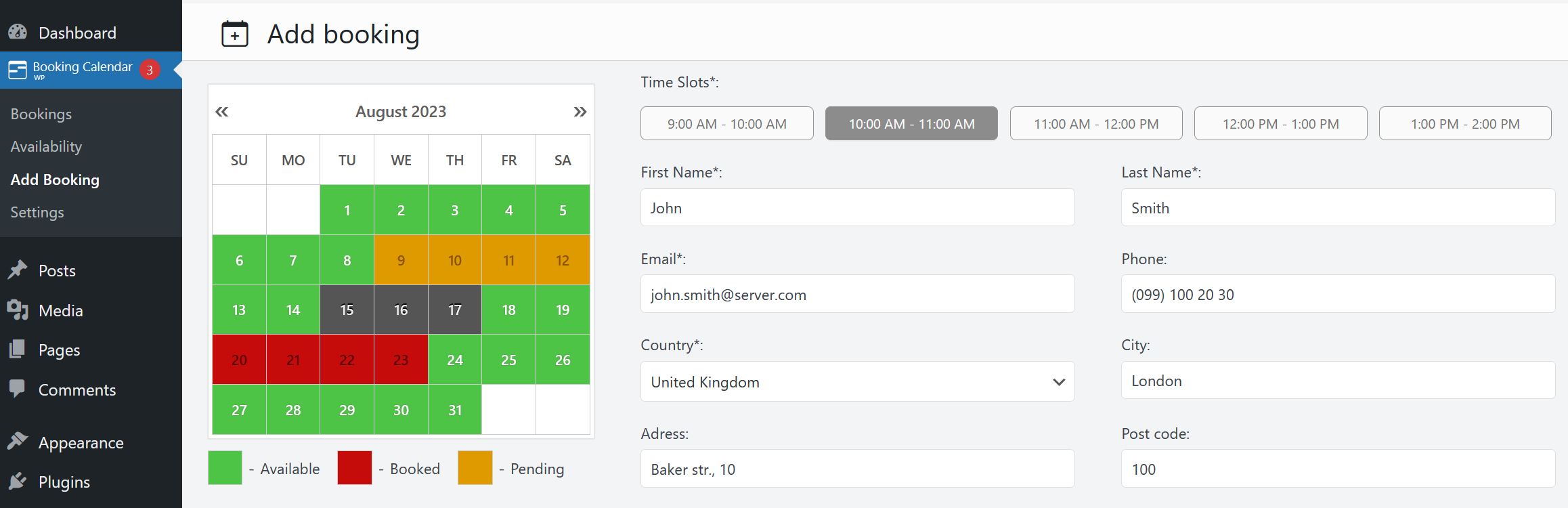
The WP Booking Calendar is a comprehensive WordPress plugin that allows users to manage and track bookings. This plugin provides a user-friendly interface for displaying calendar availability, accepting bookings from visitors, and managing these bookings through a modern and clean admin panel.
The booking system is versatile, and capable of handling full-day bookings, time-slot appointments, and events.
This calendar plugin for WordPress is particularly useful for businesses that require a booking system such as bed and breakfasts, spas, clinics, rental services, and event scheduling. The ability to sync bookings with other services allows for seamless management and avoids duplicate bookings.
Why use WP Booking Calendar Plugin
Using the WP Booking Calendar plugin ensures that your booking system is efficient and reliable. It offers a smooth user experience for both you and your website visitors, reducing the chances of booking errors and improving customer satisfaction.
Pros:
- Easy to set up and use
- Versatile, suitable for a variety of businesses
- Syncs with other booking services
- Offers a modern and clean admin panel
Cons:
- May have too many features for simple booking needs
- Could be overkill for small businesses
Key Features:
- Full-day bookings, time-slot appointments, and events management
- Syncs bookings with other services
- Multi-language support
- Prevention of double bookings
- Customizable calendar and booking form
Pricing Structure
The WP Booking Calendar plugin offers a free version with basic features. For more advanced features and functionality, there are several premium versions available ranging from $59.25 for the Personal version to $449.25 for the MultiUser version. Each premium version offers a different set of features, allowing you to choose the one that best suits your business needs.
6. ICS Calendar
ICS Calendar is a WordPress plugin that allows users to convert any iCalendar subscription feed into an integrated, automatically updating calendar on their WordPress site. This plugin is compatible with various calendar software such as Google Calendar, Microsoft Office 365, Apple iCloud, Airbnb, Vrbo, and many others.
This plugin is useful as it allows users to manage their events in the calendar software they are already familiar with, while ensuring that the calendar on their WordPress site is always up-to-date. Display options include month, list, or week view. ICS Calendar does not require any API keys, making the process of setting up and maintaining your calendar even more straightforward.
Why use ICS Calendar
Why should you use this plugin? This plugin removes the need for additional work in updating your WordPress calendar. With its ability to work with any calendar software that generates a public iCalendar subscription link, it provides a seamless and efficient solution for integrating a calendar into your WordPress site.
Pros:
- Easy to use with a simple shortcode
- No API keys required
- Compatible with any calendar software that generates a public iCalendar subscription link
- Provides a live preview of your calendar
- Offers a shortcode builder for ease of use
Cons:
- The free version may have limited features
Key Features:
- Seamless integration with various calendar software
- Auto-updating feature
- Multiple display options (month, list, week view)
- No API keys required
- Live preview feature
Pricing Structure
While the basic version of the ICS Calendar plugin is free, there is a Pro version available at $49 per year, which offers additional features and priority support. A lifetime plan is also available at $149.
7. Amelia
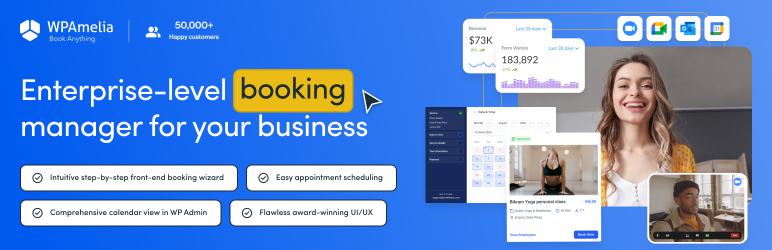
Amelia Lite is a powerful WordPress Booking Plugin that seamlessly doubles as an intuitive calendar plugin. Ideal for businesses seeking a streamlined appointment and event management solution, Amelia Lite combines user-friendly functionality with robust features to transform your website into an efficient booking and scheduling platform.
Amelia Lite excels as a calendar plugin, providing an organized and visually appealing representation of your appointments, events, and availability. With its user-centric design, users can easily navigate through dates, view booked slots, and schedule new appointments directly from the calendar interface.
This integration simplifies the booking process, making it an indispensable tool for service-based businesses, consultants, and anyone requiring appointment scheduling.
Why use Amelia Lite
- User-Friendly Interface: The intuitive calendar layout ensures a seamless user experience, allowing both administrators and clients to effortlessly manage appointments.
- Flexible Scheduling Options: Amelia Lite offers customizable time slots, recurring appointments, and multiple booking calendars, providing the flexibility needed for various businesses.
- Real-time Availability: Keep your calendar up-to-date with real-time availability, preventing overbookings and ensuring accurate scheduling.
- Integration with Other Features: The calendar seamlessly integrates with Amelia Lite’s comprehensive set of features, including client management, payment processing, and notifications, creating an all-in-one solution for businesses.
Pros:
- Easy to use and set up, even for users with limited technical knowledge.
- Versatile and suitable for a wide range of businesses, from salons and spas to consultants and fitness trainers.
- Robust booking and scheduling features, including staff management, customizable booking forms, and reminders.
Cons:
- Some advanced features are available only in the premium version, but the Lite version still offers powerful functionality.
- Limited customization options for the appearance of the calendar.
Key Features:
- Interactive Calendar: A visually appealing calendar interface for easy appointment management.
- Flexible Booking Options: Customizable time slots, recurring appointments, and multi-location support.
- Real-time Availability: Avoid double bookings with up-to-date availability displayed on the calendar.
- Client Management: Keep track of client details and history for improved customer relationships.
- Email Notifications: Send automated reminders and notifications to clients and staff.
Pricing Structure
Amelia Lite WordPress Booking Plugin is free to use. However, for more advanced features, users would need to switch to the paid versions.
8. WP Simple Booking Calendar
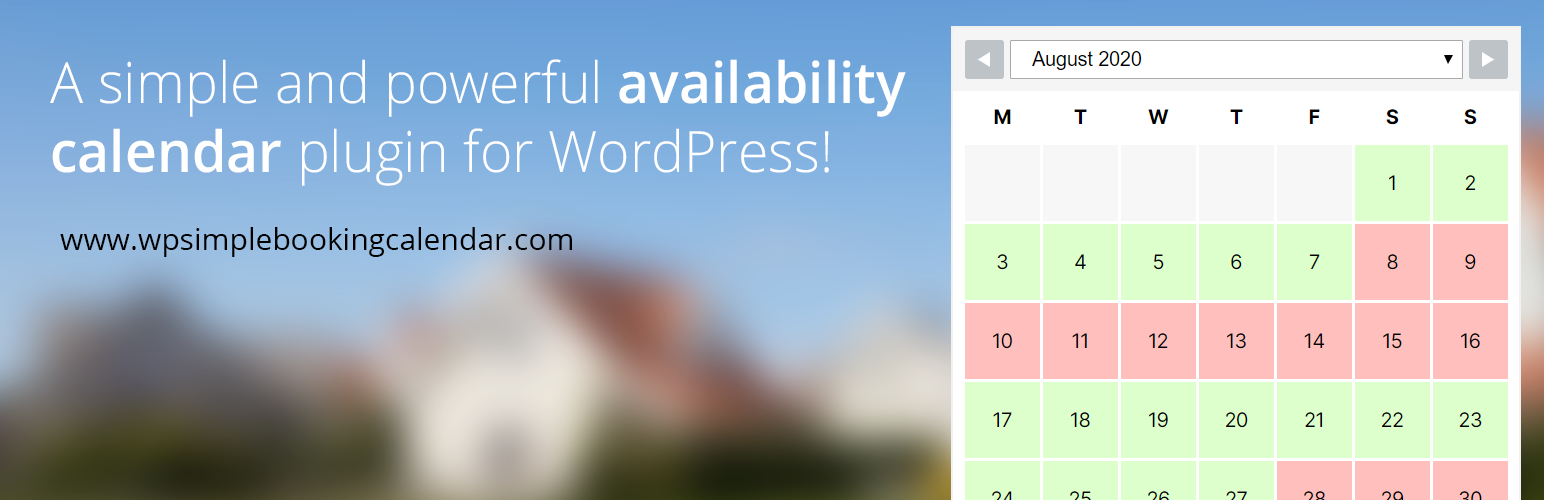
WP Simple Booking Calendar is a free WordPress plugin designed to display the availability of a holiday home, room, bed & breakfast, office, or even a piece of equipment on your website.
This user-friendly WordPress calender plugin allows your website visitors to check the availability of your property with just a few clicks. It offers complete editing freedom and is updated regularly for smoother usage.
This plugin proves to be useful by displaying the availability dates of your rental property, thereby reducing the time spent communicating with potential customers via phone, chat, or email. It can also be used as a shift calendar or for displaying the availability of a room, office, or piece of equipment.
Why use WP Simple Booking Calendar
The WP Simple Booking Calendar should be used because it simplifies the booking process by providing a clear visual of when your property is available. It saves time and increases efficiency by reducing the need for back-and-forth communication about availability.
Pros:
- User-friendly and easy to install
- Provides clear visibility of property availability
- Saves time by reducing communication about availability
- Multiple use cases
Cons:
- Advanced features only available in the Premium version
- Only one calendar can be created in the Free version
Key Features (Free version):
- Create one calendar
- Display a legend near the calendar
- Simple user-friendly interface
- Displays availability
- Responsive calendar layout
- Add and save booking information for each day on each of your booking calendars
- Legend items and month names translated in over 30 languages
- Language translation options using PO files
- Backup/restore calendars and data
Key Features (Premium version):
- Create unlimited booking calendars
- Sync calendars with Airbnb, Booking.com, HomeAway and other iCal supporting sites
- Display multiple months
- Bulk editor for editing multiple dates with one click
- Customizable legends
- Export dates as CSV file
- User management assign specific users to specific calendars
- Change the first day of the week
- Change the start month/year
Pricing Structure
The Free version of WP Simple Booking Calendar is available for download at no cost. For access to advanced features, you can upgrade to the Premium version. Pricing details for the Premium version are available on the official website.
9. WP Event Manager

WP Event Manager stands out as a versatile and feature-rich WordPress plugin designed to elevate your website into a dynamic event calendar. This robust plugin seamlessly transforms your site into a comprehensive event management platform, making it easy for organizers and attendees to engage with events.
From conferences and workshops to community gatherings, WP Event Manager is your go-to solution for creating and managing events effortlessly.
WP Event Manager excels as an event calendar plugin, providing a visually appealing and organized display of upcoming events. With its intuitive design, users can quickly browse through dates, filter events based on categories or tags, and seamlessly register or purchase tickets directly from the calendar interface.
This integration makes WP Event Manager an essential tool for businesses, organizations, and individuals looking to showcase and manage events effectively.
Why use WP Event Manager Plugin:
- Effortless Event Management: WP Event Manager simplifies the process of creating, organizing, and showcasing events, offering a user-friendly experience for both organizers and attendees.
- Customizable Calendar Views: Choose from various calendar views, such as monthly, weekly, or daily, to suit the preferences of your audience and enhance user engagement.
- Powerful Search and Filtering: Users can easily find specific events with advanced search and filtering options, ensuring a seamless and personalized experience.
- Responsive Design: The calendar seamlessly integrates with your website’s design, providing a responsive and mobile-friendly interface for users on any device.
Pros:
- Comprehensive event management capabilities, including event creation, registration, and ticketing.
- Flexible customization options to match the calendar’s appearance with your website’s design.
- SEO-friendly, helping to boost your events’ visibility on search engines.
Cons:
- Some advanced features may require additional add-ons, which may involve extra costs.
- While the core plugin is free, certain functionalities may need add-ons, leading to potential additional expenses.
Key Features:
- Event Listings: Showcase events with detailed information, including dates, locations, and descriptions.
- Customizable Calendar Views: Choose from different calendar layouts to suit your website’s aesthetic.
- Advanced Search and Filtering: Enable users to find events easily based on categories, tags, or specific criteria.
- Event Registration and Ticketing: Allow users to register for events or purchase tickets directly through your website.
Pricing Structure
The WP Event Manager plugin offers a free version with basic functionalities. For advanced features, users can purchase premium add-ons individually or opt for the All Access Pass, priced at $235 for a single site, $499 for up to five sites, and $999 for unlimited sites. The All Access Pass comes with one year of updates and premium support.
10. Editorial Calendar
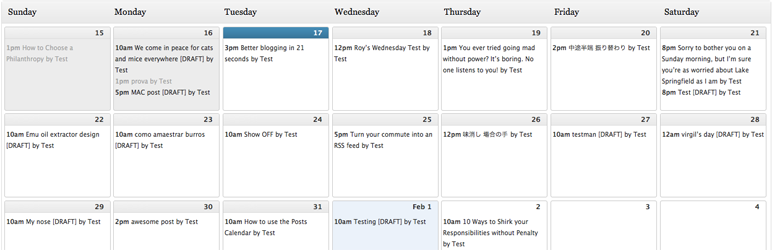
Editorial Calendar is a WordPress plugin that offers a comprehensive overview of your blog’s publication schedule. The plugin is designed to help you manage your posts, allowing you to effectively plan, arrange, and visualize your content strategy.
Editorial Calendar is incredibly useful for bloggers or web administrators who need to maintain a consistent posting schedule. By providing a visual representation of when each post will go live, it simplifies the process of planning and organizing your content.
Why Use Editorial Calendar
The plugin should be used as it ensures that you never forget about an upcoming post. You can easily drag and drop posts to change their publication dates, manage drafts, and even edit posts directly within the calendar.
Pros:
- Easy to use and intuitive interface
- Allows for efficient content planning and scheduling
- Supports multiple authors
- Drag and drop feature for easy management
Cons:
- Limited customization options
- Might be unnecessary for single-author blogs or websites with less frequent posting schedules
Key Features:
- Overview of all posts and their publication dates
- Drag and drop feature for changing post dates
- Drafts management
- Quick edit for post titles, contents, and times
- Post-publication or draft management
- Status overview for all posts
- Support for multiple authors
Pricing Structure
Editorial Calendar is a free plugin available in the WordPress plugin directory. There is no premium version or additional costs associated with this plugin. It is open-source software, and the developers welcome feedback and suggestions for improvements.
How do WordPress Calendar Plugins help in optimizing your schedule
WordPress Calendar Plugins play a pivotal role in optimizing your schedule by providing advanced tools and functionalities that enhance the efficiency of managing appointments, events, and deadlines. Here’s a breakdown of how these plugins contribute to schedule optimization:
- Visual Representation: Calendar plugins offer a visual representation of your schedule, allowing you to see events and appointments at a glance. This visual approach simplifies the process of understanding your schedule and identifying available time slots.
- Easy Scheduling: Users can easily schedule appointments or events directly through the calendar interface. This eliminates the need for back-and-forth communication and streamlines the booking process, saving time for both the organizer and attendees.
- Real-Time Availability: Many calendar plugins provide real-time updates on availability. This prevents overbooking and helps in making informed decisions about scheduling, ensuring that time slots are utilized efficiently.
- Customizable Time Slots: WordPress Calendar Plugins often offer the flexibility to customize time slots based on your specific needs. Whether you run a consultancy service with specific session durations or manage events with varying timelines, the plugins adapt to your scheduling requirements.
- Automated Reminders: These plugins typically include automated reminder features. Users can receive notifications about upcoming events or appointments, reducing the likelihood of missed schedules and improving overall time management.
- Integration with Other Tools: Many WordPress Calendar Plugins seamlessly integrate with other productivity tools and platforms, creating a centralized hub for managing your schedule. This integration eliminates the need to switch between multiple applications, enhancing workflow efficiency.
- User-Friendly Interface: The intuitive design of these plugins ensures that users can navigate and interact with their schedules effortlessly. Whether you are an event organizer or an individual managing personal appointments, the user-friendly interface contributes to a smoother scheduling experience.
- Multi-Functional Capabilities: Beyond basic scheduling, some calendar plugins offer additional functionalities such as event registration, ticketing, and attendee management. This multifunctional approach consolidates various aspects of event organization in one platform, optimizing the overall scheduling process.
In essence, WordPress Calendar Plugins provide a comprehensive solution for individuals and businesses seeking to optimize their schedules. From visualizing time commitments to facilitating easy scheduling and automating reminders, these plugins empower users to make the most of their time in a digital landscape.
Final Word
The WordPress calendar plugins like offer unique features to cater to various needs. They provide an efficient way of managing and displaying events, appointments, and scheduling.
Depending on your specific requirements, such as event management, booking system, or content organization, there’s a plugin suited for you. It is recommended to try out these plugins and see which one works best for your website.


