When a client believes in the less is more philosophy, creating a one-page website is a sleek, focused, and increasingly popular web design approach. For agencies and developers constantly seeking efficiency and high conversion rates for their clients, mastering the art of the one page site is no longer optional – it’s a strategic advantage.
This isn’t about sacrificing functionality; it’s about laser-focusing your message and crafting a seamless user journey within a single page website, a single, scrollable experience. Let’s dive into what one page websites are, why they’re impactful, and how you can build them like a pro.
Table of Contents
Decoding the One-Page Phenomenon: What Exactly is a One Page Website?
Imagine a meticulously crafted brochure that is interactive and dynamic on the web. That’s essentially a one page website. All the essential information is presented on a single, vertically scrolling page, eliminating the need for navigation menus and multiple page loads. This single page website design is gaining traction for its simplicity.
It cleverly eliminates the need for traditional navigation menus and the frustrating wait times of multiple page loads. Creating single page website design isn’t just a fleeting trend; it’s a strategic evolution gaining significant traction, especially in a mobile-first world where simplicity and speed are paramount.
Think of it like this:
- Traditional Website: A multi-chapter book, each chapter (page) exploring a different facet of the story.
- One Page Website: A compelling magazine article, with sections flowing seamlessly together to tell the complete story within a single page read.
The beauty of a one page website lies in its clarity and focused user journey. By removing navigational clutter and presenting information sequentially, you guide visitors towards your key message and call-to-action with minimal distraction.
Why Embrace the One-Page Website Development Approach
For agencies and developers, developing one page websites offers tangible benefits:
Simplified Navigation=Enhanced User Experience (UX)
Users intuitively scroll, guiding them through a pre-defined narrative. This linear flow minimizes distractions and keeps users engaged with your core message, especially on a single page website.
Mobile-First Design Advantage
Naturally responsive, one page websites excel on mobile. Scrolling is the natural interaction on smartphones, making them inherently mobile-friendly, and easy to create a one page website that looks great everywhere.
Focused Call-to-Action = Higher Conversion Rates
One pager WordPress websites are designed to guide users towards a specific goal. By eliminating distractions, you can funnel visitors towards your primary conversion point – be it a contact form, a signup, or a purchase on your single page website.
Streamlined Workflow
With a one-page website means less content to manage, fewer pages to design and develop, which translates to faster project turnaround times and reduced development costs. Ideal for quick campaigns and MVP launches, and even feasible to launch a free one-page website for initial testing.
Concentrated Keyword Strategy
Optimizing a single page can be more efficient than spreading SEO efforts across multiple pages. Focus your keywords and content strategy for maximum impact on your one page website.
Visual Storytelling
One page websites lend themselves beautifully to visual storytelling through parallax scrolling, animations, and strong visual hierarchy, creating a memorable user experience when you create a one page website.
One Page Website Examples for Reference
Want to see how one page websites look in real-life? Here are some of the best one page website examples for you.
Real One-Page Website Examples: Catchy Edition
- Bellroy (bellroy.com): Masterful visual storytelling unfolds as you scroll – product-focused and beautifully clean.
- Apes in Space (apesinspace.io): Playful animations and bold visuals make exploring their portfolio an adventure.
- Minimal Co. (minimal.co): Simplicity reigns supreme; whitespace and clear content showcase minimalist product design.
- Melanie F (melanie-f.com): Concise, visually clear personal portfolio – skills and projects jump off the page.
Each example nails one core element – storytelling, interactivity, minimalism, clarity, or energy – making their one-page approach impactful and memorable. Check them out for quick inspiration!
Projects Perfect for One-Page Website Domination
While one-page websites are talk of the town, they are not ideal for each type of website. They work for:
Landing Pages (Lead Gen & Conversions): Obvious, but crucial! If your primary goal is to drive a specific action – sign-ups, downloads, event registrations, product trials – one-pagers are conversion machines.
Why? Laser focus. No distractions. Users are guided directly to your call-to-action through a carefully crafted narrative.
Must Read: Landing Page Optimization: How to Improve Your Conversion Rates
Portfolio Websites (Concise & Visual): For individuals like freelancers (designers, photographers, writers), or small studios showcasing a curated selection of their best work.
Why? Showcase your highlights in a visually impactful, easily digestible scroll. Less is often more when making a first impression with your portfolio.
Must Read: How to Build a Professional WordPress Portfolio That Converts [For Freelancers]
Product Launches (Single Product/Feature): Hyping a new product or a key feature? A one-pager creates buzz and focuses attention precisely where you want it.
Why? Tell the story of this product, its benefits, and drive pre-orders or initial sales with focused messaging.
Event Websites (Simple & Informative): For conferences, workshops, webinars, or local events needing to convey essential details quickly – date, time, location, speakers, registration.
Why? All event info in one place, easy to access on mobile, and clear calls to action (register, buy tickets). No need to navigate multiple pages for basic event details.
Small Business “Brochure” Sites (Quick & Clean): For businesses with straightforward services or a very specific offering (local businesses, restaurants with online ordering, consultants).
Why? Present your core offering, contact info, and value proposition without overwhelming visitors. A digital business card that’s more engaging.
Personal Branding/”About Me” Sites (Direct & Engaging): For individuals wanting a strong online presence to introduce themselves professionally – think personal branding, online resumes, or bios.
Why? Tell your story, highlight your skills, and make it easy for people to connect with you, all in a smooth, personal scroll.
Campaign-Specific Sites (Time-Limited Focus): For marketing campaigns with a short lifespan or a very targeted message (seasonal promotions, contests).
Why? Create a dedicated, high-impact online presence for the duration of the campaign, then easily retire it.
When One-Pagers Might NOT Be Ideal:
- Content-Heavy Websites: Extensive blogs, large e-commerce stores with vast product catalogs, complex documentation sites.
- Websites with Complex Navigation Needs: Sites requiring users to explore deeply into many different areas, or user accounts with personalized dashboards.
- SEO for Broad Keyword Targets: While one-pagers can be SEO-optimized, ranking for a very wide range of keywords might be more challenging compared to a multi-page site with topical depth.
In short: One-page websites excel when you need focus, clarity, and a direct user journey. If your project goals align with these strengths, a one-pager can be a powerful and efficient solution!
How to Create a One Page WordPress Website
Now that you’ve clarity on what a page website is and why you should go for it, your next step is to learn how to create a one page WordPress website.
Step 1. Define Your Goal & Target Audience
Before any design or code, clarity on your website’s purpose and your ideal visitor is paramount. First, pinpoint your primary objective. What action do you want visitors to take? Is it lead generation, product sales, event sign-ups, portfolio views, or brand awareness for a campaign? Be specific and consider how you’ll measure success.
For example, instead of “have a website,” aim for “generate X leads per month” or “increase product orders by Y%.”
Equally critical is defining your target audience. Go beyond basic demographics. Deeply understand their needs and pain points – what problems does your offering solve for them?
What are their motivations and desires? Consider their online behavior, tech comfort, and existing awareness of your brand. Are they mobile-first? What kind of content do they engage with? Tools like customer personas, market research, surveys, and website analytics (if available) can provide valuable insights.
Step 2: Choose Your One-Page Website Builder
Now that you have a clear goal and target audience, it’s time to select the right tool to bring your one page website vision to life. The choice of builder significantly impacts development speed, customization flexibility, and even long-term maintainability.
Here’s a breakdown of popular approaches:
You broadly have three main paths for building a one page website:
Option 1: WordPress with Page Builders: Leverage the power of WordPress, a robust Content Management System (CMS), combined with visual drag-and-drop page builders. Popular examples include Elementor, Beaver Builder, and WP Bakery Page Builder.
Pros: Highly flexible and extendable due to the vast WordPress ecosystem of plugins and themes. Offers robust CMS capabilities if content updates are needed later. Good for SEO. Scalable. Often cost-effective. Many WordPress themes are specifically designed for onepage websites.
Cons: It can have a slightly steeper learning curve than dedicated one-page website builders. Might require some plugin management. Can be slightly more overhead if you don’t need full CMS features for a simple single page website.
Option 2: Dedicated One-Page Website Builders (Simplified Platforms): These platforms are specifically designed for creating simple, often marketing-focused websites, including one-pagers. Examples include Wix and Squarespace.
Pros: Extremely user-friendly, drag-and-drop interfaces make building visually intuitive. Very fast setup and deployment. Often come with built-in templates optimized for conversions. Excellent for users who prioritize speed and ease of use over deep customization. Many offer free one page website plans with limitations.
Cons: Less customization flexibility compared to WordPress or code-based approaches. Platform lock-in – migrating later can be difficult. SEO capabilities can be more limited than WordPress. Can become more expensive as you need advanced features, or remove branding on free one page website plans.
Option 3: Code-Based Development (HTML, CSS, JavaScript): For developers who want maximum control and performance optimization, building from scratch using code is an option. Frameworks like Bootstrap or Tailwind CSS can speed up development.
Pros: Complete design freedom and customization. Optimal performance and speed. No platform lock-in. Ideal for highly bespoke designs or when performance is absolutely critical. Can be the foundation for creating a truly free one page website if you host it yourself on basic hosting.
Cons: Requires coding expertise (or hiring developers). Longer development time compared to using builders. Less user-friendly for content updates unless you build a custom CMS or use a flat-file CMS.
If you’re having a tough time selecting the right kind of one-page website builder, keep these points in mind.
- Ease of Use & Speed: How quickly do you need to launch? How comfortable are you (or your client) with the platform’s interface? Drag-and-drop builders excel in speed.
- Customization Needs: Do you need highly unique design elements or specific functionalities beyond standard features? Code or WordPress with page builders offer more customization.
- Required Features: Do you need built-in forms, e-commerce integration, blogging capabilities, or advanced analytics? Ensure the builder supports your essential features.
- SEO Considerations: How important is search engine optimization? WordPress and code-based approaches offer strong SEO control. Check the SEO features of dedicated builders.
- Budget: What’s your budget for the builder platform itself (monthly fees, one-time costs)? Consider costs for themes, plugins, or developer time if applicable. Look into free one page website builder options if budget is tight, but understand limitations.
- Technical Skills: Assess your team’s technical expertise. If coding skills are limited, a drag-and-drop builder is likely the best choice.
- Scalability & Future Needs: While one page websites are often designed to be concise, consider if there’s potential for the site to evolve or expand later. WordPress offers more scalability if you anticipate future growth.
Based on your project goals, target audience, budget, and technical capabilities, evaluate these three options and select the one page website builder that best aligns with your needs. Experiment with free trials or demos to get a feel for different platforms before committing to a final choice.
Step 3: Choosing and Setting Up Hosting
Once you’ve selected your website builder, the next essential step is choosing the right hosting to make your one page website accessible to the world. Think of hosting as the server where your website’s files reside, ensuring it’s online and available to visitors 24/7.
Even a lean single page website needs reliable hosting for optimal performance and accessibility.
While one-page sites are often lightweight, choosing the right hosting is still crucial. Key considerations include:
- Speed & Performance: Users expect fast loading times, especially on mobile. Choose hosting known for its speed and optimized server infrastructure. Faster loading enhances user experience and improves SEO.
- Reliability & Uptime: Downtime means lost opportunities. Select a hosting provider with a strong track record of uptime to ensure your one page website is consistently available.
- Security: Protect your website and visitor data. Look for hosting with security features like SSL certificates, firewalls, and regular security updates.
- Ease of Use & Management: Consider your technical comfort level. Some hosting options are more user-friendly than others, especially when it comes to setup and ongoing maintenance.
- Scalability (Optional, but Forward-Thinking): While a one page website may be simple now, consider if you might expand in the future. Scalable hosting allows you to handle increased traffic or add features if needed.
You have several hosting types available such as shared hosting, VPS hosting, dedicated hosting, and so on. But, managed WordPress hosting is the real game changer as it can simplify many aspects of setup and maintenance.
- Blazing-Fast Performance: Lightning-quick loads? Yes! Like Happyplankton hitting 97+ PageSpeed with ease.
- Hands-Off Maintenance & Security: Ditch the tech stress! Managed hosting handles updates & security, so you can focus on growth.
- Effortless Setup & Management: Launch & control your one-pager in a snap – even beginners will find it a breeze.
- Expert WordPress Support: WordPress pros on standby! Get specialized priority support whenever you need it, ensuring smooth sailing.
Step 3: Install WordPress on Your Hosting
With your hosting chosen, the next step is to install WordPress, if you’ve opted for this powerful platform. Many hosting providers streamline this process, making it surprisingly quick and easy, especially with managed WordPress hosting.
Generally, you’ll encounter a few primary ways to install WordPress on your hosting account:
Method 1: One-Click WordPress Installers (Hosting Provider Panels)
This is the easiest and fastest method, often offered by best managed hosting providers directly within their control panels (like cPanel, Plesk, or custom panels).
For instance, InstaWP hosting users can simply log in to their hosting account and get WordPress pre-installed without any hassle as it is one of the best managed WordPress hosting out there.
Check this InstaWP hosting installation guide to know steps in detail.
Method 2: Manual WordPress Installation (More Control, Slightly More Technical)
This involves manually uploading WordPress files and setting up the database. It offers more control but is a bit more technical.
Method 3: WP-CLI (WordPress Command-Line Interface – For Developers)
For developers comfortable with the command line, WP-CLI offers a powerful and efficient way to install WordPress.
Installation through this process requires SSH access to your server and WP-CLI installed on the server.
Step 4: Install a Page Builder Plugin
If you’ve chosen WordPress, a page builder plugin is your secret weapon for crafting visually stunning one page websites without extensive coding. These plugins offer drag-and-drop interfaces, pre-built modules, and templates to speed up design and customization dramatically.
Popular Page Builder Choices:
- Elementor: User-friendly, feature-rich, with a free version and powerful pro features. Excellent for visual design and responsive layouts.
- Beaver Builder: Known for its stability and clean code output, loved by developers for its robust framework and reliability.
- WP Bakery Page Builder (Visual Composer): A long-standing popular option, often bundled with premium themes, offering a wide range of elements.
- Brizy: Intuitive and fast, with a focus on ease of use and modern design trends.
Installation of one page website builder is easy.
Within your WordPress dashboard, navigate to Plugins > Add New.
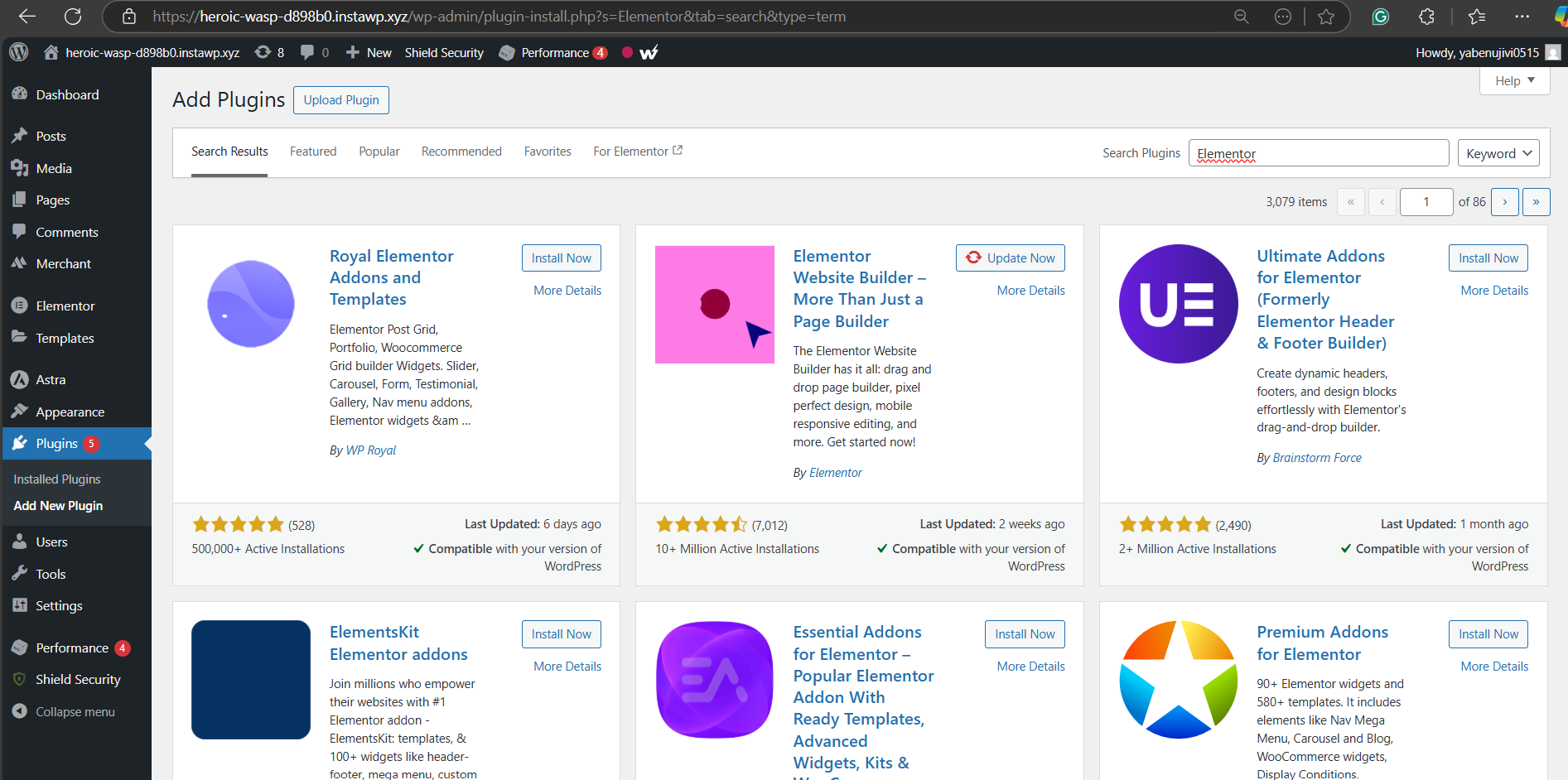
Search for your chosen page builder (e.g., “Elementor”).
Click “Install Now” and then “Activate.”
Once activated, you’ll see the page builder options when creating or editing pages.
Step 5: Create a New Page – Your One-Page Canvas
With your page builder installed, you need to create the foundation for your one page website: a new WordPress page.
Navigate to Pages > Add New in your WordPress dashboard.
Click on ‘Edit with Elementor’ to edit the new page.
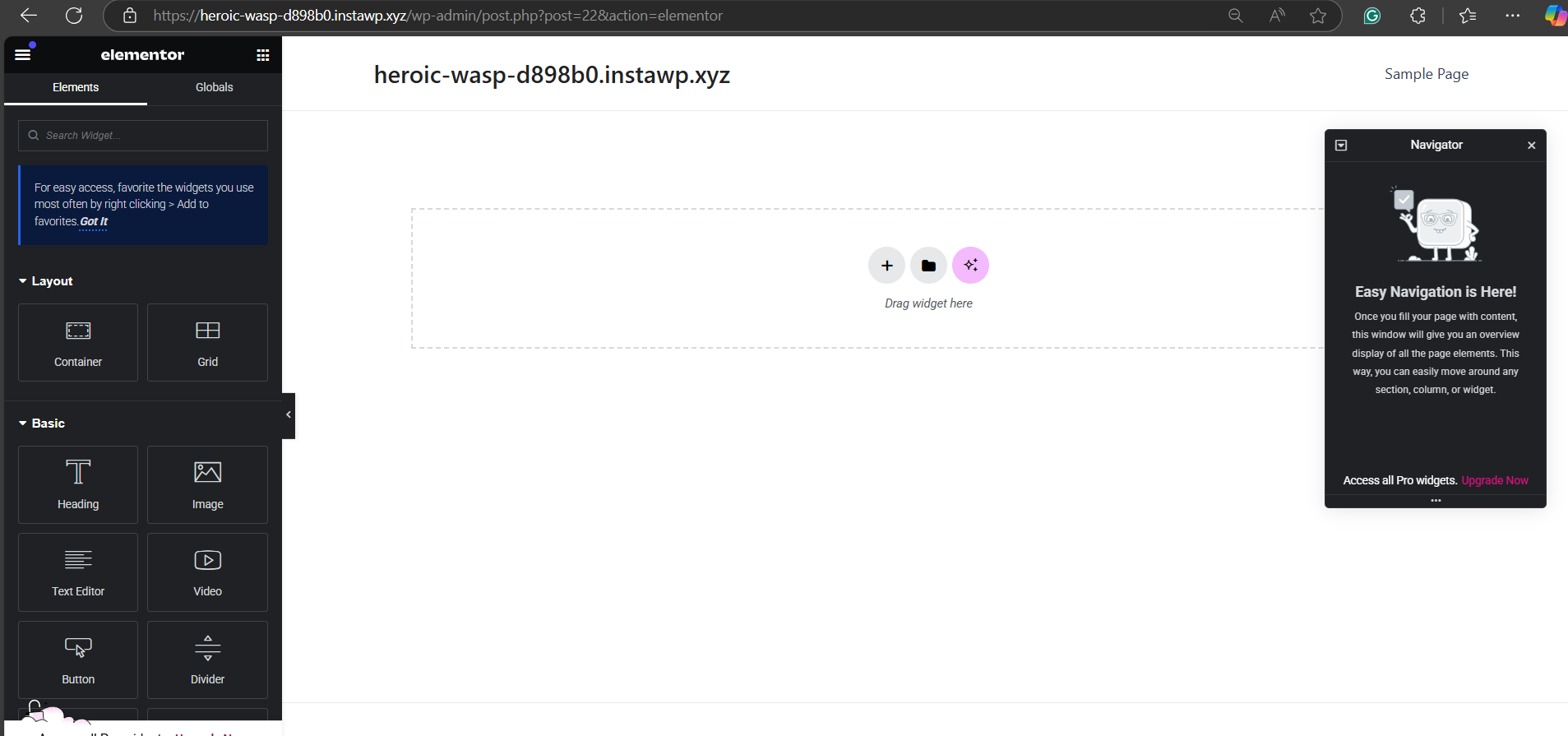
Give Your Page a Title: This could be something like “Homepage,” “Landing Page,” or the name of your business/campaign. This title is primarily for internal organization.
You now have a blank canvas within your chosen page builder to start constructing your one page website visually.
Step 6: Add Your Branding
Before diving into content, establish your visual brand identity on your one page website. Consistent branding builds recognition and trust.
Global Styles (Page Builder Settings): Most page builders offer global style settings. Define your:
- Primary & Secondary Colors: Your brand color palette.
- Typography: Choose brand fonts for headings and body text. Set default font sizes and styles.
- Button Styles: Design button appearances (colors, shapes, hover effects) to be consistent throughout the site.
Logo (Header Section): Add your logo to the header section of your one page website. Ensure it’s high-resolution and appropriately sized.
Favicon (Website Icon): Upload a favicon (small icon) in your WordPress Customizer or theme options. This appears in browser tabs and bookmarks, reinforcing brand recognition.
Step 7: Choose a Layout
A well-structured layout is crucial for guiding visitors through your one-page narrative. Page builders excel at providing layout flexibility.
- Section-Based Structure: Think of your content in logical sections (Hero, About, Services, Portfolio, Contact, etc.). Use your page builder to add sections or containers to define these areas.
- Full-Width vs. Boxed Layouts: Decide if you want full-width sections that span the entire browser window, or boxed layouts with margins. Full-width can be impactful for visuals, while boxed layouts can improve readability for text-heavy sections.
- Visual Hierarchy: Plan how sections will flow visually. Use contrasting background colors or images, whitespace, and clear headings to create visual separation and guide the eye.
- Mobile Responsiveness from the Start: As you build sections, constantly preview in mobile view within your page builder to ensure a seamless experience on smaller screens.
Step 8: Add Content Blocks
Now, start populating your sections with relevant content using your page builder’s modules or elements (often called “widgets” or “blocks”).
- Hero Section Essentials: Headline (compelling and benefit-driven), Subheadline (supporting info), Visual (image or video), Call-to-Action Button (clear and prominent).
- About Us/Services/Product Sections: Text blocks (concise and focused on benefits), Images/Icons (visual reinforcement), Lists (easy-to-scan information).
- Portfolio/Gallery: Gallery modules to display visuals, project grids for portfolio showcases.
- Testimonials/Social Proof: Testimonial sliders or blocks, client logos.
- Team Section: Team member profiles with photos, names, and brief bios.
- Call-to-Action Sections: Buttons, forms, clear prompts to encourage desired actions.
- Footer: Contact information, copyright notice, social media links.
Remember, it’s a one page website. Prioritize key information, focus on user benefits, and avoid overwhelming visitors with lengthy text.
Step 9: Add Unlimited Rows (Sections)
Page builders typically allow you to add unlimited rows or sections vertically, giving you the flexibility to expand your one page website as much as needed (while still keeping it a single page).
- Adding New Sections: Within your page builder interface, look for options to add new “sections,” “rows,” or “containers.” These will typically appear below your existing content.
- Organize Content Logically: Use new sections to separate different content topics (e.g., a new section for pricing below your features section).
- Maintain Visual Flow: As you add rows, consider how they visually connect and flow together. Use background colors, section dividers, and consistent styling to create a cohesive overall design.
- Avoid Excessive Length: While you can add unlimited rows, be mindful of user scroll fatigue. Keep your one page website focused and avoid unnecessary content that detracts from your core message.
Step 10: Create a ‘Contact Us’ Form
A contact form is essential for most one page websites, especially those focused on lead generation or customer interaction.
- Contact Form Modules (Page Builder): Most page builders include built-in form modules. Drag and drop a “Form,” “Contact Form,” or similar module into your contact section.
- Customize Form Fields: Add fields like Name, Email, Message. Consider adding fields relevant to your goals (e.g., Phone Number, Service Interest). Keep forms concise to encourage completion.
- Form Actions: Configure where form submissions are sent (your email address) and set up confirmation messages.
- Integrate with CRM/Email Marketing (Optional): For advanced lead management, you can integrate form submissions with CRM systems or email marketing platforms (often through plugin integrations).
Step 11: Publish Your One-Page Website – Go Live!
Once you’re satisfied with your design and content, it’s time to make your one page website live!
- Save Your Work: Within your page builder, ensure you’ve saved all your changes.
- WordPress Publish Button: In the WordPress page editor (usually top right), click the “Publish” button.
- Set as Homepage (WordPress Settings): Go to Settings > Reading. Under “Your homepage displays,” choose “A static page” and select the one page website page you just created as your “Homepage.” Click “Save Changes.”
- Test Thoroughly: Visit your live website on different devices (desktop, mobile, tablet) and browsers to ensure everything looks and functions correctly. Test your contact form submission process.
Congratulations! Your one-page website is now live!
Bonus Tips: How to Grow Your One-Page Website (Beyond Launch)
A one page website can be a powerful starting point. But, you have to work hard to expand its reach and bring it into the limelight. Here’s how to keep it growing and effective:
- SEO Optimization (Ongoing): Continuously monitor your SEO performance (rankings, traffic). Refine your on-page SEO based on keyword research and performance data. Consider building high-quality backlinks over time.
- Content Updates (Strategic): While it’s a one-pager, content isn’t static. Periodically review and refresh content. Update testimonials, add new portfolio items, refine your messaging as your business evolves. Even minor content tweaks can keep the site fresh and engaging.
- Analytics Tracking & Optimization: Use analytics tools (like Google Analytics) to track visitor behavior (bounce rate, time on page, conversion rates). Analyze data to identify areas for improvement in design, content, or CTAs. A/B test different elements to optimize for conversions.
- Promote Your One-Pager: Don’t just launch and wait. Actively promote your one page website through social media, email marketing, paid advertising, and by including it in your business cards and online profiles.
- Consider Expansion (Strategically): While the beauty of a one page website is its simplicity, if your business evolves significantly, strategically consider if adding a few key linked pages (e.g., a separate blog, a more detailed product catalog) might enhance your overall online presence without sacrificing the focused impact of your core one-pager.
Conclusion: Embrace the Simplicity, Amplify the Impact
One-page websites are more than just a minimalist design trend. They are powerful tools for agencies and developers seeking to deliver focused, high-converting web experiences efficiently.
By understanding their strengths and mastering the building process, you can leverage the streamlined power of one-pagers to create impactful websites that resonate with users and achieve your clients’ business objectives. So, embrace the simplicity, amplify the impact, and start crafting compelling one-page experiences today!
FAQs
Q: What is a one-page website?
A: A one-page website (also known as a single-page website or a one-pager) presents all its content on a single, vertically scrolling webpage. Instead of navigating to different pages, users access all information by scrolling down the page, with content typically divided into logical sections. It’s designed for streamlined storytelling and focused user journeys.
Q: How to make a one-page website?
A: Building a one-page website involves planning your content sections, designing for visual hierarchy and responsiveness, choosing your technology stack (HTML, CSS, JavaScript, frameworks), implementing SEO best practices (on-page optimization, structured data, speed optimization), and continuous testing and iteration.
Follow the step-by-step guide outlined in this blog post for a detailed breakdown.
Q: How to do SEO for a one-page website?
A: SEO for one-page websites focuses on optimizing the single page for relevant keywords.
Key strategies include thorough keyword research, strategic keyword placement within the page’s content (headings, body text, meta descriptions, image alt text), optimizing page speed, ensuring mobile-friendliness, implementing structured data markup, and using internal anchor links for section navigation. A concentrated and well-executed on-page SEO strategy is crucial.
Q: How much to charge for a one-page website?
A: Pricing for a one-page website, like any web project, depends on several factors: complexity of design and features, content creation involved, SEO requirements, the agency’s expertise and location, and the overall project scope.
While generally less complex than multi-page sites, one-pagers still require professional design, development, and SEO. Agencies should price based on value provided, time invested, and market rates, considering the potential ROI a focused one-page website can deliver to the client.