
Clear All Cache for WP Super Cache

Clear All Cache for WP Super Cache

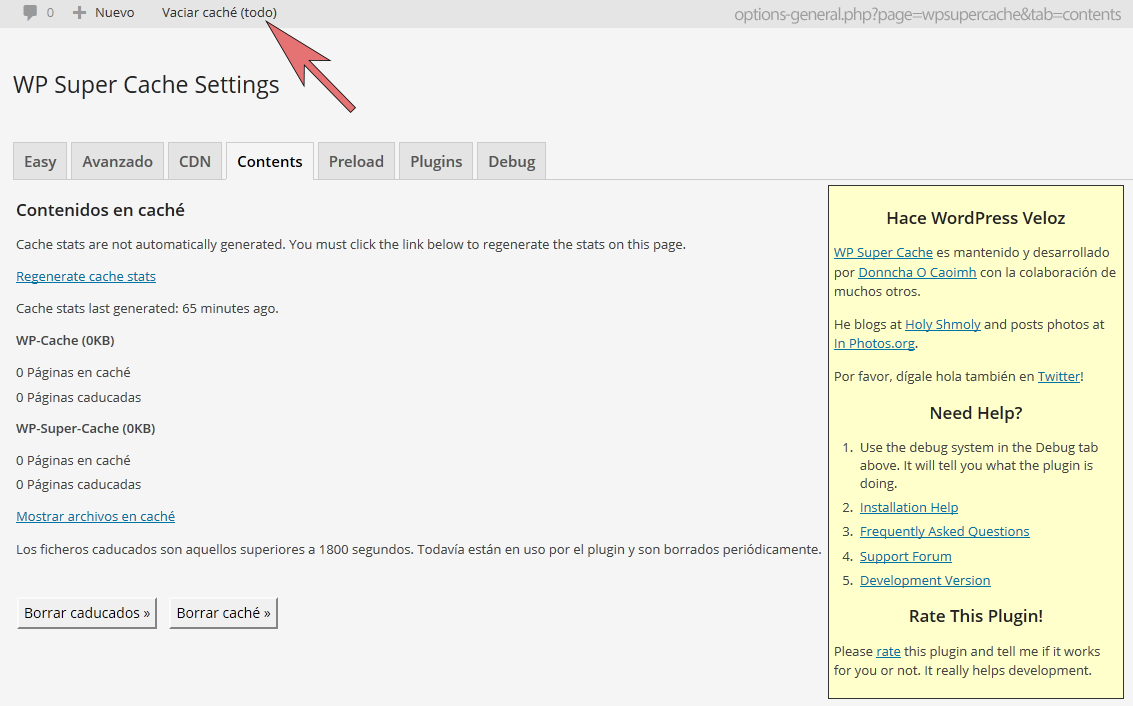
Clear all cache for WP Super Cache adds a menu entry to the admin menu to clear the cache completely .
Rating:
3.1
star-rating-1star-rating-2star-rating-3star-rating-4star-rating-5
Active Installations:
9000+
Last Updated:
Sep 23, 2023
WordPress Version:
3.0.1 or higher
Tested up to:
6.3.5

Easy Cache Clearing

Clear WP Super Cache in one click

This plugin allows you to clear the cache completely from WP Super Cache directly from the admin menu. No need to navigate to the CONTENTS tab anymore.

Quick Cache Clearing

Instantly clear your WP Super Cache

2.0 (19/SEP/2019)

  • Updated name from “WP Super Cache – Clear all cache” to “Clear All Cache for WP Super Cache” in order to comply with the WordPress plugin repository trademark guidelines.

1.4.0

  • Changed function_exists(‘is_plugin_active’) handling so that it doesn’t load when outside of the WordPress administration.

1.3.1

  • Minor update to fix a problem with automatic update from WordPress plugin repository.
  • Corrected two typos. Thanks to Kevin W. McCarthy.

1.3

  • Updated the code to fix the bug inspirationdate found: “The link added is relative so it doesn’t work when the toolbar is displayed on the frontend”.

1.2

  • Updated and corrected readme.txt.

1.1

  • Updated and corrected readme.txt.

1.0

  • First stable release.

0.5

  • Beta release.

Super add-on for Super Cache!

By movingmagic on July 7, 2018

Works like a charm. Saves a lot of time clearing the cache after you made changes to your site. You have to just activate it and it works. Using it on WordPress 4.9.7 Works great.

We need this

By omerekelly on March 2, 2018

is there anyway to only clear Homepage,Categories,tags and Current post when i update a post?

Useless, NOTHING works

By candy2012 on December 11, 2017

waste of time, nothing shows up in admin, so it must have serious flows ...

Doesn't work

By djsnik on November 3, 2017

it doesn't work, and on top of that they copied the name

Don't bother - does not work!

By juscommune on August 21, 2017

Complete waste of time. Followed all the instructions twice and nothing shows up! Don't bother - does not work!

Simply doesn't work

By ricardoalmeida on December 3, 2016

Simply doesn't work.

Simply doesn't work

By jagbuilt on September 3, 2016

I have installed it , activated it, not in admin menu... uninstalled it deleted the files, reinstalled it, doesn't show up anywhere. I tried it a third time, logged out, cleared my workstations cache even, logged back in... Nothing. Not working with wp 4.5.3 and Photocrati v5 theme with nextgen gallery pro. It is simply nowhere to be found. Must move on to a different plug in.

Usefull plugin

By Celso Azevedo (celsoazevedo) on September 3, 2016

Works very wall, thanks!

Try other plugins too!

SQLite Object Cache

A persistent object cache backend for the rest of us, powered by SQLite.

Try Demo More Details

Plugin Load Filter

Dynamically activate the selected plugins for each page. Response will be faster by filtering plugins.

Try Demo More Details

LWSCache

This plugin lets you manage and automatically purge your hosting's LWSCache whenever you edit your website's content

Try Demo More Details
Author Site Author Site

Try Clear All Cache for WP Super Cache With InstaWP

Contact Sales

Reach out to us to explore how InstaWP can benefit your business.