
WP SmartCrop

WP SmartCrop

WP SmartCrop will crop your images on-the-fly to match your CSS, keeping the main focal point in view.
Rating:
3.7
star-rating-1star-rating-2star-rating-3star-rating-4star-rating-5
Active Installations:
4000+
Last Updated:
Sep 13, 2024
WordPress Version:
3.5.0 or higher
Tested up to:
6.4.5

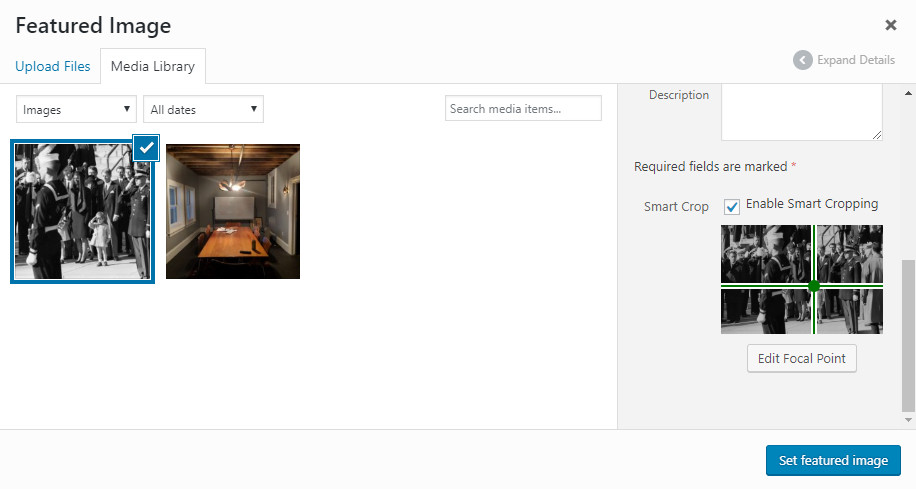
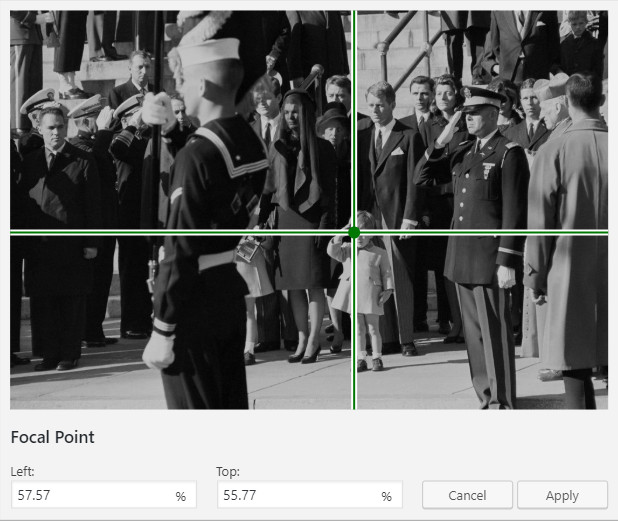
Visually Select Focal Points

Intuitively choose the focal point of your images with a click-based interface.

Enable or Disable Smart-Cropping

Easily turn on or off smart-cropping on a per-image basis.

Target Images for Styling

Style only the images you want with the img.wpsmartcrop-image selector.

Automatic Image Preloader

Ensure your users never see partially loaded images with the automatic image preloader.

2.0.10

  • Remove references to plugin website

2.0.9

  • Fix attribute parsing issue

2.0.8

  • Add support for generic img tags with the default url format

2.0.7

  • Add support for figure markup

2.0.6

  • Test against WordPress 5.6.0
  • Fix a PHP Notice generated by admin settings UI (PR #12, props to @basvandenwijngaard)

2.0.5

  • Fix potential security concern

2.0.4

  • Update admin email

2.0.3

  • Remove mutation observer for IE11

2.0.2

  • Fix admin url

2.0.1

  • Fix custom image size issue

2.0.0

  • completely rework media library interface for ease of use and compatibility
  • add support for relative position mode
  • incorporate mutation observer for live ajax updates
  • fix support for setting focal point in JS

1.5.0

  • fix compatibility with modals in the media library’s grid view

1.4.7

  • fix misplaced parenthesis on count causing warnings on php 7

1.4.6

  • version bump in attempt to fix wordpress.org listing bug

1.4.5

  • Fix for list view

1.4.4

  • center smartcrop focus by default.
  • fix conflict with jQuery 3.0+
  • remove unnecessary IOS compatibility mode

1.4.3

  • fix settings link on plugins page

1.4.2

  • switch to minified js

1.4.1

  • add unnecessary $(window).load event, to solve intermittent issues in Edge Browser

1.4.0

  • abstract wp-smartcrop into a jquery plugin
  • repair list view in media library

1.3.2

  • Fix focal point selection at large resolutions

1.3.1

  • Fix issue with edge cases and focal positions of with 0 as a coordinate

1.3.0

  • Provide better support for iOS devices
  • additional css tweaks for better universality

1.2.0

  • Add initial steps towards add-on friendliness
  • Add extensible settings page

1.1.0

  • Recrop existing cropped thumbnail sizes to match focal point

1.0.0

  • Initial Release

Great But Needs Improvement

By thall11 on November 8, 2022

I had to alter the plugin code slightly to allow it to work with custom sizes as well. It would also be nice if the smart crop dimensions weren't removed upon plugin deactivation, also, if the smart cropping functionality was behind a user role privilege check.

A small but significant improvement to WP

By Morten Ellegaard Larsen (ellegaarddk) on June 18, 2022

This function should be a core functionality! So when I found this little gem I was so happy.

Worked, but not in IE

By dragon013 on June 14, 2019

The plugins worked quite well, but not in IE 11. There it broke the site. Sadly I got no help with that from the developer. So I stopped using it. Another downside (but probably not solvable by a plugin): the preview of links on facebook and twitter is still the non edited one.

OUTSTANDING - this should be on everyone's must have plugin

By Dadarocks on March 22, 2019

Dont you hate it when you upload a picture to the featured image and its cropped completely wrong - like the focus of the picture isnt even the frame - THIS SOLVES that problem! Great plugin!

Intuitive, great plugin!!! works perfectly

By elronb on March 9, 2019

Thank you for taking the time to create this awesome plugin for us.

Not working in WP 5

By leymannx on February 28, 2019

Seems really promising but I didn't got it working in WP 5.1.0. Neither WP Smart Crop v 2.0 (UI works, but output unchanged) nor 1.5. (UI doesn't work anymore, can't select focal point).

Not works as expected

By vessnaws on September 30, 2018

Supports only standard wordpress crops. Doesn't work with custom theme's crops

No more cropping by hand

By odamfm (odam.fm) on May 28, 2018

Time saving plugin, no more cropping by hand to get same height images. Great work!

I can't believe this isn't a core feature!

By dwallace31 on September 3, 2016

I've only been using WP SmartCrop for a couple of days, but I'm already a complete convert! I can finally stop cropping photos by hand before using them with a post. I just upload them and choose a focus, and they suddenly look good on every screen.

It's like magic.

I'm definitely installing this plugin on every site I build from now on.

Try other plugins too!

Gallery Manager

Supercharged image gallery management tool with touch-enabled, responsive, mobile-friendly image lightbox for WordPress!

Try Demo More Details

reSmush.it : the only free Image Optimizer & compress plugin

The FREE Image Optimizer which will compress your pictures and improve your SEO & performances by using reSmush.it, the 20+ billion images API opt …

Try Demo More Details

Meteor Slides

Easily create responsive slideshows with WordPress that are mobile friendly and simple to customize.

Try Demo More Details
Screenshots
Author Site Author Site

Try WP SmartCrop With InstaWP

Contact Sales

Reach out to us to explore how InstaWP can benefit your business.