Time management has become very important in WordPress development. Every hour saved on one project can be channeled into another, potentially maximizing productivity. With less time spent on Project A, you’ll find yourself swiftly moving towards Project B, saving precious time and growing faster.
This is where InstaWP’s WordPress Staging comes into play, offering a streamlined solution to cut down WordPress development time and enhance efficiency.
Let’s tell you how leveraging InstaWP Staging can save you a valuable hour each day.
Table of Contents
InstaWP’s Staging Feature: A Quick Overview
InstaWP Staging offers a comprehensive suite of features designed to streamline your WordPress development workflow.
With its fast and secured WordPress staging tool, you can launch a fully functional WordPress site in less than a second, eliminating the tedious traditional setup process and allowing you to dive straight into development.
Build WordPress Sites

InstaWP is now the industry-leading WordPress staging environment tool that allows you to create WordPress sites in seconds, saving valuable time and eliminating redundancies.
WordPress Staging

WordPress staging is elevated to a whole new level of convenience and efficiency.
InstaWP’s staging feature allows developers to create a replica of their live WordPress site for testing, development, and experimentation purposes without affecting the live site’s performance or functionality.
WordPress Hosting

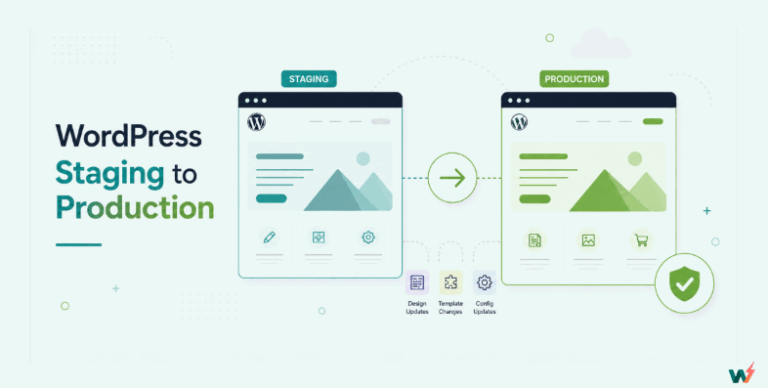
This InstaWP’s WordPress hosting service provides developers with a seamless and reliable platform to deploy websites instantly, directly from their staging environment, thus streamlining the deployment process and allowing developers to transition smoothly from development to production with ease.
Management of multiple WordPress projects
Within InstaWP, developers have the ability to efficiently manage multiple websites through the InstaWP dashboard. This feature simplifies the management and administration of numerous WordPress website projects, eliminating the need to navigate between multiple interfaces or platforms. It also helps save time and improves time management skills by keeping everything organized in one place.
Migration

InstaWP’s platform not only offers robust website development and management capabilities but also gives agencies the opportunity to migrate their websites.
Note that all WordPress websites, whether or not they are built with InstaWP, can be migrated between hosting providers or hosted with InstaWP’s very own hosting service, InstaWP hosting.
Benefits of using WordPress Staging for WordPress Agencies
Agencies typically deal with multiple sites which may include but are not limited to website development, website maintenance, and oftentimes SEO. The challenge is usually how to maintain those multiple WordPress sites from one platform without the need to go into each site separately. InstaWP staging environment dashboard solves this challenge.
In InstaWP, agencies can combine multiple WordPress sites into one single platform and manage them from there.
These are the highlights:
Collaboration Across Development Phases
InstaWP has a plan that is built purposely for agencies to be able to collaborate with both team members and customers.
To access this feature as an agency, you need to sign up for an agency account first. With an agency account, you get these collaboration features:
Apart from the fact that agencies can build faster, test, and deploy you can share projects as you build them.
WordPress Site Maintenance
Site maintenance is made easy with InstaWP features that allow developers to create a WordPress staging of their live sites. With the InstaWP Connect plugin, you can make a copy of your live site in the staging environment.
This feature is essential to ensuring seamless collaboration between agencies and customers.
This plugin seamlessly integrates with WordPress sites, allowing developers to make a copy of their live site and transfer it to the staging environment with just a few clicks. This eliminates the need for manual backups and complicated migration processes, saving time and reducing the risk of errors during site maintenance.
Migrating from WordPress Staging to Live
Migration is a key feature in InstaWP that WordPress development agencies deploy to collaborate with team members and collect feedback from customers.
Before the website goes live from WordPress staging, feedback must have been collected as part of the development process. This proactive approach not only ensures the seamless integration of client preferences and requirements but also instills a sense of confidence in the final product.
InstaWP’s migration capabilities play a crucial role in this process by facilitating the smooth transfer of websites from the staging environment to live servers. This transition allows agencies to showcase their work-in-progress to clients and stakeholders in a controlled setting, enabling them to provide valuable feedback and suggestions for improvement.
WordPress Support
Documentation

Our docs provide all the info needed to start using InstaWP with your team..
Blog

Our blog has articles to help you learn more about InstaWP and WordPress development.
Community

InstaWP is community-oriented. Its live chat option serves as official support. The organization also has a Facebook page where users can get answers and support for various InstaWP features.
From Staging In WordPress to Hosting
InstaWP now boasts a robust and seamless staging to hosting process that keeps you on one single platform for management and testing. This is beneficial to WordPress development agencies in that while sharing processes and collecting feedback from customers, they can go live with their WordPress build.
The robust staging to hosting process in InstaWP simplifies the development workflow by allowing agencies to manage all stages of website creation and deployment within a single platform.
Developers can create and refine websites in the staging environment, collaborating with team members and collecting feedback from clients along the way. This streamlined process ensures that agencies can address any concerns or requests before moving the website to the live hosting environment.
This not only reduces complexity but also improves efficiency and saves time, as developers can seamlessly transition from testing and refinement to deployment without switching between platforms.
WordPress Demos
InstaWP empowers WordPress development agencies to swiftly create demo sites, providing clients with an interactive preview of their projects to gather valuable feedback.
For agencies and developers, the ability to quickly create demo sites means they can showcase their work-in-progress to clients with minimal effort and turnaround time. This efficiency enables agencies to focus their time and resources on refining the website based on client feedback, rather than getting bogged down in administrative tasks.
Similarly, clients benefit from the time-saving aspect of InstaWP’s demo site feature. Instead of waiting days or weeks to see progress on their projects, clients can access demo sites almost instantaneously and provide feedback in real time.
Testing and QA
Traditionally, setting up a testing environment for WordPress websites can be a time-consuming and labor-intensive task, requiring developers to replicate the live site’s configuration and content manually. However, with InstaWP’s staging environment capability, developers can quickly clone the live site to create a replica for testing purposes.
Additionally, InstaWP’s demo sites provide a controlled WordPress staging environment for thorough testing of new features, plugins, and updates before they are implemented on the live site. Developers can conduct comprehensive QA checks and address any issues or bugs in the staging environment, ensuring a smooth and error-free deployment process.
Furthermore, InstaWP’s Staging environment benefits facilitate collaboration between developers and clients during the testing and QA phase. Clients can access the demo site to review progress, provide feedback, and report any issues or concerns directly within the platform.
Troubleshooting
It is a frustrating thing when the site stops working for whatever reason. No client will be happy with a site that constantly goes down, and neither will the developers be at peace. This is why troubleshooting is essential.
What is even more significant is being able to troubleshoot your WordPress site without affecting the live site and user experience. This is why you need InstaWP, which will also save you time.
InstaWP’s staging environment serves as a sandboxed space where developers can troubleshoot and debug activities without fear of disrupting the live site. By creating a replica of the live site in the staging environment, developers can isolate and address issues in a controlled setting, away from users’ prying eyes.
By providing a robust and user-friendly platform for troubleshooting WordPress sites, InstaWP not only saves developers a significant amount of time but also ensures the stability and reliability of the live site.
Guide to creating WordPress Staging with InstaWP
As mentioned earlier, InstaWP can save you a lot of time. To take full advantage of its many helpful features, follow this guide to get started with InstaWP.
Getting started in InstaWP is rather easy. With a few clicks, your account is ready. To create an account, go to InstaWP.

If you already have an account, proceed to the login page.

Create A Fresh WordPress Instance
To create a WordPress staging site, click the Add New button.

Next, configure your WordPress staging site instance setting.

After choosing your desired settings, click on the Create Site button. In a few seconds, you will have a fresh WordPress site to work with.
How to Create Staging of Your Live Site?
With the InstaWP Connect plugin, you can create a staging copy of your live site.
Go to the WordPress plugin repository and search for the plugin.
Install the plugin and activate it. After activating, you will need to connect your live site to InstaWP.

Click on the Connect with InstaWP button. It will take you to the page below.

Click on the Approve button. You will then see a successful connection pop up. Congratulations!
The next step is to start creating a clone of your live WordPress site. To do so, navigate to the InstaWP Connect plugin.

Click on the Create Staging Site button. Follow the instructions, and in a few clicks, you will have successfully created a live replica of your live site.
Conclusion
InstaWP Staging is a game-changer for WordPress developers and agencies, saving up to one hour per day by streamlining the website development process. By providing a seamless and efficient workflow, InstaWP enables developers to focus more on building exceptional websites and less on administrative tasks, ultimately saving valuable time and boosting productivity.
FAQ
1. What is InstaWP Staging?
InstaWP is a WordPress Staging tool that lets you easily build, test, and launch WordPress websites. It also has migration and hosting facilities that make it a complete WordPress project delivery tool.
2. How Can InstaWP Save Me One Hour per Day time?
InstaWP is fast. You can spin up a staging site in a few seconds with a few clicks. It has advanced tools to speed up your WordPress workflows. The platform also lets you launch the site, eliminating the need for migration. That’s how it saves you hours upon hours of every day of development.
3. Can I collaborate with team members using InstaWP?
Yes, Agencies who are on the agency plan get to collaborate within the team and also share project updates with customers
4. Is InstaWP suitable for beginners?
Yes, InstaWP is designed to be a beginner-friendly and easy-to-use WordPress staging platform.