If your WordPress site loads fast in one region but lags in another, the issue might not be your code or theme; it could be your infrastructure. Global users don’t just expect fast performance. They expect consistency. This is where a point of presence (PoP) makes a measurable difference.
By strategically routing traffic through nearby PoPs, your WordPress site can deliver content faster, lower bounce rates, and improve SEO. Whether you’re managing a client site in Europe or running a WooCommerce store with international customers, PoPs are key to improving global WordPress performance without complex setups.
In this guide, you’ll learn exactly how PoPs work and why choosing the right host can significantly speed up your site for users around the world.
Table of Contents
What Is a Point of Presence in WordPress Hosting?
A point of presence (PoP) is a physical or virtual location where a network routes user traffic through dedicated infrastructure like routers, switches, and caching servers. Think of it as a shortcut that connects visitors to your website using the most efficient path possible.
In the context of WordPress hosting, PoPs are critical when you’re serving visitors across different geographic regions. Instead of every visitor connecting directly to your origin server, PoPs help route their requests through a closer access point, resulting in faster load times and smoother user experiences.
Modern WordPress hosts feature a CDN with enough PoPs to minimize the physical and digital distance between your user and your content. For agencies building international websites or client portals, understanding how PoPs work helps you make better hosting decisions.
How PoPs Help Improve Global WordPress Performance
When your WordPress site is accessed from the same country where it’s hosted, everything feels fast. But the moment someone from another continent tries to visit the site, performance can drop noticeably.
This isn’t just about bandwidth or server RAM; it’s about how far the request must travel. A point of presence (PoP) solves this by acting as a localized access point that routes traffic more efficiently.
In the world of global WordPress performance, PoPs are the invisible infrastructure that makes websites faster, smoother, and more stable. Let’s break down how.
1. PoPs Reduce Latency
Latency is the delay between a user’s request and the server’s response. When a visitor from Brazil accesses a WordPress site hosted in Frankfurt, that request travels thousands of kilometers, passing through multiple networks and exchange points. This can result in 300–500ms of latency before the page even begins loading.
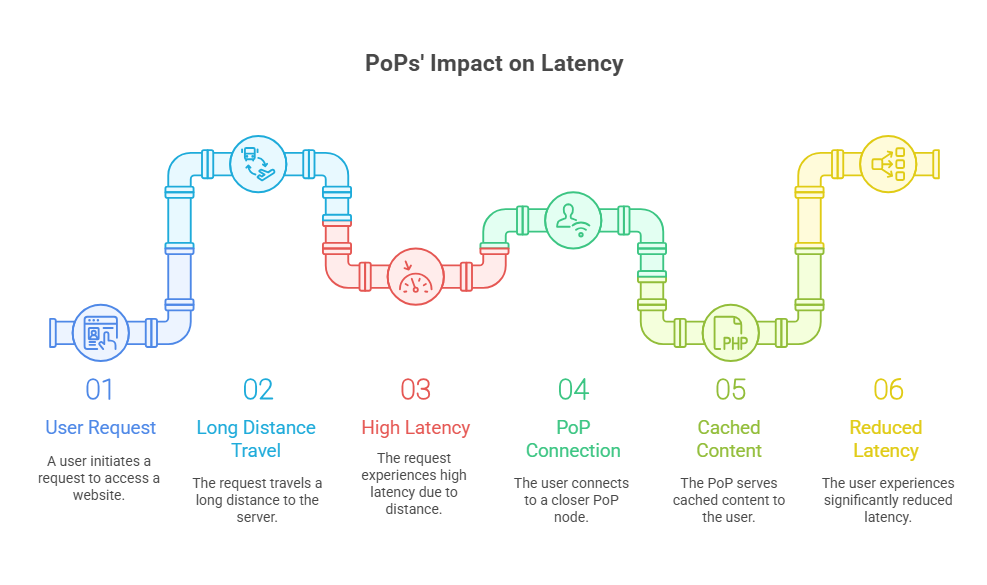
Now, add in DNS resolution, TLS negotiation, and backend processing, and the total Time to First Byte (TTFB) might exceed 800ms, which Google considers slow.
A point of presence changes this. Instead of routing traffic directly to the origin server, it connects the user to a closer, intermediary node, typically through a CDN like BunnyCDN. If static files like images, fonts, and CSS are cached at that PoP, the user experiences much faster initial loads, often shaving 50–75% off latency.
2. PoPs Improve Static Asset Delivery
Most WordPress sites load more than 30 static resources on first view—images, stylesheets, JavaScript files, web fonts, and more. Serving these assets from your origin server adds pressure to your bandwidth, increases loading time, and creates bottlenecks during peak hours.
PoPs work by caching these static assets at the network edge. When a user requests your site from Japan, they don’t wait for your US server to send files. Instead, a local PoP (Tokyo, for example) delivers the assets instantly. This dramatically improves:
- First Contentful Paint (FCP)
- Largest Contentful Paint (LCP)
- Overall page speed scores
CDNs like BunnyCDN report that PoP-enabled delivery cuts global asset loading times from 1.5 seconds to 300ms or less, depending on the region.
3. PoPs Lower Time to First Byte (TTFB)
TTFB measures how fast the first byte of data reaches a user’s browser after making a request. While dynamic content still has to hit your WordPress backend, PoPs often cache full pages or serve HTML skeletons to accelerate TTFB.
On average, using PoPs through a CDN reduces TTFB by up to 60% for international visitors. This is particularly helpful for WooCommerce sites, membership portals, and content-heavy blogs where every millisecond counts.
4. PoPs Improve Performance During Traffic Spikes
If your site gets sudden global attention, like a product launch or viral blog post, PoPs act as a protective buffer. They absorb traffic at the edge, reduce direct hits on your origin server, and prevent slowdowns or outages.
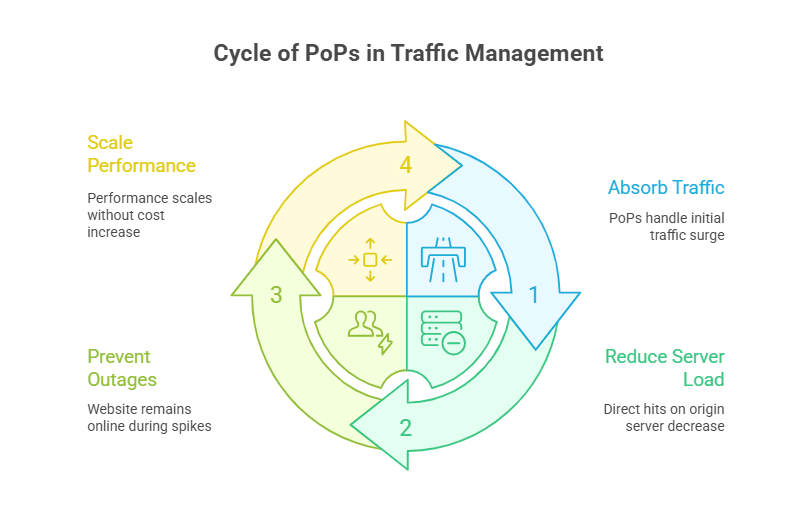
For agencies managing multiple client sites, this can be the difference between staying online and crashing during peak demand. PoPs help you scale performance without increasing server size or cost.
5. PoPs Enhance Regional User Experience
Users in different parts of the world care about speed in different ways. A corporate site in the U.S. might need a fast homepage load time, while an e-commerce site in the UAE might prioritize checkout flow. By serving content from nearby PoPs, you improve every part of the experience, tailored to the user’s location.
This is especially important for:
- Multilingual WordPress sites
- Agencies serving international clients
- WooCommerce stores with global shipping
- Portfolio sites are being demoed to remote clients
6. PoPs Complement Your Entire Performance Stack
PoPs aren’t a replacement for WordPress caching plugins or performance-optimized themes. Instead, they enhance them. When used alongside tools like WP Rocket, LiteSpeed Cache, or FlyingPress, PoPs ensure that cached content is served from the closest geographic node, not just from the server’s disk.
This layered optimization approach leads to faster perceived performance and better Core Web Vitals, two key elements of SEO success.
In short, PoPs help you build WordPress sites that load fast, scale efficiently, and deliver a smooth experience regardless of geography. Whether you’re testing in a staging environment or running a full-scale site, PoPs make sure your content reaches users quickly, reliably, and securely.
How Point of Presence Affects Your WordPress Site
It’s one thing to understand how points of presence work. But to really see their value, you need to look at how they affect WordPress sites in practical, real-world scenarios. Whether you’re managing a brochure site, an eCommerce platform, or an international blog, the presence or absence of PoPs can dramatically change performance outcomes.
1. Agency Hosting in the US, Clients in Europe
Imagine your agency hosts all client sites on a US-based server. One of your clients runs a multilingual site targeting customers in France, Germany, and Spain. Without PoPs, European visitors must connect to a server across the Atlantic.
Result without PoPs:
- Time to First Byte (TTFB) = 600–800ms
- Page load = 4+ seconds
- Bounce rate increases due to poor performance
Result with PoPs:
- European users are routed through a Frankfurt or Paris PoP
- TTFB drops to under 200ms
- Load times improve to under 2 seconds
- Improved engagement and conversions
2. WooCommerce Store Serving Asia-Pacific and the US
A WooCommerce store built with Elementor and multiple product variations tends to be resource-heavy. Without a CDN and PoPs, the site loads fine for US users but is painfully slow in Australia or Singapore.
With regional PoPs:
- Product images, stylesheets, and scripts are cached at edge nodes
- Asset delivery time drops from 1.8 seconds to 300ms
- The checkout flow is smoother, and cart abandonment reduces
This is especially useful for agencies managing multi-region shipping stores, where customers are spread across multiple continents.
3. Staging Sites for International Client Demos
You send a demo link for a client site hosted in the US to a prospect based in Dubai. Without PoPs, your carefully crafted design loads slowly, giving a poor first impression.
With InstaWP’s 10–119 PoPs via BunnyCDN:
- Assets are served from the nearest SmartEdge location
- Even staging and sandbox environments load in under 2 seconds globally
- You impress the client before the first Zoom call starts
4. Blog with International Traffic Surges
A blog covering digital marketing goes viral in Southeast Asia. Your origin server is in the US, and the traffic surge causes spikes in load times.
With PoPs in Singapore, Tokyo, and Jakarta:
- 90% of traffic is handled at the edge
- The origin server stays stable
- Pages continue loading fast, even under high traffic
5. Portfolio Site for a Developer in South America
You host a personal portfolio on a budget plan with limited infrastructure. A potential client from Europe visits your site.
Without PoPs: They experience long image load times and layout shifts.
With PoPs: Images, CSS, and JS load from a local European node. Your work is showcased with the performance it deserves, increasing your chance of landing the project.
These examples show that PoPs aren’t just for enterprise-level websites. They benefit staging sites, blogs, stores, and small business sites alike. If your audience is global, or if you’re delivering client-facing work across time zones, PoPs are not optional—they’re essential.
How InstaWP’s PoP-Backed Hosting Improves Global WordPress Performance
One of the most overlooked reasons WordPress sites underperform globally is a lack of built-in edge delivery. Most hosting plans either don’t include a CDN or offer a one-size-fits-all setup. InstaWP takes a smarter approach.
It’s managed WordPress hosting offers tiered access to global points of presence (PoPs), based on how your site is being used; whether it’s a local blog or a high-traffic eCommerce site.
This means you get the right number of PoPs to match your needs, without overpaying for infrastructure you don’t use or suffering from underperformance when you do need global reach.
Let’s look at how InstaWP’s PoP-backed hosting transforms the day-to-day experience across multiple use cases:
1. Faster Sites Anywhere in the World
When you share a site’s link with a client based in a different region, delays in loading can negatively influence their perception of your work. With InstaWP’s Basic Tier (10 PoPs), even a $5/month site loads smoothly across continents. Assets like fonts, JS, and layout visuals are cached at the edge.
Impact:
- Clients see your designs load in under 2 seconds, no matter where they are
- You avoid frustrating “site looks broken” complaints
- Demos feel professional from the very first click
2. Reduced Support Tickets Around Site Speed
Agencies often spend hours explaining to clients why a site “feels slow” outside the main hosting region. With InstaWP’s Premium Tier (119+ PoPs), site speed is consistent, regardless of visitor location.
Impact:
- Fewer performance-related complaints
- No need to recommend third-party CDNs (which clients rarely want to configure)
- More trust in your agency’s technical competence
3. Seamless Global eCommerce and Membership Site Delivery
If you’re running WooCommerce, LMS plugins, or content gating, latency becomes a bottleneck. Every extra second affects conversions or user experience. PoPs reduce the time it takes for assets and responses to reach users in APAC, EU, or South America.
Impact:
- Checkout forms render faster, reducing abandonment
- Pages and dashboards feel snappier for logged-in users
- You retain more global users and see better completion rates
4. More Control Over Performance Without the Overhead
Traditionally, developers would need to manage a CDN separately, configure DNS, handle API keys, map URLs, and troubleshoot caching rules. InstaWP integrates PoPs at the hosting layer, removing that friction entirely.
Impact:
- No learning curve to deliver edge performance
- Fewer plugins needed, lowering your maintenance load
- One dashboard handles both site deployment and delivery optimization
5. Better Core Web Vitals and SEO for All Projects
Google considers metrics like Time to First Byte (TTFB), Largest Contentful Paint (LCP), and First Input Delay (FID) in search rankings. PoPs help improve these across every region. You don’t need to rewrite code or change themes to get better scores.
Impact:
- Improved search performance globally
- Better results in PageSpeed Insights and Lighthouse
- Higher client satisfaction (and potential for upsells)
6. Scalable Infrastructure That Grows With Client Needs
You might start with a staging site today, but scale it into a full production build tomorrow. InstaWP’s tiered PoP strategy means you never need to migrate or rebuild to improve speed. Just upgrade the plan.
Impact:
- Faster time-to-launch
- No infrastructure limits when scaling from prototype to live
- Predictable billing and technical continuity
In short, PoP-backed hosting isn’t just faster; it’s smarter. It lets you deliver high-performance WordPress sites without extra tools, plugins, or DevOps work. And because it’s built into InstaWP’s infrastructure, it scales naturally with your agency’s workflow.
It’s not just about milliseconds—it’s about trust, reputation, and professional-grade delivery across borders.
Ready to Deliver WordPress Performance Without Borders?
Every second counts when your site is accessed from across the globe. Whether you’re previewing a client build, running an online store, or managing a high-traffic blog, global performance isn’t just a bonus—it’s an expectation.
By using a host that leverages the power of points of presence, you ensure your WordPress site loads quickly, no matter where your users are. InstaWP makes this easy by offering a built-in, tiered CDN strategy with 10 to 119+ PoPs, tailored to your site’s actual traffic and use case. There’s no complicated setup. No extra billing layers. Just faster, more reliable performance out of the box.
Ready to experience it yourself?
Launch a free WordPress sandbox on InstaWP today and see how PoPs can change the way your site performs globally.