When most agencies evaluate WordPress hosting, they focus on CPU, RAM, or disk space. But there’s one overlooked metric that often makes or breaks performance, PHP workers.
PHP workers control how many uncached, dynamic requests your site can process at once. If you run a WooCommerce store, LMS, or membership platform, too few workers means slower checkouts, login delays, and even 504 errors during peak traffic.
The problem? Most hosts either don’t disclose their PHP worker limits or tie them to premium plans with vague thresholds. That’s why developers and agency owners are now searching for the best WordPress hosting for PHP workers, platforms that clearly define how many workers you get, and allow you to scale without backend tweaks.
In this post, we’ll compare PHP worker limits in WordPress hosting across the top providers.
Table of Contents
What Is the Role of PHP Workers in Hosting?
PHP workers are one of the most important, yet least understood, components of WordPress hosting performance. While CPU and RAM get all the attention, it’s the PHP workers that determine how many dynamic, uncached requests your site can handle at the same time.
Must Read: What Are PHP Workers in WordPress? A Complete Guide for Agencies
In managed WordPress hosting environments, PHP workers operate behind the scenes to do this:
Each PHP worker is a background process that executes PHP code when a page or request bypasses the cache. This includes:
- Logged-in user dashboards
- WooCommerce cart and checkout pages
- AJAX calls, form submissions, and REST API requests
Every uncached request is assigned to one PHP worker. If your site has 3 PHP workers, only 3 uncached requests can be processed at once. The 4th request waits in a queue, leading to higher Time to First Byte (TTFB) or even 504 errors during traffic spikes.
Unlike the CPU, which controls how fast the request is handled, PHP workers control how many requests can be handled in parallel.
For Example:
- A WooCommerce store with 6 people checking out at once and only 2 PHP workers? Four users are going to experience slowdowns or errors, even if your CPU is strong.
- A busy LMS during course enrollment with too few workers? Expect complaints about slow dashboards and incomplete submissions.
PHP workers play a concurrency role, not a speed role. Choosing a WordPress host with clear PHP worker limits per plan ensures your site can handle real-time traffic, especially for dynamic or logged-in user activity.
Which are the Best WordPress Hosting By PHP Worker Limits in 2026
We have reviewed a couple of hosting providers and their PHP worker limit, and here are our top contenders.
1. InstaWP
For agencies tired of hidden resource limits and complex server tweaks, InstaWP is the most transparent WordPress hosting provider when it comes to PHP workers. Designed for modern development workflows, InstaWP offers hosted WordPress sites with pre-defined PHP worker limits per plan, giving you full clarity and flexibility.
Whether you’re building WooCommerce stores, LMS platforms, or high-traffic membership sites, you can scale PHP workers in WordPress environments instantly, without touching PHP-FPM settings or waiting on support.
What truly sets InstaWP apart is the ability to launch sandbox sites for real-time performance testing before committing to a live plan. You get predictable concurrency, faster delivery, and resource control that adapts to your actual traffic load.
Best Hosting Features
- Clearly defined PHP workers per plan
- Instant plan upgrades/downgrades from the dashboard
- Sandbox testing environments for concurrency validation
- Integrated Performance Scanner to monitor worker load
- Tiered pricing based on site volume — lower cost per site as you scale
- 2-click plan switching — no downtime, no file edits
- Designed for agencies managing WooCommerce, LMS, and WordPress Multisite sites
PHP Worker Limits Offered
What’s more exciting about this managed WordPress hosting is the fact that its flexible site plans let you choose the PHP worker limits based on the type of sites you’re building. And, you can switch your plans any time.
Below is a quick overview of the PHP workers’ limits with each site plan.
| Plan Name | PHP Workers | Ideal For |
| Free (Sandbox) | 1 | Testing and prototyping |
| Starter | 2 | Simple blogs, brochure sites |
| Plus | 3 | Small WooCommerce stores |
| Pro | 4 | Growing dynamic sites |
| Turbo | 6 | High-concurrency LMS or WooCommerce |
| Elite | 10 | Heavy traffic and active users |
What This PHP Worker Limit Means for Site Owners
With InstaWP, you don’t need to guess whether your site is ready for traffic — each plan clearly states its PHP workers WordPress allocation. This ensures that dynamic requests are handled smoothly, without queueing or slowdowns. If your site starts to grow, you can simply upgrade the plan and instantly gain more workers — no support tickets or downtime required.
2. Nexcess
Nexcess stands out as one of the best WordPress hosting providers for PHP workers because it not only allocates a generous base number of workers per plan, but also includes autoscaling.
That means during peak traffic periods, your site can temporarily use more PHP workers without you needing to upgrade instantly, a huge benefit for agencies managing traffic-sensitive sites like WooCommerce or LMS platforms.
Nexcess publicly lists the number of PHP workers per site for each plan, something most managed hosts don’t disclose. This makes them an excellent choice for developers and agencies that want performance transparency along with scalability.
Best Hosting Features
- Autoscaling PHP workers per site (20–70 extra)
- PHP 8+ with full-stack WordPress optimization
- Free Object Cache Pro + Redis support for faster response
- Daily backups + built-in staging environments
- Global CDN and premium image compression
- 24/7/365 expert support across all plans
- Free site migration with no traffic limits or overage fees
PHP Worker Limits (Nexcess Plans)
Here is the number of PHP workers you get with each site plan.
| Plan Name | PHP Workers | Ideal For |
| Lite | 5 | Hobby projects, entry-level blogs |
| Spark | 10 | Small sites, starter WooCommerce |
| Spark+ | 15 | Blogs or portfolios with traffic |
| Maker | 20 | Freelancers managing a few clients |
| Designer | 20 | Agencies with client dashboards |
| Builder | 30 | Growing eCommerce or LMS sites |
| Producer | 40 | High-volume WooCommerce |
| Executive | 60 | Enterprise-level WordPress hosting |
What This PHP Worker Limit Means for Site Owners
Nexcess offers one of the most scalable PHP worker environments in WordPress hosting. With autoscaling built into every plan, your site is protected from sudden surges in traffic, without needing to upgrade mid-campaign. It’s ideal for site owners who expect spikes, like during launches, flash sales, or course enrollment periods.
3. Pressable
Pressable, part of the Automattic family (makers of WordPress.com and WooCommerce), delivers enterprise-grade WordPress hosting with a clear focus on stability and scaling.
While they don’t offer per-plan customization of PHP worker counts, every plan includes a base of 5 PHP workers per site, along with autoscaling and bursting capabilities, making it a powerful choice for developers managing unpredictable traffic patterns.
Unlike hosts that throttle performance or queue traffic once you hit resource limits, Pressable is designed to burst beyond your base PHP worker allocation. This is especially useful for WooCommerce or LMS-based businesses running time-sensitive campaigns or experiencing seasonal traffic spikes.
Best Hosting Features
- 5 base PHP workers (5 vCPUs) per site + auto-bursting
- Edge caching, OPcache, and built-in page caching
- Jetpack Security + automated daily and hourly backups
- Geo-redundant high-availability infrastructure
- Staging with intelligent syncing built in
- 512MB of memory per PHP process for improved stability
- Performance reports + health insights included across plans
PHP Worker Limits
These are the PHP worker limits with each Pressable plan.
| Plan Name | PHP Workers (Base) | Ideal For |
| Signature 1 | 5 | Basic sites or landing pages |
| Signature 2–4 | 5 | SMBs, agency starter sites |
| Signature 5–6 | 5 | Busy WooCommerce or LMS deployments |
| Signature 7–8 | 5 | Enterprise-level WordPress hosting |
Each site on a plan gets its own 5 PHP workers with scalable burst support based on load.
What This PHP Worker Limit Means for Site Owners
Pressable gives each site its own dedicated 5 PHP workers, but its real strength lies in autoscaling. This allows agencies to confidently launch client sites without fearing bottlenecks during launch weeks or unexpected spikes. Combined with strong caching and cloud bursting, this setup ensures dynamic performance, even under pressure.
4. Rocket.net
Rocket.net positions itself as a performance-first WordPress host, especially for developers and agencies managing dynamic, uncached content. What makes it unique in this list is that it offers unlimited PHP workers per site. That means you’re not restricted by the usual concurrency limits tied to lower-tier plans.
Rocket.net’s aggressive edge caching, Cloudflare Enterprise integration, and full-stack security suite (WAF, malware scanning, and bot protection) make it ideal for WordPress websites that need speed, resilience, and concurrency, without micromanaging backend configurations.
Best Hosting Features
- Unlimited PHP workers across all plans
- Enterprise-grade Cloudflare CDN + WAF
- Built-in edge caching for faster dynamic delivery
- 14-day automatic backup retention
- Unmetered visitor traffic with clear bandwidth caps
- Free migrations + malware cleanup included
- Supports PHP 5.6 to PHP 8.3 with instant switching
PHP Worker Limits
| Plan Name | PHP Workers | Ideal For |
| Starter | Unlimited | Bloggers, freelancers, and microsites |
| Pro | Unlimited | Small agencies, multisite setups |
| Business | Unlimited | High-traffic WooCommerce or LMS |
What This PHP Worker Limit Means for Site Owners
With unlimited PHP workers WordPress hosting, Rocket.net removes concurrency as a bottleneck. It’s ideal for developers managing interactive websites where cached content isn’t always enough.
Whether it’s live webinars, checkout pages, or dashboard-heavy experiences, Rocket.net ensures PHP worker limits never throttle performance — a key advantage for high-growth agencies.
5. InMotion Hosting
InMotion Hosting offers affordable WordPress hosting with transparent PHP worker allocations, making it a great choice for developers who need clarity on concurrency without breaking the bank. With NVMe SSD storage, native backups, and multisite support even on mid-tier plans, InMotion is ideal for freelancers or small agencies building performance-optimized WordPress sites.
Each plan comes with a defined number of PHP workers per site, allowing you to choose the right level of concurrency for your project. From small blogs to moderately dynamic WooCommerce stores, InMotion provides scaling flexibility with developer-friendly tooling like Node.js, Git version control, and staging environments.
Best Hosting Features
- PHP worker limits listed per plan for transparency
- Advanced caching + opcode cache pool support
- Support for Node.js, Python, Ruby, and Git
- Native backups and automatic migrations
- Free domain, SSL, and email with each plan
- NVMe SSD storage for faster read/write speeds
- Staging + multisite support starting from WP Launch tier
PHP Worker Limits
| Plan Name | PHP Workers | Ideal For |
| WP Core | 2 | Personal sites, basic blogs |
| WP Launch | 3 | Starter WooCommerce or portfolios |
| WP Power | 4 | Multisite setups, dev/test sites |
| WP Pro | 6 | Agencies, dynamic or high-traffic |
Each site receives a fixed number of PHP workers depending on the plan. Worker count does not autoscale.
What This PHP Worker Limit Means for Site Owners
If you manage multiple client sites or expect moderate concurrency, InMotion’s PHP workers per site help you plan resource allocation upfront. It’s ideal for agencies that prefer low-cost hosting with defined concurrency boundaries, especially when building dynamic yet budget-sensitive WordPress environments.
How to Choose the Right PHP Worker Limit for Your WordPress Site?
If you’re managing multiple WordPress websites, especially dynamic ones like WooCommerce stores or LMS platforms, selecting the right PHP worker limit is critical. But how many PHP workers do you really need? The answer depends on site complexity, visitor load, and how much of your traffic is cached.
Here’s what WordPress agencies and developers should consider when evaluating PHP worker requirements:
Factors That Affect PHP Worker Needs
- Logged-in users: WooCommerce, membership, and LMS sites require more workers because most content cannot be cached.
- Checkout pages and dashboards: These always bypass caching layers and hit the server directly.
- High concurrent traffic: If multiple users visit dynamic pages at once, each request may need its own PHP worker.
- API usage and background tasks: Cron jobs, search filtering, AJAX calls, and REST API endpoints also consume PHP workers.
Example Use Cases and PHP Worker Guidelines
Here are the basic guidelines to choose the right number of PHP workers based on the type of site you own.
| Website Type | Recommended PHP Workers |
| Basic blog or portfolio site | 1–2 workers |
| Agency brochure or static site | 2–3 workers |
| WooCommerce store (low traffic) | 4–6 workers |
| Course or membership site | 6–10 workers |
| High-traffic eCommerce or LMS | 10+ workers |
These aren’t hard limits, but a helpful guide for choosing the right hosting plan based on real-world needs. Too few workers? You risk slow response times and queued requests. Too many? You’re paying for unused resources.
That’s why InstaWP’s flexible PHP worker allocation helps agencies stay agile. Need more? Just change your site’s plan directly from the dashboard. No migrations. No hidden throttling.
Why InstaWP Makes PHP Worker Management Easier for Agencies
Managing PHP workers shouldn’t require technical guesswork or time-consuming migrations. That’s where InstaWP’s managed WordPress hosting stands out, especially for agencies juggling multiple dynamic WordPress websites.
With InstaWP, you don’t have to dig into server config files or contact support to scale your resources. PHP workers are bundled transparently into each plan, and upgrading (or downgrading) takes just a few clicks from your dashboard.
Before InstaWP, increasing PHP workers often meant:
- Submitting a ticket to your host
- Waiting for provisioning
- Possibly migrating to another server
With InstaWP, it’s radically simpler.
Here’s how InstaWP simplifies PHP worker management:
- Clear worker limits per plan: Whether you’re running a sandbox, a small dynamic site, or a high-traffic production build, you know exactly how many PHP workers are included.
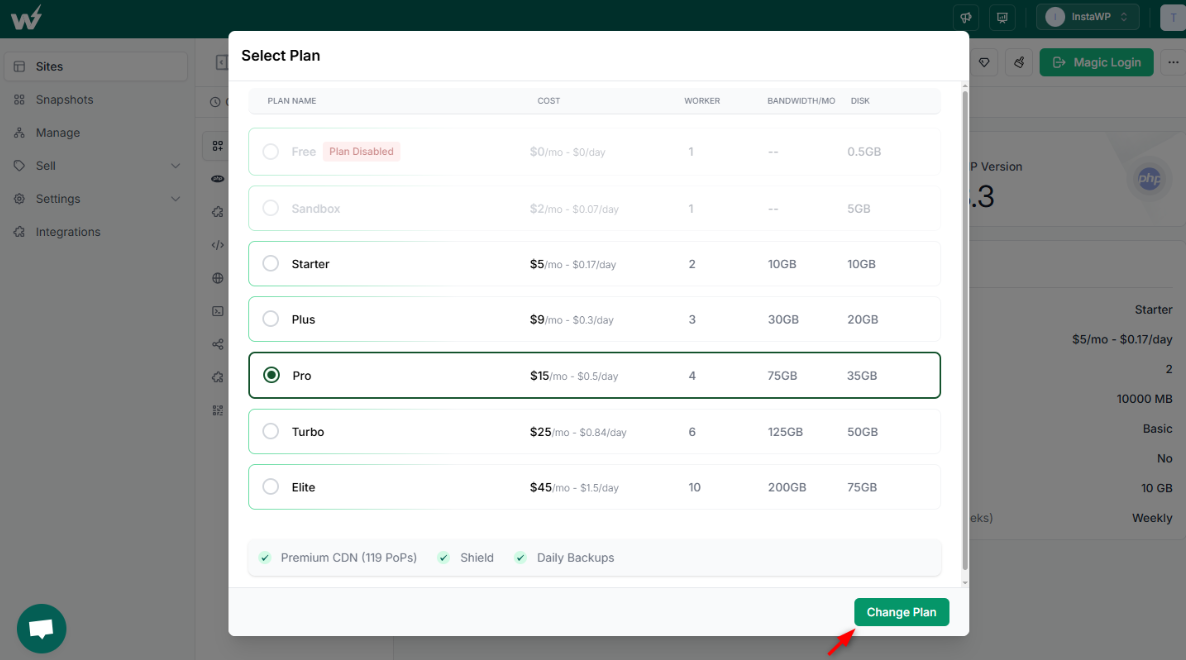
- Instant plan switching: Need more PHP workers for a client’s WooCommerce site? Just go to the InstaWP dashboard, pick a higher plan, and click “Update Plan.” The change is applied instantly; no downtime or migrations.
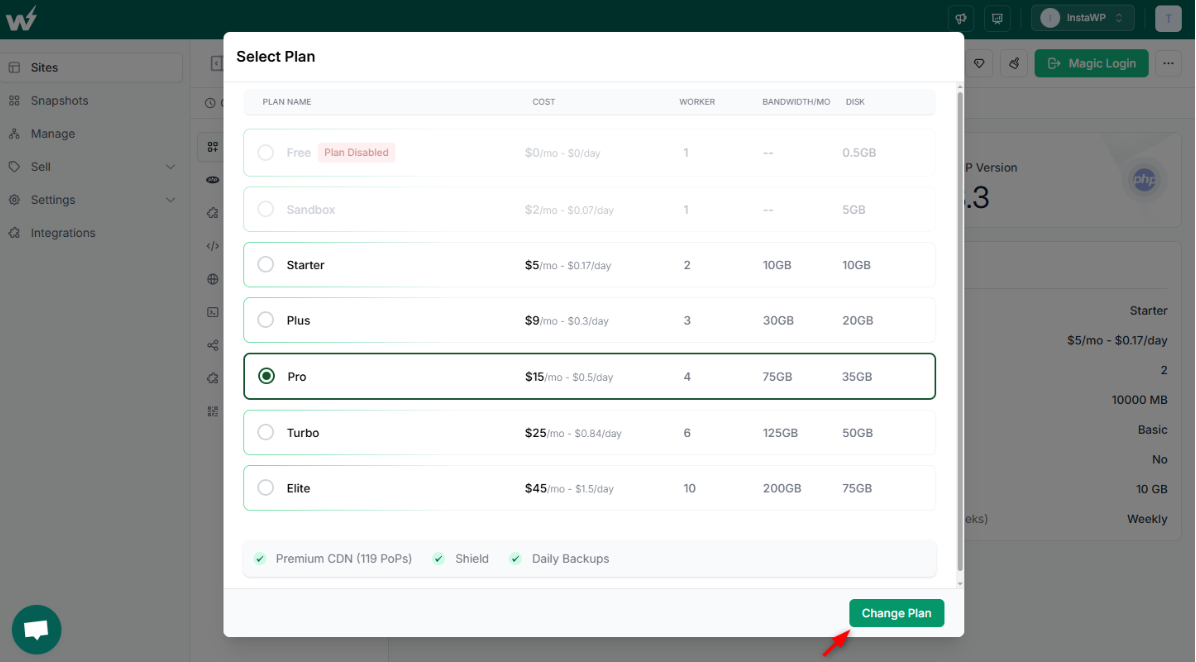
- Bulk pricing calculator: If you’re managing multiple client sites, InstaWP automatically reduces your per-site cost as you scale up.
- Granular control: The flexible site plans range from single-worker sandboxes to 10+ PHP worker environments, so you always get the concurrency level your project demands.
- Built-in staging and versioning: You can test your site’s performance under different worker configurations using InstaWP’s staging and site cloning tools before committing to a plan.
In short, InstaWP is built for scale, speed, and clarity. No lock-ins. No bottlenecks. Just developer-first hosting that grows with your agency’s needs.
Choose Hosting That Respects Your PHP Worker Needs
For WordPress agencies and developers, understanding PHP worker limits is no longer optional; it’s essential. These backend processors directly impact how many uncached or dynamic requests your site can handle at once. Underpowered hosting plans with vague PHP worker caps can throttle your growth, degrade performance, or force unnecessary upgrades.
That’s why transparent PHP worker limits and easy scalability matter more than ever. And this is where InstaWP leads. With clearly defined PHP worker allocations, instant plan switching, and bulk pricing flexibility, InstaWP makes it seamless for agencies to scale hosting based on real-world traffic and concurrency needs, without bottlenecks or backend stress.
Ready to scale without worrying about PHP limits?
Launch a free sandbox, where PHP worker management is finally built for how agencies work.
→ Get Started with InstaWP
FAQs
1. What are PHP workers in WordPress hosting?
PHP workers are background processes that handle uncached requests like form submissions, dynamic pages, AJAX calls, or WooCommerce checkouts. The more PHP workers your plan offers, the more simultaneous requests your site can handle.
2. How do PHP workers impact website performance?
If your PHP workers are maxed out, new incoming requests are queued. This leads to delays, admin lag, or 504 errors — especially on high-traffic or interactive sites. More workers = smoother performance under load.
3. Is 2 PHP workers enough for a WordPress site?
It depends on your site type. For static blogs or low-traffic pages, 2 workers might suffice. But for WooCommerce, LMS, or membership sites, 4–6+ PHP workers are typically needed for consistent performance.
4. Which WordPress host gives the most PHP workers?
Rocket.net offers unlimited PHP workers on all plans. InstaWP offers up to 10 PHP workers with easy plan switching. Nexcess includes base + autoscaling workers depending on the plan.
5. Can I increase PHP workers without migrating?
Yes, with InstaWP, you can upgrade your hosting plan directly from the dashboard, increasing PHP workers instantly without migrations, downtime, or support tickets.
6. What causes high PHP worker usage in WordPress?
Uncached pages, logged-in users, AJAX-heavy themes, large WooCommerce checkouts, and REST API requests can all consume PHP workers. Monitoring your site’s backend load helps you optimize this usage.