Ever wondered why your WordPress site isn’t attracting the traffic it deserves? The culprit may be your slow-loading images! Don’t fret, there’s a solution: image compressor plugins.
Let’s dive into the world of these image compressor plugins and discover how they can help you transform your WordPress site into a thriving hub of user engagement.
Table of Contents
Best Image Compressor Plugins for WordPress
Want to optimize images for better SEO? Check out these best image compressor plugins for WordPress.
Must Read: How to Optimize Images in WordPress Websites
Autoptimize

Experience a new standard in website building and optimization with Autoptimize, a powerful WordPress image compressor plugin that takes your site performance to new heights. With its ability to streamline, minify, and cache all scripts and styles, it offers a seamless process to improve your site’s speed and user experience even when it’s already on HTTP/2.
In addition, it offers extensive API to tailor Autoptimize to your website’s specific needs, making it an invaluable asset for any WordPress site owner. Autoptimize stands out from the crowd due to its multiple functionalities that cater to real-world usage.
With its ability to optimize and lazy-load images, optimize Google Fonts, async non-aggregated JavaScript, and remove WordPress core emoji cruft, it’s no wonder Autoptimize is a top choice for users. Embrace the image optimization plugin that not only enhances your website’s performance but also makes site optimization a breeze.
Features Useful for Image Compression
1. Ensure your event images load quickly and effectively.
2. Enhances legibility and overall aesthetics of your event page.
3. Improve the responsiveness of interactive elements on your event site.
4.
Increase your website’s speed, making it easier for attendees to navigate your event page.
5. Improve the design and layout of your event page with ease.
6. Styles Speed up load times for returning visitors to your event site.
7. Tailor Autoptimize to your event site’s specific needs.
Developer-Friendly Features
1. Allows you to customize the image compressor plugin based on your specific needs.
2. Helps to reduce the size of your code, improving load times.
3. Allows you to easily improve the design and layout of your website.
4. Enhance the functionality and user interactivity of your site.
5. Removal of WordPress Core Emoji Cruft helps to clean up unnecessary code clutter, improving site performance.
Ideal Use Cases
Autoptimize is perfect for website owners looking to improve their website’s performance and speed. It is also ideal for event managers who want to optimize event pages to enhance user experience and interaction. Developers seeking to customize and optimize their websites will also find this image optimization plugin extremely useful.
Pricing
Autoptimize comes with a free version, perfect for those starting out. For a more comprehensive solution, consider Autoptimize Pro, a premium power-up that offers image optimization, CDN, page caching, automatic critical CSS rules, and extra booster options.
- Single Site: €11.99/$ per month or €79/$ per year
- 5 Sites: €31.99/$ per month or €299/$ per year
reSmush.it

The reSmush.it plugin is a versatile tool that revolutionizes your WordPress website-building experience. This free image compressor and optimizer plugin swiftly smushes your site’s images, enhancing their load speed and thereby improving your website’s overall performance.
Its user-friendly interface makes it a top choice for users, allowing seamless image optimization with just a couple of clicks.
Rely on reSmush.it for efficient, real-world usage and experience the difference it brings to your website. This image compressor plugin supports JPG, PNG, and GIF formats and offers robust features like bulk optimization of past images and automatic optimization of new ones.
With more than 400,000 active users globally, reSmush.it stands tall as the preferred choice for WordPress image optimization.
Features Useful for Image Compression
1. Manage multiple event images with ease.
2. Upload Save time by optimizing images as they are uploaded.
3. Choose the quality of your event images.
4. Retain the original quality of certain images.
5. API Seamlessly integrates with other software.
6. Personalize the image optimization to suit your event’s needs.
7. Safeguard your original images.
Developer-Friendly Features
1. Ideal for debugging and tracking.
2. Get insights about image optimizations.
3. Optimization with CRON and automate image optimization tasks.
4. Original image files.
5. Easier integration and customization.
Ideal Use Cases
This image compressor plugin is ideal for bloggers, e-commerce site owners, photographers, event managers, and any WordPress website user who frequently uploads and manages images.
Pricing
The best part about reSmush.it is that it’s completely free. You get all these amazing features and functionalities without having to worry about any hidden charges or subscription fees. This makes it a cost-effective solution for image optimization on WordPress websites.
Imagify
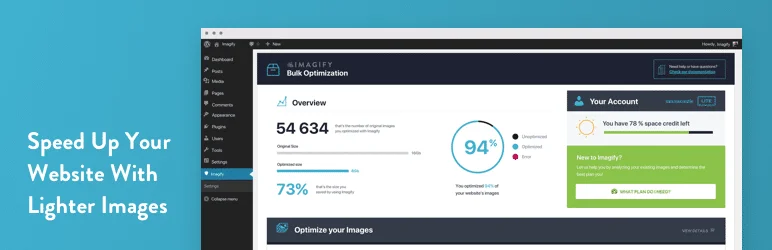
Imagify is a powerful image compressor plugin designed specifically for WordPress, aimed at enhancing website performance by reducing the file size of images without compromising quality.
In an era where website speed is crucial for user experience and SEO, Imagify provides a seamless solution to optimize images efficiently. With just one click, users can compress multiple images, ensuring that their website loads faster and operates smoothly.
This image compressor plugin not only allows for bulk optimization but also supports advanced features like automatic resizing and conversion to next-gen formats such as WebP and AVIF. By integrating Imagify into your WordPress site, you can significantly improve loading times, enhance Core Web Vitals scores, and ultimately provide a better experience for your visitors.
Whether you’re managing a blog, an e-commerce site, or any platform that relies heavily on visuals, Imagify stands out as an essential tool for effective image management.
Features Useful for Image Compression
1. Allows you to optimize multiple images at once, saving time when preparing for an event.
2. Adjust the size and compress large images without losing quality, ensuring your event page loads faster.
3. Convert images to next-gen formats like WebP and AVIF for faster loading times.
4. Images are automatically optimized at the best compression level, ensuring your event visuals are of high quality.
5.
Automatically optimizes images at the best compression level and quality.
6. Optimize images from all formats including gif, jpeg, png, and even pdf.
7. By optimizing images, it improves the overall website performance, which is crucial for event management websites that often have high traffic.
Developer-Friendly Features
1. Imagify easily integrates with WordPress, making it simple for developers to add to their toolkit.
2. Imagify provides detailed documentation for developers, enabling them to understand and utilize all features effectively.
3. Developers can access the Imagify API for more advanced customization and integration with other tools or platforms.
4.
Developers can customize the image compressor plugin settings according to the specific needs of the site.
5. Imagify supports next-gen image formats like WebP and AVIF, allowing developers to stay up-to-date with the latest web technologies.
Ideal Use Cases
Bloggers, e-commerce site owners, photographers, digital marketers, and any WordPress site owners who regularly use images can benefit from the Imagify image compressor plugin. It’s especially useful for event management websites where high-quality visuals are crucial and page load speed can significantly impact user experience.
Pricing
Imagify is free for optimizing up to 20MB of images per month, which is around 200 images. For more extensive needs, they offer various pricing plans starting from $4.99 per month, which allows for the optimization of 1GB of images. For higher usage, there are also plans available for $8.99 and $19.99 per month. For more details, you can visit their pricing page.
Robin Image Optimizer By Creative Motion
The Robin Image Optimizer is a unique image compressor plugin that transforms your media library by reducing the weight of images, thus making your website faster and more efficient. This advanced image optimizer sets itself apart from other WordPress plugins with its smart features and unlimited-use capabilities.
An absolutely free tool, it offers the same features as paid products, making it a top choice for users looking for a professional yet cost-effective solution to optimize their website images.
With the increasing necessity for mobile website optimization, the Robin Image Optimizer is praised for its real-world usage and functionalities. This image compressor plugin ensures that your pages load faster by reducing image weights by up to 80% without any loss of quality.
Its key aspects include automatic optimization using Cron, manual mass-optimization, image backup, selection of compression mode, and detailed statistics on optimized images.
Features Useful for Event Management
1. This image compressor plugin constantly optimizes images in the background, ensuring your event images are always at their best quality.
2. This feature allows you to press a button and wait till all your event images are optimized.
3. This image compressor plugin stores all images in original quality before optimization starts, which can be useful in case of any loss of event images.
4.
You can choose the compression mode (normal, regular, high) depending on the need of your event images.
5. This feature ensures that your event images are optimized as soon as your website loads.
6. Reducing the Pre-Optimization Image Weight feature can be useful for event images that have a large size.
7. This image compressor plugin provides detailed statistics on optimized images, helping you understand the improvement in your event images.
Developer-Friendly Features
1. The PRO version of this image compressor plugin offers WP CLI commands for developers.
2. Developers can choose between media-library, custom-folders, and nextgen for their optimization needs.
3. Developers can reduce the pre-optimization image weight by changing the image size.
4. Developers can avail free support for any queries or issues.
Ideal Use Cases
The Robin Image Optimizer is ideal for website owners, bloggers, e-commerce businesses, event managers, photographers, and any individual or business that regularly uses images on their website and wants to enhance their website’s speed and performance.
Pricing
The Robin Image Optimizer is absolutely free with zero limitations in terms of the number of images and optimization quality. However, for additional features like WP CLI commands, users can upgrade to the PRO version. The pricing details for the PRO version can be found on the official website.
Image Optimizer by 10web
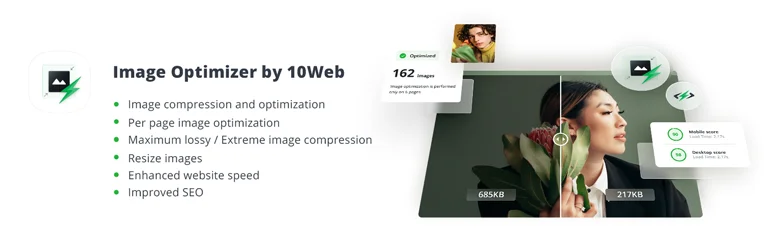
The Image Optimizer by 10web is a revolutionary plugin that serves as a powerful website builder tool for WordPress users. This image compressor plugin is a godsend to users seeking to optimize their images, improve site speed, and ultimately enhance the overall user experience.
The Image Optimizer is highly regarded for its robust functionalities, practical real-world usage, and the unique aspects that set it apart in the landscape of WordPress plugins.
The Image Optimizer plugin is a top choice among users, lauded for its seamless blending of practicality and performance.
From small businesses to large enterprises, this image compressor plugin’s benefits are far-reaching, boasting functionalities such as image resizing, compression, and optimization in various formats. Thereby, it significantly boosts the speed of your website, ensuring your visitors have a seamless browsing experience.
Features Useful for Event Management
1. Up to 50K image compression and optimization.
2. Optimize images per page for specific event pages.
3. Extreme image compression ensures high-quality visuals with less storage.
4.
Resize images to fit different event layouts and designs.
5. Faster loading event pages for a better user experience.
6. Better SEO ranking due to optimized images.
7. Optimize multiple images at once for large-scale events.
Developer-Friendly Features
1. Conservative, balanced, and extreme modes for varied needs.
2. Supports PNG, JPG, GIF, WebP, and PDF formats.
3. Generates smaller images without compromising quality.
4. Allows resizing of image files by up to 80%.
5. Provides comprehensive data on image optimization activities.
Ideal Use Cases
This image compressor plugin is ideal for bloggers, small businesses, e-commerce sites, and event management companies. It’s perfect for anyone who wants to improve their website’s speed, SEO, and overall performance by optimizing their images.
Pricing
The Image Optimizer by 10web offers different tiered pricing plans. The free plan offers basic features with limited functionalities. To access more advanced features such as automatic optimization of new images, users can upgrade to the 10Web Booster Pro plans, the price of which depends on the specific needs and requirements of the user.
Final Word
Elevate your WordPress site performance with these powerful image compressor plugins. Not only will your website load faster, but the visual appeal of your event pages will also drastically improve. Enhance user experience, boost SEO, and manage high volumes of images with ease. Don’t wait, give your website the advantage of swift image optimization today!
Incorporating these image compressor plugins into your event management strategy can significantly enhance your site’s performance and user experience. They offer a plethora of features from bulk optimization to automatic image compression upon upload. Make your event pages more engaging and user-friendly. Unlock the true potential of your WordPress site now!
FAQ
1. Why should I use an image compressor plugin for my WordPress site?
Using an image compressor plugin can dramatically improve your website’s speed and performance. Compressed images take up less space, load faster, and enhance user experience without sacrificing image quality.
2. How does an image compressor plugin work?
An image compressor plugin automatically reduces the file size of images without reducing their visual quality. It uses various algorithms to compress image data, making your media library more efficient without affecting how images appear on your site.
3. Can I restore my images to their original quality after compression?
Yes, most image compressor plugins for WordPress offer an option to revert compressed images to their original state, allowing flexibility if you need the original files later on.
4. Does image compression affect SEO?
Yes, in a positive way! By reducing image sizes, your website loads faster, which is a key ranking factor for SEO. Faster load times lead to a better user experience and improved search engine rankings.
5. Will image compression reduce the visual quality of my images?
A good image compressor plugin uses lossless or lossy compression techniques to reduce file sizes without noticeable loss in visual quality. You can often choose the level of compression to balance quality and size.
6. Is image compression suitable for all types of images?
Yes, image compression works with most image formats such as JPEG, PNG, and GIF. Some plugins also support advanced formats like WebP, which are optimized for web performance.
7. How often should I compress my images?
It’s a good practice to compress images as soon as they are uploaded. Some plugins offer automatic compression, so you don’t have to worry about doing it manually every time.


