InstaWP prices WordPress hosting per site rather than per server. Production tiers run from $5 to $45 per site per month, with a $2 sandbox tier for work that is not live yet. Billing is daily, invoiced monthly, and you can move any site up or down a tier on any day with the change prorated. This page walks through what each tier actually includes and which kind of client site belongs on it.
This is a single-provider breakdown. If you want the same tier-by-tier view across several hosts, read our comparison of managed WordPress hosting plans for agencies. If you are still deciding which kind of host an agency needs at all, and what a whole client portfolio costs to run, start with our guide to WordPress hosting for agencies.
Key takeaways
- Six tiers: Sandbox $2, Starter $5, Plus $9, Pro $15, Turbo $25, Elite $45, all per site per month.
- Every tier, including the $2 sandbox, gets SSH, SFTP, WP-CLI, custom domains with free SSL and the managed firewall.
- Backups are weekly on Starter and daily from Plus upward, with one-click restore.
- Object cache and site management arrive at Plus. Image optimization arrives at Pro.
- Billing is daily and prorated, so a site that runs for nine days costs nine days. Park a finished site as a $2 sandbox instead of paying a production tier for it.
- Mix tiers freely across a portfolio. A $5 brochure site can sit beside a $25 store on the same account and one invoice.
Table of Contents
What a Plan Tier Actually Decides for a Client Site
Once you have picked a host, the tier you put each client site on decides four things. It is worth being deliberate about it, because the difference between the right tier and a lazy default is both the site’s behaviour under load and your margin on that client.
Headroom under load. CPU and disk are what a tier really sells. Managed WordPress hosting plans give each site an isolated slice of resources, so a client’s campaign traffic does not slow down another client’s site. Undersize a store and you get slow checkouts. A slow site damages user experience and, in turn, your client’s search performance.
Which protections are switched on. Every site gets the managed firewall, but bot protection, DDoS mitigation and vulnerability scanning come in above the entry tier. If you want the fuller picture of what a firewall does and does not stop, see our guide to firewalls for agencies.
How often you can roll back. Backup frequency is tiered. That decides how much work a client loses in the worst case, which is a conversation you would rather have before the incident than during it.
How much of the workflow is included. Site monitoring, update automation and image optimization are bundled from certain tiers upward. Every tier includes the things a build depends on: shell access, free SSL, and staging environments in the form of a sandbox you can promote. And on any tier you can reach reliable managed hosting support when a site misbehaves.
For a wider view of how to weigh those factors when choosing a plan for agency clients, the criteria are the same across hosts. Only the tier names change.
InstaWP Hosting Plans, Tier by Tier
When it comes to managed WordPress hosting for agencies, InstaWP sells one site at a time. There is no bundle to grow into and no server to fill. Here is the whole range in one table.
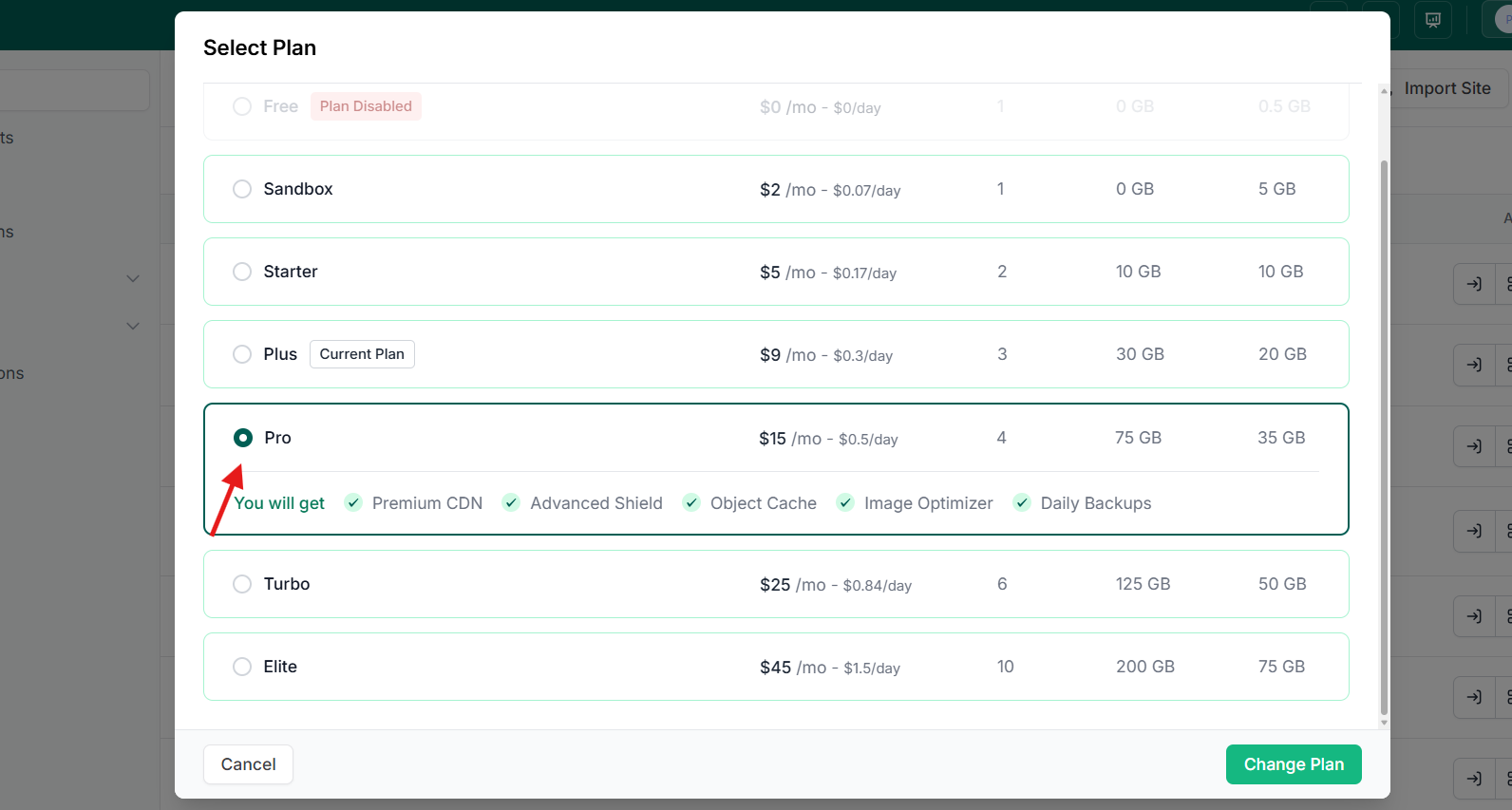
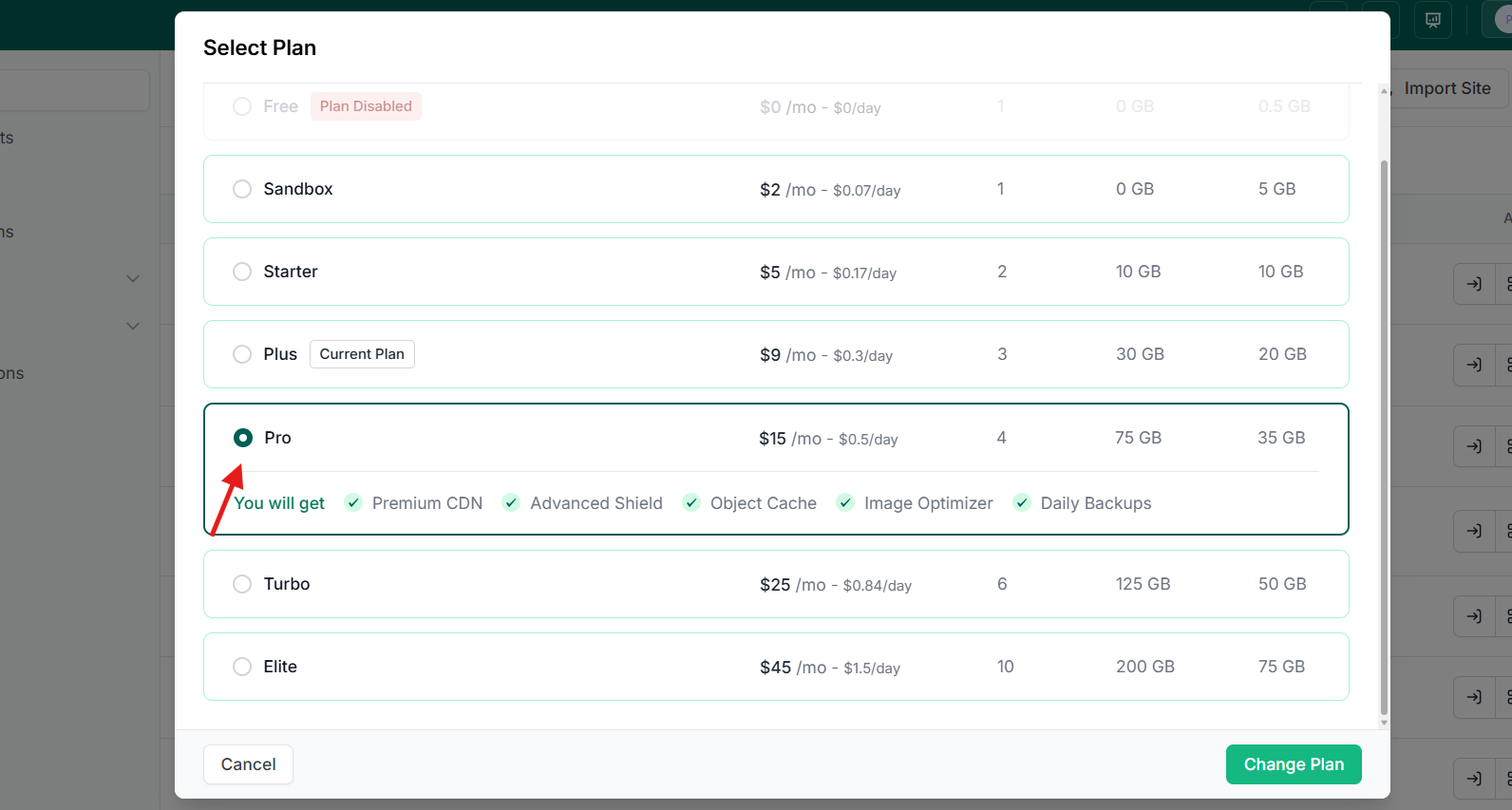
| Tier | Price per site | CPU | Disk | Backups | Best for |
|---|---|---|---|---|---|
| Sandbox | $2/mo | 1 | 5 GB | Monthly | Dev, staging, client builds, plugin tests |
| Starter | $5/mo | 2 | 10 GB | Weekly | Tiny sites, brochures and blogs |
| Plus | $9/mo | 3 | 20 GB | Daily | Small, dynamic sites |
| Pro | $15/mo | 4 | 35 GB | Daily | Medium sites |
| Turbo | $25/mo | 6 | 50 GB | Daily | eCommerce |
| Elite | $45/mo | 10 | 75 GB | Daily | High-traffic sites |
Whether you are running one site or handling multiple high-traffic client sites, the platform underneath is the same on every tier. What changes is resources, backup frequency, the CDN allowance, and a handful of bundled tools.
Sandbox, $2 per site
1 CPU, 5 GB disk, monthly backups, roughly $0.07 a day.
The sandbox is the tier most agencies underuse. It is the same WordPress, with the same SSH and WP-CLI access, at a fraction of the production price, and it converts to a production tier in one click with no migration step. That makes it the right home for three things: a site being built before launch, a staging copy of a live client site, and a parked site you are keeping but not serving.
The parking case is the one that saves real money. A seasonal campaign site or a finished project waiting on client sign-off does not need a production tier. Dropping it to a sandbox cuts it to $2 a month instead of $9 or $15.
Starter, $5 per site
2 CPU, 10 GB disk, weekly backups, 10 GB of basic CDN across 10 edge locations, core firewall rules.
Starter is where real hosting begins. It suits brochure sites, portfolios and blogs: content that changes weekly rather than hourly, with no cart and no logged-in users. This is the tier where most of a typical agency portfolio sits.
Know its two limits before you put a client on it. Backups are weekly, so the worst-case data loss is a week of edits, which is fine for a static brochure and not fine for a site with form submissions you care about. Object cache and automated site management are not on this tier.
Plus, $9 per site
3 CPU, 20 GB disk, daily backups, 30 GB of premium CDN across 120+ locations with HTTP/3, advanced firewall, object cache, site management.
Plus is the tier where the jump is largest, and it is the sensible default for a client site that does anything. Three things arrive at once: backups become daily, the firewall gains bot protection, DDoS mitigation and vulnerability scanning, and the object cache switches on.
That object cache matters more than the CPU bump for most sites. Page caching only helps anonymous visitors. Anything logged in, any cart, any members area and most WooCommerce pages bypass it, and the object cache is what keeps those pages quick. Site monitoring and automated plugin and theme updates are included from here too, rather than being a $2 add-on.
Pro, $15 per site
4 CPU, 35 GB disk, daily backups, 75 GB of premium CDN, plus automatic image optimization.
Pro is for medium sites: a busy content site, a lead-generation site running paid campaigns, a small store. The tier’s distinguishing feature is image optimization, which converts images to WebP and AVIF and serves them from the edge. On an image-heavy site that is usually the single biggest page-weight win available, and it removes a plugin you would otherwise install and maintain on every site.
Turbo and Elite, $25 and $45 per site
Turbo: 6 CPU, 50 GB disk, 125 GB premium CDN. Elite: 10 CPU, 75 GB disk, 200 GB premium CDN. Daily backups and the advanced firewall on both.
Turbo is the eCommerce tier. A store’s load is not evenly spread: carts, checkout and account pages cannot be page-cached, so the CPU headroom is doing real work during exactly the traffic you least want to drop. Elite is for genuinely high-traffic sites, or stores whose peaks are large enough that Turbo runs hot during a sale.
You do not have to guess between them. Start a store on Turbo, watch it through one busy period, and move up if the numbers ask for it. The change applies the same day and prorates.
Note: plan resources and prices here reflect the InstaWP managed WordPress hosting pricing page at the time of writing and may change. Check the pricing page before quoting a client.
How the Billing Works
The billing model matters as much as the tier list when you are running client sites, because it decides how predictable your monthly cost is and how cleanly you can rebill it.
- Daily, not monthly. Each site accrues at its tier’s daily rate. Totals across every site are charged to your card once a month, as one invoice.
- You only pay for what you keep running. A site that existed for nine days costs nine days. That matters when you launch and retire client sites continuously.
- Tier changes prorate from the day you make them, up or down. There is no upgrade window to wait for.
- Mix tiers freely. A $5 brochure site and a $25 store sit on the same account, each billed for what it is.
- No annual contract, no minimum, no setup fee, and new accounts start with $25 in credits.
- Pausing is not parking. A paused site stays on its tier and keeps billing. To cut its cost, drop it to a $2 sandbox, or delete it to stop billing entirely.
As a reference point, a typical ten-site mix of five Starter, three Plus and two Turbo sites runs about $102 a month. Add-ons sit outside the tier price: snapshots and templates from $1 a month each, a white-label domain at $5 a month, and site management at $2 a month on the tiers where it is not already included. Migrating a site into InstaWP is free and zero-downtime.
For the mechanics of pay-as-you-go billing in more detail, see how InstaWP billing works. For what a whole portfolio costs at five, ten, twenty-five and fifty sites, the worked tables are in our guide to WordPress hosting for agencies.
Which Tier for Which Client Site
A short version you can apply without thinking about it too hard:
| If the client site is… | Put it on | Because |
|---|---|---|
| Not launched, or a staging copy | Sandbox, $2 | Same stack and shell access, promotes to production in one click |
| A brochure, portfolio or blog | Starter, $5 | Mostly cacheable, weekly backups are proportionate |
| Taking form entries, bookings or logins | Plus, $9 | Daily backups, object cache for uncacheable pages, advanced firewall |
| Image-heavy or running paid campaigns | Pro, $15 | Image optimization and more CDN allowance where page weight costs money |
| A WooCommerce store | Turbo, $25 | Cart and checkout cannot be page-cached, so CPU headroom is the product |
| High traffic, or a store with big peaks | Elite, $45 | 10 CPU and 200 GB of premium CDN for sustained load |
Two habits make this work in practice. Start a site one tier lower than instinct says and move it up on evidence, since the change is same-day and prorated. And review the portfolio once a quarter for sites sitting on a production tier that nobody visits any more, because those are the ones quietly costing you margin.
Price a real client site
Start on a $2 sandbox, build it, then promote it to a production tier in one click when the client signs off. Billing is daily, so an unlaunched site costs almost nothing.
InstaWP Hosting Plan FAQs
How much does InstaWP hosting cost per site?
Production tiers are $5 for Starter, $9 for Plus, $15 for Pro, $25 for Turbo and $45 for Elite, each per site per month. There is also a $2 sandbox tier for sites that are not live yet, such as builds in progress, staging copies and parked projects. Billing is daily and invoiced monthly, so a site only costs for the days it actually ran, and there is no annual contract or setup fee.
Which InstaWP plan should an agency put a client site on?
Match the tier to what the site does rather than to the client’s size. Unlaunched work and staging copies belong on the $2 sandbox. Brochure sites, portfolios and blogs fit Starter at $5. Anything with logins, bookings or form entries you care about should be on Plus at $9, where backups become daily and the object cache switches on. Image-heavy or campaign sites suit Pro at $15, WooCommerce stores suit Turbo at $25, and high-traffic sites suit Elite at $45.
How often does InstaWP back up a site?
Backups are automatic and off-site with one-click restore of the whole site, and the frequency is tiered: monthly on a sandbox, weekly on Starter, and daily from Plus upward. You can also take an on-demand backup before a risky change. For any client site where a week of lost edits would be a problem, Plus is the entry point rather than Starter.
Can I change a site’s plan later, and what does that cost?
Yes. You can move any site up or down a tier on any day, and billing prorates from that day. There is no upgrade window and no penalty for moving back down. Because of that, the sensible approach is to start a site a tier below your instinct and move it up on evidence from a real traffic peak rather than guessing at launch.
Do cheaper InstaWP tiers restrict developer access?
No. SSH, SFTP and WP-CLI, Git and Composer workflows, custom domains with free SSL, the managed firewall, and the one-click sandbox to production path are on every tier, including the $2 sandbox. What the tiers change is resources, backup frequency, CDN allowance, and whether object cache, site management and image optimization are bundled.
Is there a discount for hosting many client sites?
The standard per-site pricing is the same whether you run one site or twenty, and the saving comes from tiering each site correctly and parking the ones that are not live rather than from a volume band. Agencies and platforms hosting more than about twenty sites, or needing custom infrastructure, can talk to sales about volume pricing, and agencies reselling under their own brand can use the white-label WaaS model with no workspace fee.