For WordPress agencies, hosting is more than just server space—it’s the backbone of every client project. A slow, unreliable, or restrictive hosting provider can create bottlenecks across development, deployment, security, and even client satisfaction.
That’s why choosing the best WordPress hosting for agencies isn’t a matter of cost alone—it’s about performance, scalability, support, and workflow compatibility.
The short answer: an agency is best served by managed WordPress hosting that is billed per site rather than per server, includes a staging environment for every site, and lets the whole client portfolio be run from one dashboard. Per-site pricing typically runs from about $5 to $45 per month depending on how busy the site is, so a ten-site portfolio usually lands between $50 and $150 a month. The rest of this guide covers the hosting types open to an agency, the features that actually matter once you are running client work at volume, and how to work out your real monthly cost.
In this guide, we’ll break down the criteria that matter most to digital agencies and developers, including staging environments, white-label options, multisite support, and dev-friendly tooling. Whether you’re launching five sites a month or managing 500+ for clients, this is your roadmap to confidently selecting the right WordPress hosting for agencies, without guesswork.
Table of Contents
Different Types of WordPress Hosting for Agencies
Choosing the right hosting is mission-critical for agencies managing multiple WordPress projects. It affects everything from development workflow and client satisfaction to site security and long-term scalability. Before you settle on a provider, let’s explore the different types of WordPress hosting for agencies, their pros and cons, and how each one fits into agency workflows.
Shared Hosting: Budget-Friendly but Risky for Agencies
Best for: Beginners, hobby bloggers, non-commercial sites
Avoid for: Client projects, production sites, multisite installs
Shared hosting places multiple websites on a single physical server—each fighting for the same pool of resources (CPU, RAM, bandwidth). While attractive for its low cost, this setup is unpredictable under load and limited in terms of control and performance.
Why It’s a Bad Fit for Agencies:
- You can’t isolate client environments.
- A poorly optimized neighboring site can slow down your client’s project.
- Most shared hosts restrict advanced dev tools (SSH, Git, staging).
? Verdict: Not suitable for any serious WordPress agency hosting needs.
VPS (Virtual Private Server) Hosting: A Transitional Choice
Best for: Solo developers or small agencies with 2–3 active projects
Avoid for: Teams needing built-in scalability and workflow automation
VPS hosting offers a virtualized slice of a server with dedicated resources and root access. You gain more control and performance consistency than shared hosting—without the full cost of a dedicated server.
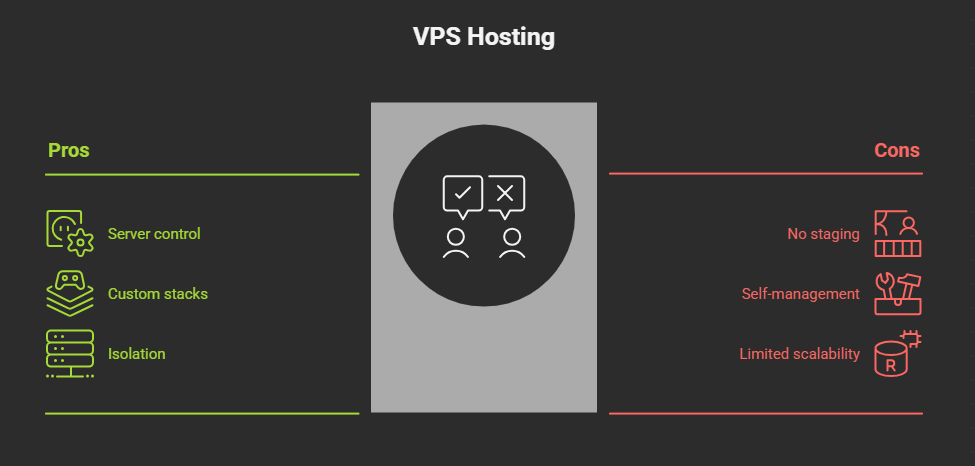
? Verdict: Acceptable for small teams, but managing multiple client sites becomes time-consuming fast.
Dedicated Hosting: Full Power, High Responsibility
Best for: Agencies handling high-traffic enterprise websites
Avoid for: Teams without a dedicated sysadmin or DevOps resource
Dedicated hosting gives you full ownership of a physical server—ideal for custom performance tuning, compliance-heavy industries, or handling thousands of concurrent users.
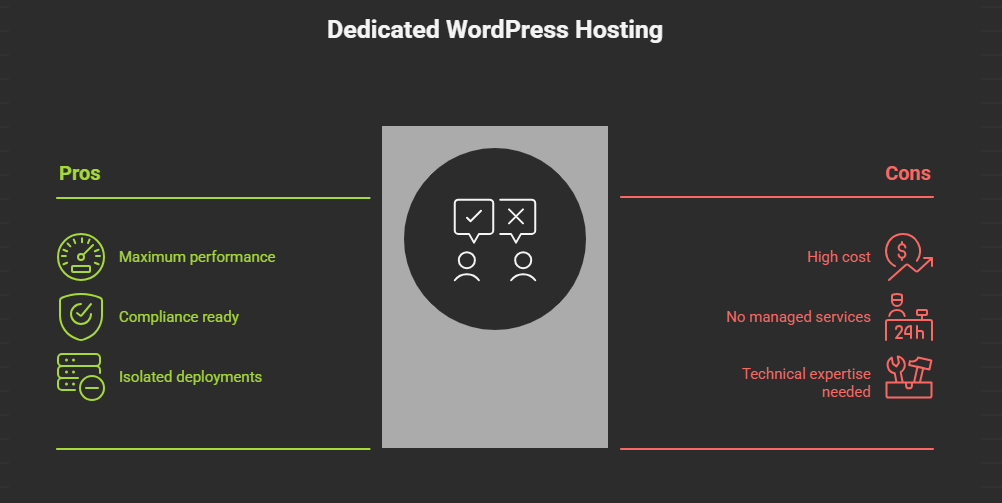
? Verdict: Powerful but overkill for most mid-sized agencies. Better suited for enterprise clients or hosting resellers.
Managed WordPress Hosting: The Smart Default for Agencies
Best for: Agencies prioritizing speed, automation, and low operational overhead
Avoid for: Highly customized stacks or projects needing full server control
Managed WordPress hosting is built specifically for WordPress. These providers handle updates, performance tuning, security hardening, and daily backups—so your agency can focus on design, development, and delivery.
Why It’s Ideal for Agencies:
- Auto-scaling resources for client spikes (campaigns, launches)
- Built-in WP staging environments for safe testing
- White-label dashboards for client access
- 24/7 support from WordPress-trained engineers
- Often includes WordPress Git integration, CDN, malware scanning, and caching
Additional Perks:
- Free SSL certificates
- One-click cloning and multisite support
- Custom workflows for WooCommerce or LMS sites
? Verdict: The best WordPress hosting for agencies looking for a hands-off yet high-performance solution. Ideal for handling multiple client projects at once.
Cloud Hosting: Ultimate Scalability for Agencies on the Move
Best for: Agencies working with high-traffic sites, SaaS platforms, or variable workloads
Avoid for: Teams unfamiliar with cloud orchestration tools (unless managed)
Cloud hosting spreads your website across a network of servers, enabling elastic resource scaling, near-instant failover recovery, and global load balancing.
Agency Advantages:
- Auto-scale infrastructure based on real-time traffic
- Pay-as-you-go pricing for peak periods
- Multiple deployment regions for faster global reach
- Perfect for hosting multi-brand projects under one umbrella
Considerations:
- Raw cloud platforms (like AWS, GCP) require orchestration skills
- Managed cloud platforms (like Cloudways or InstaWP hosting) offer a balance of power and simplicity
? Verdict: Excellent for modern agencies hosting dynamic projects. Just ensure the platform includes user-friendly management layers.
Each hosting type has its place, but not every one is built with agency workflows in mind. Shared hosting is risky, VPS is limited, and dedicated hosting requires ops expertise. For most growing teams, managed WordPress hosting for agencies or cloud-based platforms with agency-focused tools is the sweet spot.
Up next, we’ll walk through the non-negotiable features every agency should demand in a hosting provider—from automated staging and security to uptime monitoring and multi-site control.
Key Features to Look for in WordPress Hosting for Agencies
Not all WordPress hosting is built with agencies in mind. Beyond uptime and speed, agencies need operational efficiency, scalability, and client management tools. If you’re juggling multiple websites, clients, and timelines, the hosting you choose should feel like an extension of your development workflow, not a bottleneck.
Here are the features that truly matter when selecting the best WordPress hosting for agencies:
⏱️ Uptime Guarantees (Reliability Comes First)
Uptime is the percentage of time a server stays operational. A 99.9% uptime guarantee may sound like a marketing buzzword, but for agencies, it means fewer client complaints, better SEO performance, and more revenue consistency.
What agencies should look for:
- 99.9% or higher uptime SLA (Service Level Agreement)
- Real-time uptime monitoring tools
- Downtime alerts or automated logging (like InstaWP’s uptime reports)
- Compensation policies in case of SLA violation
? Client Impact: Even 1% downtime means 7+ hours/month of lost visibility, which is unacceptable for e-commerce, campaign, or service-driven sites.
? Backups (Your Last Line of Defense)
Backups are your safety net against hacks, plugin conflicts, bad updates, and accidental deletions—situations agencies deal with regularly.
What agencies should look for:
- Daily automated backups
- On-demand/manual backup creation before major updates
- One-click restore for staging and live environments
- Off-site or redundant backup storage
- Downloadable backup access for local archiving
? Security Features (Client Trust Starts Here)
Security goes beyond SSL when we talk about WordPress hosting for agencies. It’s about proactively protecting client data, forms, payment pages, and content management workflows.
What agencies should look for:
- Free SSL certificate (Let’s Encrypt or custom integration)
- Web Application Firewall (WAF)
- DDoS protection and brute-force protection
- Regular malware scans + auto-removal
- Blocklist monitoring and IP whitelisting
- Activity logs for user actions (especially for teams or multisite)
? Use Case: An agency managing membership sites or WooCommerce stores should prioritize PCI compliance and form-level encryption support.
? Customer Support (Your Emergency Lifeline)
Priority support that agencies might get with a hosting quality determines how fast you can resolve critical issues under pressure. For agencies, time is money, especially when a client site goes down mid-campaign. So, if your hosting is not offering priority support, you’re missing a lot.
What agencies should look for:
- 24/7 support availability
- Multiple channels: live chat, phone, email, and ticketing
- Dedicated WordPress experts, not general tech support
- SLA-based response time (e.g., <5 mins on chat)
- Help docs, API references, and agency-focused guides
? Tip: Ask if their support team includes WordPress developers. That’s a huge value-add when debugging plugin conflicts or query-level issues.
? Scalability (Plan for Client Growth)
Scalability allows you to scale server resources as your agency or client’s needs evolve—whether during a Black Friday rush or post-viral traffic spike.
What agencies should look for:
- Easy plan upgrades (with no migration headaches)
- Auto-scaling for traffic surges
- Container-based or cloud-native resource allocation
- WordPress multisite support for scaling agency ops
- Ability to spin up new sites instantly without provisioning delays
? Bandwidth & Storage (Resource Allocation that Matches Reality)
These define how much data your site can transfer and store. Low limits result in hidden fees, throttled performance, or forced upgrades.
What agencies should look for:
- Unmetered bandwidth or realistic data caps (1TB+)
- SSD or NVMe storage (not just HDD)
- Scalable storage with alerts when nearing limits
- Image/file optimization tools included
- File manager or SFTP for asset management
⚡ Performance (Speed = SEO + UX)
Performance doesn’t just impact bounce rates—it affects SEO rankings, Core Web Vitals, and client satisfaction.
What agencies should look for:
- Server-level caching (Nginx/Redis/OPcache)
- Built-in CDN (Cloudflare, BunnyCDN, etc.)
- Global data center availability
- Image compression, lazy loading
- PHP 8+ support and object cache integration
Control Panel (Day-to-Day Usability)
Agencies need intuitive, powerful dashboards—not overly technical ones that slow teams down.
What agencies should look for:
- 1-click installations (WP, themes, plugins)
- DNS and domain control
- Email account management
- Advanced tools like WP-CLI access, database editor, cron jobs
- Multi-site overview for agency account holders
? Pro Insight: InstaWP offers a clean, developer-friendly control panel where you can toggle PHP versions, edit WP config, access DBs, and manage auto-updates without code.
Which is the Best WordPress Hosting for Agencies
When you break down what agencies actually need from their hosting—from instant staging and site cloning to white-label client access, security automation, performance scanning, and version control—you’ll realize that very few providers check all the boxes, and InstaWP hosting is one of them.
InstaWP hosting isn’t just another hosting platform. It’s purpose-built for agencies that want to launch faster, manage smarter, and deliver confidently.
Every feature you saw above? InstaWP hosting offers it under one intuitive dashboard:
Whether you’re a solo developer handling 5 clients or an agency scaling toward 500, this managed WordPress hosting gives you every infrastructure advantage—without the DevOps overhead.
Let’s have a look at a few of its key features that make it stand out.
- Comprehensive Managed Hosting Features: InstaWP hosting is specifically optimized for WordPress, offering a range of managed hosting features that simplify website operations. This includes automated WordPress updates, server-level caching for improved performance, and expert WordPress support.
- Enhanced Security and Performance: With InstaWP hosting, you get robust security measures such as DDoS protection, Web Application Firewalls (WAFs), and malware scanning, ensuring that your site is safeguarded against a wide range of online threats.
- Regular Automated Backups: InstaWP hosting prioritizes your data safety with its comprehensive backup system. Automatic hourly database and daily file backups ensure your information is always secure and recoverable, minimizing disruption and providing easy restoration options in case of any issues.
- Multi-region real-time failover: InstaWP hosting offers increased reliability and speed through its Multi-Region Real-Time Failover. This distributes resources across various locations, ensuring consistent uptime and performance. With features like Global Redundancy, Geographic Load Balancing, and Reduced Latency, InstaWP hosting also enhances disaster recovery capabilities.
- Migration and Scalability: InstaWP hosting facilitates easy migration of websites from one server to another, which can be a boon for agencies managing multiple client websites. This feature enables the transfer of sites seamlessly and with minimal downtime. Plus, it’s a scalable WordPress hosting, meaning it can grow with your site’s needs, accommodating spikes in traffic or expanding content without degradation in performance.
- Integrated Content Delivery Network: InstaWP hosting boasts a built-in CDN with automated WordPress edge caching to improve your website’s performance significantly.
- Guaranteed Uptime: This translates to consistent website availability for your visitors, leading to enhanced user satisfaction and a boost in trust and credibility. Ultimately, this minimizes disruptions and ensures business continuity for your operations.
- Advanced Development Tooling: InstaWP hosting offers a comprehensive set of WordPress site development tools to streamline your development workflow. This includes SSH, SFTP, WP-CLI, phpMyAdmin, and features for easy creation of staging sites and site templating, all fully integrated with the InstaWP platform for easy site management and efficient workflow.
- Pricing and Support: InstaWP offers per-site WordPress hosting with transparent billing, which can be particularly attractive for agencies handling multiple sites.
We are sure you’ve understood how InstaWP hosting covers all your hosting needs!
Are you still not sure?
Let’s take a look at the insights of the website that is hosted on InstaWP:
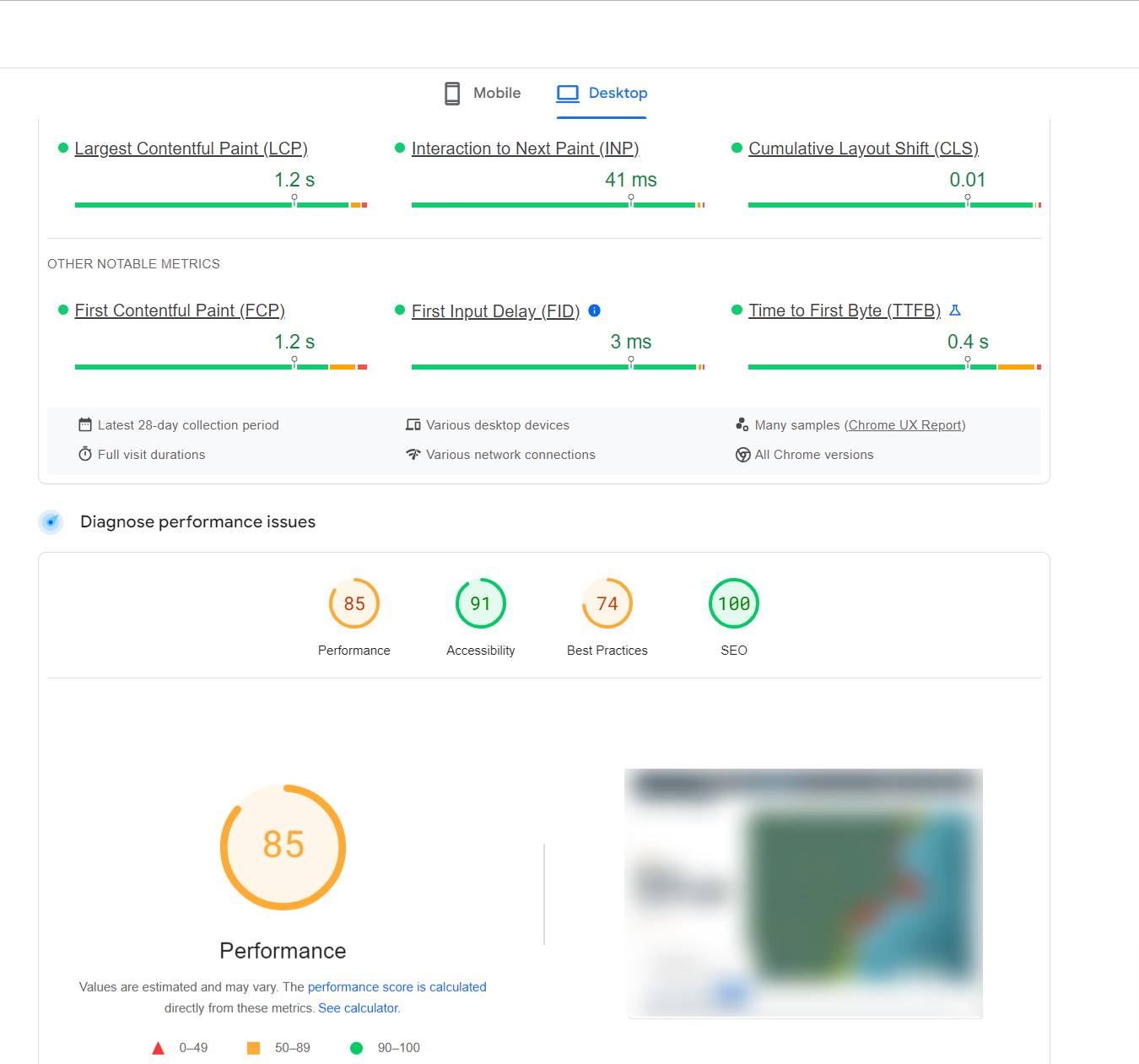
Now, a website can be defined by several key metrics. Here are some of the most important ones:
- Page Load Time: The time it takes for a web page to fully load in a user’s browser. Faster load times generally lead to a better user experience. Ideally, the page should load within 2-3 seconds.
- Time to First Byte (TTFB): The time it takes for the browser to receive the first byte of data from the server. This metric helps assess the server’s responsiveness. A TTFB of less than 0.8 seconds is considered good.
- First Contentful Paint (FCP): The time it takes for the first piece of content to appear on the screen. It gives an indication of how quickly the user sees visual feedback. The FCP should occur within 1.8 seconds or less to ensure a good user experience.
- Largest Contentful Paint (LCP): The time it takes for the largest piece of content on the page to load. It is an important metric for user-perceived load speed. The LCP should be within 2.5 seconds of when the page first starts loading.
- Time to Interactive (TTI): The time it takes for a page to become fully interactive. This means that all elements are loaded and can respond to user interactions. The TTI should be within 0.8 seconds on most devices.
- Total Blocking Time (TBT): The total time during which the main thread is blocked and unable to respond to user inputs. Aim for a TBT of less than 200 milliseconds.
- Cumulative Layout Shift (CLS): Measures the visual stability of the page by tracking unexpected layout shifts. A CLS score of less than 0.1 is considered good for visual stability.
Well, the numbers speak for themselves! As you can see, the website performance is optimal and as expected!
Are you convinced now?
InstaWP hosting provides a comprehensive and efficient managed hosting environment that’s geared specifically towards maximizing the performance and security of WordPress sites.
What Agency WordPress Hosting Costs
Hosting cost is the part of this decision most agency guides skip, and it is usually the part that decides the answer. The number that matters is not the headline plan price, it is what one client site costs you per month once it is live, multiplied by the number of sites you are responsible for.
Two billing models dominate. Per-server hosting sells you a box and lets you pack as many client sites onto it as it will hold. It looks cheap per site until one client’s traffic spike degrades every other site on the server, and it makes billing a single client for their own hosting awkward. Per-site hosting prices each site independently, which costs more at the very small end and is far easier to attribute, resell and scale.
InstaWP uses the per-site model. It is managed WordPress hosting priced per site, billed daily and invoiced monthly, with no annual contract and no setup fee:
| Plan | Price per site | Resources | Typical fit |
|---|---|---|---|
| Sandbox | $2/mo | 1 CPU, 5 GB disk | Development and staging, before launch |
| Starter | $5/mo | 2 CPU, 10 GB disk | Small brochure and portfolio sites |
| Plus | $9/mo | 3 CPU, 20 GB disk | Small dynamic sites, daily backups |
| Pro | $15/mo | 4 CPU, 35 GB disk | Busier client sites, image optimization |
| Turbo | $25/mo | 6 CPU, 50 GB disk | High-traffic sites, premium CDN |
| Elite | $45/mo | 10 CPU, 75 GB disk | WooCommerce and heavy traffic |
Worked out across a portfolio, the monthly cost of hosting client sites looks like this:
| Client sites | All on Starter ($5) | All on Plus ($9) | All on Pro ($15) |
|---|---|---|---|
| 5 sites | $25/mo | $45/mo | $75/mo |
| 10 sites | $50/mo | $90/mo | $150/mo |
| 25 sites | $125/mo | $225/mo | $375/mo |
| 50 sites | $250/mo | $450/mo | $750/mo |
In practice a portfolio is mixed rather than uniform. Most agencies end up with the bulk of client sites on the lower tiers and a handful of busy or transactional sites on Pro and above, so the real bill usually sits below the middle column. Because billing is daily, a site that is only live for part of a month is only charged for the days it ran, which matters when you are launching and retiring client sites continuously.
Budget separately for the things that are not hosting: domain registration, premium plugin and theme licences, and your own maintenance time. Those routinely cost an agency more per client than the hosting does.
Agency WordPress Hosting FAQs
What is agency WordPress hosting?
Agency WordPress hosting is managed WordPress hosting set up for running many client sites rather than one site of your own. The practical differences are per-site billing so each client’s cost can be attributed and rebilled, a staging environment on every site, one dashboard covering the whole portfolio with bulk updates and health checks, and client-facing reporting you can white-label. The underlying server technology is often the same as consumer plans; the management layer is what makes it an agency product.
How much does WordPress hosting cost for an agency?
On per-site managed hosting, expect roughly $5 to $45 per site per month depending on how much traffic and processing the site needs. A ten-site portfolio typically costs between $50 and $150 a month, and a fifty-site portfolio between $250 and $750. Per-server hosting can be cheaper per site at high volume but shifts server administration, security patching and resource isolation onto your team, which is a real cost even though it does not appear on the invoice.
Can an agency host multiple client sites on one plan?
It depends on the billing model. On per-server hosting you buy a server and host as many sites on it as its resources allow. On per-site hosting such as InstaWP, each client site has its own plan and its own isolated resources, and they are all managed from a single agency account with one combined monthly invoice. Per-site isolation means one client’s traffic spike or plugin problem cannot slow down another client’s site.
Do agencies need managed WordPress hosting, or is shared hosting enough?
Shared hosting is usually adequate for a single low-traffic site and stops being adequate once you are accountable to clients. The gap is not raw speed, it is operations: managed hosting supplies staging, automatic backups and restore, a managed firewall, automatic SSL and centralized updates. On shared hosting your team performs all of that manually, and the hours spent doing it generally exceed the price difference within a few client sites.
What should an agency look for in a WordPress host?
Staging on every site rather than as a paid add-on, automatic backups with a restore you have actually tested, isolated per-site resources, SSH and WP-CLI access for developer workflows, Git deployment support, a managed WAF with automatic SSL, one dashboard covering every client site, and white-label reporting. Transparent per-site pricing matters too, because it determines whether you can cleanly rebill hosting to clients.
Does every client site need its own staging site?
Any site that receives ongoing changes does. Staging is what lets you test a WordPress core update, a plugin change or a redesign against real client data before it reaches visitors, and it is the difference between finding a conflict yourself and having the client find it. A cheap dedicated staging tier makes this affordable across a whole portfolio; on InstaWP a sandbox is $2 per month and can be promoted to a live plan without a migration.
Your Hosting Choice Can Make or Break Your Agency Workflow
Choosing the right WordPress hosting for agencies isn’t just a technical decision—it’s a strategic one. The right hosting partner ensures your client sites run fast, stay secure, scale effortlessly, and remain under your control with minimal friction.
From automated backups to instant staging, from role-based access to white-labeled reporting—your hosting must empower your agency, not limit it.
If you’re serious about growth, efficiency, and delivering a premium experience to your clients, it’s time to move beyond generic solutions.
? Ready to streamline your agency’s hosting infrastructure? Try InstaWP hosting—the all-in-one hosting solution built specifically for agencies.
Launch, manage, and scale client sites with zero risk and zero delays.