Most public agent skill repos will not survive contact with a client site. I cloned fifteen of them, measured what was actually inside each one, and found seven worth installing. The rest were stubs, single-commit repos, or a README advertising five skills over a folder containing one.
Someone asked in a WordPress group recently whether anyone was using AI to QA website launches. The replies were a fair snapshot of where the ecosystem is: one person hands Claude a markdown checklist and walks through it, another uses the Chrome extension to simulate real browsing, a third says “built a skill for it, magical” and gets immediately asked where did you start?
That question has a bad answer right now. Search “Claude skill pre-launch audit” and you get thirty repos. Most were pushed once and abandoned. Several have zero stars and read like they were generated in a single prompt. A few have hundreds of stars and one working skill behind a README that advertises five.
So I cloned fifteen of them and measured what was actually inside. This is what survived, organised by the seven jobs you actually get paid for.
- Average lines per
SKILL.mdis the single best slop detector. Under roughly 100 lines means stubs, whatever the star count says. - Stars lie in both directions. A 229-star repo shipped one of the five skills its README lists; a 16-star security repo had the best writing in the whole audit.
- Install the skill, not the repo. Large collections are wildly uneven because they are cheap to generate and expensive to maintain.
- Skills now install to
~/.agents/skills/and symlink into each agent, so one install covers Claude Code, Codex, Cursor, Cline and others. - Read the
SKILL.mdbefore you trust it with a client’s site. It takes ninety seconds and it is the whole quality gate. - Half the useful skills here write before you get a chance to review, so run them against a disposable copy of the site first.
First, the thirty-second version of how skills work
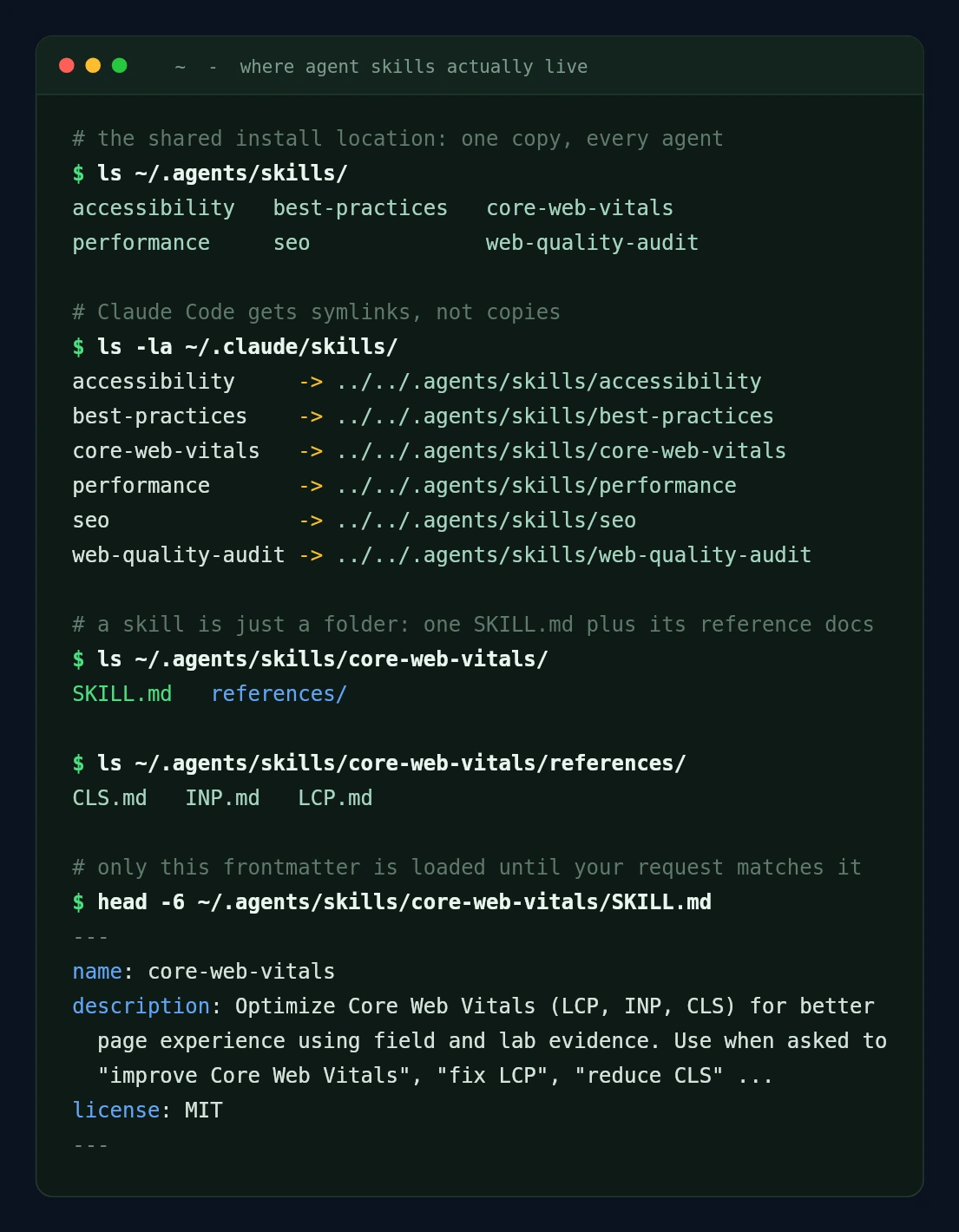
If you have never installed one: a skill is a folder with a SKILL.md file in it. Claude reads the frontmatter of every skill at session start, and loads the full body only when your request matches the description. That two-stage load is the whole design. Frontmatter is cheap, so you can have fifty skills installed and pay for almost none of them until one is relevant.
# the current installer, works across agents
$ npx skills add addyosmani/web-quality-skills

# the manual way, still works everywhere
$ git clone https://github.com/addyosmani/web-quality-skills
$ cp -r web-quality-skills/skills/* ~/.claude/skills/
That is the whole mechanism. No API keys, no build step. Which is exactly why the ecosystem filled up with slop so fast.
One thing worth knowing before you run it: the installer no longer drops files straight into ~/.claude/skills/. It installs to a shared ~/.agents/skills/ and symlinks from there into each agent it detects. It also runs a security pass over what it is about to install, which is more than the manual clone gives you.
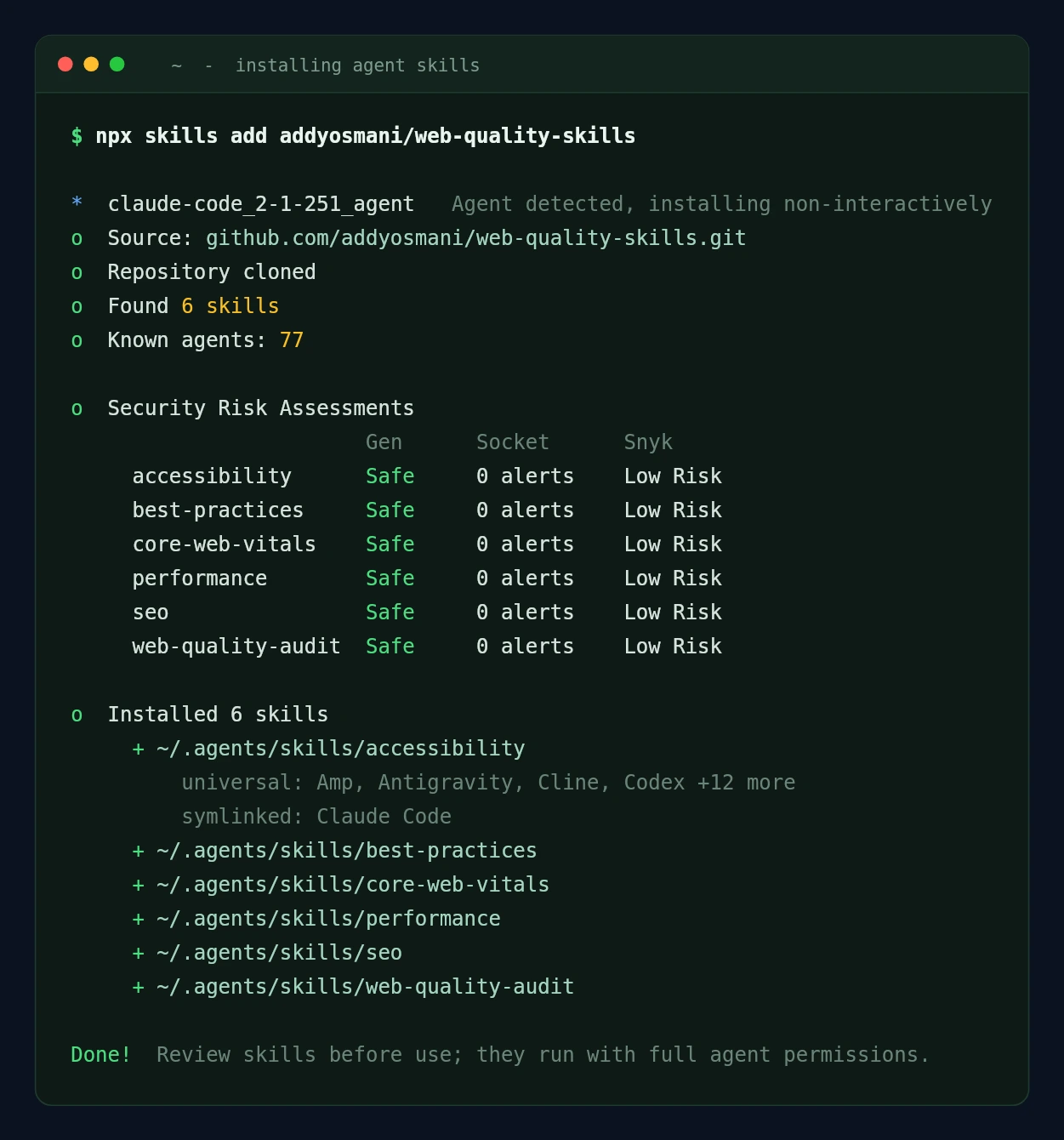
The symlink layout matters more than it sounds. It means a single install serves every agent on your machine, and it means you can read the skill on disk before you let it near anything.
How I graded these
Stars lie in both directions, so I pulled metadata with gh api repos/<owner>/<name> and then cloned and counted:
created_atvspushed_at. If they match, it is a single-commit repo that nobody has touched since.- Average lines per
SKILL.md. This is the best slop detector I found. Under about 100 lines means stubs. A repo advertising “200+ skills” at 64 lines each is a table of contents, not a toolkit. - Reference docs and scripts. A good skill delegates: the
SKILL.mdroutes, andreferences/holds the depth. Repos with zero supporting files are usually one long prompt in a trenchcoat.
Here is what that produced.
| Repo | Stars | Last Push | Skills | Avg LOC | Verdict |
|---|---|---|---|---|---|
| addyosmani/web-quality-skills | 2,730 | 2026-08-24 | 6 | 364 | Best in class |
| AgricIDaniel/claude-seo | 15,988 | 2026-08-26 | 33 | 219 | Deepest SEO coverage |
| rampstackco/claude-skills | 798 | 2026-08-28 | 206 | 249 | Broad, well-routed |
| Community-Access/accessibility-agents | 403 | 2026-08-11 | 132 | 259 | Spec-grounded |
| petrkindlmann/qa-skills | 103 | 2026-06-10 | 50 | 312 | Genuine QA depth |
| GoldenWing-360/claude-security-skills | 16 | 2026-08-03 | 38 | 234 | Low stars, real expertise |
| bzsasson/pre-launch-audit-skill | 7 | 2026-05-09 | 1 | 395 | Small and smart |
Two of those have almost no stars and made the list anyway. One repo with 229 stars did not. More on both below.
1. Pre-launch QA and the go-live runbook
Use: bzsasson/pre-launch-audit-skill and rampstackco/claude-skills (qa-testing, launch-runbook)
$ npx skills add bzsasson/pre-launch-audit-skill
# then: "run a pre-launch audit on https://staging.client.test"
Seven stars, one skill, 395 lines, ten reference docs. It runs five sub-audits (technical SEO, AI accessibility, security headers, Core Web Vitals, on-page) after probing the stack first, then tailors each check to the framework it found.
The reason it beat repos fifty times its size is one section: pre-launch block classification. A staging site is supposed to have Disallow: / in robots.txt and noindex headers everywhere. Every generic audit skill screams about this. This one classifies each block as sitewide, section-level, or page-specific, reports the expected ones as launch-day checklist items rather than bugs, and only escalates the genuine conflicts (a page that sits in the sitemap and carries noindex).
That is practitioner knowledge. It exists because someone ran the audit against a real staging site and got tired of the false positives.
Pair it with rampstack’s qa-testing, which scales to three tiers (smoke after every deploy, standard after a new page, full matrix before a release) and, unusually, documents when not to use itself and which sibling skill to route to instead.
For the checklist you feed it, thedaviddias/Front-End-Checklist (74k stars, still active) is now explicitly maintained “for humans and AI agents” and tiers each item by how omissible it is. Ignore the older agency launch checklists floating around GitHub; the two most-linked ones were last touched in 2017 and 2022.
2. Accessibility, and the compliance work you can bill for
Use: Community-Access/accessibility-agents and the accessibility skill in addyosmani’s pack
This is the theme with a regulatory deadline behind it, which means it is the one theme here where the output is a deliverable a client pays for rather than an internal quality gate.
accessibility-agents ships 132 real skills (the repo shows 212 SKILL.md files, but 80 are duplicated Codex copies of the same content, so discount the headline number). What earns it a place is that the skills cite normative sources directly. The ePub skill, for instance, opens with links to EPUB Accessibility 1.1, WCAG 2.2 and the DAISY knowledge base, then enumerates rules by severity. It also ships an MCP server, a CLI and a VS Code extension, so it is not skills-only.
Gabriel-Dalton/digital-accessibility-claude-skill or tendera01-spec/accessibility-audit-toolkit. Both surface high in search results with impressive READMEs promising WCAG 2.2, Section 508, AODA and EN 301 549 coverage. Both have zero stars and a single commit, and one has no clear license.Caveats worth knowing before you install accessibility-agents: 44 open issues, and the scope has crept well past web into PDF and ePub. Take the web agents, skip the rest.
For a lighter first pass, addyosmani’s accessibility skill plus its references/WCAG.md and references/A11Y-PATTERNS.md covers keyboard nav, screen reader support and contrast without pulling in a 17MB repo.
3. Speed, measured rather than guessed
Use: addyosmani/web-quality-skills plus chrome-devtools-mcp
$ npx skills add addyosmani/web-quality-skills
$ claude mcp add chrome-devtools npx chrome-devtools-mcp@latest
If you install one thing from this post, install this. Six skills, 2,189 lines, fourteen reference docs, five contributors, maintained by Addy Osmani at Google Chrome, MIT licensed, pushed last week.
It is the only repo I read that refuses to overclaim. From core-web-vitals/SKILL.md:
If only source code is available, identify likely causes but do not claim that LCP, INP, or CLS is failing without runtime evidence.
And on verification, it tells the agent not to claim a field improvement after a fix, because CrUX and RUM need new user visits first. Every other performance skill I read happily asserts a page “has an LCP problem” from reading the markup.
The prescribed sequence is CrUX p75 first (with an explicit label when it falls back to origin-level data), then a browser trace, then analysis of only the insights tied to the failing metric, then re-measure. If you want the thresholds it is scoring against, they are the published Core Web Vitals targets. Chrome DevTools MCP is what supplies the trace: lighthouse_audit for scores, performance_start_trace for LCP/INP/CLS breakdowns with render-blocking and network dependency trees, plus console and network inspection.
4. Plugin and core updates without the Monday morning phone call
Use: petrkindlmann/qa-skills (visual-testing, agentic-browser-testing, playwright-automation) and microsoft/playwright-mcp
This is the highest-volume, lowest-margin work most agencies do, and the one with the clearest automation path. 50 skills averaging 312 lines each, with 148 test files in the repo, which is more self-verification than anything else in this list.
The workflow is the one someone in that original thread arrived at mid-sentence: have the agent write Playwright specs as you build, replay them after every update, and let it read the logs and triage what broke. selector-drift-recovery is a nice touch, since selector rot is what kills most agency-maintained test suites by month three.
On the WordPress-native side, WebChange Detector and VRTs both screenshot-and-diff around updates, with the former ignoring sliders and carousels so you only get alerted on real regressions. 10up published the best account of running this at agency scale.
5. Migrations and replatforming
Use: rampstack’s content-migration
The honest state of this theme: the best builder-to-builder migration tooling I found is vendor-locked. There is a repo covering Elementor, Divi, WPBakery, Oxygen, Beaver Builder, Brizy, Thrive and Visual Composer conversions into Gutenberg, Bricks and Breakdance, with stated 65 to 95 percent coverage and genuinely careful design-token handling. Every skill in it declares mcp-server: respira-wordpress in its frontmatter and does nothing without that vendor’s plugin installed. That may be a fine trade for you. Just go in knowing the skills are a shopfront for the MCP server, not a portable toolkit.
What is portable is rampstack’s content-migration, which is strong on the part people get wrong. The URL map is the artifact that matters, the inventory is assembled from CMS export plus XML sitemap plus server logs plus analytics plus Search Console rather than any one source, and cutover is not the finish line. The 30 to 90 day window after is when the problems surface.
If the specific job in front of you is a builder conversion, the manual route is still worth understanding before you hand it to an agent, because it tells you what the agent is about to get wrong. We wrote up the Elementor to Gutenberg conversion in that spirit.
6. Security cleanup and hardening
Use: GoldenWing-360/claude-security-skills (wordpress-hardening, site-server-audit)
Sixteen stars. Best single piece of writing in this entire audit.
The WordPress hardening skill does not talk about “scanning for malware.” It names webshell families (Sid Gifari, WSO, FilesMan, b374k, c99), ships the grep -rEl signature pattern that catches them, lists the specific filenames mass-compromise tools drop (wp-conflg.php, lock360.php, radio.php), and opens with the assumption that matters on shared hosting: one dirty sub means lateral movement across the account until you prove otherwise.
# straight out of the skill
$ find wp-content/uploads -name '*.php' -o -name '*.phtml' -o -name '*.phar'
Production WordPress never writes PHP into uploads. That check alone has found more compromises than most commercial scanners.
This is what real expertise looks like when it gets written down, and the star count tells you nothing about it. If you want to see the same workflow driven end to end rather than skill by skill, we walked through hardening WordPress with an AI agent separately.
7. SEO and answer-engine visibility after launch
Just under 16,000 stars, 33 skills, 117 scripts, 39 tests, 13 contributors, active. It covers technical SEO, schema, GEO/AEO, hreflang, local, e-commerce and programmatic, with optional DataForSEO, Firecrawl and Ahrefs extensions and PDF/Excel reporting for client deliverables.
It is the one repo where the size is matched by structure: the skills route to a reference layer, everything is versioned, upstream frameworks are attributed with licenses. For a lighter footprint, addyosmani’s seo skill and its references/STRUCTURED-DATA.md handle crawlability and schema without the extension surface.
The two repos that did not make it, and why that matters to you
elvismdev/claude-wordpress-skills has 229 stars and a README listing five skills: performance review, security review, Gutenberg blocks, theme development, plugin development. Clone it and there is one SKILL.md in the repo. The other four are marked in progress. Last push was November 2025.
OneWave-AI/claude-skills has 280 stars and 205 skills. Average length is 64 lines. Its accessibility-auditor is 23 lines total. But its sow-generator is genuinely excellent, delegating to six reference documents with real cross-reference traceability rules and an explicit instruction never to fabricate company information.
Install the skill, not the repo.
Large skill collections are wildly uneven because they are cheap to generate and expensive to maintain.
Read the
SKILL.md
before you trust it with a client’s site. It takes ninety seconds, and it is the whole quality gate.
What none of this does yet
Worth saying plainly, because the enthusiasm outruns the reality:
- Judging whether the design is any good. Agents catch spacing inconsistencies and contrast failures. They do not catch “this looks cheap.”
- Deciding whether a migration is worth doing. They will happily execute a replatform that should never have been quoted.
- Knowing the client. Every audit output needs you to strike the findings that do not matter for this particular site.
- Anything irreversible. Which brings us to the part that actually blocks most people.
The prerequisite nobody puts in the README
Read back through those seven themes. A malware cleanup that deletes files. A builder migration that rewrites post meta across every page. A performance fix that touches the theme. A hardening pass that edits wp-config.php.
None of these belong anywhere near a live client site on their first run. Not because the agent is careless, but because you cannot review a change you have already shipped, and half the useful skills here write before you get a chance to look.
Now read that list again as a set of environment requirements. Each theme above assumes something about where it runs, and none of the READMEs say so out loud.
| Skill category | What it silently assumes |
|---|---|
| Lighthouse and Core Web Vitals | A real URL that is not production |
| Security cleanup | Filesystem access, over SSH or WP-CLI |
| Builder migrations | Permission to rewrite post meta across every page |
| Visual regression | An on-demand before and after clone |
| Anything MCP-driven | A host that exposes the install to an agent at all |
That right-hand column is a checklist you can run against your own hosting before you install anything:
- A disposable copy of the site you can destroy without a rollback plan.
- WP-CLI or SSH, so a skill can act on the site rather than only read it.
- A way to expose the install to an agent, over MCP or an API.
- Clone and restore measured in minutes, not a support ticket.
- No rate limiting when an agent makes a few hundred requests in a row.
Some of that you will already have. The rest is worth checking before an agent’s first write rather than after it.
That checklist is a fair description of what we built InstaWP for.
Sandboxes. Pull a copy of the production site in a couple of minutes, let the agent work on the copy, read the diff, then throw the copy away. Nothing reaches the client site until you apply it yourself, and anything you reject goes away with the copy.
InstaCLI. The same thing without leaving the terminal, which matters when the agent already lives there. instawp create provisions the site, and the shell session that just ran npx skills add can point a skill straight at it.
InstaMCP. One toggle gives the agent real control of the WordPress install inside that sandbox: posts and pages, taxonomies, media, plugins, themes and logs, rather than HTML scraped from the outside. That is the difference between a skill that can audit a site and one that can fix it.
It is also the same platform underneath. Going live is a plan change rather than a migration, so the sandbox is not a detour off the host you ship on.
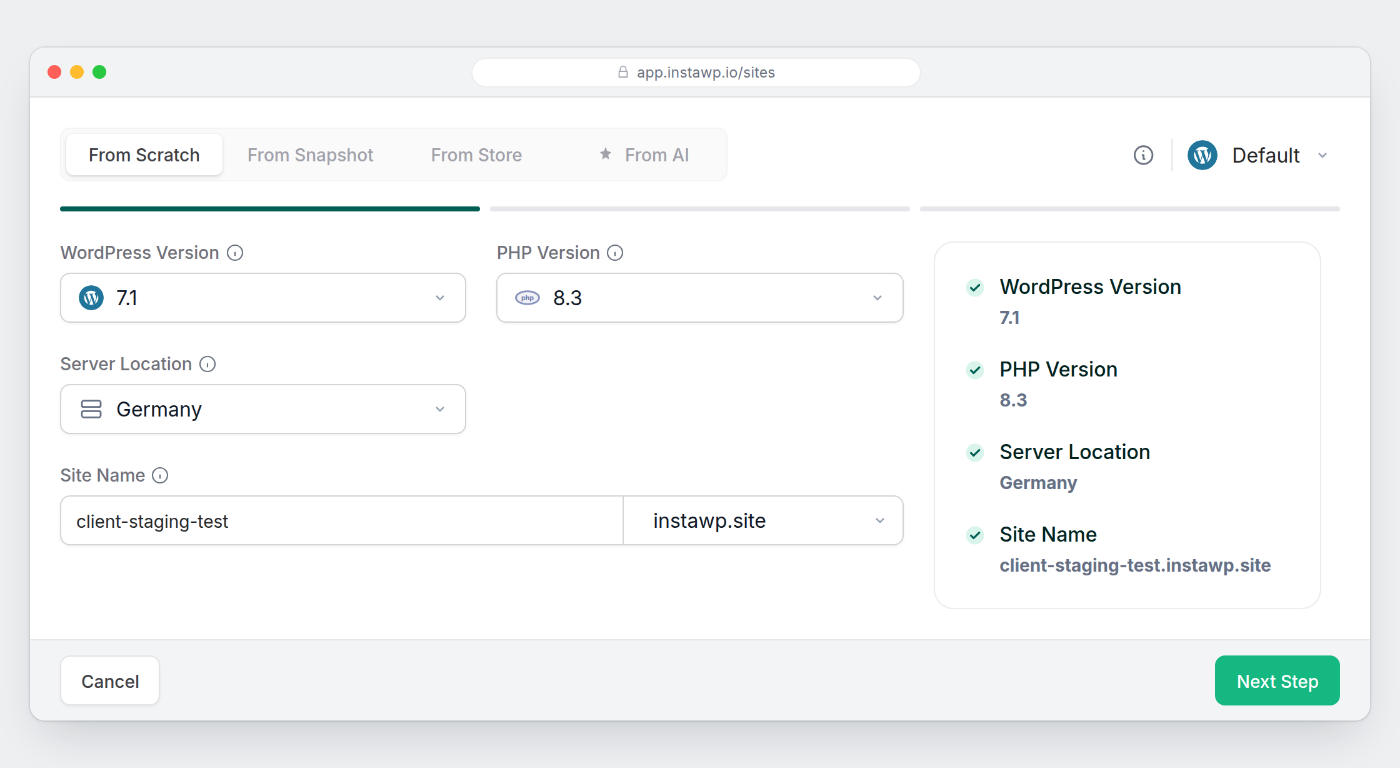
You can absolutely do this with local Docker or a staging subdomain. The point is not the tool. The point is that “run it against staging first” stops being a discipline you have to maintain and becomes the default path.
Where to start tonight
$ npx skills add addyosmani/web-quality-skills
$ claude mcp add chrome-devtools npx chrome-devtools-mcp@latest
$ claude mcp add playwright npx @playwright/mcp@latest
Then take the launch checklist you already keep, save it as prelaunch/SKILL.md with three lines of frontmatter, and run npx skills add ./prelaunch -g. It lands in ~/.agents/skills/ beside everything else and gets wired into the agents on your machine, the same as anything you pulled from GitHub.
The third piece is the one nothing on GitHub sets up for you. The skills and the MCP servers take an evening. Somewhere safe to point them is a question about your hosting rather than your tooling, and the checklist further up is the one to run before you install anything.
That is the version of “I built a skill for it” that anyone can reach in an evening. Everything else in this post is refinement.
Give the agent a copy, not the client’s site
Spin up a disposable WordPress sandbox, let the skills run, review the diff, then apply.
Frequently asked questions
Where do agent skills actually live on disk?
Two places, and which one depends on how you installed. A manual git clone and copy puts them in ~/.claude/skills/ for personal skills, or .claude/skills/ inside a repo for project skills. The npx skills add installer does something different: it writes one copy to ~/.agents/skills/ and symlinks from there into each agent it finds, so ~/.claude/skills/core-web-vitals becomes a link pointing back at ../../.agents/skills/core-web-vitals. Either way a skill is just a folder holding a SKILL.md, usually with a references/ directory beside it.
Do these skills work in Codex, Cursor or Cline, or only Claude Code?
Most of them work anywhere. A SKILL.md is plain markdown with YAML frontmatter, and the shared ~/.agents/skills/ convention exists specifically so one install serves several agents. When I installed the addyosmani pack it reported knowing 77 agents and set each skill up as universal across Amp, Antigravity, Cline, Codex and a dozen more, with a symlink for Claude Code. The caveat is content, not format: a skill that tells the agent to call a specific MCP tool only works where that MCP server is connected.
How do I tell a good skill repo from a generated one?
Three checks, about ninety seconds. First, compare created_at and pushed_at from gh api repos/OWNER/NAME: if they match it is a single-commit repo nobody has returned to. Second, divide total lines by number of SKILL.md files. Under roughly 100 lines average means stubs, and a repo advertising hundreds of skills at 64 lines each is a table of contents. Third, look for a references/ folder. A real skill routes to depth held elsewhere; a generated one is a single long prompt with nothing behind it. Star count is the one signal that failed me in both directions.
Can I run these against a client’s live site?
Read-only audits, yes. A pre-launch audit, a Core Web Vitals trace or an accessibility scan only fetches and measures, so pointing one at production is fine. Anything that writes is a different question. Malware cleanup deletes files, builder migrations rewrite post meta across every page, and hardening passes edit wp-config.php, all before you have seen a diff. Run those against a copy, review what changed, then apply the change yourself.
Do I need an API key or a paid plan to use skills?
Not for skills themselves. A skill is a markdown file your agent reads, so there is no service behind it, no key and no build step. You need whatever subscription runs your agent, and that is it. Costs appear only when a specific skill reaches for a paid service: the larger SEO packs have optional DataForSEO, Firecrawl and Ahrefs extensions, and those need their own keys. The skills work without them, with less data.
How many skills should I actually install?
Fewer than you want to. Frontmatter for every installed skill is read at session start, so a hundred stubs is a hundred descriptions competing to match your request, and the wrong one wins often enough to be annoying. Start with one pack that covers your most common job, add a second when you hit a gap you can name, and delete anything you have not triggered in a month.
What about a skill that ships its own MCP server?
Check whether the skill still does anything without it. Some packs are genuinely portable and treat an MCP server as an optional accelerator. Others declare a required mcp-server in every skill’s frontmatter and are inert until you install that vendor’s plugin, which makes the skills a shopfront rather than a toolkit. Neither is wrong, but the second is a purchasing decision dressed as a free repo, and the frontmatter tells you which one you are looking at before you commit.
Every repo above was cloned and read on 1 September 2026. Star counts and last-push dates are from that date. This space moves fast, so check pushed_at before you rely on any of it.