

Site Kit is a one-stop solution for WordPress users to use everything Google has to offer to make…
About Multiple Columns for Gravity Forms
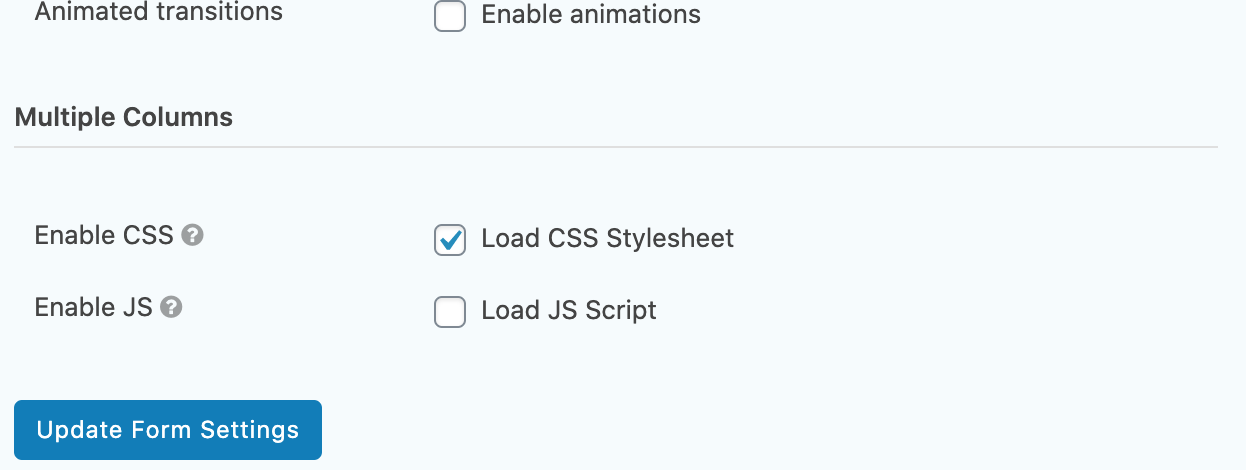
This plugin allows you to split Gravity Forms elements into columns on your website. You can enable or disable the plugin's CSS and JS files for each form, and it is recommended to keep the CSS enabled at all times. Note that if you are updating from a previous version, you may need to recreate your form with the current design definitions.Screenshots


Frequently asked questions
What does the Multiple Columns for Gravity Forms plugin do?
This plugin introduces new form elements into Gravity Forms, allowing you to split form elements into columns. It adds "Row Start," "Column Break," and "Row End" elements to the Gravity Forms administration area.
How do I control the plugin's CSS and JavaScript?
For each form, you can enable or disable the plugin's CSS and JS in its form settings. The CSS manages the form's layout, while the JS removes unwanted spacing from hidden elements due to conditional logic.
Are there any important update considerations?
If updating from a version prior to version 3, forms will need to be recreated with the current design definitions. If updating from version 3.0.3 or earlier and columns are not displaying correctly, check the "Enable CSS" checkbox in the Form Settings for each form.
Changelog
4.0.6
If upgrading from a previous version of this plugin it may be necessary to activate the CSS for each form that uses the multiple column functionality. This is done by going to the form -> Form Settings -> Check the box beside Load CSS Stylesheet -> Click Update Form Settings.
Fix: Rollback of GFMC-73 issue as this appeared to cause issues with removed layout elements.
4.0.5
If upgrading from a previous version of this plugin it may be necessary to activate the CSS for each form that uses the multiple column functionality. This is done by going to the form -> Form Settings -> Check the box beside Load CSS Stylesheet -> Click Update Form Settings.
Fix: How to remove muticolumn fields from Entries. (GFMC-73)
Fix: PHP error (Required parameter). (GFMC-76)
4.0.4
If upgrading from a previous version of this plugin it may be necessary to activate the CSS for each form that uses the multiple column functionality. This is done by going to the form -> Form Settings -> Check the box beside Load CSS Stylesheet -> Click Update Form Settings.
Fix: CSS class names on MCGF elements. (GFMC-74)
4.0.3
If upgrading from a previous version of this plugin it may be necessary to activate the CSS for each form that uses the multiple column functionality. This is done by going to the form -> Form Settings -> Check the box beside Load CSS Stylesheet -> Click Update Form Settings.
Fix: Divide by Zero error. (GFMC-69)
Fix: Uninstall Function Conflict. (GFMC-60)
4.0.2
If upgrading from a previous version of this plugin it may be necessary to activate the CSS for each form that uses the multiple column functionality. This is done by going to the form -> Form Settings -> Check the box beside Load CSS Stylesheet -> Click Update Form Settings.
Fix: An error of type E_PARSE on update, related to PHP version site is running on. (GFMC-71)
4.0.1
Fix: Not working if Gravity Forms is Must-Use plugin. (GFMC-65)
Fix: Undefined offset PHP notice. (GFMC-67)
4.0.0
Fix: Issue due to CSS conflict when displaying default form and form with GFMC elements. (GFMC-58)
Fix: JavaScript functionality issue for hiding elements because of conditional logic. (GFMC-64)
Alteration: Plugin no longer supports initial column specification using Sections in versions 2 and before. If updating plugin from a version prior to version 3, the form will need to be recreated with the current design definitions.
3.2.1
Fix: Warning: Division by zero message corrected with the use of a check for zero. (GFMC-57)
3.2.0
Fix: Resolution of issue when conditional logic JS enabled – Uncaught TypeError: e[n].target.parentElement is null On Page with Conditional Logic Elements (GFMC-44)
Fix: composer.json file included at root of the plugin which was causing issues when installing or updating the plugin with WP-CLI. (GFMC-49)
Fix: Restructure of layout for Gravity Forms 2.5 as this uses divs when not in legacy enabled mode. (GFMC-55)
3.1.5
Fix: Update button in administrator fixed when Gravity Forms -> Settings in On state (GFMC-43)
3.1.4
Fix: Page count added to row count causing division by zero issue (GFMC-30)
3.1.3
Fix: Multipage form layout broken (GFMC-29)
3.1.2
Fix: Problem with form deactivation on save.
3.1.1
Fix: Inaccurate set of files uploaded.
3.1.0
Fix: IE11 CSS styling that was not correctly aligning columns.
Improvement: Form settings modified which allows the addition of a .js file that hides and shows the wrapper list element around conditional logic elements.
Improvement: Form settings modified which allows the plugin CSS file to be enabled and disabled for inclusion.
Improvement: Included possibility to allow for CSS classes to be defined for columns
Improvement: Removes form entries added when the plugin is uninstalled.
Improvement: Form validation when saving to reduce unequal row start to row end implementations.
Improvement: Introduced functionality that will also provide appropriate layout on AJAX generated forms.
Alteration: Changed Column Start and Column End to Row Start and Row End respectively.
3.0.3
Fix: Removed echo commands as these were causing update issues from within Gutenberg pages. Improvement: Altered CSS to be more specific with class naming implementation.
3.0.2
Restructured way that columns and rows are added to forms; native UI buttons are now integrated into the Gravity Forms interface. Resolved a few issues that had been highlighted in previous versions: Displaying multiple forms on a single page Correct error handling when form id not present in shortcode * CSS enhancements to align list elements
3.0.1
The same as 2.1.1, due to previous inaccurate upload.
3.0.0
Problematic upload. Ignore this version.
2.1.1
This version removed code that had been used for testing multisite in 2.1.0.
2.1.0
Allow admins to activate or deactivate on individual network sites. New CSS style introduced to remove spacing around the first column of a row. Plugin name changed to align with WordPress recommendations.
2.0.1
Update to work with PHP version < 5.4.
2.0.0
Introduced new feature to allow for multiple rows. Individual rows will split the columns they contain evenly.
1.0.1
Altered details related to the supporting files. No functional alterations. Upgrade optional.
1.0.0
Initial Release. Trumpets sound!

