WordPress Multisite hosting is hosting built to run a WordPress Multisite network: one WordPress install, one database, and many subsites managed from a single Network Admin. The best option depends on one decision you make before you compare a single price, which is whether you want a true Multisite network at all or many independent installs under one dashboard. This guide compares 8 hosts on per-site cost, network setup and centralized control, and shows what 10 client sites actually cost on each.
Key takeaways
- Most agencies do not need true Multisite. Separate installs under one dashboard give you per-client plugin freedom, a contained blast radius and a clean handover. Real Multisite wins when subsites are near-identical.
- Pricing models differ more than prices. Bluehost, A2 and Cloudways sell you a container. Kinsta, WP Engine and Flywheel sell tiers with a site allowance. InstaWP prices each site on its own tier.
- Site 11 is where allowance plans hurt. Adding one brochure site can push you into the next band and a full price jump.
- At 10 sites the managed hosts land roughly between $7.70 and $20 per site. The cheap shared plans are not managed WordPress infrastructure.
- InstaWP converts a hosted site to Multisite in one click, subdomain or subdirectory, from the site’s Settings. The conversion cannot be undone.
- Check wildcard DNS and wildcard SSL before you commit to a subdomain network. It is the requirement that trips up most first Multisite builds.
What Is WordPress Multisite Hosting?
WordPress multisite hosting allows you to manage a network of websites from a single WordPress installation. Instead of maintaining separate dashboards, updates, and plugins for each site, multisite hosting consolidates all of that into one powerful admin panel.
Whether you’re building a blog network, educational platform, SaaS tool, or managing multiple client projects, WordPress multi-site hosting simplifies the experience. It centralizes control, reduces plugin redundancy, improves scalability, and makes backups and updates much easier to manage.
Why Regular Hosting Falls Short for WordPress Multisite Networks?
You might be asking, “What’s wrong with my reliable, long-time hosting provider? Why can’t it handle a WordPress Multisite network?” Well, the truth is, there are several reasons why regular hosting just won’t cut it:
a. Resource Limitations: A WordPress Multisite network requires significantly more server resources than a single WordPress site. With multiple sites running under one installation, you’ll need a managed WordPress hosting plan that can handle higher traffic, storage, and database usage. Regular hosting cannot often support this load efficiently.
b. Performance Bottlenecks: Multisite networks depend on lightning-fast performance to manage multiple websites without delays. Standard hosting providers may not offer optimized servers or caching solutions tailored for the increased demand, leading to slower loading times and unhappy users.
c. Limited Scalability: As your Multisite network grows, so do your resource needs. Regular hosting plans are often inflexible, making it challenging to scale seamlessly. A hosting provider specialized in Multisite ensures you can expand your network without hitting any roadblocks.
d. Security Concerns: Managing multiple websites under one roof amplifies security risks. Regular hosting providers may not have the advanced security measures or tailored solutions necessary to protect a Multisite setup from vulnerabilities and attacks.
e. Lack of Advanced Support: Multisite WordPress networks require a deeper level of expertise for troubleshooting and management. Regular hosting providers typically offer generic support that may fall short when addressing the unique complexities of WordPress Multisite environments.
f. No Network-Specific Features: Specialized WordPress Multisite hosting providers often offer features like WP staging environments, centralized management tools, and optimized database configurations, all of which are crucial for managing a large-scale network. These are often missing in standard hosting plans.
Can you run a true WordPress Multisite network on InstaWP?
Yes. Any hosted InstaWP site can be converted into a WordPress Multisite network from the site’s own settings, in either subdomain or subdirectory mode. There is no wp-config.php editing and no server access required. The feature shipped with InstaWP product update v2.40.0.
This matters because most guides to managed WordPress hosting quietly avoid the question. A host can be excellent at running many separate WordPress installs and still make a real network painful to stand up. Here is the actual path on InstaWP.
How to convert an InstaWP site to Multisite
example.com/client-one. Subdomain gives you client-one.example.com. If you are unsure which fits, our guide to subdomain vs subdirectory walks through the trade-offs.This is a one-way door
Multisite conversion cannot be reversed, and the subdomain versus subdirectory choice is made at conversion time. Pick the structure you want to live with. The cheap way to be certain is to clone the site to a $2 sandbox, convert the copy, and see how your plugins and your URL structure behave before you do it for real.
Subdomain networks need wildcard DNS
A subdirectory network needs nothing special from DNS. A subdomain network does. Every new subsite creates a new hostname, so instead of adding a record per subsite you point a wildcard record at the site, which resolves every subdomain at once. InstaWP handles DNS and certificates for domains you buy in-platform or map yourself, and renews them automatically. Confirm wildcard certificate coverage for your specific network before you launch client subsites on it.
If you are mapping distinct client domains onto subsites rather than using subdomains of one root, read WordPress’s own Multisite domain mapping documentation first, then InstaWP’s domain mapping guide.
Choosing the Best Hosting for WordPress Multisite
When it comes to managing multiple sites under one roof, not just any hosting will do. You need a WordPress multisite hosting provider that’s built to handle the complexity, traffic, and growth that agencies demand. Below are the key features to evaluate before choosing the best hosting for WordPress multisite setups.
1. Multisite Compatibility
Not all hosts support WordPress multi-site hosting out of the box. Look for plans that explicitly mention support for Multisite, subdirectory/subdomain configurations, and domain mapping. The best hosts also provide automatic setup options and built-in tools for managing multiple subsites.
? Pro Tip: Ask the provider whether their support team has dedicated experience with multisite configurations.
2. High-Speed Performance
Multisite hosting requires significantly more resources than single-site setups. Choose hosting providers that use NVMe SSD storage, LiteSpeed or NGINX servers, HTTP/3 protocols, and built-in caching mechanisms. This ensures your entire network stays fast, even during traffic spikes.
? Agency Insight: Edge caching and global CDNs (like Cloudflare Enterprise) can cut load times across all your sub-sites dramatically.
3. Scalability for Growth
Your client list will grow, and your hosting should grow with it. Look for vertical scalability (more CPU, RAM, storage) and horizontal scalability (adding new sites seamlessly). A good WordPress multisite hosting provider allows you to scale without migrations or downtime.
? Watch for: Soft inode limits and unclear storage policies that could throttle your performance as your network expands.
4. Robust Security at the Network Level
With one core installation powering multiple sites, a vulnerability in one can affect the entire network. The best WordPress multisite hosting plans offer enterprise-grade security: Wildcard SSL, WAF (Web Application Firewall), malware scanning, brute force protection, and DDoS mitigation.
? Pro Tip: Look for automatic daily backups that cover the entire network, not just individual subsites.
5. WordPress Multisite-Specific Support
Troubleshooting WordPress multisite issues isn’t the same as fixing a single WordPress blog. Choose recommended WordPress multisite hosts with 24/7 support teams trained specifically in multisite configurations, database structures, domain mapping, and migration complexities.
? Ask this: “What’s your average response time for Multisite-related tickets?”
6. Developer & Agency Tools
Agencies benefit from staging environments, WP-CLI, WordPress Git integration, and cloning tools. These features streamline development, testing, and launch workflows across all sites in your network. Look for multisite WordPress hosting that includes these tools by default.
? Advanced Features to Look For: Safe Updates, version control, template cloning, and collaboration permissions.
7. Integrated Site Management
The best hosting for WordPress multisite environments comes with dashboards that let you manage backups, updates, performance, and even plugin installs across all subsites. This saves time and reduces human error.
? Avoid: Hosts that require jumping between cPanel accounts for each sub-site.
8. Transparent, Scalable Pricing
While multisite WordPress hosting can be cost-effective, many providers bury advanced features under expensive add-ons. Make sure your provider offers pricing that scales fairly with your usage and provides agency or bulk discounts for hosting multiple sites.
? Pro Tip: Calculate cost per site. Some managed providers offer discounted rates if you host 10+ sites.
Choosing the best WordPress multisite hosting isn’t about price alone. Agencies need a host that’s fast, secure, scalable, and built for centralized site management. In the next section, we’ll break down the top 8 multisite WordPress hosting providers that check all the right boxes.
| Host | Pricing model | Lowest published price | Published cost for 10 sites/month | Per-site equivalent |
|---|---|---|---|---|
| InstaWP | Per site, billed daily | $5/site (Starter) | $50 on Starter, $90 on Plus | $5 to $45, set per site |
| CloudPress | Per site | $12/site (Basic) | $120 | $12 |
| A2 Hosting | Shared account, unlimited sites | $2.99 (Ignite, 1 site) | $5.99 (Accel) | $0.60 |
| Cloudways | Per server, not per site | $11/mo (1 GB RAM) | Depends on server size | Varies with resources |
| Bluehost | Account with a site allowance | $2.95/mo intro (10 sites) | $2.95 intro, renews higher | $0.30 intro |
| Kinsta | Tier with a site allowance | $30/mo (1 site) | $200 (Business 2) | $20 |
| WP Engine | Tier with a site allowance | $20/mo (1 site) | $77 (Growth) | $7.70 |
| Flywheel | Tier with a site allowance | $13/mo (1 site) | $96 (Freelance) | $9.60 |
WordPress Multisite Hosting Pricing Compared: What 10 Client Sites Actually Cost
Most hosting comparisons stop at the headline price of a single plan, which tells an agency almost nothing. What matters is the per-site cost once your network is real. The table below takes each provider’s own published pricing (the same figures broken out per host later in this guide) and normalises it to one question: what does it cost to run 10 client sites for a month, and what is that per site?
Two pricing models are in play. Bluehost, A2 and Cloudways sell you a container: one plan, one server or one account, with sites packed into it. Kinsta, WP Engine and Flywheel sell tiers with a site allowance, so you jump a full price band the moment you add site 11.
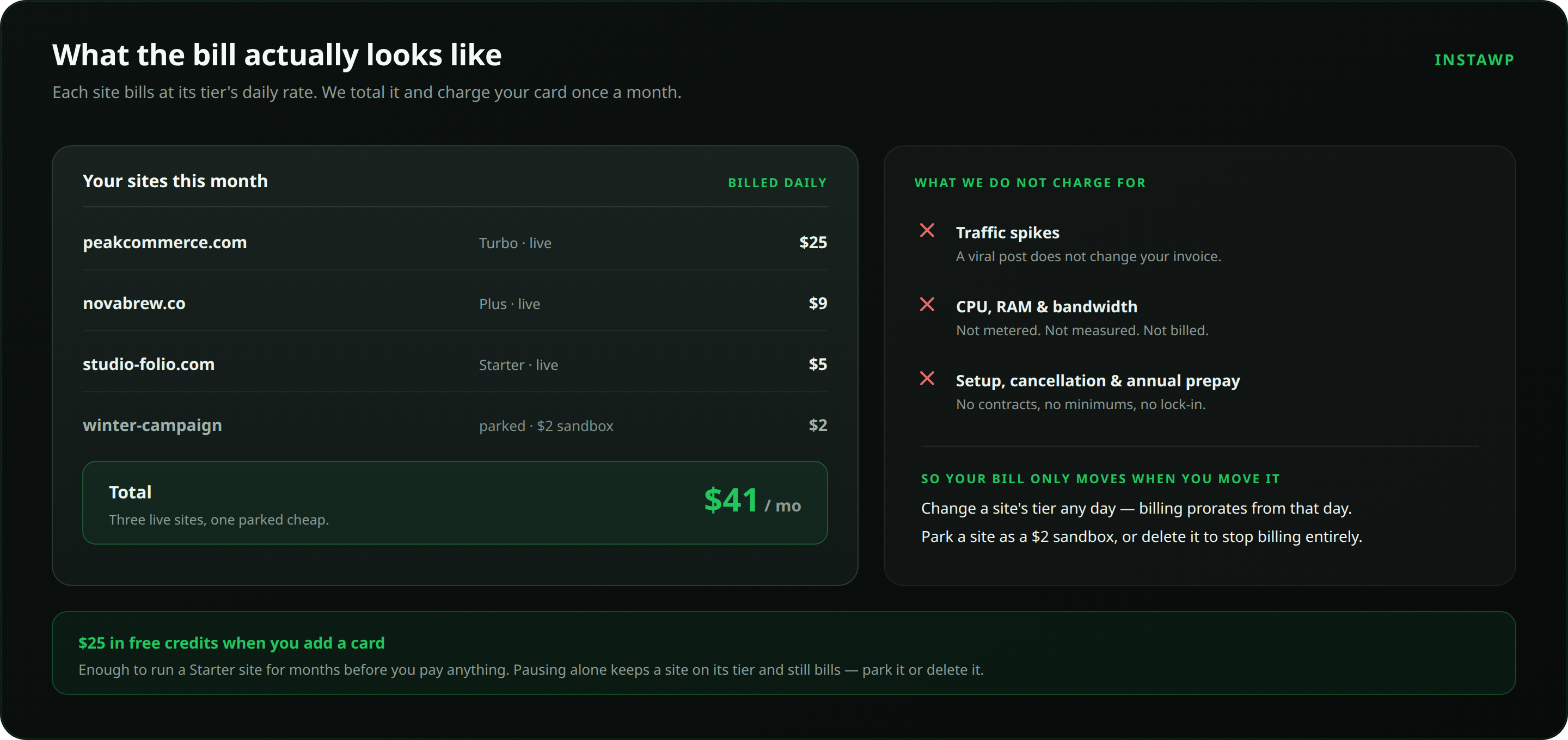
InstaWP prices each site on its own tier, which is what per-site WordPress hosting means in practice: a $5 brochure site and a $25 store sit side by side and each is billed for what it actually is.
Read the cheap end of that table carefully. A2 and Bluehost look unbeatable per site because they are shared hosting: sites share one pool of CPU and memory, the low Bluehost figure is a 12-month introductory rate that renews higher, and neither is sold as managed WordPress infrastructure. The managed hosts cluster between roughly $7.70 and $20 per site at ten sites.
The other thing the table hides is what happens at site 11. On an allowance-based tier you pay the next band in full even if the eleventh site is a one-page brochure. On per-site daily billing there is no band to cross, and a site you take down stops billing the same day.
Competitor figures are each provider’s published list price at the time of writing and are detailed per host below. Introductory rates renew at higher prices. Check current pricing before you commit.
Best WordPress Multisite Hosting Providers for Agencies
Let’s review these hosting providers in detail to give you an idea of what makes them the best.
1. InstaWP: best for agencies that want per-site billing and a one-click network
InstaWP is a WordPress cloud platform rather than a traditional host. It covers the whole lifecycle: disposable sandboxes for building, managed WordPress hosting for production, and a single dashboard for managing every client site. For Multisite specifically, it is one of the few hosts on this list where converting a live site into a network is a button rather than a support ticket.
Key features for WordPress Multisite networks
- One-click Multisite conversion: turn any hosted site into a subdomain or subdirectory network from its settings, with no
wp-config.phpediting. The conversion is not reversible, so test it on a clone first. - Per-site pricing instead of allowance tiers: each site sits on its own plan from $2 to $45 a month and is billed daily. A $5 brochure site and a $25 store live side by side, and neither forces the other into a higher band.
- Edge delivery through InstaCDN: static responses are cached at the edge and CSS and JS are Brotli-compressed, which keeps TTFB low across subsites. Edge caching matters more on a network than on a single site, because one origin serves every subsite.
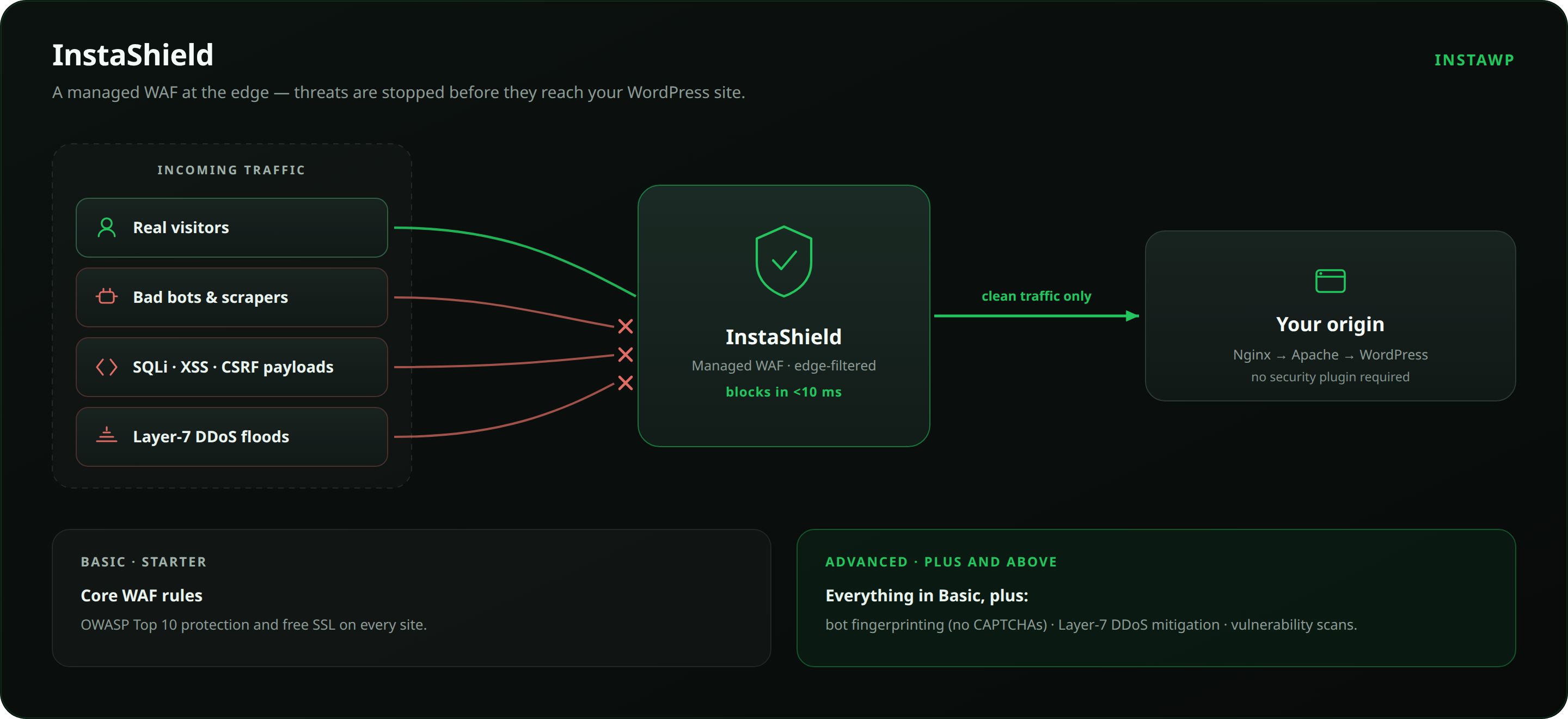
- InstaShield managed WAF on every plan: maintained OWASP rules, DDoS mitigation, bot filtering and rate limiting sit in front of the site. Plus and above add bot fingerprinting without CAPTCHAs, Layer-7 DDoS mitigation and vulnerability scans.
- Backups scaled to the tier: automatic off-site backups with 30-day retention, monthly on sandbox, weekly on Starter, daily on Plus and above.
- Full developer access: SSH on every plan, plus SFTP, WP-CLI, Git deployments and PHP 7.4 through 8.5 switchable per site.
- Five regions: US, UK, Germany, Singapore and Australia, so a client network can sit near its audience.
- Uptime monitoring built in: multi-region checks with response-time history and email and Slack alerts, which saves bolting a third-party uptime monitor onto every network.
- Free migrations: the team moves the site for you, usually inside an hour, with no downtime.
Driving a network with AI, through InstaMCP
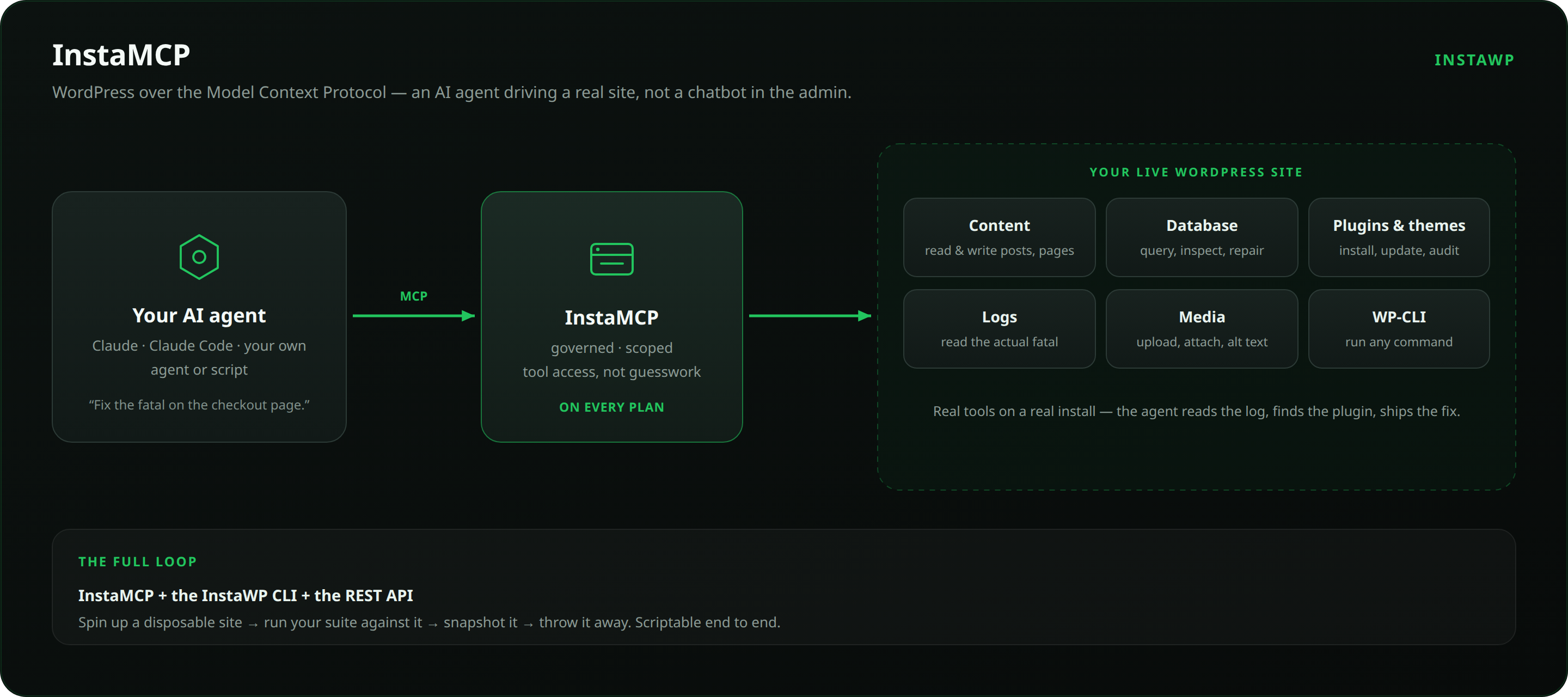
Multisite admin is repetitive by nature, which makes it a good fit for automation. InstaMCP exposes a WordPress site over the Model Context Protocol, so an AI client such as Claude, Claude Code or Cursor can read the error log, query the database, audit plugins, upload media and run WP-CLI commands against the real install. It is included on every plan. For an agency running a network, a job like auditing every subsite for an outdated plugin becomes a single instruction rather than an afternoon of clicking.
How InstaWP helps agencies manage WordPress Multisite
- Spin up staging environments for a network before pushing a plugin update to every subsite at once
- Start a build on a $2 sandbox and promote it to a live tier on the same URL, with no export and no import
- Roll a site back from an automatic backup when an update breaks compatibility across the network
- Stand up new client sites from reusable templates instead of rebuilding the same stack
- Watch uptime, performance and plugin vulnerabilities for every site from one place, and manage multiple client sites without logging into each one
- Run a Website as a Service platform on top, with your own branding, pricing and customer portal
InstaWP pricing overview
| Plan | Price (per site/month) | Daily rate | CPU | Disk | Backups |
|---|---|---|---|---|---|
| Sandbox | $2 | ~$0.07 | 1 | 5 GB | Monthly |
| Starter | $5 | $0.17 | 2 | 10 GB | Weekly |
| Plus | $9 | $0.30 | 3 | 20 GB | Daily |
| Pro | $15 | $0.50 | 4 | 35 GB | Daily |
| Turbo | $25 | $0.83 | 6 | 50 GB | Daily |
| Elite | $45 | $1.50 | 10 | 75 GB | Daily |
Every tier, sandbox included, gets the same platform: SSH, SFTP and WP-CLI, Git and Composer, custom domains with auto-renewing SSL, off-site backups, InstaMCP, free migration in, and one-click promotion from sandbox to production on the same URL.
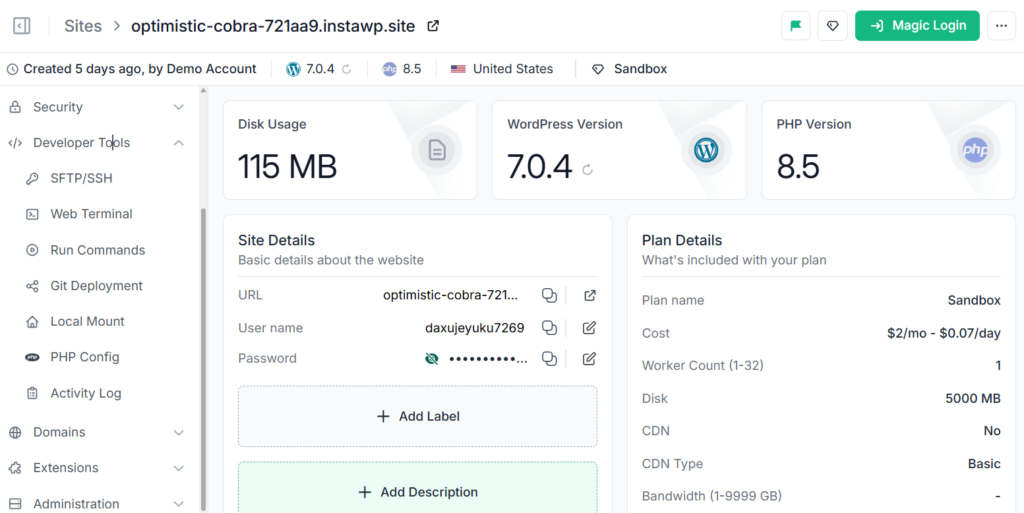
Plus and above add a Valkey object cache, which is what keeps logged-in and WooCommerce pages fast on a busy network. Pro and above add automatic image optimization.
Did you know?
CPU, RAM and bandwidth are not metered or billed on InstaWP, so a subsite that goes viral does not change your invoice. Adding a card gives you $25 in free credits, and production plans carry a 14-day money-back guarantee. There is no free tier: the $2 sandbox is the cheapest way in.
InstaWP pros and cons
What works well
- Per-site tiers with no allowance bands to cross
- Multisite conversion without server access
- Daily billing, so parked and deleted sites stop costing
- SSH and InstaMCP on every plan, including the $2 sandbox
- Free hands-on migration
What to check first
- Multisite conversion cannot be undone
- No free plan, so budget from the $2 sandbox up
- Five regions, which is fewer than the largest clouds
- Confirm wildcard certificate coverage for a subdomain network before launch
- Weekly rather than daily backups on Starter
Final verdict on InstaWP
Pick InstaWP if your site count moves, if you want each client site priced for what it actually is, or if you want to stand up a real network without touching a config file. It is a weaker fit if you need a free tier or a region outside its five.
Best for: agencies running 10 or more client sites, WaaS builders, and teams that want sandbox-to-production in one platform.
Starting price: $2 a month for a sandbox, $5 a month for a production site.
Support: priority support on production plans, plus free hands-on migration.
Test a client network before you commit to one
Spin up a $2 sandbox, convert the clone to Multisite, and see how your plugin stack behaves on a network. Adding a card gives you $25 in free credits.
Create a WordPress site2. CloudPress
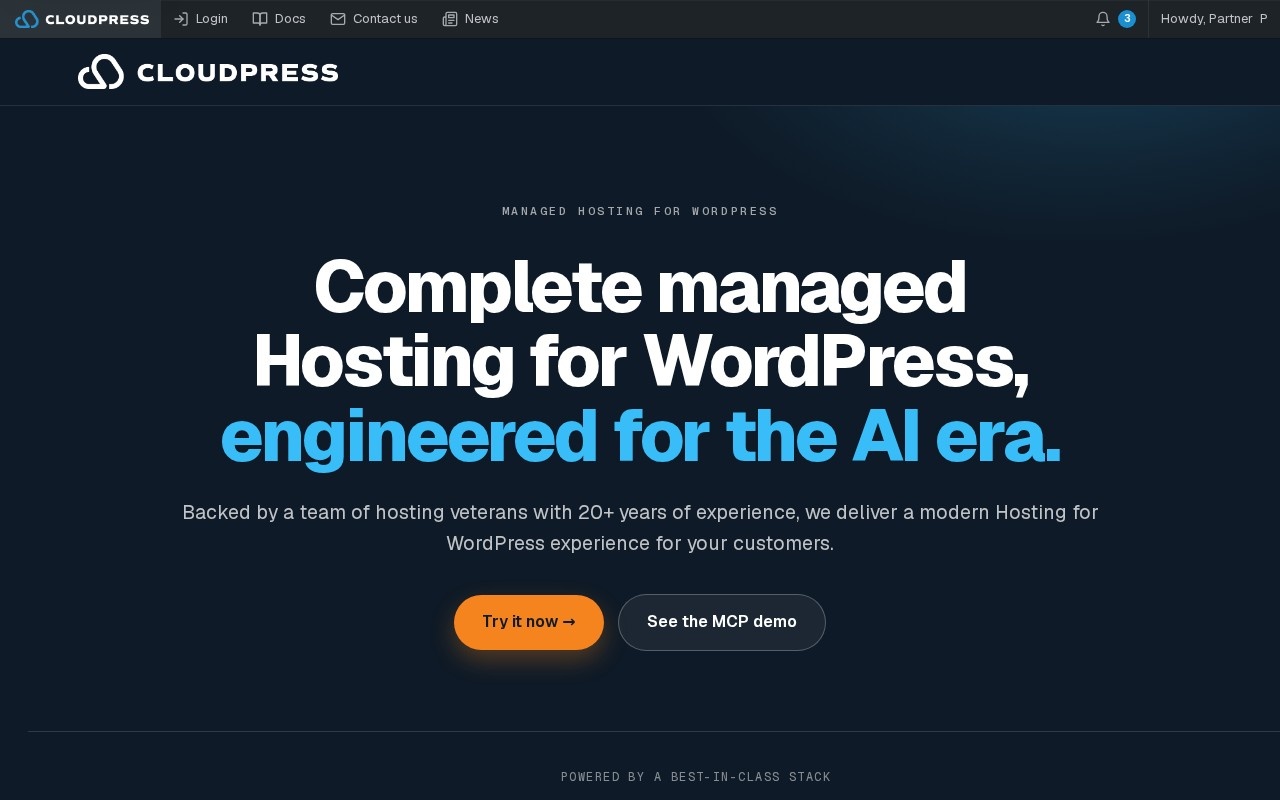
CloudPress puts simplicity at the forefront, offering a clean, no-fuss approach to WordPress multisite hosting. Built on a globally distributed cloud infrastructure, it removes the barriers to launching and scaling multiple sites with speed, security, and minimal overhead.
For agencies that prefer intuitive interfaces, rapid prototyping, and straightforward deployment processes, CloudPress is a solid contender among the best hosting for WordPress multisite in 2026.
Key Features for WordPress Multisite Networks
CloudPress is built to simplify the complexities of WordPress multisite hosting, making it an excellent choice for agencies that want intuitive control without sacrificing power. Its platform blends visual simplicity with reliable cloud performance, developer flexibility, and behind-the-scenes security.
- Effortless Multisite Setup: Launch full WordPress multisite environments in just a few clicks, with no code required. Whether you’re using subdomains, subfolders, or mapped domains, CloudPress handles the configuration automatically within a user-friendly, distraction-free dashboard ideal for non-technical users.
- High-Availability Cloud Performance: Powered by a globally distributed edge network, CloudPress delivers consistently fast load times across all subsites. Built-in Redis caching and real-time image optimization ensure your network stays lean and lightning-fast, even as traffic scales.
- Smart, Silent Security: Enjoy automated daily backups, instant restores, and continuous threat monitoring without lifting a finger. CloudPress protects your network with advanced firewalls and intelligent malware detection that works quietly in the background.
- Built for Workflow Agility: Preview updates in isolated staging environments, collaborate securely with clients and team members, and use Git integration for structured deployments. CloudPress supports the fast-paced iteration cycle agencies rely on, without breaking anything in production.
How CloudPress Simplifies Multisite for Agencies
Agencies working across design and development will find CloudPress effortless to use. It enables you to:
- Spin up new client sites in under a minute
- Consolidate updates, backups, and DNS management from a single hub
- Set permissions for clients or collaborators per site
- Preview updates safely in staging, then push live with one click
- Keep workflows visual, fast, and scalable without needing sysadmin skills
For agencies prioritizing a balance of ease and power in their multisite WordPress hosting, CloudPress brings just the right amount of automation without locking you out of deeper control.
CloudPress Pricing Overview
| Plan | Price (per site/month) | Storage | RAM | CPU Cores |
|---|---|---|---|---|
| Basic | $12 | 25 GB | 5 GB | 5 |
| Pro | $24 | 50 GB | 8 GB | 8 |
| Max | $48 | 100 GB | 10 GB | 10 |
All plans come with full support for WordPress multi-site hosting, automated backups, global CDN, and Redis acceleration.
Final Verdict on CloudPress
CloudPress strips away the technical clutter and delivers a smooth experience for agencies who want to scale networks fast. If you value beautiful interfaces and predictable performance, this is one of the most recommended WordPress multisite options for 2026.
Best for: Design-first agencies, non-tech founders, fast turnaround teams
Use Case: Simple site creation, client access control, visual site staging
3. A2 Hosting
Known for its blazing-fast Turbo Servers, A2 Hosting is a performance-focused provider that gives agencies the power to run large WordPress multisite networks without sacrificing speed or control. Whether you’re starting with a handful of sites or managing dozens, A2 Hosting’s infrastructure makes sure your pages load fast, even under pressure.
With unlimited site support, advanced server-level caching, and developer flexibility, A2 Hosting earns its spot as a recommended WordPress multisite provider, especially for performance-obsessed teams.
Key Features for WordPress Multisite Networks
A2 Hosting brings serious speed and developer control to the table, making it a go-to choice for agencies managing dynamic WordPress multisite environments. Its infrastructure is built for agility, while its plans offer the flexibility to scale as your client portfolio grows.
- Optimized for Blazing-Fast Multisite Performance: A2’s Turbo Servers deliver up to 20x faster page loads, backed by NVMe SSD storage and AMD EPYC processors. With pre-configured server-side caching layers like APC, OPcache, and Memcached, your entire multisite WordPress hosting network stays snappy, no matter the load.
- Unlimited Subsite Hosting with Room to Grow: Whether you’re hosting 5 sites or 50, A2 Hosting supports an unlimited number of WordPress installs under a single account. No caps on bandwidth or storage, and tiered plans offer scalable CPU/RAM as your multisite hosting needs evolve.
- Security That’s Ready From Day One: Every plan comes with essential protections, including free SSL, dual firewalls, and brute force detection. KernelCare ensures continuous security patching without reboots, while AI-powered malware scanning keeps threats off your radar.
- Built for Developers and Power Users: From WP-CLI and Git to Softaculous auto-installers and multi-PHP support, A2 Hosting empowers teams that want full control. Use it with or without cPanel, and enjoy easy access to staging sites for safe updates and testing.
How A2 Hosting Supports WordPress Multisite Agencies
Speed and flexibility are at the heart of A2 Hosting’s offer. Agencies can:
- Manage plugins and themes across multiple sites from one dashboard
- Use staging environments to test new features before rolling them out
- Adjust server-level configurations for fine-grained control
- Monitor load times, uptime, and database usage in real time
- Count on expert support whenever a multisite hiccup appears
A2 Hosting is a great match for agencies that want to squeeze the most performance out of their multisite WordPress hosting environment, without paying premium prices.
A2 Hosting Pricing Overview
| Plan | Price (per month) | Sites | Storage |
|---|---|---|---|
| Ignite | $2.99 | 1 Website | 10 GB SSD |
| Accel | $5.99 | Unlimited | Unlimited SSD |
| Turbo Nitro | $14.99 | Unlimited | Unlimited NVMe |
| Turbo Velocity | $7.99 | Unlimited | Unlimited NVMe |
Turbo plans include LiteSpeed compatibility, server caching, and more aggressive CPU/RAM allocations ideal for WordPress multisite hosting.
Final Verdict on A2 Hosting
If low-latency performance and deep customization are high on your list, A2 Hosting delivers in spades. It’s an excellent choice for agencies that want fast page loads, tech freedom, and budget flexibility, all in one reliable multisite hosting platform.
Best for: Performance-focused developers, budget-conscious agencies
Use Case: Speed optimization, plugin testing, large site portfolios
4. Cloudways
If you want full control over your infrastructure without the pain of server management, Cloudways offers the perfect balance. It simplifies cloud hosting by layering an intuitive platform over providers like AWS, Google Cloud, DigitalOcean, and Vultr, making it ideal for running high-performance WordPress multisite hosting networks.
Built for developers, digital agencies, and performance-focused teams, Cloudways gives you the freedom to customize every aspect of your stack while ensuring stability, scalability, and speed.
Key Features for WordPress Multisite Networks
Cloudways delivers unmatched control over your WordPress multisite hosting setup by letting you choose from multiple top-tier cloud providers while abstracting away the complexities of server management. It’s an ideal solution for performance-driven teams that want both flexibility and automation.
- Multi-Cloud Architecture with Scalable Control: Spin up your multisite WordPress hosting network on AWS, Google Cloud, DigitalOcean, Vultr, or Linode, right from one dashboard. With transparent pricing, dedicated resources, and vertical scaling at your fingertips, Cloudways gives you infrastructure freedom without sysadmin overhead.
- Performance Stack Built to Handle Demand: Your sites run on a hybrid PHP-FPM, Apache, and NGINX setup, backed by SSD storage and built-in support for Varnish, Redis, and Memcached. Whether you’re hosting content-heavy blogs or WooCommerce multisites, Cloudways keeps performance consistent and optimized.
- Security at Cloudflare-Backed Scale: Activate the Cloudflare Enterprise add-on for advanced DDoS protection, bot mitigation, and HTTP/3 support. Combined with automated firewalls, SSL installation, and continuous app-level patching, Cloudways ensures your multisite network stays secure, without manual babysitting.
- Developer-Centric Tooling for Agile Teams: With Git, SSH, WP-CLI, and SafeUpdates for staging-side testing, Cloudways makes deploying and maintaining multiple sites efficient and low-risk. Role-based permissions allow secure collaboration across teams while maintaining site-specific access boundaries.
How Cloudways Supports Multisite WordPress Agencies
Cloudways is built for agencies that want more than just plug-and-play hosting. It lets you:
- Deploy and scale your multisite hosting stack in minutes
- Run isolated environments for each client project on the same server
- Monitor app-level performance, traffic, and server health with built-in tools
- Automate updates with rollback-safe testing
- Reduce vendor lock-in with the freedom to change infrastructure at any time
For technically inclined teams, Cloudways offers the closest thing to owning your own cloud server, without the ops headache.
Cloudways Pricing Overview
Pricing varies depending on your chosen provider. Here’s a snapshot using DigitalOcean Standard as an example:
| Plan | Price (monthly) | RAM | CPU | Storage | Bandwidth |
|---|---|---|---|---|---|
| 1 GB RAM | $11 | 1 GB | 1 | 25 GB | 1 TB |
| 2 GB RAM | $26 | 2 GB | 1 | 50 GB | 2 TB |
| 4 GB RAM | $50 | 4 GB | 2 | 80 GB | 4 TB |
| 8 GB RAM | $96 | 8 GB | 4 | 160 GB | 5 TB |
All plans include 24/7 support, free SSL, firewall, app monitoring, and full compatibility with multisite WordPress hosting.
Final Verdict on Cloudways
Cloudways is the go-to for agencies that demand configurability without getting buried in DevOps. It’s powerful, modular, and built to grow alongside your network. If you want a high-performance, developer-grade WordPress multisite hosting experience, this is it.
Best for: Dev-centric teams, WooCommerce multisites, SaaS, and WaaS builders
Use Case: Cloud-native architecture, multi-region setup, customizable server stack
5. Bluehost
For agencies just getting started with multisite WordPress hosting, Bluehost is a familiar and budget-friendly name. It offers all the essential tools to launch and manage a WordPress multisite network, without overwhelming you with server-level complexity.
As a hosting provider officially recommended by WordPress.org, Bluehost makes it easy for small teams and freelancers to create, scale, and manage multisite setups through a simplified cPanel interface and built-in WordPress tools.
Key Features for WordPress Multisite Networks
Bluehost focuses on accessibility and simplicity, making it a strong choice for smaller agencies or solo developers launching their first WordPress multisite hosting projects. With essential tools included and a no-fuss setup process, it balances affordability with a reliable foundation.
- Easy Multisite Setup for Beginners: Launch your multisite WordPress hosting network with a 1-click installer, complete with pre-configured plugins and optimized WordPress settings. Whether you’re using subdomains, subfolders, or custom domains, Bluehost streamlines the process with clear guidance throughout.
- Decent Performance for Small-to-Mid Networks: Powered by NVMe storage and unmetered bandwidth, Bluehost ensures your multisite setup runs smoothly under modest traffic. Cloudflare CDN integration improves global load times and helps maintain reliable uptime for agency-grade availability.
- Essential Security, Built In: Protect your network with free SSL certificates for every site. Higher-tier plans also include SiteLock malware scanning, CodeGuard daily backups, and a basic firewall, all contributing to a worry-free security baseline for entry-level multisite hosting users.
- Agency-Friendly Features Without the Overhead: Bluehost includes tools for managing plugins, domains, and email hosting within a simple dashboard. With 24/7 chat and phone support from WordPress-trained staff, help is never far away, even for Multisite-specific questions.
How Bluehost Helps Agencies Build Multisite Setups Efficiently
Bluehost is ideal for smaller agencies or side hustlers managing client sites on a limited budget. It allows you to:
- Launch a multisite network with no technical overhead
- Use the cPanel interface to manage domains, redirects, and files
- Host multiple subsites with unified billing and simplified DNS controls
- Scale gradually with options to upgrade to higher-tier managed hosting later
- Enjoy peace of mind with support available whenever issues arise
If you need multisite hosting that’s accessible, easy to use, and comes with WordPress’s own endorsement, Bluehost checks all those boxes.
Bluehost Pricing Overview
| Plan | Price (12-mo intro) | Websites | Storage |
|---|---|---|---|
| Basic | $2.95/month | 10 Websites | 10 GB NVMe |
| Choice Plus | $5.45/month | 50 Websites | 50 GB NVMe |
| Online Store | $9.95/month | 50 Websites | 50 GB NVMe |
| Pro | $13.95/month | High-Traffic | Advanced SSD |
All Bluehost plans come with pre-installed WordPress, Cloudflare CDN, and full compatibility with WordPress multi-site hosting out of the box.
Final Verdict on Bluehost
While it’s not the most powerful host on this list, Bluehost is an excellent starter option for agencies testing the waters with WordPress multisite hosting. It offers a reliable foundation, essential tools, and wallet-friendly pricing for agencies that want simplicity first.
Best for: New agencies, freelancers, low-traffic site networks
Use Case: Budget multisite setups, starter WaaS platforms, onboarding non-tech clients
6. Kinsta

When uptime, security, and global performance are non-negotiable, Kinsta steps up as one of the most recommended WordPress multisite solutions. Built on Google Cloud Platform’s premium tier, Kinsta offers a refined hosting environment purpose-built for serious agencies, enterprise users, and high-traffic multisite WordPress hosting networks.
With automated scaling, top-tier infrastructure, and a control panel designed exclusively for WordPress, Kinsta delivers unparalleled speed, security, and support, without the clutter of shared hosting interfaces.
Key Features for WordPress Multisite Networks
Kinsta delivers an enterprise-class WordPress multisite hosting experience, purpose-built for agencies that can’t afford downtime, lag, or security lapses. With a fully containerized architecture and Google Cloud’s premium tier under the hood, Kinsta is engineered for stability, speed, and seamless growth.
- Global-Grade Hosting Infrastructure: Every site and subsite in your network runs in its own isolated environment, powered by Google Cloud’s fastest data centers. Kinsta’s auto-scaling tech adjusts resources based on real-time usage, making it ideal for unpredictable traffic patterns and high-growth networks.
- Performance-First Hosting Stack: From HTTP/3 and edge routing to PHP 8+ optimization and Redis Object Caching, Kinsta’s environment is tuned for top-tier WordPress speed. A globally integrated CDN with 260+ PoPs ensures sub-second load times across all regions.
- Security That Goes Beyond the Basics: With DDoS protection, dual firewalls, uptime monitoring, and malware scanning included, Kinsta’s layered security approach is designed for peace of mind. Daily automatic backups and a “hack fix guarantee” offer a safety net agencies can count on.
- Advanced Agency Workflow Tools: DevKinsta allows you to develop locally and push changes directly to staging or live. One-click cloning, environment duplication, and granular user controls streamline collaboration across developers, designers, and clients.
How Kinsta Empowers Agencies Running WordPress Multisite
For agencies managing mission-critical networks, Kinsta isn’t just another host. It is a strategic upgrade. You’ll benefit from:
- Seamless deployment of large multisite setups with automated resource scaling
- High availability across regions for international client sites
- Isolated environments that eliminate “noisy neighbor” issues
- Hands-on support from WordPress experts with Multisite experience
- Granular analytics dashboards to track PHP usage, performance, and visitor data
Kinsta’s infrastructure is made for reliability. If you’re building or maintaining large WordPress multisite hosting environments, this is a platform you can depend on under pressure
Kinsta Pricing Overview
| Plan | Price (monthly) | Sites Included | SSD Storage | Monthly Visits |
|---|---|---|---|---|
| Starter | $30 | 1 | 10 GB | 25,000 |
| Pro | $60 | 2 | 20 GB | 50,000 |
| Business 1 | $100 | 5 | 30 GB | 100,000 |
| Business 2 | $200 | 10 | 40 GB | 250,000 |
Multisite support starts at the Pro plan and higher. Includes premium support, DevKinsta access, and enterprise-grade CDN.
Final Verdict on Kinsta
For agencies managing high-value websites or SaaS platforms, Kinsta is more than just a host. It is a fully managed infrastructure partner. With elite performance, airtight security, and developer-first tooling, it’s one of the best WordPress multisite hosting solutions available today.
Best for: Enterprise agencies, global brands, SaaS platforms
Use Case: Scalable multisite operations, traffic-heavy blogs, eCommerce networks
7. WP Engine

WP Engine offers an incredibly polished, purpose-built experience for WordPress multisite hosting, especially if your agency thrives on clean workflows, premium tools, and scale-ready performance. Powered by Google Cloud and AWS, WP Engine combines enterprise infrastructure with WordPress-exclusive enhancements, making it an appealing choice for developers and marketers alike.
From site cloning to automated updates and custom environments, WP Engine focuses on delivering speed and structure without sacrificing control.
Key Features for WordPress Multisite Networks
WP Engine blends enterprise-level infrastructure with agency-grade developer tools to offer one of the most reliable and performance-tuned environments for WordPress multisite hosting. From native Multisite compatibility to high-speed delivery and bulletproof security, it’s built for serious digital teams.
- Multisite-Optimized Core Infrastructure: Starting from the Business tier, WP Engine offers full WordPress multi-site hosting support, including seamless handling of subdirectory, subdomain, and domain-mapped setups. Network management tools are integrated directly into the admin interface, removing guesswork from daily tasks.
- Performance Engineered for Scale: The proprietary EverCache® technology accelerates delivery of even the most dynamic pages. With built-in CDN, PHP 8+, and advanced object caching, your multisite network runs smoothly across all traffic levels, backed by Google Cloud and AWS infrastructure.
- Built-In Enterprise Security Protocols: Stay protected with proactive threat detection, managed firewalls, DDoS prevention, and auto-updates. Daily snapshots and 1-click restores mean agencies can recover fast without relying on external backup systems.
- Developer-Focused Workflow Essentials: Enjoy full control with SSH, WP-CLI, Git workflows, and robust staging environments. LocalWP integration allows seamless local-to-live deployment, while granular SFTP permissions ensure your agency team can collaborate securely and efficiently.
How WP Engine Streamlines WordPress Multisite for Agencies
With WP Engine, you’re getting a hosting experience that’s not just fast. It is intelligently designed around agency workflows. You can:
- Create, duplicate, and manage subsites in just a few clicks
- Deploy updates confidently using built-in staging and testing tools
- Assign granular access controls across dev, design, and content teams
- Use LocalWP to build locally, then push live instantly
- Get expert help fast, because support agents are trained specifically for multisite WordPress hosting environments
For teams who value structure and speed, WP Engine offers a clean, battle-tested platform that scales with your ambition.
WP Engine Pricing Overview
| Plan | Price (monthly) | Sites | Storage | Monthly Visits |
|---|---|---|---|---|
| Startup | $20 | 1 Site | 10 GB | 25,000 |
| Professional | $39 | 3 Sites | 15 GB | 75,000 |
| Growth | $77 | 10 Sites | 20 GB | 100,000 |
| Scale | $193 | 30 Sites | 50 GB | 400,000 |
Final Verdict on WP Engine
WP Engine hits the sweet spot between power and simplicity. It’s perfect for teams who want a fast, secure, and structured environment to manage large networks of WordPress sites, without losing the developer tools that keep them agile.
Best for: Tech-savvy agencies, content studios, plugin/theme developers
Use Case: Workflow automation, local-to-live deployment, scalable site cloning
8. Flywheel

If your team values clean design, intuitive workflows, and zero server stress, Flywheel is a dream fit for your WordPress multisite hosting needs. Built with creatives and small agencies in mind, Flywheel offers a visually refined platform that simplifies multisite management while offering premium features like staging, collaboration tools, and nightly backups.
It’s not the most technical host, but that’s the point. It gives you everything you need to manage client sites smoothly, minus the engineering overhead.
Key Features for WordPress Multisite Networks
Flywheel is a modern, hassle-free WordPress multisite hosting solution tailor-made for agencies that value simplicity, design-focused workflows, and reliable performance. It removes technical clutter while offering the essentials your team needs to scale confidently.
- Multisite Simplicity, Out of the Box: Forget cPanel. Flywheel’s custom dashboard is intuitive and prepped for WordPress multi-site hosting starting from its higher-tier plans. Managing subdomains, subdirectories, or mapped domains is effortless, with no code wrangling required.
- Performance Without the Headaches: With SSD servers, FlyCache, and a global CDN baked in, your network stays fast no matter where your clients are. The stack is tuned for PHP and WordPress performance so your team doesn’t have to tweak server settings manually.
- Worry-Free Security and Nightly Backups: Each site in your multisite network benefits from nightly automated backups with 30-day recovery, real-time malware scanning, and always-on firewall protection. SSL is included at no extra cost for every domain you manage.
- Built for Client-Focused Agencies: Flywheel shines when it comes to agency workflows, offering team collaboration, user-specific permissions, white labeling, and seamless billing transfers. The Blueprint feature lets you save your favorite multisite setups and replicate them in seconds.
How Flywheel Supports Multisite Agencies
Flywheel gives creative teams the structure they need, without expecting them to be sysadmins. Agencies can:
- Launch new client sites based on saved multisite blueprints
- Manage users, plugins, and themes centrally with ease
- Collaborate securely with clients or contractors on specific subsites
- Preview major changes in staging before pushing live
- Get expert support without wading through technical jargon
Flywheel is a perfect example of recommended WordPress multisite hosting for creative teams that want to focus on building, not debugging.
Flywheel Pricing Overview
| Plan | Price (monthly) | Sites | Storage | Bandwidth |
|---|---|---|---|---|
| Tiny | $13 | 1 Site | 5 GB | 20 GB |
| Starter | $25 | 1 Site | 10 GB | 50 GB |
| Freelance | $96 | 10 Sites | 20 GB | 200 GB |
| Agency | $242 | 30 Sites | 50 GB | 500 GB |
Multisite functionality is included in Freelance and Agency plans, both of which are ideal for collaborative multisite hosting projects.
Final Verdict on Flywheel
Flywheel is a joy to use and delivers everything a design-forward team needs: fast load times, easy client collaboration, and worry-free updates. If your agency wants premium WordPress multisite hosting without the learning curve, Flywheel is your ideal match.
Best for: Designers, freelancers, boutique creative studios
Use Case: Client handoff, collaborative design workflows, blueprint-based site launches
* All prices are based on the rates available at the time of writing.
How to set up WordPress Multisite manually
If your host has no one-click conversion, you enable Multisite by hand. It takes about ten minutes on a clean install and considerably longer on a site that has been live for years. Back up first, and deactivate all plugins before you start.
- Allow the network. Add
define( 'WP_ALLOW_MULTISITE', true );towp-config.php, just above the line that reads “That’s all, stop editing”. - Open the Network Setup screen. Reload the admin and go to Tools, then Network Setup. WordPress asks whether you want subdomains or subdirectories.
- Choose your structure. Subdirectories are unavailable on installs older than one month unless you override it, because of a historical permalink conflict. Subdomains need wildcard DNS.
- Paste in the generated config. WordPress prints a block of
define()lines forwp-config.phpand a rewrite block for.htaccessor your Nginx config. Both must be added exactly as given. - Log back in. Your session breaks when the network activates. Sign in again and you land in Network Admin, where My Sites, Users, Themes, Plugins and Settings are now network-wide.
- Reactivate plugins deliberately. Decide for each one whether it should be network-activated or left to individual subsites. This decision is the single biggest source of Multisite pain later.
WordPress’s own documentation is the authority here: read Before You Create A Network and Create A Network before you touch a production site, and keep Multisite Network Administration open once you are running. If you would rather follow a walkthrough with screenshots, we have a longer guide on how to set up and host a WordPress Multisite network.
When WordPress Multisite is a bad idea
Multisite is often recommended for situations it actively makes worse. Skip it in these cases.
- Your clients are unrelated businesses. They will want different plugins, separate billing, and eventually their site handed over. Extracting a subsite from a network is a migration, not an export.
- One client needs a plugin the others cannot have. On a network, plugin files are shared. You can activate selectively, but you cannot run two versions of the same plugin, and a conflict lands on everyone.
- You are running multiple WooCommerce stores. Each store adds its own product, order and session tables to the shared database, and a network of busy stores is a well-known way to make a Multisite install slow.
- Clients need their own admin autonomy. Subsite admins cannot install plugins or themes. Only a network admin can. If your clients expect to add a plugin themselves, Multisite will generate support tickets forever.
- You cannot tolerate a shared blast radius. One database problem, one bad core update or one compromised network-activated plugin affects every subsite at once.
- You need per-site backups and restores. Restoring one subsite from a network-wide backup means surgery on shared tables rather than a one-click rollback.
If more than one of those applies, run separate installs and buy centralized management instead. That is the pattern most agencies land on, and it is what the section on centralized control below is about.
Multisite hosting details thin comparisons skip
Most listicles compare storage and price. On a network, these four things decide whether it holds up.
| What to check | Why it matters on a network | What to ask the host |
|---|---|---|
| Inode limits | Every subsite adds uploads, and shared plans cap the number of files, not just their size. Networks hit the file-count ceiling long before the disk fills. | Is there an inode or file-count cap, and what is it? |
| Wildcard DNS and wildcard SSL | A subdomain network creates a new hostname per subsite. Without wildcard coverage, each new subsite needs manual DNS and a manual certificate. | Do you support wildcard records and wildcard certificates on a mapped domain? |
| Database size and shared tables | Multisite adds a set of tables per subsite in one database. Backups get slower, and restoring a single subsite is not a simple operation. | How are backups taken, and can one subsite be restored on its own? |
| Object cache | Network Admin queries and logged-in pages bypass page caching. Without a persistent object cache, a network feels slow exactly where you work. | Is Redis or Valkey available, and on which plan? |
On security, remember that a network shares one attack surface. A WAF in front of the origin protects every subsite at once, which is an advantage, but a vulnerable network-activated plugin exposes every subsite at once too. Scan the network, not the subsite, and keep the plugin list as short as you can. Our guide to WordPress Multisite plugins covers the ones that are genuinely network-aware.
Centralized Control: Managing a Multisite Network From One Dashboard
“Centralized control” means two different architectures, and agencies routinely buy the wrong one. Deciding which you need is the single most consequential choice in this guide.
| True WordPress Multisite | Separate sites, one dashboard | |
|---|---|---|
| What it is | One WordPress install, one database, many subsites under a Network Admin. | Many independent WordPress installs managed from a single control panel. |
| Best when | Sites are near-identical: campus sites, franchise locations, or a WaaS product. | Clients are unrelated and each wants their own plugins, billing, and exit path. |
| Plugin freedom | Shared across the network; one bad plugin can affect every subsite. | Fully independent per site. |
| Blast radius | Network-wide: a core or database problem can affect every subsite at once. | Contained to one site. |
| Handing a client their site | Requires exporting a subsite out of the network. | Hand over one site with no untangling. |
Most agencies describing themselves as running “multisite” actually want the second column. They want one login, one bill and one place to see every client site, not one shared WordPress install with a shared plugin surface and a network-wide failure mode.
What centralized control should actually include
- One dashboard for every site, with one-click login into any of them rather than a password manager full of wp-admin credentials.
- Monitoring you do not have to assemble: uptime checks, performance data, error logs and vulnerability scanning reported per site, in one view.
- Update control across the fleet: automated plugin and theme updates you can set per site, so a client on a fragile build is not forced onto the same schedule as everyone else.
- Staging on every site, not just the expensive ones, so testing an update is never a reason to skip it.
- Per-site billing you can read: what each client site costs you, so you can price retainers from real numbers instead of dividing one invoice by a headcount.
- A scriptable way out of the dashboard: SSH and WP-CLI on every site, plus an API or CLI, for the jobs that are faster in a terminal than in any UI.
On InstaWP every site in the account is listed in one dashboard with one-click admin login, uptime and site monitoring, logs, and automated plugin and theme updates, and every site (sandbox or production) ships with SSH, SFTP and WP-CLI. Because each site carries its own tier and its own daily line item, the dashboard doubles as the answer to what any single client actually costs you to host. Sites you host elsewhere can be pulled into the same view with the InstaWP Connect plugin, and the InstaWP CLI and WordPress MCP endpoint cover the fleet-wide jobs that are quicker to script than to click.
If you genuinely need one shared WordPress install, run true Multisite and make sure your host supports subdomain and subdirectory setups plus domain mapping. If what you actually need is one place to run many unrelated client sites, separate installs under a single dashboard will cost you less pain at every stage, from a plugin conflict to an offboarding.
How Agencies Should Select the Best WordPress Multisite Hosting
Selecting the right WordPress Multisite hosting is a critical decision for agencies managing multiple websites. The hosting you choose will directly impact your network’s performance, scalability, and management efficiency.
Here’s a step-by-step guide with practical tips to help agencies make the best choice:
1. Assess Hosting Requirements for Your Multisite Network
Before diving into hosting options, evaluate the specific needs of your Multisite network:
- Number of Sites: Estimate how many sites you’ll manage.
- Traffic Volume: Determine the expected traffic for all sites combined.
- Storage Needs: Consider media-heavy sites that may require substantial storage.
- Scalability: Plan for future growth to avoid migrating later.
Tip
Create a checklist of must-have features for your hosting provider, including speed, security, and customer support.
2. Prioritize High-Performance Servers
Multisite networks are resource-intensive, especially as you add more sites. Opt for WordPress hosting that guarantees:
- Dedicated Resources: Look for managed WordPress hosting instead of shared hosting.
- High Uptime: Ensure at least 99.9% uptime to keep your network operational.
- Caching Support: Choose a host offering built-in caching for faster site loading.
Tip
Ask the hosting provider about their support for WordPress Multisite-specific optimization tools like object caching and CDN integration.
3. Choose a Hosting Provider With Robust Multisite Support
Not all hosting providers are optimized for WordPress Multisite. Ensure your host:
- Supports Multisite natively without configuration headaches.
- Provides automated backups across the entire network.
- Offers Multisite-compatible tools, like domain mapping and sub-site isolation.
Tip
Read reviews or case studies of agencies using the host for Multisite networks to ensure reliability.
4. Evaluate Security Features
A Multisite network means one vulnerability can expose multiple sites. Opt for a host with:
- SSL Certificates: Includes wildcard SSL to cover all sites.
- Firewall and Malware Scanning: Protects the network from attacks.
- Automated Updates: Ensures plugins and WordPress core are secure and up-to-date.
Tip
Check if the host has a dedicated security team or offers proactive threat monitoring.
5. Ensure Scalability and Flexibility
As your clients grow, so will your network. Look for:
- Flexible Plans: Allows easy upgrades without downtime.
- Vertical Scaling: Add more resources (CPU, RAM) as needed.
- Horizontal Scaling: Handle traffic surges efficiently.
6. Look for Developer-Friendly Features
Agencies managing complex networks often require advanced tools, such as:
- Staging Environments: For testing updates before going live.
- SSH and WP-CLI Access: For efficient Multisite management.
- Git Integration: To streamline development workflows.
7. Check for Excellent Support and Documentation
A Multisite network can be complex to manage. Select a hosting provider with:
- 24/7 Expert Support: Available via chat, phone, or email.
- Multisite Expertise: Support agents experienced in Multisite setups.
- Comprehensive Documentation: Guides tailored to Multisite hosting.
Tip
Test the support team by asking a few Multisite-specific questions before committing to a plan.
8. Consider Cost-Effectiveness
While budget is important, avoid cutting corners. Cheap hosting often lacks features necessary for Multisite management. Compare plans based on:
- Included features vs. hidden costs.
- Performance guarantees.
- Long-term scalability pricing.
The right WordPress Multisite hosting empowers agencies to provide a seamless experience for their clients while simplifying management. By focusing on performance, security, scalability, and support, you can select a hosting solution that ensures your WordPress Multisite network thrives.
Final verdict
Decide the architecture before the host. If your subsites are genuinely alike, a true Multisite network is the right tool and you should pick a host that can stand one up without a support ticket. If your sites are unrelated client projects, run them separately and buy centralized management instead, because pulling one subsite out of a network to hand it over is a migration, not an export.
On price, the model matters more than the number. Allowance tiers punish the eleventh site, and per-server plans quietly make you the capacity planner. Per-site daily billing is the only one of the three that tracks what you actually run. And whichever you pick, check inodes, wildcard DNS and object cache before you migrate a network onto it, because those are the three things that break quietly at scale.
Move your client sites to per-site hosting
Each site on its own tier from $5 a month, billed daily, with free hands-on migration. Convert any hosted site to a Multisite network in one click when you need one.
Start on InstaWP See pricingFrequently asked questions
What is WordPress Multisite hosting?
WordPress Multisite hosting is hosting configured to run a WordPress Multisite network: one WordPress installation and one database serving many subsites, all administered from a single Network Admin. It differs from ordinary WordPress hosting in three ways that matter: it supports wildcard DNS and wildcard SSL for subdomain networks, it does not cap you on file count as your subsite uploads grow, and it offers a persistent object cache so network-wide admin queries stay fast.
What is the best hosting for a WordPress Multisite network?
It depends on whether your subsites are alike. For near-identical subsites such as campus, franchise or WaaS sites, a true network on InstaWP or Kinsta works well. For unrelated client sites, separate installs under one dashboard are almost always the better answer, and InstaWP is the strongest fit there because each site is priced on its own tier and billed daily rather than counted against an allowance.
How much does WordPress Multisite hosting cost for 10 client sites?
At ten sites, managed hosts land roughly between $7.70 and $20 per site per month. WP Engine Growth is $77 for 10 sites, Flywheel Freelance is $96, Kinsta Business 2 is $200, and CloudPress is $120 at $12 a site. InstaWP is $50 if all ten sit on Starter and $90 if all ten sit on Plus, because it prices each site separately. Shared plans from A2 and Bluehost look far cheaper per site but are not managed WordPress infrastructure, and Bluehost’s low figure is an introductory rate that renews higher.
Can I host multiple WordPress sites without using Multisite?
Yes, and for most agencies it is the better choice. Running separate WordPress installs and managing them from one dashboard gives each client their own plugins, their own database, a contained blast radius when something breaks, and a clean handover if they leave. You give up the single shared user table and network-wide updates that Multisite provides.
Can I convert an existing WordPress site to Multisite?
Yes. On InstaWP you convert a hosted site from its settings and choose subdomain or subdirectory mode. On other hosts you add WP_ALLOW_MULTISITE to wp-config.php, run Tools then Network Setup, and paste the generated config and rewrite rules back in. In both cases the conversion is not reversible and the subdomain versus subdirectory choice is permanent, so clone the site and convert the copy first.
Do I need wildcard DNS for WordPress Multisite?
Only for a subdomain network. Each subsite creates a new hostname such as client-one.example.com, so a wildcard DNS record resolves all of them without you adding a record per subsite, and a wildcard certificate covers them for HTTPS. A subdirectory network uses paths like example.com/client-one and needs no special DNS at all.
What are the limitations of WordPress Multisite?
Plugin and theme files are shared across the network, so you cannot run two versions of the same plugin and subsite admins cannot install their own. Everything shares one database, which makes backups slower and restoring a single subsite difficult. A core, database or network-activated plugin problem affects every subsite at once. Multiple WooCommerce stores on one network are a common performance problem. Handing a subsite to a departing client is a migration rather than an export.
Which hosting is best for agencies managing multiple client sites?
Look for centralized management across separate installs rather than a true network: one dashboard, per-site staging, uptime and vulnerability monitoring, free migrations, and billing that does not jump a full price band when you add one small site. Per-site daily billing suits agencies whose site count changes month to month, because a site you park or delete stops costing you that day.
Is WordPress Multisite good for a WaaS platform?
It can be, because a WaaS product is the case Multisite was designed for: many near-identical subsites running the same plugin stack under one codebase you control. The trade-off is that customers cannot install their own plugins and cannot easily take their site elsewhere. If either of those is part of your offer, run separate installs and use a WaaS layer over the top instead.