In the world of web creation, WordPress has long been revered as a powerful platform, and WordPress plugins like WordPress Duplicate Post Plugins are essential tools that greatly enhance its capabilities.
These plugins, as varied and versatile as they are, can revolutionize the way you manage your site, offering solutions to problems, providing insights, and even offering a source of entertainment.
Whether you’re a seasoned web developer or a novice blogger, you’ve likely found yourself needing to create duplicate posts or pages for comparison, reusing elements in different projects, or running load tests. WordPress Duplicate Post Plugins are designed to streamline this process, saving you valuable time and effort.
In this listicle, we delve into some of the best WordPress Duplicate Post Plugins, providing an overview of their features, benefits, and pricing structure. By the end of this list, you’ll have a clear understanding of which plugin best suits your specific needs and how to leverage its features to enhance your WordPress experience.
Table of Contents
What Are WordPress Duplicate Post Plugins
WordPress duplicate post plugins are tools designed to simplify the process of creating duplicates of existing posts or pages within a WordPress website.
These plugins are particularly useful for website administrators, content creators, and developers who frequently need to replicate content for various reasons, such as creating drafts, testing changes, or maintaining consistency across multiple pages.
Must Read: WordPress Guide: How to Duplicate a Page in WordPress
Here’s a detailed explanation of how WordPress duplicate post plugins work and their key features:
- Cloning Functionality: The primary feature of duplicate post plugins is the ability to clone posts or pages with a single click. Users can select the post they want to duplicate from the WordPress dashboard and initiate the duplication process using the plugin’s interface.
- Options for Duplication: Depending on the plugin, users may have various options when duplicating posts or pages. These options could include choosing whether to duplicate the content only, including metadata and settings, or copy attachments and associated media files.
- Customization Options: Some duplicate post plugins offer customization options that allow users to specify how the duplicated content should be handled. For example, users might be able to modify the title, permalink, or category of the duplicated post before it is created.
- Bulk Duplication: Many plugins also support bulk duplication, allowing users to select multiple posts or pages and create duplicates of all of them simultaneously. This feature can save time when duplicating a large number of items.
- Template Creation: Advanced duplicate post plugins may offer template creation capabilities. Users can create templates for specific types of posts or pages, including predefined content, metadata, and settings. When duplicating content, users can choose from these templates to streamline the process.
- Permissions and Access Control: Some plugins provide options for controlling who can duplicate posts or pages within the WordPress website. Administrators can define user roles and permissions to restrict or grant access to the duplication functionality as needed.
- Compatibility and Integration: Duplicate post plugins are typically designed to work seamlessly with other WordPress plugins and themes. They should be compatible with popular page builders, content management systems, and custom post types, ensuring that duplicated content retains its formatting and functionality.
- Version Control and Tracking: Advanced duplicate post plugins may offer version control and tracking features, allowing users to keep track of changes made to duplicated content over time. This can be useful for auditing purposes or reverting to previous versions if necessary.
- Performance Optimization: To ensure optimal performance, duplicate post plugins should be lightweight and efficient. They should not significantly impact website loading times or consume excessive server resources, especially when duplicating large amounts of content.
- Support and Updates: Reliable duplicate post plugins are regularly updated to maintain compatibility with the latest versions of WordPress and address any security or performance issues. They should also provide comprehensive documentation and responsive support to assist users with any questions or issues they encounter.
Best WordPress Duplicate Post Plugins
Here are some of the best WordPress plugins to duplicate pages without any hassle. Just install the plugin on your site and see the magic happening.
1. Yoast Duplicate Post
Plugin Overview
- Developer: Yoast
- Active Installations: 4+ million
- Tested Upto: WordPress 6.8.1
- Minimum WordPress Version: 6.6
- PHP Requirement: 5.6.20 or higher
Yoast Duplicate Post is a lightweight and powerful plugin designed to duplicate posts, pages, and custom post types in WordPress with minimal effort. With over four million active installations, it offers an intuitive way to copy content directly from the post list, edit screen, or even the front end.
Editors and developers can quickly spin up variations of existing content without disrupting the original. This plugin stands out as the best WordPress plugin to duplicate pages, especially for high-velocity publishing environments or multi-author websites.
hether you’re copying content from the admin bar, the post list, or the edit screen itself, the plugin offers flexible options that fit seamlessly into your workflow. It supports bulk actions, role-based restrictions, and even front-end duplication using template tags.
Key Features
- Instantly clone content using ‘Clone’ or ‘New Draft’ links
- Bulk copy multiple posts or pages at once from the dashboard
- Supports front-end duplication with template tags
- Role- and post-type-based access controls
- One-click “copy to draft” on the post edit screen or admin bar
- Customizable behavior via settings and developer hooks
- Fully translation-ready with documentation on GitHub
Ideal Use Cases
Ideal for publishers, bloggers, and development teams who need to reuse layout structures, A/B test content, or manage custom post types efficiently without repetitive manual effort.
Pros
Simple interface, bulk duplication, developer-ready, works with custom post types, supports frontend cloning, role restrictions, well-maintained by Yoast
Cons
No built-in scheduling or auto-renaming of copies, limited UI customization
Why Choose This Plugin
Yoast Duplicate Post is often cited as the best duplicate page plugin WordPress users can install for both simplicity and power. For teams that need the best page duplicator WordPress solution with minimal configuration, it delivers every time. It functions smoothly as a duplicate post WordPress plugin with smart defaults and fine-grained control.
If you’re searching for a WordPress plugin to duplicate pages and manage them at scale, this tool fits right in. It also earns a spot as the best WordPress page duplicator plugin for those working with custom post types.
Its reliability as a WordPress duplicate post plugin makes it a top pick among content creators. Overall, it’s a robust and dependable plugin to duplicate page in WordPress—no extra coding or friction needed.
2. Duplicate Post
Plugin Overview
- Developer: Inisev
- Active Installations: 300,000+
- Tested Upto: WordPress 6.8.1
- Minimum WordPress Version: 4.6
- PHP Requirement: 5.6 or higher
If you’re looking for a powerful solution that goes beyond simple duplication, Duplicate Post by Inisev is a feature-packed plugin built for serious productivity.
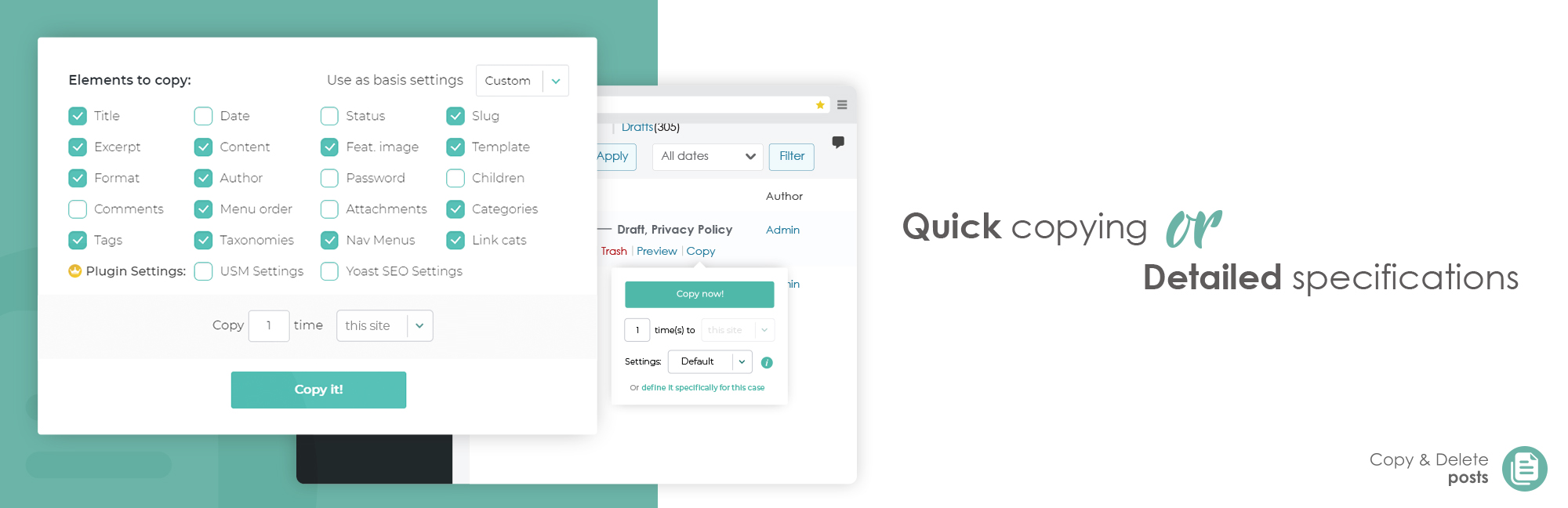
Whether you need to clone a page layout, duplicate a post with custom metadata, or bulk delete outdated content, this plugin handles it all. Its intuitive copy button works across the post list, edit screens, Gutenberg editor, and even the admin bar.
You can customize what gets copied—such as featured images, child pages, or third-party plugin data—and define naming formats using dynamic variables like time and date. Even better, its cleanup module lets you scan for and remove duplicates using smart filters like title, slug, or word count.
This makes it not just a duplicator but a content maintenance tool. It’s often favored as the best WordPress plugin to duplicate pages and clean up content workflows in one go.
In case you need to duplicate a site, here are some of the best WordPress clone plugins.
Key Features
- Duplicate posts or pages instantly with one click
- Customize which content gets cloned (images, slugs, metadata)
- Supports child-page duplication and bulk operations
- Includes naming logic with counters and timestamps
- Built-in duplicate post/page cleaner with smart filters
- Role-based and content-type-based access controls
- Advanced options in premium version like multisite replication and auto-delete
Ideal Use Cases
Ideal for content-heavy WordPress sites, agencies, or editors who regularly duplicate layouts, create page templates, or clean up bulk content.
Pros
Highly customizable, fast duplication, duplicate cleaner built-in, works with page builders, includes naming options, role restrictions, bulk operation support
Cons
Free version lacks multisite duplication, UI can be overwhelming for beginners
Why Choose Duplicate Post by Inisev
This plugin is widely regarded as the best duplicate page plugin WordPress users can deploy when they want both speed and precision.
It functions beautifully as the best page duplicator WordPress teams rely on to generate multiple page variations in seconds. As a duplicate post WordPress plugin, it’s equipped with powerful tools for content replication and cleanup.
Need a WordPress plugin to duplicate pages and maintain order in your dashboard? This one delivers. With smart automation and customization, it earns its place as the best WordPress page duplicator plugin for advanced use cases.
Its built-in scan and delete module makes it a trusted WordPress duplicate post plugin for large sites. If you’re searching for a plugin to duplicate page in WordPress and clean up after, this one is a complete package.
3. Duplicate Page and Post

Plugin Overview
- Developer: Arjun Thakur
- Active Installations: 100,000+
- Tested Upto: WordPress 6.6.2
- Minimum WordPress Version: 3.5
- PHP Requirement: 5.2.4 or higher
For users who want a lightweight, no-fuss way to clone their WordPress content, Duplicate Page and Post by Arjun Thakur provides a simple and efficient solution. With a single click, you can duplicate pages, posts, and even custom post types, saving them immediately as drafts.
While it doesn’t aim to be the most feature-rich plugin in its category, its blazing-fast performance and clean execution make it perfect for users who prioritize speed and simplicity. The plugin includes options to customize the post suffix, redirect behavior, and even the duplicate link label.
It supports both Gutenberg and Classic editors, offering just enough control for users without overwhelming them. It’s an ideal choice if you’re seeking the best WordPress plugin to duplicate pages without any unnecessary bulk or complexity.
Key Features
- One-click duplication of posts, pages, and custom post types
- Saves duplicates directly as drafts
- Editor support for Gutenberg and Classic Editor
- Add a custom post suffix to identify duplicates
- Change the text of the duplicate button
- Set post status for the duplicated content
- Redirect users after duplication if needed
Ideal Use Cases
Perfect for freelancers, bloggers, and WordPress beginners who want to duplicate content quickly without advanced configurations or extra load.
Pros
Very fast performance, minimal setup, beginner-friendly, works with custom post types, clean interface, works with both editors, no bloat
Cons
Limited customization options, lacks bulk duplication or cleanup tools
Why Choose Duplicate Page and Post
It’s often recommended as the best duplicate page plugin WordPress beginners can use to get started easily. As a best page duplicator WordPress solution, it focuses on speed and usability rather than complexity. For anyone needing a duplicate post WordPress plugin that “just works,” this plugin delivers.
It checks all the boxes for a lightweight WordPress plugin to duplicate pages during prototyping or content reuse. Many users consider it the best WordPress page duplicator plugin for its simplicity.
As a reliable WordPress duplicate post plugin, it remains functional and fast. Whether you’re building a small blog or testing landing page layouts, it’s a great plugin to duplicate page in WordPress quickly and cleanly.
4. WP Post Page Clone
Plugin Overview
- Developer: Gaurang Sondagar
- Active Installations: 80,000+
- Tested Upto: WordPress 6.8.1
- Minimum WordPress Version: 4.5
- PHP Requirement: 5.6.20 or higher
If all you need is a fast, no-setup tool to duplicate your WordPress content, WP Post Page Clone is exactly that. This plugin offers a clean, one-click experience to clone posts or pages without any complex configurations or bloat. It duplicates both the content and the settings of a post or page, allowing users to create instant drafts ready for editing.
With full compatibility across modern browsers like Chrome, Firefox, Safari, and Opera, WP Post Page Clone is built for users who want straightforward functionality without distractions.
Whether you’re a blogger prototyping content or a developer replicating templates, it’s a dependable choice. For its ease and speed, it’s often considered a contender for the best WordPress plugin to duplicate pages—especially for users who prefer tools that do one thing and do it well.
Key Features
- One-click cloning for posts and pages
- Duplicates both content and configuration
- Zero configuration required post-install
- Works across all major browsers
- Lightweight and fast
- Compatible with custom post types
- Creates editable drafts for immediate use
Ideal Use Cases
Best suited for individual creators, minimalist WordPress builds, and quick layout duplication without the need for bulk operations or advanced logic.
Pros
Extremely lightweight, intuitive interface, quick duplication, cross-browser support, no learning curve, instantly creates editable drafts, ideal for non-technical users
Cons
No bulk duplication, no role restrictions, lacks customization of cloned post naming
Why Choose WP Post Page Clone
It stands out as the best duplicate page plugin WordPress users can adopt when simplicity is a priority. Known as one of the best page duplicator WordPress tools for non-technical creators, it offers just the right amount of power without complexity. When you need a duplicate post WordPress plugin for everyday use, this gets the job done.
If you’re seeking a WordPress plugin to duplicate pages in a clean and fast way, this one fits perfectly. Often seen as the best WordPress page duplicator plugin for beginners, it’s a reliable pick.
Functioning smoothly as a WordPress duplicate post plugin, it ensures consistent results with minimal effort. Whether you’re refreshing blog layouts or reusing post structures, it’s a smart plugin to duplicate page in WordPress with one click.
5. Duplicate Post, Page and Any Custom Post

Plugin Overview
- Developer: Binsaifullah
- Active Installations: 10,000+
- Tested Upto: WordPress 6.7.2
- Minimum WordPress Version: 6.0
- PHP Requirement: Not specified
For WordPress users who want a no-frills, dependable solution to clone content—including posts, pages, and custom post types—Duplicate Post, Page and Any Custom Post offers just what’s needed.
It’s a lightweight plugin that lets you duplicate content from both the admin dashboard and the frontend single post view. Once duplicated, the content is automatically saved as a draft, ready for editing.
Whether you’re working on custom layouts, reusing a landing page design, or spinning off new blog content, this tool offers the flexibility to handle it from any part of the site. The minimal UI and fast cloning speed make it a solid choice for users who need a reliable WordPress tool.
For many, it ranks as the best WordPress plugin to duplicate pages when performance optimization and frontend access are top priorities.
Key Features
- One-click duplication of posts, pages, and custom post types
- Cloning available from both backend and single post frontend view
- Lightweight with no bloated features
- Saves duplicates as drafts by default
- Works seamlessly with any registered custom post types
- Minimal configuration needed after install
- Ideal for theme and layout reuse across post types
Ideal Use Cases
Perfect for developers, content creators, or website owners who want the flexibility to duplicate posts from the frontend or admin panel without heavy UI overhead.
Pros
Frontend duplication support, fast and minimalistic, works with CPTs, backend and frontend support, auto-saves as drafts, simple interface, no setup required
Cons
No bulk duplication, lacks advanced controls or role-based settings
Why Choose Duplicate Post, Page and Any Custom Post
It’s a strong candidate for the best duplicate page plugin WordPress developers and editors can use when speed and frontend access matter. It easily serves as the best page duplicator WordPress users need for simple cloning workflows.
As a duplicate post WordPress plugin, it gives you basic but essential functionality. If you’re searching for a WordPress plugin to duplicate pages and custom post types from anywhere in the site, this does the job efficiently. It’s consistently referred to as the best WordPress page duplicator plugin in minimalist tool circles.
With its smooth performance, it’s also a capable WordPress duplicate post plugin for solo creators. When you’re after a flexible plugin to duplicate page in WordPress—without slowing down your site—this plugin is worth trying.
6. Duplicate Page or Post

Plugin Overview
- Developer: wpdevart
- Active Installations: 10,000+
- Tested Upto: WordPress 6.7.2
- Minimum WordPress Version: 3.4.0
- PHP Requirement: Not specified
If your workflow demands more than basic duplication, Duplicate Page or Post by wpdevart delivers advanced cloning with precision control. This plugin allows you to duplicate WordPress posts, pages, and their complete metadata with ease—including categories, tags, featured images, templates, formats, and even passwords.
It’s especially useful for store owners, blog editors, and site managers working with dozens of similar entries. From the plugin settings, you can define exactly what gets copied—useful if you want to replicate everything except the content, or just copy a title with a suffix for versioning.
Designed to speed up repetitive content creation while maintaining structure, it’s often chosen as the best WordPress plugin to duplicate pages when granular control is needed.
Key Features
- One-click duplication of posts or pages from the admin list
- Select which elements to copy (title, image, tags, etc.)
- Customize title prefix and suffix for clones
- Supports excerpts, templates, status, and author cloning
- Fast and lightweight with no impact on site speed
- Safe to use—passes WordPress.org quality and security checks
- Works across all standard and custom post types
Ideal Use Cases
Ideal for online store managers, bloggers, and content teams needing structured duplication with custom post data and selective field cloning.
Pros
Highly configurable, supports full post metadata, user-friendly interface, lightweight, secure and optimized, suitable for WooCommerce, supports all core WordPress fields
Cons
No frontend duplication, lacks bulk clone or deletion options, UI may feel basic compared to modern alternatives
Why Choose Duplicate Page or Post
It’s a strong pick as the best duplicate page plugin WordPress site managers can rely on for detailed post replication.
Whether you’re building ecommerce product listings or content libraries, it functions effectively as the best page duplicator WordPress users need. As a duplicate post WordPress plugin, it supports full metadata copying to eliminate repetitive tasks.
When you’re looking for a WordPress plugin to duplicate pages that doesn’t bloat your site, this one is ideal. It earns its place among the best WordPress page duplicator plugin options due to its deep configuration settings.
For anyone managing templates or complex content types, it’s a capable WordPress duplicate post plugin. If your goal is to have a reliable plugin to duplicate page in WordPress without slowing your site or missing key data fields, this tool is an excellent fit.
7. PublishPress Revisions

Plugin Overview
- Developer: PublishPress
- Active Installations: 10,000+
- Tested Upto: WordPress 6.8.1
- Minimum WordPress Version: 5.5
- PHP Requirement: 7.2.5 or higher
PublishPress Revisions is a powerful plugin designed not just to duplicate posts and pages, but to manage editorial workflows with precision. It allows users to submit change requests for published content, which are then stored in a revision queue. Admins and editors can approve, reject, or schedule these revisions—all within the native WordPress interface.
Alongside its revision management tools, the plugin also enables users to duplicate content easily, including custom post types, WooCommerce products, and builder-based content like Elementor or Beaver Builder.
With advanced permissions, role-based access, and frontend moderation support, this plugin is ideal for collaborative publishing environments. Whether you’re duplicating posts for testing or scheduling future content updates, PublishPress Revisions can serve as the best WordPress plugin to duplicate pages while improving your editorial control.
Key Features
- Duplicate posts, pages, and custom post types with plugin integration
- Submit, review, and approve content revisions
- Schedule revisions to go live on a future date
- Full compatibility with Gutenberg and Classic Editor
- Frontend moderation and preview of pending revisions
- Email notifications for editors and admins upon submission
- Supports major plugins like ACF, WooCommerce, WPML, Elementor (Pro version)
Ideal Use Cases
Perfect for editorial teams, WooCommerce stores, and content-heavy websites that need both duplication functionality and structured content approvals.
Pros
Built-in revision queue, easy post/page duplication, frontend moderation, extensive third-party plugin support, email alerts, scheduled publishing, professional editorial workflow
Cons
Advanced features require Pro version, initial setup may be complex for casual users
Why Choose PublishPress Revisions
It’s more than just the best duplicate page plugin WordPress publishers can use—it’s an editorial system in itself. As the best page duplicator WordPress teams can rely on, it provides structure and security around content updates. It operates efficiently as a duplicate post WordPress plugin while also empowering content review.
When you need a WordPress plugin to duplicate pages and schedule updates with transparency, this plugin fits the bill. It also qualifies as the best WordPress page duplicator plugin for agencies managing large teams.
Whether you’re looking for a powerful WordPress duplicate post plugin or a full revision control suite, this tool brings both worlds together. If your team needs a dependable plugin to duplicate page in WordPress and elevate approval workflows, PublishPress Revisions is a top-tier choice.
8. Duplicate Post

Plugin Overview
- Developer: rbplugins
- Active Installations: 100+
- Tested Upto: WordPress 6.7.2
- Minimum WordPress Version: 3.1
- PHP Requirement: Not specified
Duplicate Post – copy post, clone post, post draft by rbplugins is a minimal yet functional plugin for duplicating WordPress posts without unnecessary overhead. It’s perfect for users who want to quickly replicate a post with just a couple of clicks—either as a direct clone or a new editable draft.
The plugin integrates directly into the post list screen and adds “Clone” and “New Draft” links under each post title. While it doesn’t support page duplication or advanced configuration, it’s fast, focused, and ideal for simple editorial needs. For its simplicity and performance, many consider it the best WordPress plugin to duplicate pages—if you’re only duplicating posts.
Key Features
- One-click clone or draft of any post
- Appears directly in the post list screen
- Duplicates post content and structure
- Offers both clone and new draft options
- Fully backend-based (no frontend duplication)
- Lightweight and fast, perfect for small sites
- Requires no setup after activation
Ideal Use Cases
Perfect for bloggers, content editors, and solopreneurs who frequently reuse post layouts and want an easy way to duplicate content without extra features.
Pros
Super lightweight, very easy to use, instant duplication, supports draft and clone options, no learning curve, integrates neatly into admin UI
Cons
No page or custom post type support, lacks bulk duplication, no access control or naming options
Why Choose Duplicate Post – copy post, clone post, post draft
This tool is often picked as the best duplicate page plugin WordPress users with post-only workflows can rely on. For users needing the best page duplicator WordPress experience with simplicity at its core, this plugin delivers for posts. It does what a duplicate post WordPress plugin should do—without the bloat.
If you’re searching for a fast and reliable WordPress plugin to duplicate pages (or at least posts), this is a good starting point. It fits in well as the best WordPress page duplicator plugin for minimalist sites.
As a WordPress duplicate post plugin, it checks all the basic boxes. For any WordPress user looking for a simple plugin to duplicate page in WordPress (or specifically posts), this option does the job without any complications.
9. Duplicate Page

Plugin Overview
- Developer: mndpsingh287
- Active Installations: 3+ million
- Tested Upto: WordPress 6.6.2
- Minimum WordPress Version: 3.4
- PHP Requirement: 5.x
Duplicate Page by mndpsingh287 is a widely trusted WordPress plugin that lets you duplicate posts, pages, and custom post types with a single click. Whether you’re duplicating for version control, layout reuse, or A/B testing, this plugin makes the process seamless.
You can customize the post status of the cloned item—whether it’s saved as a draft, published, private, or pending—right from the settings menu. The plugin supports user role restrictions, post type filters, prefix/suffix configurations, and more.
It’s simple to set up, works reliably across all WordPress versions, and is often recommended as the best WordPress plugin to duplicate pages at scale.
Key Features
- One-click duplication for pages, posts, and custom post types
- Choose the post status of the duplicated content (draft, pending, published)
- Role-based access control for duplication permissions
- Set default prefix and suffix for cloned content titles
- Select clone link position (admin bar, post row, editor)
- Supports post type filtering and duplication rules
- Option to redirect after duplication is completed
Ideal Use Cases
Great for teams managing editorial content, landing pages, WooCommerce product pages, and custom layouts who want fast duplication with customized output.
Pros
Massive user base, very stable, highly configurable, supports post status and prefix/suffix settings, role and post-type filters, flexible link placement, works with custom post types
Cons
Advanced features limited to Pro version, UI design is basic
Why Choose Duplicate Page
Often named the best duplicate page plugin WordPress users can rely on for everyday operations, this plugin balances simplicity and flexibility. As the best page duplicator WordPress professionals use in high-volume environments, it offers consistent performance.
It functions seamlessly as a duplicate post WordPress plugin for all post types. If you’re looking for a WordPress plugin to duplicate pages with user role control and custom naming, this one fits perfectly.
Many users consider it the best WordPress page duplicator plugin due to its extensive adoption and stable core. As a go-to WordPress duplicate post plugin for agencies and content teams, it minimizes repetitive work. Whether you’re testing layouts or creating bulk content, it’s an ideal plugin to duplicate page in WordPress without hassle.
10. Duplicate Post Page Menu & Custom Post Type

Plugin Overview
- Developer: Attinder Singh
- Active Installations: 20,000+
- Tested Upto: WordPress 6.7.2
- Minimum WordPress Version: 5.0
- PHP Requirement: Not specified
Duplicate Post Page Menu & Custom Post Type is a feature-rich plugin designed for users who want to duplicate not just posts and pages, but also menus and complex custom post types such as WooCommerce products, events, tickets, or coupons. With just one click, users can create multiple clones—up to 100 at once with the pro version.
This is especially useful for developers, testers, and agencies who need to quickly mock up site layouts or populate sites with sample content.
Built with Ajax to avoid browser freezing during bulk duplication, this tool streamlines the process while offering configuration flexibility. It’s frequently named the best WordPress plugin to duplicate pages, particularly for users handling a diverse range of post types.
Key Features
- Duplicate posts, pages, menus, and custom post types
- Supports bulk duplication in a single click
- Ajax-powered duplication prevents browser lag
- Enable or disable duplication for specific post types or menus
- Change link title, add prefix/suffix to duplicates
- Select post status for newly duplicated items
- Extendable via pro version with role control and 100+ duplication capacity
Ideal Use Cases
Excellent for WooCommerce stores, event management sites, developers building staging sites, or anyone managing complex content types needing rapid duplication.
Pros
Supports menu and CPT duplication, bulk cloning, Ajax-powered for smooth operation, customizable post link titles, configurable prefixes and suffixes, stable across large datasets
Cons
Advanced features like user roles and extended duplication limits require Pro upgrade
Why Choose Duplicate Post Page Menu & Custom Post Type
This tool is one of the best duplicate page plugin WordPress users can install for full content control and bulk efficiency.
As the best page duplicator WordPress professionals need for testing and staging, it delivers unmatched versatility. Functioning as a reliable duplicate post WordPress plugin, it excels with support for unique post types.
Whether you need a WordPress plugin to duplicate pages or menus, this one handles both. It’s highly rated as the best WordPress page duplicator plugin for WooCommerce or multisite setups. As a well-optimized WordPress duplicate post plugin, it blends power and simplicity. If your workflow demands a plugin to duplicate page in WordPress with high-volume support, this plugin is built for that.
11. Clone Posts

Plugin Overview
- Developer: George Pattichis
- Active Installations: 10,000+
- Tested Upto: WordPress 6.7.2
- Minimum WordPress Version: 5.3.0
- PHP Requirement: 7.2 or higher
Clone Posts is a clean and dependable solution for duplicating content within WordPress. Whether you’re managing posts, pages, or custom post types (CPTs), this plugin lets you replicate content instantly using either a one-click button or the bulk duplication feature.
It supports copying custom fields (post metadata), allows you to set the status and date of the cloned content, and maintains WordPress coding standards for compatibility and stability.
This makes it especially useful for site admins who need to create template content or build variations of existing layouts. It’s a practical choice for anyone seeking the best WordPress plugin to duplicate pages with minimal configuration and dependable results.
Key Features
- Enable/disable cloning for posts, pages, or custom post types
- Clone single entries with one click
- Bulk duplicate multiple posts/pages
- Set default status and publish date for cloned content
- Copies all post metadata and custom fields
- Translation-ready for multilingual environments
- Lightweight and built to WordPress standards
Ideal Use Cases
Perfect for content editors, agencies, and developers who regularly reuse layouts, need to test design changes, or manage structured content across post types.
Pros
Supports bulk and single duplication, works with custom post types, clones post metadata, clean UI, lightweight, no learning curve, translation-ready
Cons
No frontend duplication, lacks UI customization or scheduling options
Why Choose Clone Posts
It’s often selected as the best duplicate page plugin WordPress users can deploy for fast and structured cloning. As a best page duplicator WordPress plugin, it simplifies recurring content creation with precision. This tool also serves as a reliable duplicate post WordPress plugin, covering key features without unnecessary bloat.
Whether you need a WordPress plugin to duplicate pages or structured CPTs, it performs effectively. Many consider it the best WordPress page duplicator plugin for its balance of simplicity and flexibility.
With accurate metadata replication, it also qualifies as a go-to WordPress duplicate post plugin for professional sites. If you’re looking for a safe, fast, and user-friendly plugin to duplicate page in WordPress, Clone Posts delivers a seamless experience.
12. ClonePress

Plugin Overview
- Developer: MahdiAli Khanusiya
- Active Installations: 100+
- Tested Upto: WordPress 6.7.2
- Minimum WordPress Version: 5.0
- PHP Requirement: 7.2 or higher
ClonePress – Duplicate Pages, Posts & Custom Post Types is a lightweight yet functional plugin built for content creators and developers who need a fast way to duplicate content in WordPress.
With a single click, it lets you clone posts, pages, or any custom post type—including EDD downloads and Elementor templates. The plugin keeps all taxonomies and meta fields intact, so nothing is lost in the copy.
Users can also choose whether the duplicated content is saved as a draft or published, making it ideal for content repurposing or creating templated layouts. Whether you’re building landing pages or duplicating product listings, ClonePress is a simple but powerful choice. It’s easily one of the best WordPress plugin to duplicate pages for small-to-medium websites.
Key Features
- One-click duplication for posts, pages, and custom post types
- Preserve all meta data and taxonomies
- Choose draft or published status for duplicates
- Compatible with Elementor, EDD, and other post types
- Clean integration into the WordPress interface
- No configuration needed post-install
- Lightweight and beginner-friendly
Ideal Use Cases
Great for bloggers, marketers, WooCommerce store owners, and developers who frequently reuse post structures and templates.
Pros
Fast duplication, works with custom post types, preserves taxonomy and meta, Elementor compatible, user-friendly, supports multiple content statuses, minimal setup
Cons
No bulk duplication, lacks role-based access controls or advanced settings
Why Choose ClonePress
It’s quickly gaining recognition as the best duplicate page plugin WordPress users can adopt for quick cloning without complications. As a best page duplicator WordPress solution, it helps teams save time while maintaining data integrity. It stands strong as a duplicate post WordPress plugin for templating and layout reuse.
If you need a WordPress plugin to duplicate pages along with their settings, this does it well. It qualifies as the best WordPress page duplicator plugin for newer sites or clean installs. Its compatibility with modern page builders makes it a trusted WordPress duplicate post plugin. Looking for a simple and solid plugin to duplicate page in WordPress? ClonePress is a reliable option worth trying.
In summary, WordPress duplicate post plugins are essential tools for efficiently managing and replicating content within a WordPress website. By simplifying the duplication process and offering various customization options, these plugins help users save time, maintain consistency, and improve productivity when managing website content.
Final Word
Harness the exciting potential of these WordPress Duplicate Post Plugins to elevate your website’s management and user experience. With the ability to streamline content duplication, these plugins can significantly enhance your productivity, enabling you to expand your audience, increase engagement, and establish your authority in your niche.
Remember, best practices for plugin use include careful installation, regular maintenance, and robust security measures. Don’t wait, take the next step in optimizing your website’s functionality and user engagement. Begin exploring the potential of these tools today!
FAQs
What are WordPress duplicate post plugins?
WordPress duplicate post plugins are tools designed to simplify the process of creating duplicates of existing posts or pages within a WordPress website.
Why would I need a duplicate post plugin for WordPress?
Duplicate post plugins can be useful for various purposes, such as creating drafts, testing changes, or maintaining consistency across multiple pages.
How do duplicate post plugins work?
Duplicate post plugins typically offer a cloning functionality, allowing users to select a post or page and create a duplicate with a single click. Users may have options to customize the duplication process and handle metadata, settings, and media attachments.
Can I duplicate multiple posts at once?
Yes, many duplicate post plugins support bulk duplication, allowing users to select and duplicate multiple posts or pages simultaneously.
Are duplicate post plugins compatible with other WordPress plugins and themes?
Yes, duplicate post plugins are typically designed to work seamlessly with other WordPress plugins and themes, ensuring compatibility and functionality.
Do duplicate post plugins offer customization options?
Yes, users can often customize duplicated content by modifying titles, permalinks, categories, and other settings before creation.
Can I control who can duplicate posts on my WordPress site?
Some duplicate post plugins offer permissions and access control features, allowing administrators to define user roles and restrict access to the duplication functionality as needed.
Do duplicate post plugins have version control and tracking features?
Advanced duplicate post plugins may offer version control and tracking features to keep track of changes made to duplicated content over time.
Are duplicate post plugins lightweight and efficient?
Yes, reliable duplicate post plugins are designed to be lightweight and efficient, ensuring optimal performance without impacting website loading times.
Do duplicate post plugins receive regular updates and support?
Yes, reputable duplicate post plugins are regularly updated to maintain compatibility with the latest WordPress versions and provide comprehensive documentation and support for users.


