

Just another contact form plugin. Simple but flexible.

About WPVulnerability
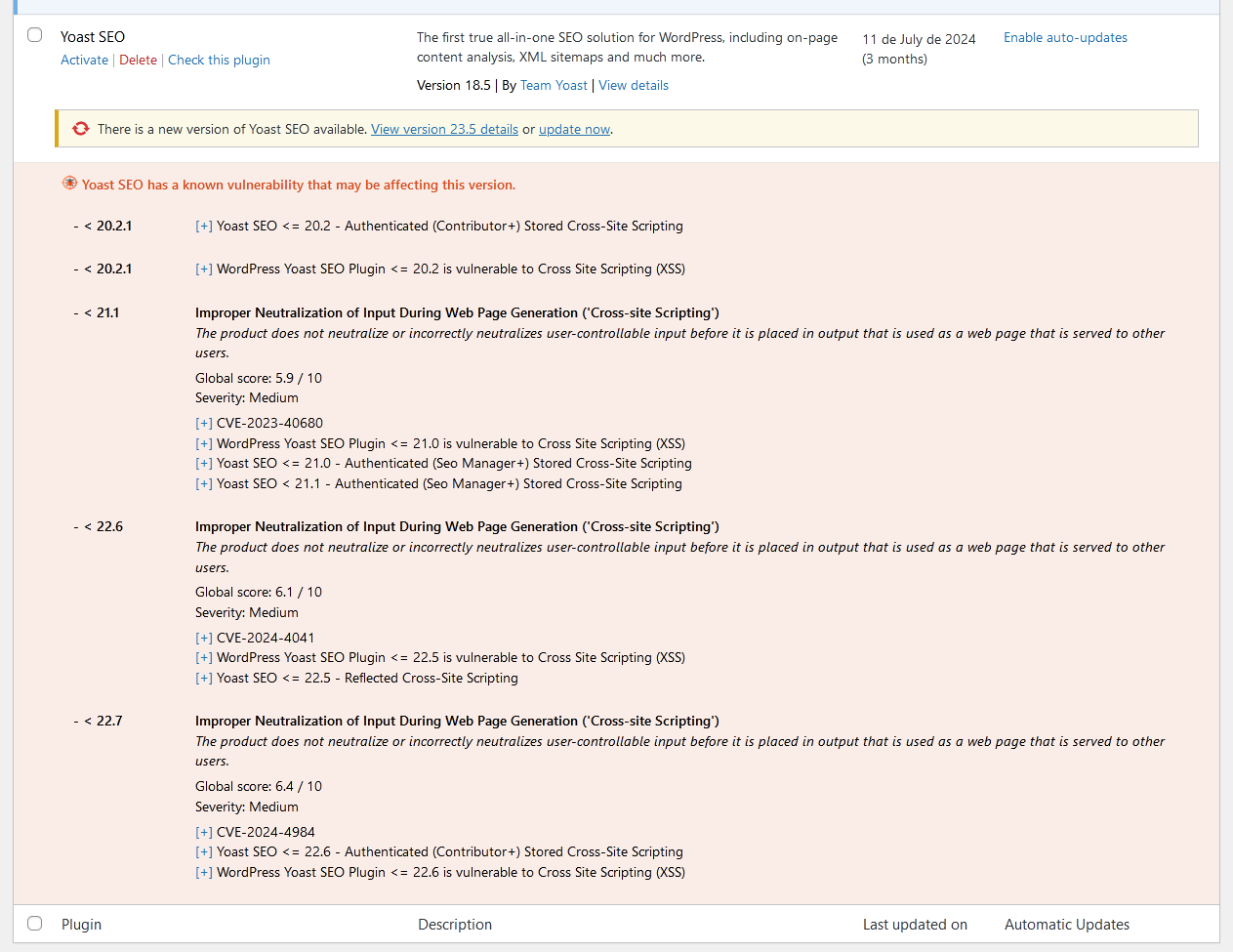
This plugin integrates with the WPVulnerability API to provide real-time vulnerability assessments for your WordPress site. It delivers detailed reports within your WordPress dashboard and can send notifications about your site's security status. The plugin is designed for ease of use and does not store or retrieve any personal data from your site.Screenshots


Frequently asked questions
What is WPVulnerability?
WPVulnerability is a WordPress plugin that integrates with the WPVulnerability API to provide real-time vulnerability assessments for your WordPress core, plugins, themes, and various server components. It helps you stay aware of potential security risks by delivering detailed reports directly within your WordPress dashboard.
How does WPVulnerability help with security?
The plugin provides real-time vulnerability assessments for WordPress core, plugins, themes, PHP, Apache HTTPD, nginx, MariaDB, MySQL, ImageMagick, curl, memcached, Redis, and SQLite. It can be configured to send periodic notifications about your site's security status, ensuring you remain informed without being overwhelmed.
Does WPVulnerability store personal data?
No, WPVulnerability does not store or retrieve any personal data from your site. It is designed for ease of use and supports proactive security measures while respecting user privacy.
How can I use WP-CLI with WPVulnerability?
WPVulnerability supports WP-CLI commands for managing and checking vulnerabilities across various components like core, plugins, themes, PHP, and databases. You can use commands like 'wp wpvulnerability core' or 'wp wpvulnerability plugins' and specify output formats like table or JSON.
What kind of information does the plugin provide?
The plugin provides information about possible vulnerabilities in your WordPress site, including its core, plugins, themes, and server environment. This data comes from the WPVulnerability Database API, which is reviewed by third parties.
Changelog
[4.0.3] – 2024-10-28
- Recreation of the 4.0.2 version. Something did not created the 4.0.2 version.
[4.0.2] – 2024-10-25
Fixed
- ImageMagick: it crashes in some cases where the hosting does not have ImageMagick.
Compatibility
- WordPress: 4.1 – 6.7
- PHP: 5.6 – 8.4
- WP-CLI: 2.3.0 – 2.11.0
Tests
- PHP Coding Standards: 3.10.3
- WordPress Coding Standards: 3.1.0
- Plugin Check (PCP): 1.1.0
- SonarCloud Code Review
[4.0.1] – 2024-10-04
Fixed
- API endpoints: some API endpoints were failing.
- CLI endpoints: some CLI endpoints were failing.
Compatibility
- WordPress: 4.1 – 6.7
- PHP: 5.6 – 8.4
- WP-CLI: 2.3.0 – 2.11.0
Tests
- PHP Coding Standards: 3.10.3
- WordPress Coding Standards: 3.1.0
- Plugin Check (PCP): 1.1.0
- SonarCloud Code Review
[4.0.0] – 2024-10-01
Added
- ImageMagic vulnerabilities (Site Health + WP-CLI + API + mail).
- curl vulnerabilities (Site Health + WP-CLI + API + mail).
- memcached vulnerabilities (Site Health + WP-CLI + API + mail).
- Redis vulnerabilities (Site Health + WP-CLI + API + mail).
- SQLite vulnerabilities (Site Health + WP-CLI + API + mail).
Fixed
- Test email without email.
- Improved MariaDB 11.x detection.
- Improved versions detection (major-minor.patch-build).
- WordPress < 5.3: use of wp_date().
- WordPress < 5.0: locale detection.
- Dashboard widget only for users with capabilities.
- WordPress < 5.2: link to Site Health
Changed
- Big refactory.
- Less files, less size, improved code quality.
Compatibility
- WordPress: 4.1 – 6.7
- PHP: 5.6 – 8.4
- WP-CLI: 2.3.0 – 2.11.0
Tests
- Manual Testing:
- WordPress 6.7 / PHP 8.4
- WordPress 6.6 / PHP 8.3
- WordPress 6.4 / PHP 8.2
- WordPress 6.1 / PHP 8.1
- WordPress 5.8 / PHP 8.0
- WordPress 5.5 / PHP 7.4
- WordPress 5.3 / PHP 7.3
- WordPress 4.9 / PHP 7.2
- WordPress 4.8 / PHP 7.1
- WordPress 4.6 / PHP 7.0
- WordPress 4.1 / PHP 5.6
- PHP Coding Standards: 3.10.3
- WordPress Coding Standards: 3.1.0
- Plugin Check (PCP): 1.1.0
- SonarCloud Code Review
Previous versions
If you want to see the full changelog, visit the changelog.txt file.

