

The Elementor Website Builder has it all: drag and drop page builder, pixel perfect design, mobile responsive editing,…
About Hide Dashboard Notifications
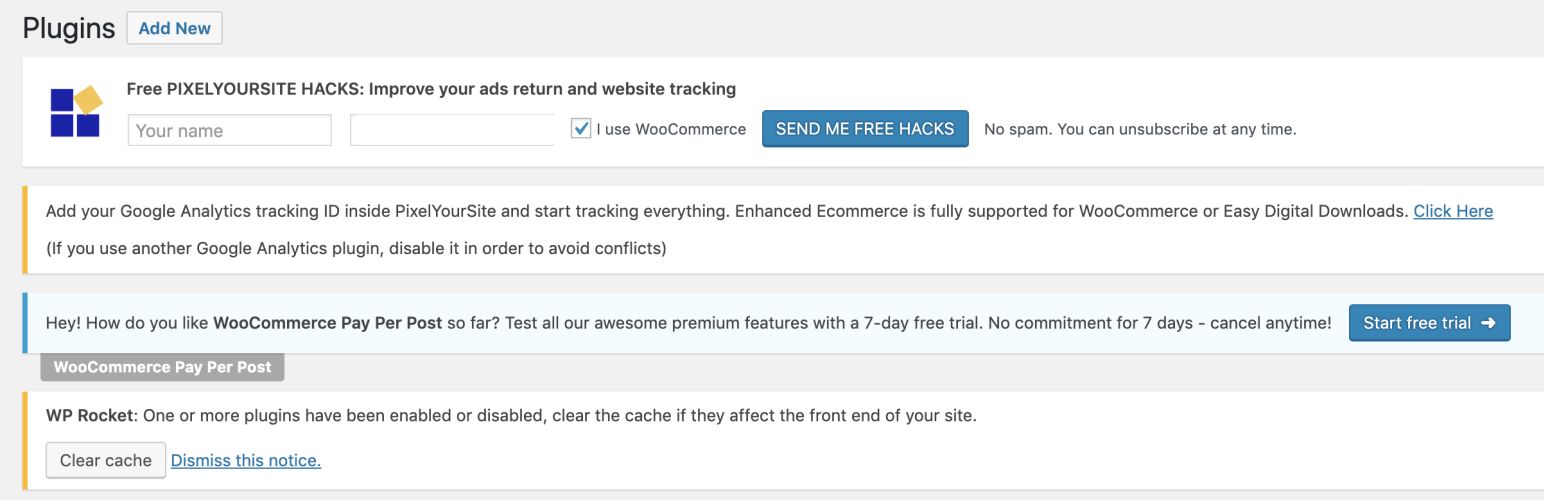
Hide Dashboard Notifications is a plugin for WordPress that allows you to turn off annoying and spammy notices on your WordPress Dashboard. It also gives you the option to store and view these notifications under the Notifications Tab for later review. With this plugin, you can declutter your dashboard and stay focused on your work.Screenshots


Frequently asked questions
What does Hide Dashboard Notifications do?
Hide Dashboard Notifications allows you to easily turn off nags and notifications from your WordPress Dashboard. It also stores them under a Notifications Tab where you can review them later.
What kinds of notifications can this plugin hide?
This plugin disables showing Plugin & Theme Notifications on your WordPress Dashboard. It also disables WordPress Notifications from the WordPress Dashboard & Admin Bar.
Can I choose who sees the hidden notifications?
Yes, you can choose if you want to hide the Dashboard Notifications for administrators (by default) or all backend user roles.
Where can I find the notifications after they are hidden?
The blocked notifications are shown under the Notifications Tab, allowing you to review them at your convenience.
Changelog
1.3.5 (7 July 2024)
- Bugfix regarding non admin user roles not being able to login to the WP Dashboard(updated).
1.3.4 (4 July 2024)
- Bugfix regarding non admin user roles not being able to login to the WP Dashboard.
1.3.3 (29 June 2024)
- Reapplying the Security Fix of 1.3.1
1.3.2 (23 June 2024)
- Version Rollback for fixing the Dashboard login issue
1.3.1 (19 June 2024)
- Security Fix by adding capability checks. Kudos to Francesco Carlucci
- Added missing admin icons(D’oh!)
1.3 (19 February 2024)
- Security Fix
1.2.3 (7 July 2023)
- NEW: Added filter for enabling/disable the plugin options based on User Roles.
- Removed the “Hide Dashboard Notices only for admins” option under the Settings Tab.
1.2.2 (10 April 2023)
- Bug Fix deprecated directory under the root directory
1.2.1 (21 July 2022)
- Bug Fix
1.2 (22 November 2020)
- Bug Fix with other plugins compatibility.
- NEW: Hide the WordPress PHP Update Required Notice.
- NEW: Hiding notices individually by admin.
- NEW: Added the “Notifications” option on the WordPress Dashboard Top Toolbar for easier acces.
1.2 (22 November 2020)
- Bug Fix with other plugins compatibility.
- NEW: Hide the WordPress PHP Update Required Notice.
- NEW: Hiding notices individually by admin.
- NEW: Added the “Notifications” option on the WordPress Dashboard Top Toolbar for easier acces.
1.1 (30 April 2020)
- NEW: Added option for Hiding Notifications only for Admins(Default action) or All Backend Users.
- NEW: Added option for showing all Hidden Notices under the Notification Tab.
- NEW: Enabling the Hide WordPress Updates Option removes the Top WordPress Admin Bar Notification.
- Plugin renamed to “Hide Dashboard Notifications”.
- Plugin menu item name changed to “Hide Notices”.
- Changed the backend UI to Tabs and Toggles.
- Optimized for performance by disabling loading on the frontend.
- Bug fix for output error(typo).
- Bug fix for not showing the post/page update notice once the Hide Notification option is enabled.
- WordPress 5.4.1 compatibility.
1.0 (11 March 2019)
Launched with basic requirements

