

Just another contact form plugin. Simple but flexible.
About Code Embed
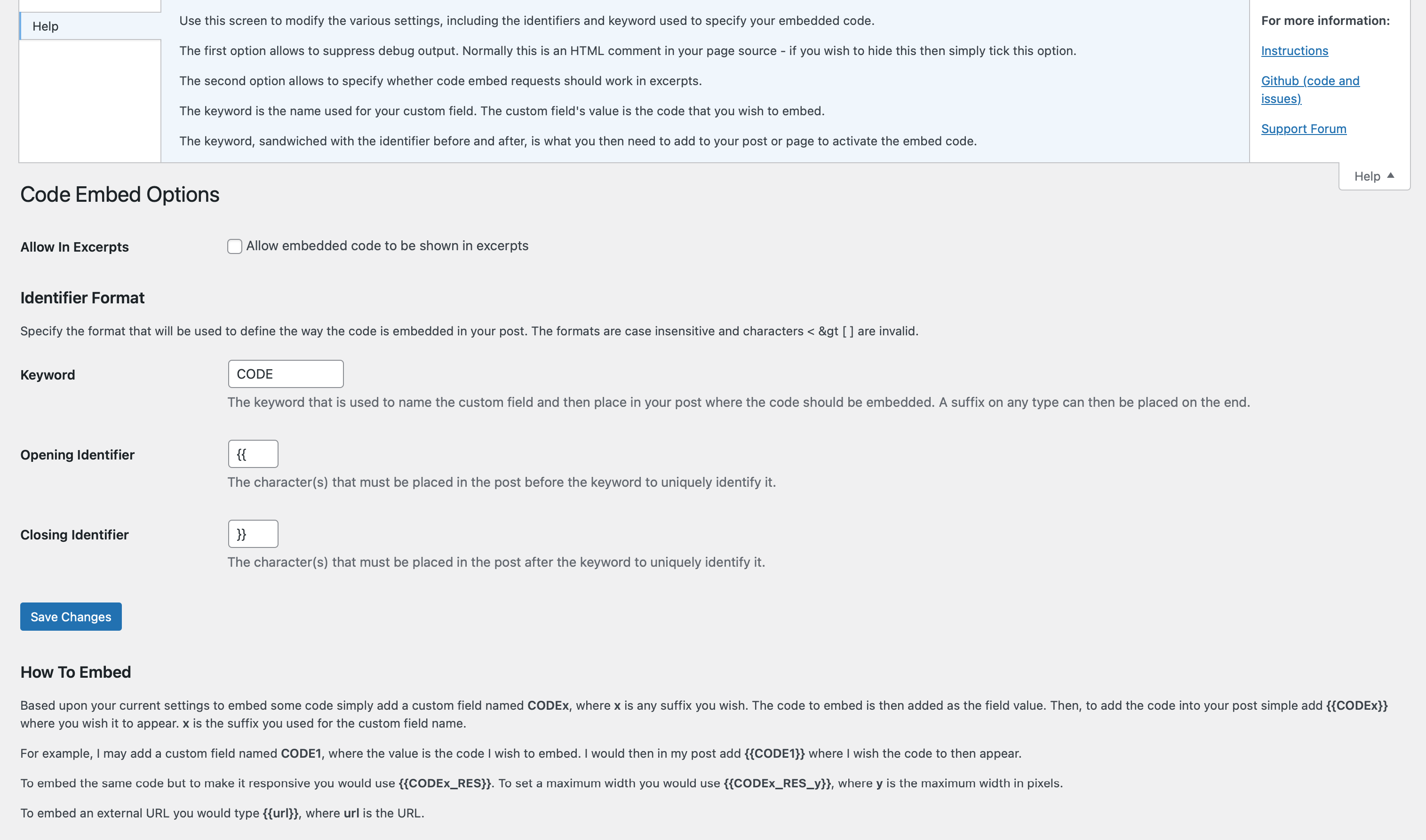
Code Embed is a WordPress plugin that allows you to easily embed code (JavaScript, CSS, and HTML) in your posts or pages without the content being changed by the editor. It is particularly useful for embedding third-party scripts or videos. The plugin also offers features such as global embedding, customizable identifiers, and the ability to embed external scripts directly using just the URL.Screenshots

Frequently asked questions
What is Code Embed?
Code Embed allows you to embed code (JavaScript, CSS and HTML – it can’t be used for server-side code, such as PHP) in a post, without the content being changed by the editor. This is incredibly useful for embedding third-party scripts, etc. The plugin is used by many large sites, including Mozilla.
What are the key features of Code Embed?
Key features include…nn- Add HTML or JavaScript to posts or pages – particularly useful for embedding videos!n- Embed in widgets using the Widget Logic pluginn- Global embedding allows you set up some code in one post or page and then access it from anothern- Modify the keywords or identifiers used for embedding the code to your own choicen- Search for embedding code via a simple search option
How do I use Code Embed?
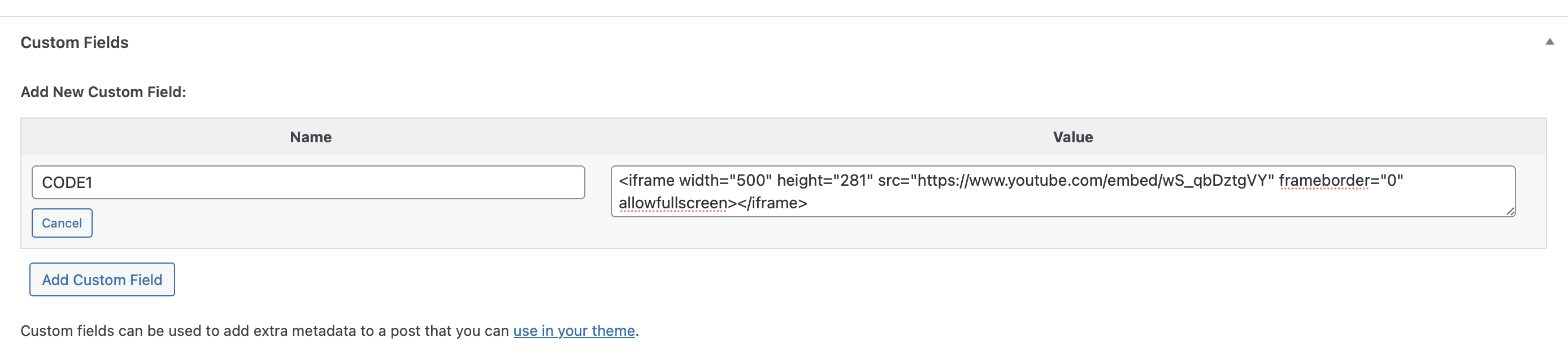
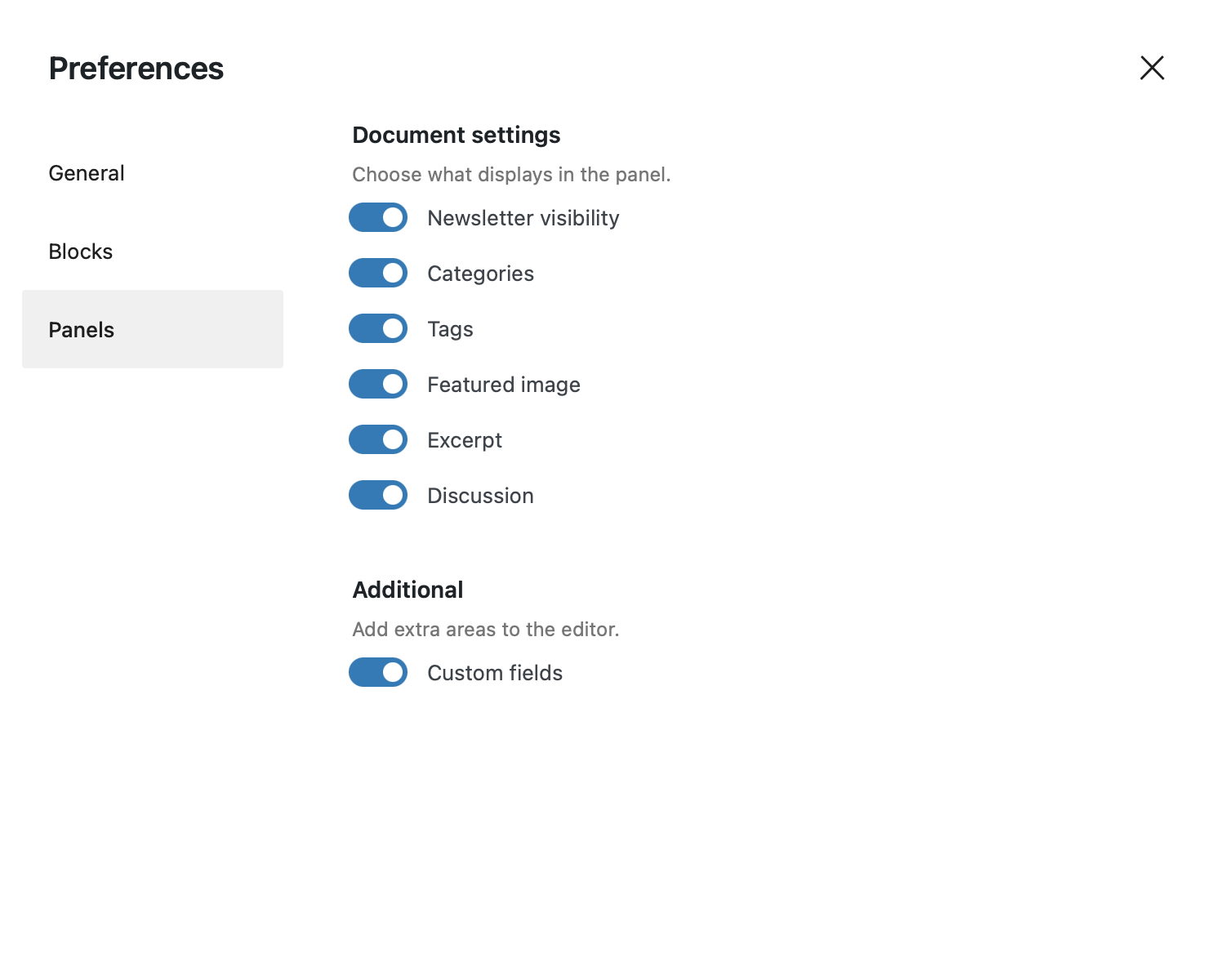
To use this plugin, you need to have custom fields enabled on your site. If you’re using the block editor, you may need to switch this on first – please scroll down to the next section to learn how to do this. If you’re using the classic editor then you’ll find the custom fields at the bottom of the editor screen.nnAlthough this plugin works for both posts and pages for simplicity I will simply refer to posts – bear in mind that pages work in the same way.nnOnce you have custom fields switched on, here’s how easy it is to use…nn1. Once you have the plugin installed start a new post.n2. Scroll down to the bottom of the screen and look for the “Custom Fields” section.n3. Under “Add New Custom Field” enter a name of CODE1 and your embed code as the valuen4. In your post content add {{CODE1}} where you wish the embed code to appear.nnAnd that’s it – when the post viewed or previewed {{CODE1}} will be replaced with the code that you asked to be embedded.nnThis should get you started – for more information and advanced options please see below.. Alternatively, there’s a fantastic guide at Elftronix which I would recommend.
How do I embed code from an external URL?
If you specify a URL within your post, surrounded by your choice of identifiers, then the contents of the URL will be embedded within your post.nnObviously, be careful when embedding a URL that you have no control over, as this may be used to hijack your post by injecting, for example, dangerous JavaScript.nnFor example, using the default options you could embed the contents of a URL using the following method…nn{{http://www.example.com/code.php}}nnornn{{https://www.example.com/code.html}}<h3>How to Use Global Embedding</h3>
How do I use global embedding in Code Embed?
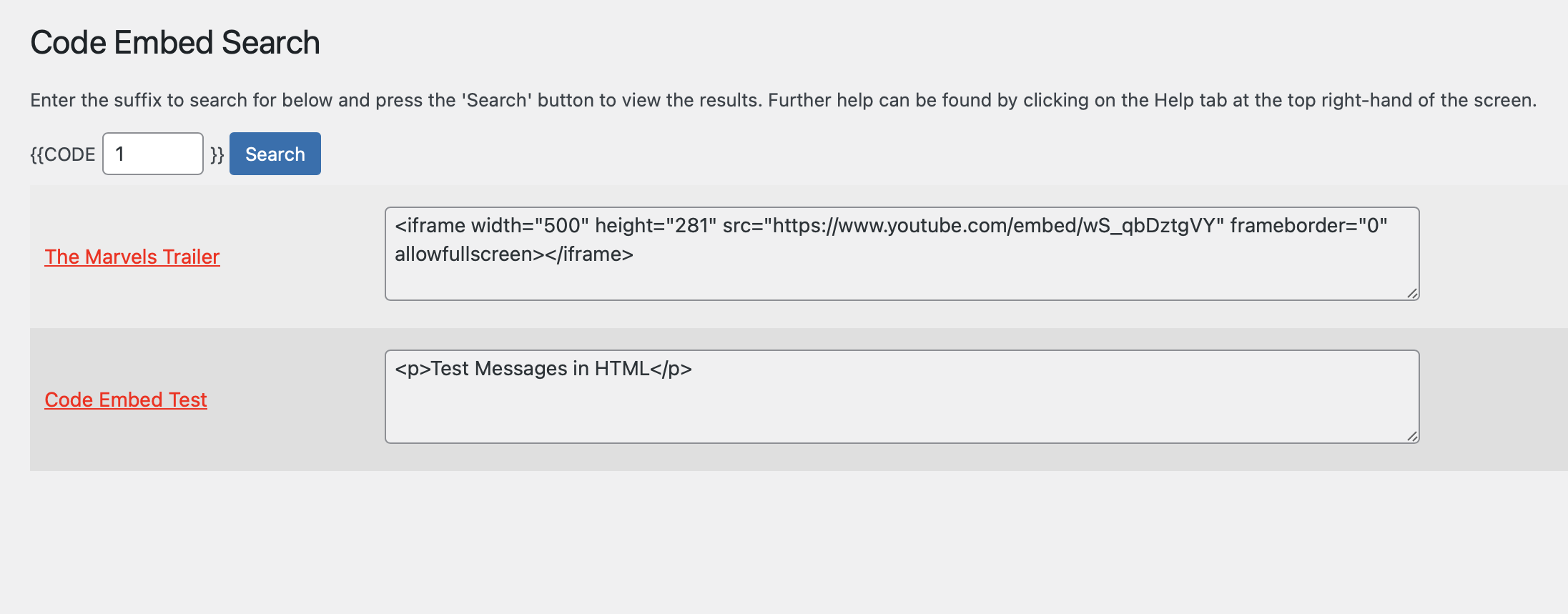
You can also create global embeds – that is creating one piece of embed code and using it in multiple posts or pages.nnTo do this simply make reference to an already defined (but unique) piece of embed code from another post or page.nnSo, let’s say in one post you define a custom field named CODE1. You can, if you wish, place {{CODE1}} not just in that post but also in another and it will work.nnHowever, bear in mind that the embed code name must be unique – you can’t have defined it in multiple posts otherwise the plugin won’t know which one you’re referring to (although it will report this and list the posts that it has been used in).nnIn the administration menu there is a sidebar menu named “Tools”. Under this is a sub-menu named “Code Search”. Use this to search for specific embed names and it will list all the posts/pages that they’re used on, along with the code for each.
Changelog
I use semantic versioning, with the first release being 1.0.
2.5.1
- Enhancement: Changed
wp_remote_gettowp_safe_remote_getto improve security
2.5
- Enhancement: This release is a revised version of 2.4, with less impact to other plugins and users. See the README for more details, but this undoes the changes in 2.4 and adds in filtering of code embed fields for users without the correct permissions.
- Bug: Fixed a long time bug that could cause an infinite loop to occur in rare situations
2.4
- Enhancement: A vulnerability was raised to me but is actually an issue with Core. I’ve implemented a fix that protects not just this plugin but any others you may have installed. Please read the section in the README titled “Custom Field Security” for more details
- Enhancement: Tweaked a few bits of code here. No visible changes, just quality improvements
2.3.9
- Enhancement: So, let me tell you a story. To make the output look neat, I was adding carriage returns to the embeds. Except, if you want to embed something part way through a line it can look… well… wrong. And all for it looking clean. Remember kids, cleanliness isn’t always next to Godliness. Needless to say, those rogue carriage returns are gone
- Enhancement: Whilst I was at it, I updated some of the settings code to a brand-spanking new version, which I’m sharing across all my plugins
- Enhancement: Tidied up some of the assets, including adding a blueprint for WordPress Playground
2.3.8
- Bug: You know that vulnerability I fixed in 2.3.7? It fixed that but broke something else. That should now resolved. Apologies for that.
2.3.7
- Bug: Fixed a bug which created a potentual vulnerabilty
- Enhancement: Improved code quality, using the latest version of PHPCS and WordPress sniffs
2.3.6
- Bug: Fixed a variable that was incorrectly assigned. It happens. I guess.
2.3.5
- Enhancement: Cleared up a big batch of code quality issues. Now it ticks all the boxes for both the WordPress and VIP rulesets in PHPCS.
- Enhancement: A new, richer, header has been added to the plugin file.
- Enhancement: The plugin version number is now used as a revision for the script queueing – this means that it be cached by the browser until the plugin release changes.
- Enhancement: Lots of changes made to the README – hopeful it should read easier than before!
2.3.4
- Bug: Fixed minor error that occurred due to the removal of the debug code in the last release. Sorry about that.
2.3.3
- Enhancement: I’ve removed the debug code. I allowed to be switched off but I’ve never used it and it may not have switched off properly anyway. So it’s gone
- Enhancement: Added some additional plugin meta
2.3.2
- Bug: Fixed another pesky bug that was affecting embedded URLs. My code to do this was years old and I couldn’t understand why I’d written it the way I had. So I’ve re-written it from scratch
2.3.1
- Bug: Fixed a variable naming issue that I may, or may not (I did), have created in the latest release
2.3
- Enhancement: All the code is now compliant with the full-fat VIP coding standards. It was no mean feat but, as a result, the plugin is more secure than ever before
- Enhancement: The default is to now use double braces around your embed name, which is kind-of the universal default for template tags such as this. If you’re an existing user, your current configuration won’t change, though – this only affects new users
- Enhancement: Improved translation output, including where I’d accidentally added an extra character to the text domain
- Enhancement: Using the
checkedfunction on fields, rather than the form parameter - Enhancement: Added a useful links sidebar to the Help for both screens
- Maintenance: Throughout, use Yoda conditions I now do
- Maintenance: Added links to the sparkly new Github repo
- Bug: When updating the options you sometimes didn’t get a confirmation message. You do now!
- Bug: Fixed a weird one where I was referencing a variable that I was never using ¯_(ツ)_/¯
2.2.2
- Maintenance: Updated README to work better with new plugin directory format. Also, now converting all text to US English, which is the WordPress standard. Snazzy.
- Maintenance: Updated all links to artiss.blog and removed donation links. Clickable.
- Maintenance: Minimum WordPress level is now 4.6 for this plugin, meaning I could remove various pieces of code. Strong and stable.
- Maintenance: Lots of language updates, many of which are a consequence of the move to WordPress 4.6 (including removal of language files and links, etc). Verbacious.
2.2.1
- Maintenance: Updated branding, inc. adding donation links
2.2
- Enhancement: Added support for embedding code in excerpts
- Enhancement: Validated, sanitized and escaped the admin screen data
- Maintenance: Overhauled the way default options are fetched and/or generated. Now a lot more efficient
- Maintenance: Updated the admin screens so they are formatted in a similar way to the default WordPress screens
- Maintenance: Removed hardcoding of plugin folder
- Maintenance: Updated author and removed donation links
- Maintenance: Renamed files and file functions – removed prefix from files and update it on functions
- Maintenance: Added a domain path for translations
2.1.2
- Maintenance: Added missing text domain, ready for automatic translation.
2.1.1
- Maintenance: Updated help text
- Maintenance: Modified admin screen headings so they’re compatible with WP4.3
- Enhancement: Added options to suppress debug output
- Enhancement: Added donation link to plugin meta. Go on, you know you want to…
2.1
- Maintenance: Updated plugin branding
- Maintenance: Removed feature pointer – no longer required
- Enhancement: Removed support screen and moved remaining admin screens
- Bug: Fixed issues with translations
2.0.2
- Enhancement: Fixed minor XSS vulnerability (kindly reported by Mozilla)
- Enhancement: Shows README appropriate to the current installed version, instead of the latest
2.0.1
- Enhancement: Removed restriction on embed code length
2.0
- Maintenance: Removed dashboard widget
- Maintenance: Further code tidying
- Maintenance: Added new code for contextual help to use new WP 3.3 elements
- Enhancement: New admin menu option, under which existing option screens now exist along with a support screen. If you have the README Parser plugin installed then it will also add a sub-menu displaying README instructions
- Enhancement: Added internationalization to code
- Enhancement: Will now work with widgets if you install the plugin Widget Logic
- Enhancement: Added experimental ability to convert to responsive output
- Enhancement: Added option to specify a URL instead of an embed code
- Enhancement: Added feature pointer for when plugin is activated
1.6.1
- Bug: Fixed bug where name of plugin folder was incorrect
1.6
- Maintenance: Improved code further from 1.5, including separating code into separate includes
- Enhancement: Added global embeds option
- Enhancement: New tools option in the administration menu which allows you to search for code embeds
1.5.1
- Enhancement: Added form security
1.5
- Maintenance: Renamed plugin to bring in line with new plugin conventions
- Maintenance: Plugin re-write to create more efficient code – can now also completely personalize the embed code used in the post
- Maintenance: PHPDoc used throughout for documentation purposes, plus new coding standards
- Maintenance: Instructions completely re-written
- Enhancement: Support information improved, including contextual help on the settings screen (if supported)
versions of this plugin
1.4.1
- Bug: Version details as HTML comments were being output whether an embed existed or not – corrected
1.4
- Enhancement: Option screen which allows you to specify the maximum number of possible embeds per post and the embed word
1.3
- Enhancement: Increased limit of number of code embeds from 5 to 20
1.2
- Maintenance: Simplification of code
1.1
- Maintenance: The instructions have been corrected (thanks to John J. Camilleri for pointing it out!)
- Maintenance: Plugin has been tested with version 2.8 of WordPress. No code changes have been made
1.0
- Initial release

