

Just another contact form plugin. Simple but flexible.

About Login or Logout Menu Item
This plugin allows you to add a login/logout menu item to your WordPress site, which will change depending on whether the user is logged in or not. You can also set specific login and logout redirect URLs. It is based on the BAW Login/Logout Menu plugin by Juliobox.Screenshots

Frequently asked questions
What does the Login or Logout Menu Item plugin do?
This plugin allows you to add a dynamic login/logout menu item to any menu on your WordPress site. The menu item changes based on whether the current user is logged in or logged out. You can also configure specific login page, login redirect, and logout redirect URLs.
Where can I find the settings for this plugin?
After installing and activating the plugin, you can find the settings in your WordPress dashboard under Settings > Login or Logout.
How do I add the login/logout item to a menu?
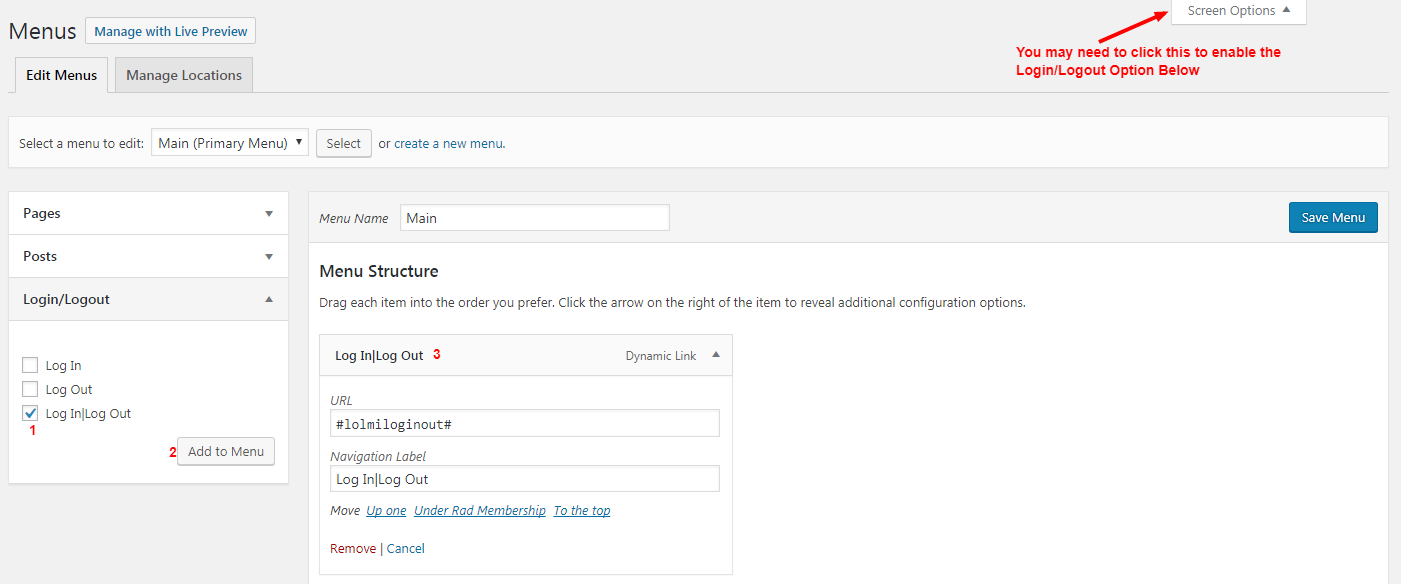
In your dashboard, go to Appearance > Menus. Click 'Screen Options' at the top right and ensure the 'Login/Logout' checkbox is checked. Then, select a menu to edit or create a new one, and you will find 'Login/Logout' in the left sidebar to add to your menu.
Can I customize the redirect URLs after login or logout?
Yes, you can set a specific Login Page URL, Login Redirect URL, and Logout Redirect URL within the plugin settings. For example, you can redirect users to the homepage or a specific account page after logging in.
Changelog
1.2.3
- Small tweaks to help avoid hosting blocks
- Fix nonce validation
1.2.2
- Bump WP Compatibility
1.2.1
- Fixed error when saving options on some web-host’s
1.2.0
- Fixed save options security vulnerability
1.1.1
- Fixed – Do not redirect Administrator users when logging in
1.1.0
- Added a settings page
- Added setting for login page URL
- Added setting for login redirect URL
- Added setting for logout redirect URL
1.0.0
- First Release

