WordPress development can easily get complicated and oftentimes overwhelming for developers if it’s not streamlined.
If you want to safely work on a WordPress site from scratch or manage a live site without disrupting the live site, you need to make staging essential during your WordPress development.
Understanding Staging Environments
Imagine you’re an architect designing a spectacular new skyscraper. Every measurement must be exact, and every material chosen with care.
Now, picture having the opportunity to construct a full-scale model of the building, allows you to make any necessary adjustments before the final construction begins. That’s essentially what a staging environment is in WordPress development.
What is a Staging Environment?
A staging environment in WordPress development is a full-scale platform that allows WordPress developers to create WordPress sites, and test sites before they go live, ensuring everything works perfectly when it counts.
WordPress Staging and Production
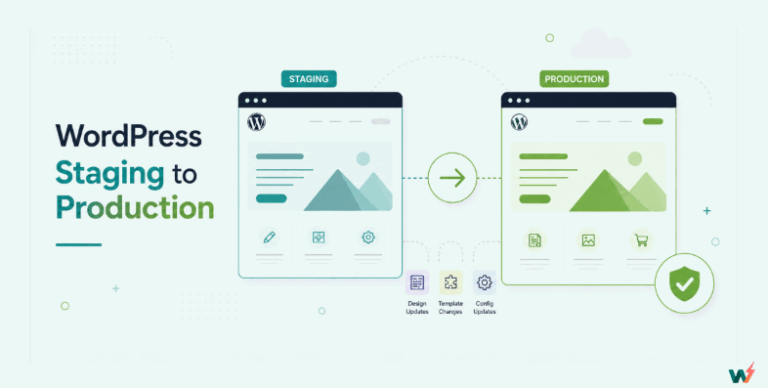
Staging is essential during the WordPress development lifecycle where developers validate the website before it goes live. Staging is the replica of the production site, with similar configurations and resources. Unlike the production site, any errors or bugs discovered in staging won’t affect visitors, allowing for thorough testing and refinement before deployment.
Staging is the stop-gap between development and production. Staging ensures developers can catch and fix bugs or errors before the WordPress site is available to end-users.
Key Benefits of Using a Staging Environment
The benefits of using a staging environment for WordPress development are underemphasized.
Risk-Free Testing
Generally, testing is how we know what works and what does not.
Testing not only ensures we eliminate potential danger but also gives us insight into a product or service.
Agreeably, testing is the most important benefit of using a staging environment. Importantly, you should be able to do risk-free testing.
With testing, you will be able to catch potential bugs and security vulnerabilities, and see how the site performs in terms of speed and functionalities.
Minimizing Downtime
One of the challenges of WordPress development to production is downtime. Having gone through rigorous development, and product testing and being sure your WordPress site is ready to go live, you are now faced with the possibility of downtime. A staging environment minimizes that risk because it takes only the finished work and pushes it to production.
Boosting Security
Performance and security vulnerabilities are issues that can negatively impact your WordPress site in the staging environment. Because of the ability to perform risk-free testing, Any bugs discovered in the WordPress staging, for example, will be contained within that environment and not spread any further.
Cost cutting
WordPress development can easily get more expensive than expected. This is more so when your development process is split, i.e. your development environment is separate from your staging environment and hosting. By using a WordPress staging environment, you can significantly save the development cost of purchasing a separate platform for the same product.
Consequences of NOT using WordPress Staging
Risk of Downtime
Deploying changes directly to your live WordPress site without prior testing can result in frequent downtime. If something goes wrong, your site could be unavailable to visitors until the issue is resolved, which can hurt your site’s reputation and traffic.
Risk of Testing
Without a staging environment, testing your site directly when it’s live increases the risk of exposing your user’s site to bugs and user data to security vulnerabilities. Any issue arising will affect your live site, potentially causing a poor user experience or even downtime.
Security Vulnerabilities
By not using a staging environment, any security issues that arise from new updates or changes are directly exposed to your users. This can lead to compromised data, which might have been avoided through thorough testing in a staging environment.
Higher Costs
Decoupled WordPress development life-cycle and fixing issues on a live site can be time-consuming and expensive. Problems that could have been identified and resolved in a staging environment will require immediate attention, often leading to higher costs for emergency fixes and potential loss of revenue during downtime.
Poor Performance
Deploying untested changes can negatively impact your site’s performance. Slow load times and broken functionalities can deter visitors, resulting in a loss of traffic and conversions. Performance issues identified in a staging environment can be fixed before they affect your live site.
How to Create a Staging in WordPress?
There is more than one way of creating staging in WordPress. Traditionally developers would use a sub-domain and tweak the wp-config file.
Some would get a hosting that provides staging while some would use LocalWP. The most efficient and seamless way, however, is using the InstaWP staging environment.
InstaWP beats all competition and goes a mile further to provide WordPress staging solutions that make WordPress staging seamless and cost-effective for developers and agencies.
With InstaWP, you can create a WordPress staging site from scratch, create a staging site from your live site, manage multiple sites, and host your site with InstaWP hosting.
Things to Remember While Staging
Let’s examine the key points to remember while staging a WordPress site below.
Selecting Appropriate Tools and Plugins
Developers’ tools are as good as the product they develop and, in this instance, the site that they build. The tools and plugins appropriate to staging will determine the success of your staging site. Let’s look at some important ones.
Reliable Database
Staging must have where to store and retrieve site data on the go. The database provides easy access to your site data and enables you to perform complex queries and modifications.
Code Editor
A code editor is a great tool that staging must have. The code editor will allow developers to make changes to theme code and also let developers add custom code to their site. They can also test theme code and plugin code.
Log Viewer
Log viewer tools are essential for identifying and resolving issues in your staging environment by providing detailed information about errors and deprecated functions, helping you to quickly identify and fix problems.
Avoiding the Same Server as the Live Site
We can’t emphasize this point enough. Avoid creating a staging site on the same server as your live site. This option is provided by hostings which may cause serious issues like human error, space issues, and site performance.
Incorporating Staging into Your Workflow
WordPress development can look different from the one that is traditionally known. As WordPress development evolves, development workflow follows. It is important to note that for agencies who are actively building and managing large WordPress sites workflow is important.
As the complexity of WordPress projects increases, so does the need for a more structured and reliable development workflow. Incorporating a staging environment into their build workflow is now more essential than ever for these agencies.
Let us examine some staging workflows that are essential during WordPress development.
Site Building from Scratch
Traditionally, WordPress development was way simpler. A developer would build a site locally, make the necessary changes, and then push those changes directly to the live site. This process worked well for small projects with minimal traffic and straightforward requirements.
However, because WordPress has grown into a robust platform capable of supporting large-scale sites with millions of visitors and agencies now look to build multi-site while cutting development time and cost significantly.
With the InstaWP staging environment, you can spin up the WordPress site from scratch in seconds.
For the win, the site you just created can be built within the platform and saved as a template to be replicated in case of multiple site development similar to that first one.
Routine Integration
Routing integration as an element of staging makes WordPress development workflow efficiently secure particularly for agencies working with many sites. How?
- Integration Tests: These tests ensure that different parts of the WordPress site work together as expected. For instance, a new plugin should integrate seamlessly with existing themes and other plugins.
- Continuous Integration: With DB Editor, Code Viewer, and Code Editor features agencies and developers can continually watch and integrate changes in a secure environment before pushing those changes to the live site
The routine integration feature in WordPress staging ensures a robust, efficient, and secure development process.
Small and Large Updates
Small updates are changes you can make, like testing plugins by installing and removing them. Other small changes are minor code edits to themes, font updates, and color updates.
Large updates, however, are updates like a complete redesign of an existing site and building a new site from scratch.
WordPress staging very much lets you make small and large updates. You can totally overhaul a site and simultaneously rebuild from scratch edit a page section, or delete a page section. You can do all these without affecting your live site.
WordPress site management and maintenance
WordPress staging allows developers and especially agencies working with multiple clients to manage and maintain these sites. What does this mean? Managing and maintaining multisite is a process that becomes increasingly complex and time-consuming. Incorporating a staging environment into their workflow is a game-changer, enabling more efficient management and maintenance.
Resolving Support Tickets
- Centralized Management: For agencies handling multiple client sites, a staging environment for each client site ensures that updates and changes are managed centrally and systematically. This reduces the risk of errors and inconsistencies.
- Efficient Workflows: Agencies can set up standard procedures for updates, testing, and deployments, streamlining their workflows and making it easier to manage multiple projects simultaneously.
Extensive Feature Testing
WordPress core can bring significant changes to sites like when a new version is released. Testing these updates in a staging environment ensures that the site continues to operate smoothly after the update. Other enhanced feature testing includes:
- Vulnerability Scans: Regular security scans can be conducted in the staging environment to identify and fix vulnerabilities without exposing the live site to risks. Tools like WPScan can be integrated into the staging workflow to automate these checks.
- Safe Environment: By testing security patches and updates in staging, developers ensure that any potential issues are resolved before they can impact the live site.
- Load Testing: Developers can use the staging environment to perform load testing, ensuring that the site can handle high traffic volumes without compromising performance. Tools like New Relic can help monitor and optimize site performance.
- Optimization Experiments: Performance enhancements, such as caching improvements or database optimizations, can be tested in the staging environment to measure their impact before implementing them on the live site.
Content and Design Review
Preview Changes: Clients can preview and test changes in the staging environment before they are applied to the live site. This helps in setting clear expectations and gaining client approval, reducing the likelihood of post-deployment issues.
Feedback Loop: Clients can provide feedback on changes in the staging environment, allowing developers to make necessary adjustments before final deployment. This iterative process ensures the final product meets the client’s requirements and standards.
Deployment from Staging to Production
One staging essential during WordPress development is being able to deploy your site from staging to production.
Hosting with InstaWP
InstaWP is a staging platform encompassing all the features that WordPress developers and agencies need to optimize their development workflow.
Other than hosting companies that provide customers a way to stage their sites, it is difficult to find a platform that lets developers create staging sites and also host their sites without having to shop from outside for suitable hosting.
InstaWP’s hosting is managed cloud hosting that is affordable.
It provides developers and agencies working with multiple clients to mass deploy their websites and manage from the same platform.
To deploy your staging site to production using instaWP hosting, you must sign in to your InstaWP dashboard. If you don’t already have an account, create one here.
Conclusion
Using a staging environment in WordPress development is essential for ensuring a seamless, secure, and efficient workflow. It allows for risk-free testing, minimizes downtime, boosts security, and reduces costs. InstaWP simplifies the staging process, making it easier to create, manage, and deploy WordPress sites to production.