For the last two years, every WordPress + AI conversation has gone the same way: pick a tool, copy your content out, paste it into ChatGPT or Claude, get a response, paste it back. Repeat. Forever.
That workflow ends today.
InstaMCP 1.1 is the biggest update since launch; and it doesn’t just add features. It changes what it means to build, manage, and scale a WordPress site in the AI era. Three things shipped, and each one is a structural shift for how WordPress works with AI.
Let’s break down what changed, why it matters, and what it unlocks.
Table of Contents
How InstaWP Already Changed the AI + WordPress Game
Before we get into what’s new in InstaMCP 1.1, it’s worth understanding why InstaMCP exists in the first place and why it’s already become the easiest way to bring AI into WordPress.
When AI assistants like Claude, ChatGPT, and Cursor started supporting MCP (Model Context Protocol), connecting them to WordPress was technically possible but practically painful. To get any AI tool talking to your WordPress site, you had to:
- Spin up and configure your own MCP server
- Wire up authentication and tokens manually
- Define and expose every tool your AI would need (create post, update user, query database, etc.)
- Maintain that server as WordPress and your AI clients evolved
- Deploy it somewhere, secure it, and keep it online
For most WordPress users, that’s a non-starter. For developers, it’s a side project that competes with actual work. The result? AI + WordPress stayed stuck in the copy-paste era for far too long.
InstaWP fixed this with InstaMCP; the easiest WordPress MCP integration on the market.
No server setup. No configuration files. No DevOps. Just build sites with InstaWP, enable the MCP, copy the MCP URL, and your site is instantly MCP-ready.
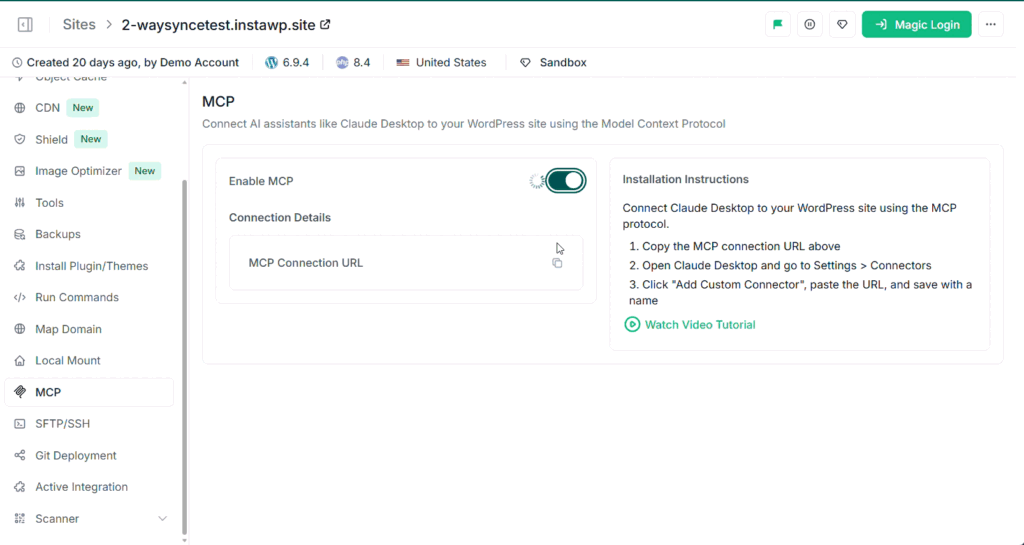
Based upon your requirments, you can now connect your WordPress site with the AI tools of your choice. We’ve a detailed video on how to connect WordPress with Claude.
That’s the InstaWP difference. Where every other MCP solution asks you to build the bridge, InstaMCP just is the bridge. One toggle, and your WordPress site speaks AI.
Must Read: Connect AI Assistants to Your WordPress Site Using MCP
This single design choice, making MCP integration as simple as activating a plugin, is what put thousands of WordPress sites onto AI workflows that would otherwise have stayed manual. It turned MCP from a developer-only experiment into something any WordPress user can use in under two minutes.
And now, with InstaMCP 1.1, that bridge just got a lot wider.
InstaMCP 1.1.0: More Clients, More Power, Same Safety
We’ve shipped InstaMCP 1.1.0, the biggest update since launch. Three things changed:

1. Connect from 13 AI Clients; Not Just Claude Desktop
When InstaMCP launched, it connected your WordPress site to Claude Desktop. That was powerful, but it locked you into one AI ecosystem. If your team used Cursor for development, ChatGPT for content, or Gemini for research, your WordPress site couldn’t talk to any of them.
That’s now solved. InstaMCP 1.1 supports 13 AI clients out of the box:
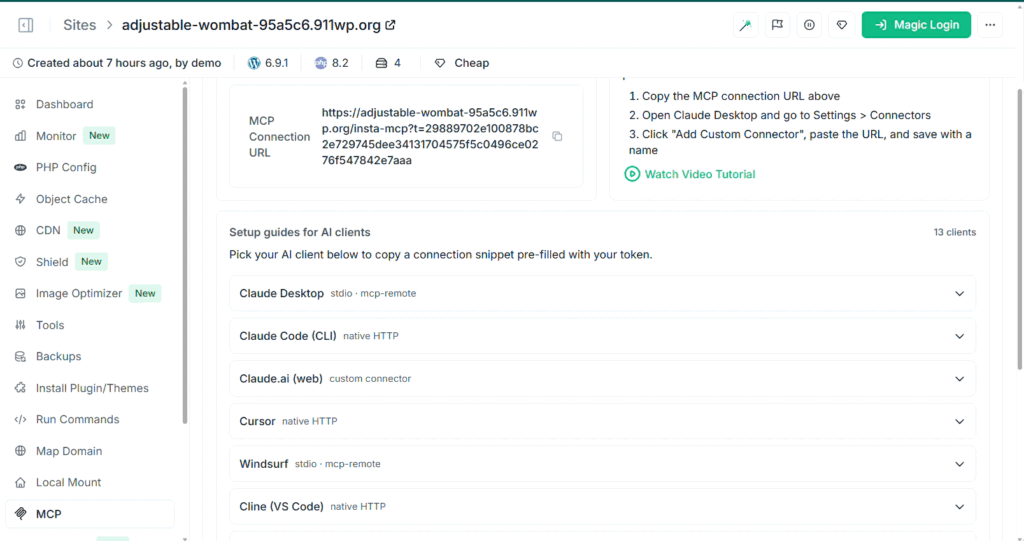
- Claude Desktop
- Claude Code
- Claude.ai
- Cursor
- Windsurf
- Cline
- Roo Code
- GitHub Copilot
- Zed
- Gemini CLI
- OpenAI Codex CLI
- ChatGPT
- Continue.dev
If your AI editor speaks MCP, it speaks InstaMCP. Setup guides for each client live in the new docs/CLIENTS.md.
The AI tooling landscape is moving faster than any one team can keep up with. Six months ago, Claude Desktop was the obvious choice. Today, developers are split across Cursor, Windsurf, and Claude Code. Tomorrow, something new will launch.
If your WordPress workflow is locked to one AI tool, you’re constantly migrating. By supporting 13 clients (and any future MCP-compatible tool), InstaMCP makes your WordPress site AI-tool-agnostic. Switch tools whenever you want. Your site doesn’t care. This is the difference between betting on a horse and owning the racetrack.
2. The New execute_php Tool: Your AI’s Escape Hatch
The InstaMCP is now shipped with execute_php, a single tool that lets your AI agent run any PHP code inside WordPress. That means:
- Full
$wpdbdatabase access - Every WordPress API
- Every loaded plugin’s functions
- Custom queries, bulk operations, debugging, schema inspection — anything PHP can do
Without it, every WordPress + AI workflow had to be composed from InstaMCP’s 43 specialized tools; one for posts, one for users, one for taxonomies, and so on. execute_php is the escape hatch that lets your AI just figure it out instead of clicking through tool menus.
Giving an AI agent unrestricted PHP access on your WordPress site sounds terrifying and it would be, if it weren’t gated correctly. execute_php is off by default and protected by four independent layers:
Site admin opt-in: must be explicitly enabled in Settings → InstaMCP → General → Execute PHP
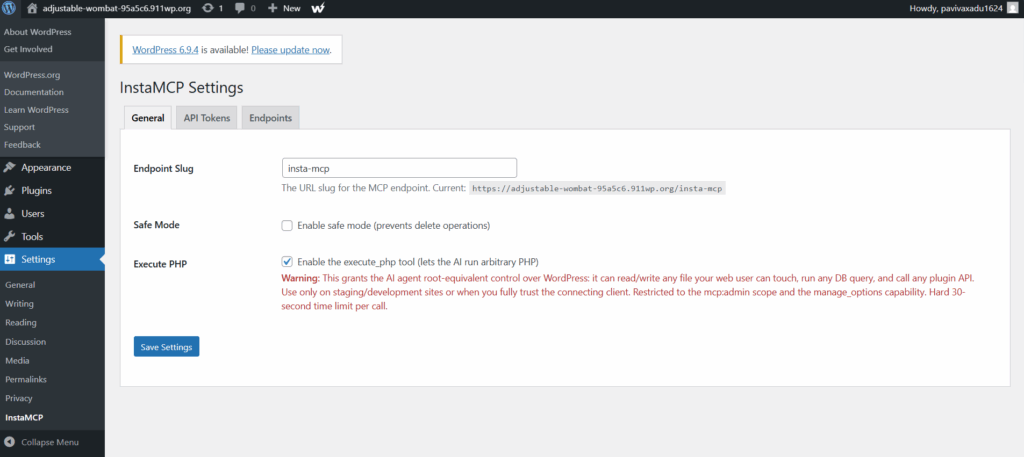
mcp:admin token scope: your API token must specifically grant this
WordPress capability check: manage_options permission required
30-second per-call hard limit: no runaway processes
When execute_php is disabled, it isn’t even advertised in the tool list; connected agents won’t know it exists and won’t try to use it.
The recommendation from us: enable it on staging or development sites first. Use it in production only when you trust the connecting client and have backups in place. (InstaWP automated snapshots make this trivial.) Sites on InstaWP managed WordPress hosting get snapshots, backups and the security shield by default.
This is how AI tools should ship dangerous capabilities; locked by default, opt-in by design, with the user always in control.
3. WordPress 6.9 Abilities API: Native Integration with the Future
If you’re running WordPress 6.9 or later, every InstaMCP tool is now also registered through wp_register_ability(); the new official WordPress core standard for AI integrations.
In plain English: InstaMCP is now a first-class citizen inside WordPress itself, not just a third-party plugin sitting alongside it.
What this unlocks
- Tool discovery: Any plugin or admin UI that consumes the Abilities API can see and use InstaMCP’s tools
- Native MCP Adapter support: The official WordPress MCP Adapter sees InstaMCP automatically, no configuration needed.
- Future-proofed: Every WP-native MCP client launching in the next 12 months works with InstaMCP out of the box
Your existing /insta-mcp endpoint and tokens are untouched. This change is purely additive; nothing breaks on WordPress versions below 6.9, but if you upgrade, you get all the benefits automatically.
Why this is a bigger deal than it sounds
WordPress 6.9’s Abilities API is the foundation for how AI will interact with WordPress for the next decade. By integrating natively today, InstaMCP isn’t just keeping up with the standard; it’s helping define what “AI-ready WordPress” actually looks like.
Most plugins will spend the next year scrambling to adopt the Abilities API. InstaMCP shipped it on day one of 1.1.
What This Means for the Future of AI + WordPress
Step back from the changelog and look at what these three updates do together:
- 13 AI clients = you’re not locked into one tool
execute_php= your AI can do anything on your site, safely- Abilities API = your site is ready for whatever WordPress AI looks like next
This is the difference between WordPress having “an AI plugin” and WordPress being AI-native infrastructure.
For years, WordPress + AI has been a translation layer; copy from one tool, paste into another, hope the formatting holds. InstaMCP 1.1 deletes the translation layer. Your AI tool of choice talks to your WordPress site directly, with full read/write access, full PHP capability when needed, and full alignment with WordPress’s official AI standards.
Who this changes the game for
- Developers stop writing one-off scripts for routine WP tasks. The AI runs them.
- Agencies stop manually managing 50 client sites. AI agents handle updates, audits, and content across all of them through a single MCP connection.
- Content creators stop the copy-paste shuffle between ChatGPT and the WP editor. Drafts, edits, and publishing happen in one conversation.
- Site owners stop being scared of “the AI will break my site.” Granular permissions and admin gating mean you control exactly what AI can and can’t do.
- Plugin developers can build on top of the Abilities API knowing InstaMCP already exposes their plugin’s data and actions to every supported AI client.
The Bigger Picture
The conversation around AI + WordPress has been stuck on the wrong question: “Which AI tool is best for WordPress?”
InstaMCP 1.1 reframes it: “Why are you choosing only one?”
Your WordPress site is the source of truth; your content, your customers, your business. The AI tools you use to interact with it should be interchangeable, swappable, and never the bottleneck. With 13 clients supported, raw PHP capability when you need it, and native WordPress 6.9 integration, that’s exactly what InstaMCP is now.
The translation layer is gone. WordPress just became AI-native. Try it now.


