

Advanced Custom Fields (ACF) helps you easily customize WordPress with powerful, professional and intuitive fields. Proudly powering over…
About Prevent Browser Caching
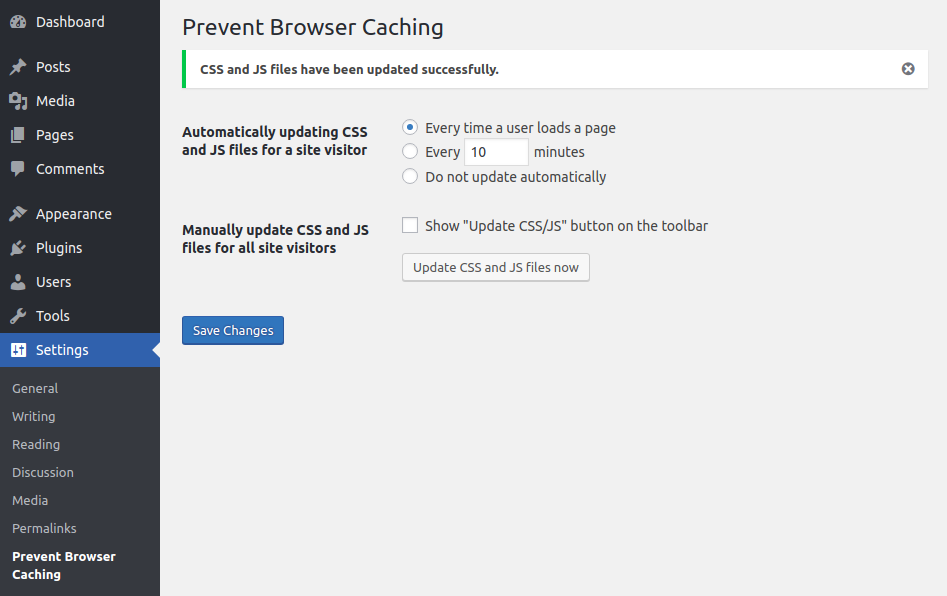
This plugin allows frontend developers to easily clear browser cache for all users by automatically or manually updating the assets version of CSS and JS files. This means that you can show the latest changes on the site without asking the client to clear their cache. Developers can also programmatically set the version of CSS and JS files using a simple code snippet.Screenshots
Frequently asked questions
What does the Prevent Browser Caching plugin do?
The Prevent Browser Caching plugin updates the assets version of all CSS and JS files. This allows the latest changes on a site to be shown without requiring users to clear their browser cache.
How does the plugin prevent browser caching?
The plugin adds a unique number to the 'ver' parameter in the URL of CSS and JS files. This ensures that browsers recognize the files as new and do not use cached versions.
Can developers control the caching behavior?
Yes, developers can configure the updating of asset files via options in the admin panel. They can also set the version of CSS and JS files programmatically by inserting code into the theme's functions.php file.
Changelog
2.3.5
- Tested the plugin in WordPress 6.5.
2.3.4
- Tested the plugin in WordPress 6.1.
2.3.3
- Tested the plugin in WordPress 6.0.
2.3.2
- Fixed “Update CSS/JS” button in the admin bar.
2.3.1
- Tested the plugin in WordPress 5.1.
2.3
- Tested the plugin in WordPress 5.0-beta1 and optimized the code.
2.2
- Added function “prevent_browser_caching” which disables all admin settings of this plugin and allows to set the new settings.
- Changing “ver” param instead of adding additional “time” param.
2.1
- Added option to show “Update CSS/JS” button on the toolbar.
2.0
- Added setting page to the admin panel.
- Added automatically updating CSS and JS files every period for individual user
- Added manually updating CSS and JS files for all site visitors
1.1
- Added plugin text domain.
1.0
- First version of Prevent Browser Caching plugin.

