

Just another contact form plugin. Simple but flexible.

About Google Authenticator
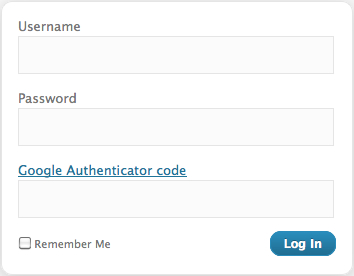
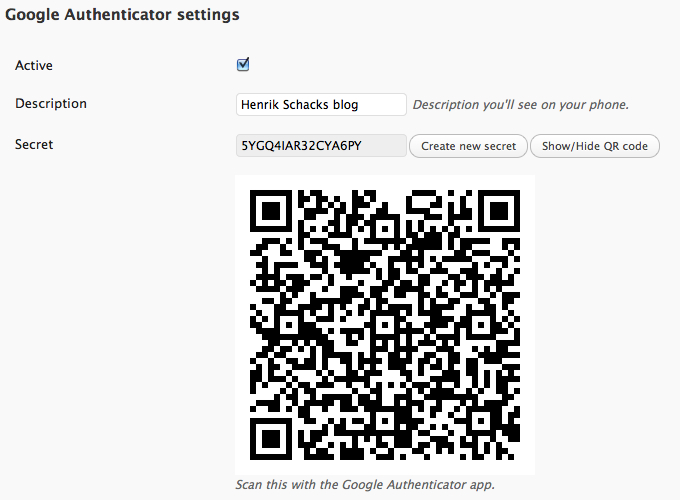
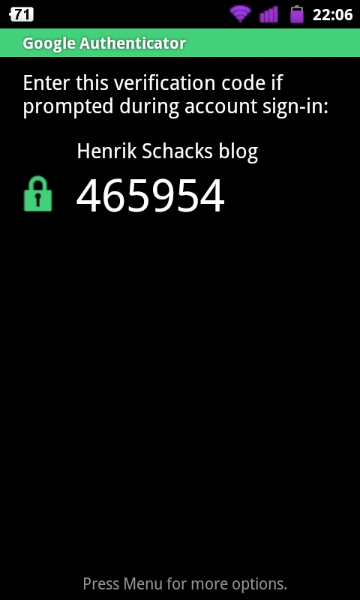
The Google Authenticator plugin for WordPress allows you to add an extra layer of security to your website by requiring two-factor authentication using the Google Authenticator app. This means that in addition to entering your password, you will also need to enter a unique code generated by the app on your smartphone. This plugin can be enabled on a per-user basis, so you can choose to only require two-factor authentication for certain accounts.Screenshots

Frequently asked questions
What is the Google Authenticator plugin for WordPress?
The Google Authenticator plugin for WordPress gives you two-factor authentication using the Google Authenticator app for Android/iPhone/Blackberry.
How can I enable two-factor authentication on WordPress?
The two-factor authentication requirement can be enabled on a per-user basis. You could enable it for your administrator account, but log in as usual with less privileged accounts.
Can I use the Google Authenticator app for other services?
If you are security aware, you may already have the Google Authenticator app installed on your smartphone, using it for two-factor authentication on Gmail/Dropbox/Lastpass/Amazon etc.
Can I enable the App password feature for maintaining my blog with an Android/iPhone app?
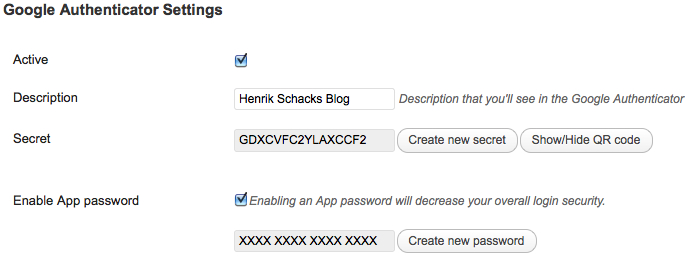
If You need to maintain your blog using an Android/iPhone app, or any other software using the XMLRPC interface, you can enable the App password feature in this plugin, but please note that enabling the App password feature will make your blog less secure.
Who are the contributors to the Google Authenticator plugin?
Thanks to Oleksiy, Paweł Nowacki, Fabio Zumbi, Guido Schalkx, Henrik.Schack, Tobias Bäthge, Pascal de Bruijn, Daniel Werl, Dion Hulse, Aldo Latino, Kaijia Feng, Alex Concha, Jerome Etienne, Sébastien Prunier for their contributions to the Google Authenticator plugin.
Changelog
0.54
- Fixed a bug in multisite.
0.53
- Add a Polish translation
0.52
- Add a Dutch translation
- Add a Portuguese translation
0.51
- Fix a regression that broke app passwords
0.50
- New maintainer ivankk
- Conditionally include base32 class
0.49
- More streamlined sign-up flow for users, configuration screen for admins.
- Multisite support to either enable 2fa by role on a site, and/or on a network.
- Added filter google_authenticator_needs_setup to determine if user needs to enable 2fa.
- Added two part login process that can ask for 2fa code on a second login screen.
- Fixed a security bug that continued check_otp even if authenticate had already returned an error.
0.48
- Security fix / compatability with WordPress 4.5
0.47
- Google chart API replaced with jquery-qrcode
- QR codes now contain a heading saying WordPress (Feature request by Flemming Mahler)
- Danish translation & updated .pot file.
- Plugin now logs login attempts recognized as Man-in-the-middle attacks.
0.46
- Man-in-the-middle attack protection added.
- Show warning before displaying the QR code.
- FAQ updated.
0.45
- Spaces in the description field should now work on iPhones.
- Some depricated function calls replaced.
- Code inputfield easier to use for .jp users now.
- Sanitize description field input.
- App password hash function switched to one that doesn’t have rainbow tables available.
- PHP notices occurring during app password login removed.
0.44
- Installation/FAQ section updated.
- Simplified Chinese translation by Kaijia Feng added.
- Tabindex on loginpage removed, no longer needed, was used by older WordPress installations.
- Inputfield renamed to “googleotp”.
- Defaultdescription changed to “WordPressBlog” to avoid trouble for iPhone users.
- Compatibility with Ryan Hellyer’s plugin http://geek.ryanhellyer.net/products/deactivate-google-authenticator/
- Must enter all 6 code digits.
0.43
- It’s now possible for an admin to hide the Google Authenticaator settings on a per-user basis. (Feature request by : Skate-O)
0.42
- Autocomplete disabled on code input field. (Feature request by : hiphopsmurf)
0.41
- Italian translation by Aldo Latino added.
0.40
- Bugfix, typo corrected and PHP notices removed. Thanks to Dion Hulse for his patch.
0.39
- Bugfix, Description was not saved to WordPress database when updating profile. Thanks to xxdesmus for noticing this.
0.38
- Usability fix, input field for codes changed from password to text type.
0.37
- The plugin now supports “relaxed mode” when authenticating. If selected, codes from 4 minutes before and 4 minutes after will work. 30 seconds before and after is still the default setting.
0.36
- Bugfix, now an App password can only be used for XMLRPC/APP-Request logins.
0.35
- Initial WordPress app support added (XMLRPC).
0.30
- Code cleanup
- Changed generation of secret key, to no longer have requirement of SHA256 on the server
- German translation
0.20
- Initial release

