

The Elementor Website Builder has it all: drag and drop page builder, pixel perfect design, mobile responsive editing,…

About AntiVirus
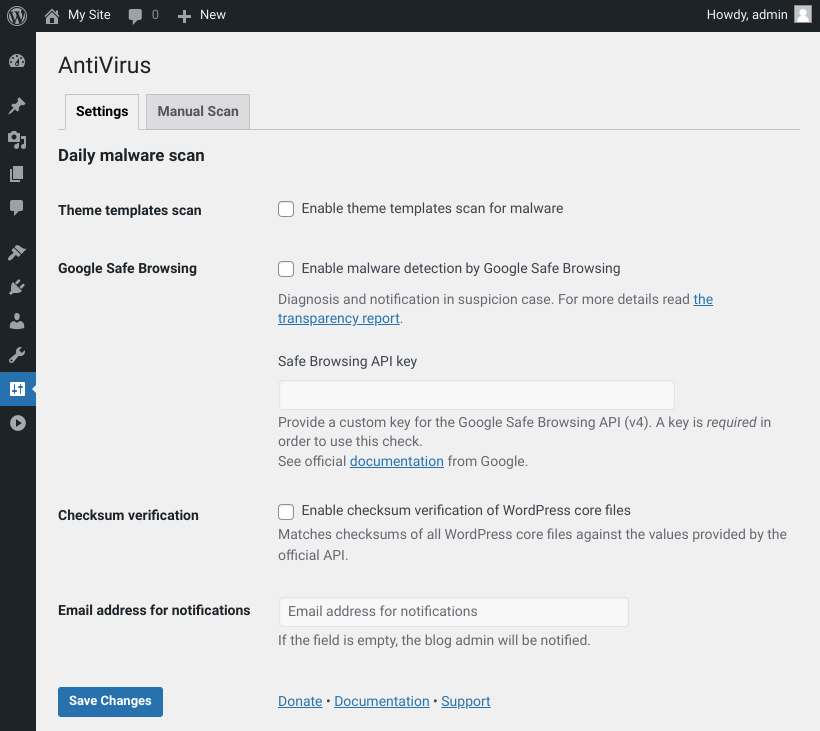
AntiVirus is a plugin for WordPress that helps protect your website from malware and spam injections. It can perform daily scans of your theme files and send notifications if any suspicious code is detected. The plugin also offers support through the WordPress support forums and is actively developed on GitHub.Screenshots

Frequently asked questions
What does the AntiVirus plugin do?
The AntiVirus plugin protects your WordPress site against exploits, malware, and spam injections. It can perform daily scans of your theme files and notify you of suspicious code.
How does AntiVirus help if my site is hacked?
If your WordPress site has been hacked, AntiVirus will help you become aware of the problem quickly by detecting suspicious code injections and sending notifications.
What are the main features of AntiVirus?
Key features include scanning for suspicious code in theme files with email notifications, checksum verification for WordPress Core files, and optional Google Safe Browsing for malware and phishing monitoring.
Where can I get support for the AntiVirus plugin?
Community support for the AntiVirus plugin is available via the support forums on wordpress.org. Support is not handled via email, Twitter, or GitHub issues.
How can I contribute to the AntiVirus plugin?
You can contribute by submitting pull requests for documented bugs on GitHub, or by helping to translate the plugin on WordPress Translate.
Changelog
1.5.2
- Add JavaScript to page footer (#145)
- Tested up to WordPress 6.7
1.5.1
- Fix issue with “dismiss” button if multiple warnings are found for one theme file (#135) (#136)
1.5.0
- Fix deprecation warning with PHP 8.1+ (#126) (#127)
- Enforce use of custom Safe Browsing API key (#104) (#108)
- Separate settings page from manual scanning with overhauled UI (#107)
- Update JS to ES2015 (IE11 no longer supported) (#32)
1.4.4
- Fix warning on SafeBrowsing API errors with PHP 8.1+ (#123)
- Tested up to WordPress 6.2
1.4.3
- Point Safe Browsing link on settings page to site-specific URL (#106)
- Increase the size of the Safe Browsing API input to show the entire key (#109)
- Show warning if Safe Browsing check is enabled without custom API key (#105)
1.4.2
- Drop recursive check on option that failed in several scenarios (#96, #97)
- Drop check for base64 encoded strings which did not work properly in al cases (#100)
- Use WP 5.7 color palette for the UI (#99)
1.4.1
- Fix some spelling mistakes and correct translations (#85)
- Fix file name sanitization in manual theme scan causing errors to be not shown in the admin area (#88, #89)
- Fix theme file collection for child themes with duplicate names (#86)
- Consider all levels in theme file check instead of one only (#87, #90)
- Support translations in old WordPress versions (#91)
1.4.0
- Option to provide a custom key for the Google Safe Browsing API (#69)
- Scan files of parent theme if a child theme is active (#1, #62)
- Verify checksums of WP core files (integrated functionality from Checksum Verifier plugin (#5, #56)
- Allow to enable Safe Browsing and Checksum Verifier as cronjob without theme scan (#66)
- Update code style check and add build script (#68)
1.3.10
- Updated PayPal link for donations
- Improve coding standards
- Translation fixes, improvements and cleanups
- Better documentation
- Some minor markup, styling, accessibility and security improvements
- Update to Safe Browsing API v4 (fixing false positive email notifications)
- PHP 7.x compatibility fixes
- Better regex to prevent false positives in file scans
1.3.9
- generated a POT file
- added German formal translation
- updated, translated + formatted README.md
- updated expired link URLs in plugin and languages files
- updated plugin authors
For the complete changelog, check out our GitHub repository.

