

Just another contact form plugin. Simple but flexible.

About User Menus – Nav Menu Visibility
User Menus is a plugin that allows you to have more control over your navigation menu for logged in users. It lets you determine who can see each menu item and also enables you to display logged in user information in the menu. Additionally, you can add login, register, and logout links to your menu.Screenshots

Frequently asked questions
What is User Menus?
User Menus is a plugin for websites with logged in users that allows you to control visibility of menu items and display user information in the navigation menu.
What control does User Menus provide over nav menu?
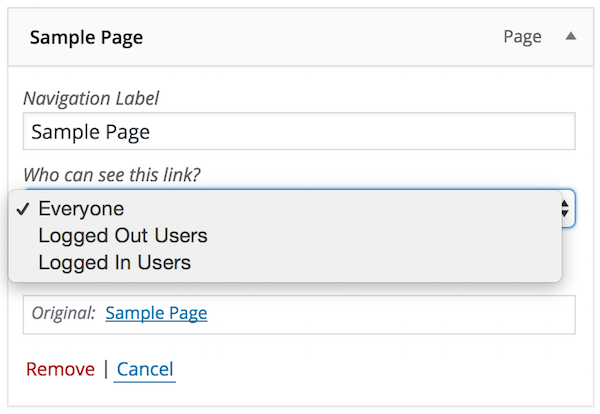
User Menus allows you to apply visibility controls to menu items, specifying who can see each menu item (everyone, logged out users, logged in users, specific user roles).
What information can be displayed in the navigation menu?
User Menus enables you to display logged in user information in the navigation menu, such as their username, first name, last name, display name, nickname, and email.
Can User Menus add login, register, and logout links to the menu?
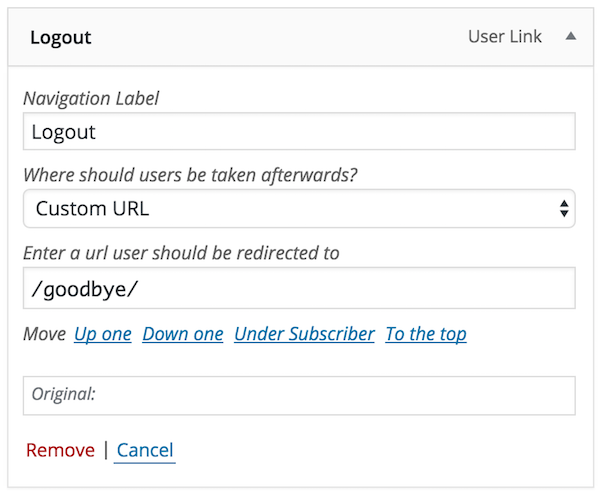
Yes, User Menus allows you to add login, register, and logout links to your menu, with optional redirect settings.
Who created User Menus?
User Menus is created by Code Atlantic, a team that specializes in building high-quality WordPress plugins.
Changelog
v1.3.2 – 07/19/2023
- Security: Fixes from the freemius library, notice can be seen here
v1.3.1 – 11/04/2022
- Tweak: Patch file mismatches in freemius/core/svn in last version.
v1.3.0 – 09/13/2022
- Tweak: Upgrade freemius sdk to v2.4.5 for PHP 8.1 compatibility.
v1.2.9 – 03/02/2022
- Tweak: Downgrade freemius sdk to the latest stable (previously version was Release Candidate).
v1.2.8 – 03/02/2022
- Tweak: Update freemius sdk to the latest version.
v1.2.7 – 07/21/2021
- Fix: Bug due to variable type mismatch which caused children of protected items to be rendered.
v1.2.6 – 07/20/2021
- Improvement: Update Freemius to 2.4.2
- Improvement: Code styling clean up.
- Improvement: Compatibility with jQuery v3.
v1.2.5 – 12/31/2020
- Improvement:Update Freemius to 2.4.1
v1.2.4 – 08/20/2020
- Improvement: Removed class that could cause links to be disabled with some themes.
- Tweak: Update Freemius sdk to v2.4.0.1.
- Fix: Compatibility issue with some sites where duplicate fields were shown in the menu editor.
v1.2.3 – 3/23/2020
- Tweak: Add compatibility fix for WP 5.4 menu walker
v1.2.2 – 12/17/2019
- Improvement: Login, Register & Logout menu links now hint at who they will be visible for.
- Fix: Deprecation notice for sites using PHP 7.4
v1.2.1 – 10/20/2019
- Fix: Bug in some sites where Menu Editor Description field was not shown.
v1.2.0 – 10/10/2019
- Feature: Added option to show or hide the menu item for chosen roles.
- Feature: Added Register user link navigation menu type with optional redirect.
- Improvement: Added Freemius integration to allow for future premium offerings
- Tweak: Updates brand from Jungle Plugins to Code Atlantic (nothing has changed, just the name).
- Tweak: Minor text and design changes.
- Fix: Bug where missing data in menu items caused an error to be thrown in edge cases.
v1.1.3
- Improvement: Corrected usage of get_avatar to ensure compatibility with 3rd party avatar plugins.
v1.1.2
- Improvement: Made changes to the nav menu editor to make it more compatible with other plugins.
v1.1.1
- Fix: Forgot to add new files during commit. Correcting this issue.
v1.1.0
- Feature: Added ability to insert user avatar in menu items with size option to match your needs.
- Improvement: Added accessibility enhancements to menu editor. Includes keyboard support, proper focus, tabbing & titles.
- Improvement: Added proper labeling to the user code dropdown.
- Tweak: Restyled user code insert elements to better resemble default WP admin.
v1.0.0
- Initial Release

