There are tons of guides on WordPress development around the web, but no one will tell you how to guide your trained WordPress professionals to be more effective and bring more revenue to your agency.
Well, that’s what made us think we should do the needful.
This WordPress development training guide for teams will cover project management, team training, automation of operations, useful tools, handy tricks, and everything that can boost your workflow efficiency.
Table of Contents
1. Start with the Managers
There is a hierarchy when you want to change your agency’s work culture. And it will begin with your managers. So, tell them to organize tasks, communicate with team members, monitor progress, and collaborate with clients—all in one centralized platform.
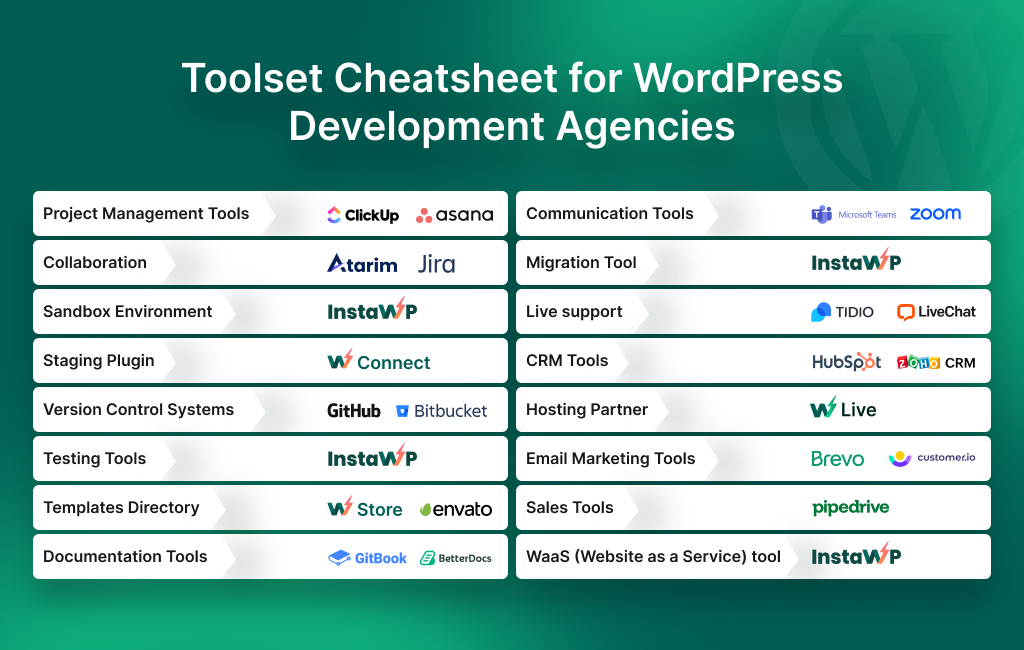
Tools like Asana offer comprehensive project management features. If you want something advanced, go for ClickUp. With this, you also have an opportunity to track who is working on which projects.
Here is a quick list of tools that your managers can use for other operations:
- Collaboration: Slack, Atarim, Jira
- Communication Tools: Microsoft Teams, Zoom
- Live support: LiveChat, Tidio
- CRM Tools: HubSpot, Zoho CRM
- Email Marketing Tools: Brevo, Customer.io
- Sales Tools: Pipedrive
2. Arm your Developers with the Tools they Need
You will agree with the fact that having the right tools at your disposal can make all the difference. And that’s why your WordPress team must have the best tools in their toolset.
Here’s how you can equip your development team with the necessary resources to enhance their efficiency:
InstaWP for Staging
InstaWP is a comprehensive WordPress management platform that empowers agencies and developers to streamline website development, deployment, and management processes.
It offers a suite of powerful tools and features designed to simplify various aspects of WordPress site management, including building, testing, staging, migration, and maintenance.
What’s there for your team?
- Utilize InstaWP to create staging sites in seconds.
- Launch sites with pre-installed plugins if you wish.
- Experiment with new features.
- Test WordPress and plugin releases before updating your clients’ sites.
- Offer better support with issue replication and demo capabilities.
- Train interns by using this platform for WordPress development training
- Test different configurations without impacting live sites.
- Seamlessly migrate sites between 2 hosting providers..
- Host directly with the platform’s native hosting service, InstaWP hosting.

Inculcate the habit of Documenting
Streamline knowledge sharing and ensure that crucial information is easily accessible to all team members. Robust documentation tools like Gitbook and Betterdocs can help you here.
By equipping your development team with the necessary knowledge, you can empower them to tackle projects with confidence and efficiency. With this, your agency can deliver exceptional WordPress solutions while optimizing development workflows for maximum productivity.
You can also ask your development team to maintain an internal repository of common challenges and their solutions. It’ll be very helpful in the long run.
Improve your Workflows
InstaWP is called WordPress professional’s all-in-one toolset and there is a solid reason behind it. The platform has more to offer than staging, managed WordPress hosting, and migration. So, you can train your team to use InstaWP for various other activities.
- Take advantage of two-way sync for selective or complete syncing of updates between staging and live sites.
- Manage version control effectively with built-in version management capabilities.
- Use tools like in-built code editor, DB editor, log viewer, and so on.
- Enhance code editing efficiency using the VS Code extension for seamless integration.
- Ensure security and compliance with easy SSL certificate installation.
- Gain secure access to servers via SSH and SFTP protocols for efficient file management.
- Speed up development by cloning existing sites and templates, reducing repetitive tasks.
- Explore a variety of off-the-shelf templates to jumpstart development projects.
- Sell Website as a Service (WaaS) using InstaWP.
3. Build an Arsenal of Templates
As an agency owner, your primary focus is on equipping your team with the tools and resources they need to deliver exceptional results efficiently. At the same time, you must ensure that they are not doing the same thing again and again.
While creating unique websites for clients remains a core aspect of your agency’s mission, you can leverage templates in InstaWP to ensure these sites are built at the fastest speed.
InstaWP Templates offer a game-changing approach to website development.
These templates are pre-configured sites (built and fetched by your team) with specific themes, plugins, configurations, and settings to streamline the site-building process.

Tell your team to build a template library of their own and keep refining it as your clients and target industries change. When required, you can also use professional templates from the InstaWP store (with or without customization).
By building a curated collection of InstaWP Templates, your team can expedite project timelines and maintain consistency in quality across projects.
Rather than investing time and effort in searching for individual themes and plugins for each project, developers can leverage these templates to jumpstart their work.
Each template can be tailored to meet the unique requirements of different industries or project types, allowing for greater efficiency and flexibility in website development.
The best part is, Git integration for InstaWP templates is absolutely possible.

By adopting InstaWP Templates, your agency can revolutionize its approach to site building, empowering your team to deliver outstanding results while optimizing productivity and workflow efficiency.
Teams vouch to have multiplied their project delivery speed by 4 times or more just by adding WordPress templates to their workflow.
4. Deal with Scope Creep effectively
Scope creep refers to the gradual expansion or addition of project requirements, features, or deliverables beyond what was originally agreed upon in the project scope.
Not only does it result in increased costs, extended timelines, and degraded project quality, but also causes client dissatisfaction and strained relationships.
Not to mention – It overburdens your team and reduces their productivity.
If you notice, there are two reasons that often cause scope creep for a WordPress development agency:
- Ineffective communication;
- Neglecting the need for frequent feedback.
InstaWP’s staging environment feature enables your team to test and experiment without impacting the live site. This provides a safe space to try out new ideas and features, reducing the risk of introducing changes that could lead to scope creep.
Alongside that, you can quickly share the live URL of the staging site with your client and collaborate better on the project. It can help you ask for feedback on real-time progress, reducing the chances of making mistakes and scope creep.
It’s up to you whether you want to share the staging site’s link or its credentials as well.
In fact, it is possible to set a custom expiration date for the staging site when using InstaWP.
5. Start Offering Maintenance and Hosting services
Many business owners lack the expertise or time to maintain their websites post-launch, presenting a lucrative opportunity for your agency. By transitioning to a model that prioritizes ongoing support and maintenance, you can generate recurring revenue while solidifying your reputation as a reliable and trustworthy partner.
So, consider the long-term sustainability of your agency by offering ongoing maintenance and support services to clients. A hassle, you’d say.
Well, true. But not when you use InstaWP effectively. Here’s how:
- Centralized Dashboard: The agency can access all client sites from a centralized dashboard within InstaWP. This provides a comprehensive overview of each site’s status and allows for easy navigation between projects.
- Plugin and Theme Management: InstaWP simplifies plugin and theme management, allowing the agency to easily install, update, and deactivate plugins and themes across multiple client sites from a single interface. Yes, bulk updation for connected sites is now possible!
- Security Measures: InstaWP includes built-in security features to protect client sites from vulnerabilities and cyber threats. The agency can schedule security scans, implement SSL certificates, and configure firewall settings to safeguard their clients’ websites.
Ok. Let’s talk about offering hosting now.
You can also take advantage of InstaWP’s agency pricing to buy hosting for multiple sites. The service is optimized for WordPress, tailored for WordPress agencies, and outperforms its rivals in the managed hosting industry, so it’s definitely worth a try.
In case you want to bundle your server and client’s site to offer hosting and development services, go for Website as a Service (WaaS).
Focus on Marketing, Sales, and Customer Relations
In the hustle and bustle of managing a WordPress agency, it’s all too easy to find your team constantly encountering problems and messing up the projects. However, as an agency owner, you need to train them for high productivity.
With the above knowledge and tools, your team will be able to work more effectively than before. Hopefully, it will give you more time to work on other crucial fronts like sales, customer relationships, and marketing for your business.
When you are at it, focus on channels with the highest conversion rates, optimizing your marketing efforts. This structured approach shouldn’t be limited to client acquisition alone; it should extend to all significant aspects of your business, including budgeting, training, and project intakes.
Once you have a basic plan outlined, commit to following it consistently.
FAQs
How can I ensure consistent coding standards across my development team?
Consider implementing coding guidelines and conducting regular code reviews to enforce standards. Additionally, provide training and resources on best coding practices to empower your team members. You can also set up a review process to help developers understand your expectations.
What tools and technologies should my team be proficient in?
It’s essential to stay updated with the latest tools and technologies in the WordPress ecosystem. Equip your team with knowledge of essential tools such as version control systems (e.g., Git), staging and migration tools like InstaWP, local development environments, and popular WordPress plugins and themes. Encourage continuous learning to adapt to evolving industry trends.
How can I streamline project management and communication within my team?
Effective project management and communication are essential for successful project execution. Consider implementing project management tools like Asana or Clickup to track tasks, deadlines, and milestones. Foster open communication channels through regular team meetings, Slack channels, or other collaboration platforms.
What strategies can I use to optimize workflow efficiency?
You can explore automation tools and techniques to streamline repetitive tasks and reduce manual effort. Implement efficient development processes, such as utilizing staging environments for testing and debugging, to minimize errors and downtime.
How can I ensure the security and stability of client websites?
Implement robust security measures, such as regular software updates, strong password policies, and security audits, to mitigate potential vulnerabilities. Utilize reliable hosting providers and implement backup and disaster recovery plans to safeguard against data loss.
Can InstaWP be integrated with other tools and platforms?
InstaWP offers seamless integration with various third-party tools and platforms commonly used in WordPress development workflows. This includes version control systems like Git, collaboration tools like Atarim, as well as code editors such as Visual Studio Code (VS Code).
Does InstaWP support team collaboration and project management?
Yes, InstaWP provides features and functionalities that facilitate team collaboration and project management within WordPress development projects. Developers can use InstaWP’s collaboration tools to work together efficiently, assign tasks, track progress, and communicate effectively throughout the development lifecycle.
How does InstaWP ensure website security and reliability?
InstaWP prioritizes website security and reliability by offering features such as SSL certificate installation, SSH and SFTP access, and version management. It also follows industry best practices for security and regularly updates the platform.
Can InstaWP be used for client demonstrations and presentations?
Absolutely! Developers can easily create temporary demo sites to present design concepts, features, and functionalities to clients, helping to facilitate effective communication and decision-making. Shareable links for staging sites and WaaS simplify things even further.
What level of technical expertise is required to use InstaWP?
InstaWP is designed to be user-friendly and accessible to developers of all skill levels. While some features may require a basic understanding of WordPress development principles, InstaWP provides intuitive interfaces and comprehensive documentation to guide users through the process. So, from your developers to management and support staff, everyone will be able to use it effortlessly.