InstaWP is an efficient and reliable WordPress development tool designed to help speed up the process of launching WordPress sites and avoid the usual extensive setup time. Our tool is famous as a WordPress developer’s toolset, as it lets you build, host, manage, and test your website under the same roof.
Are you creating a website? InstaWP allows you to install bulk plugins and themes during site creation by simply ticking on the ones you need, and after instantly creating the site, it gives room to access, preview, and modify the site easily.
InstaWP’s standout feature, which we will look at in this article, is InstaWP’s 2-way sync. It refines how changes are made and deployed between staging and live sites.
All About InstaWP Connect’s 2-way Sync Feature
InstaWP allows you to merge your WordPress site changes via InstaWP Connect’s 2-way sync. You can use it to sync changes from live to staging and vice-versa.
Picture this:
You want to add a new page, change the color of buttons, or change the configuration of a slider for a customer site. You should first make the change on the staging site to ensure there’s no funny business.
Then, after you are done making and testing all necessary changes on the staging site, this 2-way feature allows you to push them to the live site by syncing them.
InstaWP’s 2-way sync has an efficient event listening system that ensures that only changes you make sync so that no existing data will be overwritten and lost.
These changes, such as adding new pages or making modifications in the staging site, are recorded, and you will be able to see every single change as it happens, making it traceable. So you can select and effect the live site changes with a simple click.
InstaWP 2-way sync feature can help WordPress agencies transition from the days of tedious synchronization processes where team members had to first copy a live site to a subdomain to make changes and then manually apply those changes to the live site.
Whether it’s tweaking designs, testing plugins, or adding new content, WordPress agencies can use this feature to synchronize changes between staging and live WordPress projects seamlessly. When ready, they can push updates from staging to live or vice versa swiftly and smoothly, ensuring minimal downtime and maximum efficiency.
By taking advantage of InstaWP Connect’s 2-way sync feature, WordPress agencies can confidently deploy changes from staging sites to their customers’ live sites without any pitfalls.
The 2-way sync feature will surely help your agency deliver exceptional results to your clients and scale your business in a competitive market.
How it works?
If you are wondering how InstaWP’s 2-way sync feature can connect staging and live sites and only implement the changes you sanction as we claim, then let’s explain exactly how it works.
1. Create a Staging site.
The first step is to create a staging site for your live site. But first, make sure you have already created an InstaWP account. If not, sign up now.
To create a staging site, install and activate the InstaWP Connect plugin on your live site. After installing it, open it and connect your live site to your InstaWP account. Then, select the kind of staging you want and start the process.
Once the process is completed, you will see a staging copy of your live site in your dashboard.
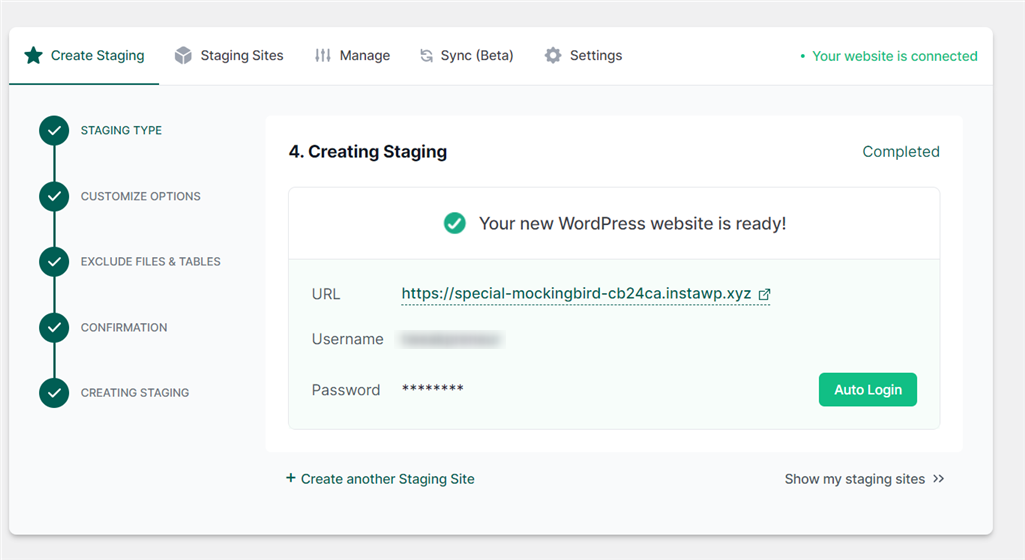
2. Sync your Live and Staging Site
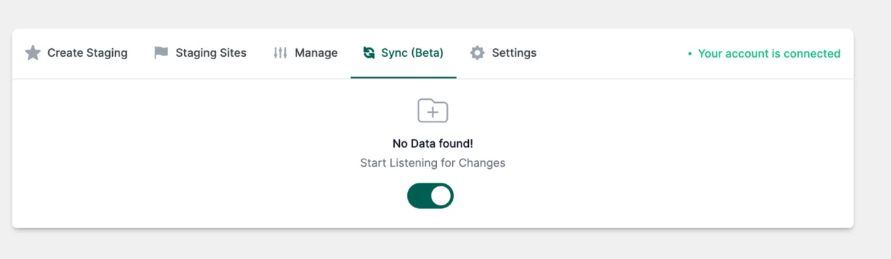
Returning to your live site, you will see your staging site under the Staging site tab. Select the Sync (Beta) tab and slide the slot to the right to switch on the event tracking.
Once this is done, the InstaWP Connect plugin in your live site, which is already connected to the staging site created in your InstaWP dashboard, will start monitoring and listening to the changing events happening on your site, which you can then sync when you’re done.
3. Make Changes on the staging site.
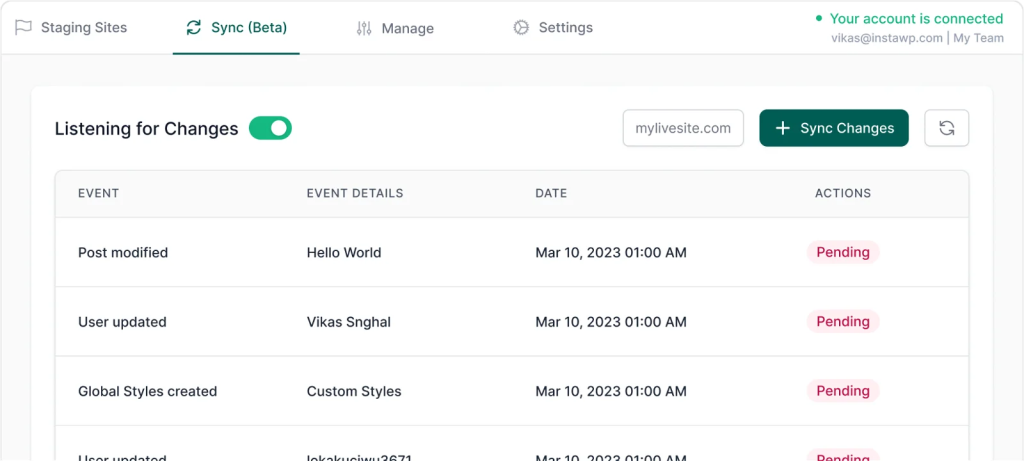
Ensure that you make all the changes you want to the staging site. Remember, it won’t affect your site since it’s a staging site. The changes you make on the staging site will be meticulously tracked and recorded, allowing you to preview and refine their modifications quickly before pushing them to the live site.
- Sync Changes to your Live Site
Once satisfied, the 2-way sync feature swiftly merges these changes with the live site, ensuring a seamless transition without disrupting site operations.
Benefits of using InstaWP 2-way sync
As a WordPress agency, you, your team of developers, and your business can all reap the benefits of InstaWP Connect’s 2-way sync in the following ways:
1. NO Downtime
With InstaWP Connect’s 2-way sync, site downtime becomes a thing of the past. Your developers will be able to deploy updates and modifications without causing disruptions to live site operations.
Using reliable hosting with a 99.9% uptime, such as InstaWP hosting, ensures the uninterrupted operation of your customers’ sites. Your team can seamlessly implement and deploy changes in the background while maintaining smooth site performance for your customers.
You will be able to avert any change that would otherwise have crashed a live site, not to mention the valuable time that will be lost during the duration the site will be offline. At the same time, your team attempts to troubleshoot and resolve the issues, thereby affecting your customers’ user experience and business, as it would only occur on the staging site.
2. 100s of Work hours Saved
The time-saving potential of InstaWP Connect’s 2-way sync is immense. What once took hours or even days can now be accomplished in a fraction of the time, allowing developers to focus on more meaningful tasks.
Are you creating a staging site? Instant and seamless. Pushing changes to a live site? Smooth and seamless.
Your agency is filled with wizards and magicians because when a customer requests an update or change on their site, as far as they can tell, your agency just makes it appear out of thin air.
3. Simplified Team Collaborations
One of the key benefits of the 2-way sync feature is its ability to make real-time updates available to team members. As changes are made on the staging site, team members can instantly see the impact of those changes and provide feedback or suggestions as needed.
If a problem arises during the development process, team members can quickly identify the issue, collaborate on potential solutions, and implement fixes without delay.
This level of transparency and collaboration ensures that everyone in your agency is on the same page, encouraging them to communicate and coordinate their efforts throughout the development process, thereby delivering high-quality projects on time and within budget.
4. The SEO Advantage
Maintaining SEO rankings and website visibility is crucial for online success. InstaWP Connect’s 2-way sync ensures that site changes are implemented smoothly, minimizing any adverse effects on search engine rankings.
So you can rest assured that updates, content changes, or structural adjustments can be applied without causing disruptions to SEO elements that contribute to search engine rankings.
At the end of the day, your agency will be able to uphold clients’ online presence and continue attracting organic traffic to their websites.
Who can use two-way Sync?
InstaWP Connect’s 2-way sync feature is a versatile ability that caters to a diverse range of users within the WordPress ecosystem. Whether you’re a WordPress developer, WooCommerce specialist, or content manager, the 2-way sync feature offers invaluable benefits for your projects.
1. WordPress Developers/Designers
WordPress developers and designers can leverage InstaWP’s 2-way sync feature to develop sites faster, preview design changes, and ensure they are implemented seamlessly across staging and live environments.
By utilizing the feature, developers can make changes and updates to their products in a staging environment, ensuring that changes are thoroughly tested before being pushed to the live site.
2. WooCommerce Developers
WooCommerce developers can benefit from InstaWP’s 2-way sync feature, particularly when managing eCommerce sites.
With the feature, developers can safely test and implement changes to product pages, pricing, and checkout processes in a staging environment without risking or any disruptions to the live site’s functionality and the shopping experience for customers.
3. Content Managers
If you are the one, utilize InstaWP’s 2-way sync feature to manage and update content across WordPress sites efficiently. Whether it’s adding new blog posts, updating product descriptions, making changes to site pages, and so on.
They can ensure that content changes are thoroughly reviewed and approved before being made available to site visitors, maintaining the integrity and quality of the website’s content.
Utilizing 2-way Sync in WordPress’s Landscape
Here are 8 Ways Agencies Can Leverage InstaWP Connect’s 2-Way Sync to enhance site development and maintenance.
1. Uninterrupted Operations (Especially Useful for WooCommerce sites)
For eCommerce websites relying on WooCommerce, uninterrupted operations are not just desirable but essential. Any downtime or disruptions in service can directly impact sales and customer satisfaction.
This is where InstaWP Connect’s 2-way sync feature proves invaluable. WooCommerce sites can maintain continuous operations without risking sales or transactions by allowing seamless deployment of site updates and modifications.
2. Selective Synchronization
One of the critical advantages of InstaWP Connect’s 2-way sync feature is its flexibility in selective synchronization. Developers can choose which changes to synchronize between staging and live sites.
Whether updating plugins, tweaking design elements, or testing new features, selective synchronization ensures that changes are implemented precisely where needed, streamlining the deployment process and reducing the risk of unintended consequences.
3. Streamlined Change Management
Managing changes across multiple environments can be complex and time-consuming. InstaWP Connect’s 2-way sync feature simplifies and streamlines this process by providing a centralized platform for tracking and implementing changes.
You can easily monitor these changes made in the staging environment and synchronize them with the live site when ready. This approach saves time and ensures that updates are deployed efficiently and accurately
4. Easy Troubleshooting
Identifying and resolving issues is critical to website maintenance and development. InstaWP Connect’s 2-way sync feature makes troubleshooting much easier and more efficient as you can quickly pinpoint the source of errors by comparing the staging and live environments and identifying any discrepancies.
Once the issue is placed, you can take corrective action with confidence, knowing that the changes will be accurately synchronized with the live site, minimizing any downtime or disruptions.
5. Omissions or Mistakes
InstaWP Connect’s 2-way sync change recording is accurate and reliable. This ensures that no changes are overlooked or implemented incorrectly. This reduces the risk of errors or omissions that could negatively impact the functionality or performance of the site.
6. Sorted Access Management
InstaWP Connect’s 2-way sync feature provides access management security measures that ensure only authorized persons can change the site.
By maintaining strict control over who can access and modify the site, InstaWP Connect helps minimize the risk of security breaches and unauthorized changes, safeguards sensitive data, and enhances the overall security and integrity of the site.
7. Effortless Content Management
Managing content across staging and live sites is made effortless with InstaWP Connect’s 2-way sync feature. Team members can easily add, modify, or remove content in the staging environment, confident their changes will be accurately reflected in both environments when synchronized.
8. Enhanced Backup and Restore Capabilities
InstaWP’s 2-way sync feature can be leveraged by WordPress agencies to improve their backup and restore capabilities. By synchronizing changes between staging and live sites, agencies can ensure that up-to-date backups reflect the most recent modifications.
In the event of a site malfunction or data loss, agencies can easily restore the site to a previous state using synchronized backups, minimizing downtime and data loss. This ensures data integrity and peace of mind for both agencies and their clients.
Conclusion
InstaWP Connect’s 2-way sync feature represents a paradigm shift in WordPress development. As you can see, InstaWP Connect’s 2-way sync feature lets you seamlessly synchronize changes between staging and live sites.
The benefits of this feature for WordPress agencies are undeniable. It is not just a tool for synchronizing changes between staging and live sites, it is also a catalyst for team collaboration, communication, and coordination within WordPress agencies.
Embrace this powerful tool and unlock new possibilities for your WordPress projects. Try InstaWP today!