Weather impacts everything—from travel plans and outdoor events to local businesses and agricultural operations. If your website caters to an audience that depends on real-time weather updates, integrating a WordPress weather plugin is a smart move.
These plugins do more than just display temperatures. Whether you need detailed meteorological reports, playful weather visuals, or location-based forecasts, the right plugin can enhance user experience, boost engagement, and provide valuable insights.
In this guide, we’ll explore the best WordPress weather plugins—covering everything from simple, no-cost widgets to advanced weather data solutions. Whether you’re a travel blogger, event planner, or business owner, find the perfect plugin to keep your audience informed and engaged.
Table of Contents
Which Types of Websites Need to Use a WordPress Weather Plugin?
Not every website needs a weather widget, but for certain industries, it can be a game-changer. Here are the types of websites that benefit the most from integrating a WordPress weather plugin:
1. Travel & Tourism Websites
Visitors planning trips need real-time weather forecasts for their destinations. A weather plugin helps travel blogs, tourism agencies, and hotel websites provide relevant weather updates to enhance user experience.
2. Outdoor Event & Adventure Websites
From wedding venues to hiking and camping guides, accurate weather predictions are essential for visitors planning activities. A weather widget helps users make informed decisions about outdoor events and trips.
3. News & Media Websites
Local news portals benefit from displaying real-time weather reports alongside news updates. A reliable weather plugin adds credibility and convenience for readers.
4. Agriculture & Farming Websites
Farmers and agricultural businesses rely on weather forecasts for crop planning and irrigation schedules. A weather plugin with detailed meteorological data can be invaluable.
5. Local Business & Community Websites
Restaurants, retail stores, and local service providers can use weather plugins to inform customers about current conditions, helping them plan their shopping or dining experiences.
6. Sports & Outdoor Recreation Websites
From golf courses to ski resorts, weather conditions directly impact sports and outdoor activities. A real-time forecast plugin helps visitors plan their outings efficiently.
Best Weather Plugins for WordPress
Here are some of the best WordPress weather plugins that will help you add WordPress weather widgets without any hassle.
1. Weather Atlas Widget
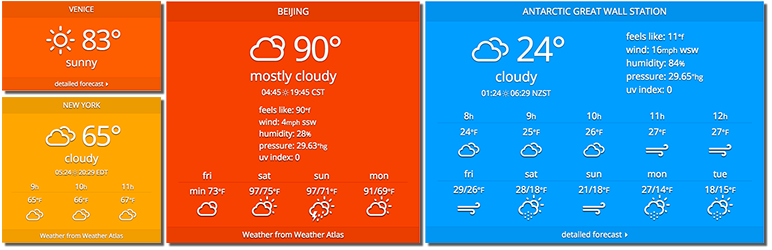
Embark on a global weather journey with the Weather Atlas Widget, a versatile weather widget for WordPress designed for comprehensive meteorological visualization. This plugin transcends basic forecasts, offering an atlas of weather data across the globe, directly embedded into your WordPress site.
Technically sophisticated yet user-friendly, it integrates with leading weather data providers to deliver precise and detailed weather information for any location you designate. Elevate your website with dynamic weather maps, interactive widgets, and rich meteorological insights.
For sites aiming to provide a broad overview of global weather patterns or detailed regional forecasts, Weather Atlas Widget is a powerful and visually engaging solution as a weather plugin.
Key Features:
- Interactive Weather Maps
- Global Weather Data Coverage
- Detailed Forecast Display
- Multiple Widget Styles
- Customizable Map Regions
- Real-Time Updates
Customization and Design Options: Weather Atlas Widget boasts extensive design flexibility. Customize map styles, widget layouts, color schemes, and data displayed to perfectly complement your website’s aesthetic and information needs. Create visually stunning and informative weather presentations.
Integration and Compatibility: Seamlessly integrate the Weather Atlas Widget throughout your WordPress site. Embed interactive maps and widgets using shortcodes, place widgets in sidebars, and enjoy broad compatibility across diverse WordPress themes, ensuring consistent display and functionality.
Data Source and Accuracy for Weather Predictions: Rely on Weather Atlas Widget’s integration with reputable meteorological APIs. This WordPress weather plugin pulls data from trusted sources, ensuring accurate and up-to-date weather plugin forecasts and conditions.
2. Location Weather
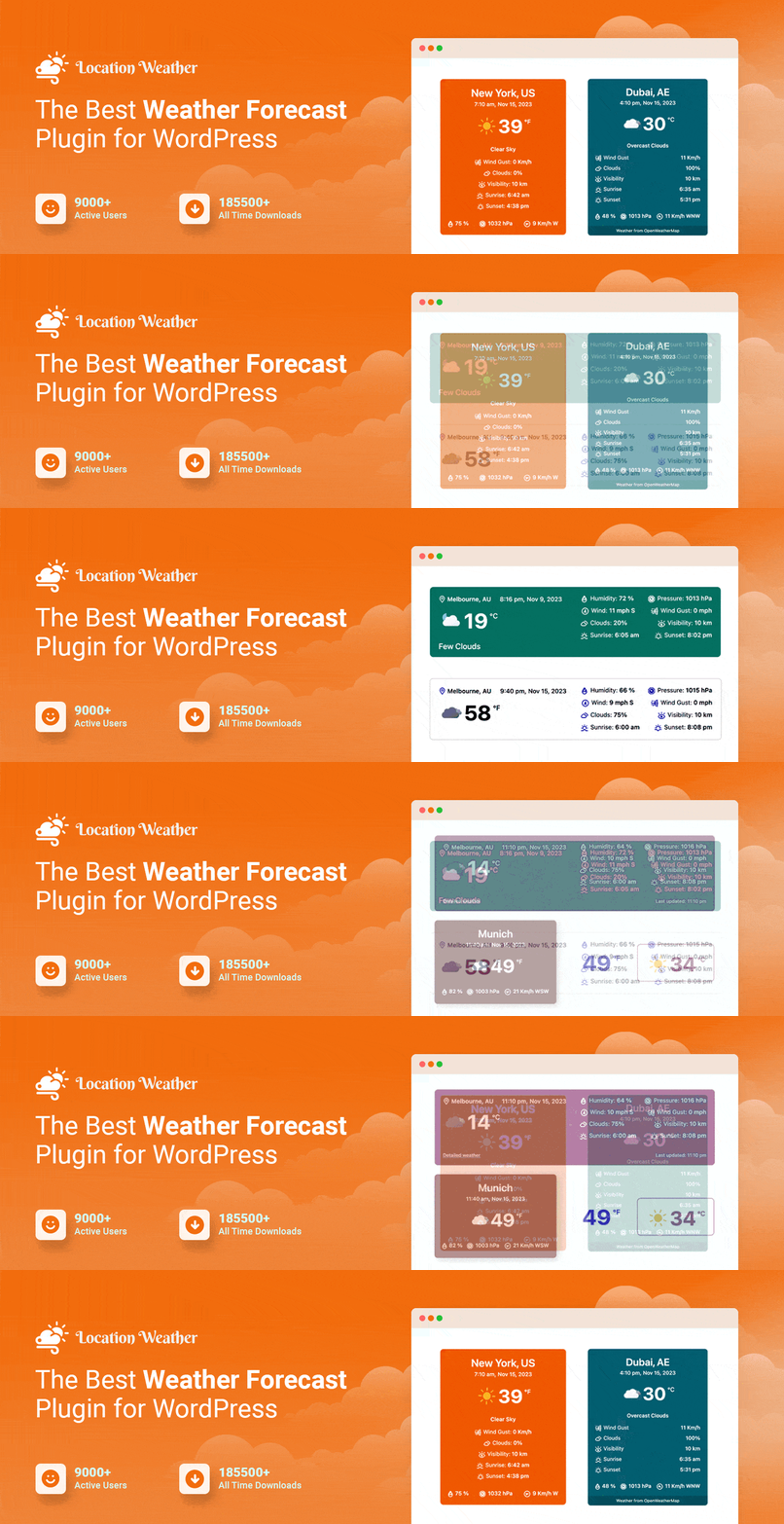
Transform your WordPress site into a hyper-local weather hub with Location Weather, a meticulously crafted WordPress weather plugin. Engineered for pinpoint accuracy, this plugin dynamically displays weather conditions specific to your users’ detected location or chosen areas worldwide.
Leveraging advanced geolocation technology and seamless API integration, it provides real-time meteorological data, ensuring visitors always receive the most relevant forecasts.
Go beyond generic weather reporting; Location Weather delivers a personalized experience with highly localized information. Ideal for community websites, travel blogs, or any site prioritizing location-specific content, this weather plugin for WordPress enhances user engagement through immediately relevant weather updates and forecasts.
Key Features:
- Automatic Geolocation Detection
- Location-Specific Weather Display
- Current Conditions & Forecasts
- Customizable Location Input
- Global City Support
- Responsive Design
Customization and Design Options: Tailor the appearance of your weather displays with Location Weather’s diverse customization options. Choose from various widget styles and layouts, adjust colors to match your branding, and control the presentation of weather data to seamlessly integrate with your website’s design.
Integration and Compatibility: Location Weather offers effortless integration within the WordPress ecosystem. Utilize widgets for sidebar placement, shortcodes for embedding within posts and pages, and ensure seamless compatibility with a wide array of WordPress themes for consistent performance.
Data Source and Accuracy for Weather Predictions: Powered by a reliable weather API, Location Weather ensures data accuracy. Real-time updates from global meteorological sources guarantee dependable weather plugin predictions and current conditions for users.
3. wp-forecast

Harness the power of simplicity and effectiveness with wp-forecast, a straightforward weather plugin for WordPress designed for clear and concise meteorological presentations. This plugin prioritizes ease of use and quick setup, delivering essential weather information without unnecessary complexities.
Technically sound in its core functionality, wp-forecast integrates with reliable weather data sources to provide accurate current conditions and forecasts. Enhance your site with simple, yet informative weather displays. For users seeking a no-frills, dependable weather widget for WordPress that gets the job done efficiently, wp-forecast is a practical and user-friendly choice.
Key Features:
- Simple and Clean Design
- Current Conditions Display
- Multi-Day Forecasts
- Location Search Functionality
- Widget & Shortcode Support
- Basic Customization Options
Customization and Design Options: wp-forecast offers basic customization to align with your site’s design. Adjust colors, select from predefined widget styles, and configure display options to create clean and functional weather presentations within your WordPress website.
Integration and Compatibility: Integrate wp-forecast seamlessly into your WordPress website. Utilize widgets for simple sidebar display, shortcodes for content embedding, and enjoy compatibility with various WordPress themes for consistent weather data presentation across your site.
Data Source and Accuracy for Weather Predictions: wp-forecast leverages reliable weather plugin data sources for dependable forecasts. This WordPress weather plugin aims to provide an accurate weather plugin for WordPress through consistent API integration and data handling.
4. Wettervorhersage

When accuracy and reliability matter, Wettervorhersage delivers. Designed with German-engineered precision, this powerful WordPress weather plugin ensures detailed, data-driven forecasts that keep your audience informed. Whether you’re running a news portal, tourism website, or local business, this plugin provides weather insights with unmatched reliability—especially for European locations.
Wettervorhersage integrates with top-tier weather data providers, ensuring highly precise weather conditions and forecasts. From temperature and precipitation levels to wind patterns and atmospheric pressure, you get comprehensive meteorological insights at your fingertips.
Tailored for European weather conditions, Wettervorhersage delivers localized, real-time updates in German and English, making it the ideal weather plugin for German-speaking regions or businesses catering to European users.
Key Features:
- German Language Focus (Also Multilingual)
- Detailed Weather Forecasts
- European Location Optimization
- Customizable Widget Styles
- Current Conditions Display
- Reliable Data Sources
Customization and Design Options: Wettervorhersage provides ample customization to tailor weather widget appearance. Adjust widget designs, color schemes, language settings, and displayed data parameters to perfectly match your website’s visual identity and target audience preferences.
Integration and Compatibility: Integrate Wettervorhersage seamlessly within your WordPress site. Utilize widgets for sidebar placement, shortcodes for embedding weather forecasts within content, and enjoy broad compatibility across diverse WordPress themes and layouts.
Data Source and Accuracy for Weather Predictions: Wettervorhersage prioritizes accurate forecasting by utilizing established weather plugin APIs. This WordPress weather plugin sources data from reputable meteorological services, ensuring reliable and regionally optimized weather information.
5. Simple Location

Imagine needing weather data not just for a city, but for a specific street corner, a remote hiking trail, or even your exact garden patch. Simple Location makes this pinpoint precision a reality.
This specialized WordPress weather plugin is engineered for hyperlocal accuracy, diving deep into geographically specific weather details. Forget generalized city forecasts; Simple Location excels at delivering meteorological information for extremely precise locations, thanks to granular data sources and advanced location handling.
Technically adept at localized data retrieval, it provides highly detailed current conditions and forecasts for your exact points of interest. Elevate your site with weather displays that are truly, exceptionally local.
For websites that demand hyper-accurate, location-specific weather – down to the most precise point – Simple Location is the definitive and focused weather widget for WordPress solution.
Key Features:
- Hyper-Local Weather Data
- Pinpoint Location Selection
- Detailed Current Conditions
- Forecast Display
- Simple Widget Interface
- Accuracy-Focused Data
Customization and Design Options: Simple Location provides essential customization for functional and clear displays. Adjust basic widget styles and data presentation options to ensure weather information is presented effectively and clearly for users focused on precise location data.
Integration and Compatibility: Integrate Simple Location easily into your WordPress site through widgets and shortcodes. The plugin is designed for broad theme compatibility and straightforward implementation, ensuring consistent and accurate hyperlocal weather display across various WordPress setups.
Data Source and Accuracy for Weather Predictions: Simple Location emphasizes data accuracy by utilizing specialized weather plugin APIs known for hyperlocal precision. This WordPress weather plugin focuses on a reliable weather plugin for WordPress data for very specific geographic points.
6. Moody Weather

Turn weather updates into engaging visual experiences with Moody Weather, a fun and functional WordPress weather plugin that adds personality to your site. Designed for websites that want to blend accurate meteorological data with creative visuals, this plugin transforms standard forecasts into delightful, cartoon-style graphics with lighthearted descriptions.
Moody Weather goes beyond traditional weather widgets by incorporating animated icons, quirky descriptions, and mood-based visuals, making weather forecasts more appealing and interactive for your visitors. Whether it’s sunny with a smile or stormy with dramatic flair, the plugin presents forecasts in a visually expressive way.
Backed by reliable weather APIs, Moody Weather ensures that playfulness doesn’t compromise precision. Your site visitors will enjoy both charm and credibility in every forecast, making it a perfect fit for blogs, travel sites, kids’ platforms, or lifestyle websites.
Key Features:
- Cartoon-Style Weather Icons
- Playful Weather Descriptions
- Current Conditions & Forecasts
- Location Search
- Customizable Themes
- Widget & Shortcode Ready
Customization and Design Options: Moody Weather allows for stylistic customization through various themes and icon sets. Select a visual theme that best matches your site’s tone, adjust icon sizes, and control the overall playful presentation of weather data within your WordPress design.
Integration and Compatibility: Integrate Moody Weather seamlessly across your WordPress website. Deploy widgets in sidebars for subtle charm, use shortcodes to inject playful weather elements into content, and enjoy broad theme compatibility for consistent visual appeal.
Data Source and Accuracy for Weather Predictions: Moody Weather utilizes dependable weather plugin APIs to ensure accurate underlying weather data. Despite its playful presentation, this WordPress weather plugin provides reliable weather information.
7. Ventus

When basic weather widgets won’t cut it, Ventus steps in as a powerful, data-driven WordPress weather plugin designed for in-depth weather analysis. Whether you’re running a travel website, an outdoor event planner, or a news portal, Ventus delivers real-time, professional-grade weather insights that go far beyond simple forecasts.
Powered by advanced weather APIs, Ventus provides granular data points such as temperature, wind speed, humidity, and even atmospheric pressure. This makes it a perfect fit for agencies and businesses that need highly accurate, real-time weather tracking.
For websites that require detailed meteorological analysis, Ventus offers an unmatched level of customization and accuracy. It’s not just another weather widget—it’s a professional solution for businesses and agencies that rely on precise weather data.
Key Features:
- Advanced Meteorological Data
- Detailed Wind Information
- Humidity & Pressure Readings
- Customizable Data Metrics
- Multiple Widget Designs
- Location Search & Selection
Customization and Design Options: Ventus offers extensive design customization to visualize complex weather data effectively. Tailor widget layouts, select specific meteorological data points to display, and customize colors and styles for professional and informative weather displays.
Integration and Compatibility: Integrate Ventus throughout your WordPress site with ease. Use widgets for sidebars, shortcodes for embedding in content, and benefit from compatibility across a range of WordPress themes. This WordPress weather plugin ensures consistent and powerful weather data presentation.
Data Source and Accuracy for Weather Predictions: Ventus prioritizes meteorological accuracy by leveraging comprehensive weather plugin for WordPress APIs. This weather plugin gathers data from authoritative sources, ensuring precise and detailed weather information for analytical displays.
8. Weather Effect

What if your website could feel alive, responding to the real world outside? Imagine visitors landing on your page and instantly experiencing the current weather – sunshine illuminating your design, gentle rain softly falling on your background, or subtle snow adding a wintery touch. Weather Effect makes this vision a reality.
This innovative WordPress weather plugin transcends ordinary weather displays by creating truly immersive atmospheric effects directly on your website. Technically sophisticated yet visually stunning, Weather Effect uses cutting-edge CSS3 and JavaScript to overlay dynamic rain, snow, cloud, or sunshine animations that react in real-time to actual weather conditions.
For websites aiming to create a memorable, visually captivating, and interactive user experience, Weather Effect is the uniquely engaging weather widget for WordPress that brings your digital world to life.
Key Features:
- Dynamic Weather Background Effects
- Real-Time Weather Simulation
- CSS3 & JavaScript Powered
- Customizable Weather Conditions
- Location-Based Effects
- Lightweight Performance
Customization and Design Options: Weather Effect provides design control through customization options for weather effect intensity, types of weather simulated, and responsiveness to location data. Tailor the visual impact to perfectly match your website’s ambiance and desired user experience.
Integration and Compatibility: Integrate Weather Effect as a background element across your WordPress site. The plugin is designed for broad theme compatibility and offers straightforward implementation, adding a unique visual layer to enhance website engagement and aesthetics.
Data Source and Accuracy for Weather Predictions: Weather Effect draws weather condition information from reputable weather plugin APIs to drive its visual simulations. This weather plugin for WordPress ensures realistic and contextually accurate weather effects based on dependable data feeds.
9. NOAA Weather

Bring official, government-backed weather data to your WordPress site with NOAA Weather, a specialized plugin that connects directly to the National Oceanic and Atmospheric Administration (NOAA).
Designed for websites that need precise, US-specific weather forecasts, this plugin ensures you’re delivering scientifically rigorous and real-time meteorological insights straight from the most authoritative source.
NOAA Weather seamlessly integrates with NOAA’s advanced weather APIs, providing hyper-accurate forecasts, severe weather alerts, and climate data for US-based locations. If your website serves travelers, emergency response teams, outdoor enthusiasts, or local communities, this plugin ensures they get the most reliable weather updates available.
Unlike generic weather widgets, NOAA Weather prioritizes detailed meteorological reporting, making it a powerful tool for agencies, news sites, and professional weather services. Display real-time temperature, wind speed, precipitation, and severe weather warnings in a structured and professional format.
Key Features:
- Official NOAA Data Source
- US-Focused Weather Forecasts
- Current Conditions Display
- Reliable Government Data
- Simple Widget Integration
- Clear Data Presentation
Customization and Design Options: NOAA Weather offers straightforward customization options for clear data presentation. Adjust widget layouts and basic styling to ensure weather information from NOAA is displayed functionally and accessibly within your WordPress website.
Integration and Compatibility: NOAA Weather integrates easily into your WordPress site using widgets and shortcodes. Designed for broad theme compatibility, this WordPress weather plugin provides consistent access to authoritative NOAA weather data across various WordPress setups and designs.
Data Source and Accuracy for Weather Predictions: NOAA Weather uniquely sources its data directly from NOAA, a leading US governmental weather plugin authority. This WordPress weather plugin guarantees access to a highly reliable and official weather plugin for WordPress information for US locations.
10. Visual Crossing Weather Forecast

Visualize meteorological trends and insights with Visual Crossing Weather Forecast, a data-rich WordPress weather plugin designed for detailed analysis and display. This plugin moves beyond simple forecasts, providing historical weather data, detailed climate analysis, and customizable weather graphs directly on your website.
Technically advanced and information-dense, it integrates with Visual Crossing Weather API, offering access to extensive meteorological datasets. Elevate your site with interactive weather charts, historical climate data, and comprehensive forecasts.
For websites requiring in-depth weather analysis and data visualization, Visual Crossing Weather Forecast is a powerful and insightful weather widget for WordPress solution.
Key Features:
- Historical Weather Data Access
- Interactive Weather Charts
- Detailed Climate Analysis
- Customizable Weather Graphs
- Forecast & Current Conditions
- Data Export Options
Customization and Design Options: Visual Crossing Weather Forecast allows for extensive customization of data visualizations. Design interactive charts and graphs, select data parameters to display, and tailor visual styles to create informative and engaging weather data presentations.
Integration and Compatibility: Integrate Visual Crossing Weather Forecast throughout your WordPress site. Embed charts and data displays using shortcodes, place widgets in sidebars for quick insights, and enjoy compatibility with various WordPress themes for consistent data presentation.
Data Source and Accuracy for Weather Predictions: Visual Crossing Weather Forecast relies on the robust Visual Crossing Weather API for data. This WordPress weather plugin ensures data accuracy and depth, providing reliable historical climate and weather information.
11. Free Weather

Get reliable weather updates on your WordPress site without spending a dime with Free Weather, a lightweight and easy-to-use plugin. Designed for simplicity and accessibility, this plugin ensures any website can display essential weather information without unnecessary complexity.
Free Weather pulls real-time temperature, humidity, wind speed, and forecasts from open weather APIs, making it a budget-friendly solution for blogs, local businesses, and personal websites that need basic yet dependable meteorological information.
No complicated setup, no premium upgrades—just a clean, simple weather widget that integrates smoothly into any WordPress theme. Whether you need a quick weather check for visitors or a functional forecast display, Free Weather delivers without the fuss.
Key Features:
- Basic Weather Data Display
- Current Conditions & Forecasts
- Simple Location Selection
- Widget Integration
- Open Weather Data Source
- Lightweight & Free
Customization and Design Options: Free Weather offers basic customization for simple design adjustments. Modify widget colors and layout options within its straightforward settings to ensure a clean and functional weather display that integrates with your site’s basic aesthetic.
Integration and Compatibility: Free Weather integrates readily into your WordPress website. Deploy widgets in sidebars and footers, utilize shortcodes for content embedding, and enjoy broad compatibility with various WordPress themes for consistent display and ease of use.
Data Source and Accuracy for Weather Prediction: Free Weather utilizes open and accessible weather plugin APIs to provide its data.
How Are WordPress Weather Plugins for Websites Beneficial
Weather plugins for WordPress are add-ons or extensions that allow website owners to display weather information on their WordPress websites. These plugins typically integrate with various weather APIs (Application Programming Interfaces) to fetch real-time or forecasted weather data and present it in a visually appealing format on the website.
WordPress weather plugins can enhance your website in several ways:
- Improved User Experience: Weather plugins provide visitors with relevant and timely information, enhancing their overall experience on your website. Users can quickly check current weather conditions or forecasts without leaving your site, which can increase engagement and encourage return visits.
- Increased Relevance: For businesses with weather-dependent services or products, such as outdoor events, travel agencies, or retail stores, displaying weather information can make your website more relevant to your audience’s needs. It helps users make informed decisions based on weather conditions.
- Personalization: Weather plugins often allow users to view weather information specific to their location. This personalization creates a more tailored experience, making visitors feel understood and valued, which can lead to increased user satisfaction and loyalty.
- Enhanced Visual Appeal: Many weather plugins come with customizable designs and layouts, allowing you to integrate weather information seamlessly into your website’s aesthetic. Well-designed weather widgets can add visual interest to your site and improve its overall appearance.
- SEO Benefits: Incorporating weather-related keywords and content into your website can potentially improve your search engine optimization (SEO) efforts. Weather plugins enable you to add relevant weather-related content to your site, which can attract organic traffic from users searching for weather-related information.
- Promotional Opportunities: Weather plugins can be used as a platform to promote weather-related products or services. For example, if you run a clothing store, you can display weather forecasts alongside recommendations for weather-appropriate clothing items, potentially driving sales.
- Increased Time Spent on Site: By providing valuable weather information directly on your website, you can encourage users to spend more time engaging with your content. This increased dwell time can have positive effects on metrics such as bounce rate and session duration.
- Mobile Optimization: Many weather plugins are designed to be responsive and mobile-friendly, ensuring that your website’s weather information is easily accessible and readable across different devices and screen sizes.
Overall, WordPress weather plugins can help improve user engagement, provide valuable information to your audience, and enhance the overall functionality and appeal of your website.
Final Word
Adding a WordPress weather plugin isn’t just about displaying temperatures—it’s about enhancing the user experience by providing real-time, location-based weather insights. Whether you run a travel blog, a local business, or an adventure-based website, choosing the right WordPress weather plugin ensures your visitors stay informed.
Pick a plugin that aligns with your website’s needs—whether it’s detailed meteorological reports, playful visuals, or simple real-time forecasts—and improve engagement while offering valuable insights to your audience.
FAQs
Can I use a free WordPress weather plugin?
Yes! Many free WordPress weather plugins offer basic weather forecasts. If you need advanced features like real-time updates, API integration, or custom displays, premium options may be better.
2. How do WordPress weather plugins fetch weather data?
Most plugins pull weather updates from trusted APIs like OpenWeatherMap, NOAA, or WeatherAPI, ensuring accuracy and real-time reporting.
3. Will a weather plugin slow down my site?
Not necessarily. Lightweight weather plugins are optimized for performance. However, excessive API calls and poorly coded plugins can affect site speed. Choose a well-optimized weather widget for WordPress to avoid slowdowns.
4. Can I customize how the weather information is displayed?
Yes! Most WordPress weather plugins allow customization, including widget placement, color themes, temperature units (°C/°F), and display styles.
5. Are weather plugins compatible with page builders like Elementor?
Many modern weather plugins work seamlessly with Elementor, WPBakery, and other WordPress page builders, allowing easy drag-and-drop customization.
6. Which WordPress weather plugin is best for a travel website?
For travel websites, Ventus (detailed reports), NOAA Weather (official US data), and Moody Weather (fun, engaging visuals) are great choices based on your needs.
7. How frequently do weather plugins update the forecast?
It depends on the API and plugin settings. Some WordPress weather monitoring plugins update in real-time, while others refresh every few hours.


